Implementing a Procedural Programming Solution for XML Data Retrieval
VerifiedAdded on 2024/05/31
|34
|5318
|107
Project
AI Summary
This project provides a procedural programming solution for retrieving data from XML files and displaying it in HTML tables using PHP. The solution utilizes NetBeans IDE and involves creating an 'Events.xml' file to store the data and an 'index.php' file to retrieve and display the data. The project outlines the principles, characteristics, and features of procedural programming, including the use of functions, variables, and control structures. It details the process of designing the solution, identifying program units, and implementing the code. The XML document structure, including declarations, document type declarations, and the document body, are explained. The project also covers the requirements specification, data flow, and form design. The implementation involves using PHP script tags to access the XML file location and retrieve data using the document.write() function. The document also discusses the importance of testing, analyzing results, and incorporating feedback to improve the procedural program solution. It further explains the creation of onscreen help and documentation for support and maintenance.


Paraphrase This Document
Need a fresh take? Get an instant paraphrase of this document with our AI Paraphraser
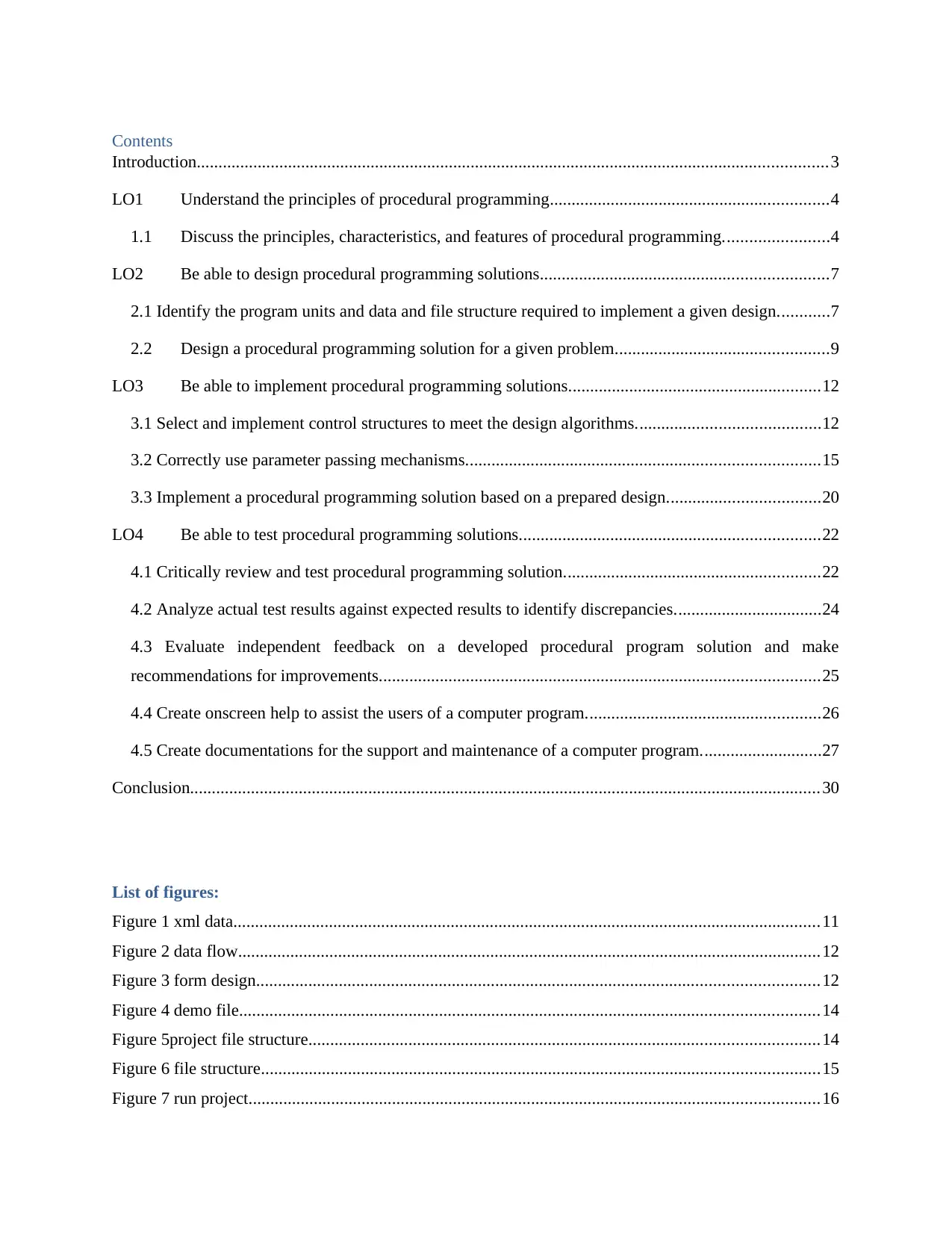
Contents
Introduction.................................................................................................................................................3
LO1 Understand the principles of procedural programming................................................................4
1.1 Discuss the principles, characteristics, and features of procedural programming........................4
LO2 Be able to design procedural programming solutions..................................................................7
2.1 Identify the program units and data and file structure required to implement a given design............7
2.2 Design a procedural programming solution for a given problem.................................................9
LO3 Be able to implement procedural programming solutions..........................................................12
3.1 Select and implement control structures to meet the design algorithms..........................................12
3.2 Correctly use parameter passing mechanisms.................................................................................15
3.3 Implement a procedural programming solution based on a prepared design...................................20
LO4 Be able to test procedural programming solutions.....................................................................22
4.1 Critically review and test procedural programming solution...........................................................22
4.2 Analyze actual test results against expected results to identify discrepancies..................................24
4.3 Evaluate independent feedback on a developed procedural program solution and make
recommendations for improvements.....................................................................................................25
4.4 Create onscreen help to assist the users of a computer program......................................................26
4.5 Create documentations for the support and maintenance of a computer program............................27
Conclusion.................................................................................................................................................30
List of figures:
Figure 1 xml data.......................................................................................................................................11
Figure 2 data flow......................................................................................................................................12
Figure 3 form design.................................................................................................................................12
Figure 4 demo file.....................................................................................................................................14
Figure 5project file structure.....................................................................................................................14
Figure 6 file structure................................................................................................................................15
Figure 7 run project...................................................................................................................................16
Introduction.................................................................................................................................................3
LO1 Understand the principles of procedural programming................................................................4
1.1 Discuss the principles, characteristics, and features of procedural programming........................4
LO2 Be able to design procedural programming solutions..................................................................7
2.1 Identify the program units and data and file structure required to implement a given design............7
2.2 Design a procedural programming solution for a given problem.................................................9
LO3 Be able to implement procedural programming solutions..........................................................12
3.1 Select and implement control structures to meet the design algorithms..........................................12
3.2 Correctly use parameter passing mechanisms.................................................................................15
3.3 Implement a procedural programming solution based on a prepared design...................................20
LO4 Be able to test procedural programming solutions.....................................................................22
4.1 Critically review and test procedural programming solution...........................................................22
4.2 Analyze actual test results against expected results to identify discrepancies..................................24
4.3 Evaluate independent feedback on a developed procedural program solution and make
recommendations for improvements.....................................................................................................25
4.4 Create onscreen help to assist the users of a computer program......................................................26
4.5 Create documentations for the support and maintenance of a computer program............................27
Conclusion.................................................................................................................................................30
List of figures:
Figure 1 xml data.......................................................................................................................................11
Figure 2 data flow......................................................................................................................................12
Figure 3 form design.................................................................................................................................12
Figure 4 demo file.....................................................................................................................................14
Figure 5project file structure.....................................................................................................................14
Figure 6 file structure................................................................................................................................15
Figure 7 run project...................................................................................................................................16
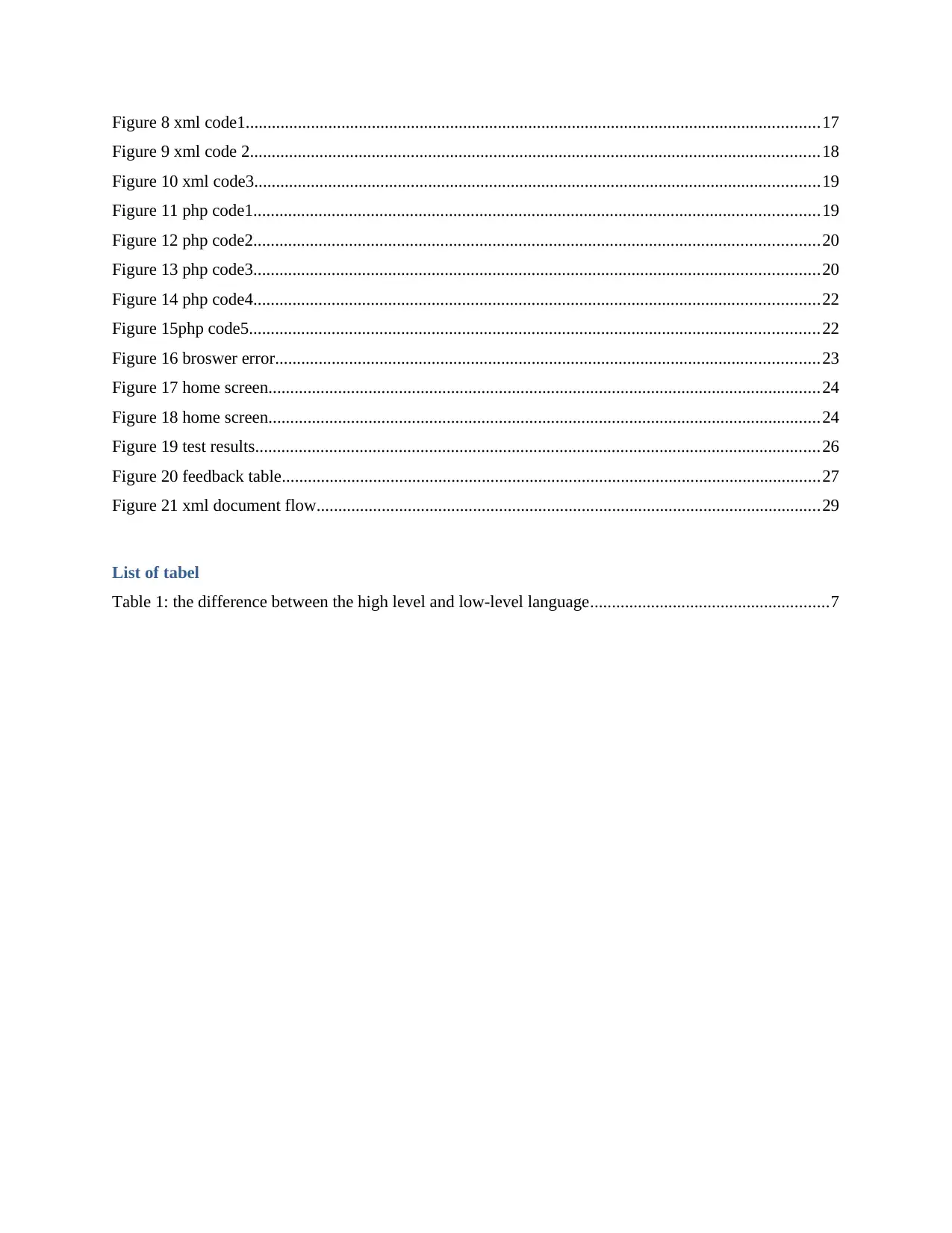
Figure 8 xml code1....................................................................................................................................17
Figure 9 xml code 2...................................................................................................................................18
Figure 10 xml code3..................................................................................................................................19
Figure 11 php code1..................................................................................................................................19
Figure 12 php code2..................................................................................................................................20
Figure 13 php code3..................................................................................................................................20
Figure 14 php code4..................................................................................................................................22
Figure 15php code5...................................................................................................................................22
Figure 16 broswer error.............................................................................................................................23
Figure 17 home screen...............................................................................................................................24
Figure 18 home screen...............................................................................................................................24
Figure 19 test results..................................................................................................................................26
Figure 20 feedback table............................................................................................................................27
Figure 21 xml document flow....................................................................................................................29
List of tabel
Table 1: the difference between the high level and low-level language.......................................................7
Figure 9 xml code 2...................................................................................................................................18
Figure 10 xml code3..................................................................................................................................19
Figure 11 php code1..................................................................................................................................19
Figure 12 php code2..................................................................................................................................20
Figure 13 php code3..................................................................................................................................20
Figure 14 php code4..................................................................................................................................22
Figure 15php code5...................................................................................................................................22
Figure 16 broswer error.............................................................................................................................23
Figure 17 home screen...............................................................................................................................24
Figure 18 home screen...............................................................................................................................24
Figure 19 test results..................................................................................................................................26
Figure 20 feedback table............................................................................................................................27
Figure 21 xml document flow....................................................................................................................29
List of tabel
Table 1: the difference between the high level and low-level language.......................................................7
⊘ This is a preview!⊘
Do you want full access?
Subscribe today to unlock all pages.

Trusted by 1+ million students worldwide
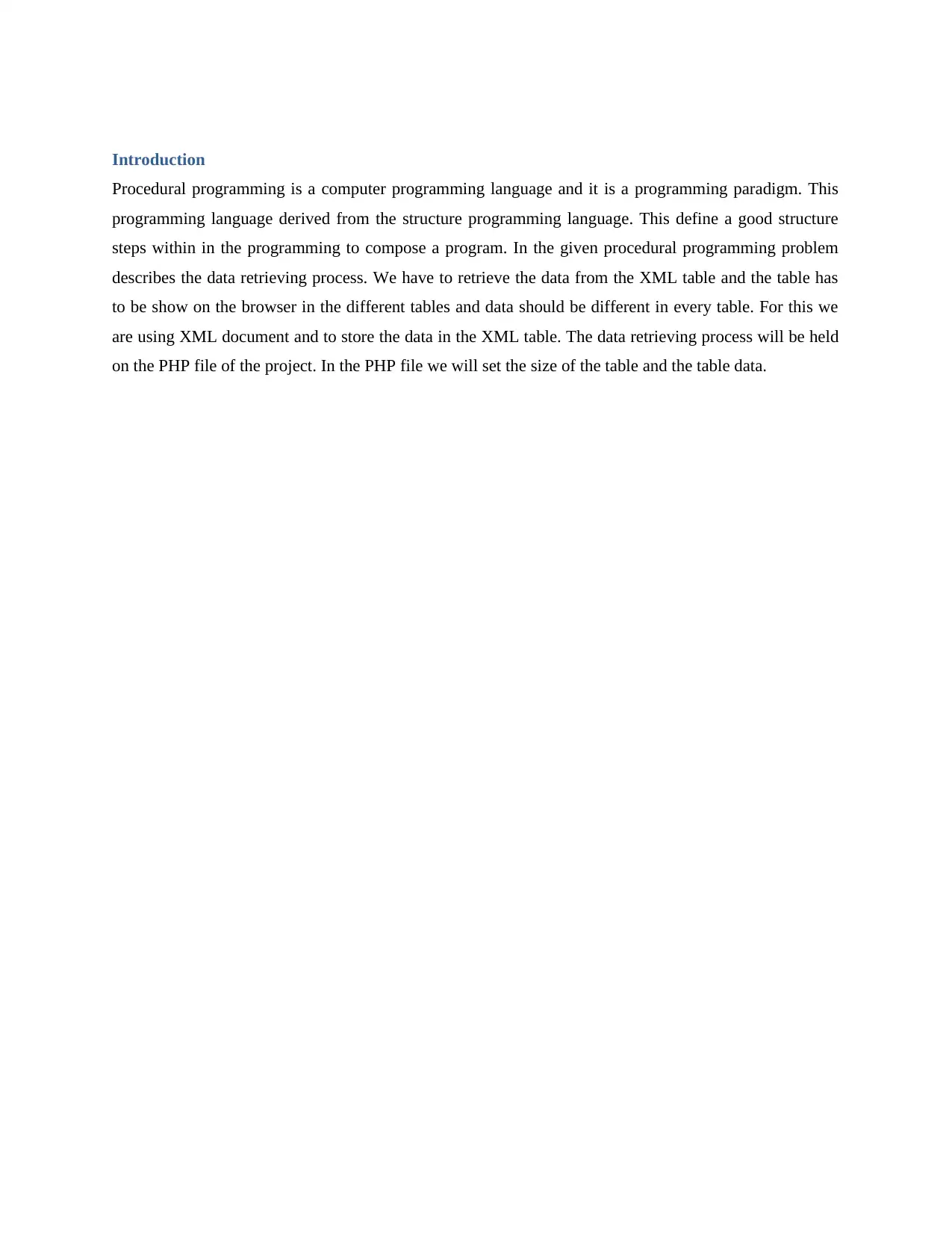
Introduction
Procedural programming is a computer programming language and it is a programming paradigm. This
programming language derived from the structure programming language. This define a good structure
steps within in the programming to compose a program. In the given procedural programming problem
describes the data retrieving process. We have to retrieve the data from the XML table and the table has
to be show on the browser in the different tables and data should be different in every table. For this we
are using XML document and to store the data in the XML table. The data retrieving process will be held
on the PHP file of the project. In the PHP file we will set the size of the table and the table data.
Procedural programming is a computer programming language and it is a programming paradigm. This
programming language derived from the structure programming language. This define a good structure
steps within in the programming to compose a program. In the given procedural programming problem
describes the data retrieving process. We have to retrieve the data from the XML table and the table has
to be show on the browser in the different tables and data should be different in every table. For this we
are using XML document and to store the data in the XML table. The data retrieving process will be held
on the PHP file of the project. In the PHP file we will set the size of the table and the table data.
Paraphrase This Document
Need a fresh take? Get an instant paraphrase of this document with our AI Paraphraser
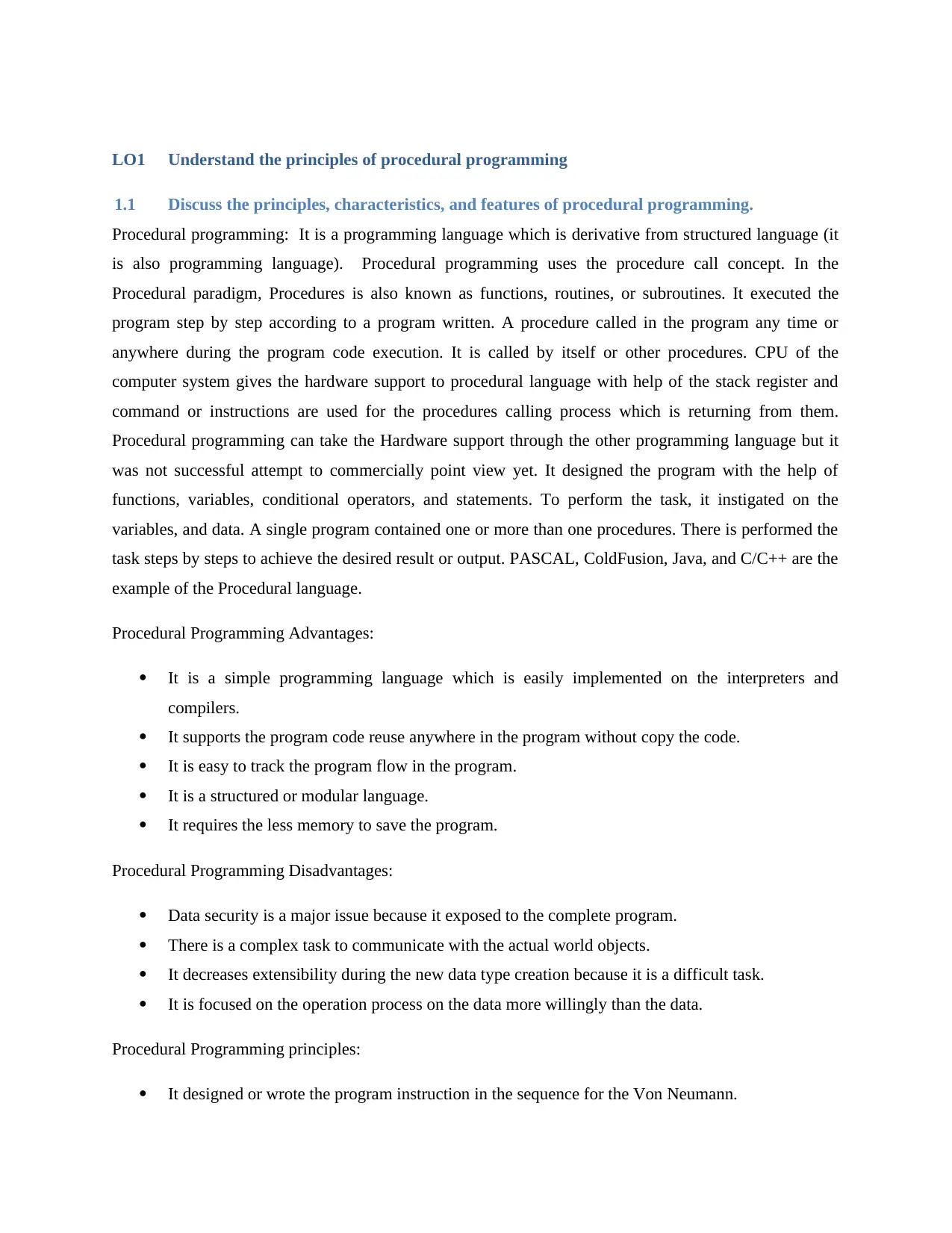
LO1 Understand the principles of procedural programming
1.1 Discuss the principles, characteristics, and features of procedural programming.
Procedural programming: It is a programming language which is derivative from structured language (it
is also programming language). Procedural programming uses the procedure call concept. In the
Procedural paradigm, Procedures is also known as functions, routines, or subroutines. It executed the
program step by step according to a program written. A procedure called in the program any time or
anywhere during the program code execution. It is called by itself or other procedures. CPU of the
computer system gives the hardware support to procedural language with help of the stack register and
command or instructions are used for the procedures calling process which is returning from them.
Procedural programming can take the Hardware support through the other programming language but it
was not successful attempt to commercially point view yet. It designed the program with the help of
functions, variables, conditional operators, and statements. To perform the task, it instigated on the
variables, and data. A single program contained one or more than one procedures. There is performed the
task steps by steps to achieve the desired result or output. PASCAL, ColdFusion, Java, and C/C++ are the
example of the Procedural language.
Procedural Programming Advantages:
It is a simple programming language which is easily implemented on the interpreters and
compilers.
It supports the program code reuse anywhere in the program without copy the code.
It is easy to track the program flow in the program.
It is a structured or modular language.
It requires the less memory to save the program.
Procedural Programming Disadvantages:
Data security is a major issue because it exposed to the complete program.
There is a complex task to communicate with the actual world objects.
It decreases extensibility during the new data type creation because it is a difficult task.
It is focused on the operation process on the data more willingly than the data.
Procedural Programming principles:
It designed or wrote the program instruction in the sequence for the Von Neumann.
1.1 Discuss the principles, characteristics, and features of procedural programming.
Procedural programming: It is a programming language which is derivative from structured language (it
is also programming language). Procedural programming uses the procedure call concept. In the
Procedural paradigm, Procedures is also known as functions, routines, or subroutines. It executed the
program step by step according to a program written. A procedure called in the program any time or
anywhere during the program code execution. It is called by itself or other procedures. CPU of the
computer system gives the hardware support to procedural language with help of the stack register and
command or instructions are used for the procedures calling process which is returning from them.
Procedural programming can take the Hardware support through the other programming language but it
was not successful attempt to commercially point view yet. It designed the program with the help of
functions, variables, conditional operators, and statements. To perform the task, it instigated on the
variables, and data. A single program contained one or more than one procedures. There is performed the
task steps by steps to achieve the desired result or output. PASCAL, ColdFusion, Java, and C/C++ are the
example of the Procedural language.
Procedural Programming Advantages:
It is a simple programming language which is easily implemented on the interpreters and
compilers.
It supports the program code reuse anywhere in the program without copy the code.
It is easy to track the program flow in the program.
It is a structured or modular language.
It requires the less memory to save the program.
Procedural Programming Disadvantages:
Data security is a major issue because it exposed to the complete program.
There is a complex task to communicate with the actual world objects.
It decreases extensibility during the new data type creation because it is a difficult task.
It is focused on the operation process on the data more willingly than the data.
Procedural Programming principles:
It designed or wrote the program instruction in the sequence for the Von Neumann.
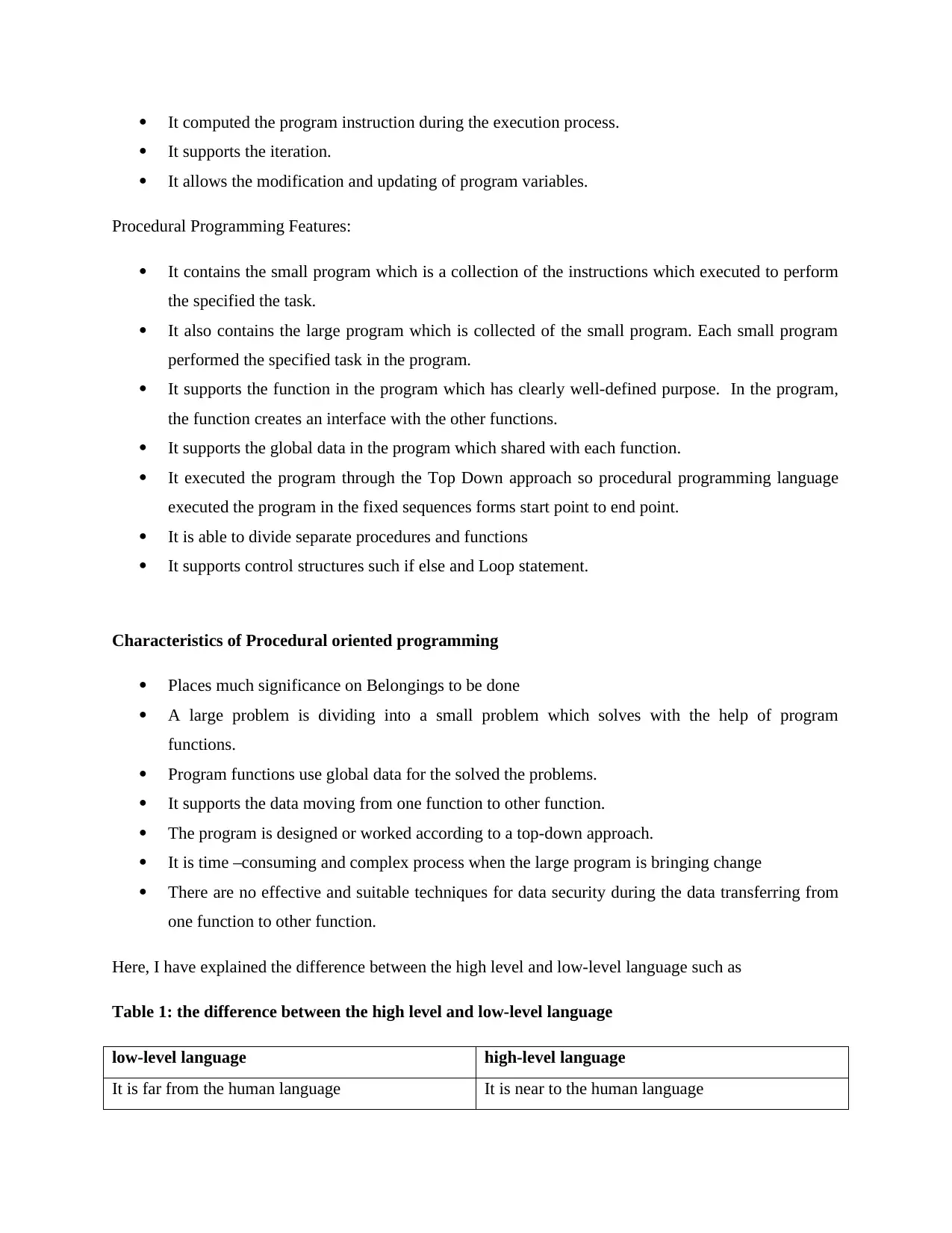
It computed the program instruction during the execution process.
It supports the iteration.
It allows the modification and updating of program variables.
Procedural Programming Features:
It contains the small program which is a collection of the instructions which executed to perform
the specified the task.
It also contains the large program which is collected of the small program. Each small program
performed the specified task in the program.
It supports the function in the program which has clearly well-defined purpose. In the program,
the function creates an interface with the other functions.
It supports the global data in the program which shared with each function.
It executed the program through the Top Down approach so procedural programming language
executed the program in the fixed sequences forms start point to end point.
It is able to divide separate procedures and functions
It supports control structures such if else and Loop statement.
Characteristics of Procedural oriented programming
Places much significance on Belongings to be done
A large problem is dividing into a small problem which solves with the help of program
functions.
Program functions use global data for the solved the problems.
It supports the data moving from one function to other function.
The program is designed or worked according to a top-down approach.
It is time –consuming and complex process when the large program is bringing change
There are no effective and suitable techniques for data security during the data transferring from
one function to other function.
Here, I have explained the difference between the high level and low-level language such as
Table 1: the difference between the high level and low-level language
low-level language high-level language
It is far from the human language It is near to the human language
It supports the iteration.
It allows the modification and updating of program variables.
Procedural Programming Features:
It contains the small program which is a collection of the instructions which executed to perform
the specified the task.
It also contains the large program which is collected of the small program. Each small program
performed the specified task in the program.
It supports the function in the program which has clearly well-defined purpose. In the program,
the function creates an interface with the other functions.
It supports the global data in the program which shared with each function.
It executed the program through the Top Down approach so procedural programming language
executed the program in the fixed sequences forms start point to end point.
It is able to divide separate procedures and functions
It supports control structures such if else and Loop statement.
Characteristics of Procedural oriented programming
Places much significance on Belongings to be done
A large problem is dividing into a small problem which solves with the help of program
functions.
Program functions use global data for the solved the problems.
It supports the data moving from one function to other function.
The program is designed or worked according to a top-down approach.
It is time –consuming and complex process when the large program is bringing change
There are no effective and suitable techniques for data security during the data transferring from
one function to other function.
Here, I have explained the difference between the high level and low-level language such as
Table 1: the difference between the high level and low-level language
low-level language high-level language
It is far from the human language It is near to the human language
⊘ This is a preview!⊘
Do you want full access?
Subscribe today to unlock all pages.
Trusted by 1+ million students worldwide
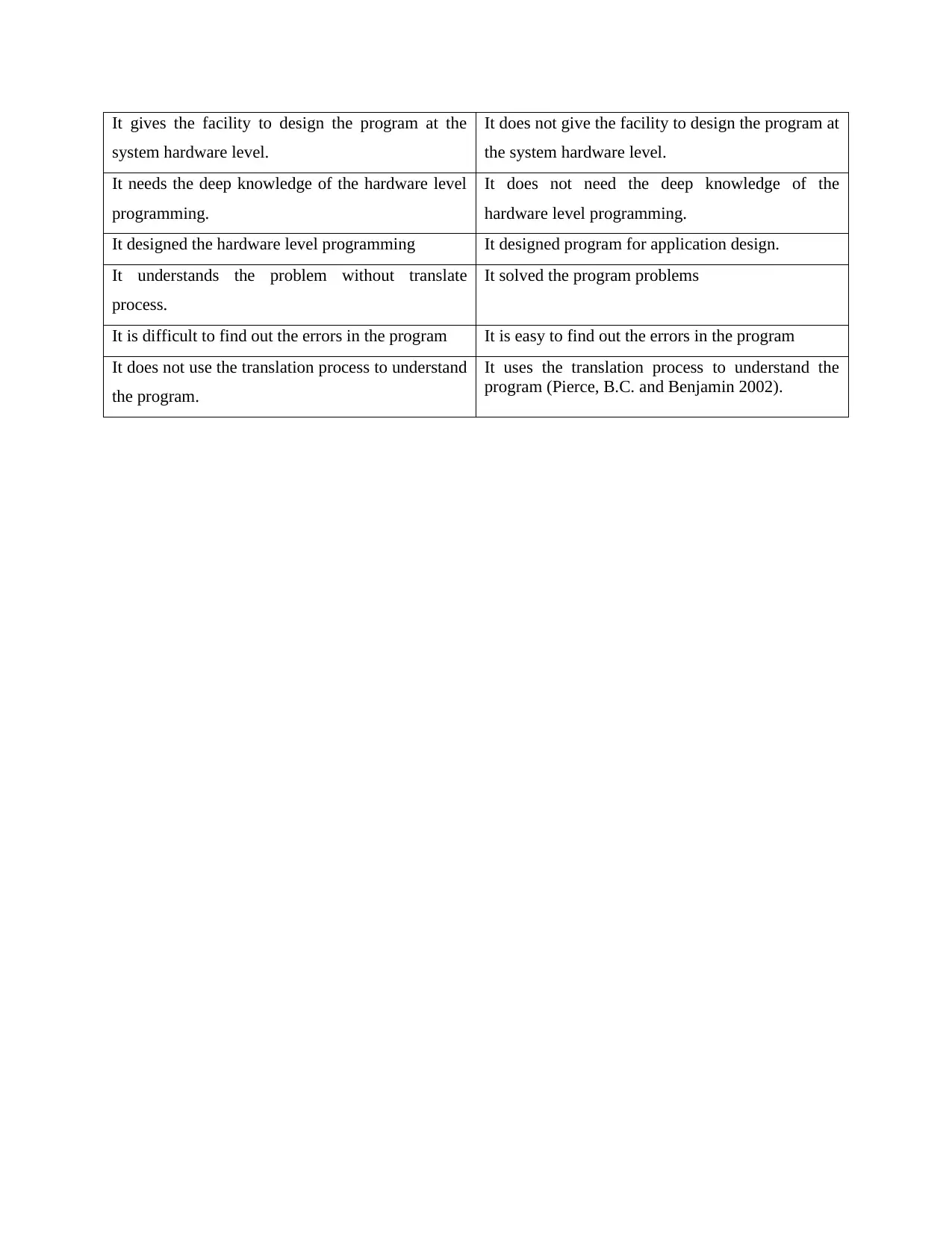
It gives the facility to design the program at the
system hardware level.
It does not give the facility to design the program at
the system hardware level.
It needs the deep knowledge of the hardware level
programming.
It does not need the deep knowledge of the
hardware level programming.
It designed the hardware level programming It designed program for application design.
It understands the problem without translate
process.
It solved the program problems
It is difficult to find out the errors in the program It is easy to find out the errors in the program
It does not use the translation process to understand
the program.
It uses the translation process to understand the
program (Pierce, B.C. and Benjamin 2002).
system hardware level.
It does not give the facility to design the program at
the system hardware level.
It needs the deep knowledge of the hardware level
programming.
It does not need the deep knowledge of the
hardware level programming.
It designed the hardware level programming It designed program for application design.
It understands the problem without translate
process.
It solved the program problems
It is difficult to find out the errors in the program It is easy to find out the errors in the program
It does not use the translation process to understand
the program.
It uses the translation process to understand the
program (Pierce, B.C. and Benjamin 2002).
Paraphrase This Document
Need a fresh take? Get an instant paraphrase of this document with our AI Paraphraser
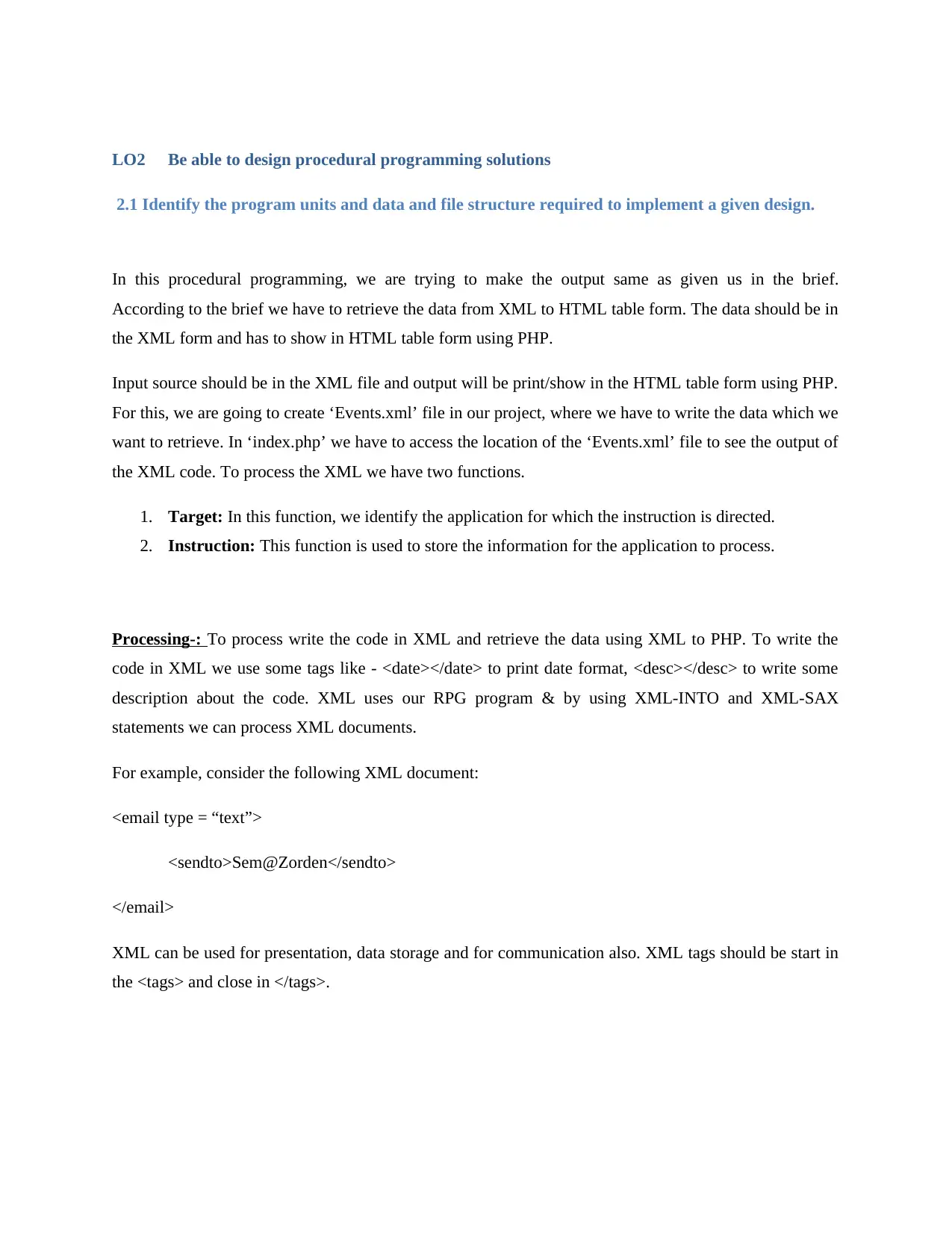
LO2 Be able to design procedural programming solutions
2.1 Identify the program units and data and file structure required to implement a given design.
In this procedural programming, we are trying to make the output same as given us in the brief.
According to the brief we have to retrieve the data from XML to HTML table form. The data should be in
the XML form and has to show in HTML table form using PHP.
Input source should be in the XML file and output will be print/show in the HTML table form using PHP.
For this, we are going to create ‘Events.xml’ file in our project, where we have to write the data which we
want to retrieve. In ‘index.php’ we have to access the location of the ‘Events.xml’ file to see the output of
the XML code. To process the XML we have two functions.
1. Target: In this function, we identify the application for which the instruction is directed.
2. Instruction: This function is used to store the information for the application to process.
Processing-: To process write the code in XML and retrieve the data using XML to PHP. To write the
code in XML we use some tags like - <date></date> to print date format, <desc></desc> to write some
description about the code. XML uses our RPG program & by using XML-INTO and XML-SAX
statements we can process XML documents.
For example, consider the following XML document:
<email type = “text”>
<sendto>Sem@Zorden</sendto>
</email>
XML can be used for presentation, data storage and for communication also. XML tags should be start in
the <tags> and close in </tags>.
2.1 Identify the program units and data and file structure required to implement a given design.
In this procedural programming, we are trying to make the output same as given us in the brief.
According to the brief we have to retrieve the data from XML to HTML table form. The data should be in
the XML form and has to show in HTML table form using PHP.
Input source should be in the XML file and output will be print/show in the HTML table form using PHP.
For this, we are going to create ‘Events.xml’ file in our project, where we have to write the data which we
want to retrieve. In ‘index.php’ we have to access the location of the ‘Events.xml’ file to see the output of
the XML code. To process the XML we have two functions.
1. Target: In this function, we identify the application for which the instruction is directed.
2. Instruction: This function is used to store the information for the application to process.
Processing-: To process write the code in XML and retrieve the data using XML to PHP. To write the
code in XML we use some tags like - <date></date> to print date format, <desc></desc> to write some
description about the code. XML uses our RPG program & by using XML-INTO and XML-SAX
statements we can process XML documents.
For example, consider the following XML document:
<email type = “text”>
<sendto>Sem@Zorden</sendto>
</email>
XML can be used for presentation, data storage and for communication also. XML tags should be start in
the <tags> and close in </tags>.
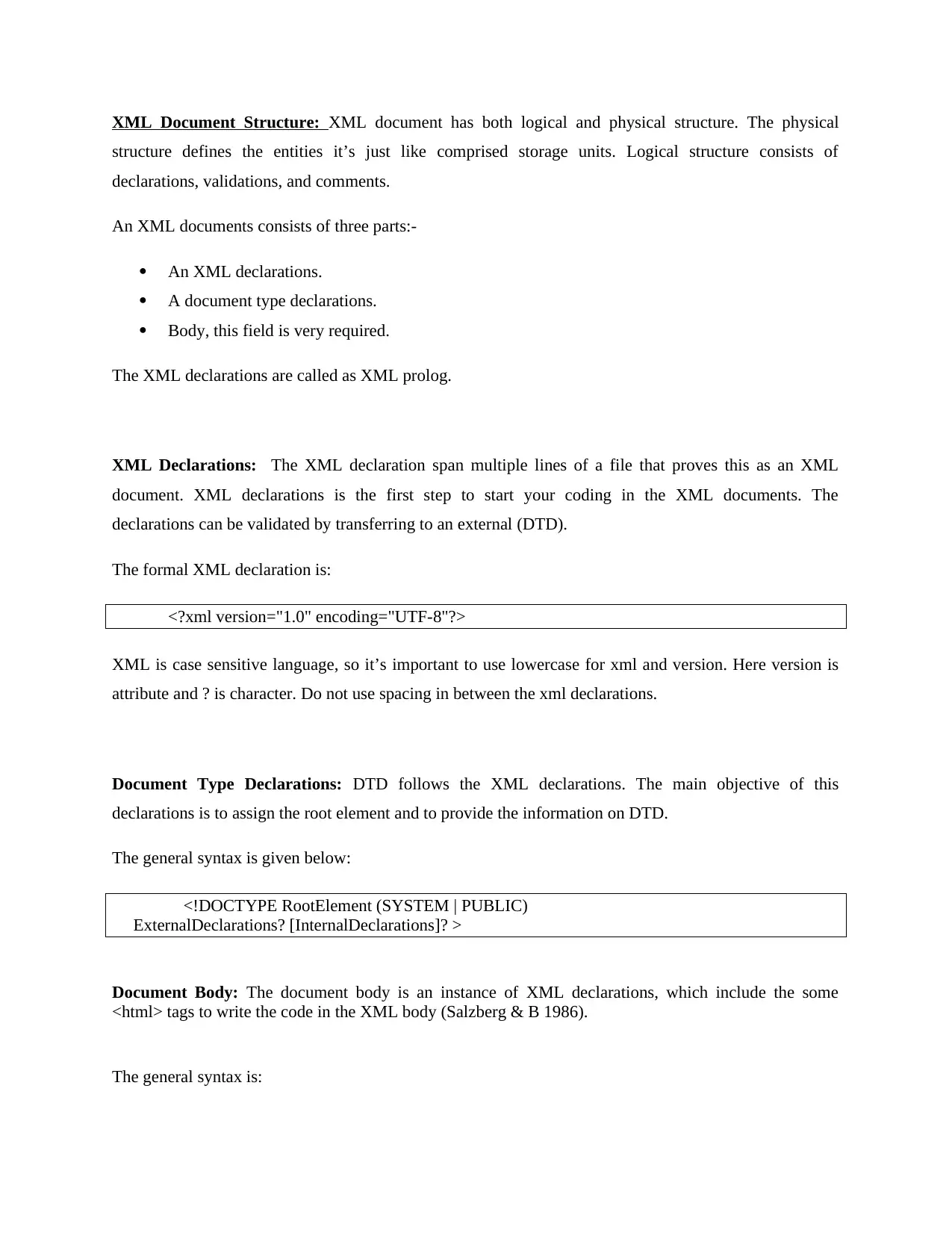
XML Document Structure: XML document has both logical and physical structure. The physical
structure defines the entities it’s just like comprised storage units. Logical structure consists of
declarations, validations, and comments.
An XML documents consists of three parts:-
An XML declarations.
A document type declarations.
Body, this field is very required.
The XML declarations are called as XML prolog.
XML Declarations: The XML declaration span multiple lines of a file that proves this as an XML
document. XML declarations is the first step to start your coding in the XML documents. The
declarations can be validated by transferring to an external (DTD).
The formal XML declaration is:
<?xml version="1.0" encoding="UTF-8"?>
XML is case sensitive language, so it’s important to use lowercase for xml and version. Here version is
attribute and ? is character. Do not use spacing in between the xml declarations.
Document Type Declarations: DTD follows the XML declarations. The main objective of this
declarations is to assign the root element and to provide the information on DTD.
The general syntax is given below:
<!DOCTYPE RootElement (SYSTEM | PUBLIC)
ExternalDeclarations? [InternalDeclarations]? >
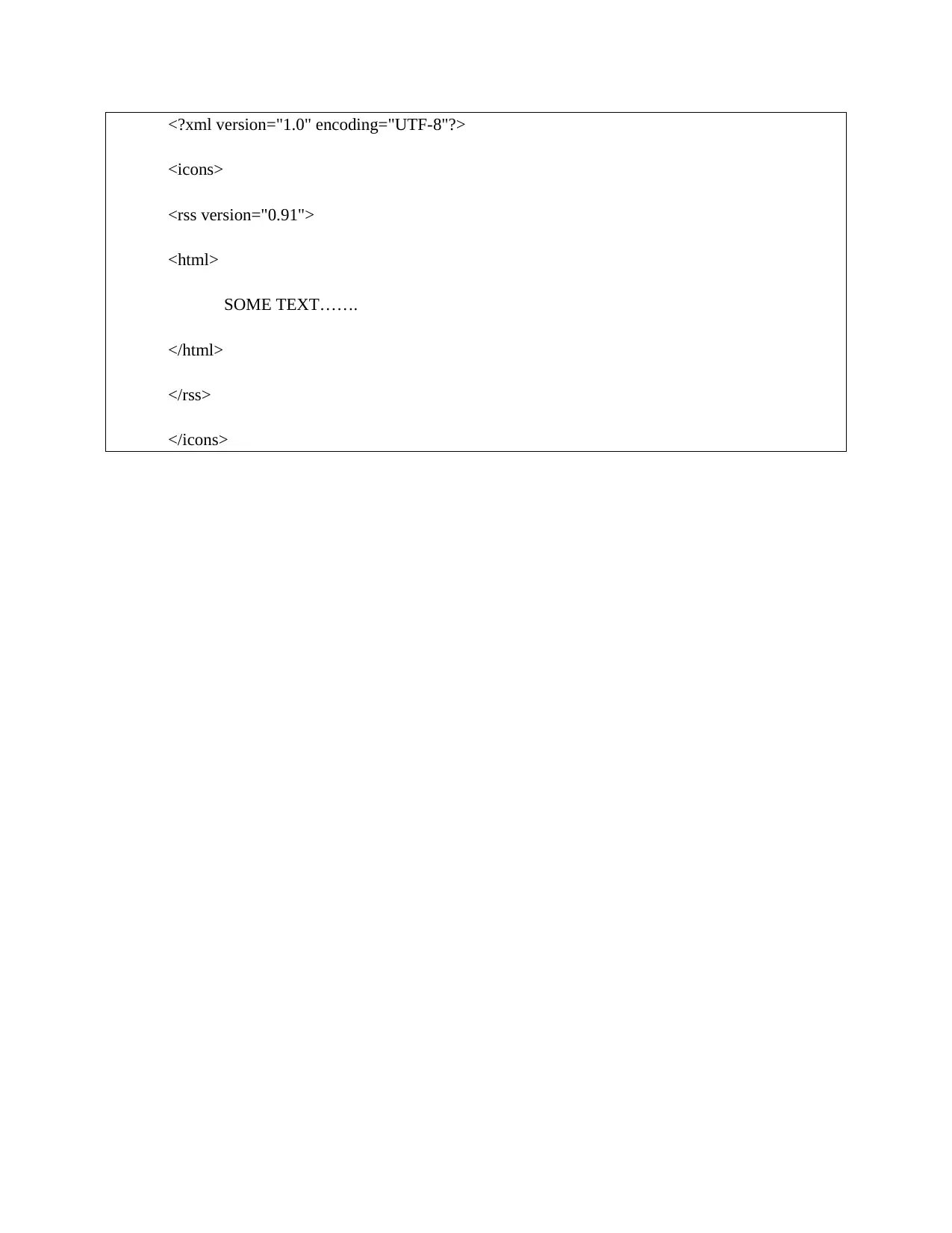
Document Body: The document body is an instance of XML declarations, which include the some
<html> tags to write the code in the XML body (Salzberg & B 1986).
The general syntax is:
structure defines the entities it’s just like comprised storage units. Logical structure consists of
declarations, validations, and comments.
An XML documents consists of three parts:-
An XML declarations.
A document type declarations.
Body, this field is very required.
The XML declarations are called as XML prolog.
XML Declarations: The XML declaration span multiple lines of a file that proves this as an XML
document. XML declarations is the first step to start your coding in the XML documents. The
declarations can be validated by transferring to an external (DTD).
The formal XML declaration is:
<?xml version="1.0" encoding="UTF-8"?>
XML is case sensitive language, so it’s important to use lowercase for xml and version. Here version is
attribute and ? is character. Do not use spacing in between the xml declarations.
Document Type Declarations: DTD follows the XML declarations. The main objective of this
declarations is to assign the root element and to provide the information on DTD.
The general syntax is given below:
<!DOCTYPE RootElement (SYSTEM | PUBLIC)
ExternalDeclarations? [InternalDeclarations]? >
Document Body: The document body is an instance of XML declarations, which include the some
<html> tags to write the code in the XML body (Salzberg & B 1986).
The general syntax is:
⊘ This is a preview!⊘
Do you want full access?
Subscribe today to unlock all pages.
Trusted by 1+ million students worldwide
<?xml version="1.0" encoding="UTF-8"?>
<icons>
<rss version="0.91">
<html>
SOME TEXT…….
</html>
</rss>
</icons>
<icons>
<rss version="0.91">
<html>
SOME TEXT…….
</html>
</rss>
</icons>
Paraphrase This Document
Need a fresh take? Get an instant paraphrase of this document with our AI Paraphraser
2.2 Design a procedural programming solution for a given problem.
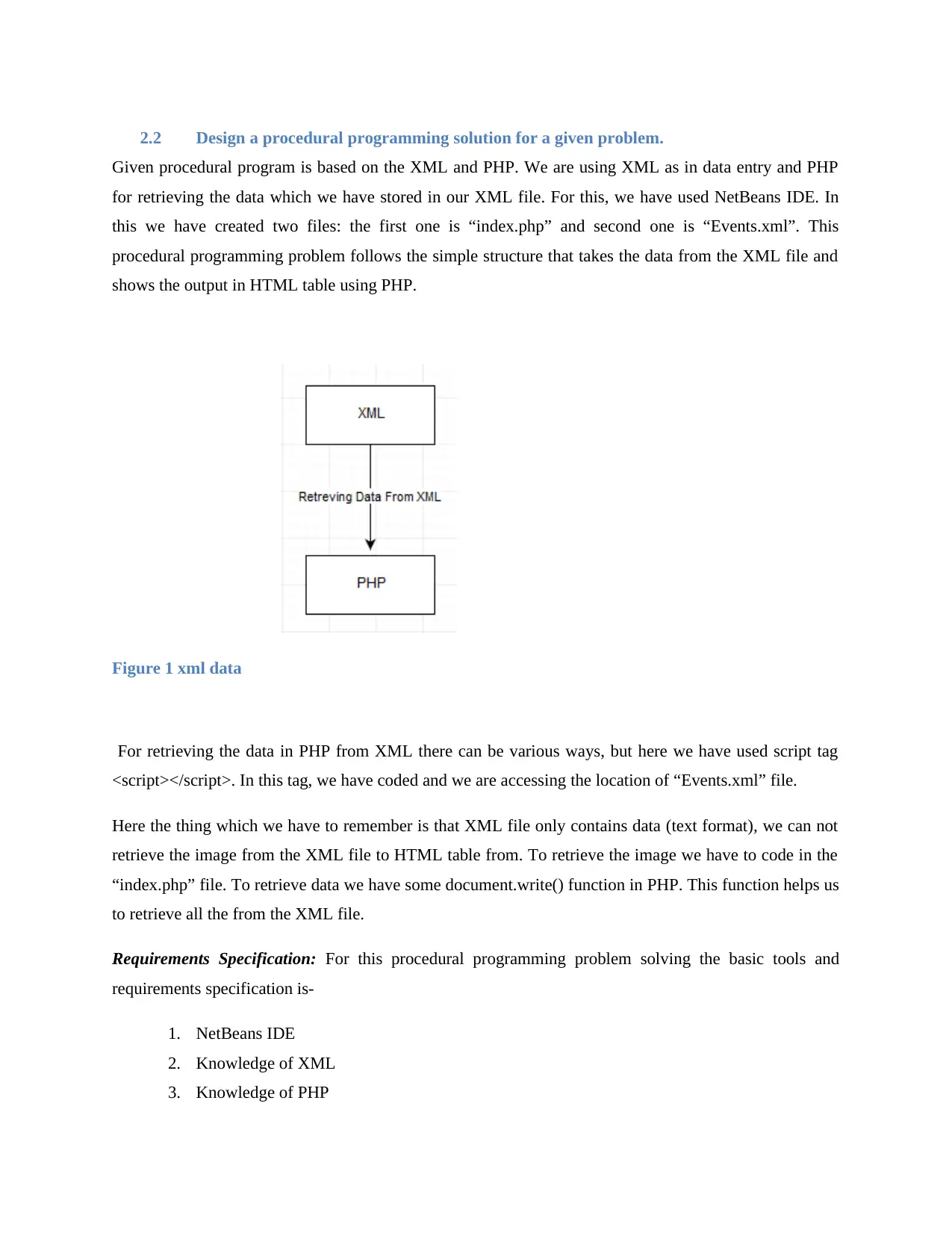
Given procedural program is based on the XML and PHP. We are using XML as in data entry and PHP
for retrieving the data which we have stored in our XML file. For this, we have used NetBeans IDE. In
this we have created two files: the first one is “index.php” and second one is “Events.xml”. This
procedural programming problem follows the simple structure that takes the data from the XML file and
shows the output in HTML table using PHP.
Figure 1 xml data
For retrieving the data in PHP from XML there can be various ways, but here we have used script tag
<script></script>. In this tag, we have coded and we are accessing the location of “Events.xml” file.
Here the thing which we have to remember is that XML file only contains data (text format), we can not
retrieve the image from the XML file to HTML table from. To retrieve the image we have to code in the
“index.php” file. To retrieve data we have some document.write() function in PHP. This function helps us
to retrieve all the from the XML file.
Requirements Specification: For this procedural programming problem solving the basic tools and
requirements specification is-
1. NetBeans IDE
2. Knowledge of XML
3. Knowledge of PHP
Given procedural program is based on the XML and PHP. We are using XML as in data entry and PHP
for retrieving the data which we have stored in our XML file. For this, we have used NetBeans IDE. In
this we have created two files: the first one is “index.php” and second one is “Events.xml”. This
procedural programming problem follows the simple structure that takes the data from the XML file and
shows the output in HTML table using PHP.
Figure 1 xml data
For retrieving the data in PHP from XML there can be various ways, but here we have used script tag
<script></script>. In this tag, we have coded and we are accessing the location of “Events.xml” file.
Here the thing which we have to remember is that XML file only contains data (text format), we can not
retrieve the image from the XML file to HTML table from. To retrieve the image we have to code in the
“index.php” file. To retrieve data we have some document.write() function in PHP. This function helps us
to retrieve all the from the XML file.
Requirements Specification: For this procedural programming problem solving the basic tools and
requirements specification is-
1. NetBeans IDE
2. Knowledge of XML
3. Knowledge of PHP
4. We must know the scripting language that helps us to retrieve the data from XML
5. Knowledge of HTML tags.
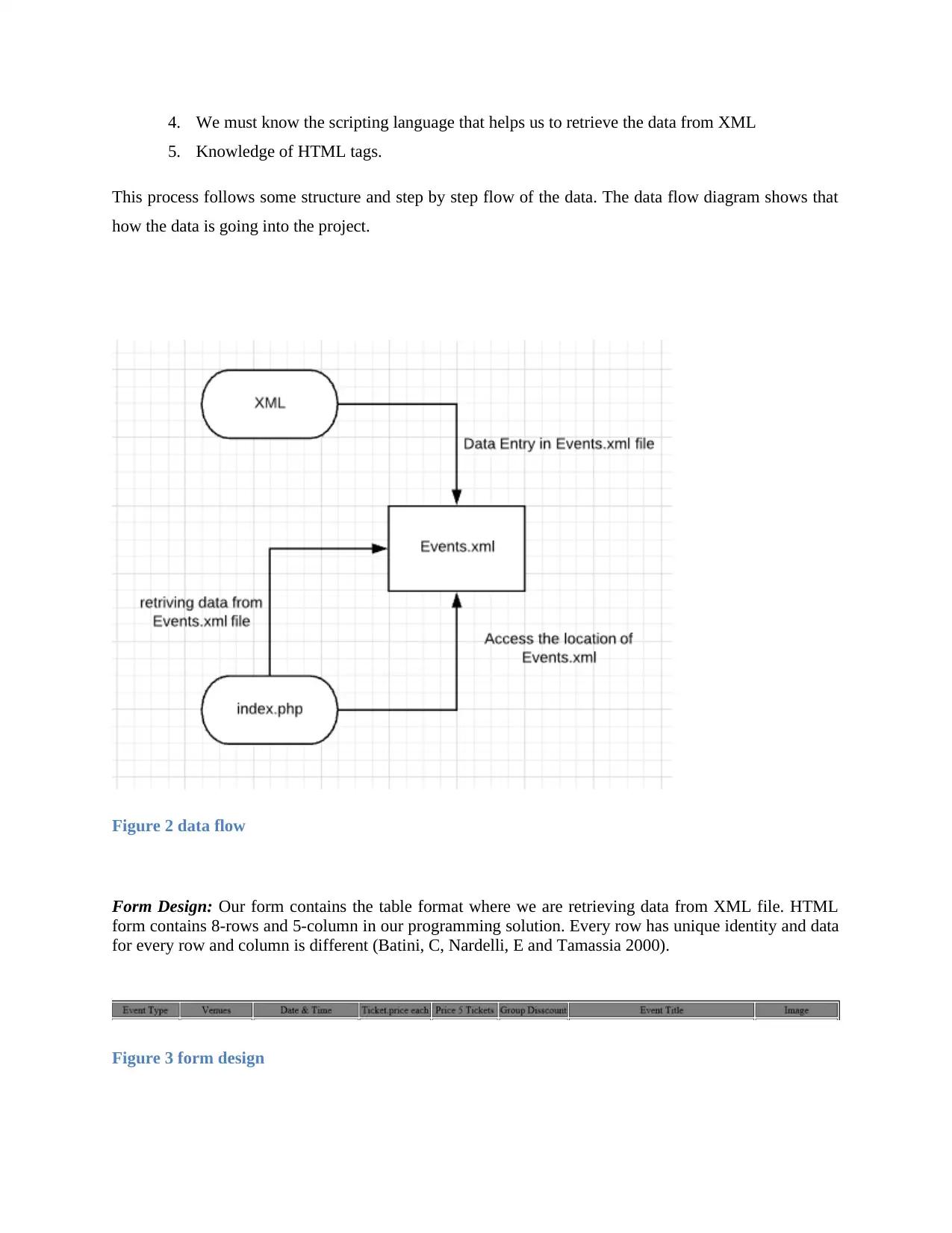
This process follows some structure and step by step flow of the data. The data flow diagram shows that
how the data is going into the project.
Figure 2 data flow
Form Design: Our form contains the table format where we are retrieving data from XML file. HTML
form contains 8-rows and 5-column in our programming solution. Every row has unique identity and data
for every row and column is different (Batini, C, Nardelli, E and Tamassia 2000).
Figure 3 form design
5. Knowledge of HTML tags.
This process follows some structure and step by step flow of the data. The data flow diagram shows that
how the data is going into the project.
Figure 2 data flow
Form Design: Our form contains the table format where we are retrieving data from XML file. HTML
form contains 8-rows and 5-column in our programming solution. Every row has unique identity and data
for every row and column is different (Batini, C, Nardelli, E and Tamassia 2000).
Figure 3 form design
⊘ This is a preview!⊘
Do you want full access?
Subscribe today to unlock all pages.
Trusted by 1+ million students worldwide

1 out of 34


Related Documents


Your All-in-One AI-Powered Toolkit for Academic Success.
+13062052269
info@desklib.com
Available 24*7 on WhatsApp / Email
![[object Object]](/_next/static/media/star-bottom.7253800d.svg)
Unlock your academic potential
Copyright © 2020–2025 A2Z Services. All Rights Reserved. Developed and managed by ZUCOL.