Programming Concept Assignment: Student Grading System Program
VerifiedAdded on 2021/04/21
|13
|1389
|147
Homework Assignment
AI Summary
This document showcases a Python program designed as a student grading system, encompassing various programming concepts. The program prompts the user to input grades for eight subjects and stores them along with the student's name. It utilizes loop control structures to present a menu, allowing users to insert, display, or exit the program. The code includes user input validation to handle incorrect entries. The assignment demonstrates the use of predefined and user-defined functions, along with global and local variables. A test plan is provided, including screenshots of program execution, user input, and data display. The document also includes a section on error validation and user documentation, detailing how to run the program and interpret its functions. The conclusion suggests potential improvements and additional features for the application.
Running head: PROGRAMING CONCEPT
Programing concept
Name of the Student
Name of the University
Authors note
Programing concept
Name of the Student
Name of the University
Authors note
Paraphrase This Document
Need a fresh take? Get an instant paraphrase of this document with our AI Paraphraser

1PROGRAMING CONCEPT
Table of Contents
Introduction................................................................................................................................2
1. Python program to display grades for students......................................................................2
2. Application of loop control structure to continue the program until user enters ‘exit’..........4
3. User input validation..............................................................................................................5
4. Program feature demonstration..............................................................................................6
4.a. Use of predefined and user defined functions.....................................................................6
4.b. Use of global and local variables.......................................................................................6
5. Test plan and evidence of testing..........................................................................................7
6. Evaluation of Test data and validating program against error.............................................10
7. User documentation for completed program.......................................................................12
Conclusion................................................................................................................................12
Table of Contents
Introduction................................................................................................................................2
1. Python program to display grades for students......................................................................2
2. Application of loop control structure to continue the program until user enters ‘exit’..........4
3. User input validation..............................................................................................................5
4. Program feature demonstration..............................................................................................6
4.a. Use of predefined and user defined functions.....................................................................6
4.b. Use of global and local variables.......................................................................................6
5. Test plan and evidence of testing..........................................................................................7
6. Evaluation of Test data and validating program against error.............................................10
7. User documentation for completed program.......................................................................12
Conclusion................................................................................................................................12

2PROGRAMING CONCEPT
Introduction
The program developed for this assessment is a basic program that will as the user to
input the grades for a student for eight different subjects. In this program we have used the
loop controls for prompting the menu to the user of the program and exit the program.
1. Python program to display grades for students
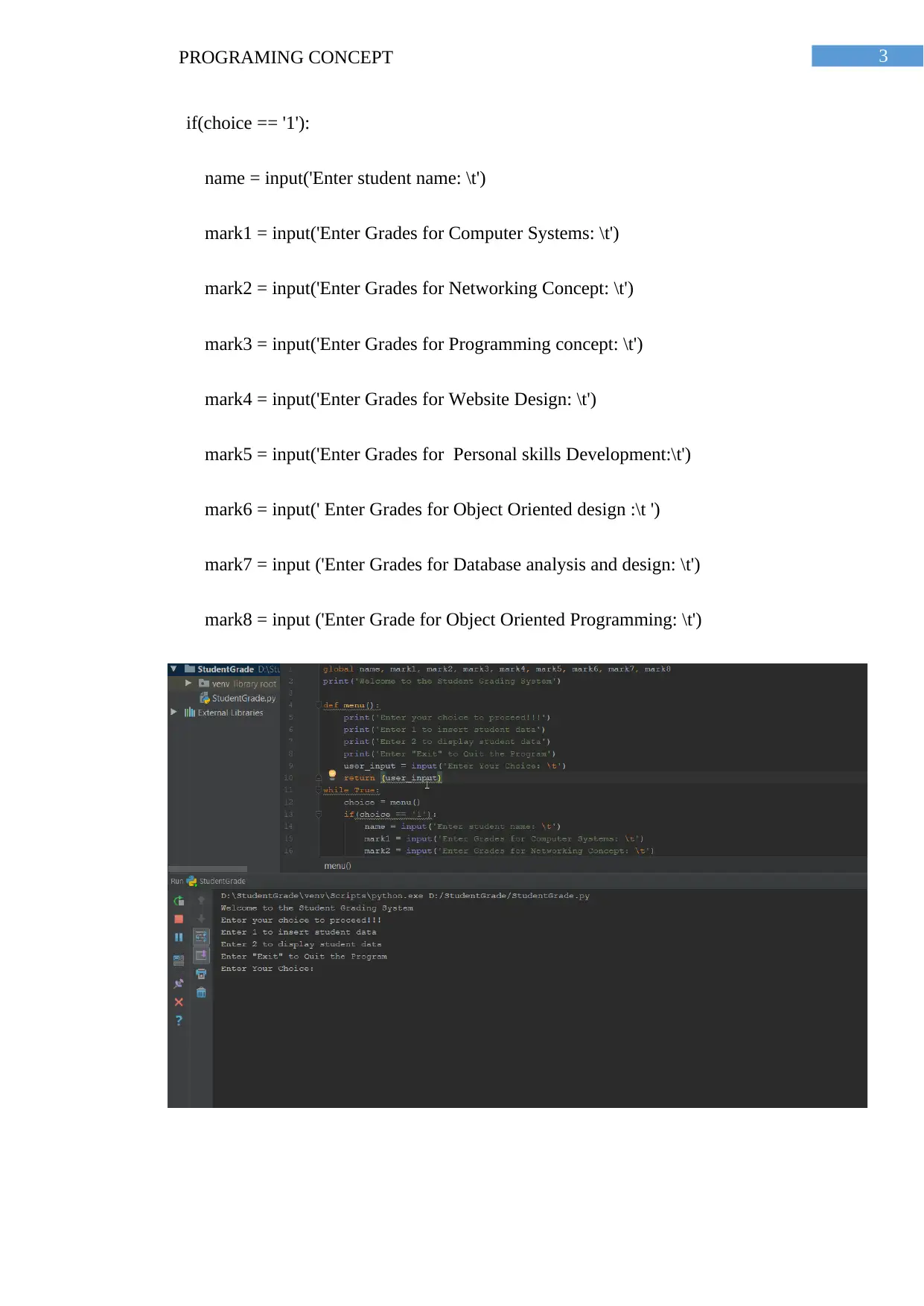
Following is the code snippet from the developed program that is developed to take
input and display the student grades for eight subjects along with their name
global name, mark1, mark2, mark3, mark4, mark5, mark6, mark7, mark8
print('Welcome to the Student Grading System')
def menu():
print('Enter your choice to proceed!!!')
print('Enter 1 to insert student data')
print('Enter 2 to display student data')
print('Enter "Exit" to Quit the Program')
user_input = input('Enter Your Choice: \t')
return (user_input)
while True:
choice = menu()
Introduction
The program developed for this assessment is a basic program that will as the user to
input the grades for a student for eight different subjects. In this program we have used the
loop controls for prompting the menu to the user of the program and exit the program.
1. Python program to display grades for students
Following is the code snippet from the developed program that is developed to take
input and display the student grades for eight subjects along with their name
global name, mark1, mark2, mark3, mark4, mark5, mark6, mark7, mark8
print('Welcome to the Student Grading System')
def menu():
print('Enter your choice to proceed!!!')
print('Enter 1 to insert student data')
print('Enter 2 to display student data')
print('Enter "Exit" to Quit the Program')
user_input = input('Enter Your Choice: \t')
return (user_input)
while True:
choice = menu()
⊘ This is a preview!⊘
Do you want full access?
Subscribe today to unlock all pages.

Trusted by 1+ million students worldwide

3PROGRAMING CONCEPT
if(choice == '1'):
name = input('Enter student name: \t')
mark1 = input('Enter Grades for Computer Systems: \t')
mark2 = input('Enter Grades for Networking Concept: \t')
mark3 = input('Enter Grades for Programming concept: \t')
mark4 = input('Enter Grades for Website Design: \t')
mark5 = input('Enter Grades for Personal skills Development:\t')
mark6 = input(' Enter Grades for Object Oriented design :\t ')
mark7 = input ('Enter Grades for Database analysis and design: \t')
mark8 = input ('Enter Grade for Object Oriented Programming: \t')
if(choice == '1'):
name = input('Enter student name: \t')
mark1 = input('Enter Grades for Computer Systems: \t')
mark2 = input('Enter Grades for Networking Concept: \t')
mark3 = input('Enter Grades for Programming concept: \t')
mark4 = input('Enter Grades for Website Design: \t')
mark5 = input('Enter Grades for Personal skills Development:\t')
mark6 = input(' Enter Grades for Object Oriented design :\t ')
mark7 = input ('Enter Grades for Database analysis and design: \t')
mark8 = input ('Enter Grade for Object Oriented Programming: \t')
Paraphrase This Document
Need a fresh take? Get an instant paraphrase of this document with our AI Paraphraser

4PROGRAMING CONCEPT
2. Application of loop control structure to continue the program
until user enters ‘exit’
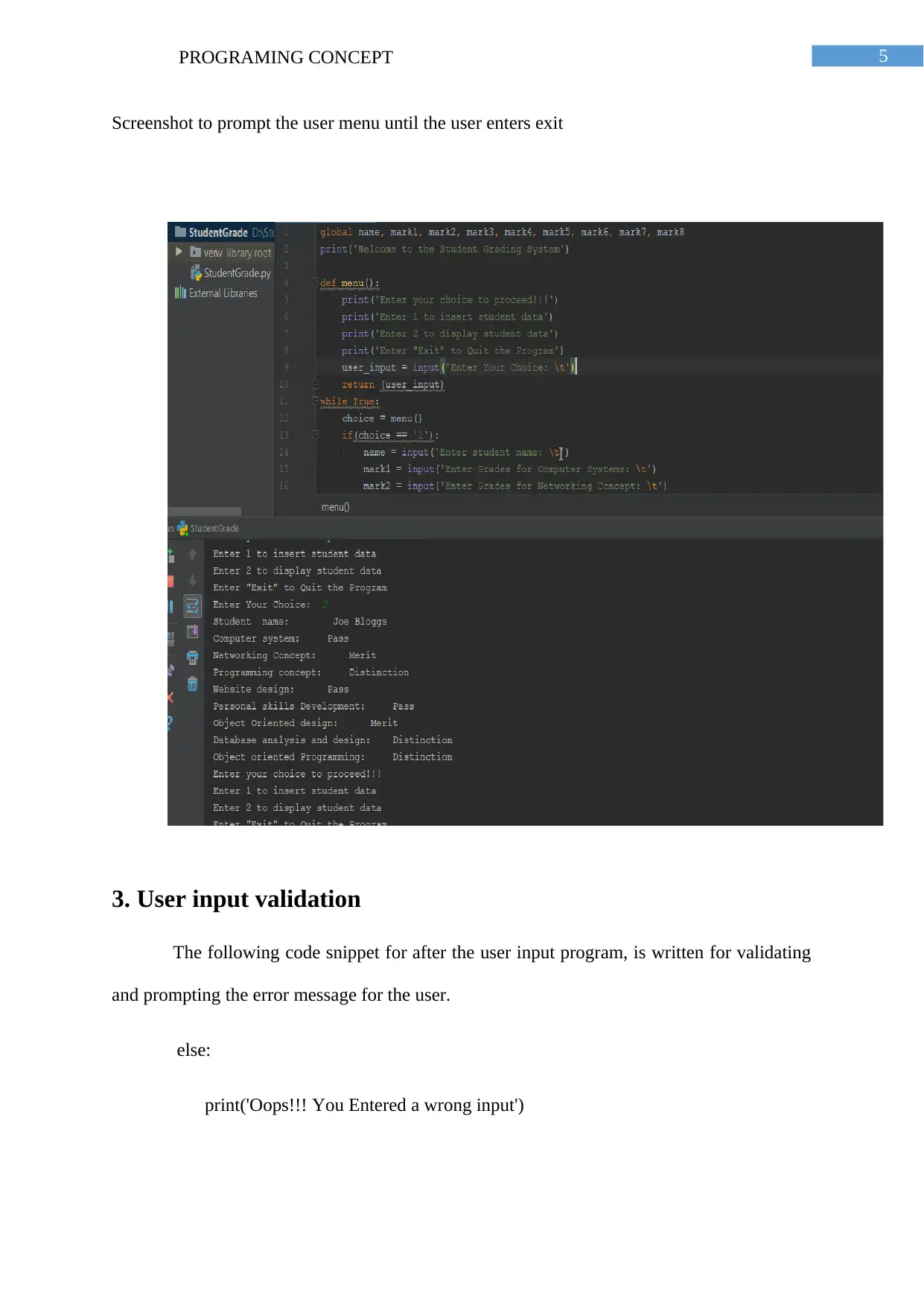
We have developed a menu for the users from where they can choose to insert data
about a student, display data about a student and at last exit from the application for this we
have used the following code snippet.
def menu():
print('Enter your choice to proceed!!!')
print('Enter 1 to insert student data')
print('Enter 2 to display student data')
print('Enter "Exit" to Quit the Program')
user_input = input('Enter Your Choice: \t')
return (user_input)
while True:
### This while loop asks the user for a valid input from the user when the user
enters anything else than, “1”, “2” and “exit”
choice = menu()
2. Application of loop control structure to continue the program
until user enters ‘exit’
We have developed a menu for the users from where they can choose to insert data
about a student, display data about a student and at last exit from the application for this we
have used the following code snippet.
def menu():
print('Enter your choice to proceed!!!')
print('Enter 1 to insert student data')
print('Enter 2 to display student data')
print('Enter "Exit" to Quit the Program')
user_input = input('Enter Your Choice: \t')
return (user_input)
while True:
### This while loop asks the user for a valid input from the user when the user
enters anything else than, “1”, “2” and “exit”
choice = menu()

5PROGRAMING CONCEPT
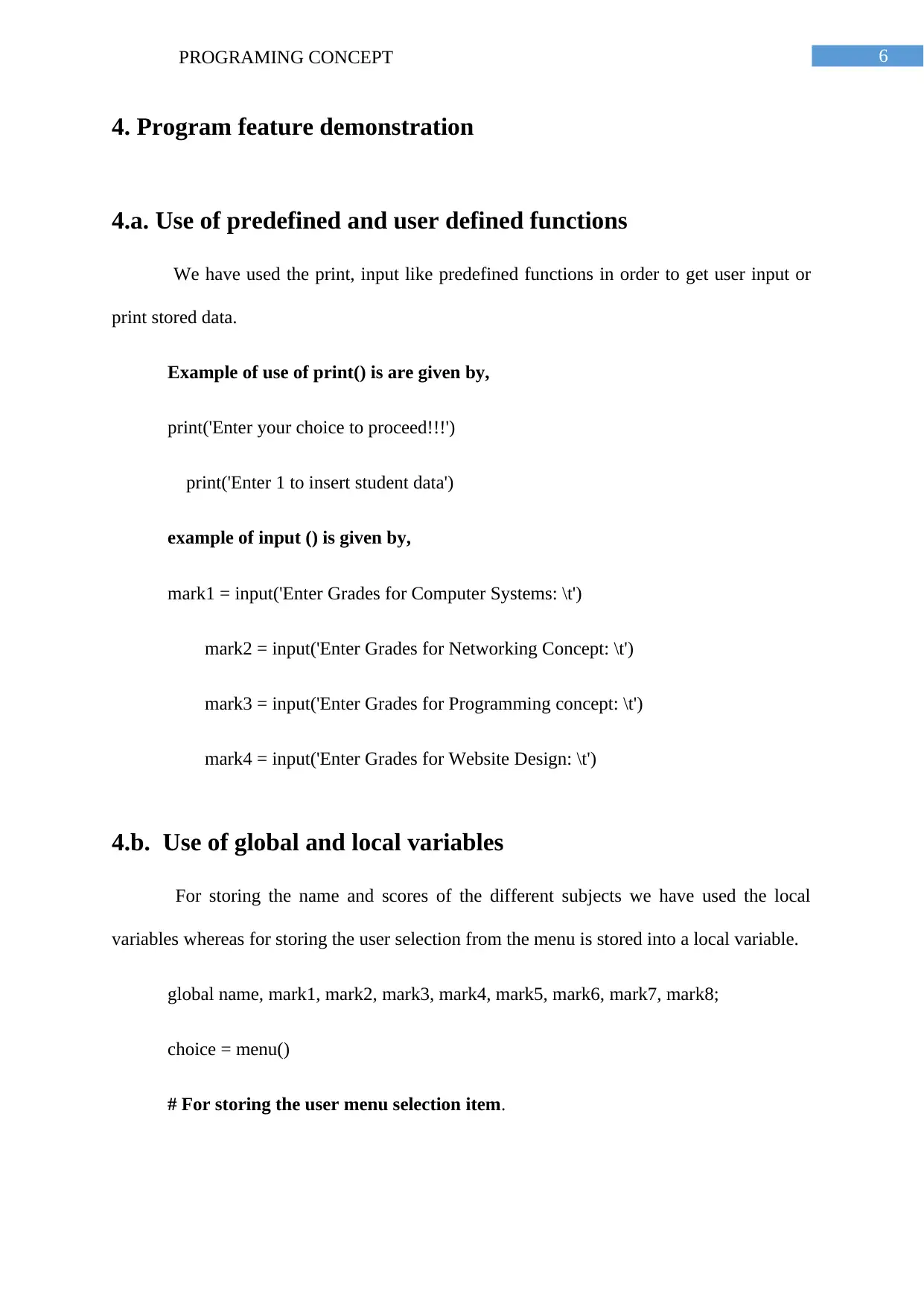
Screenshot to prompt the user menu until the user enters exit
3. User input validation
The following code snippet for after the user input program, is written for validating
and prompting the error message for the user.
else:
print('Oops!!! You Entered a wrong input')
Screenshot to prompt the user menu until the user enters exit
3. User input validation
The following code snippet for after the user input program, is written for validating
and prompting the error message for the user.
else:
print('Oops!!! You Entered a wrong input')
⊘ This is a preview!⊘
Do you want full access?
Subscribe today to unlock all pages.

Trusted by 1+ million students worldwide

6PROGRAMING CONCEPT
4. Program feature demonstration
4.a. Use of predefined and user defined functions
We have used the print, input like predefined functions in order to get user input or
print stored data.
Example of use of print() is are given by,
print('Enter your choice to proceed!!!')
print('Enter 1 to insert student data')
example of input () is given by,
mark1 = input('Enter Grades for Computer Systems: \t')
mark2 = input('Enter Grades for Networking Concept: \t')
mark3 = input('Enter Grades for Programming concept: \t')
mark4 = input('Enter Grades for Website Design: \t')
4.b. Use of global and local variables
For storing the name and scores of the different subjects we have used the local
variables whereas for storing the user selection from the menu is stored into a local variable.
global name, mark1, mark2, mark3, mark4, mark5, mark6, mark7, mark8;
choice = menu()
# For storing the user menu selection item.
4. Program feature demonstration
4.a. Use of predefined and user defined functions
We have used the print, input like predefined functions in order to get user input or
print stored data.
Example of use of print() is are given by,
print('Enter your choice to proceed!!!')
print('Enter 1 to insert student data')
example of input () is given by,
mark1 = input('Enter Grades for Computer Systems: \t')
mark2 = input('Enter Grades for Networking Concept: \t')
mark3 = input('Enter Grades for Programming concept: \t')
mark4 = input('Enter Grades for Website Design: \t')
4.b. Use of global and local variables
For storing the name and scores of the different subjects we have used the local
variables whereas for storing the user selection from the menu is stored into a local variable.
global name, mark1, mark2, mark3, mark4, mark5, mark6, mark7, mark8;
choice = menu()
# For storing the user menu selection item.
Paraphrase This Document
Need a fresh take? Get an instant paraphrase of this document with our AI Paraphraser

7PROGRAMING CONCEPT
5. Test plan and evidence of testing
The program we have developed is for displaying the grades of a student for different
subjects. The application is developed in a such a way that the application will show a menu
until the user enters exit which will lead to the completion of the program and exit from the
program.
In order to develop the program, we used global variables as well as local variables to
store the value for storing the name and the marks for the different subjects. In order to show
the menu to the user we have used the While loop.
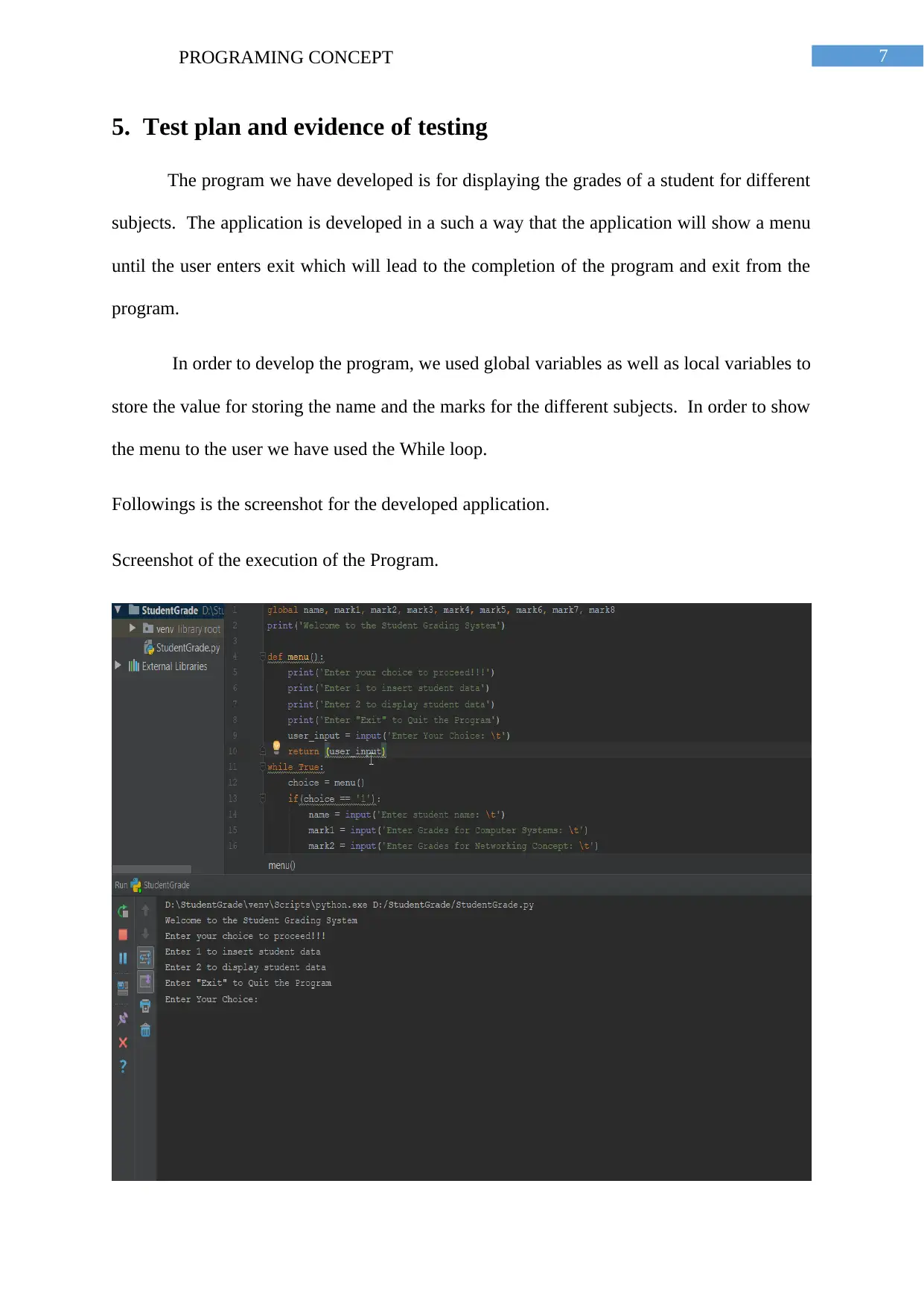
Followings is the screenshot for the developed application.
Screenshot of the execution of the Program.
5. Test plan and evidence of testing
The program we have developed is for displaying the grades of a student for different
subjects. The application is developed in a such a way that the application will show a menu
until the user enters exit which will lead to the completion of the program and exit from the
program.
In order to develop the program, we used global variables as well as local variables to
store the value for storing the name and the marks for the different subjects. In order to show
the menu to the user we have used the While loop.
Followings is the screenshot for the developed application.
Screenshot of the execution of the Program.

8PROGRAMING CONCEPT
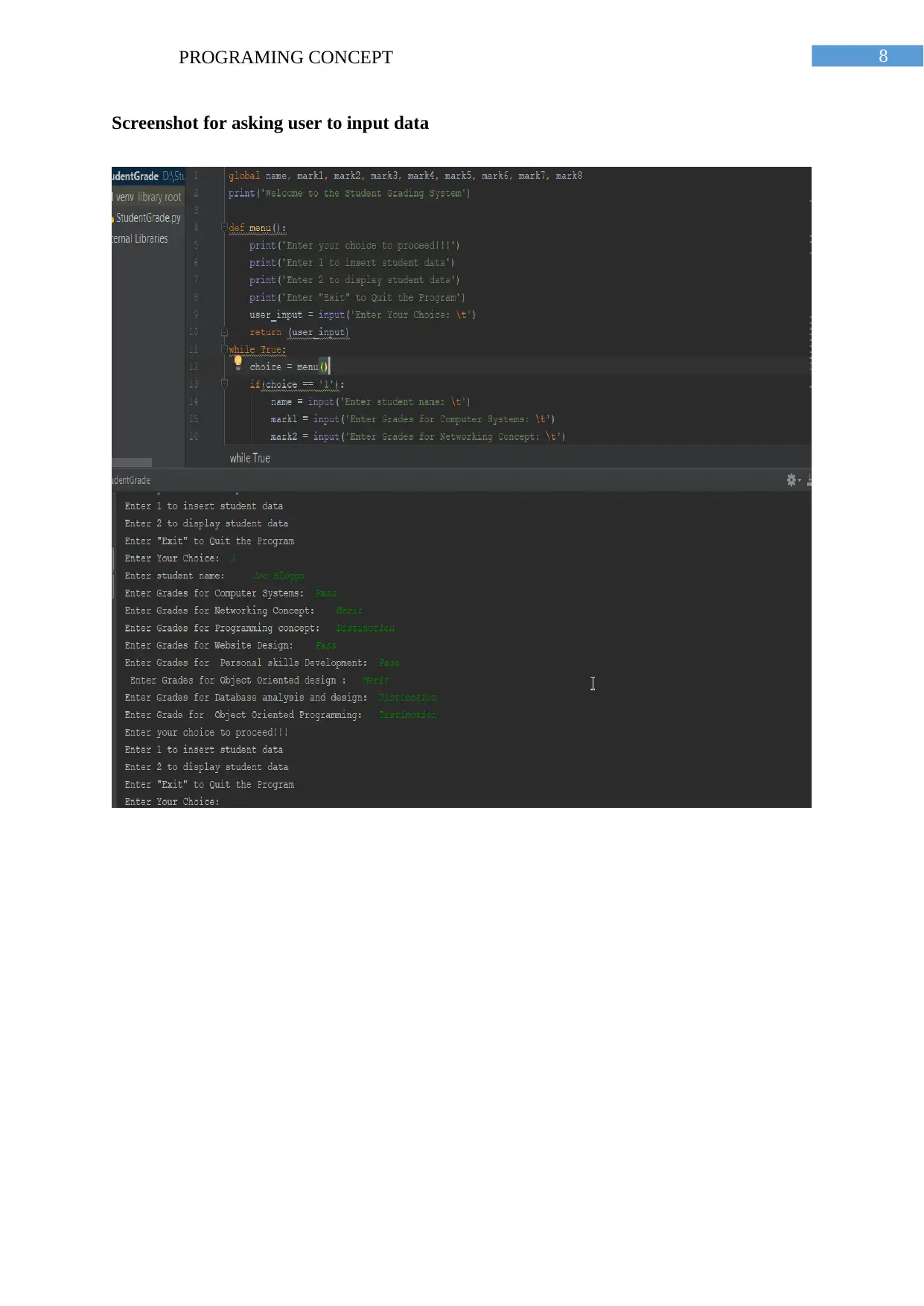
Screenshot for asking user to input data
⊘ This is a preview!⊘
Do you want full access?
Subscribe today to unlock all pages.

Trusted by 1+ million students worldwide

9PROGRAMING CONCEPT
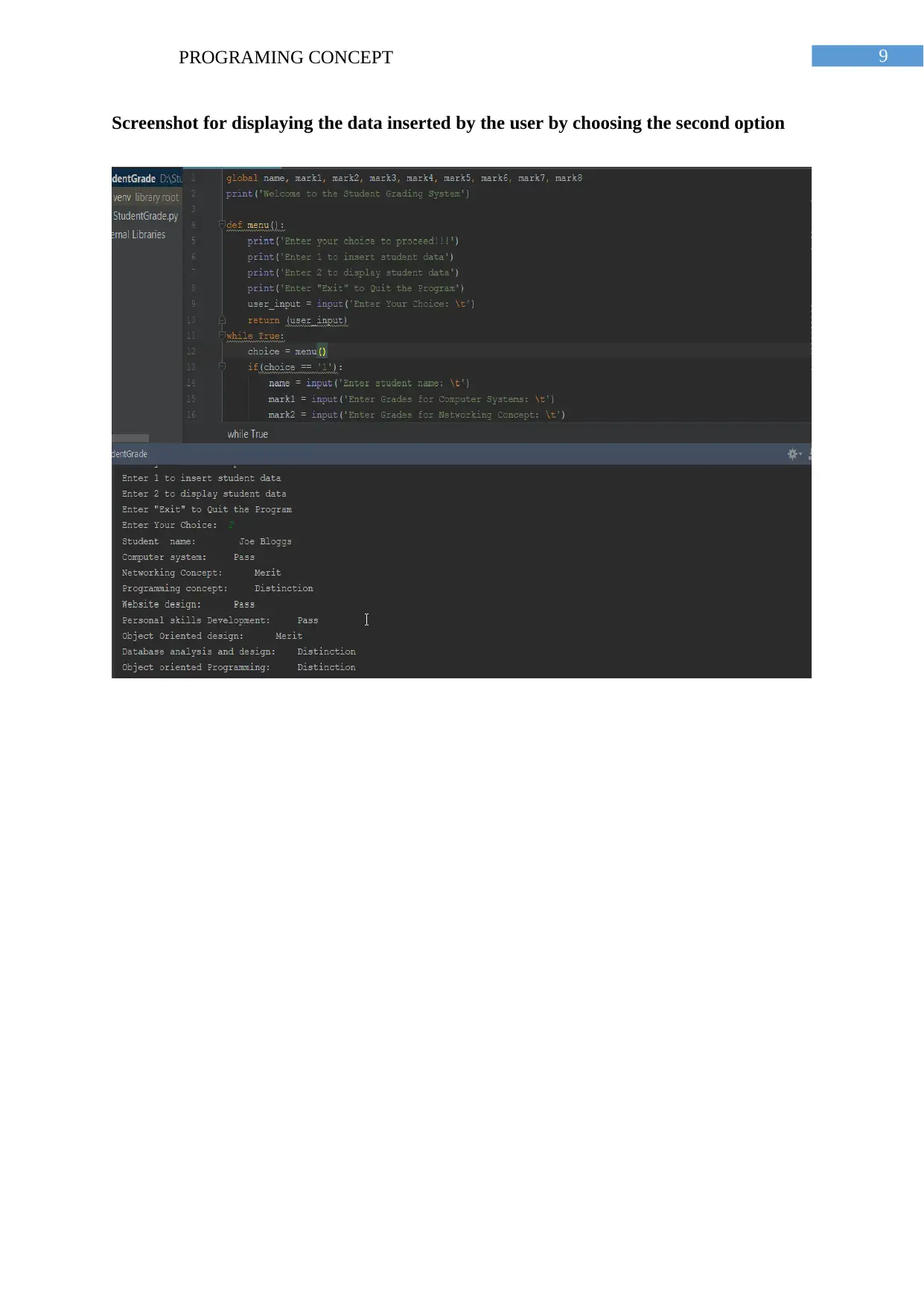
Screenshot for displaying the data inserted by the user by choosing the second option
Paraphrase This Document
Need a fresh take? Get an instant paraphrase of this document with our AI Paraphraser

10PROGRAMING CONCEPT
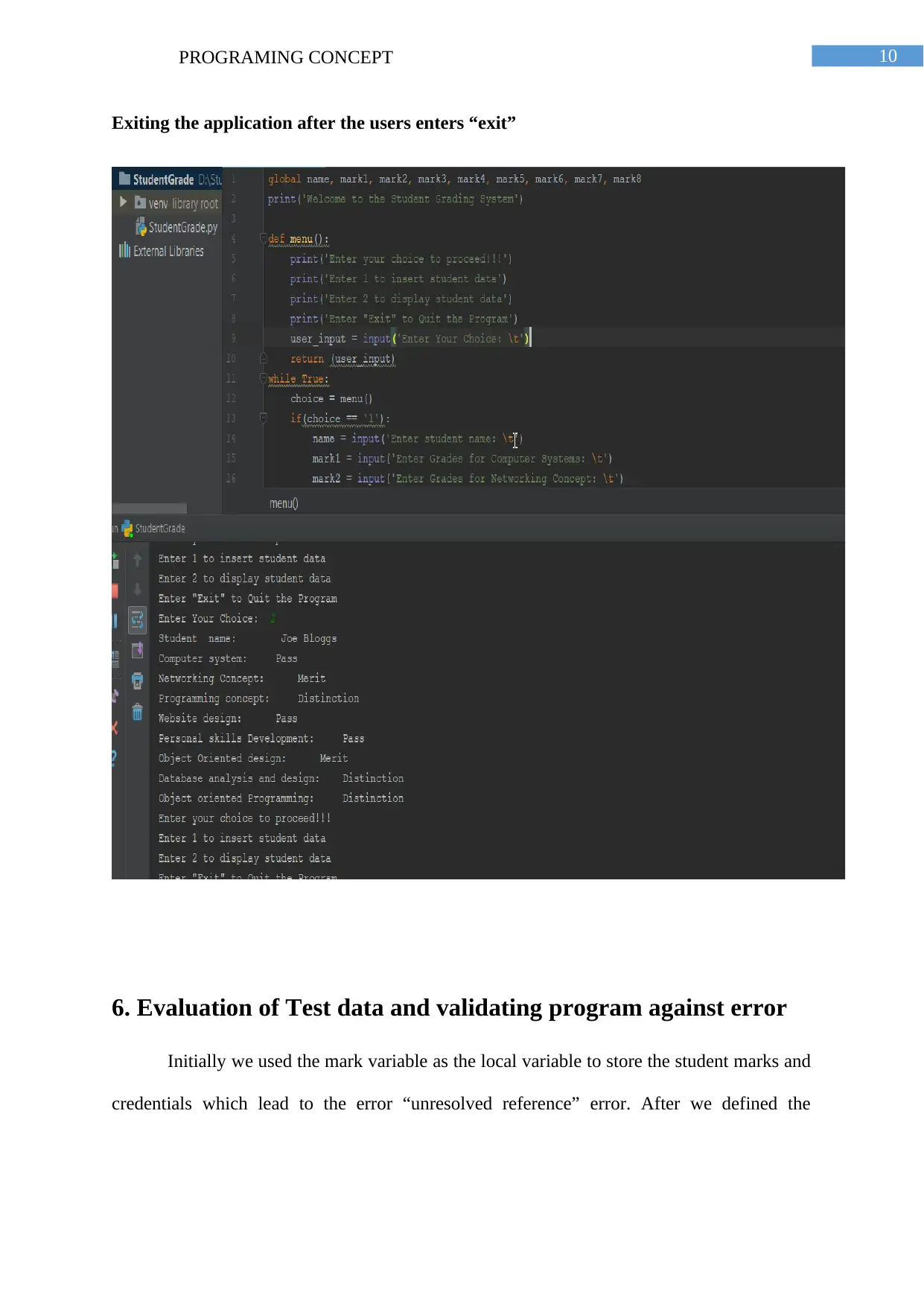
Exiting the application after the users enters “exit”
6. Evaluation of Test data and validating program against error
Initially we used the mark variable as the local variable to store the student marks and
credentials which lead to the error “unresolved reference” error. After we defined the
Exiting the application after the users enters “exit”
6. Evaluation of Test data and validating program against error
Initially we used the mark variable as the local variable to store the student marks and
credentials which lead to the error “unresolved reference” error. After we defined the

11PROGRAMING CONCEPT
variables name, mark1, mark2, mark3, mark4, mark5, mark6, mark7, mark8 as the global
variables.
The name stores the student name of the student provided by the input. Similarly
Following is the validation of the Program against an invalid input by the user and
response of the program against the invalid input by the user.
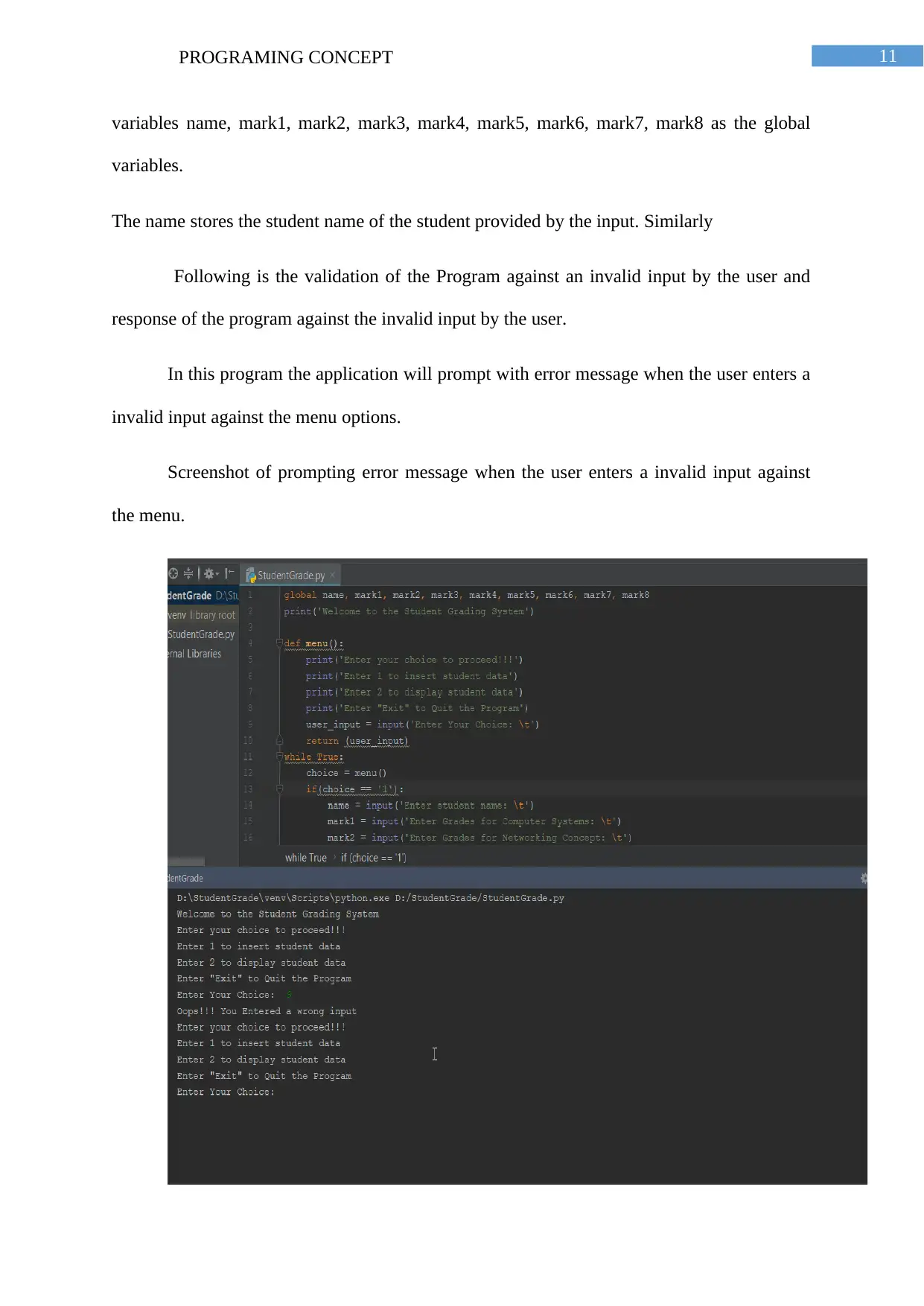
In this program the application will prompt with error message when the user enters a
invalid input against the menu options.
Screenshot of prompting error message when the user enters a invalid input against
the menu.
variables name, mark1, mark2, mark3, mark4, mark5, mark6, mark7, mark8 as the global
variables.
The name stores the student name of the student provided by the input. Similarly
Following is the validation of the Program against an invalid input by the user and
response of the program against the invalid input by the user.
In this program the application will prompt with error message when the user enters a
invalid input against the menu options.
Screenshot of prompting error message when the user enters a invalid input against
the menu.
⊘ This is a preview!⊘
Do you want full access?
Subscribe today to unlock all pages.

Trusted by 1+ million students worldwide
1 out of 13
Related Documents
Your All-in-One AI-Powered Toolkit for Academic Success.
+13062052269
info@desklib.com
Available 24*7 on WhatsApp / Email
Unlock your academic potential
Copyright © 2020–2026 A2Z Services. All Rights Reserved. Developed and managed by ZUCOL.