Python Code Solutions: Time, Turtle, Classes, Calculations, Quiz, Game
VerifiedAdded on 2020/06/04
|29
|7403
|83
Homework Assignment
AI Summary
This document provides a collection of Python code solutions addressing various programming tasks. The solutions cover diverse areas including time calculations with timezone offsets, drawing shapes using the turtle module, implementing classes and object-oriented programming principles with rectangles, performing calculations for speed and distance, working with dictionaries to store student data and calculate averages and grades, creating a number-based dictionary, working with multi-dimensional arrays, and developing a game using Tkinter. The assignments also include a quiz program with different difficulty levels and a game featuring a ball, paddles, and targets. These solutions offer a comprehensive resource for students studying Python programming, providing practical examples and demonstrating various programming concepts and techniques.
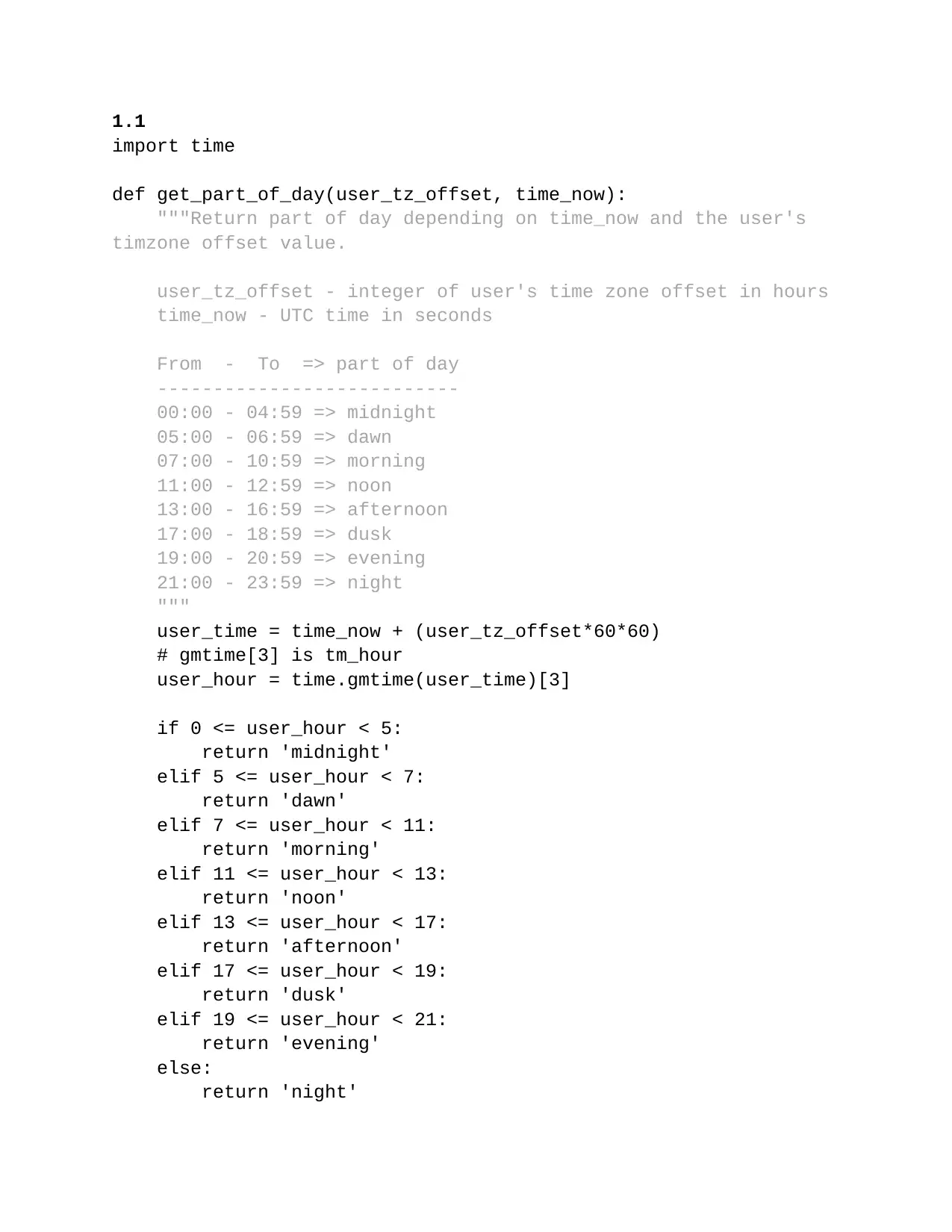
1.1
import time
def get_part_of_day(user_tz_offset, time_now):
"""Return part of day depending on time_now and the user's
timzone offset value.
user_tz_offset - integer of user's time zone offset in hours
time_now - UTC time in seconds
From - To => part of day
---------------------------
00:00 - 04:59 => midnight
05:00 - 06:59 => dawn
07:00 - 10:59 => morning
11:00 - 12:59 => noon
13:00 - 16:59 => afternoon
17:00 - 18:59 => dusk
19:00 - 20:59 => evening
21:00 - 23:59 => night
"""
user_time = time_now + (user_tz_offset*60*60)
# gmtime[3] is tm_hour
user_hour = time.gmtime(user_time)[3]
if 0 <= user_hour < 5:
return 'midnight'
elif 5 <= user_hour < 7:
return 'dawn'
elif 7 <= user_hour < 11:
return 'morning'
elif 11 <= user_hour < 13:
return 'noon'
elif 13 <= user_hour < 17:
return 'afternoon'
elif 17 <= user_hour < 19:
return 'dusk'
elif 19 <= user_hour < 21:
return 'evening'
else:
return 'night'
import time
def get_part_of_day(user_tz_offset, time_now):
"""Return part of day depending on time_now and the user's
timzone offset value.
user_tz_offset - integer of user's time zone offset in hours
time_now - UTC time in seconds
From - To => part of day
---------------------------
00:00 - 04:59 => midnight
05:00 - 06:59 => dawn
07:00 - 10:59 => morning
11:00 - 12:59 => noon
13:00 - 16:59 => afternoon
17:00 - 18:59 => dusk
19:00 - 20:59 => evening
21:00 - 23:59 => night
"""
user_time = time_now + (user_tz_offset*60*60)
# gmtime[3] is tm_hour
user_hour = time.gmtime(user_time)[3]
if 0 <= user_hour < 5:
return 'midnight'
elif 5 <= user_hour < 7:
return 'dawn'
elif 7 <= user_hour < 11:
return 'morning'
elif 11 <= user_hour < 13:
return 'noon'
elif 13 <= user_hour < 17:
return 'afternoon'
elif 17 <= user_hour < 19:
return 'dusk'
elif 19 <= user_hour < 21:
return 'evening'
else:
return 'night'

Paraphrase This Document
Need a fresh take? Get an instant paraphrase of this document with our AI Paraphraser
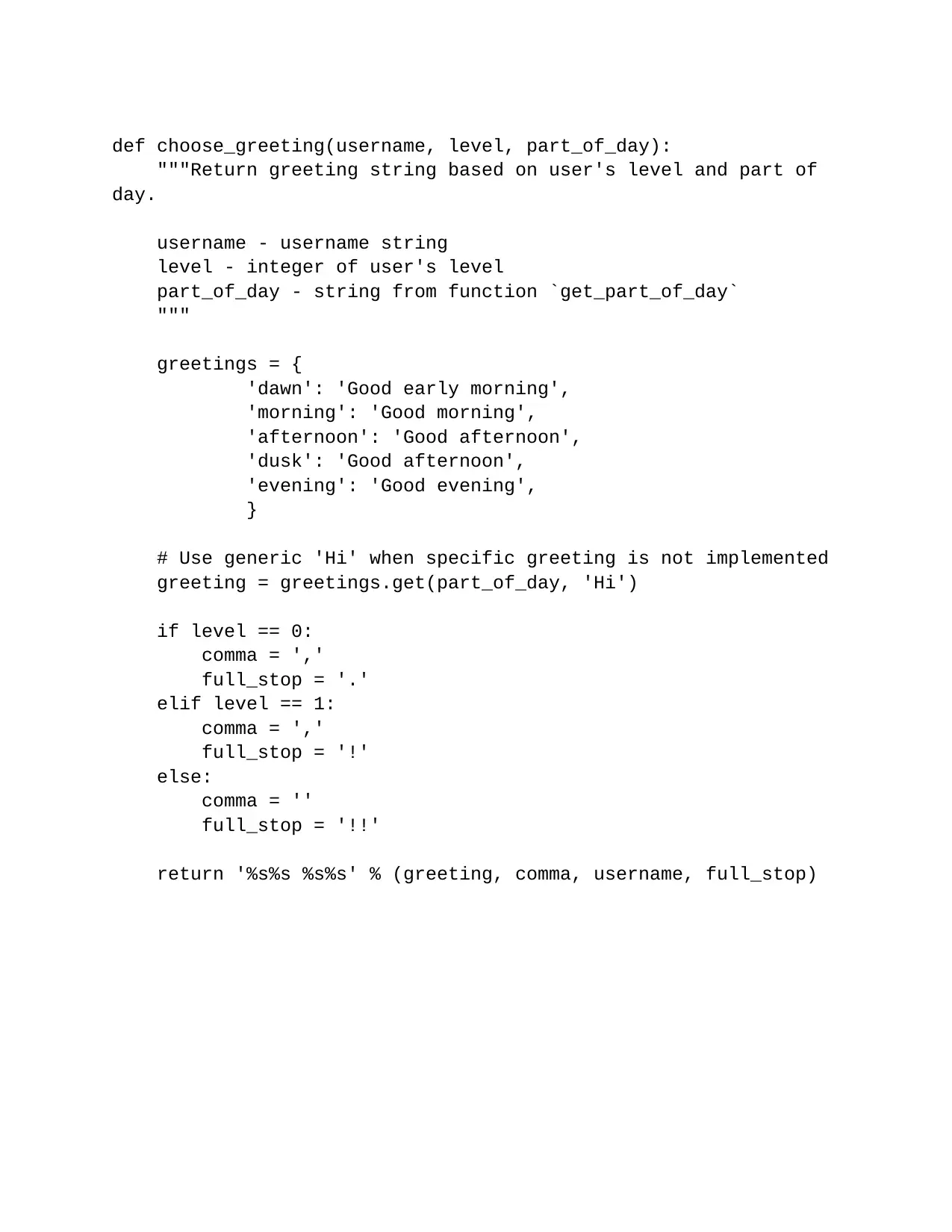
def choose_greeting(username, level, part_of_day):
"""Return greeting string based on user's level and part of
day.
username - username string
level - integer of user's level
part_of_day - string from function `get_part_of_day`
"""
greetings = {
'dawn': 'Good early morning',
'morning': 'Good morning',
'afternoon': 'Good afternoon',
'dusk': 'Good afternoon',
'evening': 'Good evening',
}
# Use generic 'Hi' when specific greeting is not implemented
greeting = greetings.get(part_of_day, 'Hi')
if level == 0:
comma = ','
full_stop = '.'
elif level == 1:
comma = ','
full_stop = '!'
else:
comma = ''
full_stop = '!!'
return '%s%s %s%s' % (greeting, comma, username, full_stop)
"""Return greeting string based on user's level and part of
day.
username - username string
level - integer of user's level
part_of_day - string from function `get_part_of_day`
"""
greetings = {
'dawn': 'Good early morning',
'morning': 'Good morning',
'afternoon': 'Good afternoon',
'dusk': 'Good afternoon',
'evening': 'Good evening',
}
# Use generic 'Hi' when specific greeting is not implemented
greeting = greetings.get(part_of_day, 'Hi')
if level == 0:
comma = ','
full_stop = '.'
elif level == 1:
comma = ','
full_stop = '!'
else:
comma = ''
full_stop = '!!'
return '%s%s %s%s' % (greeting, comma, username, full_stop)
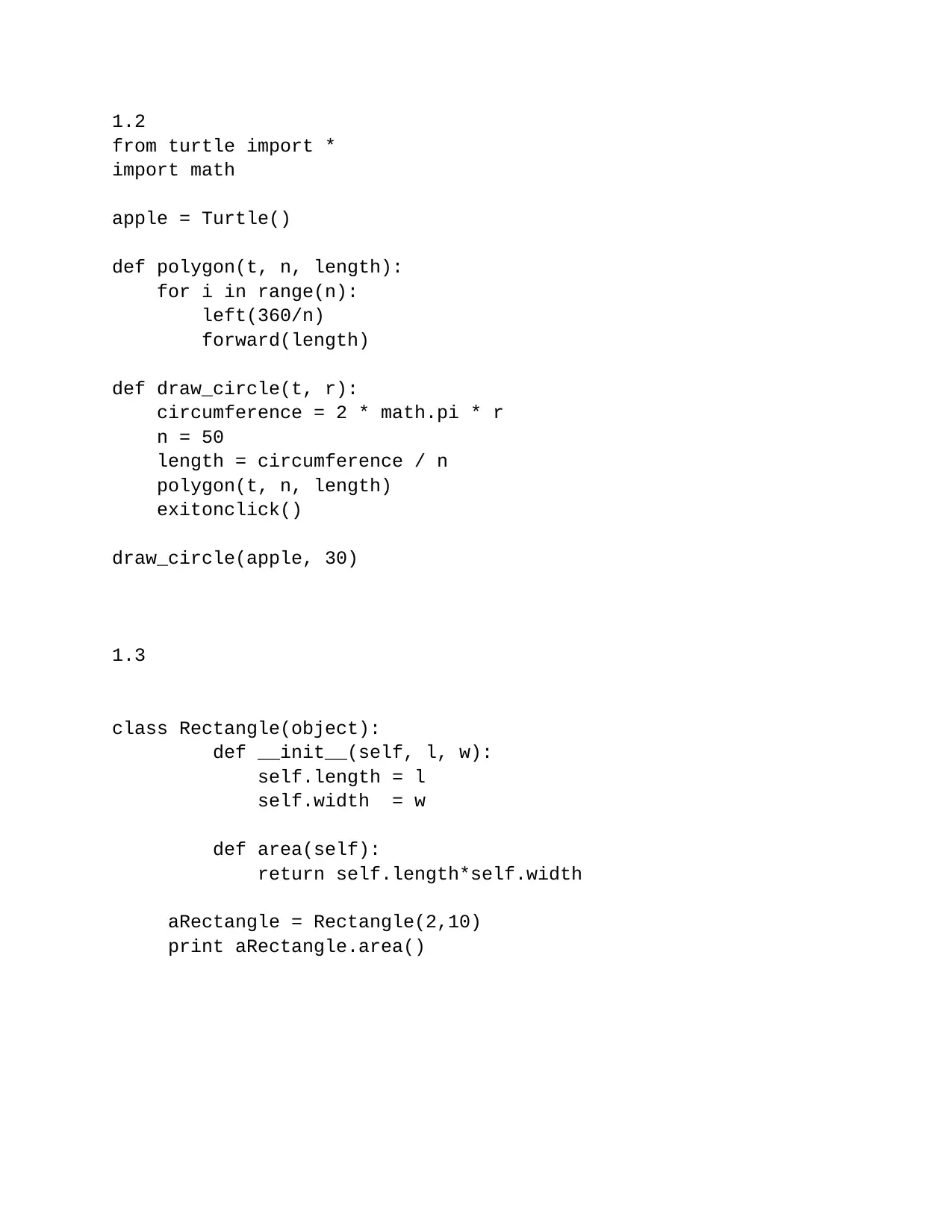
1.2
from turtle import *
import math
apple = Turtle()
def polygon(t, n, length):
for i in range(n):
left(360/n)
forward(length)
def draw_circle(t, r):
circumference = 2 * math.pi * r
n = 50
length = circumference / n
polygon(t, n, length)
exitonclick()
draw_circle(apple, 30)
1.3
class Rectangle(object):
def __init__(self, l, w):
self.length = l
self.width = w
def area(self):
return self.length*self.width
aRectangle = Rectangle(2,10)
print aRectangle.area()
from turtle import *
import math
apple = Turtle()
def polygon(t, n, length):
for i in range(n):
left(360/n)
forward(length)
def draw_circle(t, r):
circumference = 2 * math.pi * r
n = 50
length = circumference / n
polygon(t, n, length)
exitonclick()
draw_circle(apple, 30)
1.3
class Rectangle(object):
def __init__(self, l, w):
self.length = l
self.width = w
def area(self):
return self.length*self.width
aRectangle = Rectangle(2,10)
print aRectangle.area()
⊘ This is a preview!⊘
Do you want full access?
Subscribe today to unlock all pages.

Trusted by 1+ million students worldwide
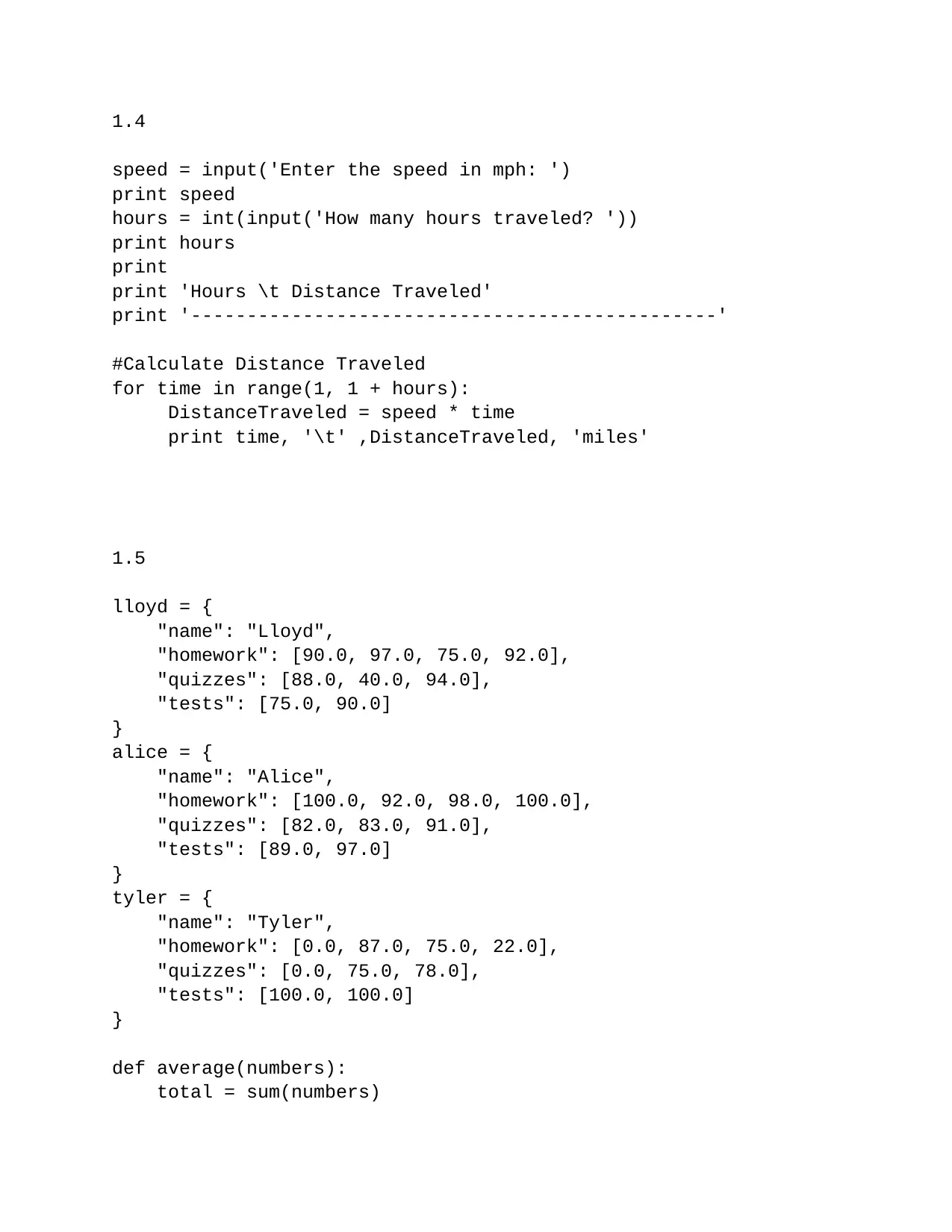
1.4
speed = input('Enter the speed in mph: ')
print speed
hours = int(input('How many hours traveled? '))
print hours
print
print 'Hours \t Distance Traveled'
print '-----------------------------------------------'
#Calculate Distance Traveled
for time in range(1, 1 + hours):
DistanceTraveled = speed * time
print time, '\t' ,DistanceTraveled, 'miles'
1.5
lloyd = {
"name": "Lloyd",
"homework": [90.0, 97.0, 75.0, 92.0],
"quizzes": [88.0, 40.0, 94.0],
"tests": [75.0, 90.0]
}
alice = {
"name": "Alice",
"homework": [100.0, 92.0, 98.0, 100.0],
"quizzes": [82.0, 83.0, 91.0],
"tests": [89.0, 97.0]
}
tyler = {
"name": "Tyler",
"homework": [0.0, 87.0, 75.0, 22.0],
"quizzes": [0.0, 75.0, 78.0],
"tests": [100.0, 100.0]
}
def average(numbers):
total = sum(numbers)
speed = input('Enter the speed in mph: ')
print speed
hours = int(input('How many hours traveled? '))
print hours
print 'Hours \t Distance Traveled'
print '-----------------------------------------------'
#Calculate Distance Traveled
for time in range(1, 1 + hours):
DistanceTraveled = speed * time
print time, '\t' ,DistanceTraveled, 'miles'
1.5
lloyd = {
"name": "Lloyd",
"homework": [90.0, 97.0, 75.0, 92.0],
"quizzes": [88.0, 40.0, 94.0],
"tests": [75.0, 90.0]
}
alice = {
"name": "Alice",
"homework": [100.0, 92.0, 98.0, 100.0],
"quizzes": [82.0, 83.0, 91.0],
"tests": [89.0, 97.0]
}
tyler = {
"name": "Tyler",
"homework": [0.0, 87.0, 75.0, 22.0],
"quizzes": [0.0, 75.0, 78.0],
"tests": [100.0, 100.0]
}
def average(numbers):
total = sum(numbers)
Paraphrase This Document
Need a fresh take? Get an instant paraphrase of this document with our AI Paraphraser
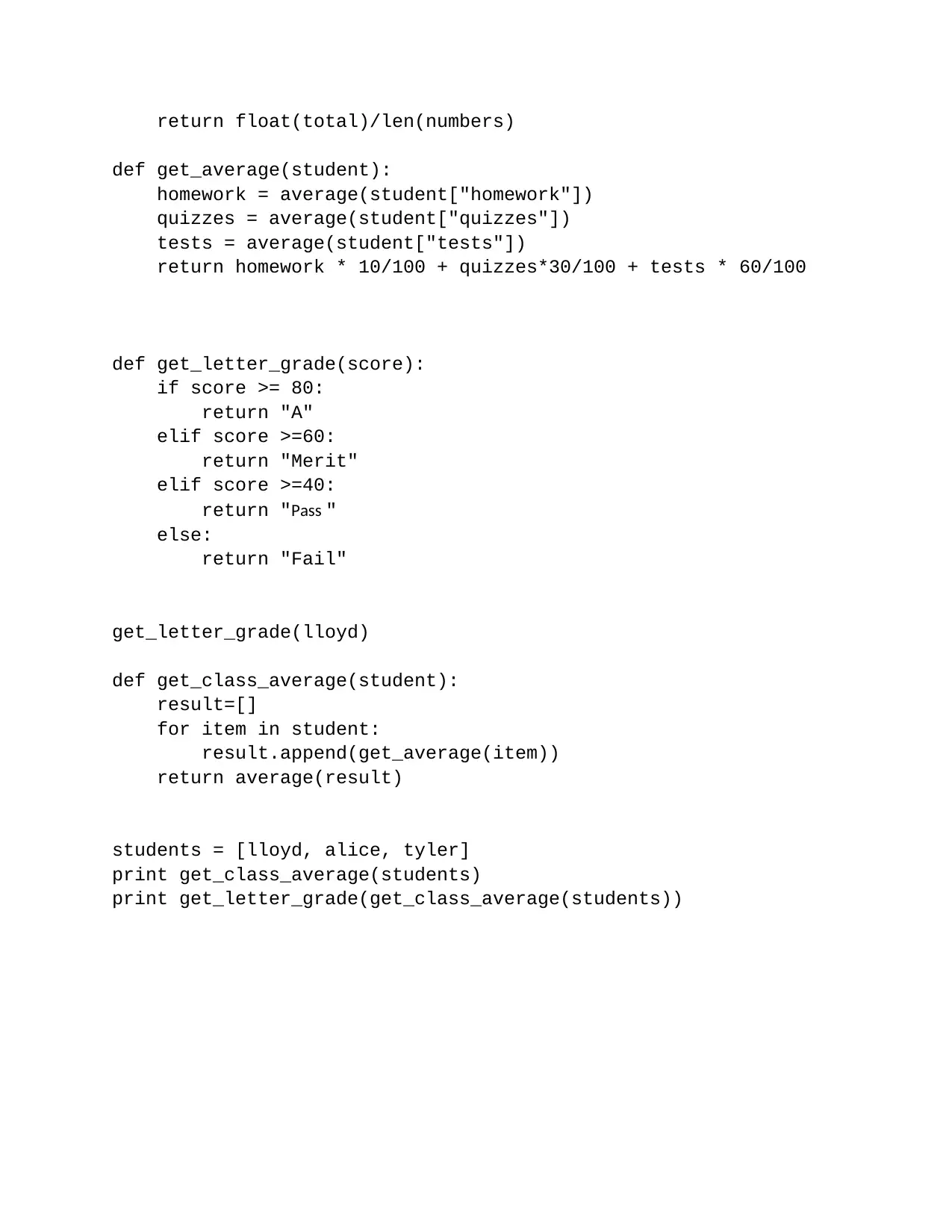
return float(total)/len(numbers)
def get_average(student):
homework = average(student["homework"])
quizzes = average(student["quizzes"])
tests = average(student["tests"])
return homework * 10/100 + quizzes*30/100 + tests * 60/100
def get_letter_grade(score):
if score >= 80:
return "A"
elif score >=60:
return "Merit"
elif score >=40:
return "Pass "
else:
return "Fail"
get_letter_grade(lloyd)
def get_class_average(student):
result=[]
for item in student:
result.append(get_average(item))
return average(result)
students = [lloyd, alice, tyler]
print get_class_average(students)
print get_letter_grade(get_class_average(students))
def get_average(student):
homework = average(student["homework"])
quizzes = average(student["quizzes"])
tests = average(student["tests"])
return homework * 10/100 + quizzes*30/100 + tests * 60/100
def get_letter_grade(score):
if score >= 80:
return "A"
elif score >=60:
return "Merit"
elif score >=40:
return "Pass "
else:
return "Fail"
get_letter_grade(lloyd)
def get_class_average(student):
result=[]
for item in student:
result.append(get_average(item))
return average(result)
students = [lloyd, alice, tyler]
print get_class_average(students)
print get_letter_grade(get_class_average(students))
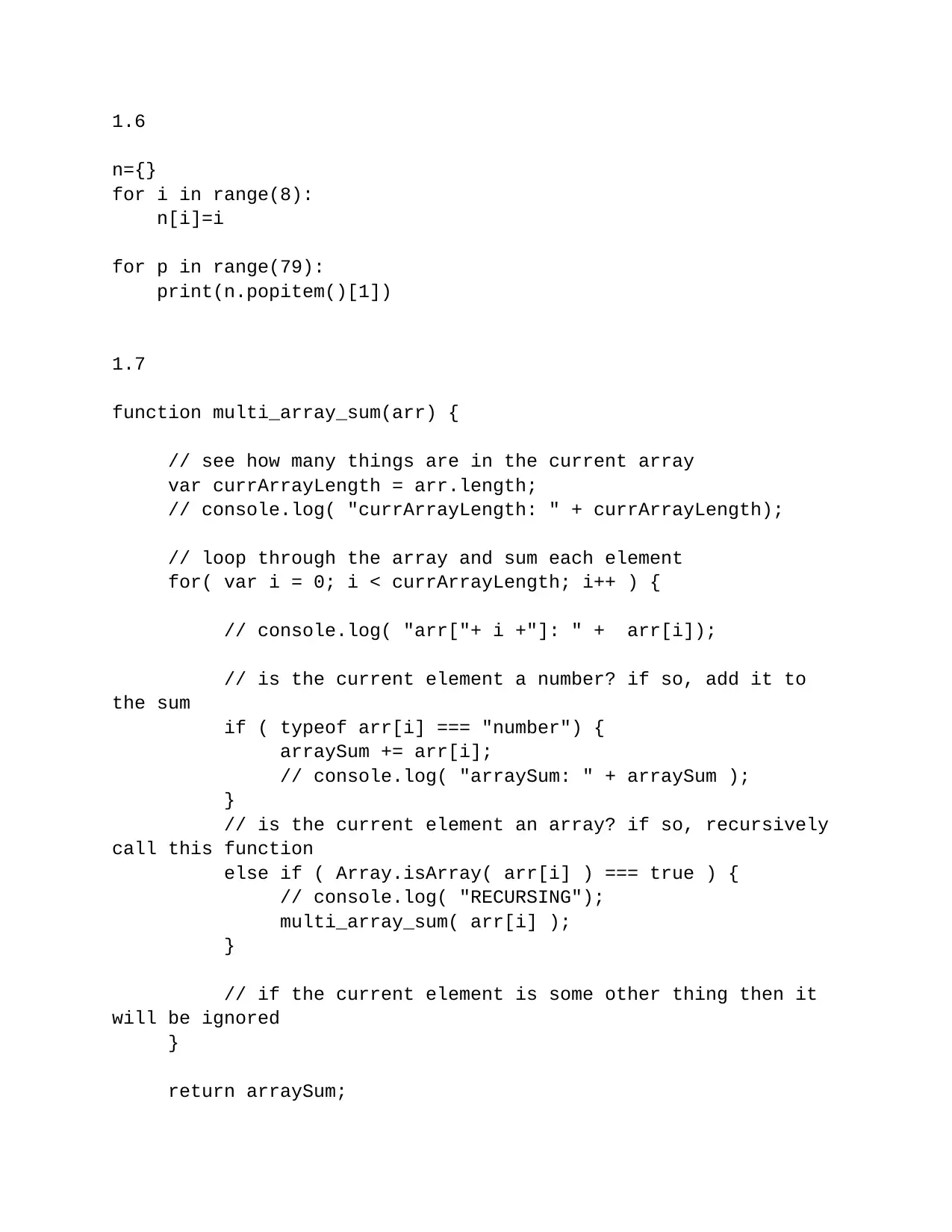
1.6
n={}
for i in range(8):
n[i]=i
for p in range(79):
print(n.popitem()[1])
1.7
function multi_array_sum(arr) {
// see how many things are in the current array
var currArrayLength = arr.length;
// console.log( "currArrayLength: " + currArrayLength);
// loop through the array and sum each element
for( var i = 0; i < currArrayLength; i++ ) {
// console.log( "arr["+ i +"]: " + arr[i]);
// is the current element a number? if so, add it to
the sum
if ( typeof arr[i] === "number") {
arraySum += arr[i];
// console.log( "arraySum: " + arraySum );
}
// is the current element an array? if so, recursively
call this function
else if ( Array.isArray( arr[i] ) === true ) {
// console.log( "RECURSING");
multi_array_sum( arr[i] );
}
// if the current element is some other thing then it
will be ignored
}
return arraySum;
n={}
for i in range(8):
n[i]=i
for p in range(79):
print(n.popitem()[1])
1.7
function multi_array_sum(arr) {
// see how many things are in the current array
var currArrayLength = arr.length;
// console.log( "currArrayLength: " + currArrayLength);
// loop through the array and sum each element
for( var i = 0; i < currArrayLength; i++ ) {
// console.log( "arr["+ i +"]: " + arr[i]);
// is the current element a number? if so, add it to
the sum
if ( typeof arr[i] === "number") {
arraySum += arr[i];
// console.log( "arraySum: " + arraySum );
}
// is the current element an array? if so, recursively
call this function
else if ( Array.isArray( arr[i] ) === true ) {
// console.log( "RECURSING");
multi_array_sum( arr[i] );
}
// if the current element is some other thing then it
will be ignored
}
return arraySum;
⊘ This is a preview!⊘
Do you want full access?
Subscribe today to unlock all pages.
Trusted by 1+ million students worldwide
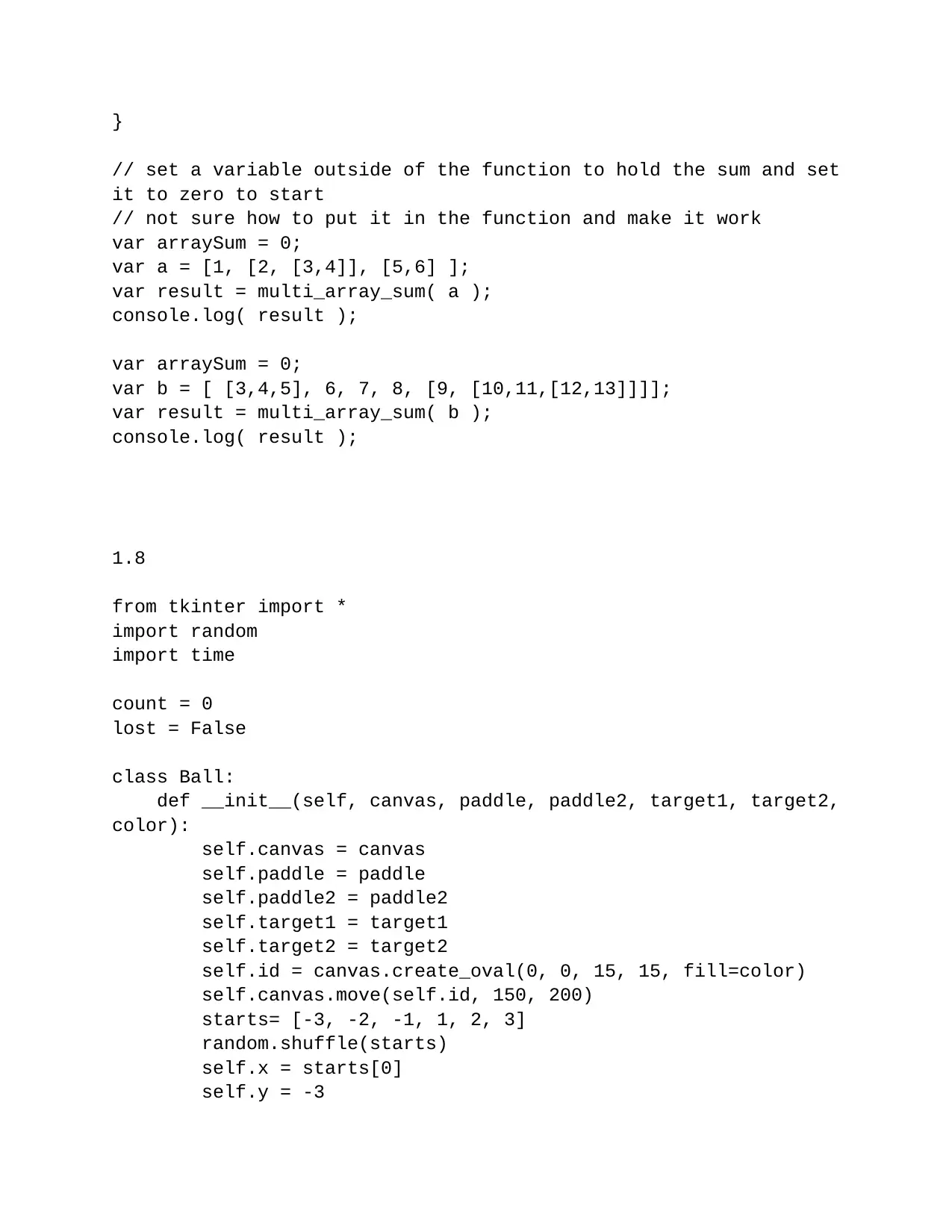
}
// set a variable outside of the function to hold the sum and set
it to zero to start
// not sure how to put it in the function and make it work
var arraySum = 0;
var a = [1, [2, [3,4]], [5,6] ];
var result = multi_array_sum( a );
console.log( result );
var arraySum = 0;
var b = [ [3,4,5], 6, 7, 8, [9, [10,11,[12,13]]]];
var result = multi_array_sum( b );
console.log( result );
1.8
from tkinter import *
import random
import time
count = 0
lost = False
class Ball:
def __init__(self, canvas, paddle, paddle2, target1, target2,
color):
self.canvas = canvas
self.paddle = paddle
self.paddle2 = paddle2
self.target1 = target1
self.target2 = target2
self.id = canvas.create_oval(0, 0, 15, 15, fill=color)
self.canvas.move(self.id, 150, 200)
starts= [-3, -2, -1, 1, 2, 3]
random.shuffle(starts)
self.x = starts[0]
self.y = -3
// set a variable outside of the function to hold the sum and set
it to zero to start
// not sure how to put it in the function and make it work
var arraySum = 0;
var a = [1, [2, [3,4]], [5,6] ];
var result = multi_array_sum( a );
console.log( result );
var arraySum = 0;
var b = [ [3,4,5], 6, 7, 8, [9, [10,11,[12,13]]]];
var result = multi_array_sum( b );
console.log( result );
1.8
from tkinter import *
import random
import time
count = 0
lost = False
class Ball:
def __init__(self, canvas, paddle, paddle2, target1, target2,
color):
self.canvas = canvas
self.paddle = paddle
self.paddle2 = paddle2
self.target1 = target1
self.target2 = target2
self.id = canvas.create_oval(0, 0, 15, 15, fill=color)
self.canvas.move(self.id, 150, 200)
starts= [-3, -2, -1, 1, 2, 3]
random.shuffle(starts)
self.x = starts[0]
self.y = -3
Paraphrase This Document
Need a fresh take? Get an instant paraphrase of this document with our AI Paraphraser
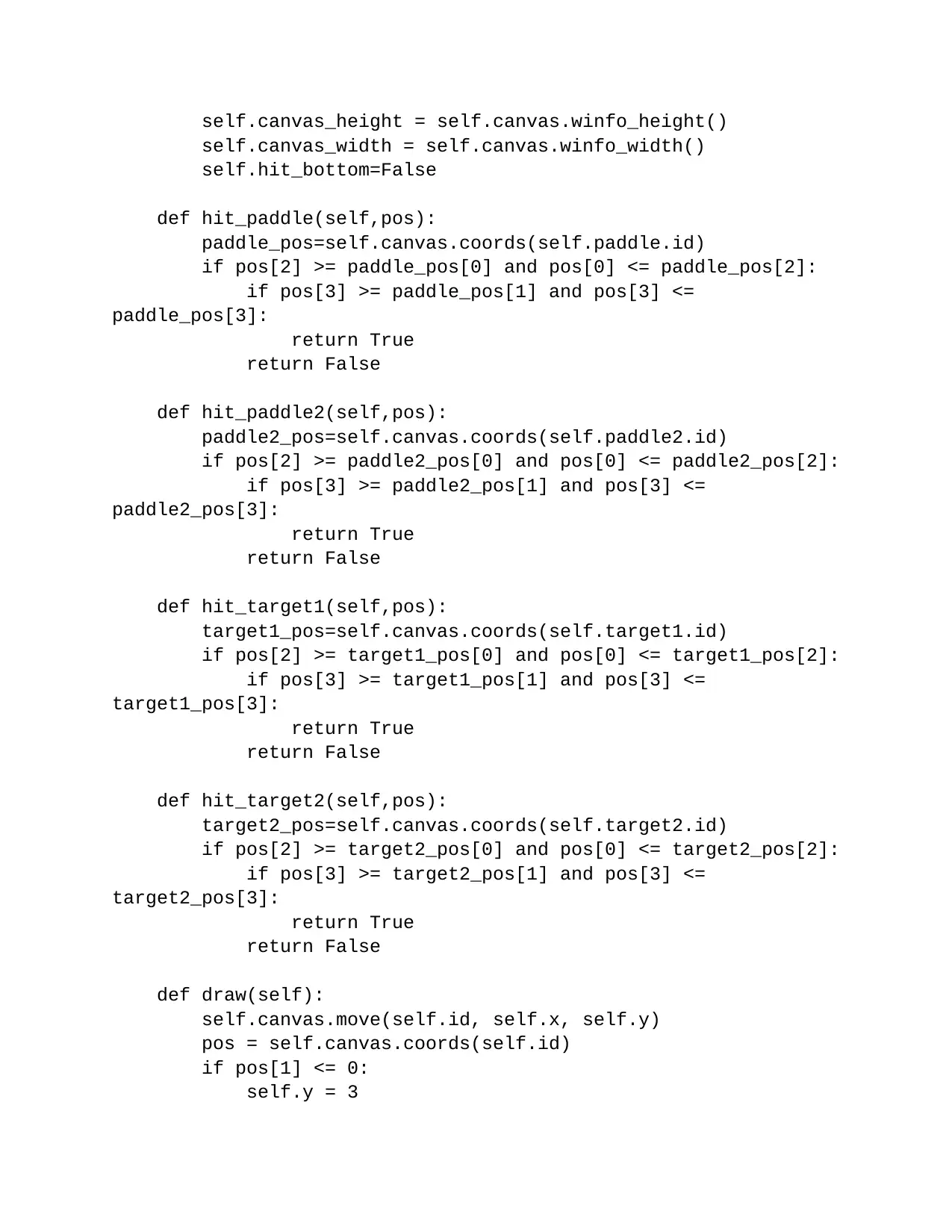
self.canvas_height = self.canvas.winfo_height()
self.canvas_width = self.canvas.winfo_width()
self.hit_bottom=False
def hit_paddle(self,pos):
paddle_pos=self.canvas.coords(self.paddle.id)
if pos[2] >= paddle_pos[0] and pos[0] <= paddle_pos[2]:
if pos[3] >= paddle_pos[1] and pos[3] <=
paddle_pos[3]:
return True
return False
def hit_paddle2(self,pos):
paddle2_pos=self.canvas.coords(self.paddle2.id)
if pos[2] >= paddle2_pos[0] and pos[0] <= paddle2_pos[2]:
if pos[3] >= paddle2_pos[1] and pos[3] <=
paddle2_pos[3]:
return True
return False
def hit_target1(self,pos):
target1_pos=self.canvas.coords(self.target1.id)
if pos[2] >= target1_pos[0] and pos[0] <= target1_pos[2]:
if pos[3] >= target1_pos[1] and pos[3] <=
target1_pos[3]:
return True
return False
def hit_target2(self,pos):
target2_pos=self.canvas.coords(self.target2.id)
if pos[2] >= target2_pos[0] and pos[0] <= target2_pos[2]:
if pos[3] >= target2_pos[1] and pos[3] <=
target2_pos[3]:
return True
return False
def draw(self):
self.canvas.move(self.id, self.x, self.y)
pos = self.canvas.coords(self.id)
if pos[1] <= 0:
self.y = 3
self.canvas_width = self.canvas.winfo_width()
self.hit_bottom=False
def hit_paddle(self,pos):
paddle_pos=self.canvas.coords(self.paddle.id)
if pos[2] >= paddle_pos[0] and pos[0] <= paddle_pos[2]:
if pos[3] >= paddle_pos[1] and pos[3] <=
paddle_pos[3]:
return True
return False
def hit_paddle2(self,pos):
paddle2_pos=self.canvas.coords(self.paddle2.id)
if pos[2] >= paddle2_pos[0] and pos[0] <= paddle2_pos[2]:
if pos[3] >= paddle2_pos[1] and pos[3] <=
paddle2_pos[3]:
return True
return False
def hit_target1(self,pos):
target1_pos=self.canvas.coords(self.target1.id)
if pos[2] >= target1_pos[0] and pos[0] <= target1_pos[2]:
if pos[3] >= target1_pos[1] and pos[3] <=
target1_pos[3]:
return True
return False
def hit_target2(self,pos):
target2_pos=self.canvas.coords(self.target2.id)
if pos[2] >= target2_pos[0] and pos[0] <= target2_pos[2]:
if pos[3] >= target2_pos[1] and pos[3] <=
target2_pos[3]:
return True
return False
def draw(self):
self.canvas.move(self.id, self.x, self.y)
pos = self.canvas.coords(self.id)
if pos[1] <= 0:
self.y = 3
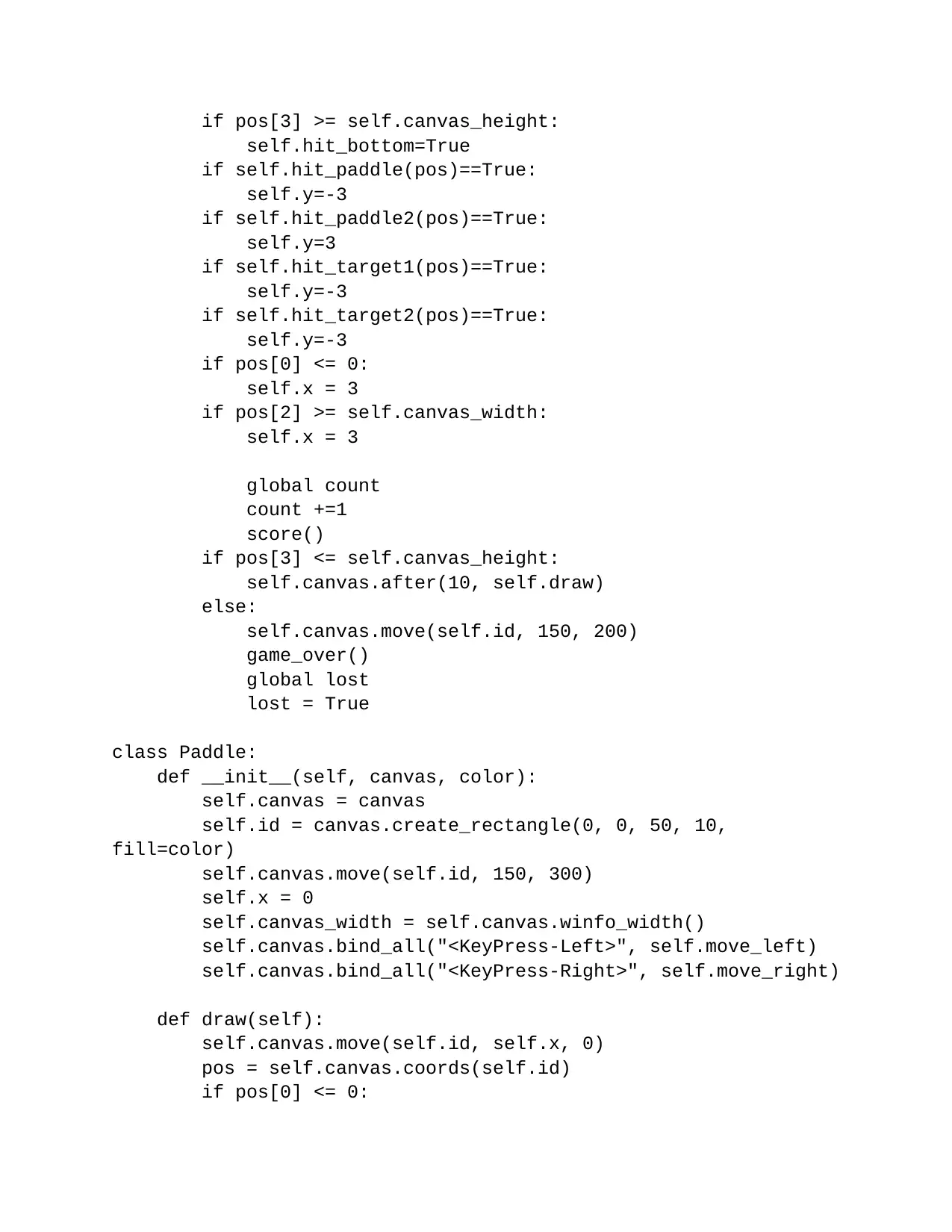
if pos[3] >= self.canvas_height:
self.hit_bottom=True
if self.hit_paddle(pos)==True:
self.y=-3
if self.hit_paddle2(pos)==True:
self.y=3
if self.hit_target1(pos)==True:
self.y=-3
if self.hit_target2(pos)==True:
self.y=-3
if pos[0] <= 0:
self.x = 3
if pos[2] >= self.canvas_width:
self.x = 3
global count
count +=1
score()
if pos[3] <= self.canvas_height:
self.canvas.after(10, self.draw)
else:
self.canvas.move(self.id, 150, 200)
game_over()
global lost
lost = True
class Paddle:
def __init__(self, canvas, color):
self.canvas = canvas
self.id = canvas.create_rectangle(0, 0, 50, 10,
fill=color)
self.canvas.move(self.id, 150, 300)
self.x = 0
self.canvas_width = self.canvas.winfo_width()
self.canvas.bind_all("<KeyPress-Left>", self.move_left)
self.canvas.bind_all("<KeyPress-Right>", self.move_right)
def draw(self):
self.canvas.move(self.id, self.x, 0)
pos = self.canvas.coords(self.id)
if pos[0] <= 0:
self.hit_bottom=True
if self.hit_paddle(pos)==True:
self.y=-3
if self.hit_paddle2(pos)==True:
self.y=3
if self.hit_target1(pos)==True:
self.y=-3
if self.hit_target2(pos)==True:
self.y=-3
if pos[0] <= 0:
self.x = 3
if pos[2] >= self.canvas_width:
self.x = 3
global count
count +=1
score()
if pos[3] <= self.canvas_height:
self.canvas.after(10, self.draw)
else:
self.canvas.move(self.id, 150, 200)
game_over()
global lost
lost = True
class Paddle:
def __init__(self, canvas, color):
self.canvas = canvas
self.id = canvas.create_rectangle(0, 0, 50, 10,
fill=color)
self.canvas.move(self.id, 150, 300)
self.x = 0
self.canvas_width = self.canvas.winfo_width()
self.canvas.bind_all("<KeyPress-Left>", self.move_left)
self.canvas.bind_all("<KeyPress-Right>", self.move_right)
def draw(self):
self.canvas.move(self.id, self.x, 0)
pos = self.canvas.coords(self.id)
if pos[0] <= 0:
⊘ This is a preview!⊘
Do you want full access?
Subscribe today to unlock all pages.
Trusted by 1+ million students worldwide
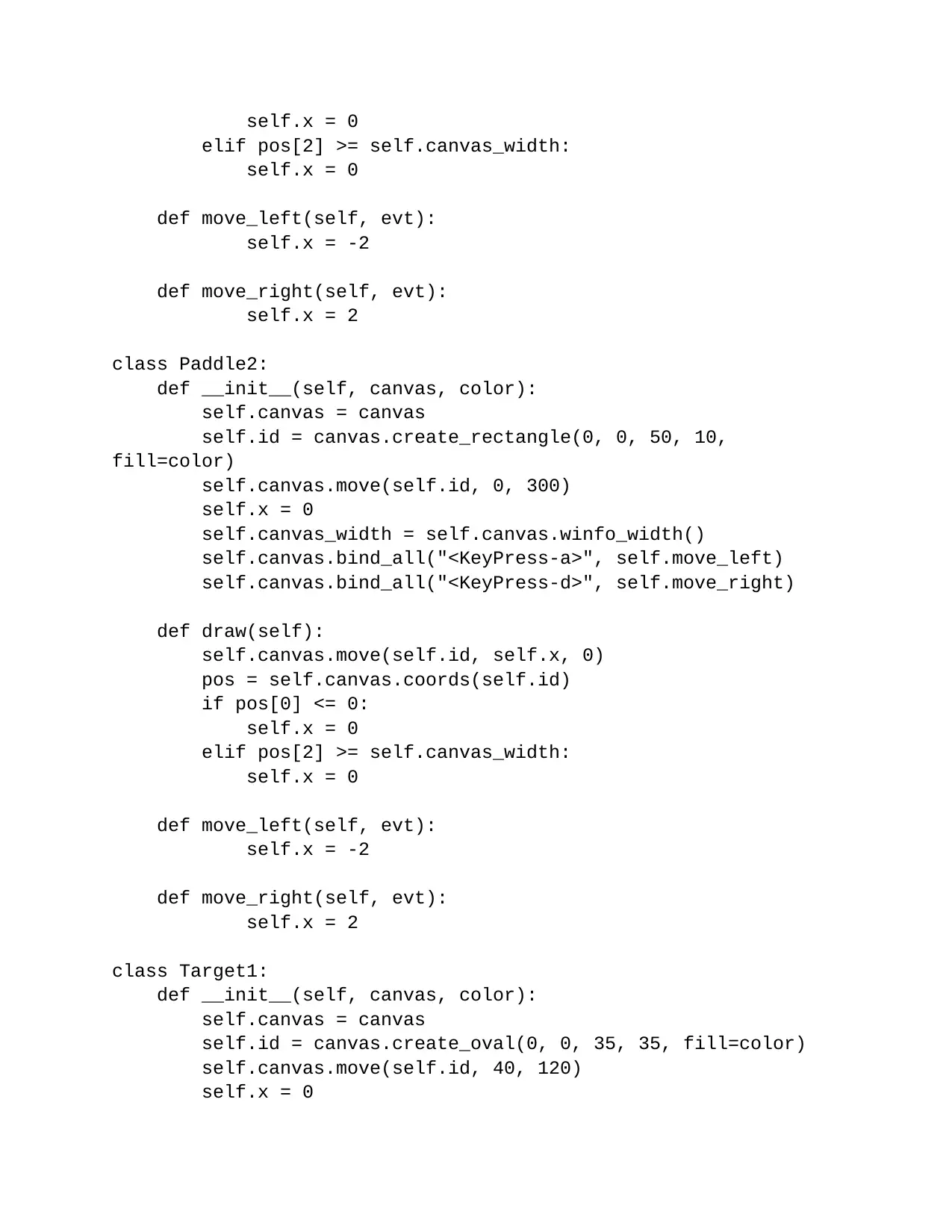
self.x = 0
elif pos[2] >= self.canvas_width:
self.x = 0
def move_left(self, evt):
self.x = -2
def move_right(self, evt):
self.x = 2
class Paddle2:
def __init__(self, canvas, color):
self.canvas = canvas
self.id = canvas.create_rectangle(0, 0, 50, 10,
fill=color)
self.canvas.move(self.id, 0, 300)
self.x = 0
self.canvas_width = self.canvas.winfo_width()
self.canvas.bind_all("<KeyPress-a>", self.move_left)
self.canvas.bind_all("<KeyPress-d>", self.move_right)
def draw(self):
self.canvas.move(self.id, self.x, 0)
pos = self.canvas.coords(self.id)
if pos[0] <= 0:
self.x = 0
elif pos[2] >= self.canvas_width:
self.x = 0
def move_left(self, evt):
self.x = -2
def move_right(self, evt):
self.x = 2
class Target1:
def __init__(self, canvas, color):
self.canvas = canvas
self.id = canvas.create_oval(0, 0, 35, 35, fill=color)
self.canvas.move(self.id, 40, 120)
self.x = 0
elif pos[2] >= self.canvas_width:
self.x = 0
def move_left(self, evt):
self.x = -2
def move_right(self, evt):
self.x = 2
class Paddle2:
def __init__(self, canvas, color):
self.canvas = canvas
self.id = canvas.create_rectangle(0, 0, 50, 10,
fill=color)
self.canvas.move(self.id, 0, 300)
self.x = 0
self.canvas_width = self.canvas.winfo_width()
self.canvas.bind_all("<KeyPress-a>", self.move_left)
self.canvas.bind_all("<KeyPress-d>", self.move_right)
def draw(self):
self.canvas.move(self.id, self.x, 0)
pos = self.canvas.coords(self.id)
if pos[0] <= 0:
self.x = 0
elif pos[2] >= self.canvas_width:
self.x = 0
def move_left(self, evt):
self.x = -2
def move_right(self, evt):
self.x = 2
class Target1:
def __init__(self, canvas, color):
self.canvas = canvas
self.id = canvas.create_oval(0, 0, 35, 35, fill=color)
self.canvas.move(self.id, 40, 120)
self.x = 0
Paraphrase This Document
Need a fresh take? Get an instant paraphrase of this document with our AI Paraphraser
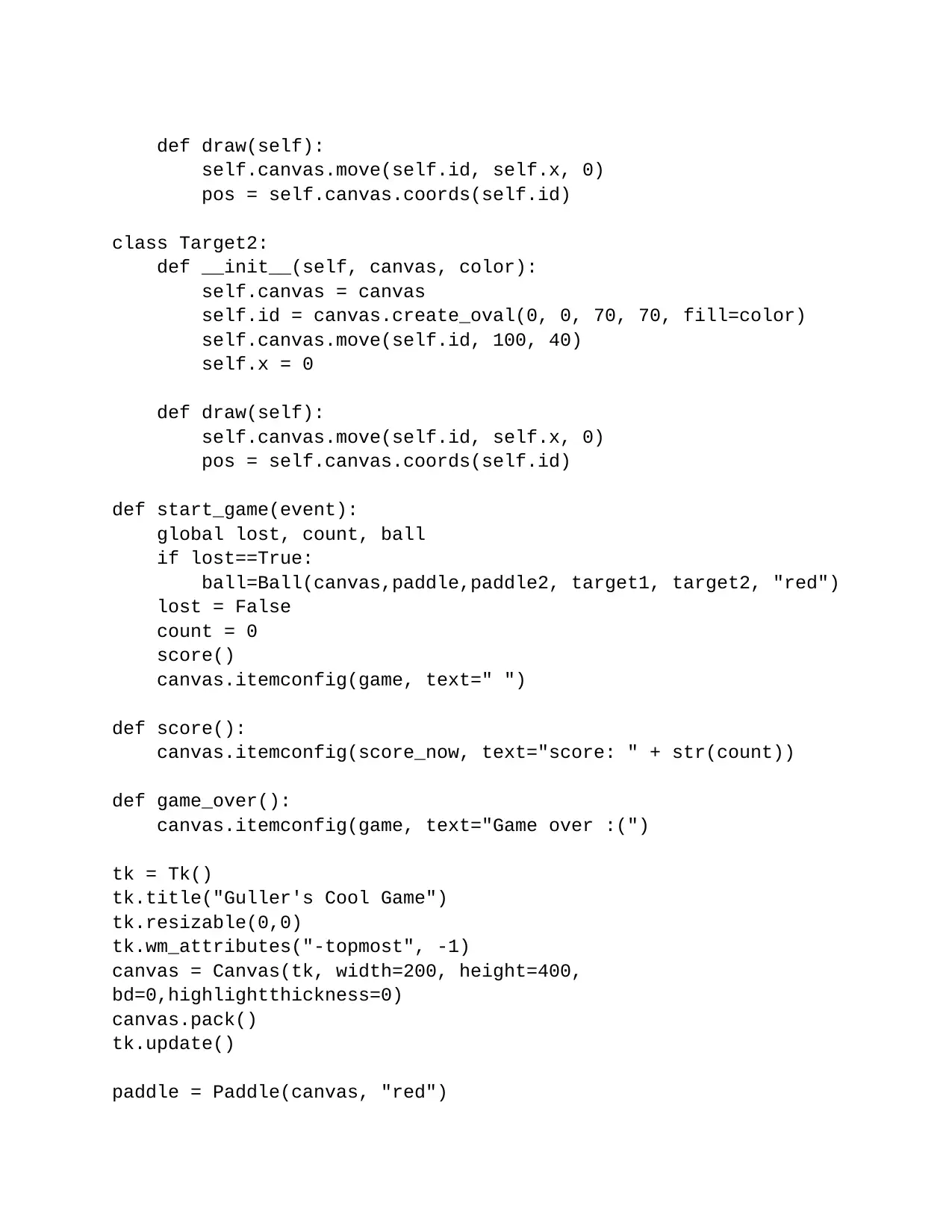
def draw(self):
self.canvas.move(self.id, self.x, 0)
pos = self.canvas.coords(self.id)
class Target2:
def __init__(self, canvas, color):
self.canvas = canvas
self.id = canvas.create_oval(0, 0, 70, 70, fill=color)
self.canvas.move(self.id, 100, 40)
self.x = 0
def draw(self):
self.canvas.move(self.id, self.x, 0)
pos = self.canvas.coords(self.id)
def start_game(event):
global lost, count, ball
if lost==True:
ball=Ball(canvas,paddle,paddle2, target1, target2, "red")
lost = False
count = 0
score()
canvas.itemconfig(game, text=" ")
def score():
canvas.itemconfig(score_now, text="score: " + str(count))
def game_over():
canvas.itemconfig(game, text="Game over :(")
tk = Tk()
tk.title("Guller's Cool Game")
tk.resizable(0,0)
tk.wm_attributes("-topmost", -1)
canvas = Canvas(tk, width=200, height=400,
bd=0,highlightthickness=0)
canvas.pack()
tk.update()
paddle = Paddle(canvas, "red")
self.canvas.move(self.id, self.x, 0)
pos = self.canvas.coords(self.id)
class Target2:
def __init__(self, canvas, color):
self.canvas = canvas
self.id = canvas.create_oval(0, 0, 70, 70, fill=color)
self.canvas.move(self.id, 100, 40)
self.x = 0
def draw(self):
self.canvas.move(self.id, self.x, 0)
pos = self.canvas.coords(self.id)
def start_game(event):
global lost, count, ball
if lost==True:
ball=Ball(canvas,paddle,paddle2, target1, target2, "red")
lost = False
count = 0
score()
canvas.itemconfig(game, text=" ")
def score():
canvas.itemconfig(score_now, text="score: " + str(count))
def game_over():
canvas.itemconfig(game, text="Game over :(")
tk = Tk()
tk.title("Guller's Cool Game")
tk.resizable(0,0)
tk.wm_attributes("-topmost", -1)
canvas = Canvas(tk, width=200, height=400,
bd=0,highlightthickness=0)
canvas.pack()
tk.update()
paddle = Paddle(canvas, "red")
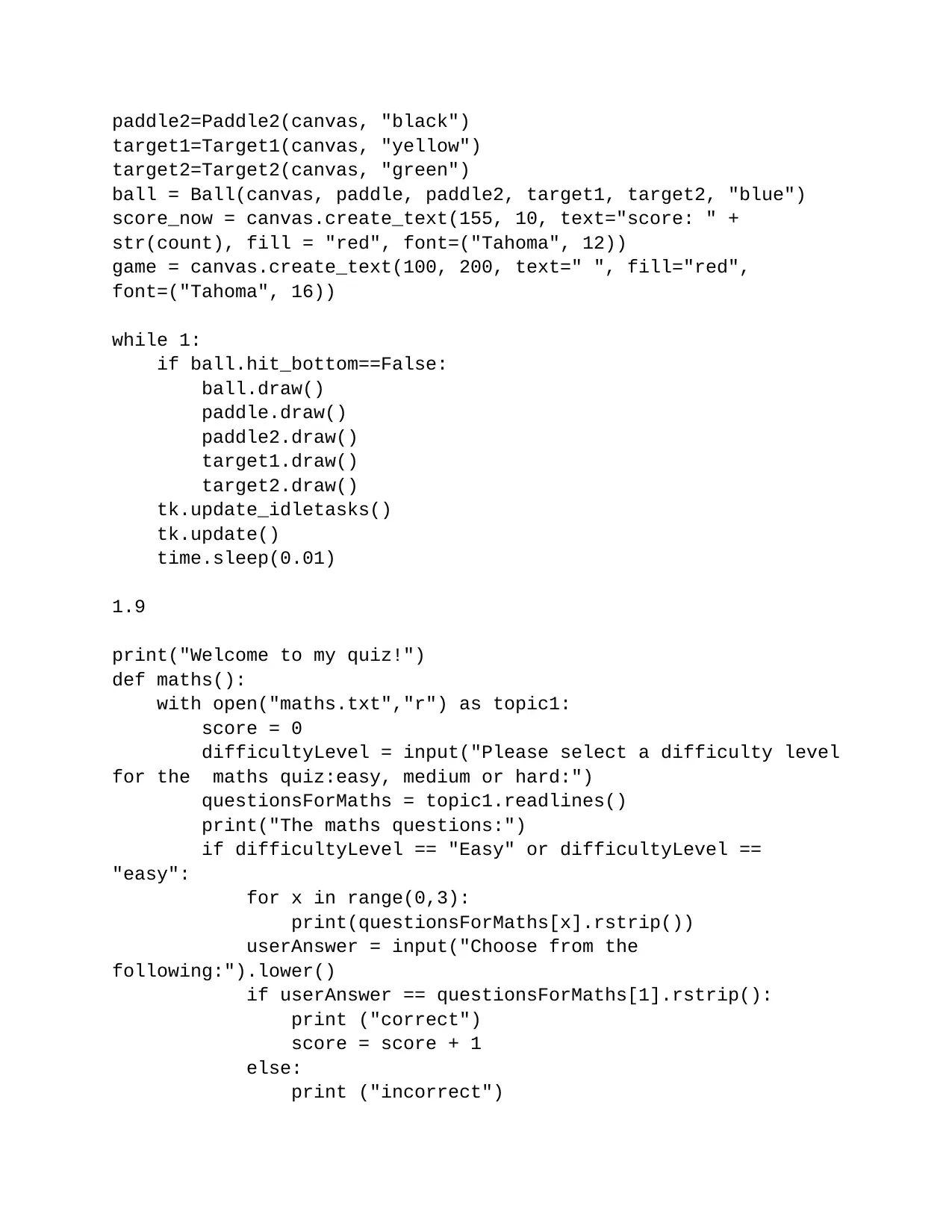
paddle2=Paddle2(canvas, "black")
target1=Target1(canvas, "yellow")
target2=Target2(canvas, "green")
ball = Ball(canvas, paddle, paddle2, target1, target2, "blue")
score_now = canvas.create_text(155, 10, text="score: " +
str(count), fill = "red", font=("Tahoma", 12))
game = canvas.create_text(100, 200, text=" ", fill="red",
font=("Tahoma", 16))
while 1:
if ball.hit_bottom==False:
ball.draw()
paddle.draw()
paddle2.draw()
target1.draw()
target2.draw()
tk.update_idletasks()
tk.update()
time.sleep(0.01)
1.9
print("Welcome to my quiz!")
def maths():
with open("maths.txt","r") as topic1:
score = 0
difficultyLevel = input("Please select a difficulty level
for the maths quiz:easy, medium or hard:")
questionsForMaths = topic1.readlines()
print("The maths questions:")
if difficultyLevel == "Easy" or difficultyLevel ==
"easy":
for x in range(0,3):
print(questionsForMaths[x].rstrip())
userAnswer = input("Choose from the
following:").lower()
if userAnswer == questionsForMaths[1].rstrip():
print ("correct")
score = score + 1
else:
print ("incorrect")
target1=Target1(canvas, "yellow")
target2=Target2(canvas, "green")
ball = Ball(canvas, paddle, paddle2, target1, target2, "blue")
score_now = canvas.create_text(155, 10, text="score: " +
str(count), fill = "red", font=("Tahoma", 12))
game = canvas.create_text(100, 200, text=" ", fill="red",
font=("Tahoma", 16))
while 1:
if ball.hit_bottom==False:
ball.draw()
paddle.draw()
paddle2.draw()
target1.draw()
target2.draw()
tk.update_idletasks()
tk.update()
time.sleep(0.01)
1.9
print("Welcome to my quiz!")
def maths():
with open("maths.txt","r") as topic1:
score = 0
difficultyLevel = input("Please select a difficulty level
for the maths quiz:easy, medium or hard:")
questionsForMaths = topic1.readlines()
print("The maths questions:")
if difficultyLevel == "Easy" or difficultyLevel ==
"easy":
for x in range(0,3):
print(questionsForMaths[x].rstrip())
userAnswer = input("Choose from the
following:").lower()
if userAnswer == questionsForMaths[1].rstrip():
print ("correct")
score = score + 1
else:
print ("incorrect")
⊘ This is a preview!⊘
Do you want full access?
Subscribe today to unlock all pages.
Trusted by 1+ million students worldwide

1 out of 29


Your All-in-One AI-Powered Toolkit for Academic Success.
+13062052269
info@desklib.com
Available 24*7 on WhatsApp / Email
![[object Object]](/_next/static/media/star-bottom.7253800d.svg)
Unlock your academic potential
Copyright © 2020–2026 A2Z Services. All Rights Reserved. Developed and managed by ZUCOL.