SAP Inventory Management: Analyzing and Redesigning Workflow Process

Verified

Added on  2023/06/11

|17
|2551
|91
Report
AI Summary
This report focuses on analyzing and redesigning the workflow process within an SAP inventory management system, specifically concerning nurses making orders for the company's inventory. The current process, which involves ordering frequently used goods with a fourteen-day supply period, is evaluated for its effectiveness. The report includes a flowchart illustrating the existing process and identifies potential areas for improvement. By documenting and using checklists, the effectiveness of the current workflow is assessed. The analysis emphasizes leveraging contracted suppliers to reduce costs and highlights the impact of inefficient workflows on employee productivity and patient care. The goal is to exploit competences, improve quality of health plus care, eliminate confusion from the present workflow and advance care synchronization. Furthermore, the document provides detailed navigation steps and data entry information for various SAP transactions related to materials management, production planning, and shop floor control, offering a comprehensive guide to SAP processes and potential workflow enhancements.
Document Page
Running Head: SAP
SAP
Student Name
Institution
Date
1
tabler-icon-diamond-filled.svg

Paraphrase This Document

Need a fresh take? Get an instant paraphrase of this document with our AI Paraphraser
Document Page
Running Head: SAP
Introduction
Perfection of the workflow is attained through having each step analyzed in a procedure together
with having the changes implemented to provide the most operative way to have it completed.
Nonetheless, just before making the analysis of the workflow, there is need to have an
understanding of the present process that is being performed on. To have the best way of making
things understandable, flowcharts are used to map every stage of the task from the start to the
end of the process (KEZIZ: a step closer to perfection?, 1971). Hence, the main objective of this
paper is having a creation of the flow chart that contains activities to have every stage analyzed
in the process and coming up with possible changes that will smoothen perfections.
The workflow process that has been picked for this kind of assignment is the nurses making
orders for the company’s inventory system. The customers need to have their goods that are
frequently ordered because they receive supply of fourteen days at a given period. Products for
customers that are associated with comfort are mostly used to make promotion that is paid by the
company. Ordered products are obtained from the company contracted which have the
distribution that specify in managing orders (Scally, 2015).
A flowchart that is created shows the present process of obtaining products which starts with two
scenarios that are unique.
Metric is the measurement that is used to make the flow of sound reported via dealers that are on
calls at the time of making customers’ orders. The kind of the procedure has not been successful
over the past five years because the workflow has been the same over and over again hence there
are some changes that should be made. By the use of documentation and checklist every time
there is an order of the goods within a local place in a method that is effective so that
2
Document Page
Running Head: SAP
effectiveness is determined of the present workflow. United States Department of Health and
Human Services had the checklists explained as a tool that is easy to use especially when trying
to make attempts of tracking incidence of the event. Having orders of the customers from the
company contracted is perfect since a lot of money could be needed for the firm in case an order
of the goods is made through the suppliers found locally.
Organization`s success depends on the activities of productivity completed every day by the
employees. In case there is inefficient activity flow, there could be a lot of time wasted by the
nurtures, organization’s increased costs plus the impacts that could be made on taking care of the
patient. However, having an understanding on how the activity is accomplished and making
analysis can result to a workflow design to be more efficient (Siddiqui, 2014). The company
made a statement that workflow redesigning can help the company to accomplish the following:
Exploit competences
Improve quality of health plus care
Eliminate confusion from the present workflow
Advance care synchronization.
Report 1
Navigation: SAP menu Logistics Materials Management Inventory Management
Goods Movement Goods Receipt Other
Tasks and Data Entry:
In the “Enter Other Goods Receipts: Initial Screen” screen, enter the following information:
3
Document Page
Running Head: SAP
Attribute Description Data Value
Distribution
Form
Products distribution
form
Receipt per initial entry of stock balances into unr.-
use
Storage Point Point of storage for
the material
The raw material
Click on (ENTER).
In the “Enter Other Goods Receipts: New Items” screen, enter the following information:
Material Amount UnE Plant
VBAP5## 10 BP The Bike Plant
VBAP5## 5 BP The Bike Plant
MARA5## 5 BP The Bike Plant
MAKT5## 5 BP The Bike Plant
VBAP5## 10 BP The Bike Plant
VBAP5## 20 BP The Bike Plant
MARA5## 5 BP The Bike Plant
VBAP5## 5 BP The Bike Plant
MARA15## 5 BP The Bike Plant
MAKT5## 5 BP The Bike Plant
4
tabler-icon-diamond-filled.svg

Paraphrase This Document

Need a fresh take? Get an instant paraphrase of this document with our AI Paraphraser
Document Page
Running Head: SAP
MAKT5## 5 BP The Bike Plant
MAKT5## 10 BP The Bike Plant
MARA5## 10 BP The Bike Plant
MARA5## 5 BP The Bike Plant
Æ Press (NEW ITEMS) key to obtain another screen to enter the rest of the materials.
Click on (SAVE) to receive a message that says “Document posted”.
Report 2
Navigation: SAP menu Logistics Production MRP Planned Order Create
Tasks and Data Entry:
In the “Create Planned Order: Initial Screen” screen, enter the following information:
Quality Explanation Data Value
Scheduled order
profile
A profile which gives the type of the order,
procurement type, special procurement kind, and
the account assignment type for processing the
planned order.
Stock Order
Click on (ENTER).
5
Document Page
Running Head: SAP
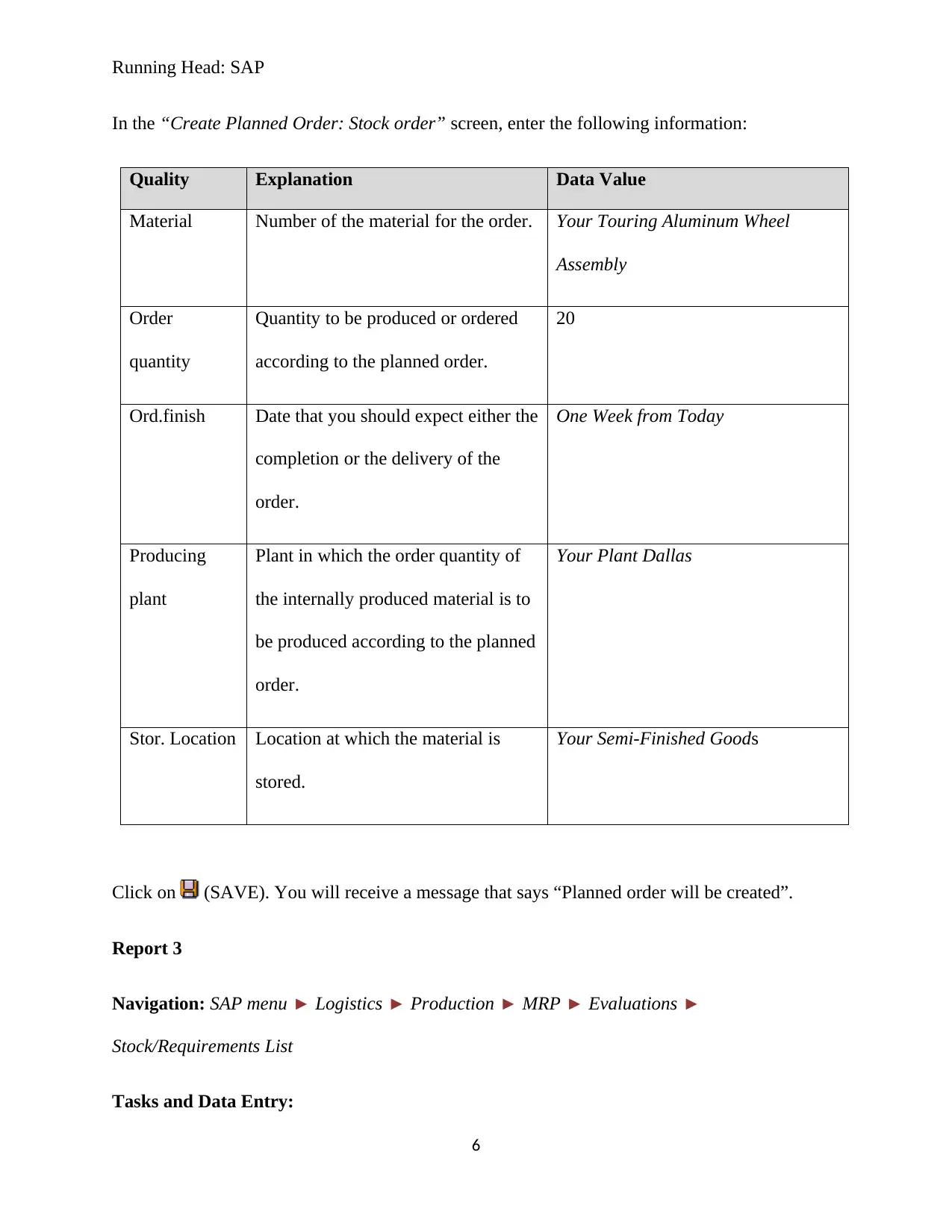
In the “Create Planned Order: Stock order” screen, enter the following information:
Quality Explanation Data Value
Material Number of the material for the order. Your Touring Aluminum Wheel
Assembly
Order
quantity
Quantity to be produced or ordered
according to the planned order.
20
Ord.finish Date that you should expect either the
completion or the delivery of the
order.
One Week from Today
Producing
plant
Plant in which the order quantity of
the internally produced material is to
be produced according to the planned
order.
Your Plant Dallas
Stor. Location Location at which the material is
stored.
Your Semi-Finished Goods
Click on (SAVE). You will receive a message that says “Planned order will be created”.
Report 3
Navigation: SAP menu Logistics Production MRP Evaluations
Stock/Requirements List
Tasks and Data Entry:
6
Document Page
Running Head: SAP
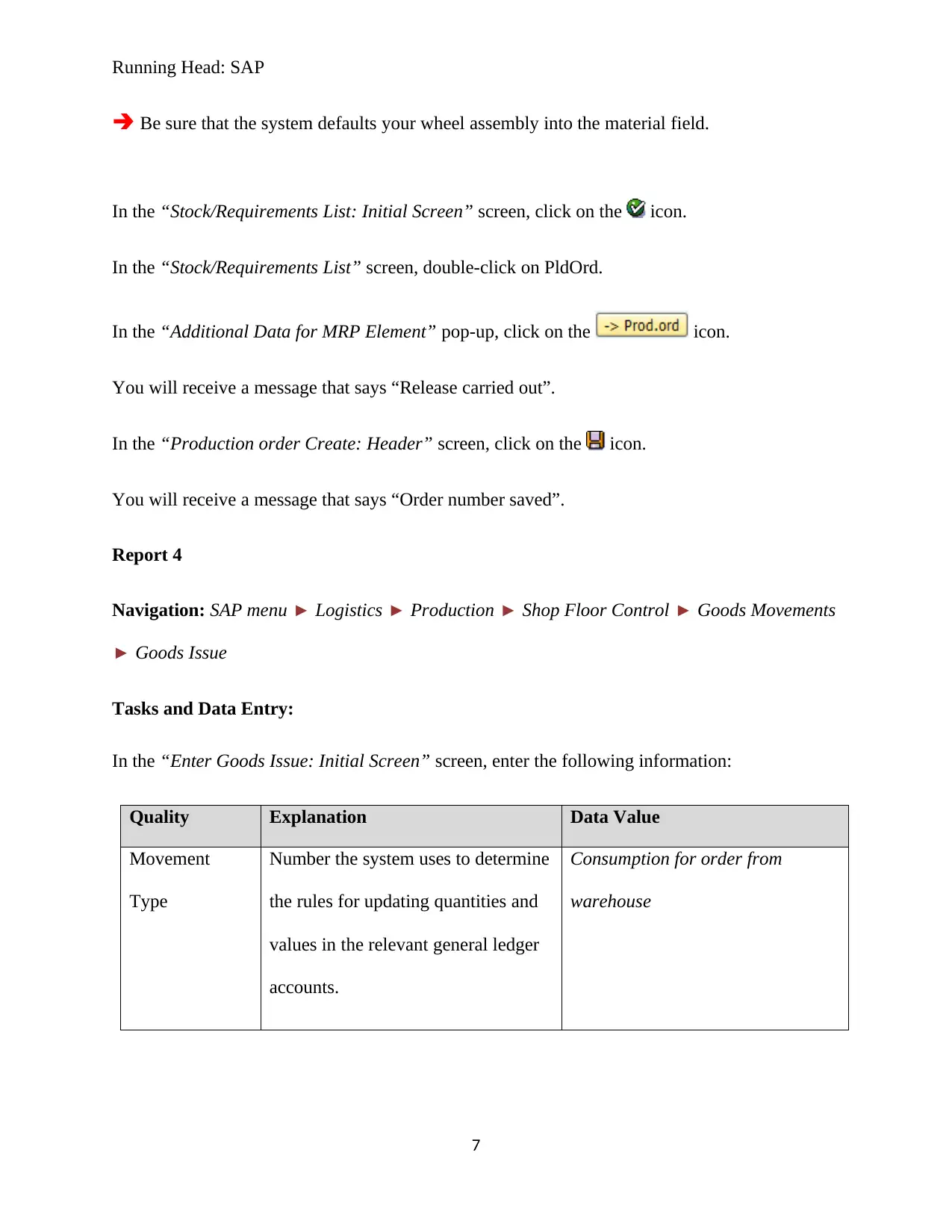
Æ Be sure that the system defaults your wheel assembly into the material field.
In the “Stock/Requirements List: Initial Screen” screen, click on the icon.
In the “Stock/Requirements List” screen, double-click on PldOrd.
In the “Additional Data for MRP Element” pop-up, click on the icon.
You will receive a message that says “Release carried out”.
In the “Production order Create: Header” screen, click on the icon.
You will receive a message that says “Order number saved”.
Report 4
Navigation: SAP menu Logistics Production Shop Floor Control Goods Movements
Goods Issue
Tasks and Data Entry:
In the “Enter Goods Issue: Initial Screen” screen, enter the following information:
Quality Explanation Data Value
Movement
Type
Number the system uses to determine
the rules for updating quantities and
values in the relevant general ledger
accounts.
Consumption for order from
warehouse
7
tabler-icon-diamond-filled.svg

Paraphrase This Document

Need a fresh take? Get an instant paraphrase of this document with our AI Paraphraser
Document Page
Running Head: SAP
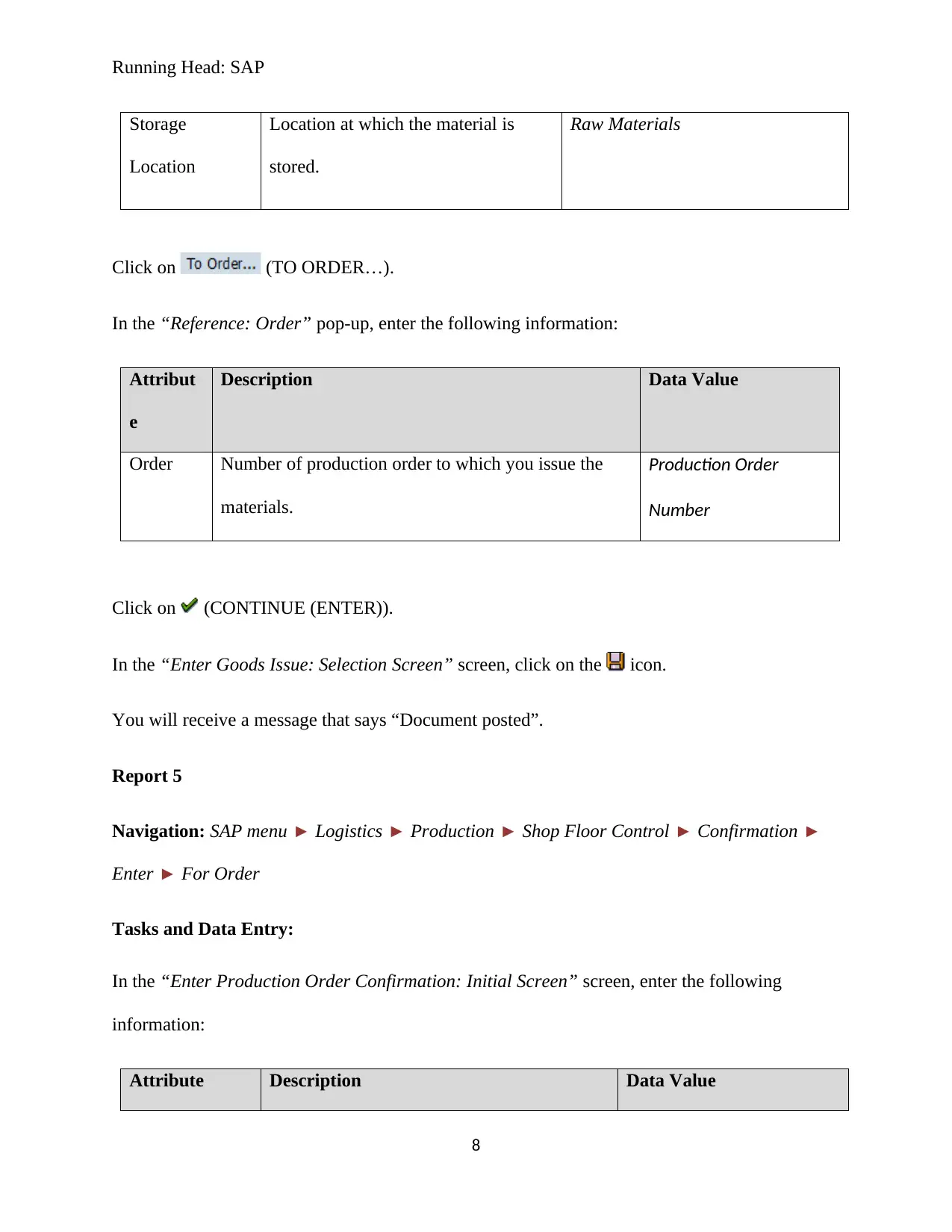
Storage
Location
Location at which the material is
stored.
Raw Materials
Click on (TO ORDER…).
In the “Reference: Order” pop-up, enter the following information:
Attribut
e
Description Data Value
Order Number of production order to which you issue the
materials.
Production Order
Number
Click on (CONTINUE (ENTER)).
In the “Enter Goods Issue: Selection Screen” screen, click on the icon.
You will receive a message that says “Document posted”.
Report 5
Navigation: SAP menu Logistics Production Shop Floor Control Confirmation
Enter For Order
Tasks and Data Entry:
In the “Enter Production Order Confirmation: Initial Screen” screen, enter the following
information:
Attribute Description Data Value
8
Document Page
Running Head: SAP
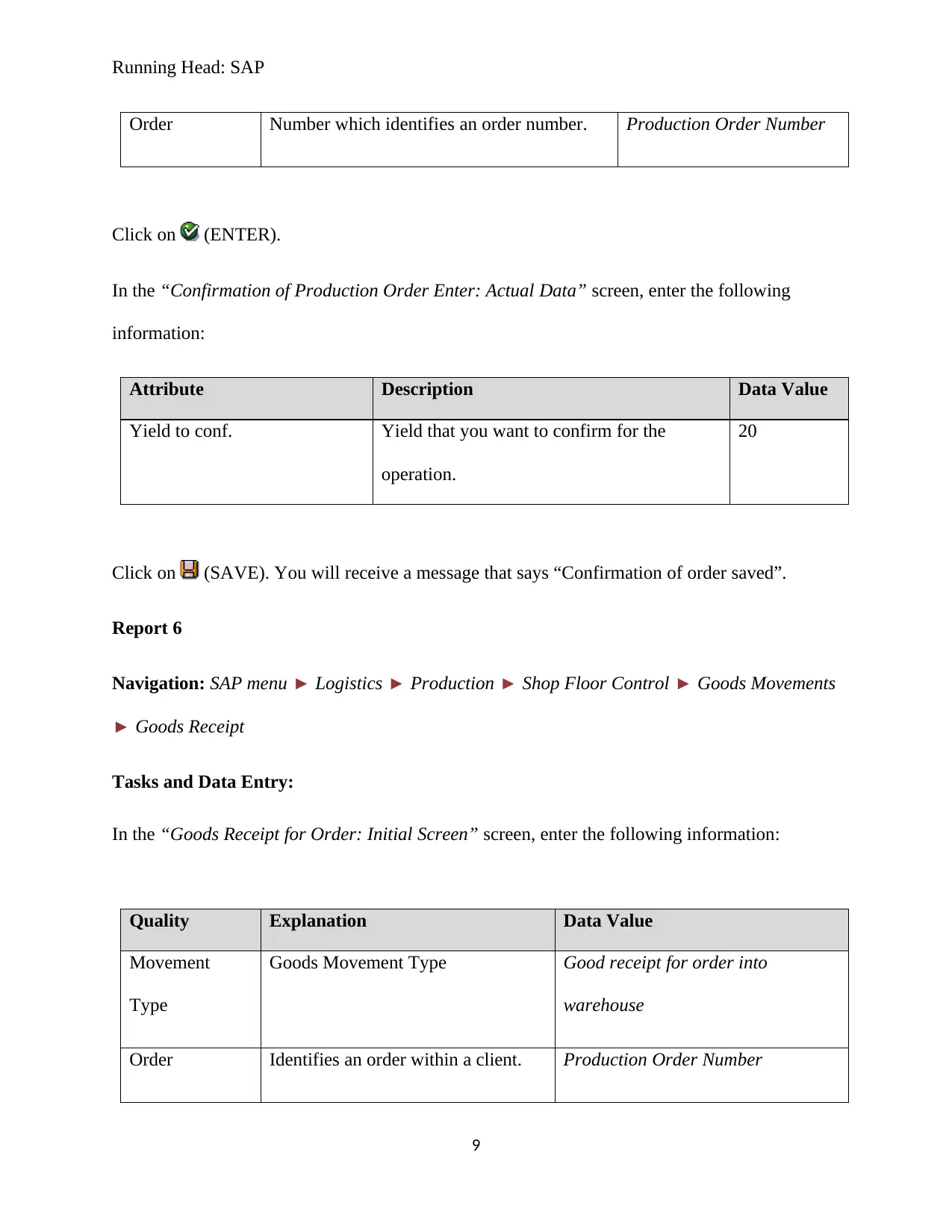
Order Number which identifies an order number. Production Order Number
Click on (ENTER).
In the “Confirmation of Production Order Enter: Actual Data” screen, enter the following
information:
Attribute Description Data Value
Yield to conf. Yield that you want to confirm for the
operation.
20
Click on (SAVE). You will receive a message that says “Confirmation of order saved”.
Report 6
Navigation: SAP menu Logistics Production Shop Floor Control Goods Movements
Goods Receipt
Tasks and Data Entry:
In the “Goods Receipt for Order: Initial Screen” screen, enter the following information:
Quality Explanation Data Value
Movement
Type
Goods Movement Type Good receipt for order into
warehouse
Order Identifies an order within a client. Production Order Number
9
Document Page
Running Head: SAP
Storage
Location
Location at which the material is
stored.
Your Semi-Finished Goods
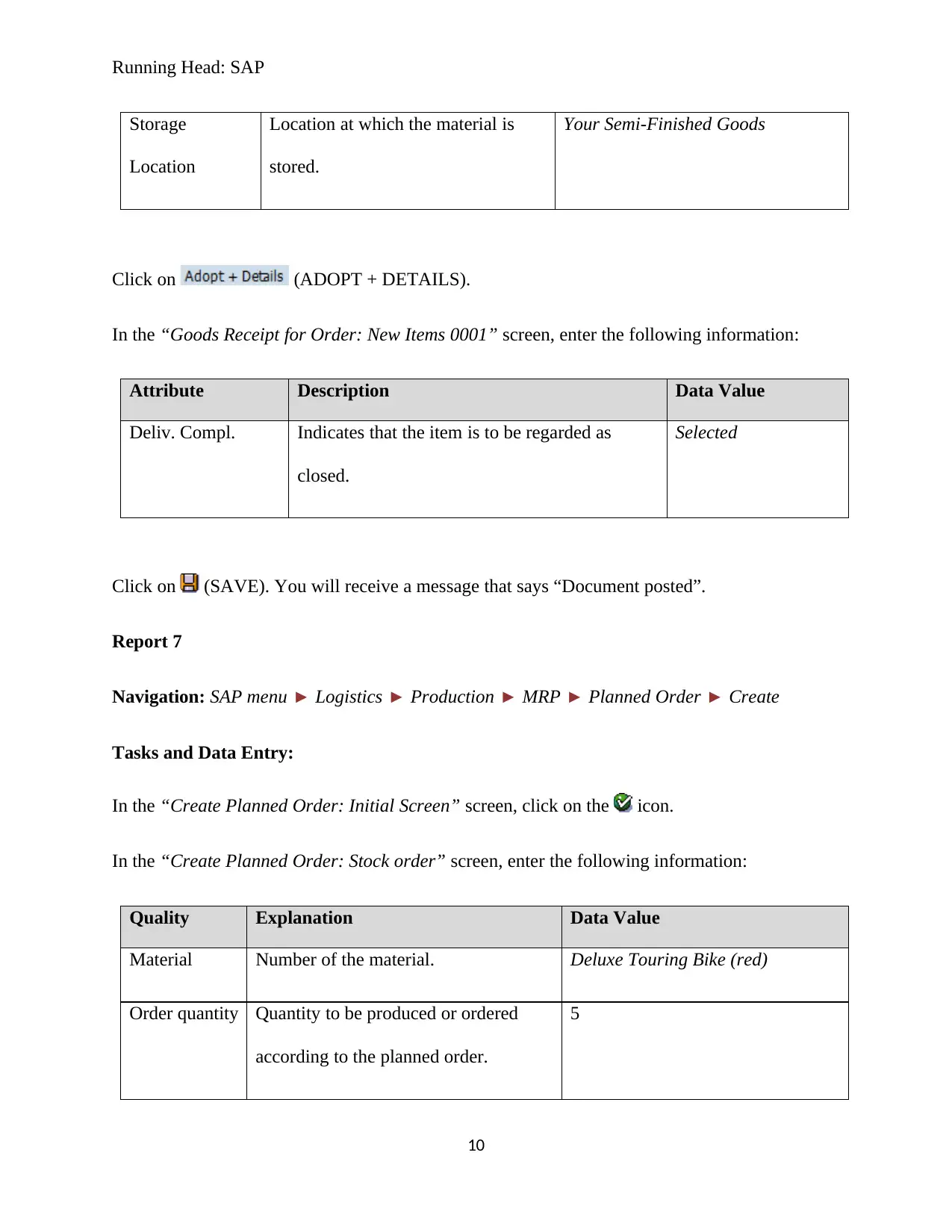
Click on (ADOPT + DETAILS).
In the “Goods Receipt for Order: New Items 0001” screen, enter the following information:
Attribute Description Data Value
Deliv. Compl. Indicates that the item is to be regarded as
closed.
Selected
Click on (SAVE). You will receive a message that says “Document posted”.
Report 7
Navigation: SAP menu Logistics Production MRP Planned Order Create
Tasks and Data Entry:
In the “Create Planned Order: Initial Screen” screen, click on the icon.
In the “Create Planned Order: Stock order” screen, enter the following information:
Quality Explanation Data Value
Material Number of the material. Deluxe Touring Bike (red)
Order quantity Quantity to be produced or ordered
according to the planned order.
5
10
tabler-icon-diamond-filled.svg

Paraphrase This Document

Need a fresh take? Get an instant paraphrase of this document with our AI Paraphraser
Document Page
Running Head: SAP
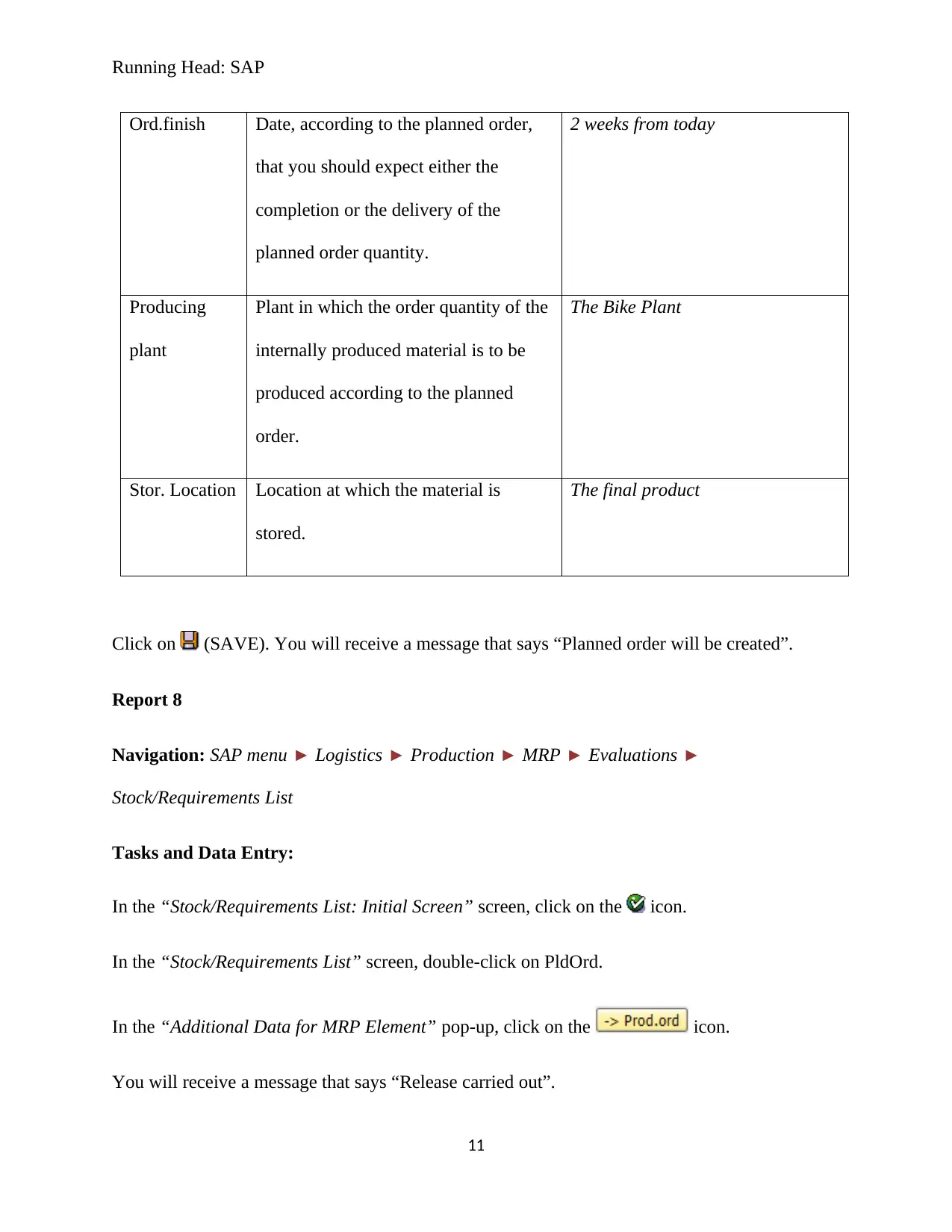
Ord.finish Date, according to the planned order,
that you should expect either the
completion or the delivery of the
planned order quantity.
2 weeks from today
Producing
plant
Plant in which the order quantity of the
internally produced material is to be
produced according to the planned
order.
The Bike Plant
Stor. Location Location at which the material is
stored.
The final product
Click on (SAVE). You will receive a message that says “Planned order will be created”.
Report 8
Navigation: SAP menu Logistics Production MRP Evaluations
Stock/Requirements List
Tasks and Data Entry:
In the “Stock/Requirements List: Initial Screen” screen, click on the icon.
In the “Stock/Requirements List” screen, double-click on PldOrd.
In the “Additional Data for MRP Element” pop-up, click on the icon.
You will receive a message that says “Release carried out”.
11
Document Page
Running Head: SAP
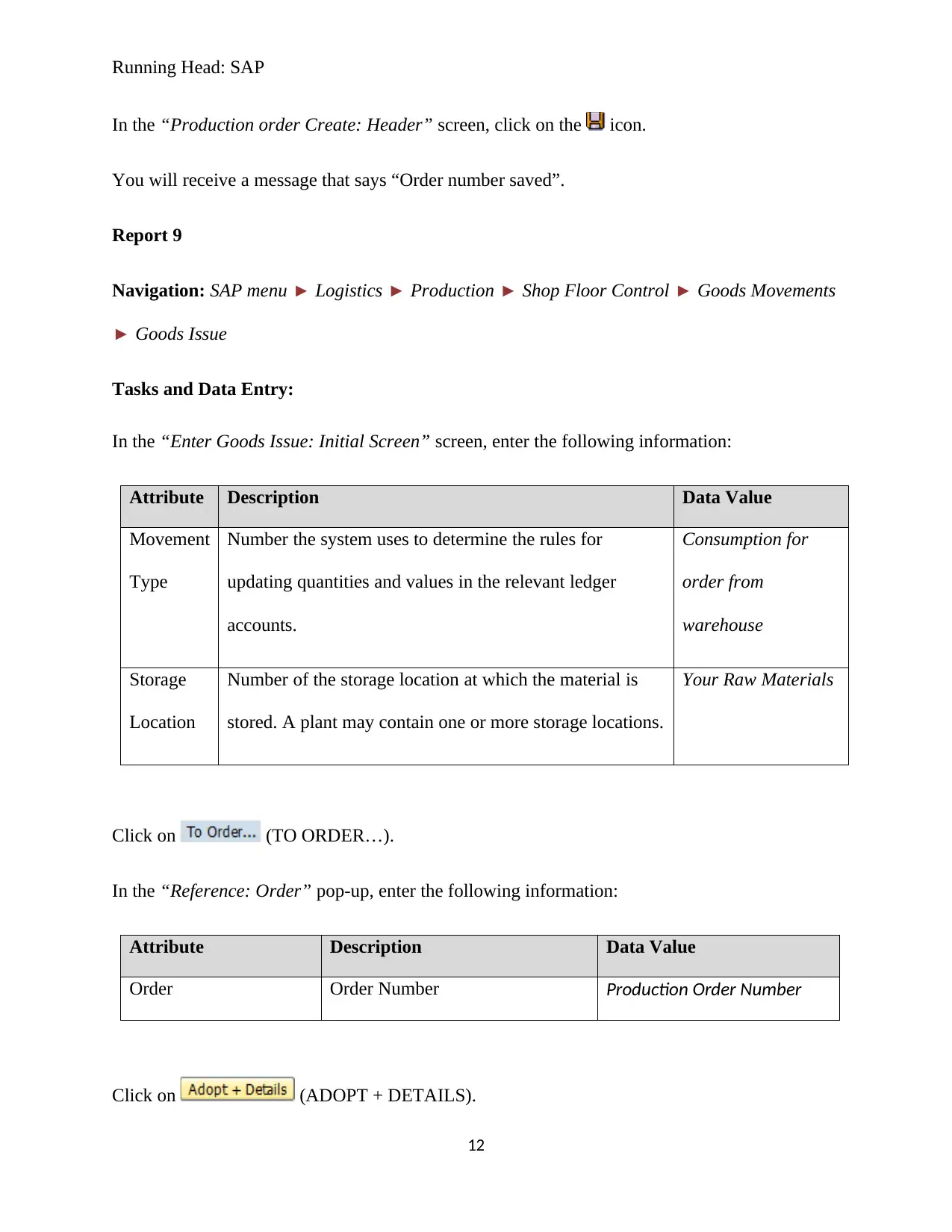
In the “Production order Create: Header” screen, click on the icon.
You will receive a message that says “Order number saved”.
Report 9
Navigation: SAP menu Logistics Production Shop Floor Control Goods Movements
Goods Issue
Tasks and Data Entry:
In the “Enter Goods Issue: Initial Screen” screen, enter the following information:
Attribute Description Data Value
Movement
Type
Number the system uses to determine the rules for
updating quantities and values in the relevant ledger
accounts.
Consumption for
order from
warehouse
Storage
Location
Number of the storage location at which the material is
stored. A plant may contain one or more storage locations.
Your Raw Materials
Click on (TO ORDER…).
In the “Reference: Order” pop-up, enter the following information:
Attribute Description Data Value
Order Order Number Production Order Number
Click on (ADOPT + DETAILS).
12
chevron_up_icon
1 out of 17
circle_padding
hide_on_mobile
zoom_out_icon
[object Object]