Designing Secure WIFI Networks: Addressing Security and Ethical Issues
VerifiedAdded on 2023/06/11
|21
|3278
|449
Report
AI Summary
This report discusses the security and ethical issues associated with WIFI networks, particularly in the context of an automobile company's network deployment. It highlights the increasing threats in wireless networks and the necessity for robust security measures. The report addresses ethical concerns such as unauthorized data access and the misuse of open networks, proposing solutions like strong authentication processes and encryption. It includes a detailed network design, outlining the physical and logical structure across multiple floors, complete with IP addressing schemes for both guest and normal users. Furthermore, the report analyzes various network security tools, focusing on WPA2 and RADIUS protocols, and describes the implementation stages for enhancing network safety. The document emphasizes the importance of balancing network flexibility with stringent security protocols to mitigate potential vulnerabilities and ensure data confidentiality.
Contents
Introduction.................................................................................................................................................2
Security issues.............................................................................................................................................2
Ethical issues with WIFI Networks.............................................................................................................2
Network design...........................................................................................................................................4
Network Topology Diagram........................................................................................................................9
Analysis of network security tools...............................................................................................................9
Implementing of Security Systems............................................................................................................10
CONCLUSION.............................................................................................................................................12
REFERENCES..............................................................................................................................................13
Introduction.................................................................................................................................................2
Security issues.............................................................................................................................................2
Ethical issues with WIFI Networks.............................................................................................................2
Network design...........................................................................................................................................4
Network Topology Diagram........................................................................................................................9
Analysis of network security tools...............................................................................................................9
Implementing of Security Systems............................................................................................................10
CONCLUSION.............................................................................................................................................12
REFERENCES..............................................................................................................................................13

Paraphrase This Document
Need a fresh take? Get an instant paraphrase of this document with our AI Paraphraser
Introduction
In today scenario the wireless network systems are widely used in the industries. Due to
its higher growth the threads involved in the wireless network also increases. So there is a need
to provide security for the network systems. This can be obtained by following the rules and
regulations. This phenomenon was known as wireless security. Here we are going to see about
the problem faced by the automobile company on their network system deployment. The
wireless network system was the most flexible as well as effective network system. But it has
major flaws in its configurations. When compared to wired connection there is no physical
control of the users. Here the user access are controlled by the authentication process. Wireless
systems also reduce the initial costs. So the drawbacks like authentication problems must to be
rectified. That is the only way to make the sustainable systems. The authentication process will
be controlled by securing the governing policies. Because the wireless network system there is a
possibility to attacked by the attackers. Unless we protect the system by employing the clear
authentication process. Here the SQL servers are used to scan the server database. That acts like
the server management system.
Security issues
Nowadays the computing system where becoming portable and smaller in size, so the
devices has theft and the data are stolen. The stolen device has may store more data that can
protected by security like encryption key. For security purpose the system gives solution as
fingerprint recognition, scanning apply to mobile devices. For example the mobile device
security improve many biometric security of HP IPAQ Pocket PC. The operating environments
have needs for security at the levels of stages when incorporates by applications of security. The
investigation have been done in this part. An example to block the file which are accessed by
PDA device the system administrator need unblock the access files whether is the credentials are
supplied improper. By severe loss of PDA operational have result in the part of environments,
that are computerized in memory have wants to erase and disk data, by unsuccessful logins may
leads to reset the hard disk.
2
In today scenario the wireless network systems are widely used in the industries. Due to
its higher growth the threads involved in the wireless network also increases. So there is a need
to provide security for the network systems. This can be obtained by following the rules and
regulations. This phenomenon was known as wireless security. Here we are going to see about
the problem faced by the automobile company on their network system deployment. The
wireless network system was the most flexible as well as effective network system. But it has
major flaws in its configurations. When compared to wired connection there is no physical
control of the users. Here the user access are controlled by the authentication process. Wireless
systems also reduce the initial costs. So the drawbacks like authentication problems must to be
rectified. That is the only way to make the sustainable systems. The authentication process will
be controlled by securing the governing policies. Because the wireless network system there is a
possibility to attacked by the attackers. Unless we protect the system by employing the clear
authentication process. Here the SQL servers are used to scan the server database. That acts like
the server management system.
Security issues
Nowadays the computing system where becoming portable and smaller in size, so the
devices has theft and the data are stolen. The stolen device has may store more data that can
protected by security like encryption key. For security purpose the system gives solution as
fingerprint recognition, scanning apply to mobile devices. For example the mobile device
security improve many biometric security of HP IPAQ Pocket PC. The operating environments
have needs for security at the levels of stages when incorporates by applications of security. The
investigation have been done in this part. An example to block the file which are accessed by
PDA device the system administrator need unblock the access files whether is the credentials are
supplied improper. By severe loss of PDA operational have result in the part of environments,
that are computerized in memory have wants to erase and disk data, by unsuccessful logins may
leads to reset the hard disk.
2
Ethical issues with WIFI Networks
The open network provides the free connection to use the network that leads to download and
browse any information and there is no rules to use GPS devices for protection, In US rules the
scanning of node is not illegal. But the information of the robbing service they can attack it [1].
By node scanning have to give the location and access point. The location privacy and access
point have issued. In access point the common breaching are used as given below.
To browse of adult website and affected network.
To access the bank account and theft the currency.
For hacking the system for the experience.
The access point were setting the duplicate to understand of the scanning in more than two
attempts in one day. In Africa the member are trying to use the credit card of the other member
there caught by theft of more credit card pin.
The ethical issues has cause the access of unauthorized data. For example In US a person has log
on the computer by other person without any regulation by an open network. The data or
network are accessed without any permission that may leads to robbing. Whether the network
has access by unauthorized persons the administrator cannot use the bandwidth for long time.
They wants to pay the money for the bandwidth compare to application that’s leads to gaming.
For access the network, user can do anymore. In future the people are becoming the aware of
network by this problems. For security the administrator are applying the passwords for each
open network. But the now also hacking the internet access and they have many tools to recover
the passwords and many website the help the hacker to hacks the passwords like remember
password. The user are not configure the system if they don’t allot. The encryption keys have
provide many high level security to the user. The authentication have provide mechanism in
802.11.
Shared key Authentication: This authentication has process the response to complete and
challenge the access point.
Open system authentication: This authentication uses the SSID approach, the access can be
granted whether it is SSID are not.
Centralized authentication: This authentication the server are used. The network can access only
in authentication.
3
The open network provides the free connection to use the network that leads to download and
browse any information and there is no rules to use GPS devices for protection, In US rules the
scanning of node is not illegal. But the information of the robbing service they can attack it [1].
By node scanning have to give the location and access point. The location privacy and access
point have issued. In access point the common breaching are used as given below.
To browse of adult website and affected network.
To access the bank account and theft the currency.
For hacking the system for the experience.
The access point were setting the duplicate to understand of the scanning in more than two
attempts in one day. In Africa the member are trying to use the credit card of the other member
there caught by theft of more credit card pin.
The ethical issues has cause the access of unauthorized data. For example In US a person has log
on the computer by other person without any regulation by an open network. The data or
network are accessed without any permission that may leads to robbing. Whether the network
has access by unauthorized persons the administrator cannot use the bandwidth for long time.
They wants to pay the money for the bandwidth compare to application that’s leads to gaming.
For access the network, user can do anymore. In future the people are becoming the aware of
network by this problems. For security the administrator are applying the passwords for each
open network. But the now also hacking the internet access and they have many tools to recover
the passwords and many website the help the hacker to hacks the passwords like remember
password. The user are not configure the system if they don’t allot. The encryption keys have
provide many high level security to the user. The authentication have provide mechanism in
802.11.
Shared key Authentication: This authentication has process the response to complete and
challenge the access point.
Open system authentication: This authentication uses the SSID approach, the access can be
granted whether it is SSID are not.
Centralized authentication: This authentication the server are used. The network can access only
in authentication.
3
⊘ This is a preview!⊘
Do you want full access?
Subscribe today to unlock all pages.

Trusted by 1+ million students worldwide
Network design
First floor
Secound floor
Third floor
Fourth floor5 computers 2
printers Video
conference
Video
conference
Conference room 2
Conference room 1
2 IP Phones
2 IP Phones
2 IP phonesMD OFFICE Switch 4
Switch 3
Switch 2
Switch 1
5 Computers
2 Printers 5 IP Phones
Finance
Dept
HR Dept IT SERVICE OFFICE
5 Computer
2 Printers
5 IP Phones
IT Printers
5 Servers
10 Computers5 IP Phones
Marketing Dept Retail Dept
10 Computers
10 Computers
2 Printers
2 IP Phones
2 IP Phones
2
Printers
5 IP Phones
2
Printers
2 IP Phones 10 Computers25
Computers
5 Printers
Sales Dept Logistic Dept
Core-Switch
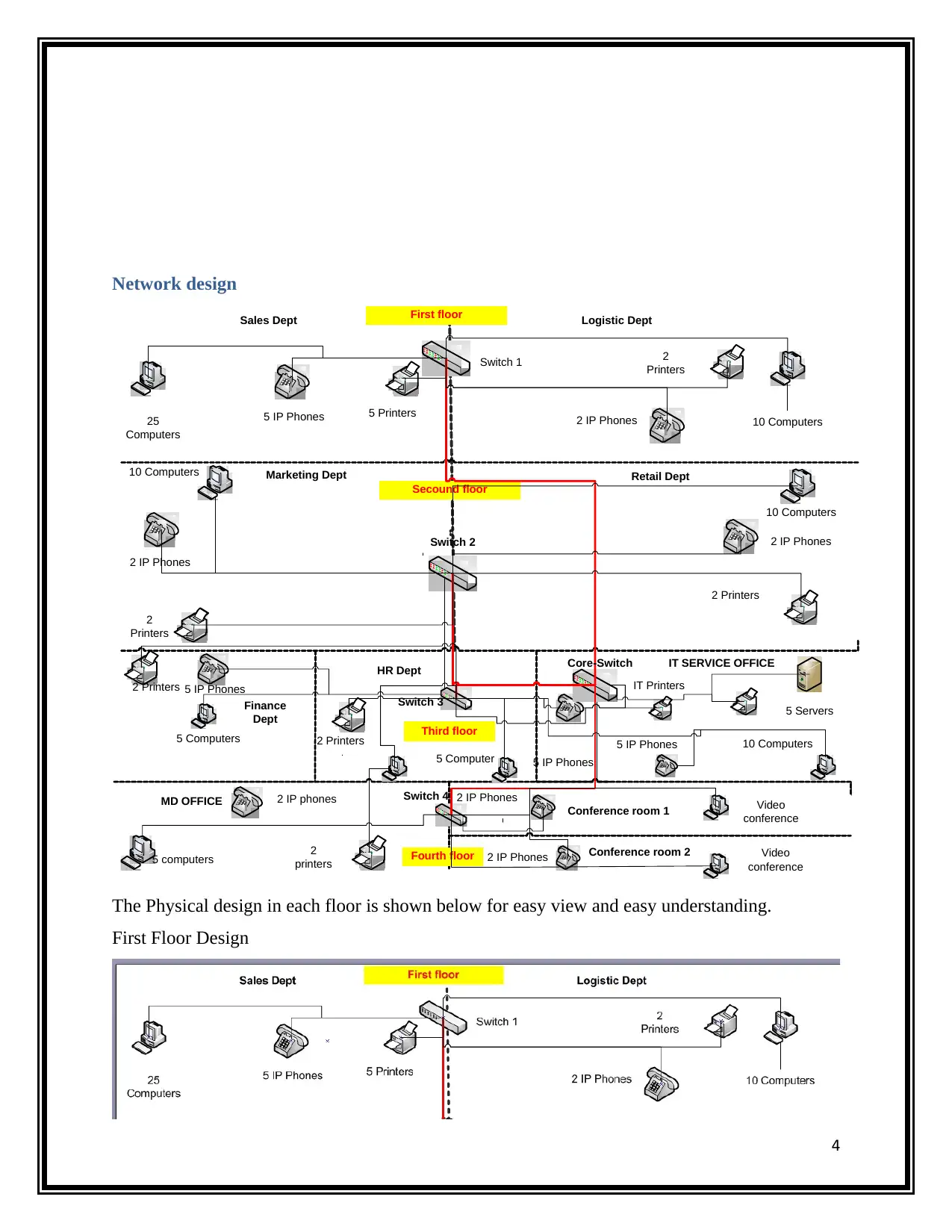
The Physical design in each floor is shown below for easy view and easy understanding.
First Floor Design
4
First floor
Secound floor
Third floor
Fourth floor5 computers 2
printers Video
conference
Video
conference
Conference room 2
Conference room 1
2 IP Phones
2 IP Phones
2 IP phonesMD OFFICE Switch 4
Switch 3
Switch 2
Switch 1
5 Computers
2 Printers 5 IP Phones
Finance
Dept
HR Dept IT SERVICE OFFICE
5 Computer
2 Printers
5 IP Phones
IT Printers
5 Servers
10 Computers5 IP Phones
Marketing Dept Retail Dept
10 Computers
10 Computers
2 Printers
2 IP Phones
2 IP Phones
2
Printers
5 IP Phones
2
Printers
2 IP Phones 10 Computers25
Computers
5 Printers
Sales Dept Logistic Dept
Core-Switch
The Physical design in each floor is shown below for easy view and easy understanding.
First Floor Design
4
Paraphrase This Document
Need a fresh take? Get an instant paraphrase of this document with our AI Paraphraser
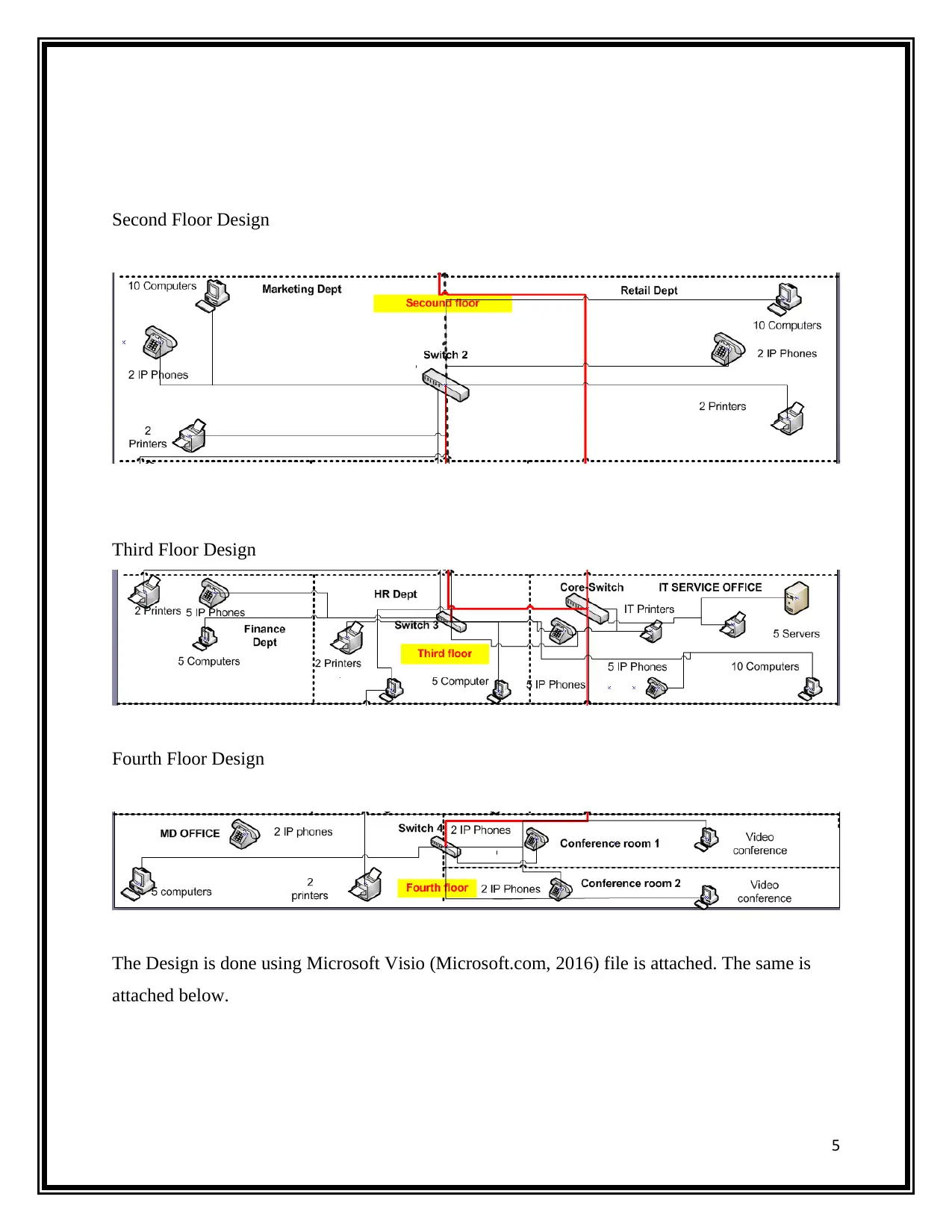
Second Floor Design
Third Floor Design
Fourth Floor Design
The Design is done using Microsoft Visio (Microsoft.com, 2016) file is attached. The same is
attached below.
5
Third Floor Design
Fourth Floor Design
The Design is done using Microsoft Visio (Microsoft.com, 2016) file is attached. The same is
attached below.
5
The attached file need Microsoft Visio to open.
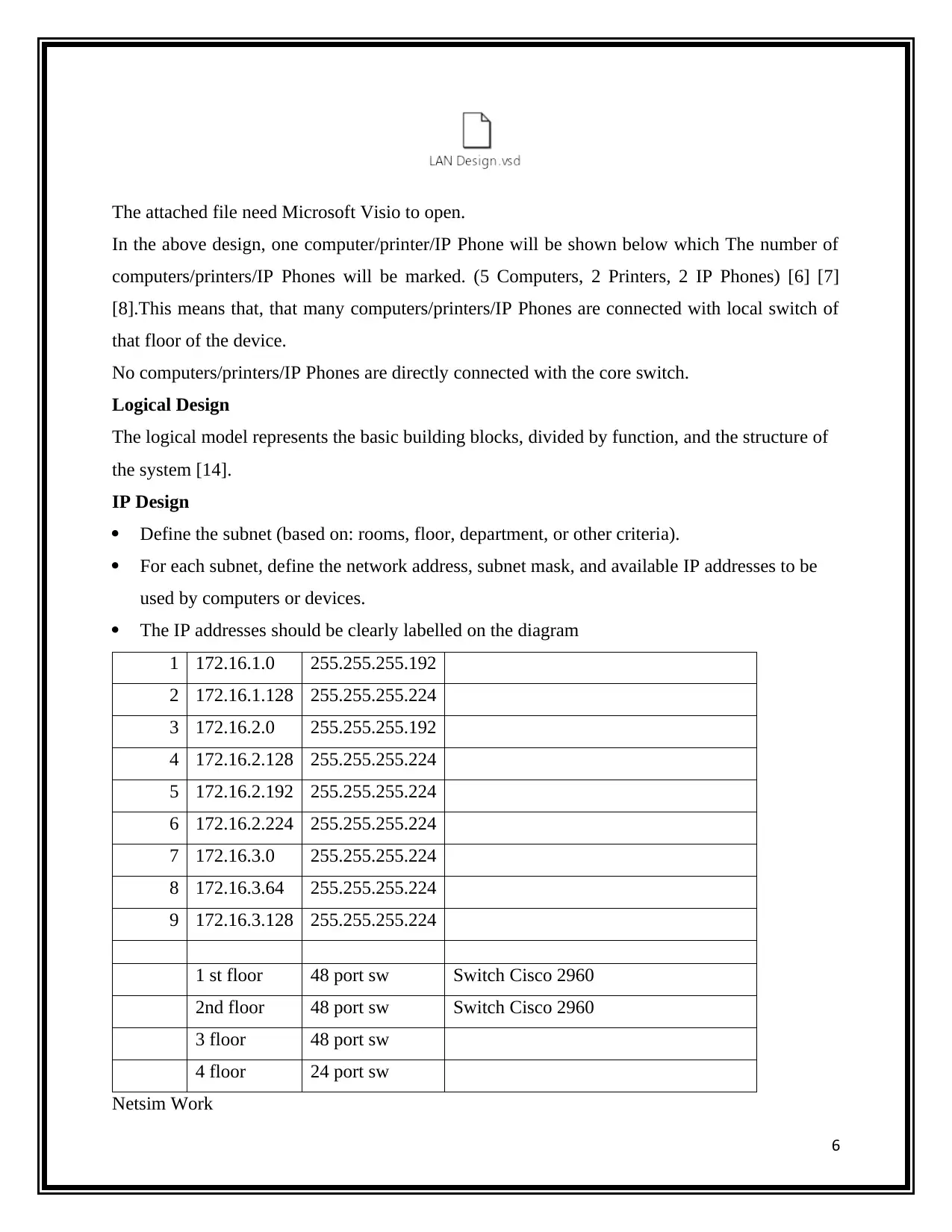
In the above design, one computer/printer/IP Phone will be shown below which The number of
computers/printers/IP Phones will be marked. (5 Computers, 2 Printers, 2 IP Phones) [6] [7]
[8].This means that, that many computers/printers/IP Phones are connected with local switch of
that floor of the device.
No computers/printers/IP Phones are directly connected with the core switch.
Logical Design
The logical model represents the basic building blocks, divided by function, and the structure of
the system [14].
IP Design
Define the subnet (based on: rooms, floor, department, or other criteria).
For each subnet, define the network address, subnet mask, and available IP addresses to be
used by computers or devices.
The IP addresses should be clearly labelled on the diagram
1 172.16.1.0 255.255.255.192
2 172.16.1.128 255.255.255.224
3 172.16.2.0 255.255.255.192
4 172.16.2.128 255.255.255.224
5 172.16.2.192 255.255.255.224
6 172.16.2.224 255.255.255.224
7 172.16.3.0 255.255.255.224
8 172.16.3.64 255.255.255.224
9 172.16.3.128 255.255.255.224
1 st floor 48 port sw Switch Cisco 2960
2nd floor 48 port sw Switch Cisco 2960
3 floor 48 port sw
4 floor 24 port sw
Netsim Work
6
In the above design, one computer/printer/IP Phone will be shown below which The number of
computers/printers/IP Phones will be marked. (5 Computers, 2 Printers, 2 IP Phones) [6] [7]
[8].This means that, that many computers/printers/IP Phones are connected with local switch of
that floor of the device.
No computers/printers/IP Phones are directly connected with the core switch.
Logical Design
The logical model represents the basic building blocks, divided by function, and the structure of
the system [14].
IP Design
Define the subnet (based on: rooms, floor, department, or other criteria).
For each subnet, define the network address, subnet mask, and available IP addresses to be
used by computers or devices.
The IP addresses should be clearly labelled on the diagram
1 172.16.1.0 255.255.255.192
2 172.16.1.128 255.255.255.224
3 172.16.2.0 255.255.255.192
4 172.16.2.128 255.255.255.224
5 172.16.2.192 255.255.255.224
6 172.16.2.224 255.255.255.224
7 172.16.3.0 255.255.255.224
8 172.16.3.64 255.255.255.224
9 172.16.3.128 255.255.255.224
1 st floor 48 port sw Switch Cisco 2960
2nd floor 48 port sw Switch Cisco 2960
3 floor 48 port sw
4 floor 24 port sw
Netsim Work
6
⊘ This is a preview!⊘
Do you want full access?
Subscribe today to unlock all pages.
Trusted by 1+ million students worldwide
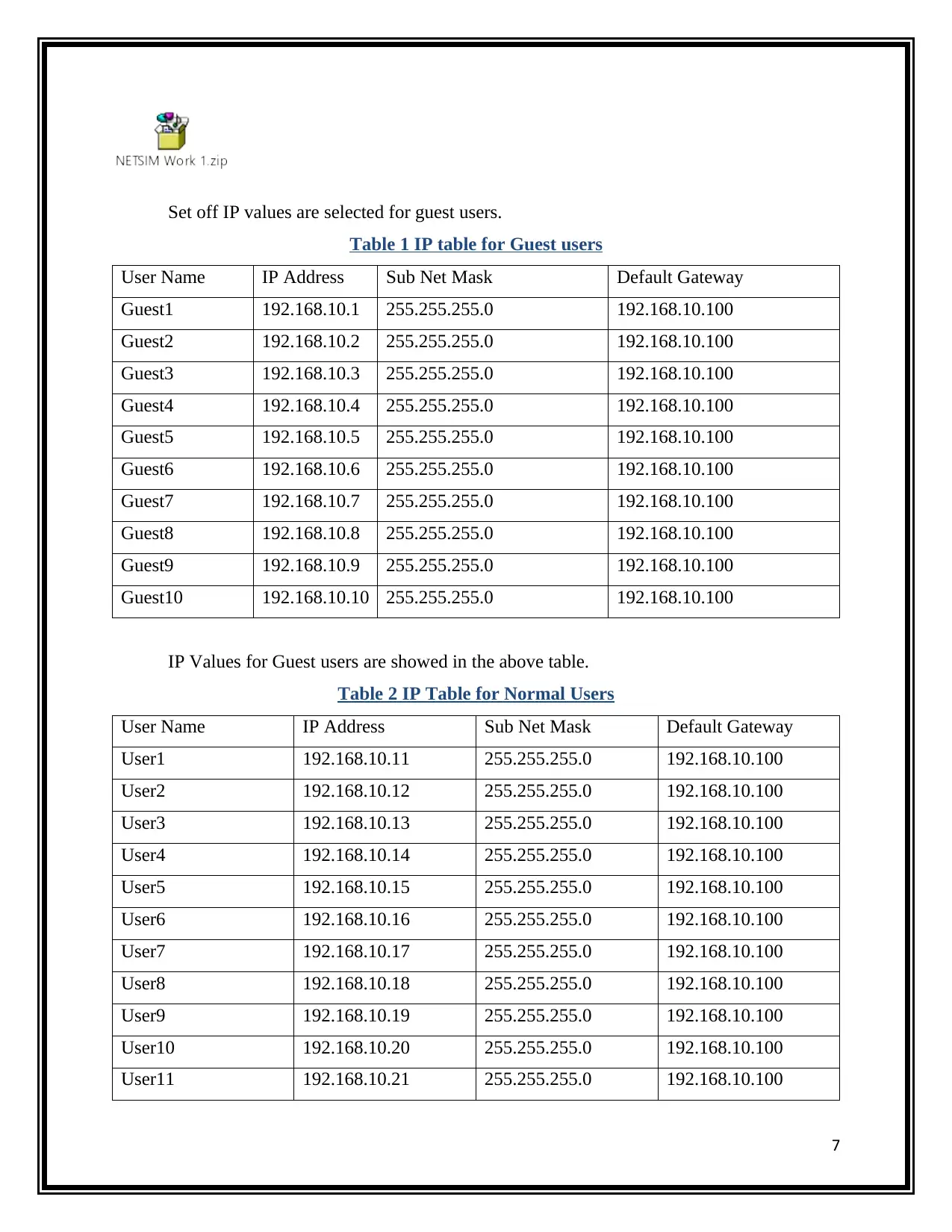
Set off IP values are selected for guest users.
Table 1 IP table for Guest users
User Name IP Address Sub Net Mask Default Gateway
Guest1 192.168.10.1 255.255.255.0 192.168.10.100
Guest2 192.168.10.2 255.255.255.0 192.168.10.100
Guest3 192.168.10.3 255.255.255.0 192.168.10.100
Guest4 192.168.10.4 255.255.255.0 192.168.10.100
Guest5 192.168.10.5 255.255.255.0 192.168.10.100
Guest6 192.168.10.6 255.255.255.0 192.168.10.100
Guest7 192.168.10.7 255.255.255.0 192.168.10.100
Guest8 192.168.10.8 255.255.255.0 192.168.10.100
Guest9 192.168.10.9 255.255.255.0 192.168.10.100
Guest10 192.168.10.10 255.255.255.0 192.168.10.100
IP Values for Guest users are showed in the above table.
Table 2 IP Table for Normal Users
User Name IP Address Sub Net Mask Default Gateway
User1 192.168.10.11 255.255.255.0 192.168.10.100
User2 192.168.10.12 255.255.255.0 192.168.10.100
User3 192.168.10.13 255.255.255.0 192.168.10.100
User4 192.168.10.14 255.255.255.0 192.168.10.100
User5 192.168.10.15 255.255.255.0 192.168.10.100
User6 192.168.10.16 255.255.255.0 192.168.10.100
User7 192.168.10.17 255.255.255.0 192.168.10.100
User8 192.168.10.18 255.255.255.0 192.168.10.100
User9 192.168.10.19 255.255.255.0 192.168.10.100
User10 192.168.10.20 255.255.255.0 192.168.10.100
User11 192.168.10.21 255.255.255.0 192.168.10.100
7
Table 1 IP table for Guest users
User Name IP Address Sub Net Mask Default Gateway
Guest1 192.168.10.1 255.255.255.0 192.168.10.100
Guest2 192.168.10.2 255.255.255.0 192.168.10.100
Guest3 192.168.10.3 255.255.255.0 192.168.10.100
Guest4 192.168.10.4 255.255.255.0 192.168.10.100
Guest5 192.168.10.5 255.255.255.0 192.168.10.100
Guest6 192.168.10.6 255.255.255.0 192.168.10.100
Guest7 192.168.10.7 255.255.255.0 192.168.10.100
Guest8 192.168.10.8 255.255.255.0 192.168.10.100
Guest9 192.168.10.9 255.255.255.0 192.168.10.100
Guest10 192.168.10.10 255.255.255.0 192.168.10.100
IP Values for Guest users are showed in the above table.
Table 2 IP Table for Normal Users
User Name IP Address Sub Net Mask Default Gateway
User1 192.168.10.11 255.255.255.0 192.168.10.100
User2 192.168.10.12 255.255.255.0 192.168.10.100
User3 192.168.10.13 255.255.255.0 192.168.10.100
User4 192.168.10.14 255.255.255.0 192.168.10.100
User5 192.168.10.15 255.255.255.0 192.168.10.100
User6 192.168.10.16 255.255.255.0 192.168.10.100
User7 192.168.10.17 255.255.255.0 192.168.10.100
User8 192.168.10.18 255.255.255.0 192.168.10.100
User9 192.168.10.19 255.255.255.0 192.168.10.100
User10 192.168.10.20 255.255.255.0 192.168.10.100
User11 192.168.10.21 255.255.255.0 192.168.10.100
7
Paraphrase This Document
Need a fresh take? Get an instant paraphrase of this document with our AI Paraphraser
User12 192.168.10.22 255.255.255.0 192.168.10.100
User13 192.168.10.23 255.255.255.0 192.168.10.100
User14 192.168.10.24 255.255.255.0 192.168.10.100
User15 192.168.10.25 255.255.255.0 192.168.10.100
User16 192.168.10.26 255.255.255.0 192.168.10.100
User17 192.168.10.27 255.255.255.0 192.168.10.100
User18 192.168.10.28 255.255.255.0 192.168.10.100
User19 192.168.10.29 255.255.255.0 192.168.10.100
User20 192.168.10.30 255.255.255.0 192.168.10.100
User21 192.168.10.31 255.255.255.0 192.168.10.100
User22 192.168.10.32 255.255.255.0 192.168.10.100
User23 192.168.10.33 255.255.255.0 192.168.10.100
User24 192.168.10.34 255.255.255.0 192.168.10.100
User25 192.168.10.35 255.255.255.0 192.168.10.100
User26 192.168.10.36 255.255.255.0 192.168.10.100
User27 192.168.10.37 255.255.255.0 192.168.10.100
User28 192.168.10.38 255.255.255.0 192.168.10.100
User29 192.168.10.39 255.255.255.0 192.168.10.100
User30 192.168.10.40 255.255.255.0 192.168.10.100
User31 192.168.10.41 255.255.255.0 192.168.10.100
User32 192.168.10.42 255.255.255.0 192.168.10.100
User33 192.168.10.43 255.255.255.0 192.168.10.100
User34 192.168.10.44 255.255.255.0 192.168.10.100
User35 192.168.10.45 255.255.255.0 192.168.10.100
User36 192.168.10.46 255.255.255.0 192.168.10.100
User37 192.168.10.47 255.255.255.0 192.168.10.100
User38 192.168.10.48 255.255.255.0 192.168.10.100
User39 192.168.10.49 255.255.255.0 192.168.10.100
User40 192.168.10.50 255.255.255.0 192.168.10.100
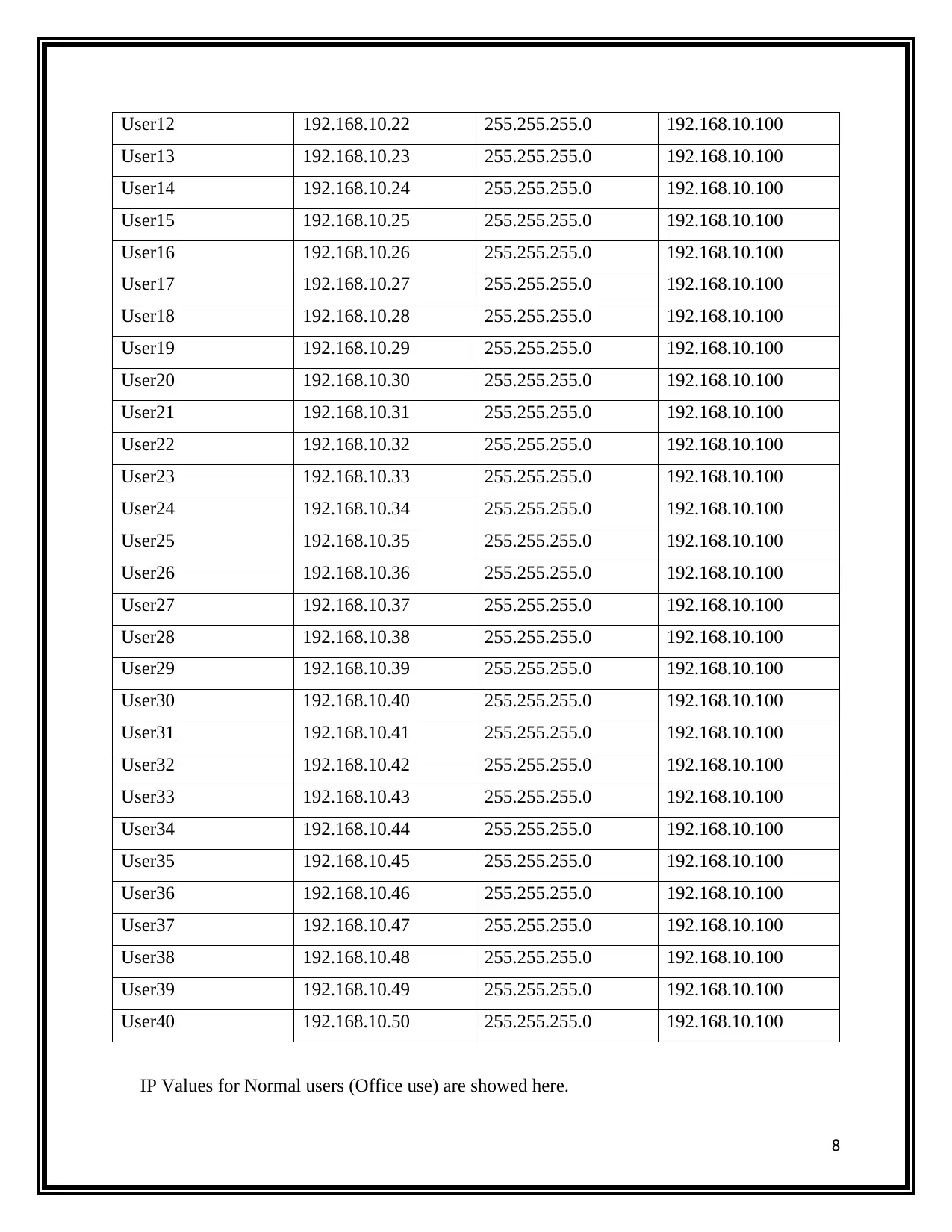
IP Values for Normal users (Office use) are showed here.
8
User13 192.168.10.23 255.255.255.0 192.168.10.100
User14 192.168.10.24 255.255.255.0 192.168.10.100
User15 192.168.10.25 255.255.255.0 192.168.10.100
User16 192.168.10.26 255.255.255.0 192.168.10.100
User17 192.168.10.27 255.255.255.0 192.168.10.100
User18 192.168.10.28 255.255.255.0 192.168.10.100
User19 192.168.10.29 255.255.255.0 192.168.10.100
User20 192.168.10.30 255.255.255.0 192.168.10.100
User21 192.168.10.31 255.255.255.0 192.168.10.100
User22 192.168.10.32 255.255.255.0 192.168.10.100
User23 192.168.10.33 255.255.255.0 192.168.10.100
User24 192.168.10.34 255.255.255.0 192.168.10.100
User25 192.168.10.35 255.255.255.0 192.168.10.100
User26 192.168.10.36 255.255.255.0 192.168.10.100
User27 192.168.10.37 255.255.255.0 192.168.10.100
User28 192.168.10.38 255.255.255.0 192.168.10.100
User29 192.168.10.39 255.255.255.0 192.168.10.100
User30 192.168.10.40 255.255.255.0 192.168.10.100
User31 192.168.10.41 255.255.255.0 192.168.10.100
User32 192.168.10.42 255.255.255.0 192.168.10.100
User33 192.168.10.43 255.255.255.0 192.168.10.100
User34 192.168.10.44 255.255.255.0 192.168.10.100
User35 192.168.10.45 255.255.255.0 192.168.10.100
User36 192.168.10.46 255.255.255.0 192.168.10.100
User37 192.168.10.47 255.255.255.0 192.168.10.100
User38 192.168.10.48 255.255.255.0 192.168.10.100
User39 192.168.10.49 255.255.255.0 192.168.10.100
User40 192.168.10.50 255.255.255.0 192.168.10.100
IP Values for Normal users (Office use) are showed here.
8
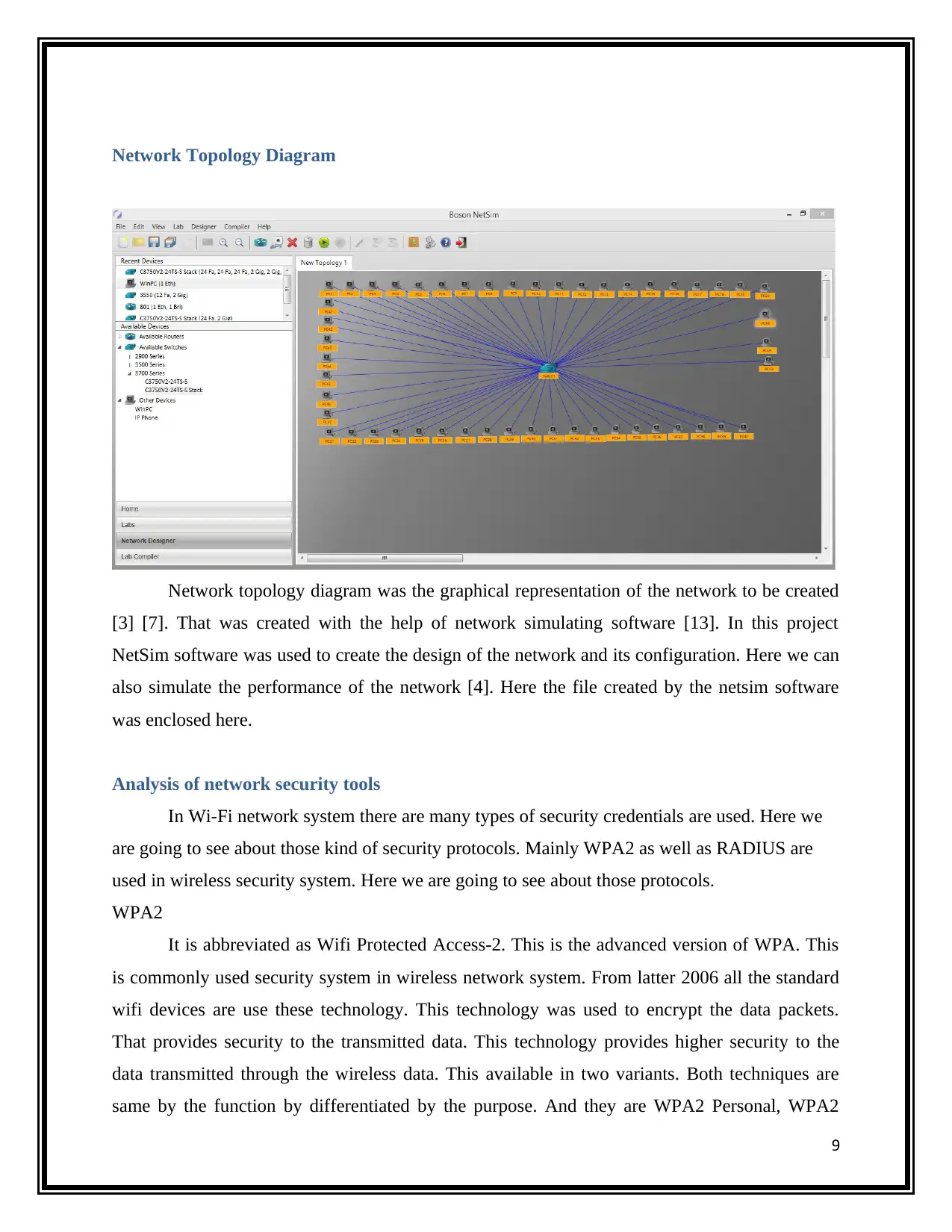
Network Topology Diagram
Network topology diagram was the graphical representation of the network to be created
[3] [7]. That was created with the help of network simulating software [13]. In this project
NetSim software was used to create the design of the network and its configuration. Here we can
also simulate the performance of the network [4]. Here the file created by the netsim software
was enclosed here.
Analysis of network security tools
In Wi-Fi network system there are many types of security credentials are used. Here we
are going to see about those kind of security protocols. Mainly WPA2 as well as RADIUS are
used in wireless security system. Here we are going to see about those protocols.
WPA2
It is abbreviated as Wifi Protected Access-2. This is the advanced version of WPA. This
is commonly used security system in wireless network system. From latter 2006 all the standard
wifi devices are use these technology. This technology was used to encrypt the data packets.
That provides security to the transmitted data. This technology provides higher security to the
data transmitted through the wireless data. This available in two variants. Both techniques are
same by the function by differentiated by the purpose. And they are WPA2 Personal, WPA2
9
Network topology diagram was the graphical representation of the network to be created
[3] [7]. That was created with the help of network simulating software [13]. In this project
NetSim software was used to create the design of the network and its configuration. Here we can
also simulate the performance of the network [4]. Here the file created by the netsim software
was enclosed here.
Analysis of network security tools
In Wi-Fi network system there are many types of security credentials are used. Here we
are going to see about those kind of security protocols. Mainly WPA2 as well as RADIUS are
used in wireless security system. Here we are going to see about those protocols.
WPA2
It is abbreviated as Wifi Protected Access-2. This is the advanced version of WPA. This
is commonly used security system in wireless network system. From latter 2006 all the standard
wifi devices are use these technology. This technology was used to encrypt the data packets.
That provides security to the transmitted data. This technology provides higher security to the
data transmitted through the wireless data. This available in two variants. Both techniques are
same by the function by differentiated by the purpose. And they are WPA2 Personal, WPA2
9
⊘ This is a preview!⊘
Do you want full access?
Subscribe today to unlock all pages.
Trusted by 1+ million students worldwide
Enterprise. It ensures the confidentiality of the network system. If we implemented those system
there is no need to worry about the unauthorized users. Because that allows only the authorized
users. It works based on the IEEE802.11i standards [10] [11][12]. This gives the highest
protection against attackers by make the strong and secure authentication process. The WPA2
personal was used for protect the network system by setting the password. But WPA2 Enterprise
was server based verification system.
RADIUS
It is abbreviated as Remote Authentication Dial In User Service. This technology was
established by the Livingston-Enterprises [2] [4]. The main purpose of this technology was to
provide security to the wireless network system by creating the strong authentication process.
This technology was based on the RFC2866 standard. Here the authenticating process was
carried out by this protocol. Each and every users are must register by the administrator. Here the
user ID as well as the password was given to the users. If the user can’t give the correct
username as well as the password. He can’t able to access the network system. The entered
access ID was compared with already registered ID. If both ID matched the access permission
was given to the user [9]. This also called as the client server protocol [5]. This technology uses
the variety of methods to ensure the proper authentication process, and they are PAP, PPP etc.
Implementing of Security Systems.
Here the above described two security systems are implemented in the developed
wireless network to ensure the safety of the system. Here we are going to see about the how to
implement the two protocols.
WPA2
The implementation of the WPA2 system was basically done by the four stages. And they
are explained below [3].
Stage 1 Checking pre – requirements
This the first stage of implementation. That is common for both methods. Here we need
to check the pre requirements of the protocol and check the compatibility of the OS. Generally
all the latest operating systems are compatible for this protocol. If we use the older software we
need to use the support software like patching software, etc.
10
there is no need to worry about the unauthorized users. Because that allows only the authorized
users. It works based on the IEEE802.11i standards [10] [11][12]. This gives the highest
protection against attackers by make the strong and secure authentication process. The WPA2
personal was used for protect the network system by setting the password. But WPA2 Enterprise
was server based verification system.
RADIUS
It is abbreviated as Remote Authentication Dial In User Service. This technology was
established by the Livingston-Enterprises [2] [4]. The main purpose of this technology was to
provide security to the wireless network system by creating the strong authentication process.
This technology was based on the RFC2866 standard. Here the authenticating process was
carried out by this protocol. Each and every users are must register by the administrator. Here the
user ID as well as the password was given to the users. If the user can’t give the correct
username as well as the password. He can’t able to access the network system. The entered
access ID was compared with already registered ID. If both ID matched the access permission
was given to the user [9]. This also called as the client server protocol [5]. This technology uses
the variety of methods to ensure the proper authentication process, and they are PAP, PPP etc.
Implementing of Security Systems.
Here the above described two security systems are implemented in the developed
wireless network to ensure the safety of the system. Here we are going to see about the how to
implement the two protocols.
WPA2
The implementation of the WPA2 system was basically done by the four stages. And they
are explained below [3].
Stage 1 Checking pre – requirements
This the first stage of implementation. That is common for both methods. Here we need
to check the pre requirements of the protocol and check the compatibility of the OS. Generally
all the latest operating systems are compatible for this protocol. If we use the older software we
need to use the support software like patching software, etc.
10
Paraphrase This Document
Need a fresh take? Get an instant paraphrase of this document with our AI Paraphraser
Stage 2 Check Wireless Adapter configurations.
Here the OS as well as the wireless adapter must compatible with this protocol. Unless
we can’t use this security protocol. If the adapter was internally fixed with the system we need to
install the supporting files.
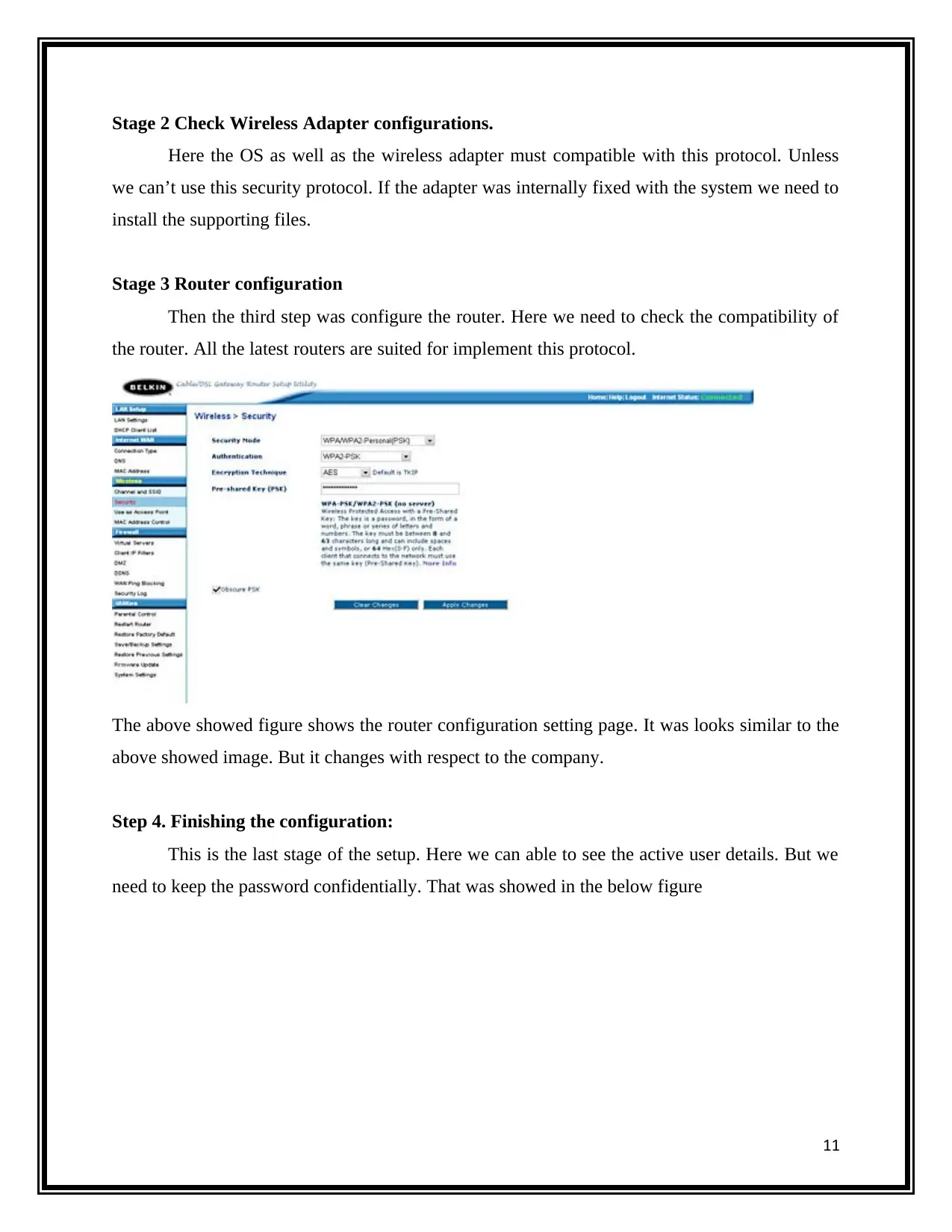
Stage 3 Router configuration
Then the third step was configure the router. Here we need to check the compatibility of
the router. All the latest routers are suited for implement this protocol.
The above showed figure shows the router configuration setting page. It was looks similar to the
above showed image. But it changes with respect to the company.
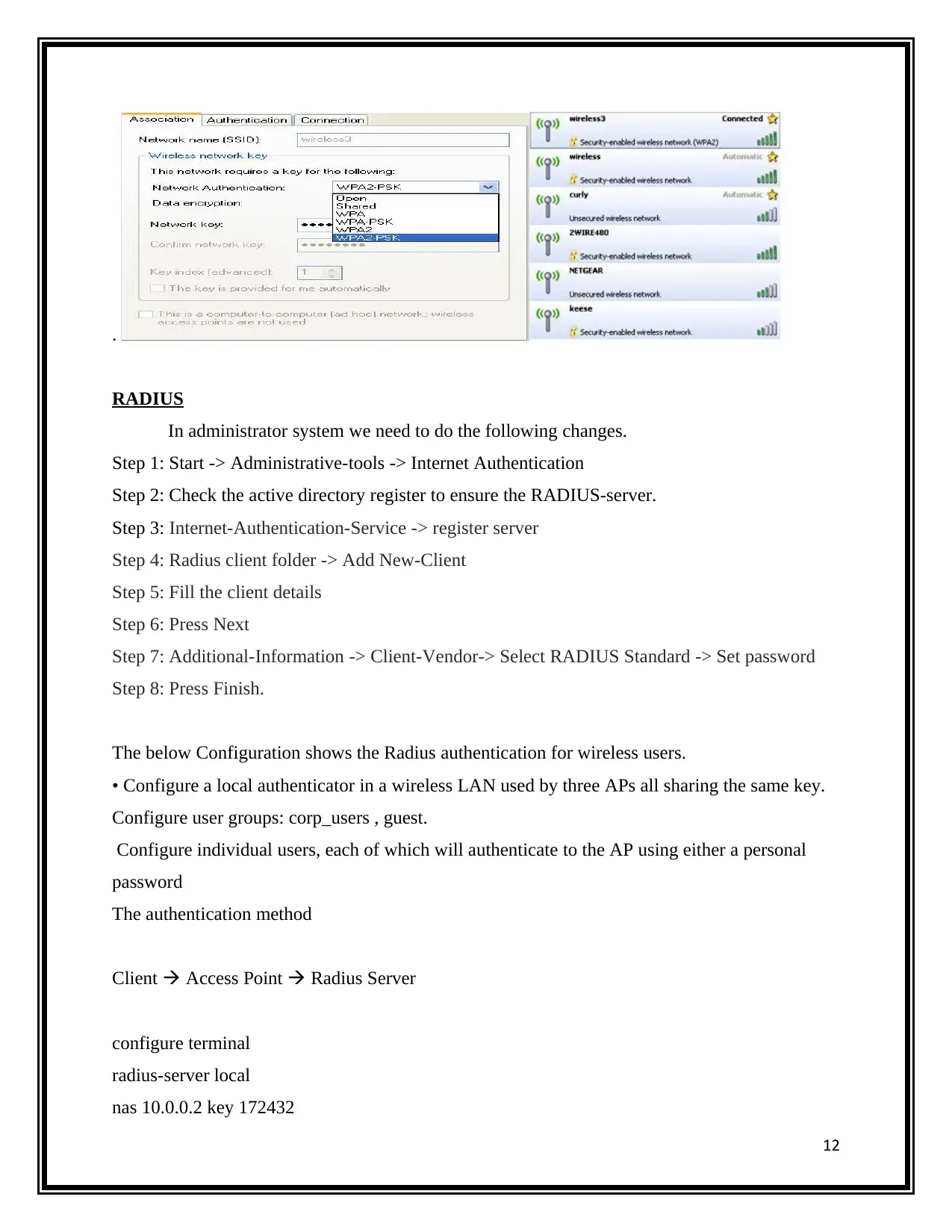
Step 4. Finishing the configuration:
This is the last stage of the setup. Here we can able to see the active user details. But we
need to keep the password confidentially. That was showed in the below figure
11
Here the OS as well as the wireless adapter must compatible with this protocol. Unless
we can’t use this security protocol. If the adapter was internally fixed with the system we need to
install the supporting files.
Stage 3 Router configuration
Then the third step was configure the router. Here we need to check the compatibility of
the router. All the latest routers are suited for implement this protocol.
The above showed figure shows the router configuration setting page. It was looks similar to the
above showed image. But it changes with respect to the company.
Step 4. Finishing the configuration:
This is the last stage of the setup. Here we can able to see the active user details. But we
need to keep the password confidentially. That was showed in the below figure
11
.
RADIUS
In administrator system we need to do the following changes.
Step 1: Start -> Administrative-tools -> Internet Authentication
Step 2: Check the active directory register to ensure the RADIUS-server.
Step 3: Internet-Authentication-Service -> register server
Step 4: Radius client folder -> Add New-Client
Step 5: Fill the client details
Step 6: Press Next
Step 7: Additional-Information -> Client-Vendor-> Select RADIUS Standard -> Set password
Step 8: Press Finish.
The below Configuration shows the Radius authentication for wireless users.
• Configure a local authenticator in a wireless LAN used by three APs all sharing the same key.
Configure user groups: corp_users , guest.
Configure individual users, each of which will authenticate to the AP using either a personal
password
The authentication method
Client Access Point Radius Server
configure terminal
radius-server local
nas 10.0.0.2 key 172432
12
RADIUS
In administrator system we need to do the following changes.
Step 1: Start -> Administrative-tools -> Internet Authentication
Step 2: Check the active directory register to ensure the RADIUS-server.
Step 3: Internet-Authentication-Service -> register server
Step 4: Radius client folder -> Add New-Client
Step 5: Fill the client details
Step 6: Press Next
Step 7: Additional-Information -> Client-Vendor-> Select RADIUS Standard -> Set password
Step 8: Press Finish.
The below Configuration shows the Radius authentication for wireless users.
• Configure a local authenticator in a wireless LAN used by three APs all sharing the same key.
Configure user groups: corp_users , guest.
Configure individual users, each of which will authenticate to the AP using either a personal
password
The authentication method
Client Access Point Radius Server
configure terminal
radius-server local
nas 10.0.0.2 key 172432
12
⊘ This is a preview!⊘
Do you want full access?
Subscribe today to unlock all pages.
Trusted by 1+ million students worldwide

1 out of 21


Related Documents


Your All-in-One AI-Powered Toolkit for Academic Success.
+13062052269
info@desklib.com
Available 24*7 on WhatsApp / Email
![[object Object]](/_next/static/media/star-bottom.7253800d.svg)
Unlock your academic potential
Copyright © 2020–2026 A2Z Services. All Rights Reserved. Developed and managed by ZUCOL.