University Java Project: Sky War Game Implementation (SET11103)

Verified

Added on  2022/11/27

|7
|943
|275
Project
AI Summary
This document presents a Java implementation of the "Sky War" game, developed as a project for a Software Development course. The game features a graphical user interface (GUI) built using Java Swing components, including a grid-based sky represented by JButtons. The core game logic, managed by the GameLogic class, utilizes threads to handle the movement of the Master Ship and various types of Enemy Ships (BattleCruiser, BattleShooter, BattleStar), demonstrating polymorphism and inheritance. The implementation includes features like random movement, conflict resolution, and game-over conditions. The project was tested thoroughly, and the document includes screenshots of the running game, showcasing the GUI and game states. The solution covers different aspects of the game, including the GUI, game logic, object movements, and testing, providing a comprehensive overview of the project's development and functionality. The assignment brief is also included.
Document Page
Sky War Java Implementation
Name
Institution
tabler-icon-diamond-filled.svg

Paraphrase This Document

Need a fresh take? Get an instant paraphrase of this document with our AI Paraphraser
Document Page
Program Design
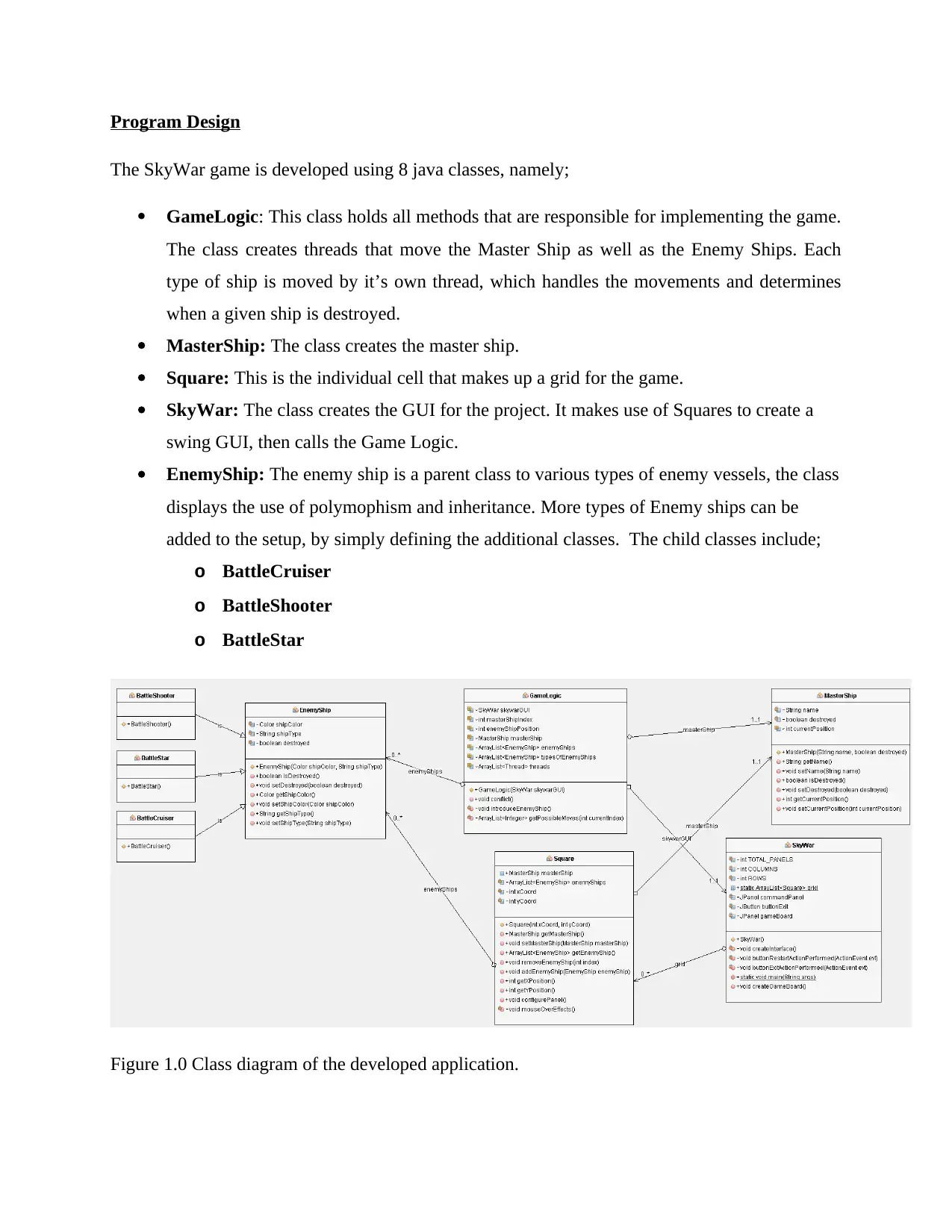
The SkyWar game is developed using 8 java classes, namely;
GameLogic: This class holds all methods that are responsible for implementing the game.
The class creates threads that move the Master Ship as well as the Enemy Ships. Each
type of ship is moved by it’s own thread, which handles the movements and determines
when a given ship is destroyed.
MasterShip: The class creates the master ship.
Square: This is the individual cell that makes up a grid for the game.
SkyWar: The class creates the GUI for the project. It makes use of Squares to create a
swing GUI, then calls the Game Logic.
EnemyShip: The enemy ship is a parent class to various types of enemy vessels, the class
displays the use of polymophism and inheritance. More types of Enemy ships can be
added to the setup, by simply defining the additional classes. The child classes include;
o BattleCruiser
o BattleShooter
o BattleStar
Figure 1.0 Class diagram of the developed application.
Document Page
Main Features
The main features of the game are the graphical user interface, the game logic and the objects that
make up the enemy and the master ship. The detailed features are as follows;
Graphical User Interface: The games GUI is made using a JFrame, two panels and 16 JButtons
that forms the grid. An upper panel is used as the base for the buttons while a lower panel is used
for commands; in this case the exit command. The Buttons are arranged into a grid by use of the
GridLayout Manager. Each JButton is made from the class Square; this class places features such
as color change on the buttons to be able to change the color on the grid depending on the type of
object on a specific button. When the Master Ship is on a button, the button turns green.
Similarly, when the button is blank – meaning no ship is on the button – the button is painted
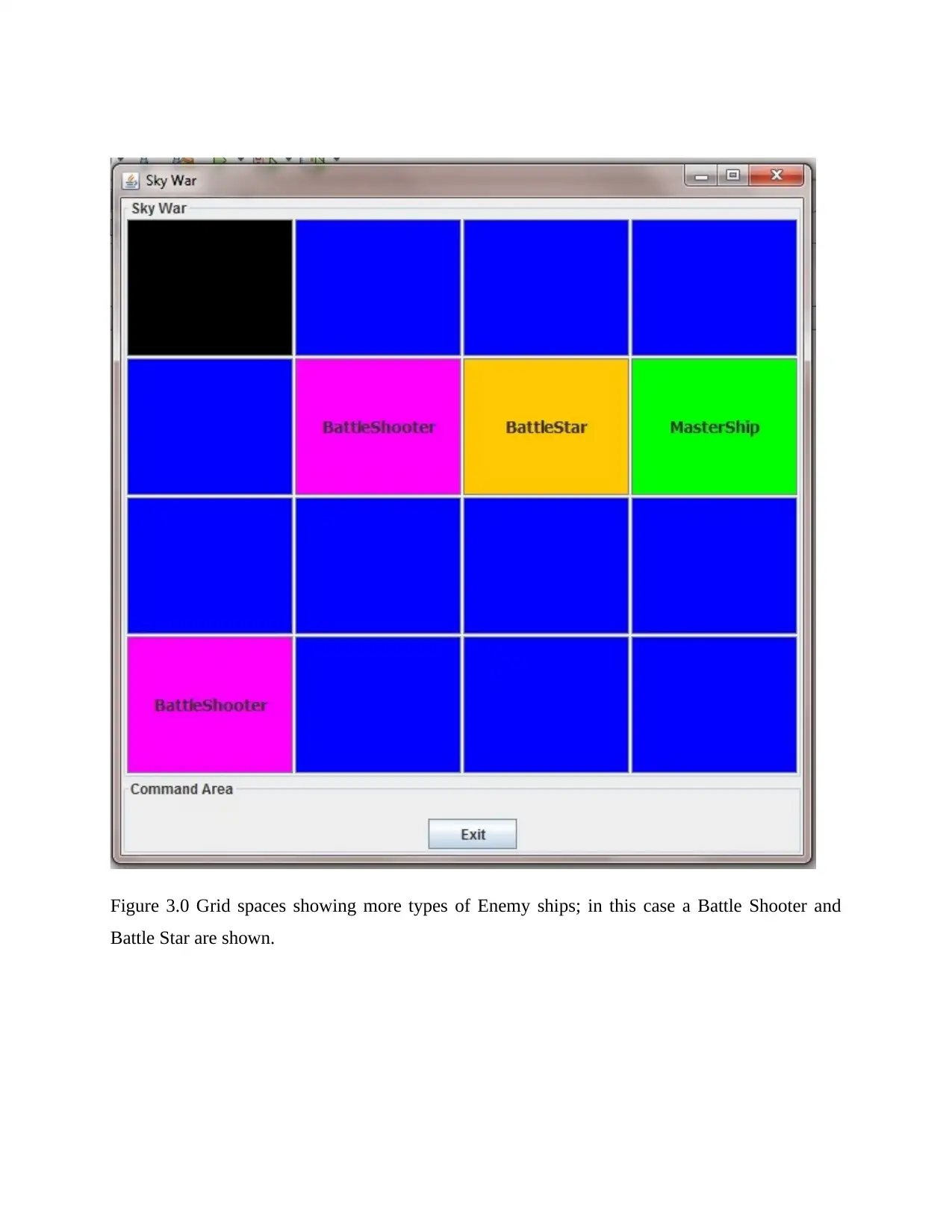
blue; representing the sky. For the enemy ships, each type of ship has its own distinct color
defined in their classes.
Game Movements: to facilitate movement of objects, java threads are used. Threads are created
using the Runnable interface for the Master Ship and for each type of enemy ship created. The
thread runs in an infinite loop until an interrupt occurs. Interrupts are induced when the game
over condition in attained; in this case when the master ship moves into a grid cell with more than
1 enemy ship. For stealth mode, the game is over when the master ship moves into a cell with
more than 2 enemy ships.
A thread is created to move the ship, this thread calls an inner class that implements the Runnable
interface, making it possible to create a thread from the class as follows;
Thread t1 = new Thread(new MoveMasterShip());
threads.add(t1);
t1.start();
The private class handling the movement of the master ship is;
private class MoveMasterShip implements Runnable {
@Override
public void run() {
while (true) {
Document Page
ArrayList<Integer> posiblePositions =
getPossibleMoves(masterShipIndex);
Random rand = new Random();
//random 0 to 7
int newPost = rand.nextInt(8);
int newIndex = posiblePositions.get(newPost);
if(newIndex < 1){
newIndex = 1;
}
if(newIndex > 15){
newIndex = 15;
}
//Reset old position
skywarGUI.grid.get(masterShipIndex).setMasterShip(null);
skywarGUI.grid.get(masterShipIndex).setText("");
//set new position
skywarGUI.grid.get(newIndex).setMasterShip(masterShip);
skywarGUI.grid.get(newIndex).setText(masterShip.getName());
masterShipIndex = newIndex;
try {
conflict();
sleep(300);
introduceEnemyShip();
conflict();
} catch (InterruptedException ex) {
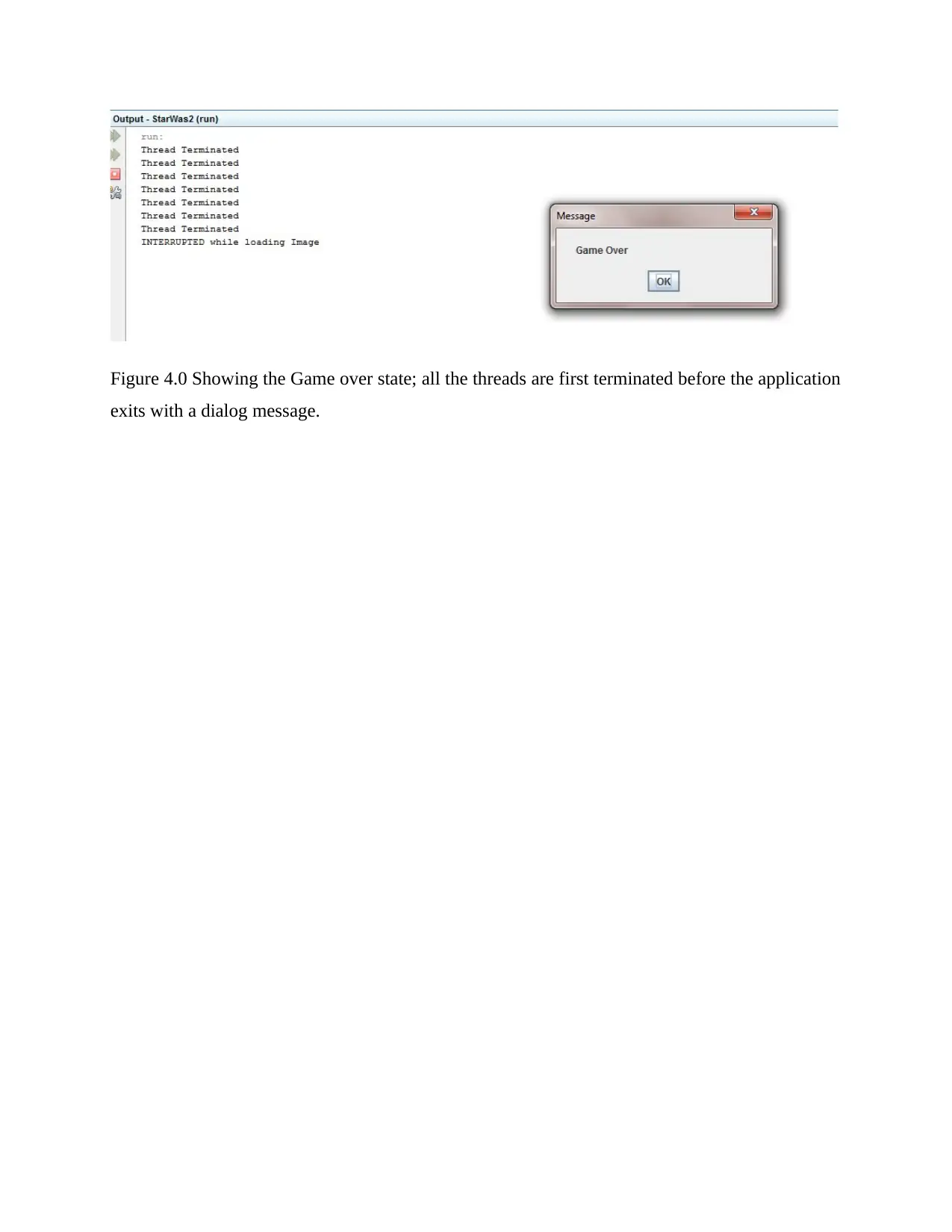
System.out.println("Thread Terminated");
}
}
}
}
Polymorphism: polymorphism in this game is implemented by use of the EnemyShip class. The
game logic processes an ArrayList of type EnemyShip. However, the ArrayList contains enemy
ships of type BattleCruiser, BattleShooter and BattleStar.
Conflict: when the Master Ship moves, a random number between 1 and 3 is generated. If the
value generated is 3, then a new enemy ship is introduced into the battle space. Each enemy ship
moves in a similar manner as the master ship.
tabler-icon-diamond-filled.svg

Paraphrase This Document

Need a fresh take? Get an instant paraphrase of this document with our AI Paraphraser
Document Page
Testing
The game was tested on a wide range of situations. The image below shows the running state of
the game.
Figure 2.0 Game Testing, the Green tile represents the Master Ship, the blue tiles are blank space,
the red is a Battle Cruiser, while the White shoes the mouse over effects on a blank space.
A use can exit the game at any time by use of the exit button.
Document Page
Figure 3.0 Grid spaces showing more types of Enemy ships; in this case a Battle Shooter and
Battle Star are shown.
Document Page
Figure 4.0 Showing the Game over state; all the threads are first terminated before the application
exits with a dialog message.
chevron_up_icon
1 out of 7
circle_padding
hide_on_mobile
zoom_out_icon
[object Object]