Proposal: Designing a Smart Office Network for Enterprise Efficiency
VerifiedAdded on 2021/06/17
|9
|2787
|126
Project
AI Summary
This project presents a detailed proposal for designing a smart office network, focusing on enhancing efficiency and communication within an enterprise. The proposal outlines the selection of UTP CAT5 cables, RJ45 connectors, and switches to establish a robust Local Area Network (LAN) across two floors. It specifies the use of routers for wireless connectivity and network cards for each desktop computer. The project emphasizes the importance of network equipment such as routers, switches, a server, and a Network Operating System (NOS) for ease of management. It adopts a star topology for each floor, connecting workstations to a central switch and includes a cost analysis for the proposed setup, including infrastructure and hardware such as printers, phones, and security systems. The proposal also recommends cloud backup solutions to ensure data recovery. The project assumes an open office layout and provides a comprehensive plan for a smart, secure, and efficient office network.
INTRODUCTION
My proposal is to provide a network to make an enterprise a smart office. This proposal aims to
suggest the best ways and best equipment to develop a network which will be able to meet the
requirement of the enterprise. A good network in an office will go a long way in promoting
efficiency and communication in the organization. There will be easy access and retrieval of
information across the network. Since there are two floors, each floor will have its own LAN.
The two LANs will be connected together to ensure there is communication between the two
floors. With developing technology, the need to also get smart devices to include in the network
is a must. These devices may include smart badges and smart pantry among other devices.
Extensive planning should be done to ensure all these devices fit well within the organization. In
designing the network, we should consider the type of business, how it operates and where the
local resources will be located. Also, not we will recommend on ways in which the business can
set up a backup. Either locally or in the cloud. In my case the business will set up a cloud storage
This proposal aims to come up with a smart office networking which will be affordable and
within the budget of the organization.
My proposal is to provide a network to make an enterprise a smart office. This proposal aims to
suggest the best ways and best equipment to develop a network which will be able to meet the
requirement of the enterprise. A good network in an office will go a long way in promoting
efficiency and communication in the organization. There will be easy access and retrieval of
information across the network. Since there are two floors, each floor will have its own LAN.
The two LANs will be connected together to ensure there is communication between the two
floors. With developing technology, the need to also get smart devices to include in the network
is a must. These devices may include smart badges and smart pantry among other devices.
Extensive planning should be done to ensure all these devices fit well within the organization. In
designing the network, we should consider the type of business, how it operates and where the
local resources will be located. Also, not we will recommend on ways in which the business can
set up a backup. Either locally or in the cloud. In my case the business will set up a cloud storage
This proposal aims to come up with a smart office networking which will be affordable and
within the budget of the organization.

Paraphrase This Document
Need a fresh take? Get an instant paraphrase of this document with our AI Paraphraser
1.1 The Cables/connectors/card
The network cables are indeed almost invisible but essential pieces for tying together a network.
The types of information that will be sent between computer, the environment and the distances
between computers determine the factor of which type of cable is suitable. In my network I will
use UTP CAT5 cables. These cables follow the TCP/IP ethernet standards and they reduce the
noise and propagation. The cables will be terminated by use of RJ45 which will act as the end
points for the cables. All the cables will be connected to a switch. This switch will be the central
point in which all the cables from the two floors will connect. A router will also be used to
provide wireless connections to the office. Since there will be two floors I recommend that we
have two routers for each floor to ensure each floor has a strong wireless signal. The signal
should be accessible within the office premises and a few metres outside. Also, each desktop
computer will have a 100 Mbps NIC installed. A NIC is a piece of hardware that is installed on a
computer to provide connectivity to the networks. NICs are varying and have different
bandwidths. Its better to choose a bandwidth that will be suitable for the organization
Also, we will have faceplates which we will use to connect the cables from the desktops.
Faceplates have their own advantages compared to directly connecting the cable to the patch
panel. Some of the advantages include making the office look neat, if there is a problem in the
cable you don’t have to change the whole cable only the part from the device to the faceplate.
Faceplates make cables to run through walls rather that dropping them on the walls and finally its
easier to replace a faulty cable since only a few meters of cable that is required from the
faceplate rather than changing the whole cable which would be tedious and use a longer cable
1.2 The Network Equipment’s and Peripherals
The network equipment which will be needed are routers, two 24-port switch, a cabinet, a patch
panel, network cards, faceplates, a server and a Network Operating System (NOS). A NOS
provides ease of configuration, installation and maintenance of a network. It has features and
services such as DHCP and DNS which makes it easier for network administrators to manage the
end users and clients in the network. A type of NOS is windows server 2000 which provides all
the features and services.
The network cables are indeed almost invisible but essential pieces for tying together a network.
The types of information that will be sent between computer, the environment and the distances
between computers determine the factor of which type of cable is suitable. In my network I will
use UTP CAT5 cables. These cables follow the TCP/IP ethernet standards and they reduce the
noise and propagation. The cables will be terminated by use of RJ45 which will act as the end
points for the cables. All the cables will be connected to a switch. This switch will be the central
point in which all the cables from the two floors will connect. A router will also be used to
provide wireless connections to the office. Since there will be two floors I recommend that we
have two routers for each floor to ensure each floor has a strong wireless signal. The signal
should be accessible within the office premises and a few metres outside. Also, each desktop
computer will have a 100 Mbps NIC installed. A NIC is a piece of hardware that is installed on a
computer to provide connectivity to the networks. NICs are varying and have different
bandwidths. Its better to choose a bandwidth that will be suitable for the organization
Also, we will have faceplates which we will use to connect the cables from the desktops.
Faceplates have their own advantages compared to directly connecting the cable to the patch
panel. Some of the advantages include making the office look neat, if there is a problem in the
cable you don’t have to change the whole cable only the part from the device to the faceplate.
Faceplates make cables to run through walls rather that dropping them on the walls and finally its
easier to replace a faulty cable since only a few meters of cable that is required from the
faceplate rather than changing the whole cable which would be tedious and use a longer cable
1.2 The Network Equipment’s and Peripherals
The network equipment which will be needed are routers, two 24-port switch, a cabinet, a patch
panel, network cards, faceplates, a server and a Network Operating System (NOS). A NOS
provides ease of configuration, installation and maintenance of a network. It has features and
services such as DHCP and DNS which makes it easier for network administrators to manage the
end users and clients in the network. A type of NOS is windows server 2000 which provides all
the features and services.
The router will be used to provide wireless connection to the office. Also, the router will be
configured by the ISP to provide access to the internet. This will ensure that there is
communication to the outside world.
The switch will be used to connect all the client computers in the two floors via ethernet cables.
This will ensure that all the two floors are on the same local area network
The cabinet will be used for storing the switch and router. This makes the office to look neat and
tidy and also the cabinet can be locked so as to ensure that no one tampers with the network
devices. The trunks will be used to pass the network cables through so as to prevent the cables
from any damage and also makes the office look neat because the cables are hidden from the
public. The cables should not be left scattered as this makes the office untidy. The server will be
located at one office i.e. the top floor office and here the network admin will be able to manage
the network efficiently through the NOS. the server also will provide a centralized place where
resources from the two offices will be stored. Each office will access the resources from the
server. The server will be connected directly to the switch. This will make it easier and faster for
everyone in the office to access whatever resources or information they need.
1.3 The Network Topology
The physical topology explains the “Bird Eye View” of the physical layout of the network. The
network will assume a star topology for both the floors. On a star topology, all the network
devices are connected to one central network device. (“What is Star Topology”, n.d.) In this case
the switch. Star topology has many advantages compared to other topologies. You can add other
workstations without disrupting the network, easy to setup and easy to troubleshoot the network
when it has problems and if one computer ails, all the others continue working without any
problems. Each floor will consist of 15 workstations. The workstations will be connected to the
switch via an ethernet cable. The cabinet will be placed in one corner and it will hold the switch,
router and server for protection and to make the office neat. The cabinet also will be placed in
one corner of the office and mounted on the wall so as not to take up much space. The
workstations in the office will be cabled using CAT5 network cables. Faceplates and phone jacks
will also be installed.
A network printer to server the whole office also will be stationed at a central position so that it
can be accessed by everyone who needs to print, scan or photocopy their documents. Also, the
configured by the ISP to provide access to the internet. This will ensure that there is
communication to the outside world.
The switch will be used to connect all the client computers in the two floors via ethernet cables.
This will ensure that all the two floors are on the same local area network
The cabinet will be used for storing the switch and router. This makes the office to look neat and
tidy and also the cabinet can be locked so as to ensure that no one tampers with the network
devices. The trunks will be used to pass the network cables through so as to prevent the cables
from any damage and also makes the office look neat because the cables are hidden from the
public. The cables should not be left scattered as this makes the office untidy. The server will be
located at one office i.e. the top floor office and here the network admin will be able to manage
the network efficiently through the NOS. the server also will provide a centralized place where
resources from the two offices will be stored. Each office will access the resources from the
server. The server will be connected directly to the switch. This will make it easier and faster for
everyone in the office to access whatever resources or information they need.
1.3 The Network Topology
The physical topology explains the “Bird Eye View” of the physical layout of the network. The
network will assume a star topology for both the floors. On a star topology, all the network
devices are connected to one central network device. (“What is Star Topology”, n.d.) In this case
the switch. Star topology has many advantages compared to other topologies. You can add other
workstations without disrupting the network, easy to setup and easy to troubleshoot the network
when it has problems and if one computer ails, all the others continue working without any
problems. Each floor will consist of 15 workstations. The workstations will be connected to the
switch via an ethernet cable. The cabinet will be placed in one corner and it will hold the switch,
router and server for protection and to make the office neat. The cabinet also will be placed in
one corner of the office and mounted on the wall so as not to take up much space. The
workstations in the office will be cabled using CAT5 network cables. Faceplates and phone jacks
will also be installed.
A network printer to server the whole office also will be stationed at a central position so that it
can be accessed by everyone who needs to print, scan or photocopy their documents. Also, the
⊘ This is a preview!⊘
Do you want full access?
Subscribe today to unlock all pages.

Trusted by 1+ million students worldwide
office will have a LAN phone which will be used for communication between the two offices
and the outside world
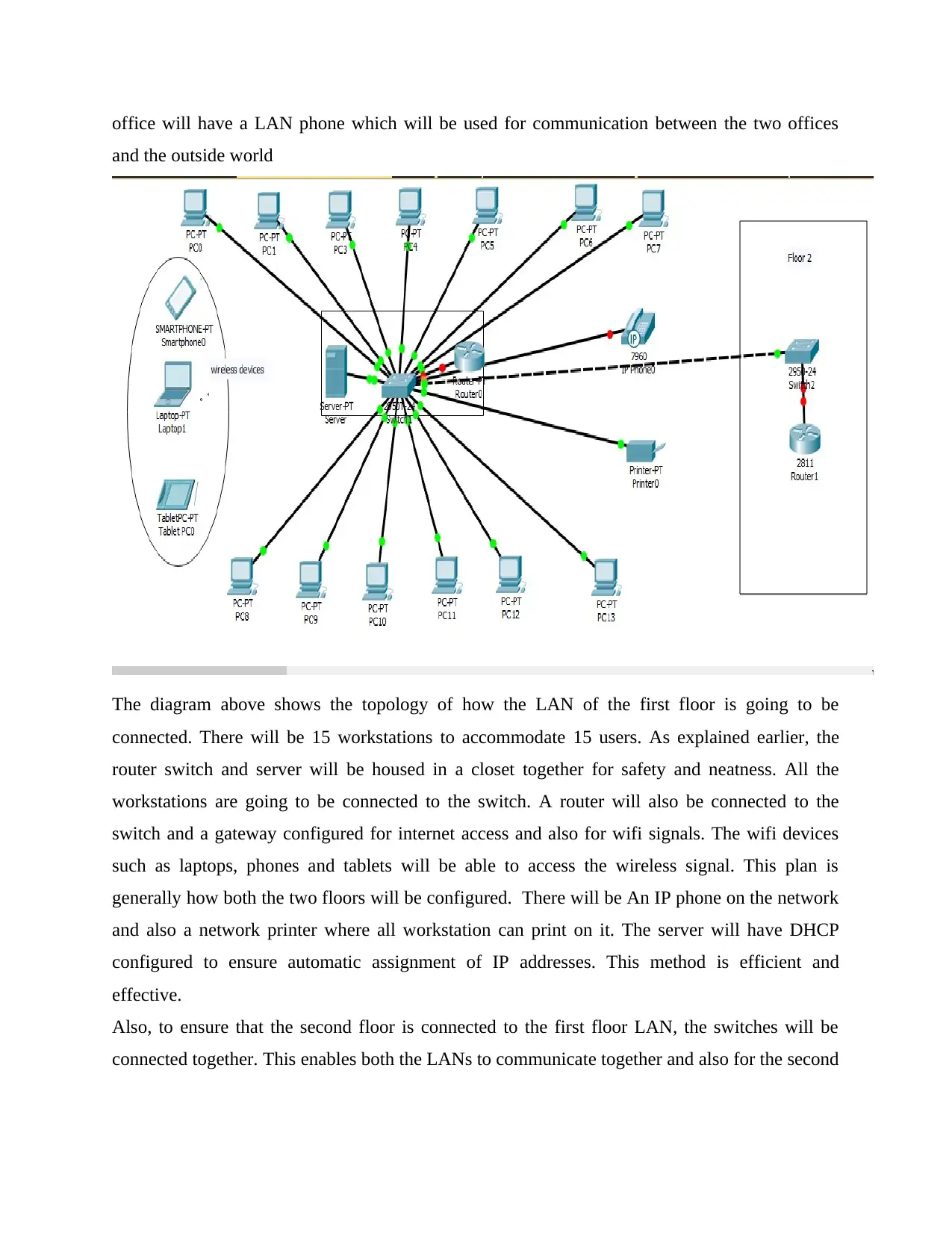
The diagram above shows the topology of how the LAN of the first floor is going to be
connected. There will be 15 workstations to accommodate 15 users. As explained earlier, the
router switch and server will be housed in a closet together for safety and neatness. All the
workstations are going to be connected to the switch. A router will also be connected to the
switch and a gateway configured for internet access and also for wifi signals. The wifi devices
such as laptops, phones and tablets will be able to access the wireless signal. This plan is
generally how both the two floors will be configured. There will be An IP phone on the network
and also a network printer where all workstation can print on it. The server will have DHCP
configured to ensure automatic assignment of IP addresses. This method is efficient and
effective.
Also, to ensure that the second floor is connected to the first floor LAN, the switches will be
connected together. This enables both the LANs to communicate together and also for the second
and the outside world
The diagram above shows the topology of how the LAN of the first floor is going to be
connected. There will be 15 workstations to accommodate 15 users. As explained earlier, the
router switch and server will be housed in a closet together for safety and neatness. All the
workstations are going to be connected to the switch. A router will also be connected to the
switch and a gateway configured for internet access and also for wifi signals. The wifi devices
such as laptops, phones and tablets will be able to access the wireless signal. This plan is
generally how both the two floors will be configured. There will be An IP phone on the network
and also a network printer where all workstation can print on it. The server will have DHCP
configured to ensure automatic assignment of IP addresses. This method is efficient and
effective.
Also, to ensure that the second floor is connected to the first floor LAN, the switches will be
connected together. This enables both the LANs to communicate together and also for the second
Paraphrase This Document
Need a fresh take? Get an instant paraphrase of this document with our AI Paraphraser
floor to access resources from the server. On floor two. A router also will be connected to the
switch to provide wifi signals.
1.4 The Cost for Setting Up
Since it is a simple network for a small office, the budget for this network set up will be
approximately $1500. This will cater for the physical devices and also for the labor incurred
during setting up the network. The budget does not include the office equipment only the devices
needed to setup a working network. There will be a service fee that will be charged after two
weeks for the maintenance of the network. This will ensure that there are minimal problems that
may arise in the network. The following devices and their prices below was accessed from the
amazon website. (“Amazon.com”, n.d.).
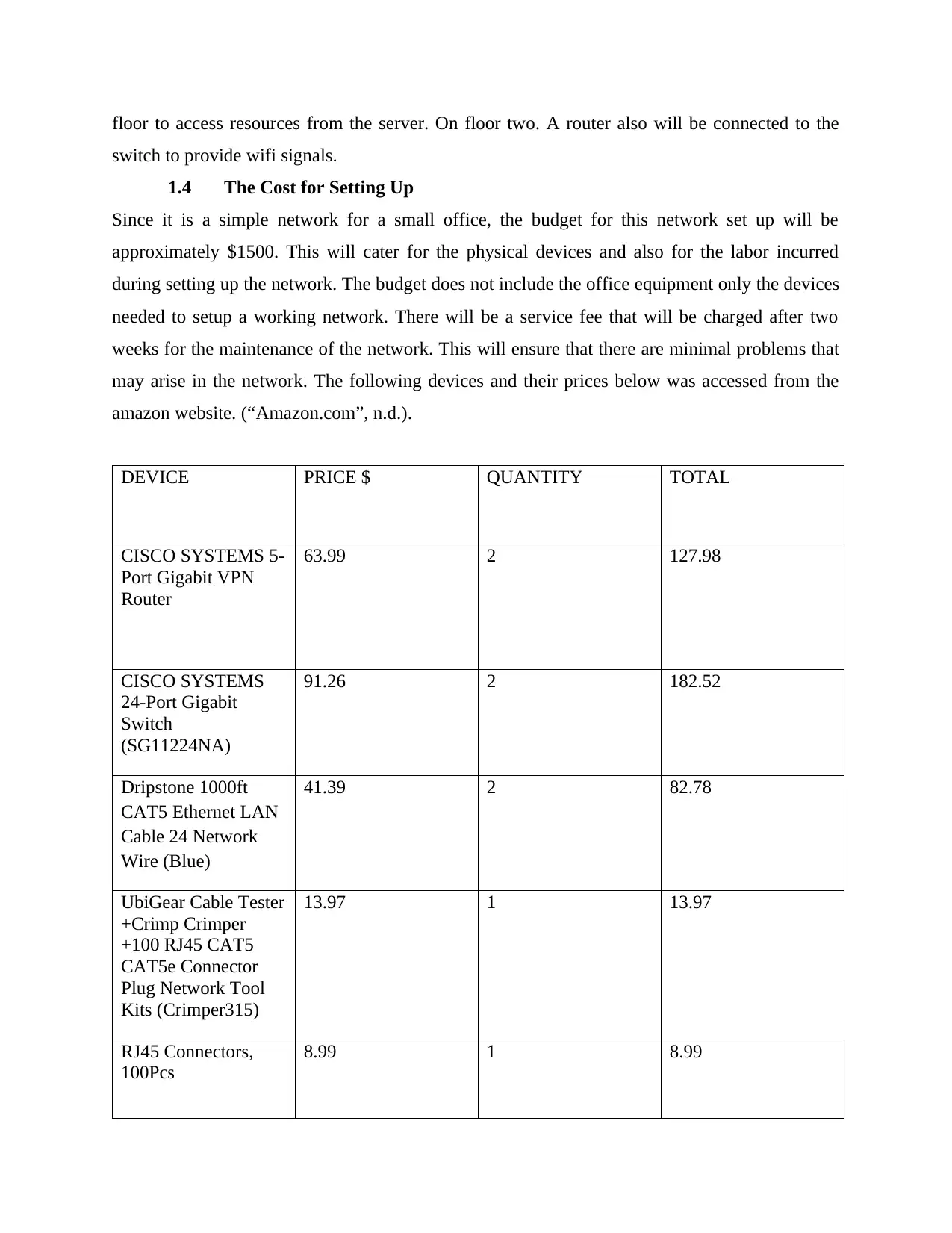
DEVICE PRICE $ QUANTITY TOTAL
CISCO SYSTEMS 5-
Port Gigabit VPN
Router
63.99 2 127.98
CISCO SYSTEMS
24-Port Gigabit
Switch
(SG11224NA)
91.26 2 182.52
Dripstone 1000ft
CAT5 Ethernet LAN
Cable 24 Network
Wire (Blue)
41.39 2 82.78
UbiGear Cable Tester
+Crimp Crimper
+100 RJ45 CAT5
CAT5e Connector
Plug Network Tool
Kits (Crimper315)
13.97 1 13.97
RJ45 Connectors,
100Pcs
8.99 1 8.99
switch to provide wifi signals.
1.4 The Cost for Setting Up
Since it is a simple network for a small office, the budget for this network set up will be
approximately $1500. This will cater for the physical devices and also for the labor incurred
during setting up the network. The budget does not include the office equipment only the devices
needed to setup a working network. There will be a service fee that will be charged after two
weeks for the maintenance of the network. This will ensure that there are minimal problems that
may arise in the network. The following devices and their prices below was accessed from the
amazon website. (“Amazon.com”, n.d.).
DEVICE PRICE $ QUANTITY TOTAL
CISCO SYSTEMS 5-
Port Gigabit VPN
Router
63.99 2 127.98
CISCO SYSTEMS
24-Port Gigabit
Switch
(SG11224NA)
91.26 2 182.52
Dripstone 1000ft
CAT5 Ethernet LAN
Cable 24 Network
Wire (Blue)
41.39 2 82.78
UbiGear Cable Tester
+Crimp Crimper
+100 RJ45 CAT5
CAT5e Connector
Plug Network Tool
Kits (Crimper315)
13.97 1 13.97
RJ45 Connectors,
100Pcs
8.99 1 8.99
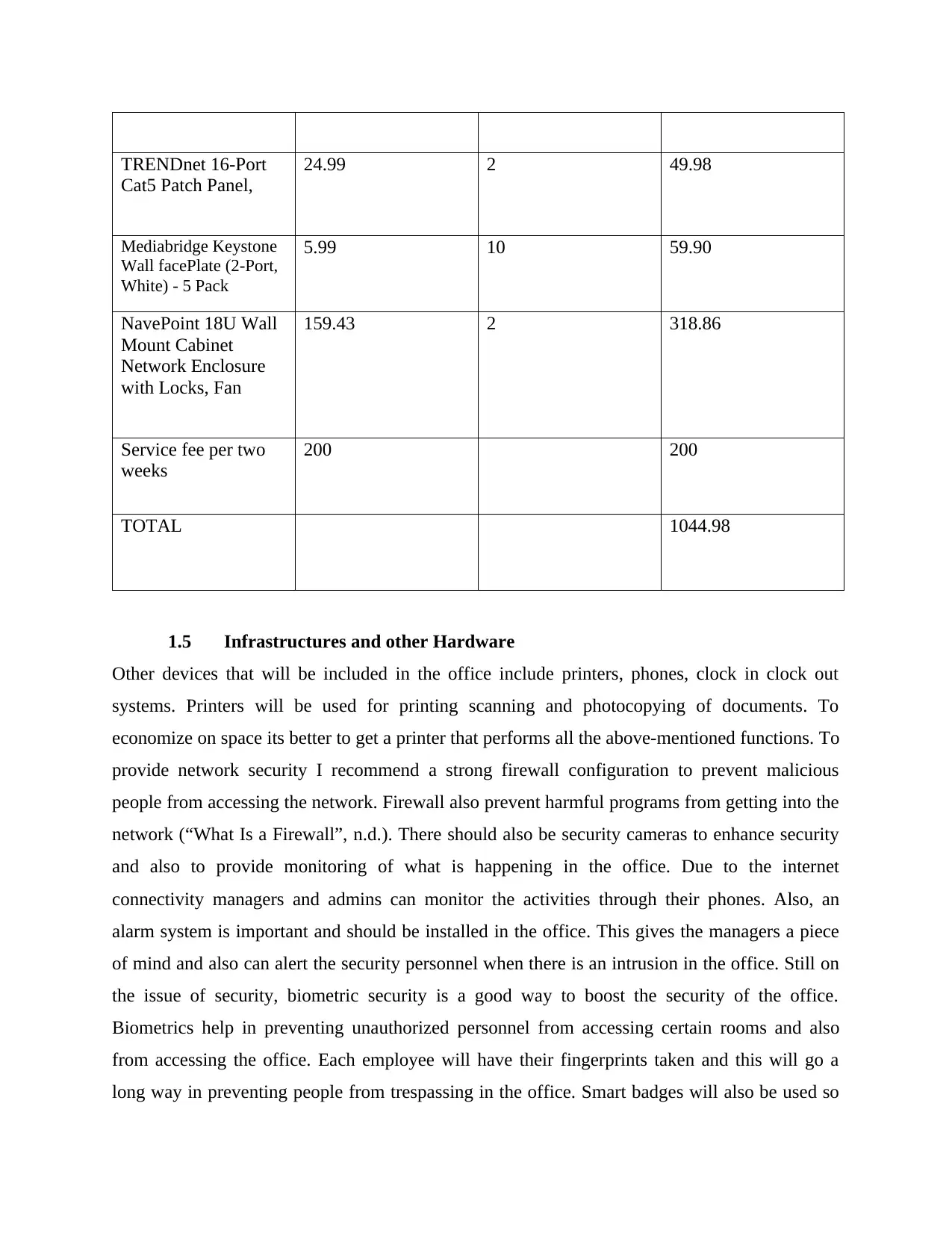
TRENDnet 16-Port
Cat5 Patch Panel,
24.99 2 49.98
Mediabridge Keystone
Wall facePlate (2-Port,
White) - 5 Pack
5.99 10 59.90
NavePoint 18U Wall
Mount Cabinet
Network Enclosure
with Locks, Fan
159.43 2 318.86
Service fee per two
weeks
200 200
TOTAL 1044.98
1.5 Infrastructures and other Hardware
Other devices that will be included in the office include printers, phones, clock in clock out
systems. Printers will be used for printing scanning and photocopying of documents. To
economize on space its better to get a printer that performs all the above-mentioned functions. To
provide network security I recommend a strong firewall configuration to prevent malicious
people from accessing the network. Firewall also prevent harmful programs from getting into the
network (“What Is a Firewall”, n.d.). There should also be security cameras to enhance security
and also to provide monitoring of what is happening in the office. Due to the internet
connectivity managers and admins can monitor the activities through their phones. Also, an
alarm system is important and should be installed in the office. This gives the managers a piece
of mind and also can alert the security personnel when there is an intrusion in the office. Still on
the issue of security, biometric security is a good way to boost the security of the office.
Biometrics help in preventing unauthorized personnel from accessing certain rooms and also
from accessing the office. Each employee will have their fingerprints taken and this will go a
long way in preventing people from trespassing in the office. Smart badges will also be used so
Cat5 Patch Panel,
24.99 2 49.98
Mediabridge Keystone
Wall facePlate (2-Port,
White) - 5 Pack
5.99 10 59.90
NavePoint 18U Wall
Mount Cabinet
Network Enclosure
with Locks, Fan
159.43 2 318.86
Service fee per two
weeks
200 200
TOTAL 1044.98
1.5 Infrastructures and other Hardware
Other devices that will be included in the office include printers, phones, clock in clock out
systems. Printers will be used for printing scanning and photocopying of documents. To
economize on space its better to get a printer that performs all the above-mentioned functions. To
provide network security I recommend a strong firewall configuration to prevent malicious
people from accessing the network. Firewall also prevent harmful programs from getting into the
network (“What Is a Firewall”, n.d.). There should also be security cameras to enhance security
and also to provide monitoring of what is happening in the office. Due to the internet
connectivity managers and admins can monitor the activities through their phones. Also, an
alarm system is important and should be installed in the office. This gives the managers a piece
of mind and also can alert the security personnel when there is an intrusion in the office. Still on
the issue of security, biometric security is a good way to boost the security of the office.
Biometrics help in preventing unauthorized personnel from accessing certain rooms and also
from accessing the office. Each employee will have their fingerprints taken and this will go a
long way in preventing people from trespassing in the office. Smart badges will also be used so
⊘ This is a preview!⊘
Do you want full access?
Subscribe today to unlock all pages.
Trusted by 1+ million students worldwide
as to easily identify each employee and also pride authentication. Other smart devices such as
smart plugs which can act as a remote control for the lighting in the office. The office will also
have a thermostat to regulate the temperature in the office and also to make the room feel
comfortable. The installation of internet access and wifi will go a long way in promoting the use
of smart devices and also enhance the security of the office. Also the office should ensure that
they have a cloud backup storage in case the server fails. This will ensure continuity of the
business because the data can be recovered from the backup cloud server.
1.6 Assumptions
We estimated that the exact number of people in both the offices to be 30. Each worker in the
office will have access to a workstation. The workstations will be divided into two, 15 per each
office. This will ensure equality in the two offices.
The office space is big enough to accommodate 15 workstations and also have adequate space
for expansion as the business continues to grow and expand
We assumed that the business is going to adopt an open office layout whereby all employees will
be in the same room with only minor partitions on their workstations. This kind of office layout
makes the connection of cables easier and also it utilizes minimal space. This will ensure that
there is adequate space to for the workstations.
We assumed that the probability of the switch to fail is less than 1%. Failure of the switch will
make the whole network to go down. To ensure that this does not happen we will install the best
switches that are available and also perform regular maintenance to the network.
We also assumed that the office will require a large bandwidth to handle the data they will be
transmitting across the network. That’s why we used the Gigabit switches to enable them handle
a large flow of data. This will also require them to get a reliable ISP to ensure that the backup of
data to the cloud storage is always ongoing without any interruptions.( “Factors to Consider
When Setting Up LAN”, n.d.)
1.7 Conclusion and Recommendations:
Due to the network topology, the network will be easy to increase it or add another workstation
to it. It will be just a simple creation of making a patch cable and connecting a new device to it.
Also, an increase in the number of workstations will not affect the network in any manner. The
setup is efficient and simple and will enhance communication in the office and also between the
smart plugs which can act as a remote control for the lighting in the office. The office will also
have a thermostat to regulate the temperature in the office and also to make the room feel
comfortable. The installation of internet access and wifi will go a long way in promoting the use
of smart devices and also enhance the security of the office. Also the office should ensure that
they have a cloud backup storage in case the server fails. This will ensure continuity of the
business because the data can be recovered from the backup cloud server.
1.6 Assumptions
We estimated that the exact number of people in both the offices to be 30. Each worker in the
office will have access to a workstation. The workstations will be divided into two, 15 per each
office. This will ensure equality in the two offices.
The office space is big enough to accommodate 15 workstations and also have adequate space
for expansion as the business continues to grow and expand
We assumed that the business is going to adopt an open office layout whereby all employees will
be in the same room with only minor partitions on their workstations. This kind of office layout
makes the connection of cables easier and also it utilizes minimal space. This will ensure that
there is adequate space to for the workstations.
We assumed that the probability of the switch to fail is less than 1%. Failure of the switch will
make the whole network to go down. To ensure that this does not happen we will install the best
switches that are available and also perform regular maintenance to the network.
We also assumed that the office will require a large bandwidth to handle the data they will be
transmitting across the network. That’s why we used the Gigabit switches to enable them handle
a large flow of data. This will also require them to get a reliable ISP to ensure that the backup of
data to the cloud storage is always ongoing without any interruptions.( “Factors to Consider
When Setting Up LAN”, n.d.)
1.7 Conclusion and Recommendations:
Due to the network topology, the network will be easy to increase it or add another workstation
to it. It will be just a simple creation of making a patch cable and connecting a new device to it.
Also, an increase in the number of workstations will not affect the network in any manner. The
setup is efficient and simple and will enhance communication in the office and also between the
Paraphrase This Document
Need a fresh take? Get an instant paraphrase of this document with our AI Paraphraser
two office floors. DHCP assignment of IP addresses is also an effective method since it does not
cause conflict. Another workstation that will be added onto the network will be assigned an IP
address automatically. With the network operating system, it will be easier for the network
admin to monitor and configure the network with ease. The network admin will also configure
services such as DNS and Mail services on the server. Each and everyone on the network will be
able to access these services.
As the business continues to grows, the business might want to create vlans for each department
in the business. This will enhance efficiency and traffic flow in the business. Also, the business
may want to configure a virtual private network (VPN) if it has other branches outside. VPNs
allows an organization to create a secure connection to another network and this ensures that data
is sent securely and in private for that particular organization.
In future the business should add another server to act as a backup in case one fails. Having two
servers is effective since you cannot always rely on the internet to provide cloud storage all the
time. When the internet fails, the business can be sure of getting their data from the local storage
i.e. the backup server.
cause conflict. Another workstation that will be added onto the network will be assigned an IP
address automatically. With the network operating system, it will be easier for the network
admin to monitor and configure the network with ease. The network admin will also configure
services such as DNS and Mail services on the server. Each and everyone on the network will be
able to access these services.
As the business continues to grows, the business might want to create vlans for each department
in the business. This will enhance efficiency and traffic flow in the business. Also, the business
may want to configure a virtual private network (VPN) if it has other branches outside. VPNs
allows an organization to create a secure connection to another network and this ensures that data
is sent securely and in private for that particular organization.
In future the business should add another server to act as a backup in case one fails. Having two
servers is effective since you cannot always rely on the internet to provide cloud storage all the
time. When the internet fails, the business can be sure of getting their data from the local storage
i.e. the backup server.
REFERENCES
(n.d.). Amazon.com: Online Shopping for Electronics, Apparel, Computers, Books, DVDs &
more. Amazon.com: Online Shopping for Electronics, Apparel, Computers, Books, DVDs &
more. Retrieved from http://www.amazon.com/ref=nav_logo
Amazon.com. (n.d.). Retrieved from http://www.amazon.com/stores/page/4B534B8F-96DB-
4A4A-8D37-2BEA9D82C5F6
(n.d.). Cisco - Global Home Page. What Is a Firewall? - Cisco. Retrieved from
http://www.cisco.com/c/en/us/products/security/firewalls/what-is-a-firewall.html
Condit, B. (2014, July 14). 4 Steps to Improve Network Security. Retrieved from
https://www.inc.com/bruce-condit/4-steps-to-improve-network-security.html
Factors to Consider When Setting Up LAN. (n.d.). Retrieved from
https://www.scribd.com/doc/38315145/Factors-to-Consider-When-Setting-Up-LAN
What is Star Topology? (2018, January 24). Retrieved from
https://www.computerhope.com/jargon/s/startopo.htm
What is virtual LAN (VLAN)? - Definition from WhatIs.com. (n.d.). Retrieved from
https://searchnetworking.techtarget.com/definition/virtual-LAN
(n.d.). Amazon.com: Online Shopping for Electronics, Apparel, Computers, Books, DVDs &
more. Amazon.com: Online Shopping for Electronics, Apparel, Computers, Books, DVDs &
more. Retrieved from http://www.amazon.com/ref=nav_logo
Amazon.com. (n.d.). Retrieved from http://www.amazon.com/stores/page/4B534B8F-96DB-
4A4A-8D37-2BEA9D82C5F6
(n.d.). Cisco - Global Home Page. What Is a Firewall? - Cisco. Retrieved from
http://www.cisco.com/c/en/us/products/security/firewalls/what-is-a-firewall.html
Condit, B. (2014, July 14). 4 Steps to Improve Network Security. Retrieved from
https://www.inc.com/bruce-condit/4-steps-to-improve-network-security.html
Factors to Consider When Setting Up LAN. (n.d.). Retrieved from
https://www.scribd.com/doc/38315145/Factors-to-Consider-When-Setting-Up-LAN
What is Star Topology? (2018, January 24). Retrieved from
https://www.computerhope.com/jargon/s/startopo.htm
What is virtual LAN (VLAN)? - Definition from WhatIs.com. (n.d.). Retrieved from
https://searchnetworking.techtarget.com/definition/virtual-LAN
⊘ This is a preview!⊘
Do you want full access?
Subscribe today to unlock all pages.
Trusted by 1+ million students worldwide

1 out of 9


Related Documents


Your All-in-One AI-Powered Toolkit for Academic Success.
+13062052269
info@desklib.com
Available 24*7 on WhatsApp / Email
![[object Object]](/_next/static/media/star-bottom.7253800d.svg)
Unlock your academic potential
Copyright © 2020–2026 A2Z Services. All Rights Reserved. Developed and managed by ZUCOL.