SQL Queries and Data Model for a Music Database System
VerifiedAdded on  2019/10/12
|12
|1272
|203
Homework Assignment
AI Summary
This assignment provides a detailed look at creating and querying a music database using SQL. It begins with the creation of seven tables: Publisher, Genre, Composer, Artist, Songs, Song_sales, and Song_at_youtube. Each table includes specific attributes and primary/foreign key constraints to ensure data integrity. The assignment then provides insert statements to populate these tables with sample data, including artist information, song details, sales records, and genre classifications. Finally, the assignment presents a series of SQL queries designed to retrieve specific information from the database, such as finding artists with multiple songs, identifying songs based on criteria, and calculating the number of songs per publisher. The provided queries cover a range of operations, including joins, aggregations, and filtering, offering a comprehensive example of database design and querying techniques.
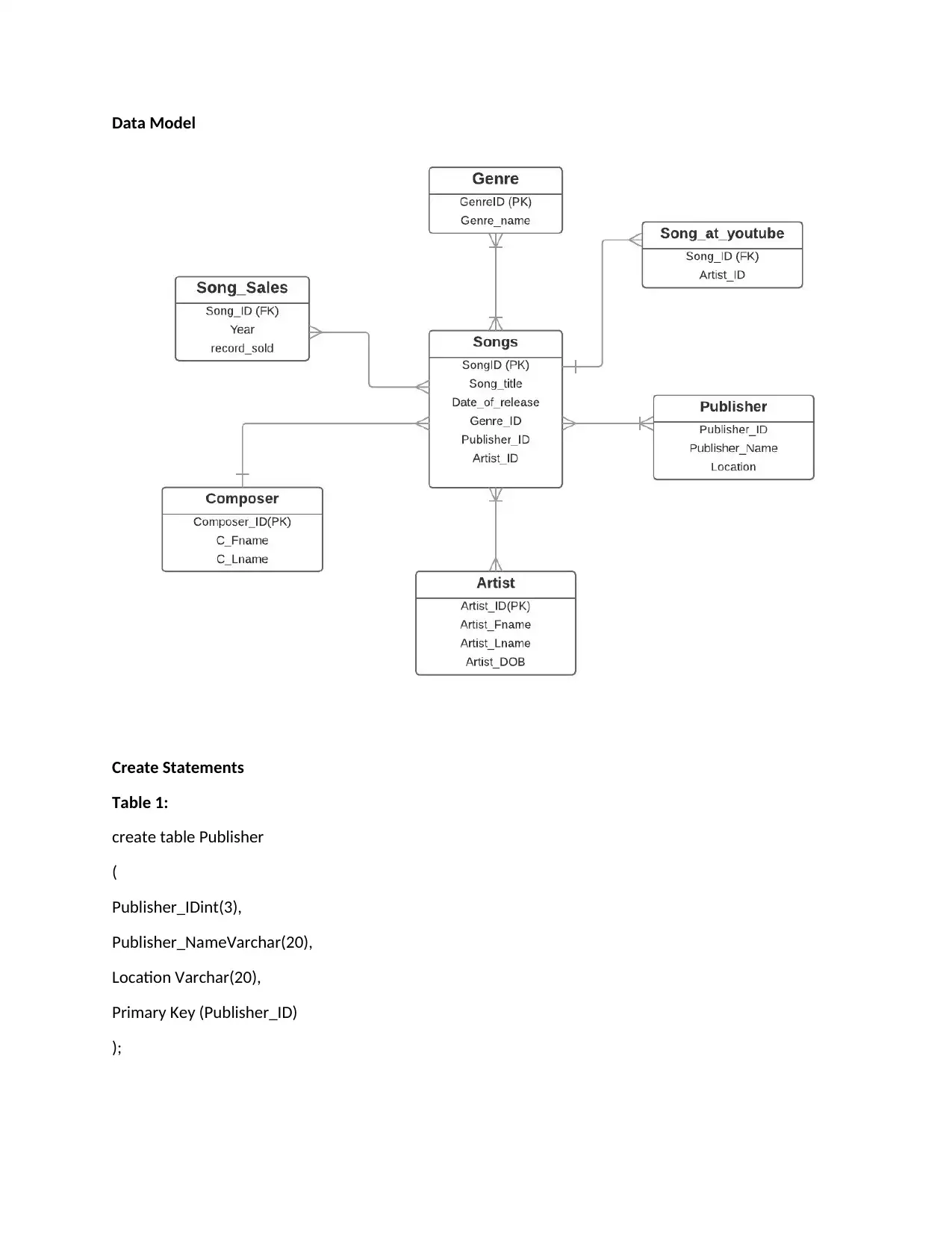
Data Model
Create Statements
Table 1:
create table Publisher
(
Publisher_IDint(3),
Publisher_NameVarchar(20),
Location Varchar(20),
Primary Key (Publisher_ID)
);
Create Statements
Table 1:
create table Publisher
(
Publisher_IDint(3),
Publisher_NameVarchar(20),
Location Varchar(20),
Primary Key (Publisher_ID)
);
Paraphrase This Document
Need a fresh take? Get an instant paraphrase of this document with our AI Paraphraser

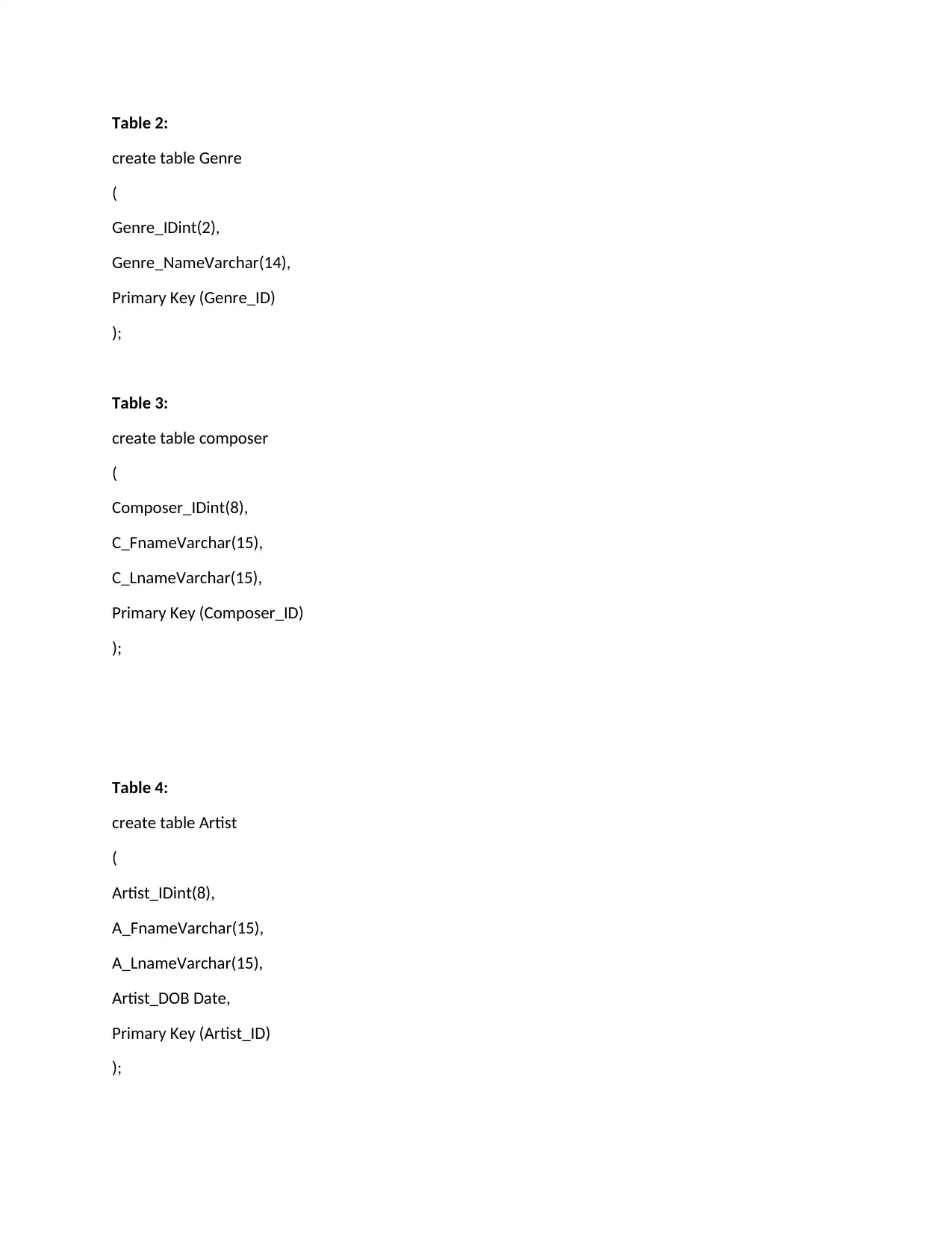
Table 2:
create table Genre
(
Genre_IDint(2),
Genre_NameVarchar(14),
Primary Key (Genre_ID)
);
Table 3:
create table composer
(
Composer_IDint(8),
C_FnameVarchar(15),
C_LnameVarchar(15),
Primary Key (Composer_ID)
);
Table 4:
create table Artist
(
Artist_IDint(8),
A_FnameVarchar(15),
A_LnameVarchar(15),
Artist_DOB Date,
Primary Key (Artist_ID)
);
create table Genre
(
Genre_IDint(2),
Genre_NameVarchar(14),
Primary Key (Genre_ID)
);
Table 3:
create table composer
(
Composer_IDint(8),
C_FnameVarchar(15),
C_LnameVarchar(15),
Primary Key (Composer_ID)
);
Table 4:
create table Artist
(
Artist_IDint(8),
A_FnameVarchar(15),
A_LnameVarchar(15),
Artist_DOB Date,
Primary Key (Artist_ID)
);

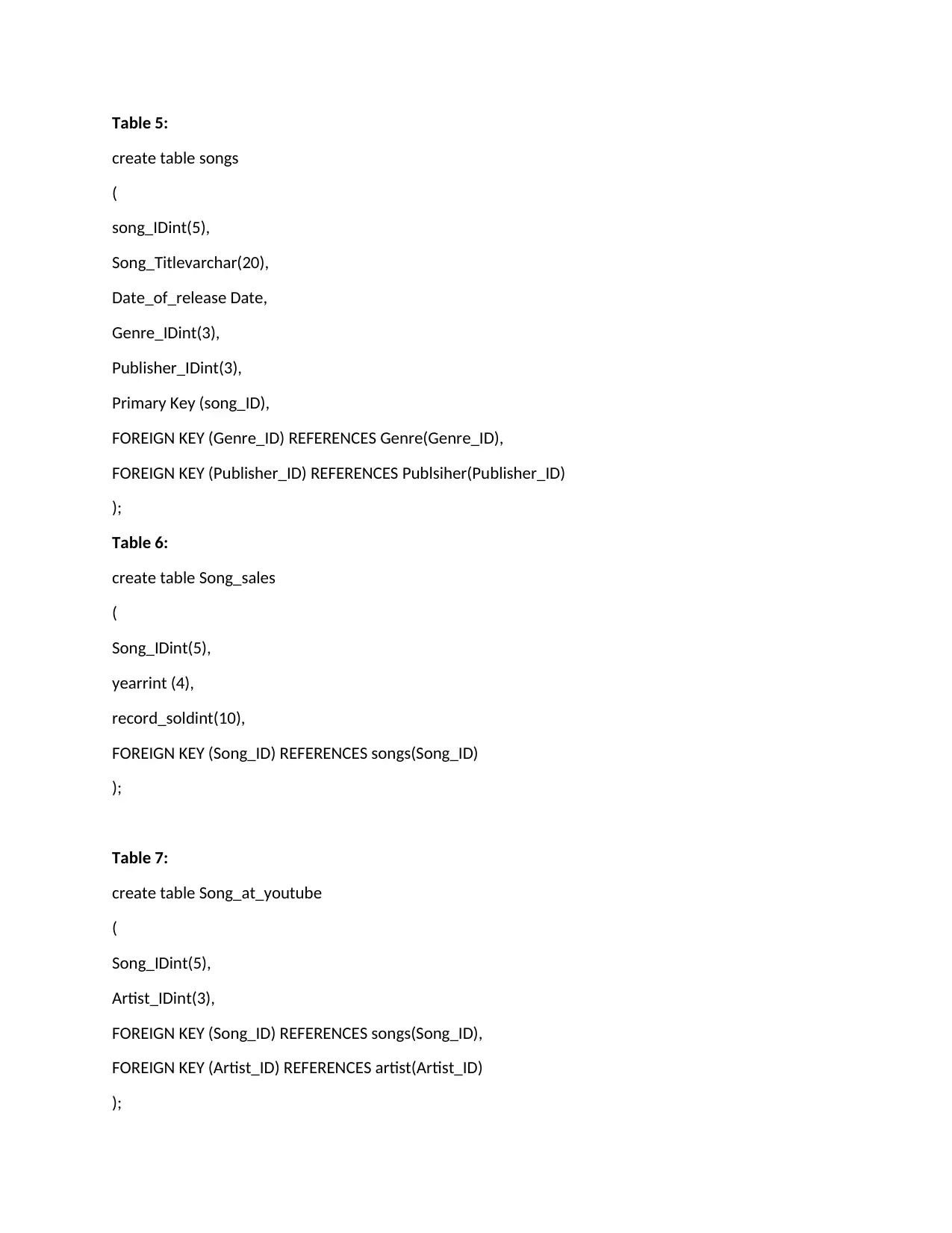
Table 5:
create table songs
(
song_IDint(5),
Song_Titlevarchar(20),
Date_of_release Date,
Genre_IDint(3),
Publisher_IDint(3),
Primary Key (song_ID),
FOREIGN KEY (Genre_ID) REFERENCES Genre(Genre_ID),
FOREIGN KEY (Publisher_ID) REFERENCES Publsiher(Publisher_ID)
);
Table 6:
create table Song_sales
(
Song_IDint(5),
yearrint (4),
record_soldint(10),
FOREIGN KEY (Song_ID) REFERENCES songs(Song_ID)
);
Table 7:
create table Song_at_youtube
(
Song_IDint(5),
Artist_IDint(3),
FOREIGN KEY (Song_ID) REFERENCES songs(Song_ID),
FOREIGN KEY (Artist_ID) REFERENCES artist(Artist_ID)
);
create table songs
(
song_IDint(5),
Song_Titlevarchar(20),
Date_of_release Date,
Genre_IDint(3),
Publisher_IDint(3),
Primary Key (song_ID),
FOREIGN KEY (Genre_ID) REFERENCES Genre(Genre_ID),
FOREIGN KEY (Publisher_ID) REFERENCES Publsiher(Publisher_ID)
);
Table 6:
create table Song_sales
(
Song_IDint(5),
yearrint (4),
record_soldint(10),
FOREIGN KEY (Song_ID) REFERENCES songs(Song_ID)
);
Table 7:
create table Song_at_youtube
(
Song_IDint(5),
Artist_IDint(3),
FOREIGN KEY (Song_ID) REFERENCES songs(Song_ID),
FOREIGN KEY (Artist_ID) REFERENCES artist(Artist_ID)
);
⊘ This is a preview!⊘
Do you want full access?
Subscribe today to unlock all pages.

Trusted by 1+ million students worldwide

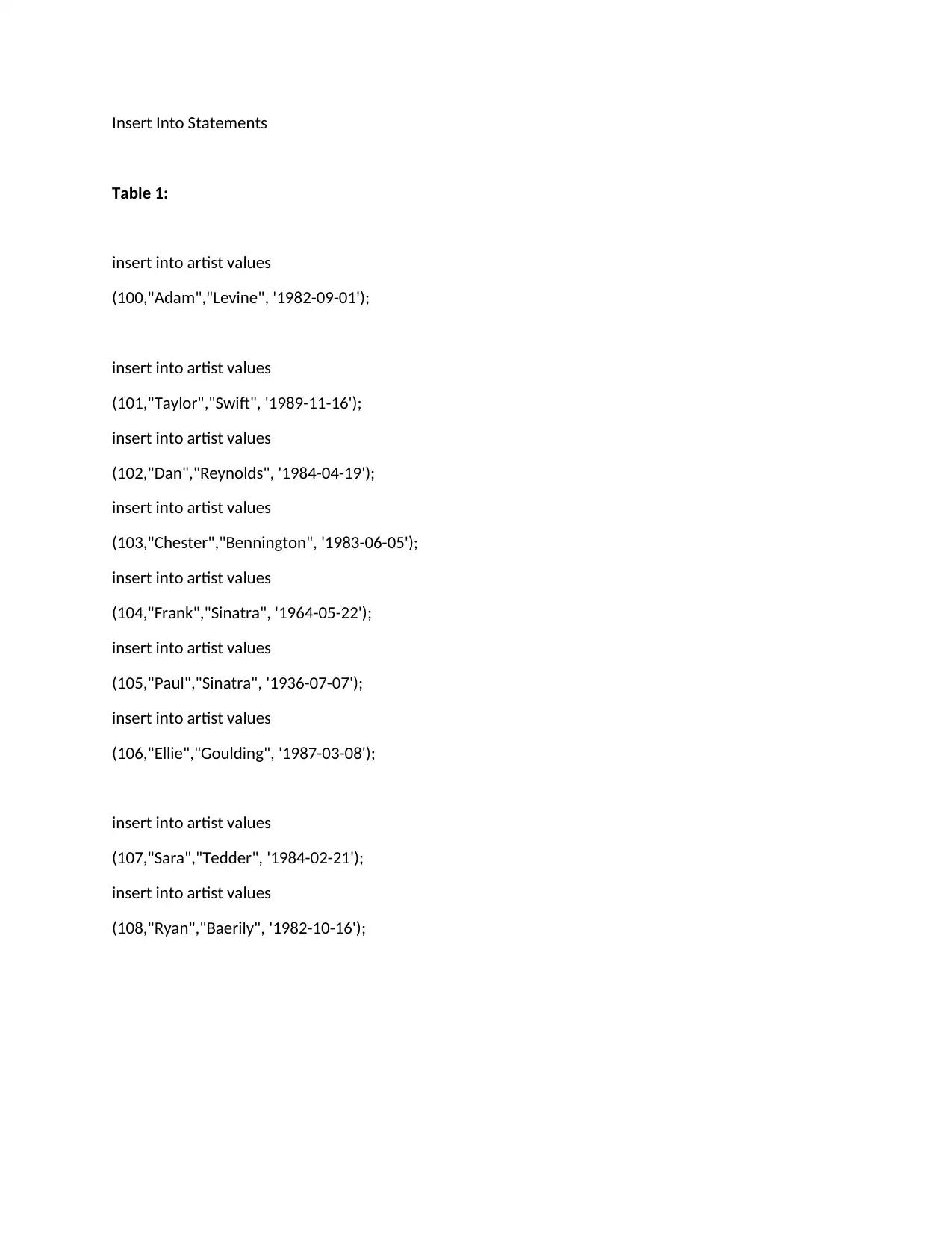
Insert Into Statements
Table 1:
insert into artist values
(100,"Adam","Levine", '1982-09-01');
insert into artist values
(101,"Taylor","Swift", '1989-11-16');
insert into artist values
(102,"Dan","Reynolds", '1984-04-19');
insert into artist values
(103,"Chester","Bennington", '1983-06-05');
insert into artist values
(104,"Frank","Sinatra", '1964-05-22');
insert into artist values
(105,"Paul","Sinatra", '1936-07-07');
insert into artist values
(106,"Ellie","Goulding", '1987-03-08');
insert into artist values
(107,"Sara","Tedder", '1984-02-21');
insert into artist values
(108,"Ryan","Baerily", '1982-10-16');
Table 1:
insert into artist values
(100,"Adam","Levine", '1982-09-01');
insert into artist values
(101,"Taylor","Swift", '1989-11-16');
insert into artist values
(102,"Dan","Reynolds", '1984-04-19');
insert into artist values
(103,"Chester","Bennington", '1983-06-05');
insert into artist values
(104,"Frank","Sinatra", '1964-05-22');
insert into artist values
(105,"Paul","Sinatra", '1936-07-07');
insert into artist values
(106,"Ellie","Goulding", '1987-03-08');
insert into artist values
(107,"Sara","Tedder", '1984-02-21');
insert into artist values
(108,"Ryan","Baerily", '1982-10-16');
Paraphrase This Document
Need a fresh take? Get an instant paraphrase of this document with our AI Paraphraser

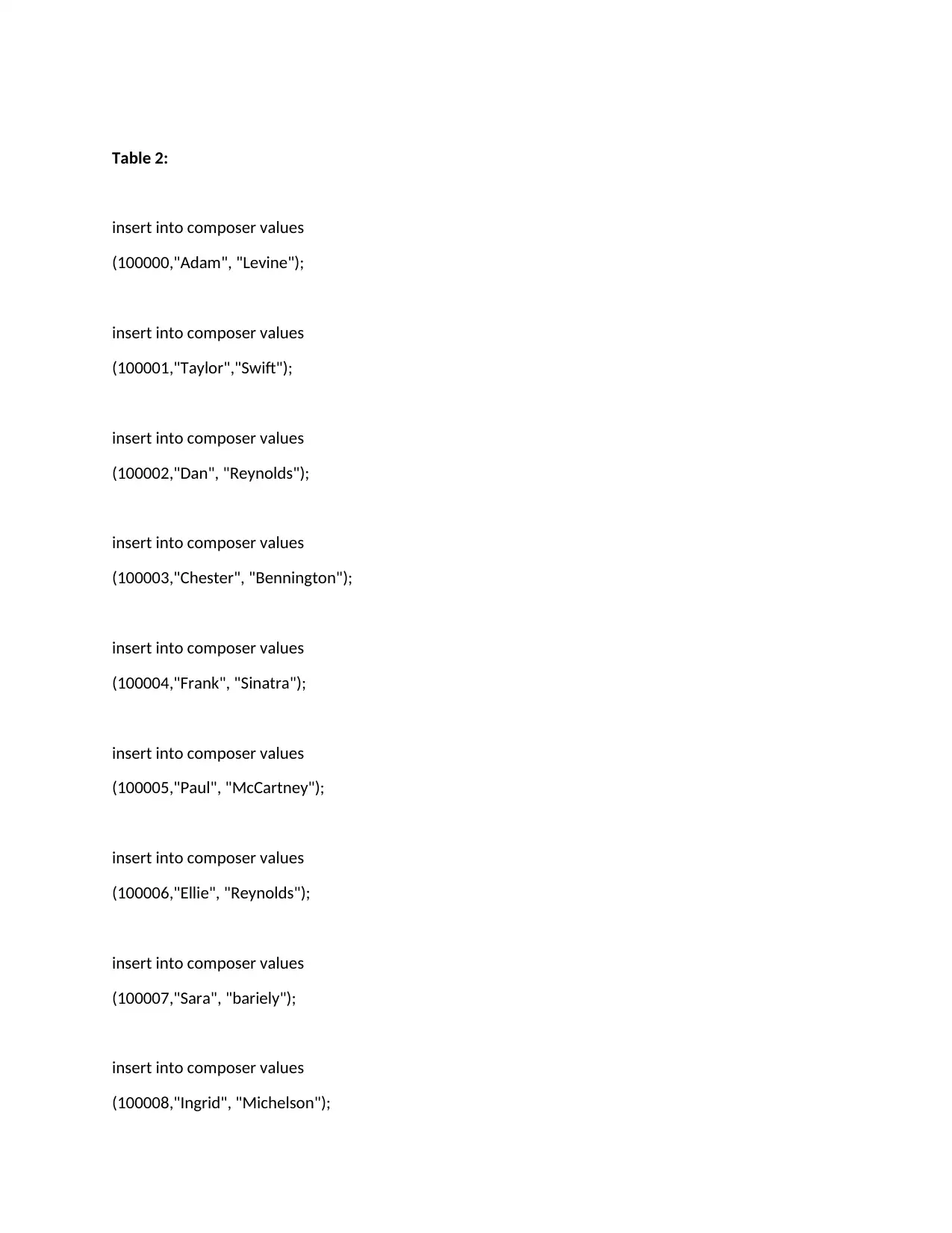
Table 2:
insert into composer values
(100000,"Adam", "Levine");
insert into composer values
(100001,"Taylor","Swift");
insert into composer values
(100002,"Dan", "Reynolds");
insert into composer values
(100003,"Chester", "Bennington");
insert into composer values
(100004,"Frank", "Sinatra");
insert into composer values
(100005,"Paul", "McCartney");
insert into composer values
(100006,"Ellie", "Reynolds");
insert into composer values
(100007,"Sara", "bariely");
insert into composer values
(100008,"Ingrid", "Michelson");
insert into composer values
(100000,"Adam", "Levine");
insert into composer values
(100001,"Taylor","Swift");
insert into composer values
(100002,"Dan", "Reynolds");
insert into composer values
(100003,"Chester", "Bennington");
insert into composer values
(100004,"Frank", "Sinatra");
insert into composer values
(100005,"Paul", "McCartney");
insert into composer values
(100006,"Ellie", "Reynolds");
insert into composer values
(100007,"Sara", "bariely");
insert into composer values
(100008,"Ingrid", "Michelson");

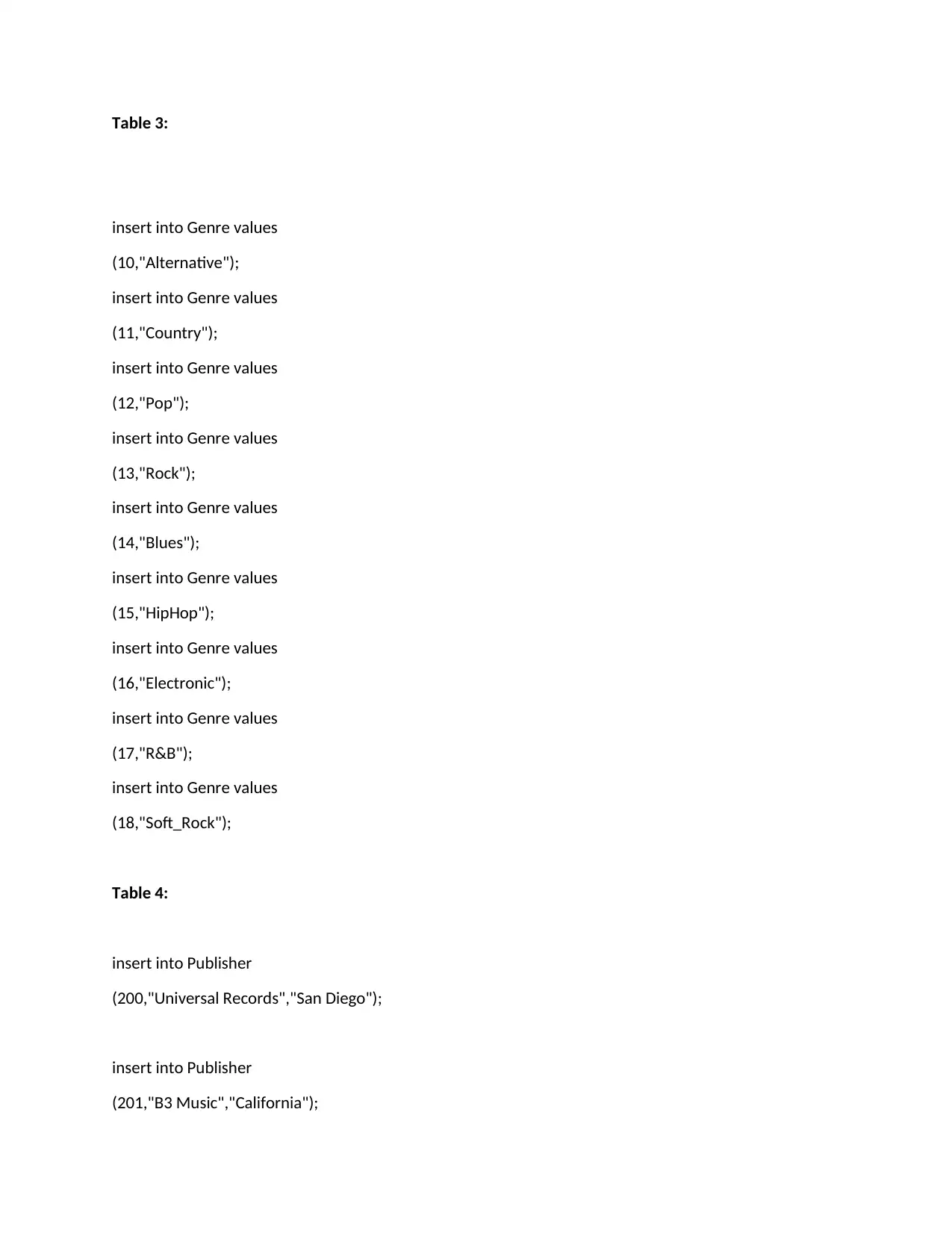
Table 3:
insert into Genre values
(10,"Alternative");
insert into Genre values
(11,"Country");
insert into Genre values
(12,"Pop");
insert into Genre values
(13,"Rock");
insert into Genre values
(14,"Blues");
insert into Genre values
(15,"HipHop");
insert into Genre values
(16,"Electronic");
insert into Genre values
(17,"R&B");
insert into Genre values
(18,"Soft_Rock");
Table 4:
insert into Publisher
(200,"Universal Records","San Diego");
insert into Publisher
(201,"B3 Music","California");
insert into Genre values
(10,"Alternative");
insert into Genre values
(11,"Country");
insert into Genre values
(12,"Pop");
insert into Genre values
(13,"Rock");
insert into Genre values
(14,"Blues");
insert into Genre values
(15,"HipHop");
insert into Genre values
(16,"Electronic");
insert into Genre values
(17,"R&B");
insert into Genre values
(18,"Soft_Rock");
Table 4:
insert into Publisher
(200,"Universal Records","San Diego");
insert into Publisher
(201,"B3 Music","California");
⊘ This is a preview!⊘
Do you want full access?
Subscribe today to unlock all pages.

Trusted by 1+ million students worldwide

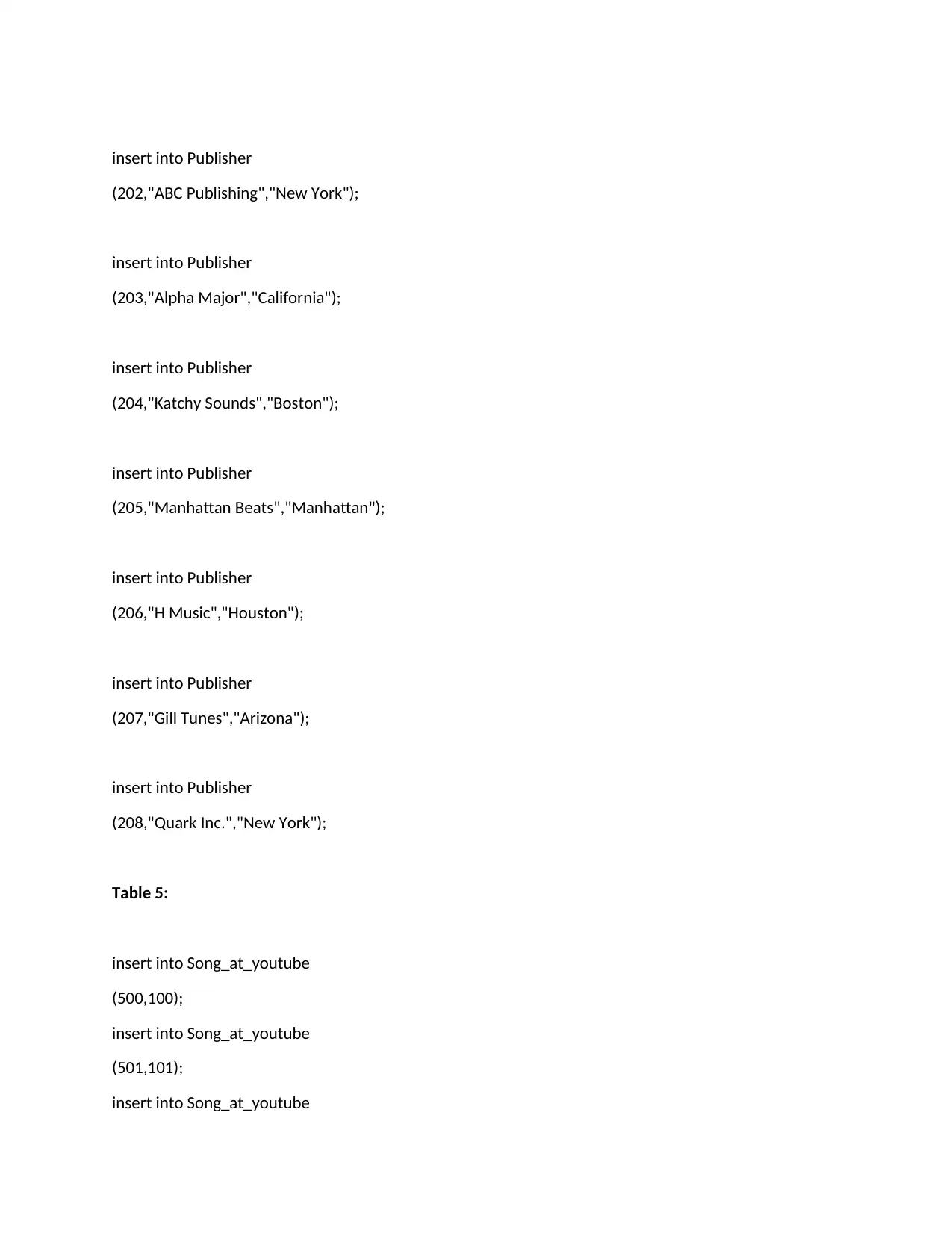
insert into Publisher
(202,"ABC Publishing","New York");
insert into Publisher
(203,"Alpha Major","California");
insert into Publisher
(204,"Katchy Sounds","Boston");
insert into Publisher
(205,"Manhattan Beats","Manhattan");
insert into Publisher
(206,"H Music","Houston");
insert into Publisher
(207,"Gill Tunes","Arizona");
insert into Publisher
(208,"Quark Inc.","New York");
Table 5:
insert into Song_at_youtube
(500,100);
insert into Song_at_youtube
(501,101);
insert into Song_at_youtube
(202,"ABC Publishing","New York");
insert into Publisher
(203,"Alpha Major","California");
insert into Publisher
(204,"Katchy Sounds","Boston");
insert into Publisher
(205,"Manhattan Beats","Manhattan");
insert into Publisher
(206,"H Music","Houston");
insert into Publisher
(207,"Gill Tunes","Arizona");
insert into Publisher
(208,"Quark Inc.","New York");
Table 5:
insert into Song_at_youtube
(500,100);
insert into Song_at_youtube
(501,101);
insert into Song_at_youtube
Paraphrase This Document
Need a fresh take? Get an instant paraphrase of this document with our AI Paraphraser

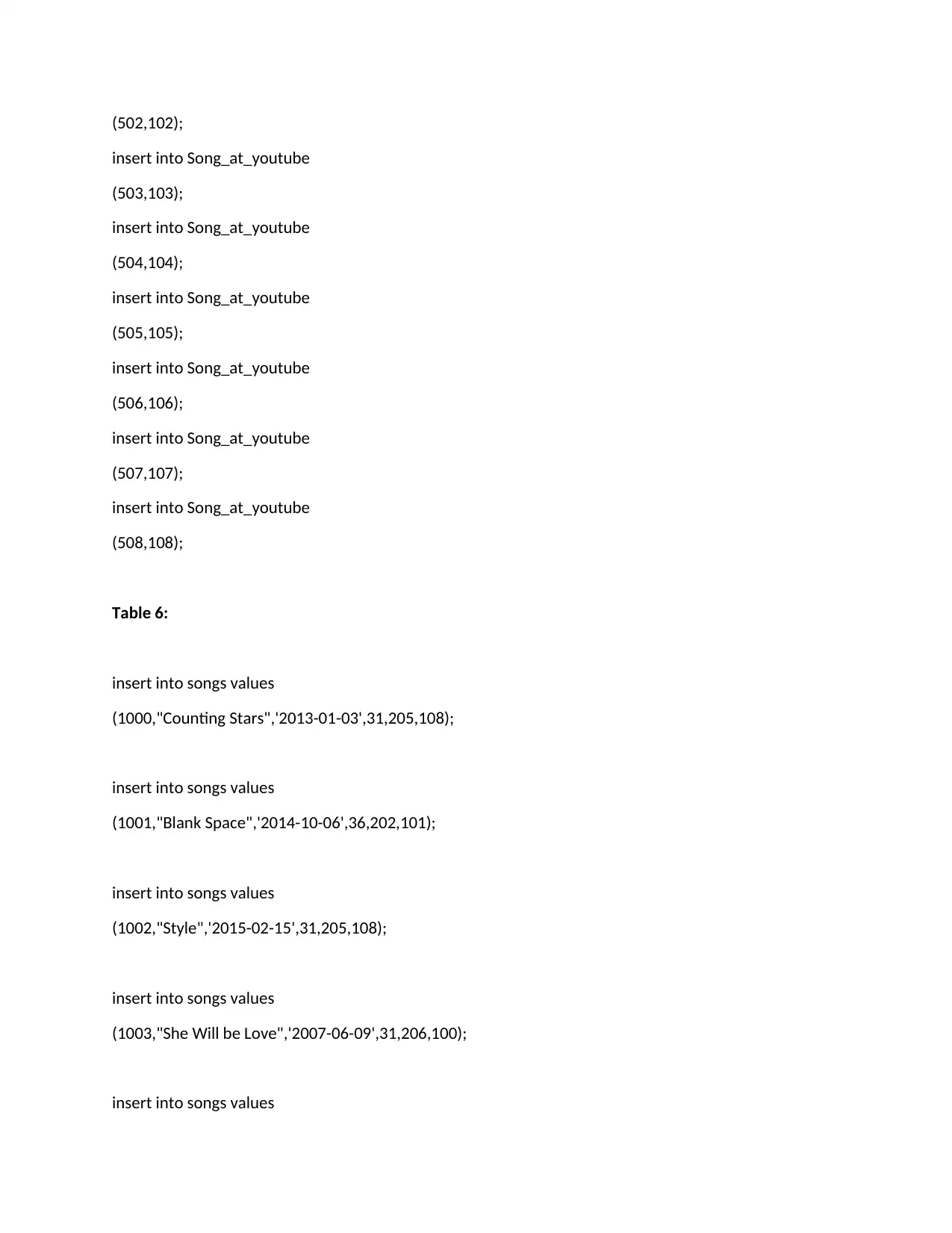
(502,102);
insert into Song_at_youtube
(503,103);
insert into Song_at_youtube
(504,104);
insert into Song_at_youtube
(505,105);
insert into Song_at_youtube
(506,106);
insert into Song_at_youtube
(507,107);
insert into Song_at_youtube
(508,108);
Table 6:
insert into songs values
(1000,"Counting Stars",'2013-01-03',31,205,108);
insert into songs values
(1001,"Blank Space",'2014-10-06',36,202,101);
insert into songs values
(1002,"Style",'2015-02-15',31,205,108);
insert into songs values
(1003,"She Will be Love",'2007-06-09',31,206,100);
insert into songs values
insert into Song_at_youtube
(503,103);
insert into Song_at_youtube
(504,104);
insert into Song_at_youtube
(505,105);
insert into Song_at_youtube
(506,106);
insert into Song_at_youtube
(507,107);
insert into Song_at_youtube
(508,108);
Table 6:
insert into songs values
(1000,"Counting Stars",'2013-01-03',31,205,108);
insert into songs values
(1001,"Blank Space",'2014-10-06',36,202,101);
insert into songs values
(1002,"Style",'2015-02-15',31,205,108);
insert into songs values
(1003,"She Will be Love",'2007-06-09',31,206,100);
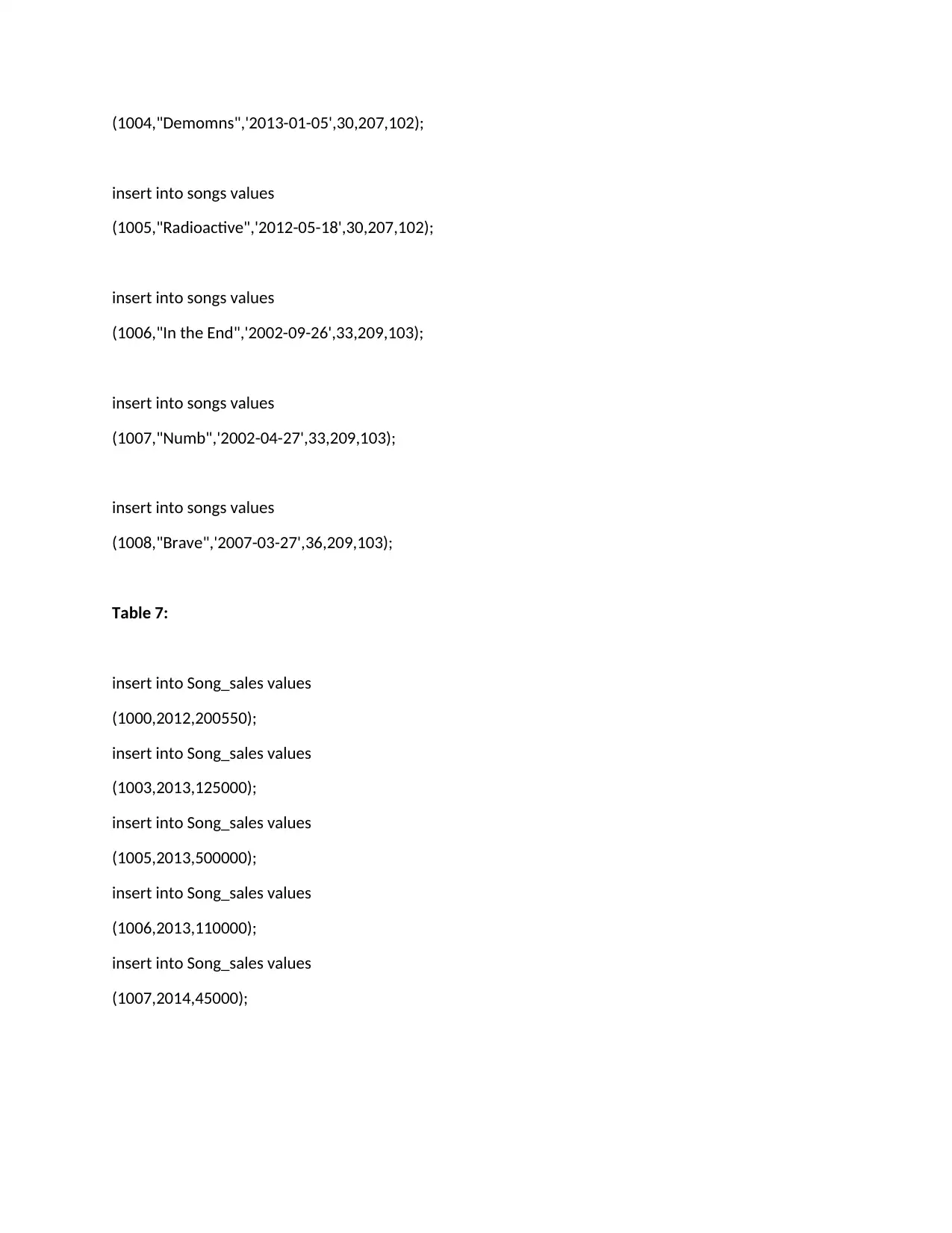
insert into songs values

(1004,"Demomns",'2013-01-05',30,207,102);
insert into songs values
(1005,"Radioactive",'2012-05-18',30,207,102);
insert into songs values
(1006,"In the End",'2002-09-26',33,209,103);
insert into songs values
(1007,"Numb",'2002-04-27',33,209,103);
insert into songs values
(1008,"Brave",'2007-03-27',36,209,103);
Table 7:
insert into Song_sales values
(1000,2012,200550);
insert into Song_sales values
(1003,2013,125000);
insert into Song_sales values
(1005,2013,500000);
insert into Song_sales values
(1006,2013,110000);
insert into Song_sales values
(1007,2014,45000);
insert into songs values
(1005,"Radioactive",'2012-05-18',30,207,102);
insert into songs values
(1006,"In the End",'2002-09-26',33,209,103);
insert into songs values
(1007,"Numb",'2002-04-27',33,209,103);
insert into songs values
(1008,"Brave",'2007-03-27',36,209,103);
Table 7:
insert into Song_sales values
(1000,2012,200550);
insert into Song_sales values
(1003,2013,125000);
insert into Song_sales values
(1005,2013,500000);
insert into Song_sales values
(1006,2013,110000);
insert into Song_sales values
(1007,2014,45000);
⊘ This is a preview!⊘
Do you want full access?
Subscribe today to unlock all pages.

Trusted by 1+ million students worldwide

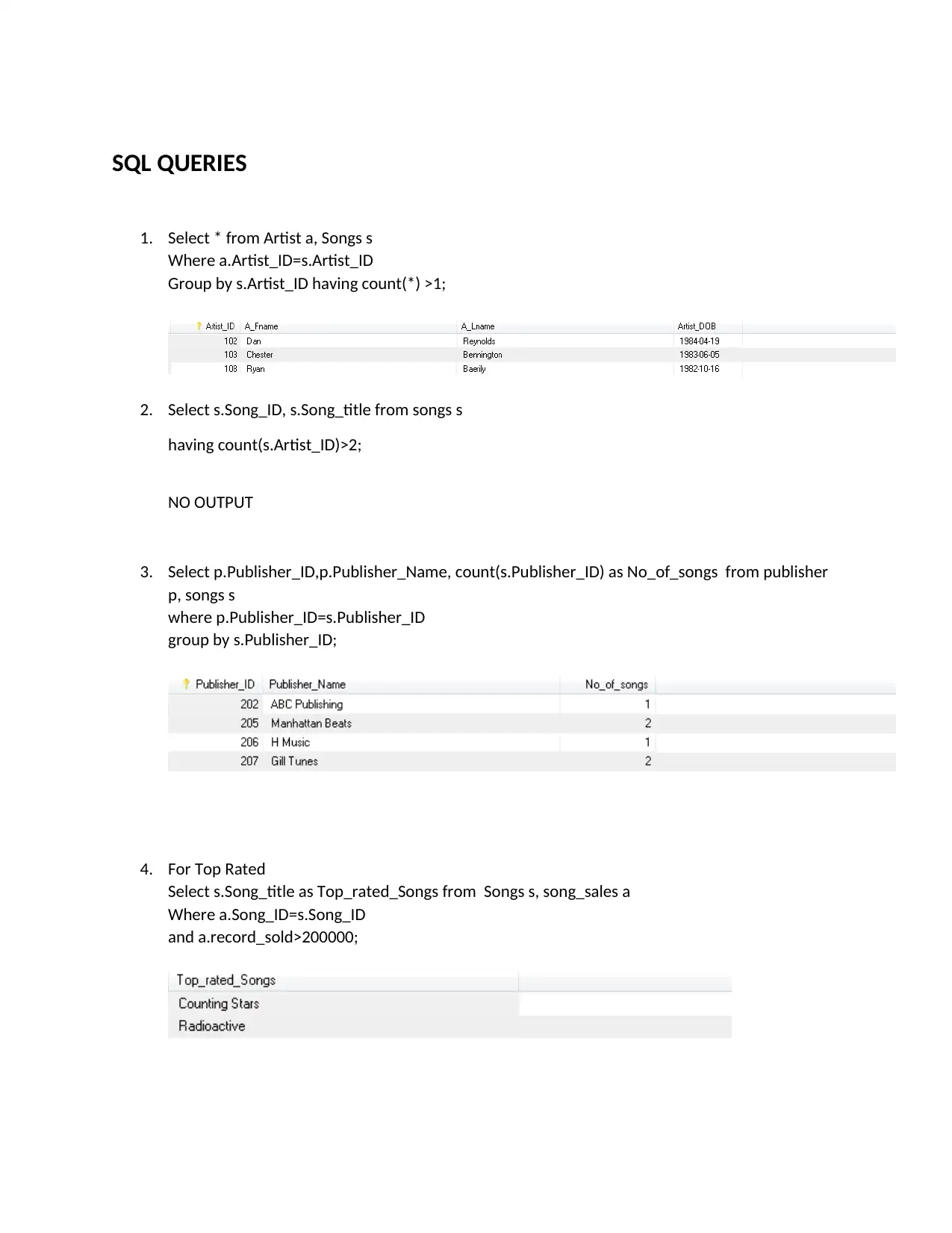
SQL QUERIES
1. Select * from Artist a, Songs s
Where a.Artist_ID=s.Artist_ID
Group by s.Artist_ID having count(*) >1;
2. Select s.Song_ID, s.Song_title from songs s
having count(s.Artist_ID)>2;
NO OUTPUT
3. Select p.Publisher_ID,p.Publisher_Name, count(s.Publisher_ID) as No_of_songs from publisher
p, songs s
where p.Publisher_ID=s.Publisher_ID
group by s.Publisher_ID;
4. For Top Rated
Select s.Song_title as Top_rated_Songs from Songs s, song_sales a
Where a.Song_ID=s.Song_ID
and a.record_sold>200000;
1. Select * from Artist a, Songs s
Where a.Artist_ID=s.Artist_ID
Group by s.Artist_ID having count(*) >1;
2. Select s.Song_ID, s.Song_title from songs s
having count(s.Artist_ID)>2;
NO OUTPUT
3. Select p.Publisher_ID,p.Publisher_Name, count(s.Publisher_ID) as No_of_songs from publisher
p, songs s
where p.Publisher_ID=s.Publisher_ID
group by s.Publisher_ID;
4. For Top Rated
Select s.Song_title as Top_rated_Songs from Songs s, song_sales a
Where a.Song_ID=s.Song_ID
and a.record_sold>200000;
Paraphrase This Document
Need a fresh take? Get an instant paraphrase of this document with our AI Paraphraser

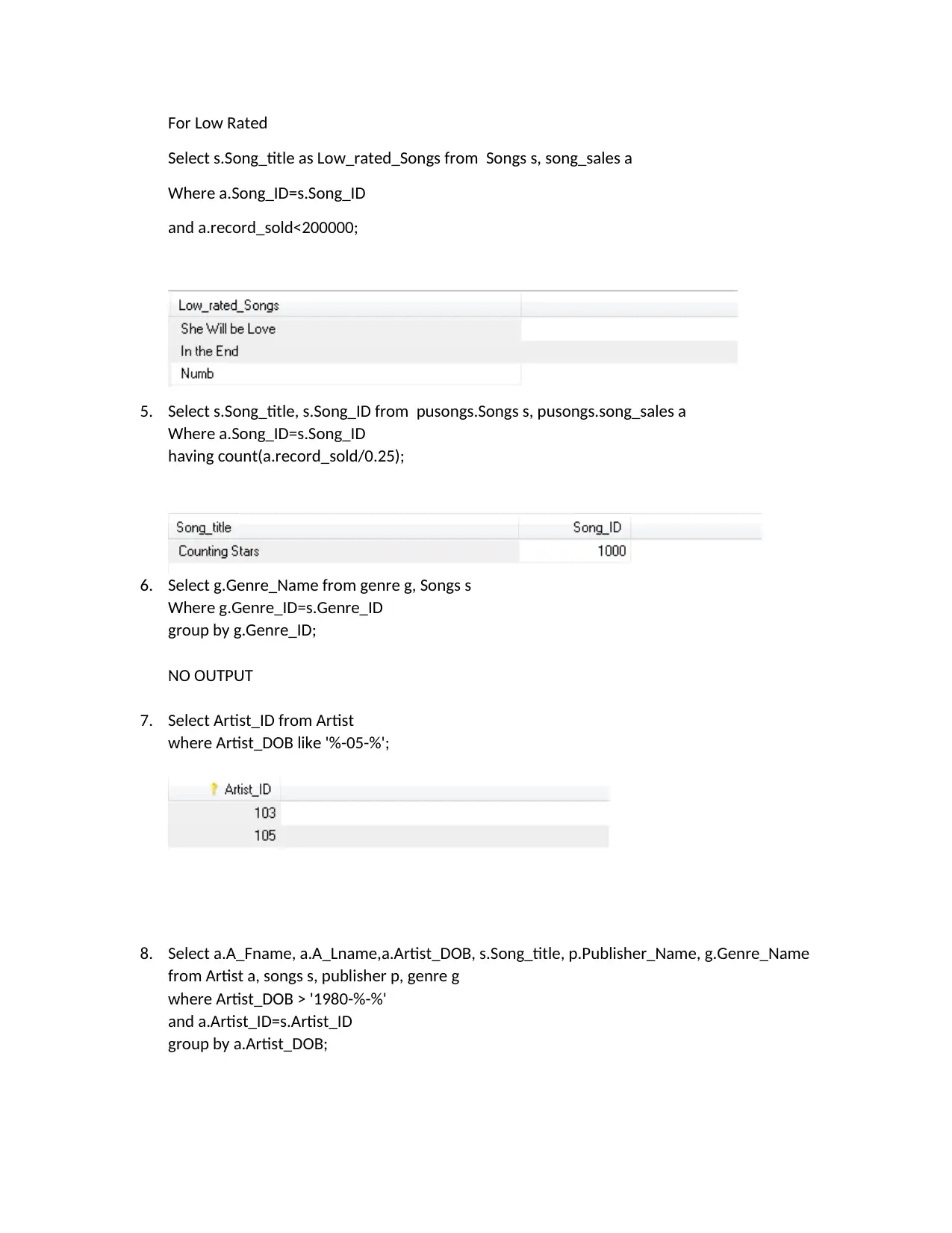
For Low Rated
Select s.Song_title as Low_rated_Songs from Songs s, song_sales a
Where a.Song_ID=s.Song_ID
and a.record_sold<200000;
5. Select s.Song_title, s.Song_ID from pusongs.Songs s, pusongs.song_sales a
Where a.Song_ID=s.Song_ID
having count(a.record_sold/0.25);
6. Select g.Genre_Name from genre g, Songs s
Where g.Genre_ID=s.Genre_ID
group by g.Genre_ID;
NO OUTPUT
7. Select Artist_ID from Artist
where Artist_DOB like '%-05-%';
8. Select a.A_Fname, a.A_Lname,a.Artist_DOB, s.Song_title, p.Publisher_Name, g.Genre_Name
from Artist a, songs s, publisher p, genre g
where Artist_DOB > '1980-%-%'
and a.Artist_ID=s.Artist_ID
group by a.Artist_DOB;
Select s.Song_title as Low_rated_Songs from Songs s, song_sales a
Where a.Song_ID=s.Song_ID
and a.record_sold<200000;
5. Select s.Song_title, s.Song_ID from pusongs.Songs s, pusongs.song_sales a
Where a.Song_ID=s.Song_ID
having count(a.record_sold/0.25);
6. Select g.Genre_Name from genre g, Songs s
Where g.Genre_ID=s.Genre_ID
group by g.Genre_ID;
NO OUTPUT
7. Select Artist_ID from Artist
where Artist_DOB like '%-05-%';
8. Select a.A_Fname, a.A_Lname,a.Artist_DOB, s.Song_title, p.Publisher_Name, g.Genre_Name
from Artist a, songs s, publisher p, genre g
where Artist_DOB > '1980-%-%'
and a.Artist_ID=s.Artist_ID
group by a.Artist_DOB;

⊘ This is a preview!⊘
Do you want full access?
Subscribe today to unlock all pages.

Trusted by 1+ million students worldwide
1 out of 12
Your All-in-One AI-Powered Toolkit for Academic Success.
 +13062052269
info@desklib.com
Available 24*7 on WhatsApp / Email
Unlock your academic potential
Copyright © 2020–2026 A2Z Services. All Rights Reserved. Developed and managed by ZUCOL.