CSC3412 Assignment 1: System Administration Tasks, Semester 1, 2020

Verified

Added on  2022/09/15

|9
|1323
|18
Homework Assignment
AI Summary
This assignment solution addresses three key areas relevant to system administration: Git, PAM (Pluggable Authentication Modules), and Syncthing. The Git section describes version control systems, highlighting Git's features, workflow, and advantages over other systems like SVN and Mercurial. The PAM module section explains PAM's role in Linux authentication, detailing its service modules, control flags, and how it integrates with various services. Finally, the Syncthing section focuses on the file synchronization application, outlining its features, installation, configuration, and security considerations, emphasizing its ability to securely transfer files between machines. The assignment solution demonstrates practical knowledge of these essential system administration tools and concepts.
Document Page
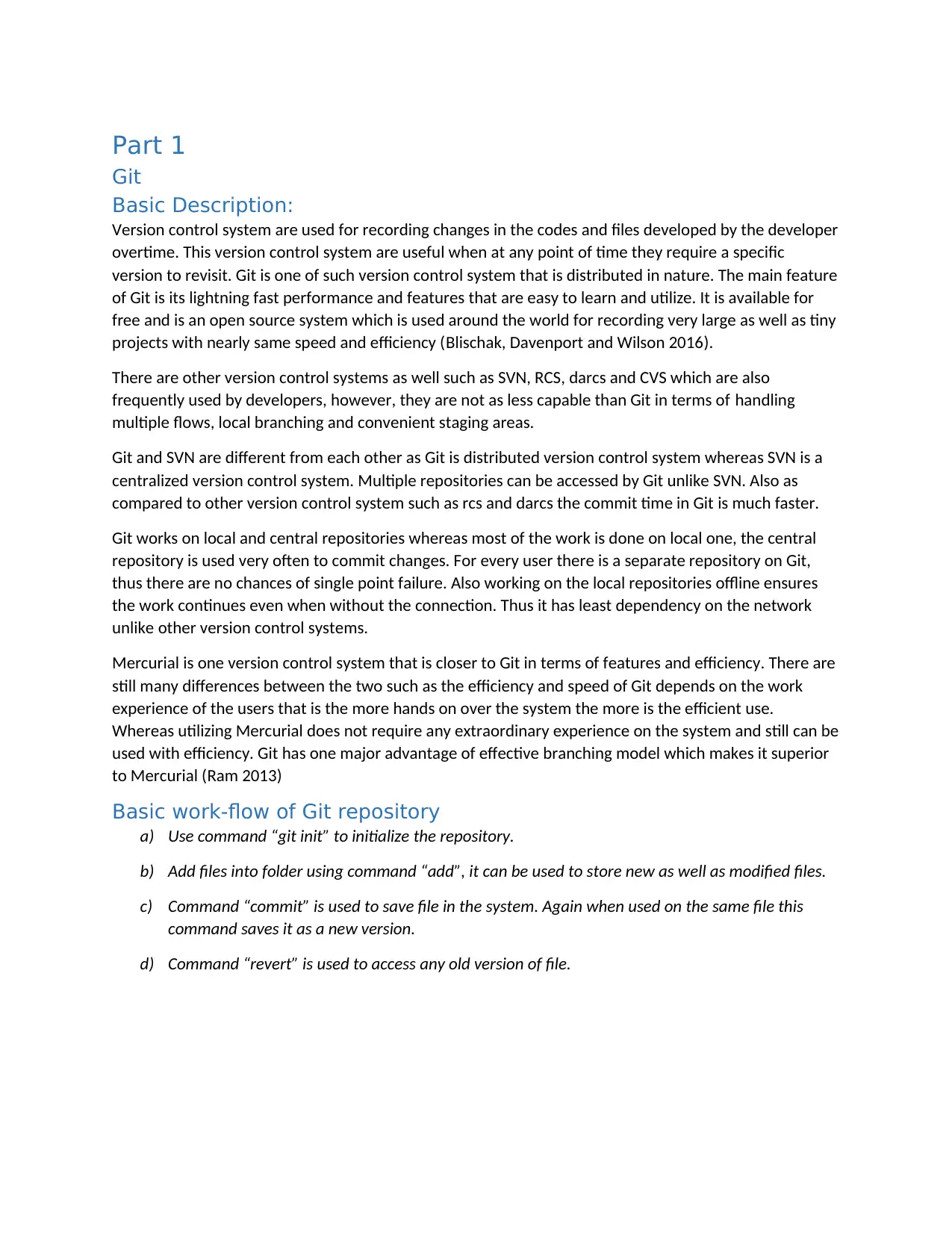
Part 1
Git
Basic Description:
Version control system are used for recording changes in the codes and files developed by the developer
overtime. This version control system are useful when at any point of time they require a specific
version to revisit. Git is one of such version control system that is distributed in nature. The main feature
of Git is its lightning fast performance and features that are easy to learn and utilize. It is available for
free and is an open source system which is used around the world for recording very large as well as tiny
projects with nearly same speed and efficiency (Blischak, Davenport and Wilson 2016).
There are other version control systems as well such as SVN, RCS, darcs and CVS which are also
frequently used by developers, however, they are not as less capable than Git in terms of handling
multiple flows, local branching and convenient staging areas.
Git and SVN are different from each other as Git is distributed version control system whereas SVN is a
centralized version control system. Multiple repositories can be accessed by Git unlike SVN. Also as
compared to other version control system such as rcs and darcs the commit time in Git is much faster.
Git works on local and central repositories whereas most of the work is done on local one, the central
repository is used very often to commit changes. For every user there is a separate repository on Git,
thus there are no chances of single point failure. Also working on the local repositories offline ensures
the work continues even when without the connection. Thus it has least dependency on the network
unlike other version control systems.
Mercurial is one version control system that is closer to Git in terms of features and efficiency. There are
still many differences between the two such as the efficiency and speed of Git depends on the work
experience of the users that is the more hands on over the system the more is the efficient use.
Whereas utilizing Mercurial does not require any extraordinary experience on the system and still can be
used with efficiency. Git has one major advantage of effective branching model which makes it superior
to Mercurial (Ram 2013)
Basic work-flow of Git repository
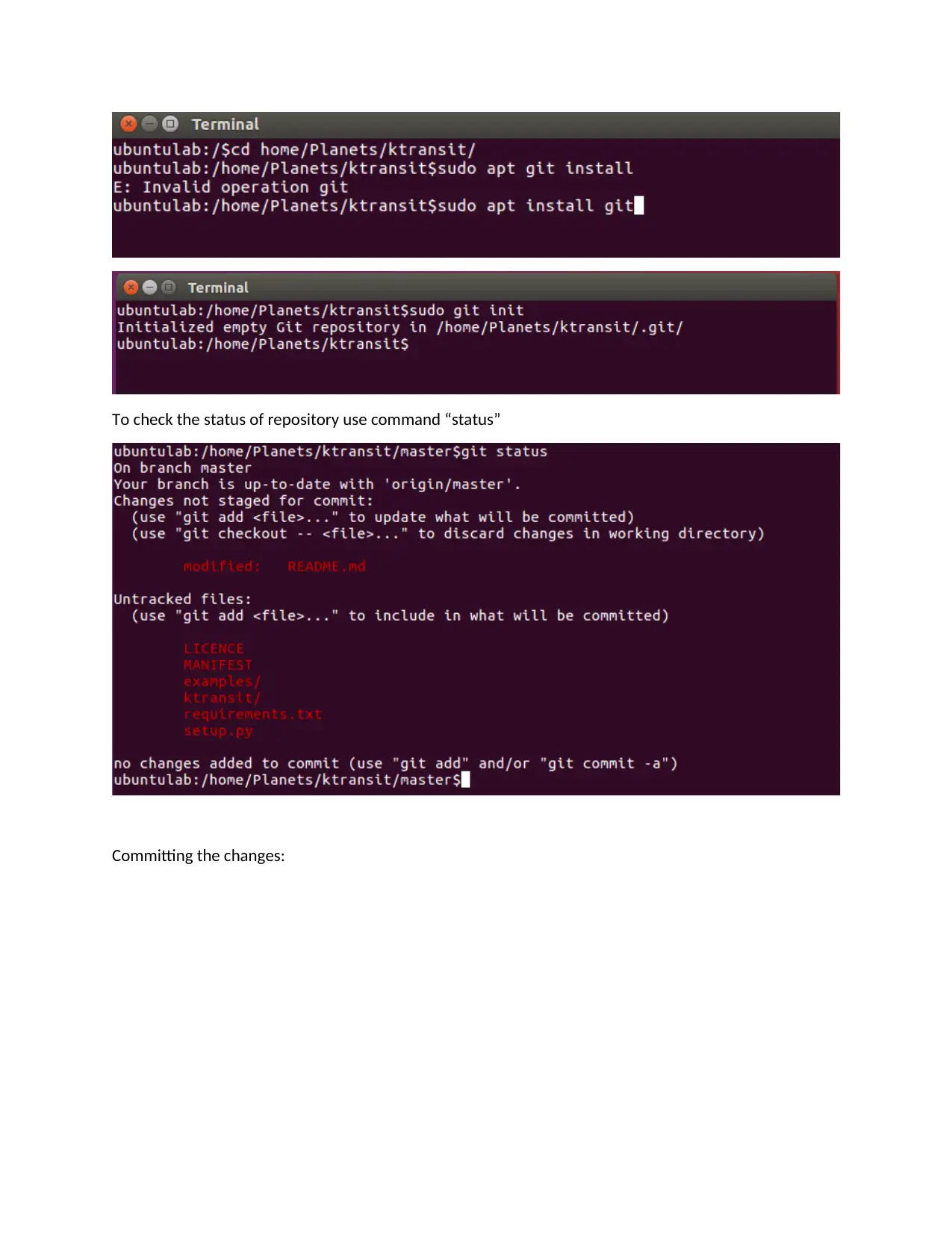
a) Use command “git init” to initialize the repository.
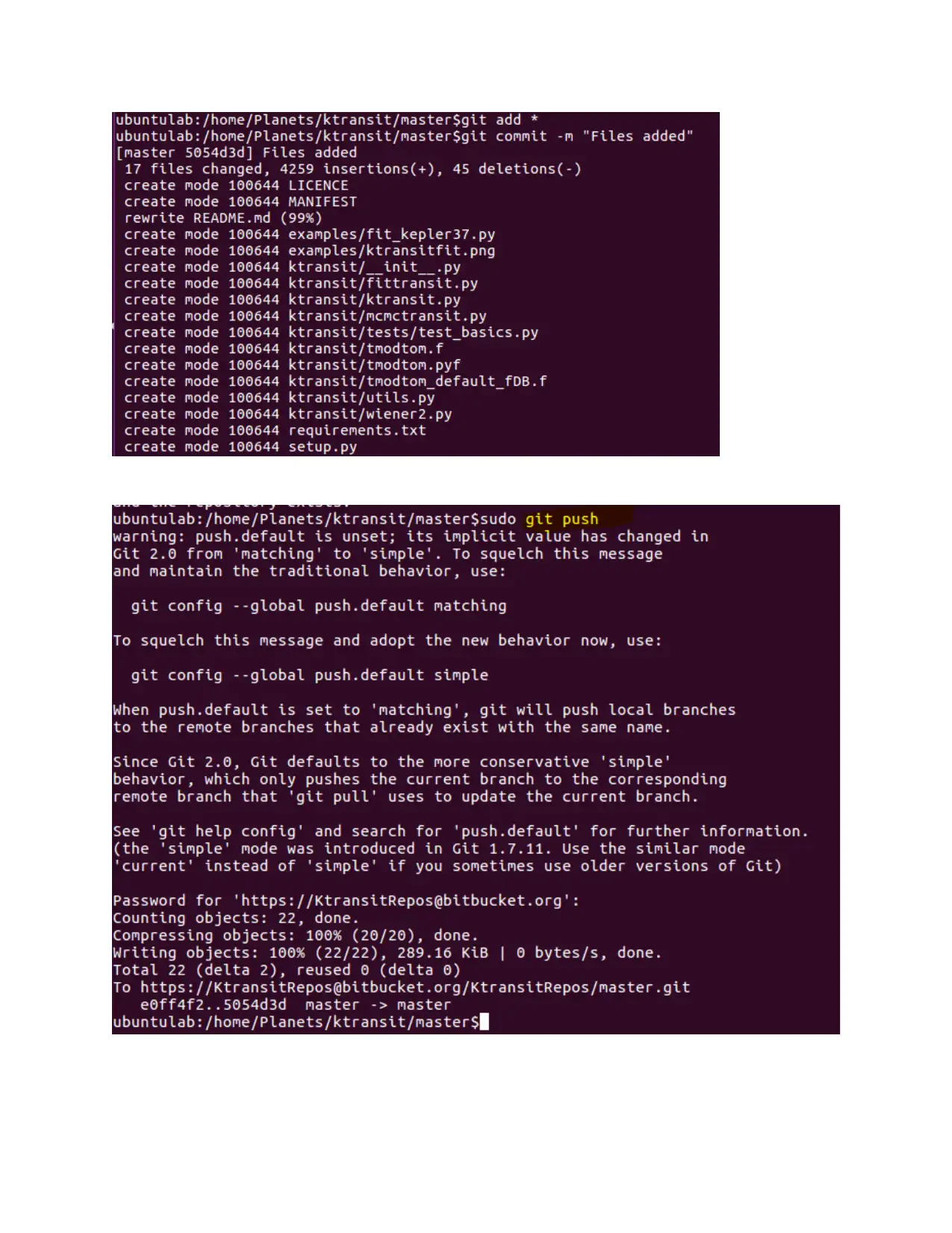
b) Add files into folder using command “add”, it can be used to store new as well as modified files.
c) Command “commit” is used to save file in the system. Again when used on the same file this
command saves it as a new version.
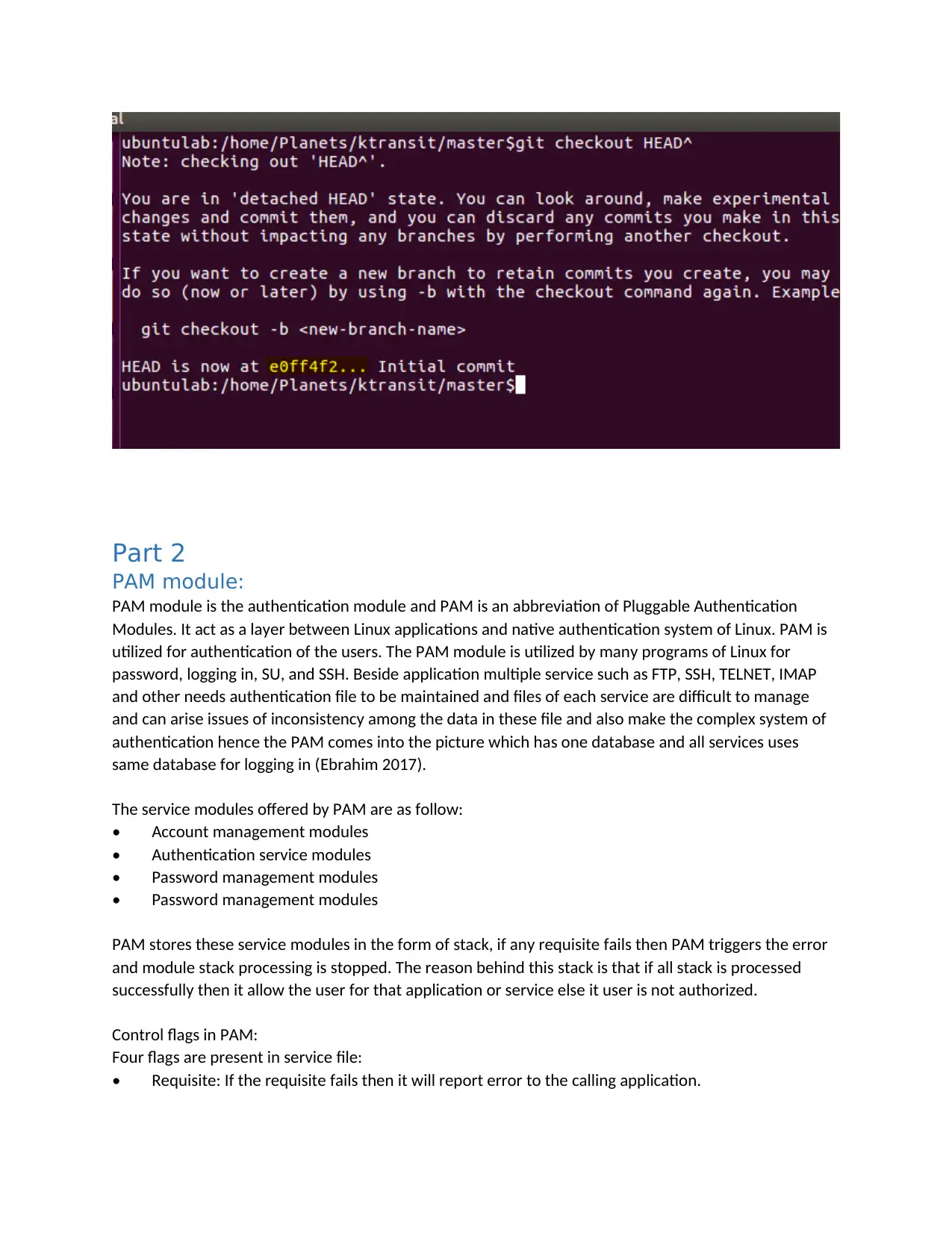
d) Command “revert” is used to access any old version of file.
tabler-icon-diamond-filled.svg

Paraphrase This Document

Need a fresh take? Get an instant paraphrase of this document with our AI Paraphraser
Document Page
To check the status of repository use command “status”
Committing the changes:
Document Page
Document Page
Part 2
PAM module:
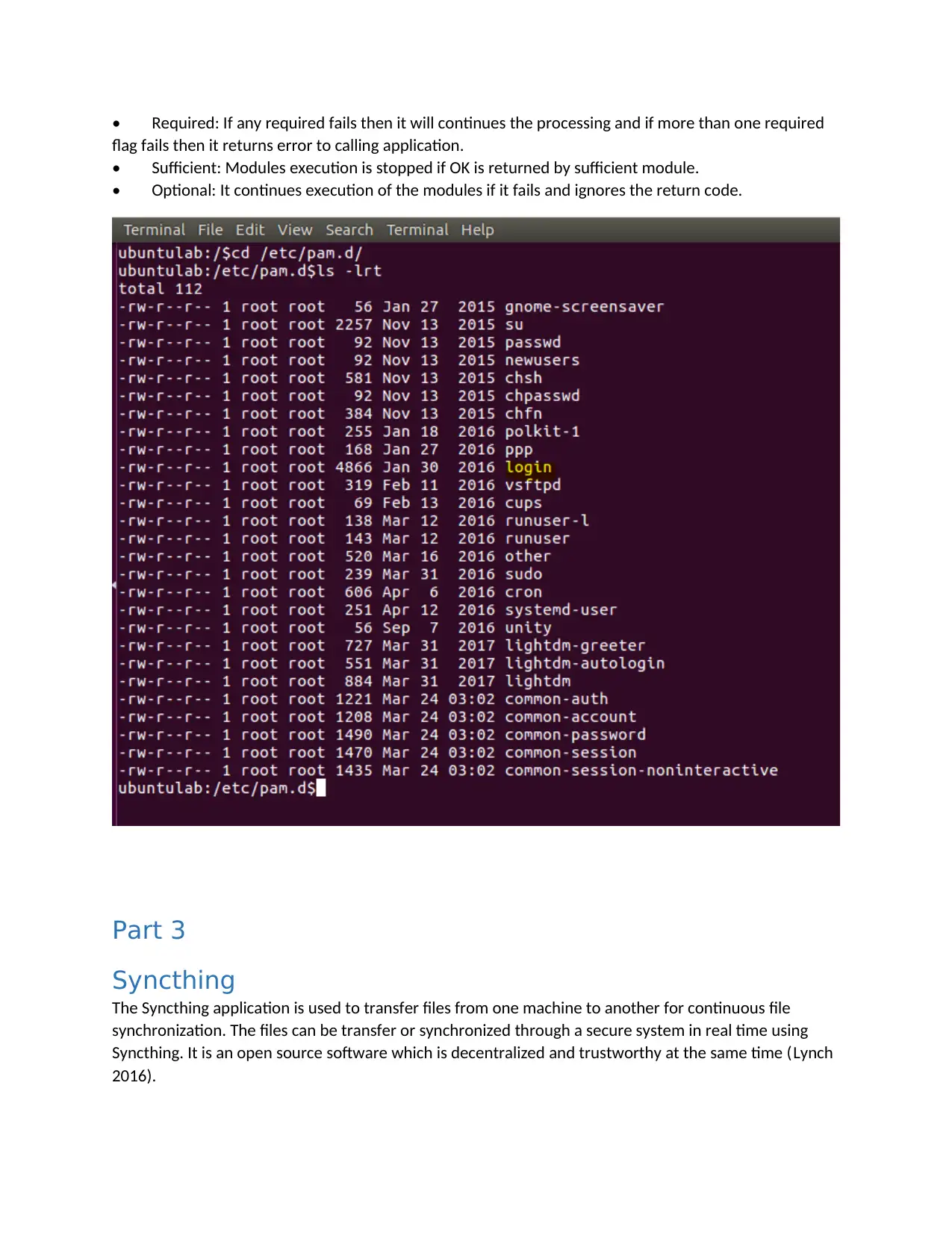
PAM module is the authentication module and PAM is an abbreviation of Pluggable Authentication
Modules. It act as a layer between Linux applications and native authentication system of Linux. PAM is
utilized for authentication of the users. The PAM module is utilized by many programs of Linux for
password, logging in, SU, and SSH. Beside application multiple service such as FTP, SSH, TELNET, IMAP
and other needs authentication file to be maintained and files of each service are difficult to manage
and can arise issues of inconsistency among the data in these file and also make the complex system of
authentication hence the PAM comes into the picture which has one database and all services uses
same database for logging in (Ebrahim 2017).
The service modules offered by PAM are as follow:
Account management modules
Authentication service modules
Password management modules
PAM stores these service modules in the form of stack, if any requisite fails then PAM triggers the error
and module stack processing is stopped. The reason behind this stack is that if all stack is processed
successfully then it allow the user for that application or service else it user is not authorized.
Control flags in PAM:
Four flags are present in service file:
Requisite: If the requisite fails then it will report error to the calling application.
tabler-icon-diamond-filled.svg

Paraphrase This Document

Need a fresh take? Get an instant paraphrase of this document with our AI Paraphraser
Document Page
Required: If any required fails then it will continues the processing and if more than one required
flag fails then it returns error to calling application.
Sufficient: Modules execution is stopped if OK is returned by sufficient module.
Optional: It continues execution of the modules if it fails and ignores the return code.
Part 3
Syncthing
The Syncthing application is used to transfer files from one machine to another for continuous file
synchronization. The files can be transfer or synchronized through a secure system in real time using
Syncthing. It is an open source software which is decentralized and trustworthy at the same time (Lynch
2016).
Document Page
Syncthing is full of features as compared to other syncing software, some of the differences are:
a) It has powerful interface which can be accessed from any browser to configure and monitor the
system.
b) It is supported on all the platforms including, FreeBSD, MAC OS, Windows, Solaris and OpenBSD.
c) The set up and configuration is comparatively easy. It does not require advance settings for the
same. A continuous internet connection and LAN is all it takes to work on it.
d) It synchronizes files with multiple folders between two or more machines (Sonney 2020).
Installation and Configuration
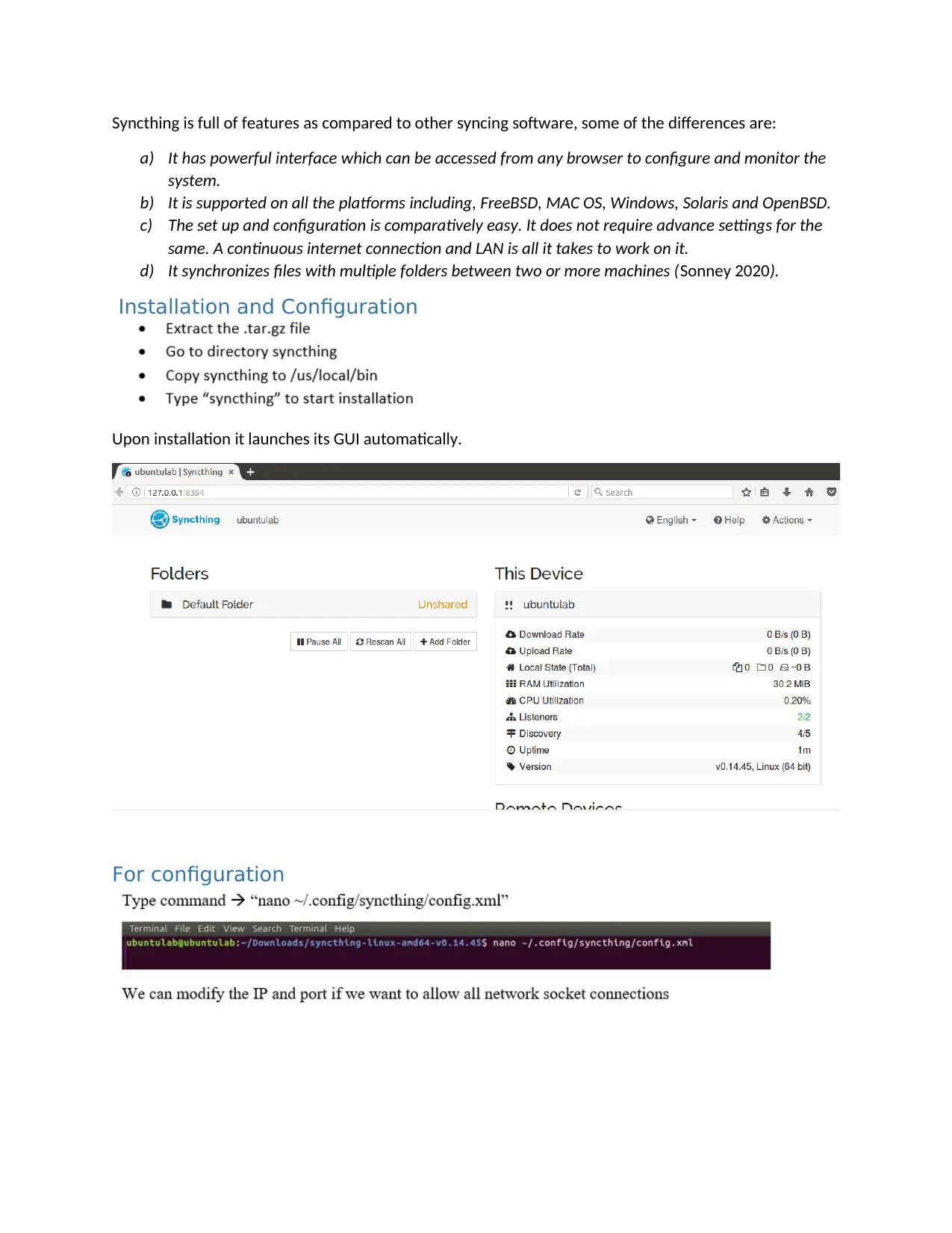
Upon installation it launches its GUI automatically.
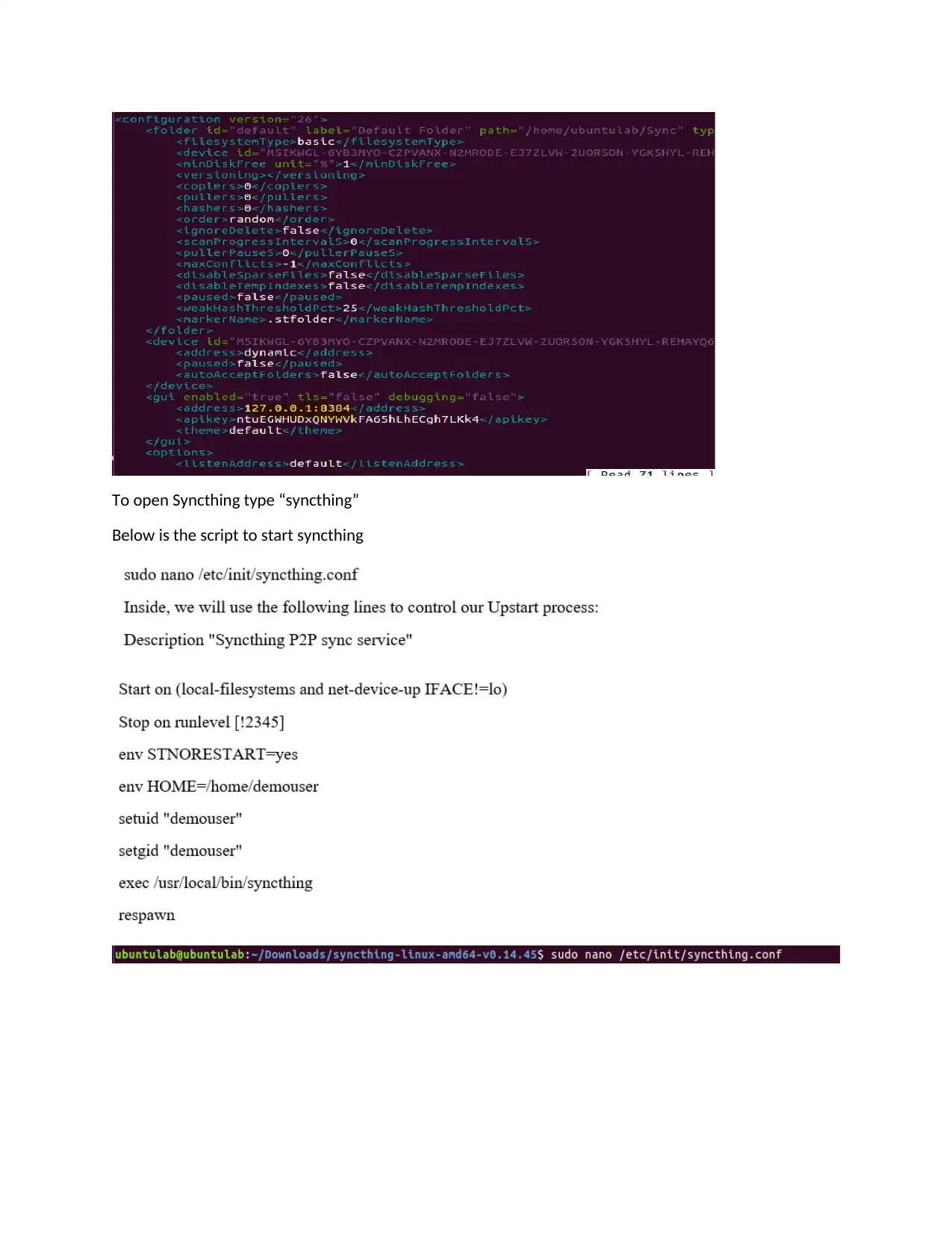
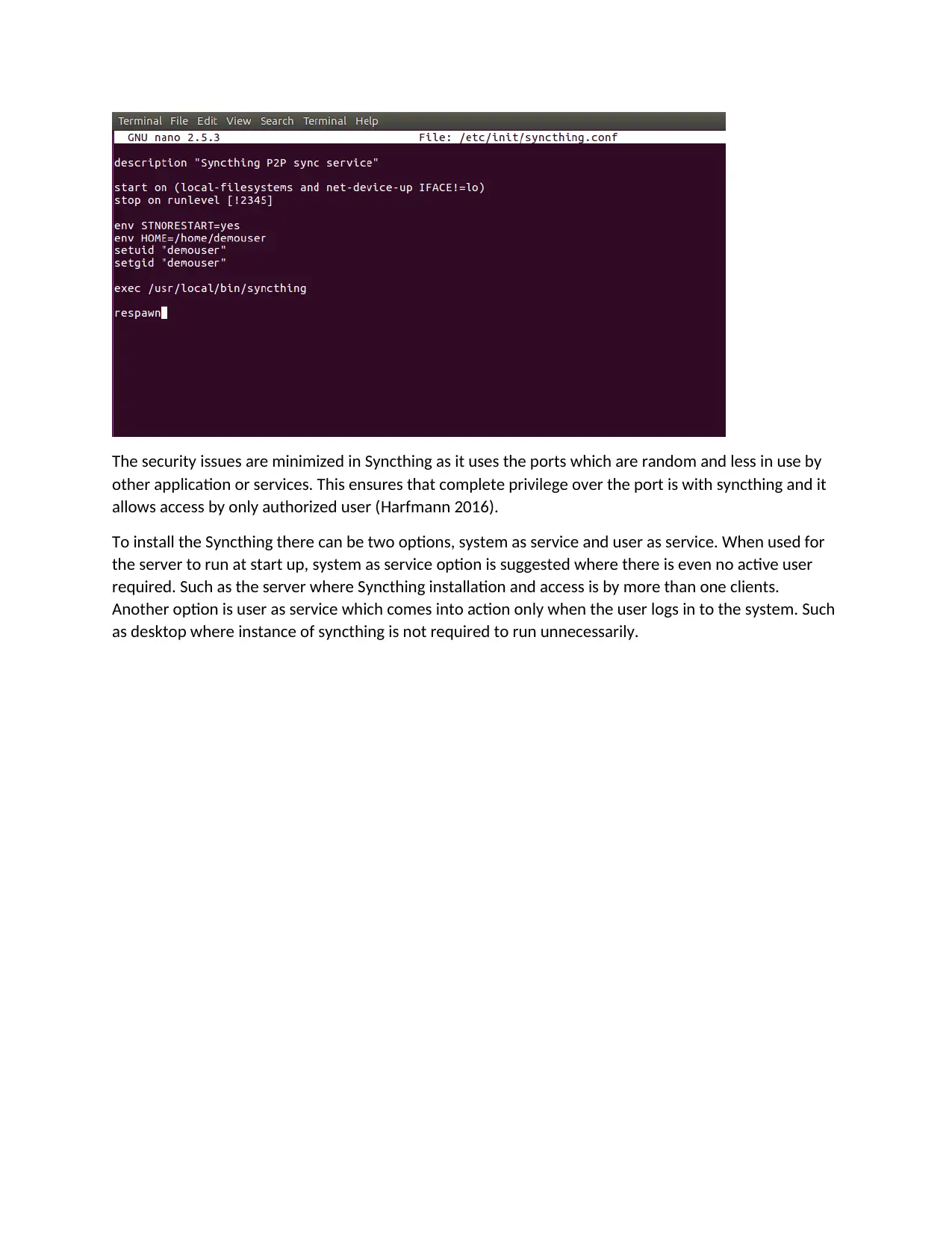
For configuration
Document Page
To open Syncthing type “syncthing”
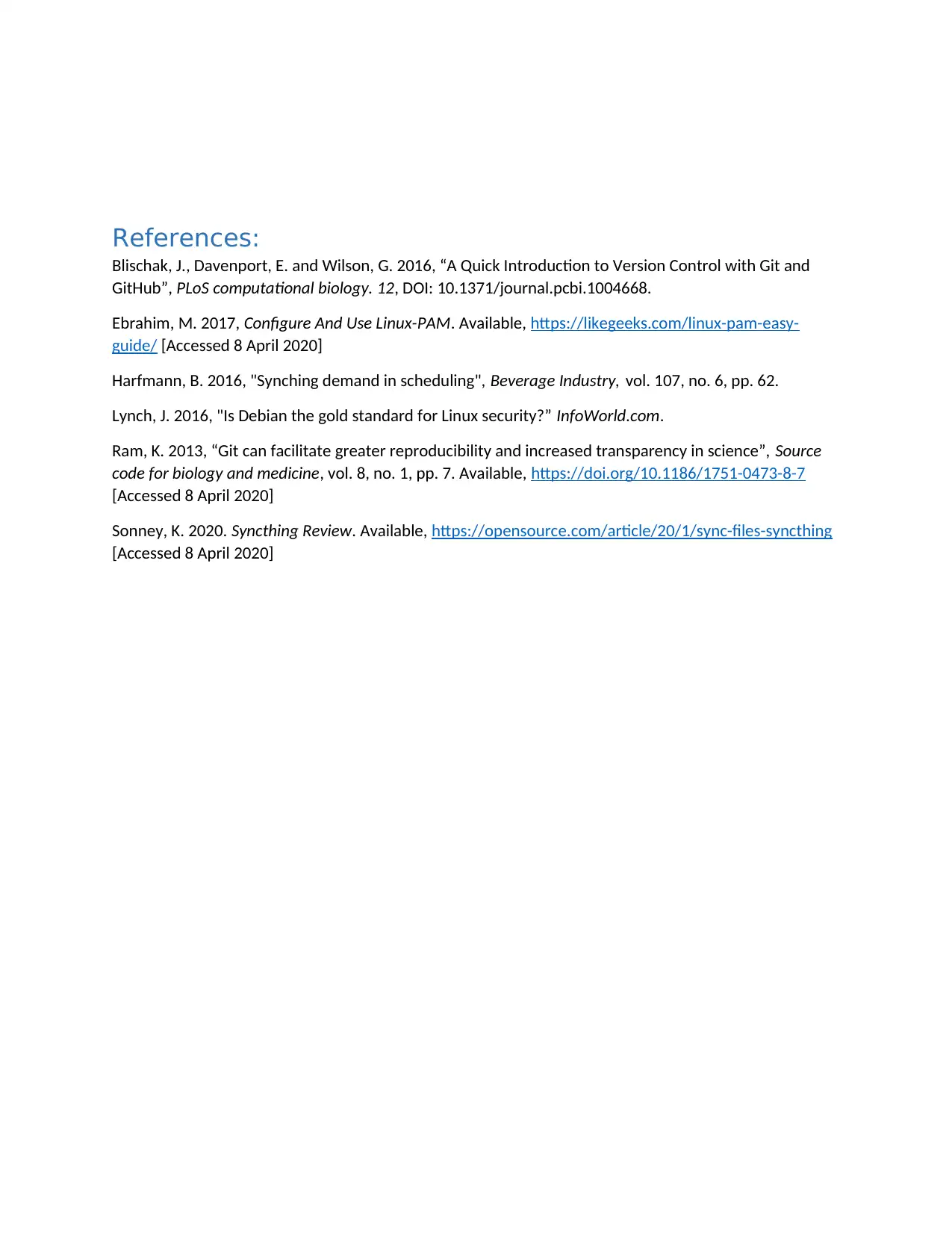
Below is the script to start syncthing
tabler-icon-diamond-filled.svg

Paraphrase This Document

Need a fresh take? Get an instant paraphrase of this document with our AI Paraphraser
Document Page
The security issues are minimized in Syncthing as it uses the ports which are random and less in use by
other application or services. This ensures that complete privilege over the port is with syncthing and it
allows access by only authorized user (Harfmann 2016).
To install the Syncthing there can be two options, system as service and user as service. When used for
the server to run at start up, system as service option is suggested where there is even no active user
required. Such as the server where Syncthing installation and access is by more than one clients.
Another option is user as service which comes into action only when the user logs in to the system. Such
as desktop where instance of syncthing is not required to run unnecessarily.
Document Page
References:
Blischak, J., Davenport, E. and Wilson, G. 2016, “A Quick Introduction to Version Control with Git and
GitHub”, PLoS computational biology. 12, DOI: 10.1371/journal.pcbi.1004668.
Ebrahim, M. 2017, Configure And Use Linux-PAM. Available, https://likegeeks.com/linux-pam-easy-
guide/ [Accessed 8 April 2020]
Harfmann, B. 2016, "Synching demand in scheduling", Beverage Industry, vol. 107, no. 6, pp. 62.
Lynch, J. 2016, "Is Debian the gold standard for Linux security?” InfoWorld.com.
Ram, K. 2013, “Git can facilitate greater reproducibility and increased transparency in science”, Source
code for biology and medicine, vol. 8, no. 1, pp. 7. Available, https://doi.org/10.1186/1751-0473-8-7
[Accessed 8 April 2020]
Sonney, K. 2020. Syncthing Review. Available, https://opensource.com/article/20/1/sync-files-syncthing
[Accessed 8 April 2020]
chevron_up_icon
1 out of 9
circle_padding
hide_on_mobile
zoom_out_icon
[object Object]