System and Security Administration Report: CSC3412, Semester 1, 2020

Verified

Added on  2022/08/25

|13
|1583
|22
Report
AI Summary
This report addresses key aspects of system and security administration, fulfilling the requirements of a CSC3412 assignment. The report begins with an introduction to Git, detailing the process of initializing a repository, cloning, checking status, adding files, and recovering specific file versions. The second part of the report delves into Pluggable Authentication Modules (PAM) within a Linux environment, explaining its role in client verification and configuration. The final section explores Syncthing, an open-source file synchronization tool, covering its installation and usage. The report provides a practical overview of these technologies, along with relevant commands and configurations, and includes a list of references.
Document Page
Running head: REPORT ON SYSTEM AND SECURITY ADMINISTRATION
By
Academic Year: 2019-20
Module: System and Security Administration
tabler-icon-diamond-filled.svg

Paraphrase This Document

Need a fresh take? Get an instant paraphrase of this document with our AI Paraphraser
Document Page
1
Introduction
Git is the adaptation control tech of decision for fundamentally everyone at this moment,
from engineers to originators. GitHub is the social code-facilitating stage that is as of now
utilized more than some other. It's where you can play and investigation. It's where you can
discover (and mess with) the most extraordinary open-source data, rising innovations,
highlights, and structures. It's a spot to learn and it's a spot to get included. You can keep
code there for work or for school, and you can snatch some sweet code that you need to
investigate further.
Question 1
Sign up and Installation
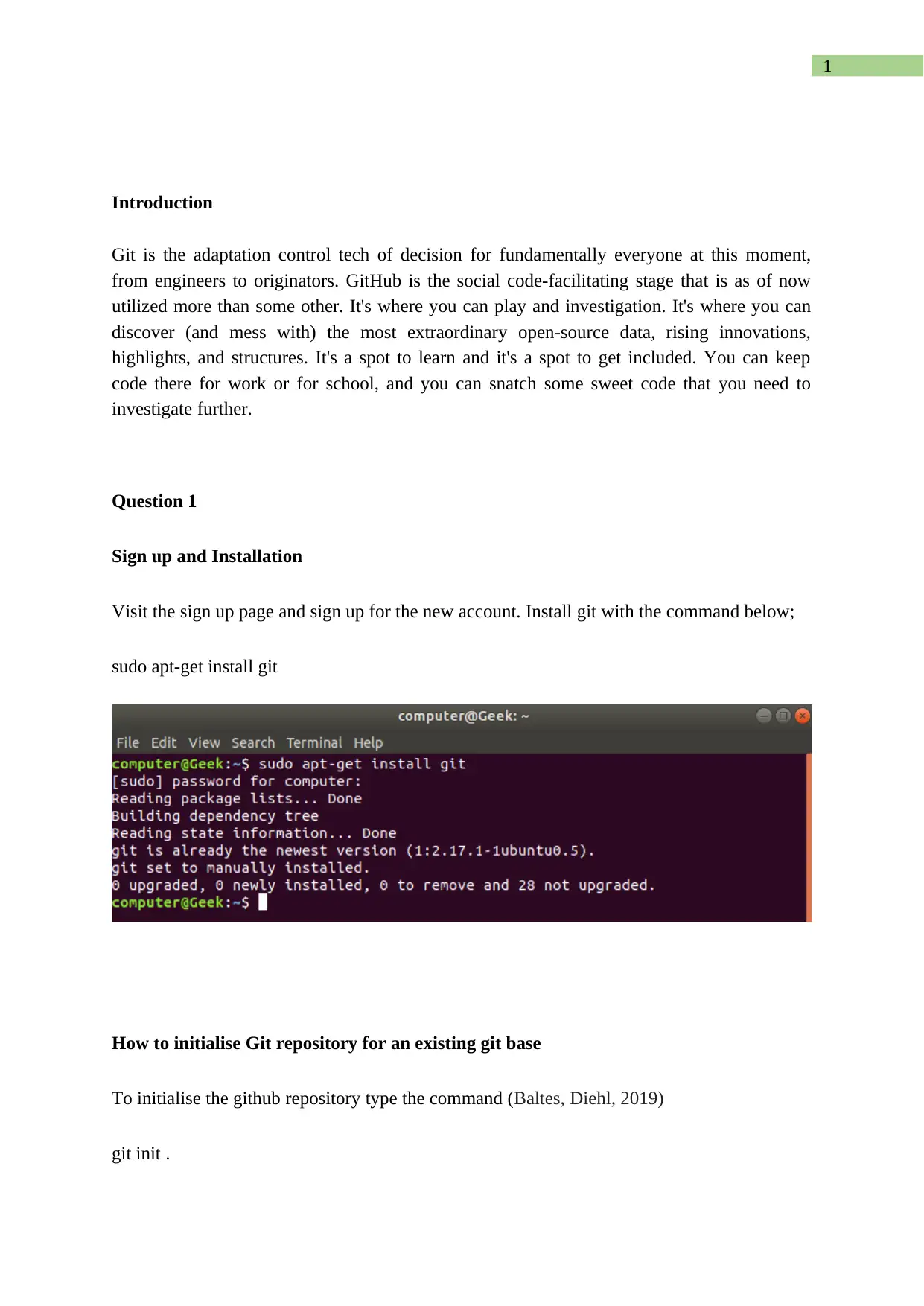
Visit the sign up page and sign up for the new account. Install git with the command below;
sudo apt-get install git
How to initialise Git repository for an existing git base
To initialise the github repository type the command (Baltes, Diehl, 2019)
git init .
Document Page
2
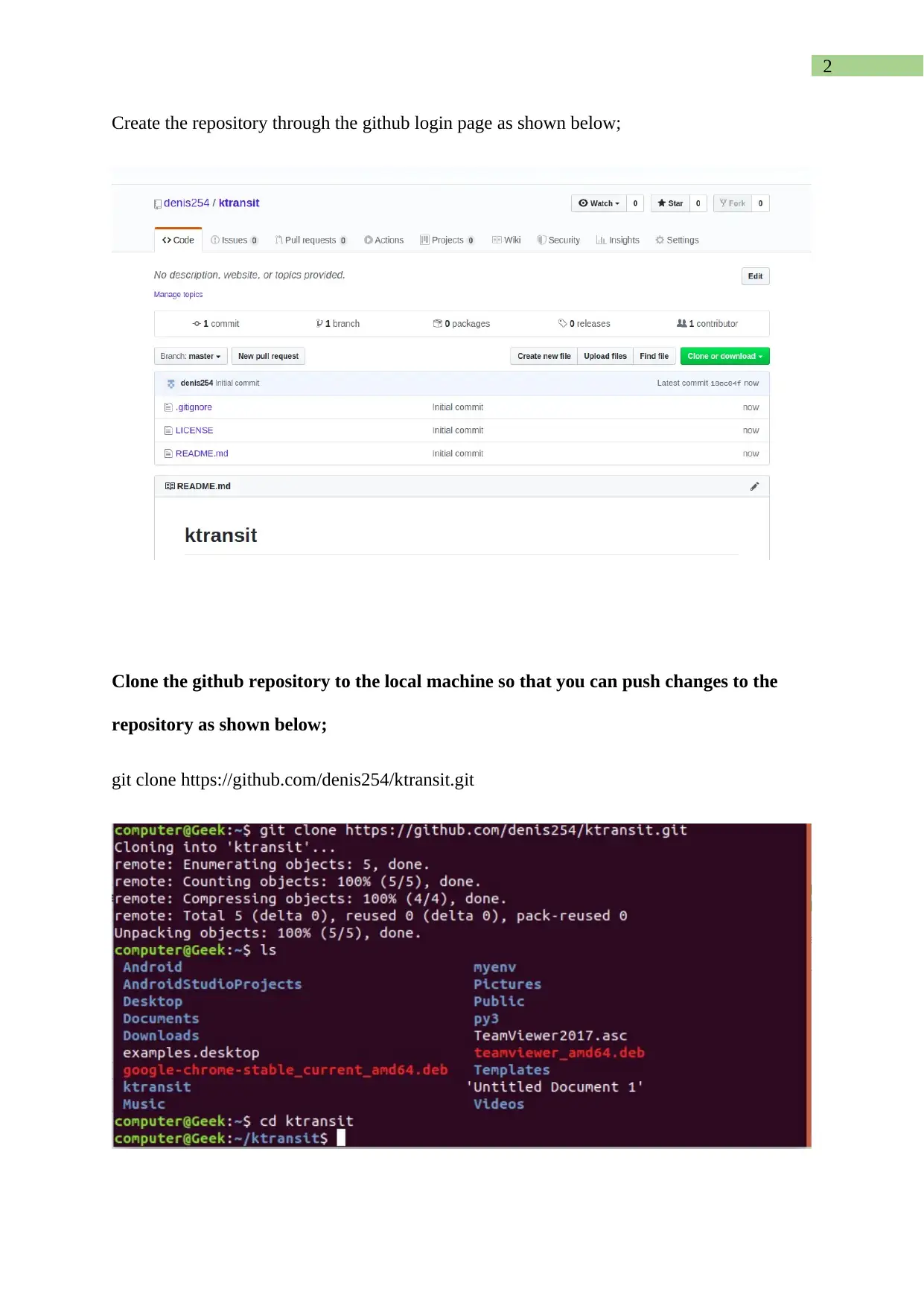
Create the repository through the github login page as shown below;
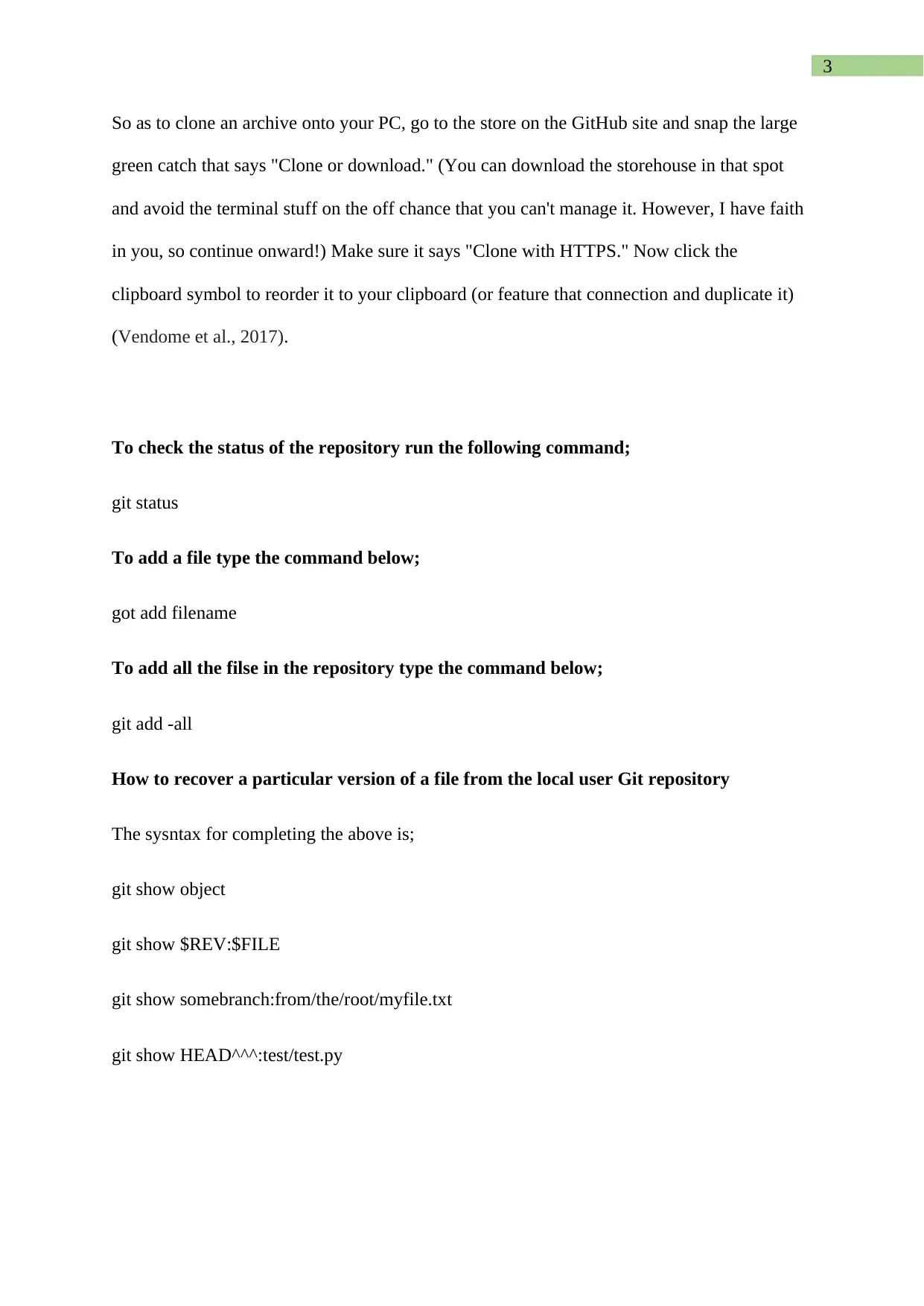
Clone the github repository to the local machine so that you can push changes to the
repository as shown below;
git clone https://github.com/denis254/ktransit.git
Document Page
3
So as to clone an archive onto your PC, go to the store on the GitHub site and snap the large
green catch that says "Clone or download." (You can download the storehouse in that spot
and avoid the terminal stuff on the off chance that you can't manage it. However, I have faith
in you, so continue onward!) Make sure it says "Clone with HTTPS." Now click the
clipboard symbol to reorder it to your clipboard (or feature that connection and duplicate it)
(Vendome et al., 2017).
To check the status of the repository run the following command;
git status
To add a file type the command below;
got add filename
To add all the filse in the repository type the command below;
git add -all
How to recover a particular version of a file from the local user Git repository
The sysntax for completing the above is;
git show object
git show $REV:$FILE
git show somebranch:from/the/root/myfile.txt
git show HEAD^^^:test/test.py
tabler-icon-diamond-filled.svg

Paraphrase This Document

Need a fresh take? Get an instant paraphrase of this document with our AI Paraphraser
Document Page
4
The order takes the typical style of amendment, which means you can utilize any of the
accompanying:
branch name (as proposed by debris)
HEAD + x number of ^ characters
The SHA1 hash of a given amendment
The initial not many (perhaps 5) characters of a given SHA1 hash
Use git restore as shown below;
git restore -s <SHA1> -- afile
git restore -s somebranch – afile
How to check the status of the local user Git repository
git status
How to view the change history of the local user Git repository
git status –stat
How to push local user Git repository changes back to the master Git repository
Use the command below to commit changes to the local repository
git commit -m “Enter the changes made here”
To push it to the github type the command below;
Document Page
5
git push
Now you can check on the status of the repo with the command mention above
Question 2
Back in past times worth remembering of linux, if a program, for example, su, passwd, login,
or xlock, expected to verify a client, it would basically peruse the essential data from/and so
on/passwd. On the off chance that it expected to change the clients' secret phrase, it would
essentially alter/and so on/passwd. This straightforward yet ungainly strategy introduced
various issues for framework chairmen and application engineers. As MD5 and shadow
passwords turned out to be progressively well known, each program requiring client
validation needed to realize how to get the correct data when managing various plans. On the
off chance that you needed to change your client confirmation conspire, every one of these
projects must be recompiled. PAM takes out this chaos by empowering projects to
straightforwardly confirm clients, paying little mind to how client data is put
away(Andjarwirawan, Palit, and Salim, 2017).
Linux-PAM (short for Pluggable Authentication Modules which developed from the Unix-
PAM engineering) is an incredible suite of shared libraries used to powerfully confirm a
client to applications (or administrations) in a Linux framework. It incorporates various low-
level verification modules into a significant level API that gives dynamic confirmation
backing to applications. This permits designers to compose applications that require
confirmation, freely of the basic validation framework. Numerous advanced Linux
disseminations bolster Linux-PAM (hereinafter alluded to as "PAM") as a matter of course.
Document Page
6
Right now, will disclose how to arrange progressed PAM in Ubuntu and CentOS
frameworks(Simmel, and Filus, 2017).
Installing PAM
Installing PAM without any preparation is long procedure, past the extent of this HOWTO. In
the event that PAM isn't introduced on your framework, you're most likely running such an
old form of your conveyance that there are numerous different motivations to redesign. On
the off chance that you truly need to do it without anyone's help, at that point you're
absolutely not the kind of individual who needs any assistance from me. For every one of
these reasons, I will expect that you as of now have PAM introduced.
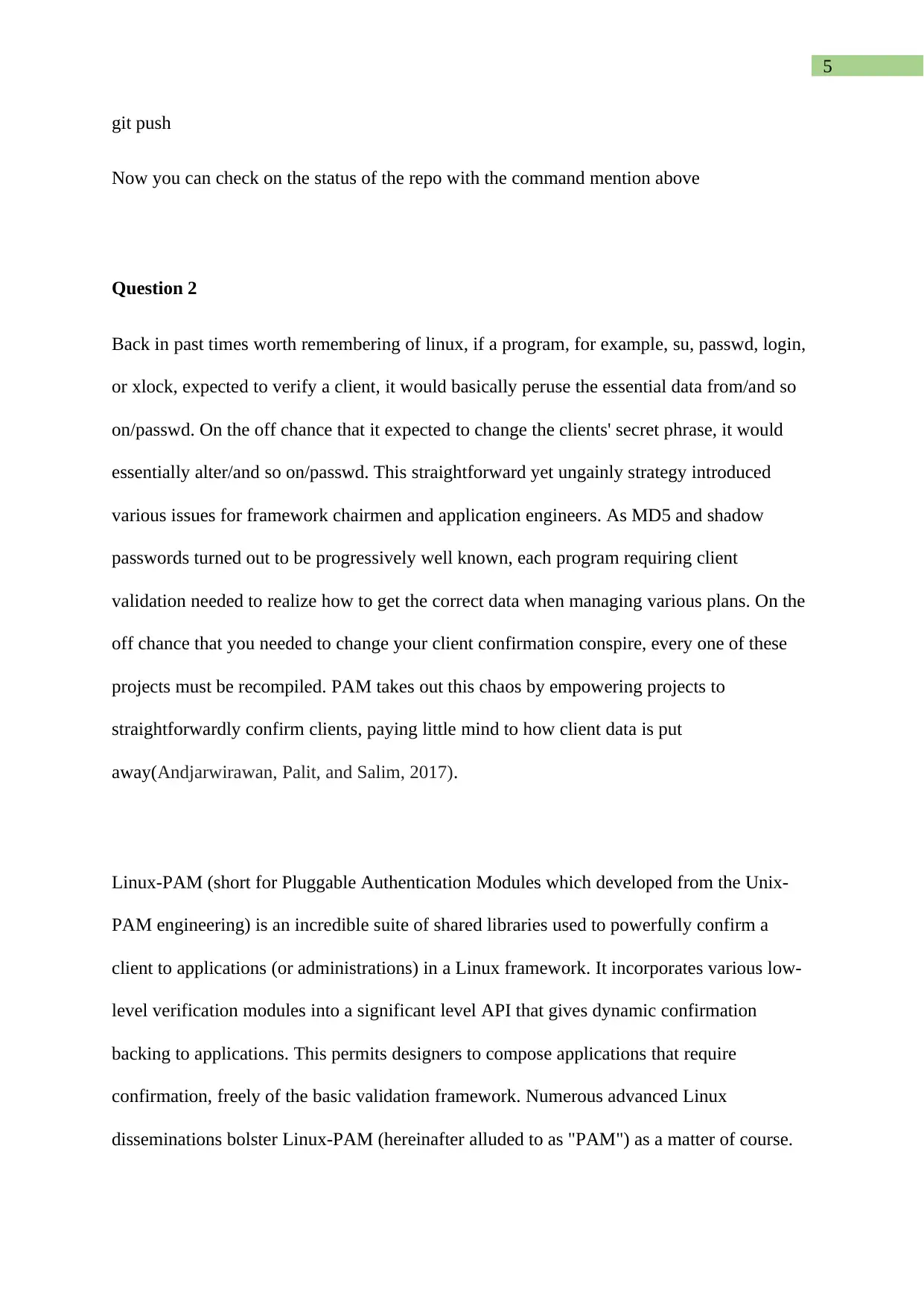
Configuration Files
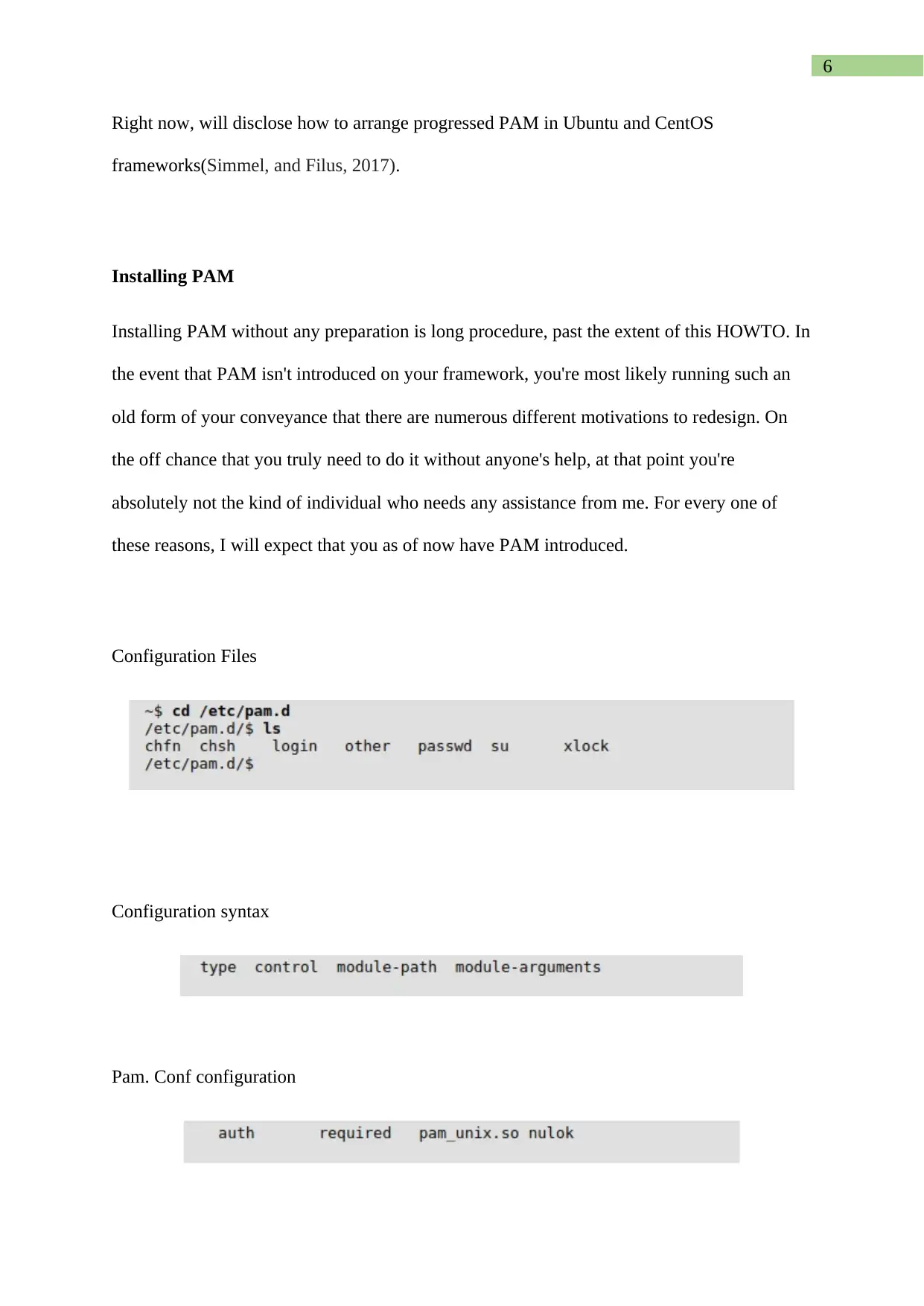
Configuration syntax
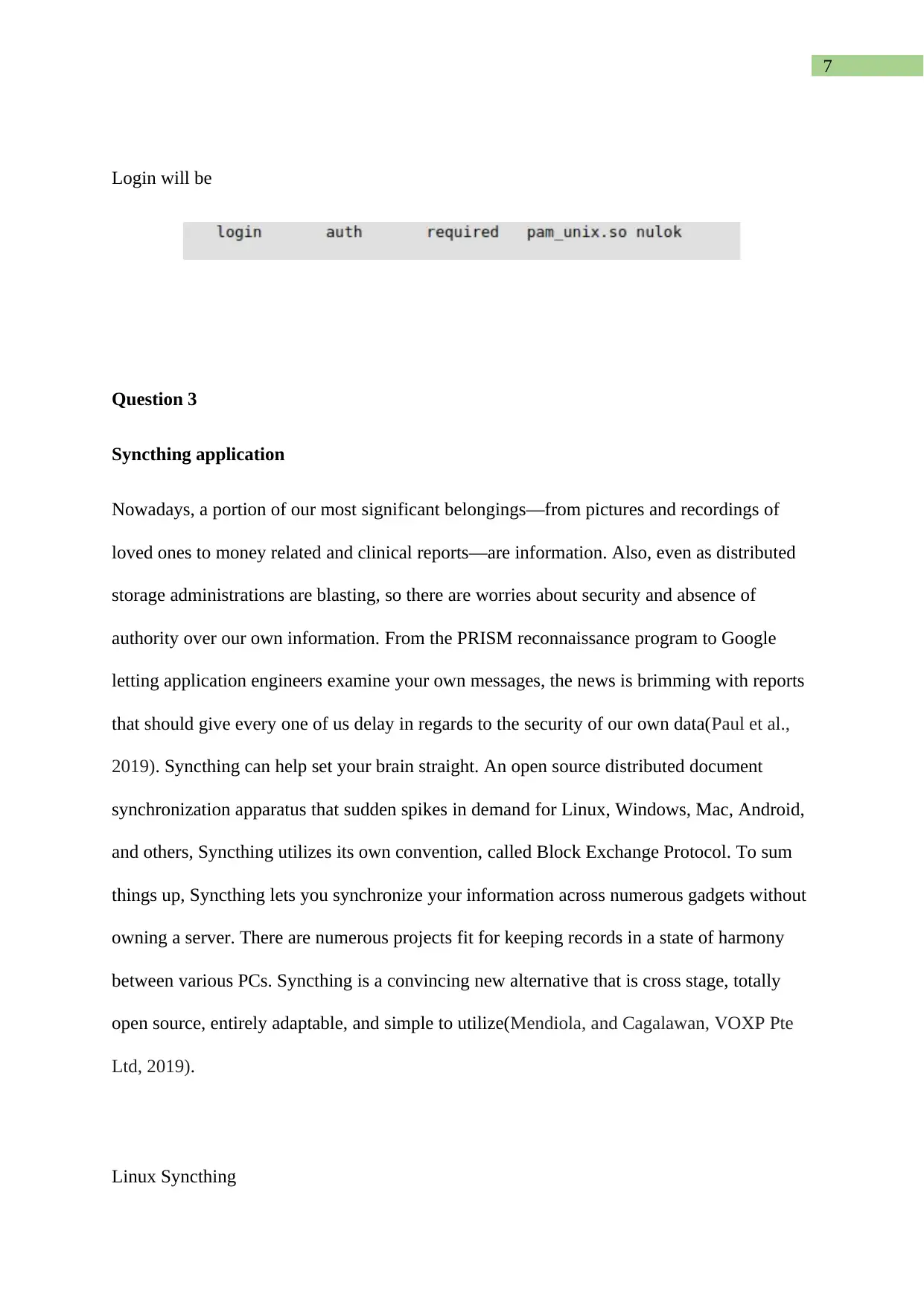
Pam. Conf configuration
tabler-icon-diamond-filled.svg

Paraphrase This Document

Need a fresh take? Get an instant paraphrase of this document with our AI Paraphraser
Document Page
7
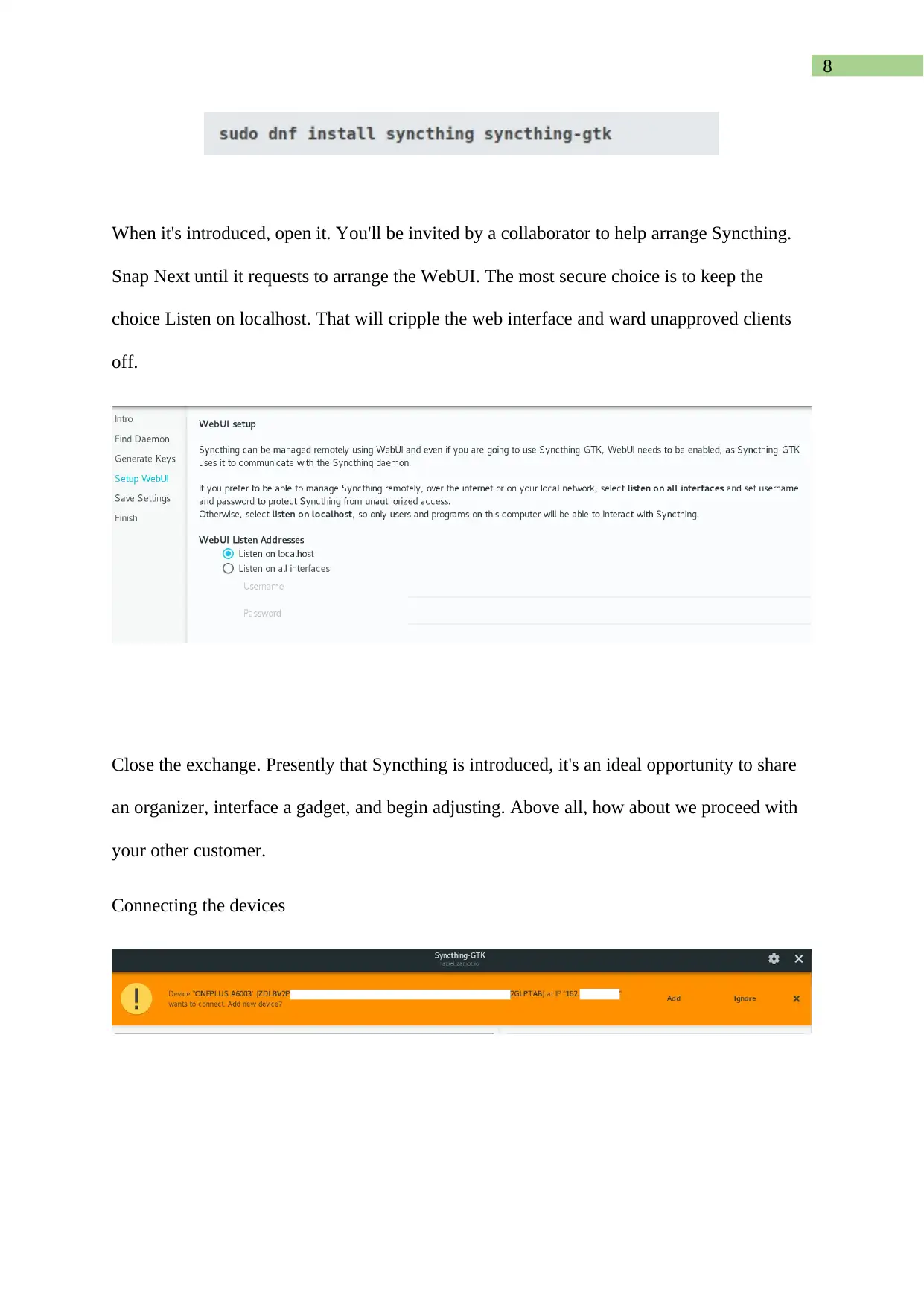
Login will be
Question 3
Syncthing application
Nowadays, a portion of our most significant belongings—from pictures and recordings of
loved ones to money related and clinical reports—are information. Also, even as distributed
storage administrations are blasting, so there are worries about security and absence of
authority over our own information. From the PRISM reconnaissance program to Google
letting application engineers examine your own messages, the news is brimming with reports
that should give every one of us delay in regards to the security of our own data(Paul et al.,
2019). Syncthing can help set your brain straight. An open source distributed document
synchronization apparatus that sudden spikes in demand for Linux, Windows, Mac, Android,
and others, Syncthing utilizes its own convention, called Block Exchange Protocol. To sum
things up, Syncthing lets you synchronize your information across numerous gadgets without
owning a server. There are numerous projects fit for keeping records in a state of harmony
between various PCs. Syncthing is a convincing new alternative that is cross stage, totally
open source, entirely adaptable, and simple to utilize(Mendiola, and Cagalawan, VOXP Pte
Ltd, 2019).
Linux Syncthing
Document Page
8
When it's introduced, open it. You'll be invited by a collaborator to help arrange Syncthing.
Snap Next until it requests to arrange the WebUI. The most secure choice is to keep the
choice Listen on localhost. That will cripple the web interface and ward unapproved clients
off.
Close the exchange. Presently that Syncthing is introduced, it's an ideal opportunity to share
an organizer, interface a gadget, and begin adjusting. Above all, how about we proceed with
your other customer.
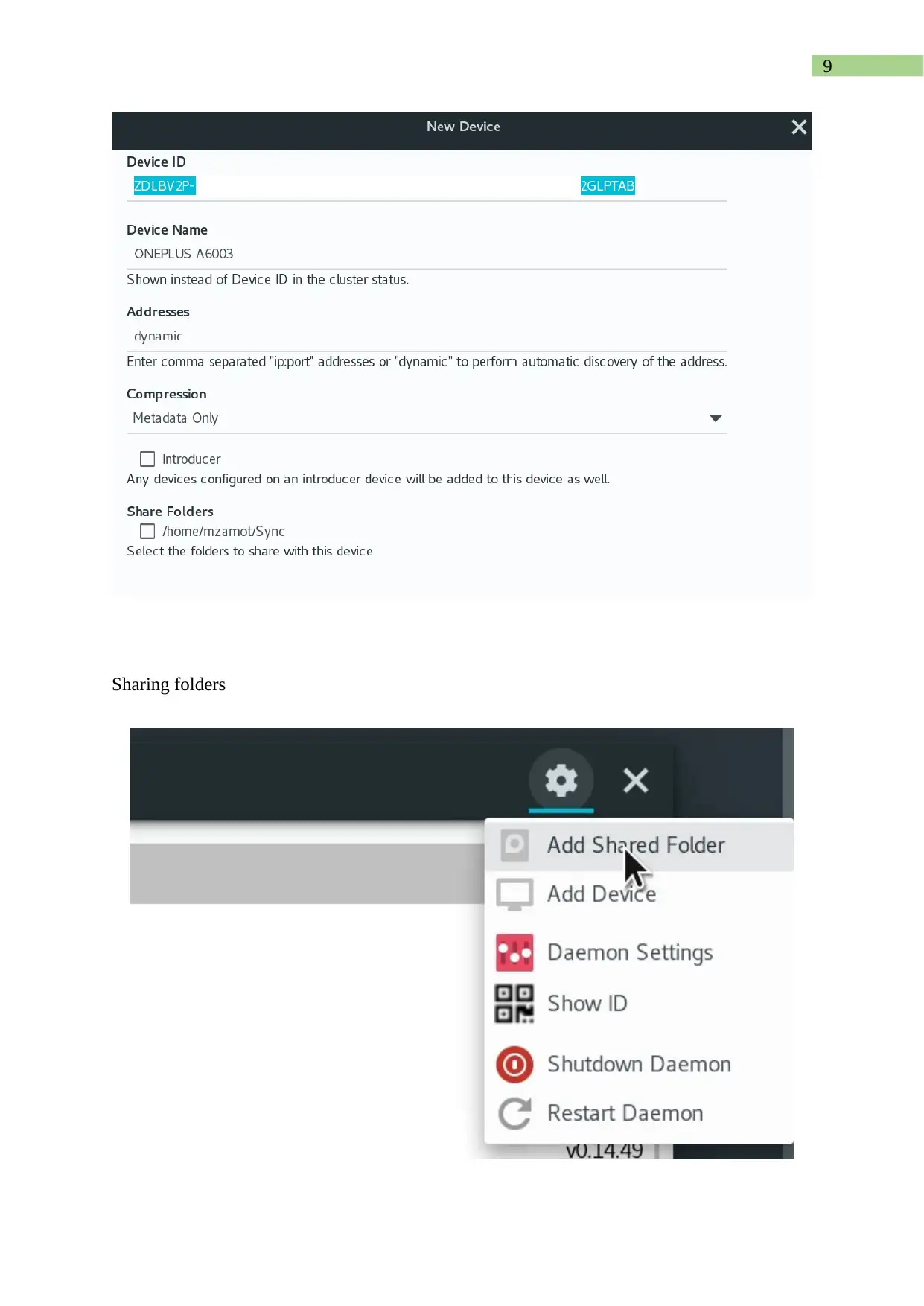
Connecting the devices
Document Page
9
Sharing folders
tabler-icon-diamond-filled.svg

Paraphrase This Document

Need a fresh take? Get an instant paraphrase of this document with our AI Paraphraser
Document Page
10
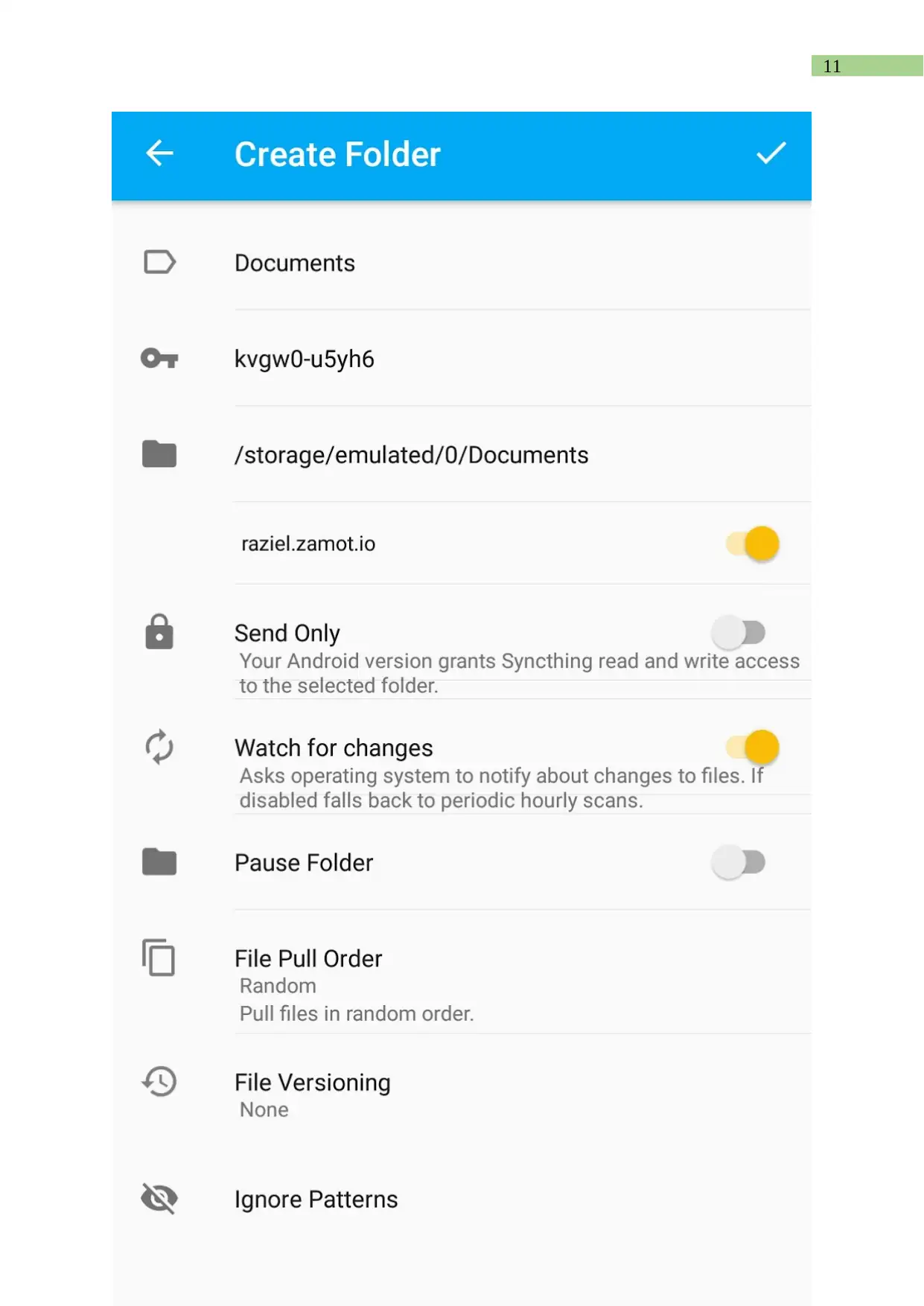
Creating folders
Document Page
11
chevron_up_icon
1 out of 13
circle_padding
hide_on_mobile
zoom_out_icon
[object Object]