Smart Application Development for AB pty Ltd Truck Delivery Using IBM

Verified

Added on  2023/06/11

|26
|2281
|293
Report
AI Summary
This report outlines the development of a smart application using IBM Bluemix services to address the business challenges faced by AB pty Ltd, a truck-based product delivery company. The company aims to improve its delivery frequency, which currently averages three times per day against a target of five. The report details the process of creating the application, including configuring IBM Bluemix services like Cloud Foundry and Geospatial Analytics, deploying the application, and addressing difficulties encountered during the development process. The application seeks to optimize truck movement, track vehicle locations, and provide real-time status updates on product deliveries, ultimately enhancing service quality and customer satisfaction.
Document Page
tabler-icon-diamond-filled.svg

Paraphrase This Document

Need a fresh take? Get an instant paraphrase of this document with our AI Paraphraser
Document Page
Table of Contents
Introduction......................................................................................................................................3
IBM Blue mix Services...................................................................................................................3
Case Study Analysis......................................................................................................................13
Business Problems.....................................................................................................................13
Possible Solutions......................................................................................................................13
Smart Applications Configuration and Deployment.....................................................................14
Difficulties on Smart Applications................................................................................................24
Conclusion.....................................................................................................................................24
References......................................................................................................................................25
2
Document Page
Introduction
Main scope of this project is to create the smart application for an AB pty Ltd company
because this company is a product deliver company by using the trucks. It has three trucks to
deliver the product for third parties and customers. This company has the set of deliver zone and
it covers an overall regions. Basically, this company delivers the products 5 times per a day but
current average for their trucks is only 3 times per day. So, the company general manager was
decided to hire and appoint the business analyst to identify the business problems and their
solutions to create the new smart application to simulate the trucks movement. This application
is a based on cloud simulating environment by using the IBM blue mix service and this tool is
used to identify and understand the problem stated in the Company. These are will be discussed
and analyzed in detail.
IBM Blue mix Services
To create smart application by using the IBM blue mix services because this tool is used
to provide the effective web application for a company. The IBM Blue mix tool is used to
supports various programming languages as well as services and integrated DevOps for building,
running, deploying and managing the applications on the cloud. The Blue mix is also helps to
have easy access of cloud across various deployments (Ibm.com, 2018). To create and develop a
web application by using the following steps,
Create the IBM account.
Login the IBM Blue mix account by entering the Login ID and Login Name. Use below
link to login the IBM account.
https://idaas.iam.ibm.com/idaas/mtfim/sps/authsvc?
PolicyId=urn:ibm:security:authentication:asf:basicldapuser
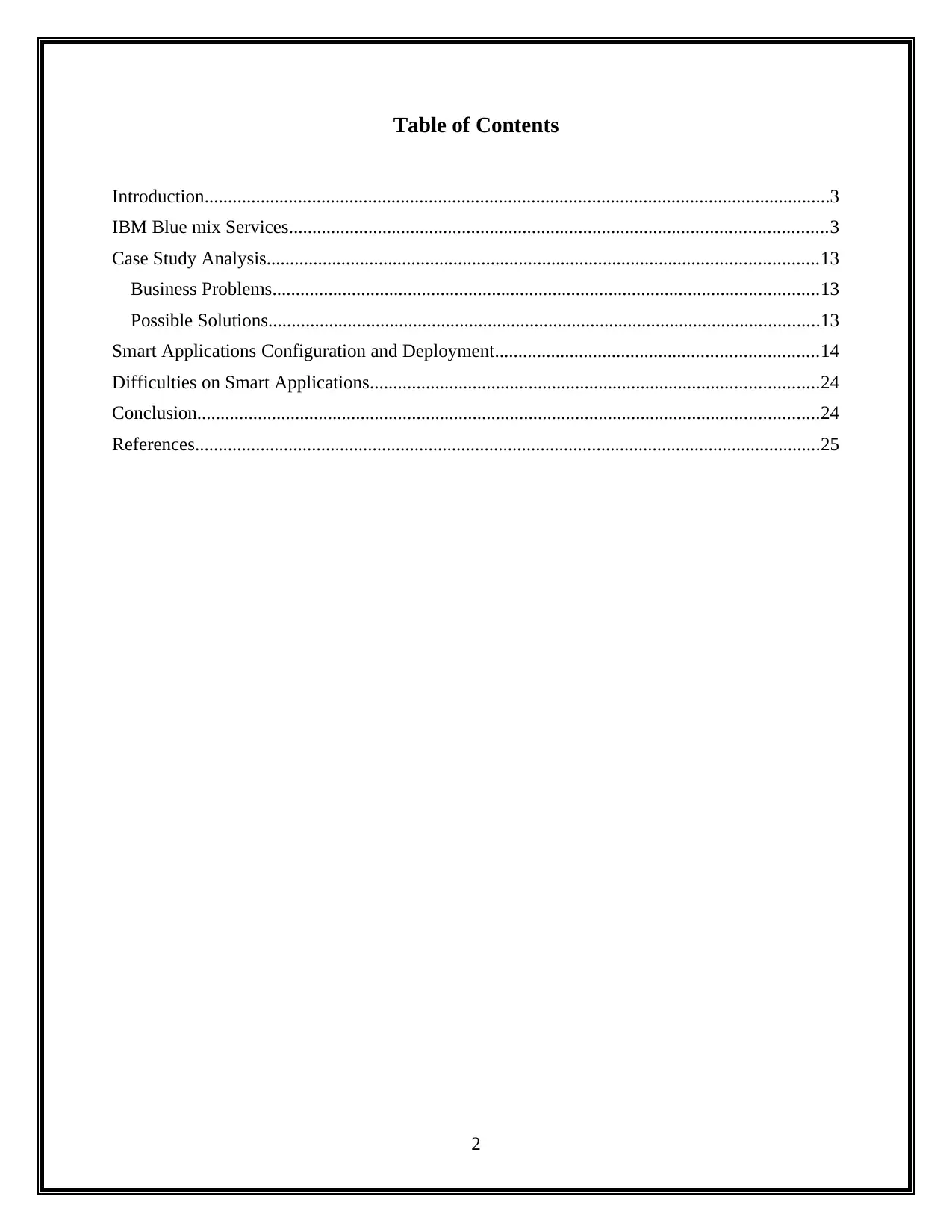
Once, user successfully login the IBM account and then launch the IBM cloud. To launch
a IBM cloud to view the left navigation and click the launch IBM cloud. This process is used to
open the new tab and it displays the IBM cloud Dash board. After, click the catalog to see the
IBM cloud service list. It is shown below.
3
Document Page
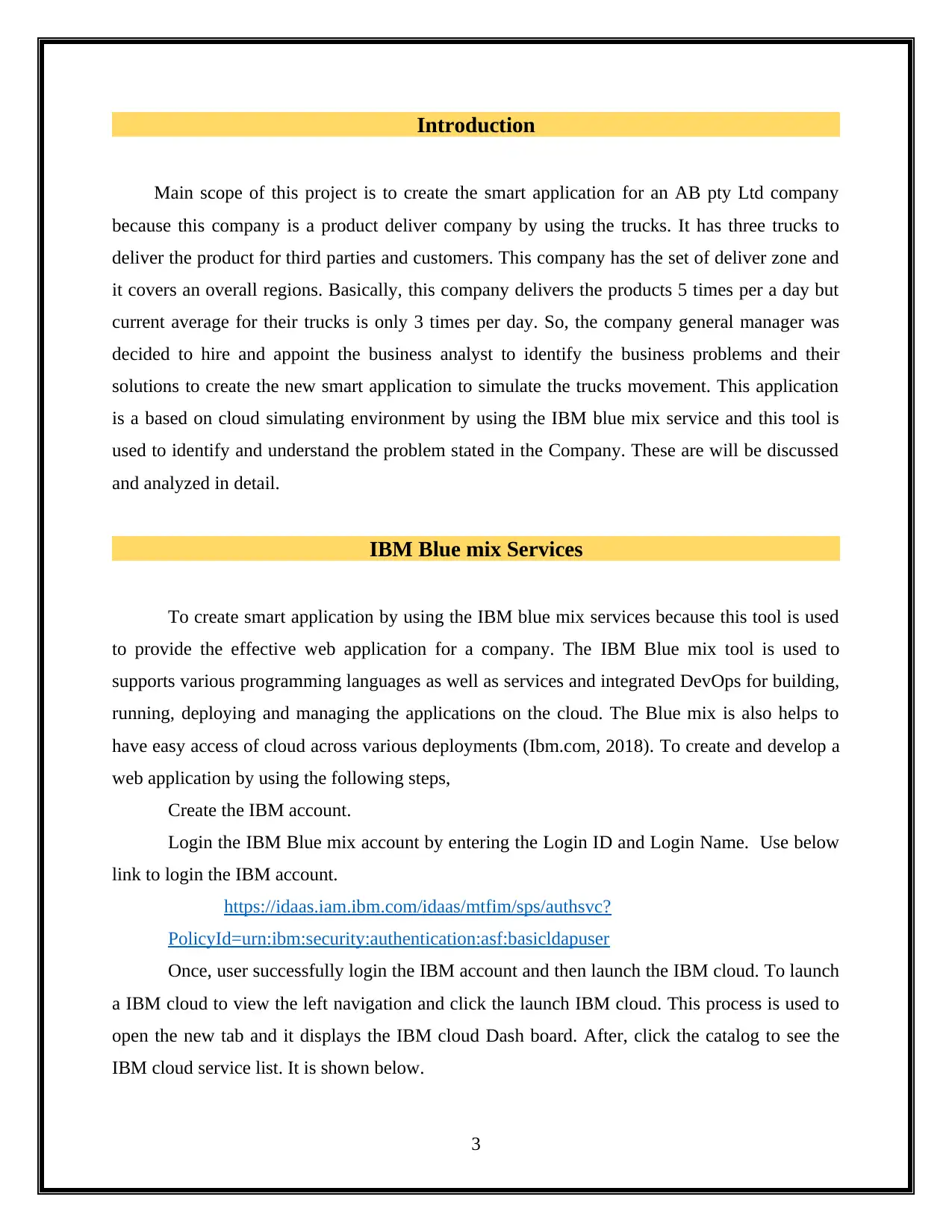
Then, user needs to create the cloud foundry application by click the cloud foundry
application from the service list. But, this application only creates the application without
infrastructure (Bloomberg.com, 2018). In cloud foundry application, click the SDK for a node to
configure and deploy the application server and it is used to providing the application and host
name. It is shown below.
4
tabler-icon-diamond-filled.svg

Paraphrase This Document

Need a fresh take? Get an instant paraphrase of this document with our AI Paraphraser
Document Page
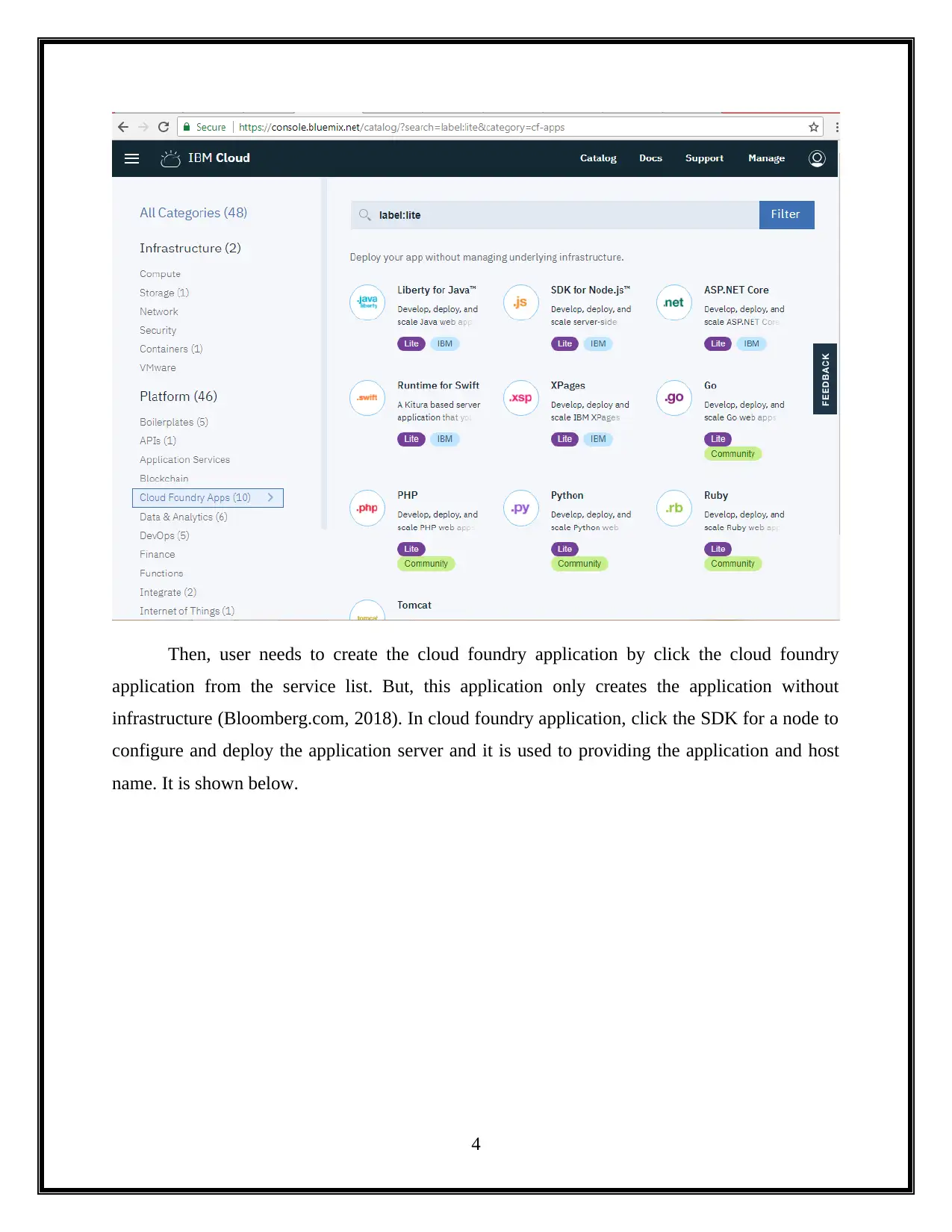
The cloud foundry application without infrastructure was created successfully, and then
users require creating the new data base for a applications. To create a database by click the
database analytics from IBM service list. The database analytics is used to provide to see view
the third party database. This process is displayed in below (Www-03.ibm.com, 2018).
5
Document Page
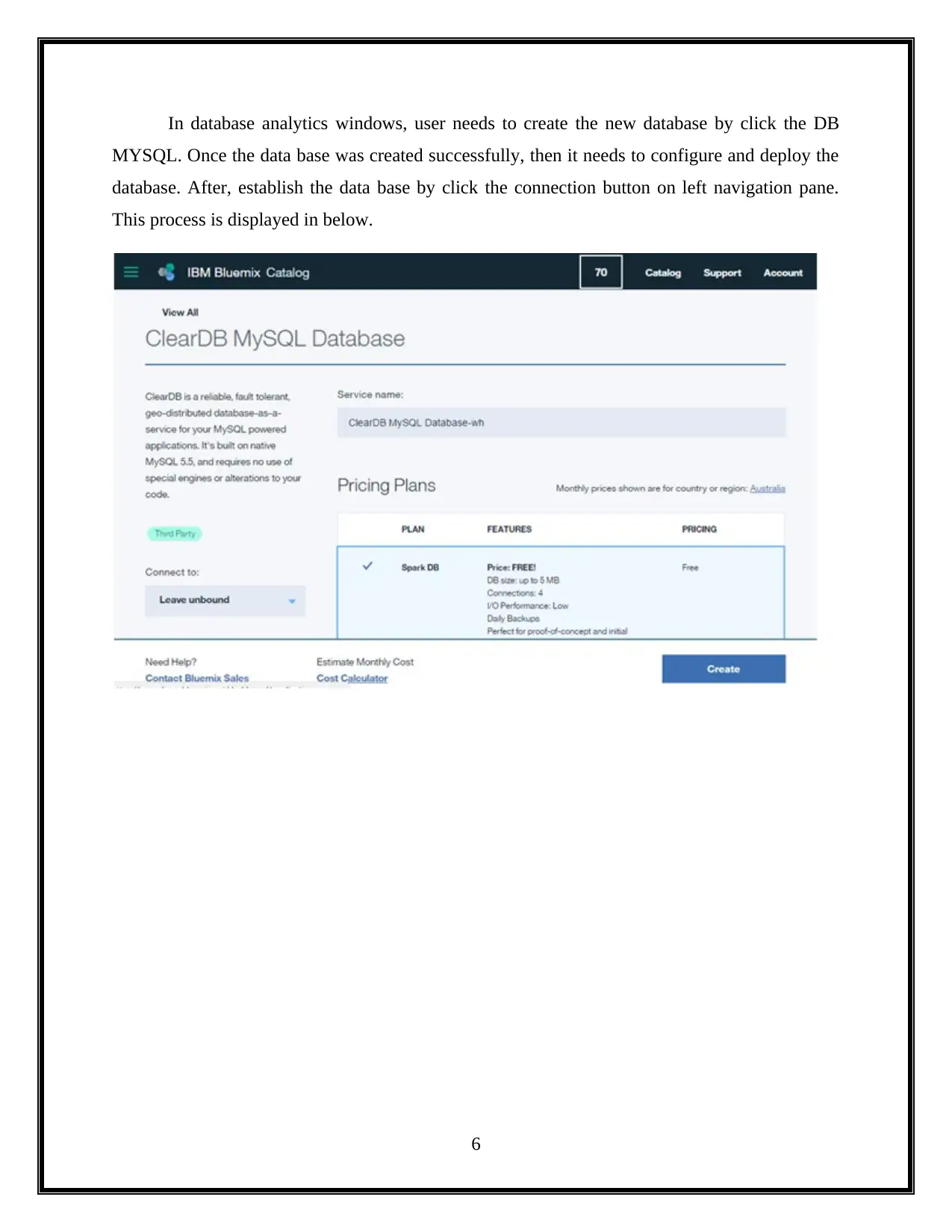
In database analytics windows, user needs to create the new database by click the DB
MYSQL. Once the data base was created successfully, then it needs to configure and deploy the
database. After, establish the data base by click the connection button on left navigation pane.
This process is displayed in below.
6
Document Page
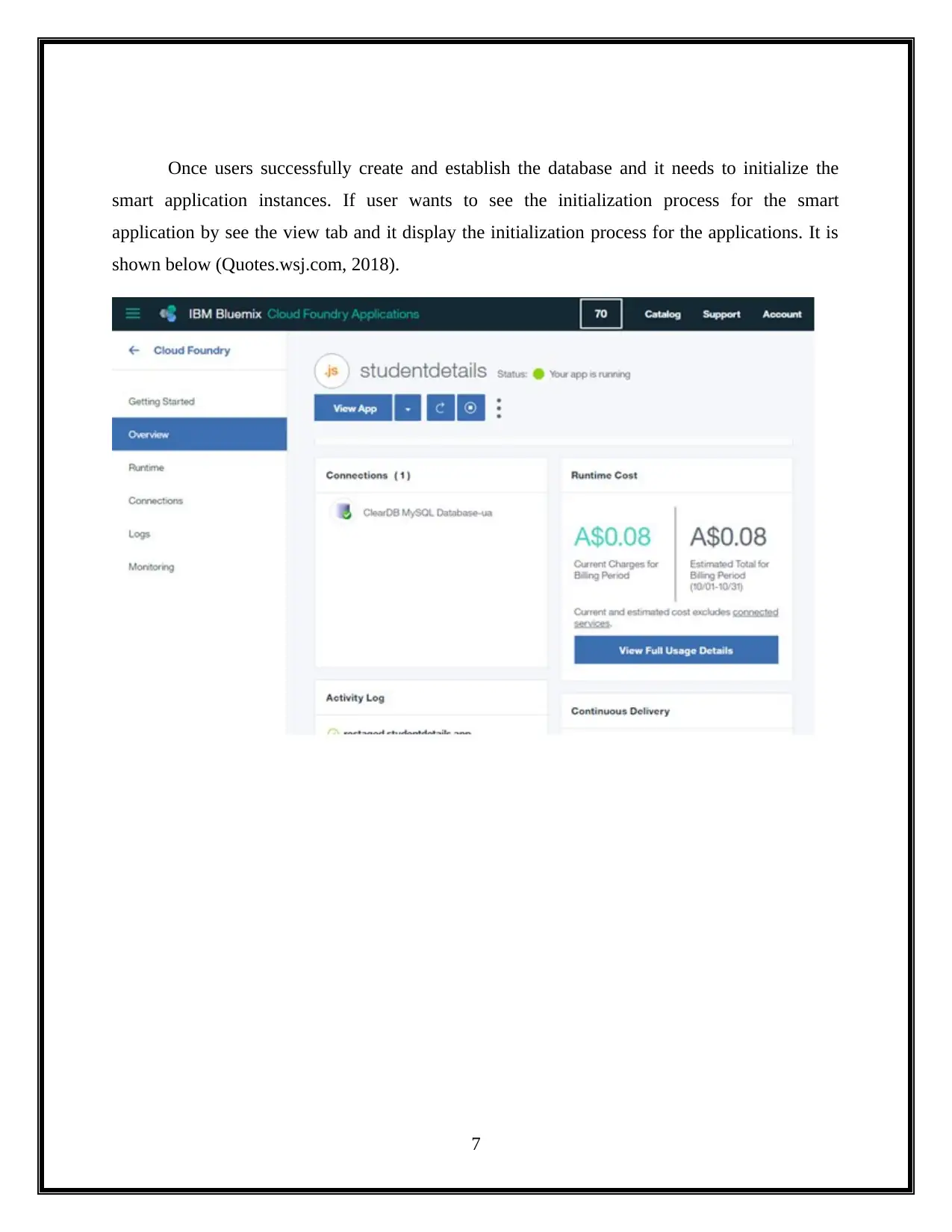
Once users successfully create and establish the database and it needs to initialize the
smart application instances. If user wants to see the initialization process for the smart
application by see the view tab and it display the initialization process for the applications. It is
shown below (Quotes.wsj.com, 2018).
7
tabler-icon-diamond-filled.svg

Paraphrase This Document

Need a fresh take? Get an instant paraphrase of this document with our AI Paraphraser
Document Page
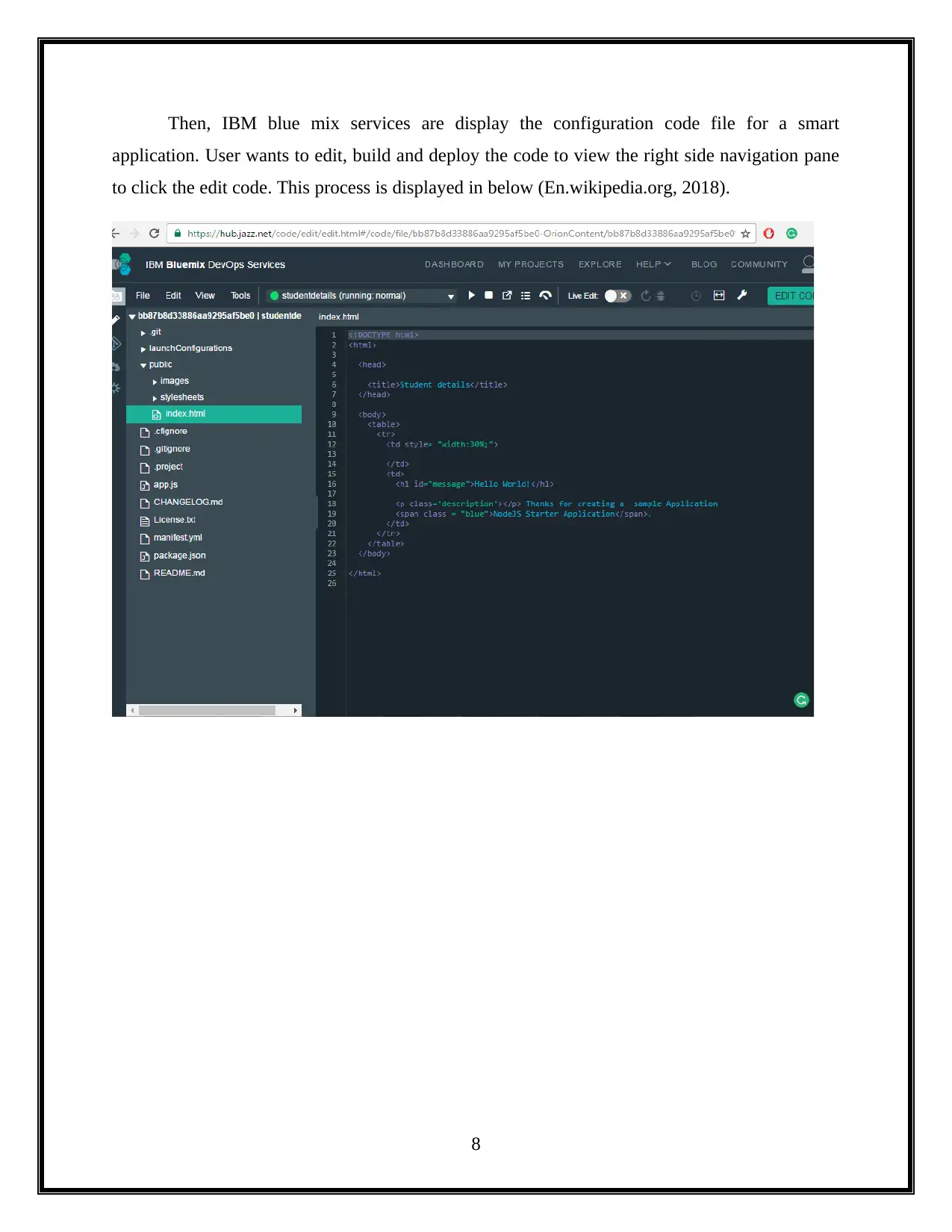
Then, IBM blue mix services are display the configuration code file for a smart
application. User wants to edit, build and deploy the code to view the right side navigation pane
to click the edit code. This process is displayed in below (En.wikipedia.org, 2018).
8
Document Page
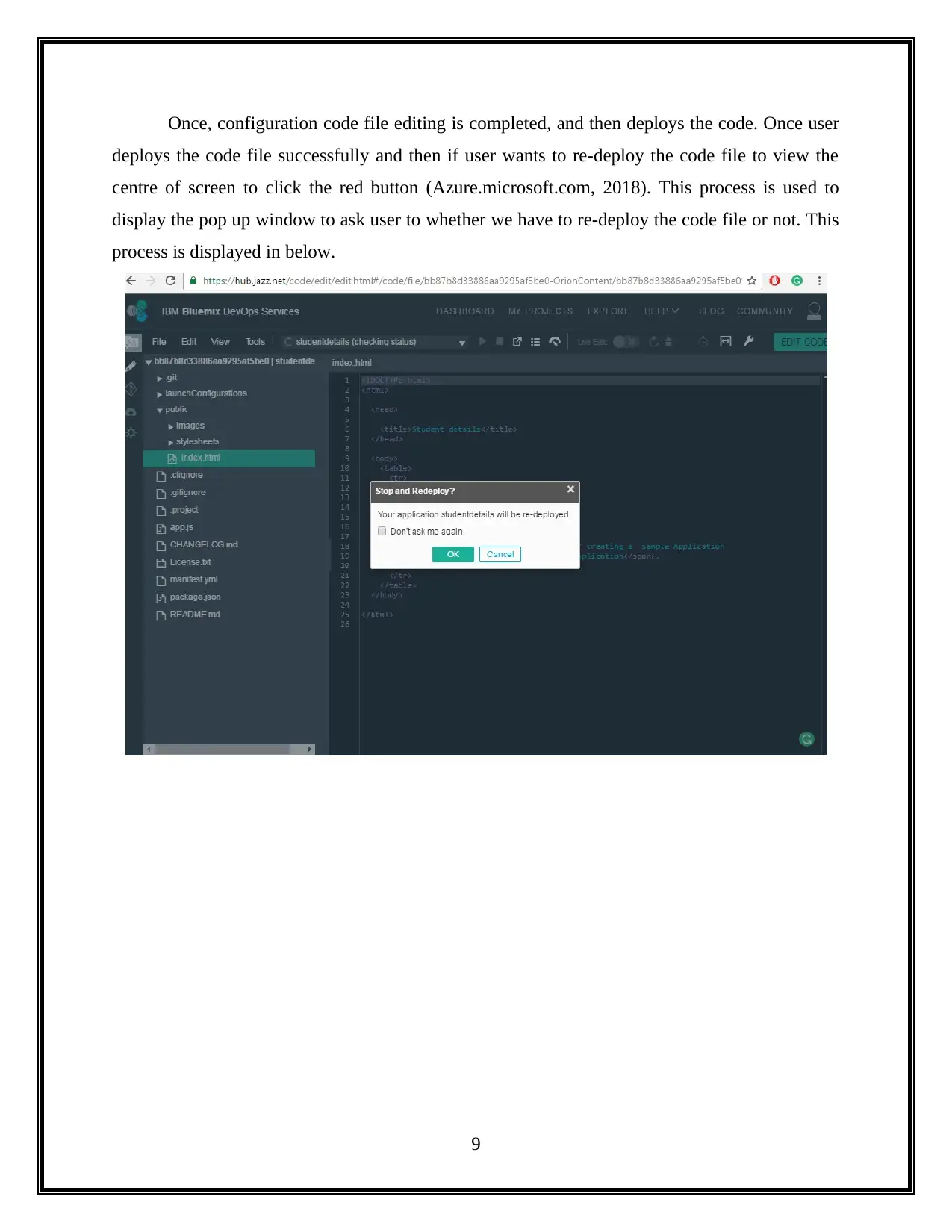
Once, configuration code file editing is completed, and then deploys the code. Once user
deploys the code file successfully and then if user wants to re-deploy the code file to view the
centre of screen to click the red button (Azure.microsoft.com, 2018). This process is used to
display the pop up window to ask user to whether we have to re-deploy the code file or not. This
process is displayed in below.
9
Document Page
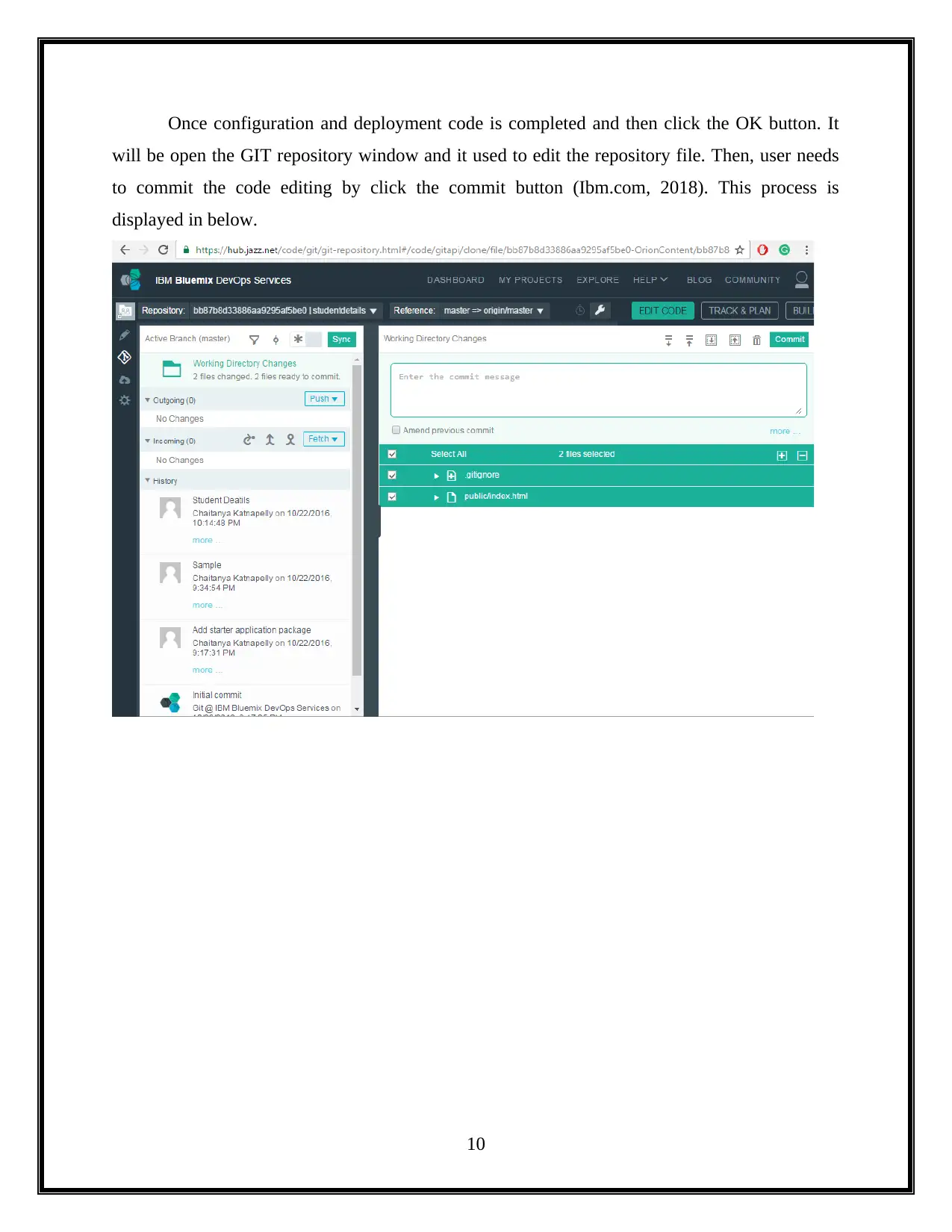
Once configuration and deployment code is completed and then click the OK button. It
will be open the GIT repository window and it used to edit the repository file. Then, user needs
to commit the code editing by click the commit button (Ibm.com, 2018). This process is
displayed in below.
10
tabler-icon-diamond-filled.svg

Paraphrase This Document

Need a fresh take? Get an instant paraphrase of this document with our AI Paraphraser
Document Page
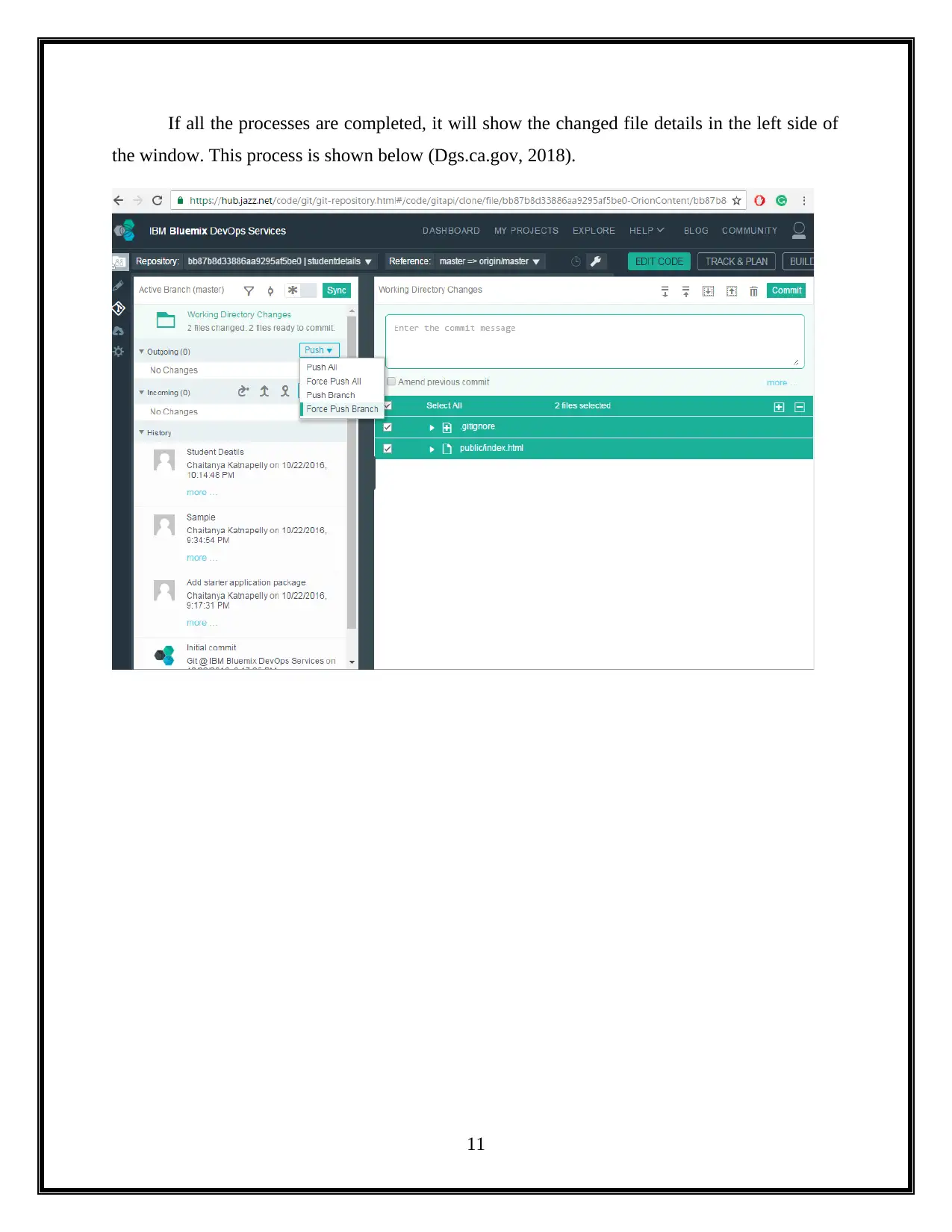
If all the processes are completed, it will show the changed file details in the left side of
the window. This process is shown below (Dgs.ca.gov, 2018).
11
Document Page
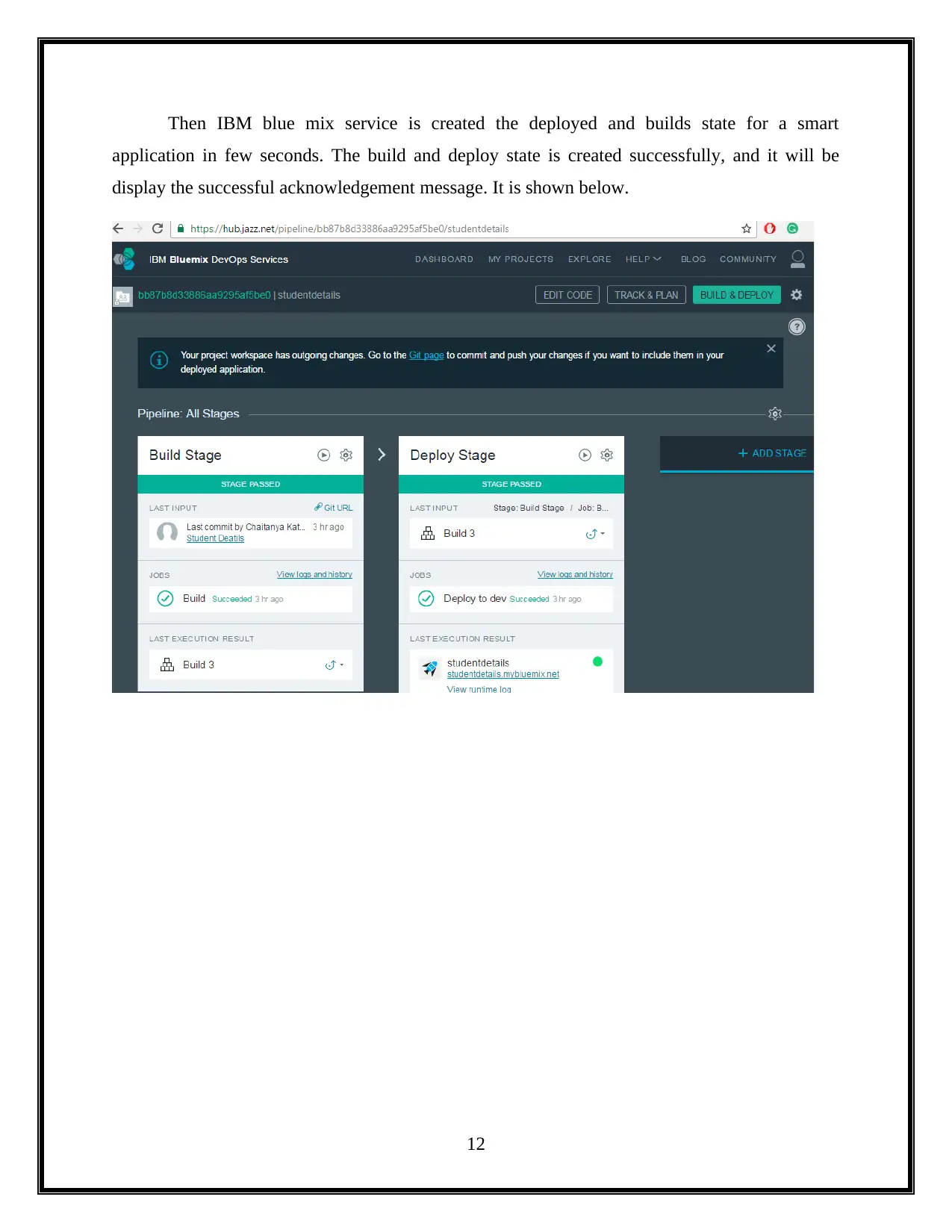
Then IBM blue mix service is created the deployed and builds state for a smart
application in few seconds. The build and deploy state is created successfully, and it will be
display the successful acknowledgement message. It is shown below.
12
chevron_up_icon
1 out of 26
circle_padding
hide_on_mobile
zoom_out_icon
[object Object]