University of California, Irvine: ICS 32 Project 3
VerifiedAdded on 2019/09/24
|12
|5858
|305
Project
AI Summary
This project, "Ride Across the River," challenges students to develop a Python program capable of displaying trip information, such as driving directions and elevation data, leveraging the MapQuest Open Data APIs. The project emphasizes the use of web services, HTTP requests, and JSON data formats, all supported within Python's standard library. Students are required to obtain and utilize a MapQuest API Key, navigate technical documentation, and integrate the Open Directions Service and Open Elevation Service to build a simple navigation system. The project aims to provide practical experience in working with web APIs, building real-world applications, and writing classes in Python, while also highlighting the importance of understanding API documentation and incremental development. The project is part of the ICS 32 course at the University of California, Irvine, and encourages students to build programs that can interact with web services, ultimately enhancing their ability to create useful Python applications.
Project #3: Ride Across the River
Background
We saw in the previous project that our Python programs are capable of
connecting to the "outside world" around them — to other programs running
on the same machine, or even to other programs running on different machines
in faraway places. This is a powerful thing for a program to be able to do,
because it is no longer limited to taking its input from a user or from a file
stored locally; its input is now potentially anything that's accessible via the
Internet, making it possible to solve a vast array of new problems and process
a much broader collection of information. Once you have the ability to connect
your programs to others, a whole new world opens up: suddenly, the idea that
you should be able to write a program that combines, say, Google search
queries, the Internet Movie Database, and your favorite social network to find
people who like movies similar to the ones you like doesn't seem so far-
fetched.
But we also saw that getting programs to share information is tricky, for (at
least) two reasons. Firstly, there's a software engineering problem: A protocol
has to be designed that both programs can use to have their conversation.
Secondly, there's a social problem: If the same person (or group of people)
isn't writing both programs, it's necessary for them to agree on the protocol
ahead of time, then to implement it. This second problem has a potentially
catastrophic effect on our ability to make things work — how could you ever
convince Google to agree to use your protocol just to communicate with you?
In practice, both of these problems are largely solved by the presence
of standards, such as those defined by the World Wide Web Consortium.
Standards help by providing detailed communication protocols whose details
have already been hammered out, with the intention of handling the most
common set of needs that will arise in programs. This eliminates the need to
design one's own protocol (where the standard protocols will suffice, which is
more often than you might think) and allows programs to be combined in
arbitrary ways; as long as they support the protocol, they've taken a big step
toward being able to interoperate with each other. What's more, standard
protocols often have standard implementations, so that you won't have to code
up the details yourself as you did in the previous project. For example, Python
has built-in support for a number of standard Internet protocols, including
HTTP (HyperText Transfer Protocol, the protocol that your browser uses to
download web pages) among others.
At first blush, HTTP doesn't seem all that important. It appears to be a
protocol that will allow you to write programs that download web pages (i.e.,
that allow you to write programs that play the same role that web browsers
do). But it turns out that HTTP is a lot more important than that, since it is the
Background
We saw in the previous project that our Python programs are capable of
connecting to the "outside world" around them — to other programs running
on the same machine, or even to other programs running on different machines
in faraway places. This is a powerful thing for a program to be able to do,
because it is no longer limited to taking its input from a user or from a file
stored locally; its input is now potentially anything that's accessible via the
Internet, making it possible to solve a vast array of new problems and process
a much broader collection of information. Once you have the ability to connect
your programs to others, a whole new world opens up: suddenly, the idea that
you should be able to write a program that combines, say, Google search
queries, the Internet Movie Database, and your favorite social network to find
people who like movies similar to the ones you like doesn't seem so far-
fetched.
But we also saw that getting programs to share information is tricky, for (at
least) two reasons. Firstly, there's a software engineering problem: A protocol
has to be designed that both programs can use to have their conversation.
Secondly, there's a social problem: If the same person (or group of people)
isn't writing both programs, it's necessary for them to agree on the protocol
ahead of time, then to implement it. This second problem has a potentially
catastrophic effect on our ability to make things work — how could you ever
convince Google to agree to use your protocol just to communicate with you?
In practice, both of these problems are largely solved by the presence
of standards, such as those defined by the World Wide Web Consortium.
Standards help by providing detailed communication protocols whose details
have already been hammered out, with the intention of handling the most
common set of needs that will arise in programs. This eliminates the need to
design one's own protocol (where the standard protocols will suffice, which is
more often than you might think) and allows programs to be combined in
arbitrary ways; as long as they support the protocol, they've taken a big step
toward being able to interoperate with each other. What's more, standard
protocols often have standard implementations, so that you won't have to code
up the details yourself as you did in the previous project. For example, Python
has built-in support for a number of standard Internet protocols, including
HTTP (HyperText Transfer Protocol, the protocol that your browser uses to
download web pages) among others.
At first blush, HTTP doesn't seem all that important. It appears to be a
protocol that will allow you to write programs that download web pages (i.e.,
that allow you to write programs that play the same role that web browsers
do). But it turns out that HTTP is a lot more important than that, since it is the

Paraphrase This Document
Need a fresh take? Get an instant paraphrase of this document with our AI Paraphraser
protocol that underlies a much wider variety of traffic on the Internet than you
might first imagine. This is not limited only to the conversation that your
browser has with a web server in order to download a web page, though that
conversation most often uses HTTP (or its more secure variant, HTTPS).
HTTP also underlies a growing variety of program-to-program
communications using web protocols, where web sites or other software
systems communicate directly with what are broadly called web services,
fetching data and affecting change. This is why you can post tweets to Twitter
using either their web site, a client application on your laptop, or a smartphone
app; all of these applications use the same protocol to communicate with the
Twitter service, differing only in the form of user interface they provide.
Fortunately, since HTTP support is built directly into Python, we can write
programs that use these web services without having to handle low-level
details of the protocol, though there are some details that you'll need to be
familiar with if you want to use the provided implementation effectively. We'll
be discussing some of these details in lecture soon, and these will be
accompanied by a code example, which will give you some background in the
tools you'll need to solve these kinds of problems in Python.
This project gives you the opportunity to explore a small part of the vast sea of
possibilities presented by web APIs and web services. You'll likely find that
you spend a lot of your time in this project understanding the web API you'll
need — being able to navigate technical documentation and gradually build an
understanding of another system is a vital skill in building real software — and
that the amount of code you need isn't nearly what you might expect when you
first read the project write-up. As always, work incrementally rather than
trying to work on the entire project all at once. When you're done, you'll have
taken a valuable step toward being able to build Python programs that interact
with web services, which opens up your ability to write programs for yourself
that are real and useful.
Additionally, you'll get what might be your first experience with writing
classes in Python, which will broaden your ability to write clean, expressive
Python programs, a topic we'll continue revisiting and refining throughout the
rest of this course.
The problem, in general
In your work on this project, you'll write a program that is capable of
displaying information about a trip from one location to another (e.g., driving
directions between two street addresses). For example, you might display turn-
by-turn directions, an estimate of how long it might take to get from one
location to another, and so on. You'll use real-world map data — real cities,
real streets — to solve your problem. So, when you're done, your program will
be a very simple navigation system, not entirely unlike the ones you see on
might first imagine. This is not limited only to the conversation that your
browser has with a web server in order to download a web page, though that
conversation most often uses HTTP (or its more secure variant, HTTPS).
HTTP also underlies a growing variety of program-to-program
communications using web protocols, where web sites or other software
systems communicate directly with what are broadly called web services,
fetching data and affecting change. This is why you can post tweets to Twitter
using either their web site, a client application on your laptop, or a smartphone
app; all of these applications use the same protocol to communicate with the
Twitter service, differing only in the form of user interface they provide.
Fortunately, since HTTP support is built directly into Python, we can write
programs that use these web services without having to handle low-level
details of the protocol, though there are some details that you'll need to be
familiar with if you want to use the provided implementation effectively. We'll
be discussing some of these details in lecture soon, and these will be
accompanied by a code example, which will give you some background in the
tools you'll need to solve these kinds of problems in Python.
This project gives you the opportunity to explore a small part of the vast sea of
possibilities presented by web APIs and web services. You'll likely find that
you spend a lot of your time in this project understanding the web API you'll
need — being able to navigate technical documentation and gradually build an
understanding of another system is a vital skill in building real software — and
that the amount of code you need isn't nearly what you might expect when you
first read the project write-up. As always, work incrementally rather than
trying to work on the entire project all at once. When you're done, you'll have
taken a valuable step toward being able to build Python programs that interact
with web services, which opens up your ability to write programs for yourself
that are real and useful.
Additionally, you'll get what might be your first experience with writing
classes in Python, which will broaden your ability to write clean, expressive
Python programs, a topic we'll continue revisiting and refining throughout the
rest of this course.
The problem, in general
In your work on this project, you'll write a program that is capable of
displaying information about a trip from one location to another (e.g., driving
directions between two street addresses). For example, you might display turn-
by-turn directions, an estimate of how long it might take to get from one
location to another, and so on. You'll use real-world map data — real cities,
real streets — to solve your problem. So, when you're done, your program will
be a very simple navigation system, not entirely unlike the ones you see on
some smartphones or in some cars. If you want to know how to drive from
Bren Hall at UCI to Staples Center in Los Angeles, your program will be able
to tell you.
That may sound like something that is well beyond your current skill level
and/or time you have available, that you're being asked to build a complete,
professional system that would ordinarily be written by a large team of people
over a period of months. And, indeed, if you had to write the entire system
from scratch, that would certainly be true; it would take even a seasoned
professional a lot longer than the time allotted to complete a task like that, and
would require skills well beyond what's been taught in your coursework to
date.
But there is good news here: We operate in an interconnected world, where
information of all kinds is available to us in web browsers, smartphone
applications, and so on. And we're fortunate that a lot of that information is
available for free, not just in a way that lets us view it in a web browser, but in
a way that makes it available to the programs we write. Provided that we can
find an online service that provides the information we need, and provided that
we're licensed to use it — either because it's free and we meet the terms of use,
or because we're willing to pay for the privilege — we can use it to solve our
problem.
As it turns out, the information we need to solve this particular problem is
available online, in a form that can be consumed by a Python program, and
licensed in a way that lets us use it (because it is free for non-commercial use).
The only trick is figuring out how to get the information into our program.
Luckily for us, the service that provides this information uses standard
protocols and formats that are common on the Internet; even better, all of these
protocols and formats are implemented already in Python's standard library, so
the low-level details will not be our concern, and we can focus on the more
interesting parts of the problem.
The MapQuest Open Data APIs
MapQuest is a company that is in the business of providing online services for
displaying maps, providing directions, reporting on current traffic conditions,
and other related services. While they're a for-profit company, some of their
services are provided free of charge for non-commercial use. As long as you're
not building a product from which you'll be trying to make money, you can
use MapQuest's free services, with the one additional caveat that you have to
follow the rules laid out in their license. These kinds of license restrictions are
no joke, so we'll spend a little time to be sure we're taking them seriously.
For our work on this project, you'll be concerned with two parts of the Open
MapQuest API, provided by a company called MapQuest; we'll need both the
Bren Hall at UCI to Staples Center in Los Angeles, your program will be able
to tell you.
That may sound like something that is well beyond your current skill level
and/or time you have available, that you're being asked to build a complete,
professional system that would ordinarily be written by a large team of people
over a period of months. And, indeed, if you had to write the entire system
from scratch, that would certainly be true; it would take even a seasoned
professional a lot longer than the time allotted to complete a task like that, and
would require skills well beyond what's been taught in your coursework to
date.
But there is good news here: We operate in an interconnected world, where
information of all kinds is available to us in web browsers, smartphone
applications, and so on. And we're fortunate that a lot of that information is
available for free, not just in a way that lets us view it in a web browser, but in
a way that makes it available to the programs we write. Provided that we can
find an online service that provides the information we need, and provided that
we're licensed to use it — either because it's free and we meet the terms of use,
or because we're willing to pay for the privilege — we can use it to solve our
problem.
As it turns out, the information we need to solve this particular problem is
available online, in a form that can be consumed by a Python program, and
licensed in a way that lets us use it (because it is free for non-commercial use).
The only trick is figuring out how to get the information into our program.
Luckily for us, the service that provides this information uses standard
protocols and formats that are common on the Internet; even better, all of these
protocols and formats are implemented already in Python's standard library, so
the low-level details will not be our concern, and we can focus on the more
interesting parts of the problem.
The MapQuest Open Data APIs
MapQuest is a company that is in the business of providing online services for
displaying maps, providing directions, reporting on current traffic conditions,
and other related services. While they're a for-profit company, some of their
services are provided free of charge for non-commercial use. As long as you're
not building a product from which you'll be trying to make money, you can
use MapQuest's free services, with the one additional caveat that you have to
follow the rules laid out in their license. These kinds of license restrictions are
no joke, so we'll spend a little time to be sure we're taking them seriously.
For our work on this project, you'll be concerned with two parts of the Open
MapQuest API, provided by a company called MapQuest; we'll need both the
⊘ This is a preview!⊘
Do you want full access?
Subscribe today to unlock all pages.

Trusted by 1+ million students worldwide
Open Directions Service and the Open Elevation Service. Both of these are
web-based APIs, similar to the one we used in the code example in which we
downloaded and displayed information about YouTube videos. Like
YouTube's API, the Open MapQuest API uses HTTP, with queries described
using a URL, and with responses returned in JSON format. Fortunately, all of
these technologies are supported in Python's standard library, so most of the
details are things that will be handled for us automatically, but, as we saw in
the YouTube example, there are some things we need to get right, and not all
of the details wil be the same in the MapQuest example as they were in the
YouTube example, so it'll be vital for you to understand why we did the things
we did in the code example, so you can know whether and where the same
techniques apply.
The two APIs you'll need are described in detail at the links below. You
certainly won't need to read all of the documentation, but you'll want to take a
look around and familiarize yourself with what the API can do, because part of
your goal in this project is to decide what parts of the API you'll need to solve
your problem.
MapQuest Open Directions Service documentation
MapQuest Open Elevation Service documentation
Creating an account and getting an AppKey
Like YouTube's API that we saw in class, MapQuest's API requires an API
Key, which links your usage of the API to an account and authorizes you to
use the API. Before you can make use of the API, you'll need to obtain your
own API Key — and due to usage restrictions, we won't all be able to share
the same key, so each of you will need to take this step. Do not share your API
Key with other students! You'll only need to do this once, and you'll be able to
use your API Key for all of your work on this project once it's been created.
And, don't worry, obtaining the API Key is free for non-commercial uses like
ours.
Visit the MapQuest Developer site in your browser.
Part of the way down the page, you'll see a blue button that says Get Your
Free API Key. Click that button.
A form will be displayed, in which you can choose a username, a password,
and so on. Fill in the necessary information, and be sure to use an email
address that you have access to; you'll need to receive emails from
MapQuest along the way.
Once you've created your account, you'll be logged in and presented with
some choices, one of which is Keys & Reporting. Click that.
You'll then see a green button that says Create a New App. Click that,
because you're going to be writing an application that uses the Open
MapQuest APIs.
web-based APIs, similar to the one we used in the code example in which we
downloaded and displayed information about YouTube videos. Like
YouTube's API, the Open MapQuest API uses HTTP, with queries described
using a URL, and with responses returned in JSON format. Fortunately, all of
these technologies are supported in Python's standard library, so most of the
details are things that will be handled for us automatically, but, as we saw in
the YouTube example, there are some things we need to get right, and not all
of the details wil be the same in the MapQuest example as they were in the
YouTube example, so it'll be vital for you to understand why we did the things
we did in the code example, so you can know whether and where the same
techniques apply.
The two APIs you'll need are described in detail at the links below. You
certainly won't need to read all of the documentation, but you'll want to take a
look around and familiarize yourself with what the API can do, because part of
your goal in this project is to decide what parts of the API you'll need to solve
your problem.
MapQuest Open Directions Service documentation
MapQuest Open Elevation Service documentation
Creating an account and getting an AppKey
Like YouTube's API that we saw in class, MapQuest's API requires an API
Key, which links your usage of the API to an account and authorizes you to
use the API. Before you can make use of the API, you'll need to obtain your
own API Key — and due to usage restrictions, we won't all be able to share
the same key, so each of you will need to take this step. Do not share your API
Key with other students! You'll only need to do this once, and you'll be able to
use your API Key for all of your work on this project once it's been created.
And, don't worry, obtaining the API Key is free for non-commercial uses like
ours.
Visit the MapQuest Developer site in your browser.
Part of the way down the page, you'll see a blue button that says Get Your
Free API Key. Click that button.
A form will be displayed, in which you can choose a username, a password,
and so on. Fill in the necessary information, and be sure to use an email
address that you have access to; you'll need to receive emails from
MapQuest along the way.
Once you've created your account, you'll be logged in and presented with
some choices, one of which is Keys & Reporting. Click that.
You'll then see a green button that says Create a New App. Click that,
because you're going to be writing an application that uses the Open
MapQuest APIs.
Paraphrase This Document
Need a fresh take? Get an instant paraphrase of this document with our AI Paraphraser
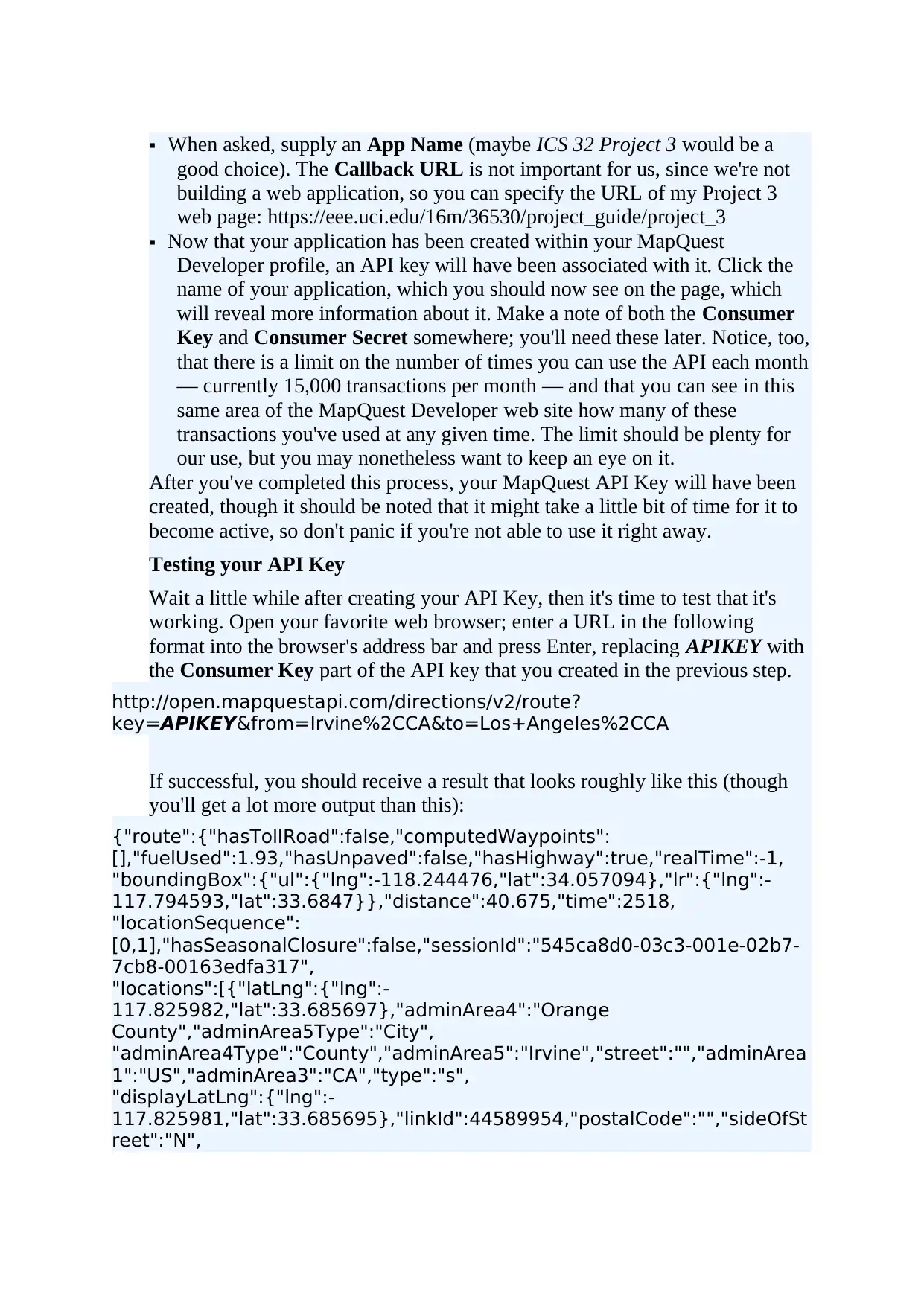
When asked, supply an App Name (maybe ICS 32 Project 3 would be a
good choice). The Callback URL is not important for us, since we're not
building a web application, so you can specify the URL of my Project 3
web page: https://eee.uci.edu/16m/36530/project_guide/project_3
Now that your application has been created within your MapQuest
Developer profile, an API key will have been associated with it. Click the
name of your application, which you should now see on the page, which
will reveal more information about it. Make a note of both the Consumer
Key and Consumer Secret somewhere; you'll need these later. Notice, too,
that there is a limit on the number of times you can use the API each month
— currently 15,000 transactions per month — and that you can see in this
same area of the MapQuest Developer web site how many of these
transactions you've used at any given time. The limit should be plenty for
our use, but you may nonetheless want to keep an eye on it.
After you've completed this process, your MapQuest API Key will have been
created, though it should be noted that it might take a little bit of time for it to
become active, so don't panic if you're not able to use it right away.
Testing your API Key
Wait a little while after creating your API Key, then it's time to test that it's
working. Open your favorite web browser; enter a URL in the following
format into the browser's address bar and press Enter, replacing APIKEY with
the Consumer Key part of the API key that you created in the previous step.
http://open.mapquestapi.com/directions/v2/route?
key=APIKEY&from=Irvine%2CCA&to=Los+Angeles%2CCA
If successful, you should receive a result that looks roughly like this (though
you'll get a lot more output than this):
{"route":{"hasTollRoad":false,"computedWaypoints":
[],"fuelUsed":1.93,"hasUnpaved":false,"hasHighway":true,"realTime":-1,
"boundingBox":{"ul":{"lng":-118.244476,"lat":34.057094},"lr":{"lng":-
117.794593,"lat":33.6847}},"distance":40.675,"time":2518,
"locationSequence":
[0,1],"hasSeasonalClosure":false,"sessionId":"545ca8d0-03c3-001e-02b7-
7cb8-00163edfa317",
"locations":[{"latLng":{"lng":-
117.825982,"lat":33.685697},"adminArea4":"Orange
County","adminArea5Type":"City",
"adminArea4Type":"County","adminArea5":"Irvine","street":"","adminArea
1":"US","adminArea3":"CA","type":"s",
"displayLatLng":{"lng":-
117.825981,"lat":33.685695},"linkId":44589954,"postalCode":"","sideOfSt
reet":"N",
good choice). The Callback URL is not important for us, since we're not
building a web application, so you can specify the URL of my Project 3
web page: https://eee.uci.edu/16m/36530/project_guide/project_3
Now that your application has been created within your MapQuest
Developer profile, an API key will have been associated with it. Click the
name of your application, which you should now see on the page, which
will reveal more information about it. Make a note of both the Consumer
Key and Consumer Secret somewhere; you'll need these later. Notice, too,
that there is a limit on the number of times you can use the API each month
— currently 15,000 transactions per month — and that you can see in this
same area of the MapQuest Developer web site how many of these
transactions you've used at any given time. The limit should be plenty for
our use, but you may nonetheless want to keep an eye on it.
After you've completed this process, your MapQuest API Key will have been
created, though it should be noted that it might take a little bit of time for it to
become active, so don't panic if you're not able to use it right away.
Testing your API Key
Wait a little while after creating your API Key, then it's time to test that it's
working. Open your favorite web browser; enter a URL in the following
format into the browser's address bar and press Enter, replacing APIKEY with
the Consumer Key part of the API key that you created in the previous step.
http://open.mapquestapi.com/directions/v2/route?
key=APIKEY&from=Irvine%2CCA&to=Los+Angeles%2CCA
If successful, you should receive a result that looks roughly like this (though
you'll get a lot more output than this):
{"route":{"hasTollRoad":false,"computedWaypoints":
[],"fuelUsed":1.93,"hasUnpaved":false,"hasHighway":true,"realTime":-1,
"boundingBox":{"ul":{"lng":-118.244476,"lat":34.057094},"lr":{"lng":-
117.794593,"lat":33.6847}},"distance":40.675,"time":2518,
"locationSequence":
[0,1],"hasSeasonalClosure":false,"sessionId":"545ca8d0-03c3-001e-02b7-
7cb8-00163edfa317",
"locations":[{"latLng":{"lng":-
117.825982,"lat":33.685697},"adminArea4":"Orange
County","adminArea5Type":"City",
"adminArea4Type":"County","adminArea5":"Irvine","street":"","adminArea
1":"US","adminArea3":"CA","type":"s",
"displayLatLng":{"lng":-
117.825981,"lat":33.685695},"linkId":44589954,"postalCode":"","sideOfSt
reet":"N",
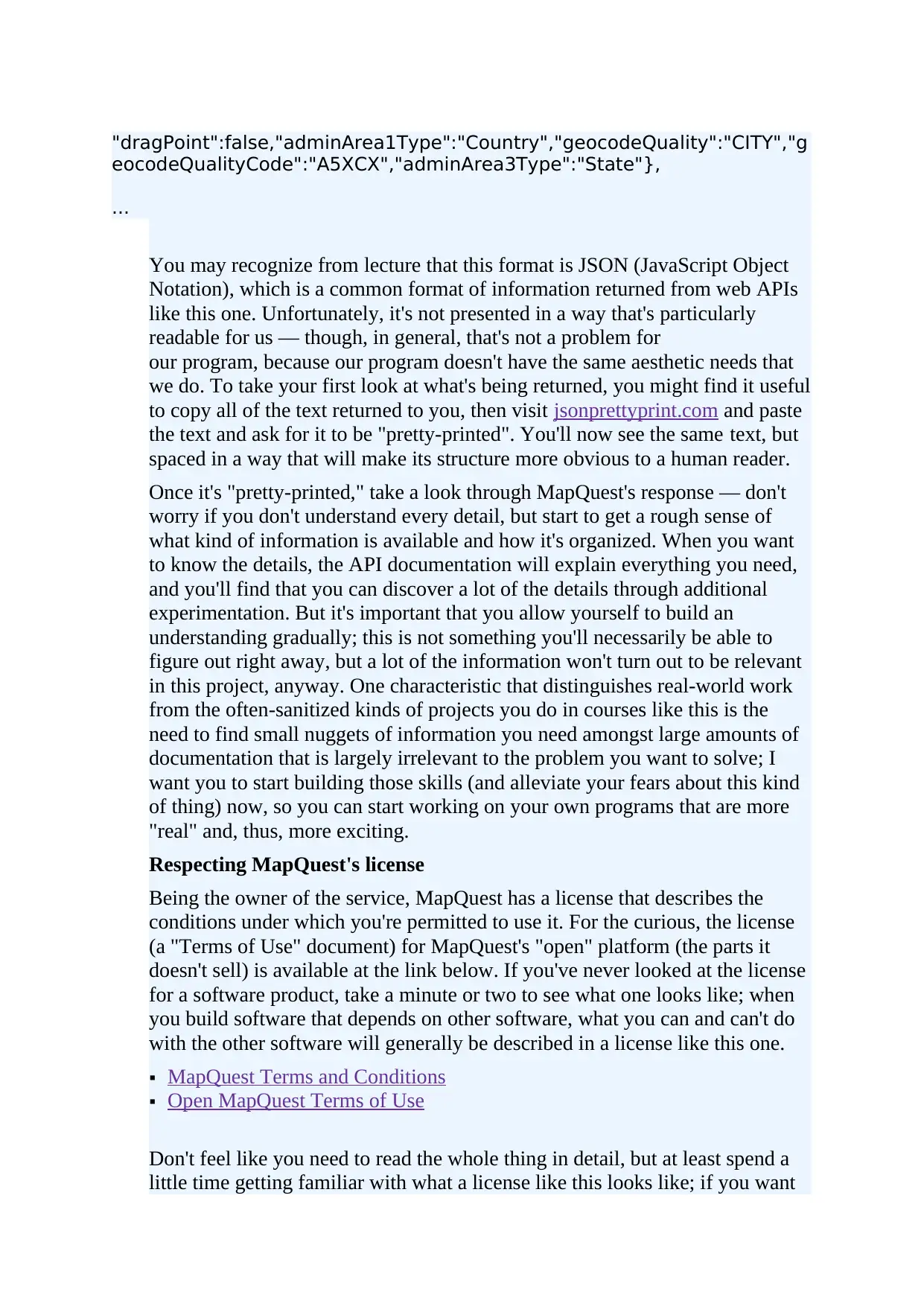
"dragPoint":false,"adminArea1Type":"Country","geocodeQuality":"CITY","g
eocodeQualityCode":"A5XCX","adminArea3Type":"State"},
...
You may recognize from lecture that this format is JSON (JavaScript Object
Notation), which is a common format of information returned from web APIs
like this one. Unfortunately, it's not presented in a way that's particularly
readable for us — though, in general, that's not a problem for
our program, because our program doesn't have the same aesthetic needs that
we do. To take your first look at what's being returned, you might find it useful
to copy all of the text returned to you, then visit jsonprettyprint.com and paste
the text and ask for it to be "pretty-printed". You'll now see the same text, but
spaced in a way that will make its structure more obvious to a human reader.
Once it's "pretty-printed," take a look through MapQuest's response — don't
worry if you don't understand every detail, but start to get a rough sense of
what kind of information is available and how it's organized. When you want
to know the details, the API documentation will explain everything you need,
and you'll find that you can discover a lot of the details through additional
experimentation. But it's important that you allow yourself to build an
understanding gradually; this is not something you'll necessarily be able to
figure out right away, but a lot of the information won't turn out to be relevant
in this project, anyway. One characteristic that distinguishes real-world work
from the often-sanitized kinds of projects you do in courses like this is the
need to find small nuggets of information you need amongst large amounts of
documentation that is largely irrelevant to the problem you want to solve; I
want you to start building those skills (and alleviate your fears about this kind
of thing) now, so you can start working on your own programs that are more
"real" and, thus, more exciting.
Respecting MapQuest's license
Being the owner of the service, MapQuest has a license that describes the
conditions under which you're permitted to use it. For the curious, the license
(a "Terms of Use" document) for MapQuest's "open" platform (the parts it
doesn't sell) is available at the link below. If you've never looked at the license
for a software product, take a minute or two to see what one looks like; when
you build software that depends on other software, what you can and can't do
with the other software will generally be described in a license like this one.
MapQuest Terms and Conditions
Open MapQuest Terms of Use
Don't feel like you need to read the whole thing in detail, but at least spend a
little time getting familiar with what a license like this looks like; if you want
eocodeQualityCode":"A5XCX","adminArea3Type":"State"},
...
You may recognize from lecture that this format is JSON (JavaScript Object
Notation), which is a common format of information returned from web APIs
like this one. Unfortunately, it's not presented in a way that's particularly
readable for us — though, in general, that's not a problem for
our program, because our program doesn't have the same aesthetic needs that
we do. To take your first look at what's being returned, you might find it useful
to copy all of the text returned to you, then visit jsonprettyprint.com and paste
the text and ask for it to be "pretty-printed". You'll now see the same text, but
spaced in a way that will make its structure more obvious to a human reader.
Once it's "pretty-printed," take a look through MapQuest's response — don't
worry if you don't understand every detail, but start to get a rough sense of
what kind of information is available and how it's organized. When you want
to know the details, the API documentation will explain everything you need,
and you'll find that you can discover a lot of the details through additional
experimentation. But it's important that you allow yourself to build an
understanding gradually; this is not something you'll necessarily be able to
figure out right away, but a lot of the information won't turn out to be relevant
in this project, anyway. One characteristic that distinguishes real-world work
from the often-sanitized kinds of projects you do in courses like this is the
need to find small nuggets of information you need amongst large amounts of
documentation that is largely irrelevant to the problem you want to solve; I
want you to start building those skills (and alleviate your fears about this kind
of thing) now, so you can start working on your own programs that are more
"real" and, thus, more exciting.
Respecting MapQuest's license
Being the owner of the service, MapQuest has a license that describes the
conditions under which you're permitted to use it. For the curious, the license
(a "Terms of Use" document) for MapQuest's "open" platform (the parts it
doesn't sell) is available at the link below. If you've never looked at the license
for a software product, take a minute or two to see what one looks like; when
you build software that depends on other software, what you can and can't do
with the other software will generally be described in a license like this one.
MapQuest Terms and Conditions
Open MapQuest Terms of Use
Don't feel like you need to read the whole thing in detail, but at least spend a
little time getting familiar with what a license like this looks like; if you want
⊘ This is a preview!⊘
Do you want full access?
Subscribe today to unlock all pages.
Trusted by 1+ million students worldwide
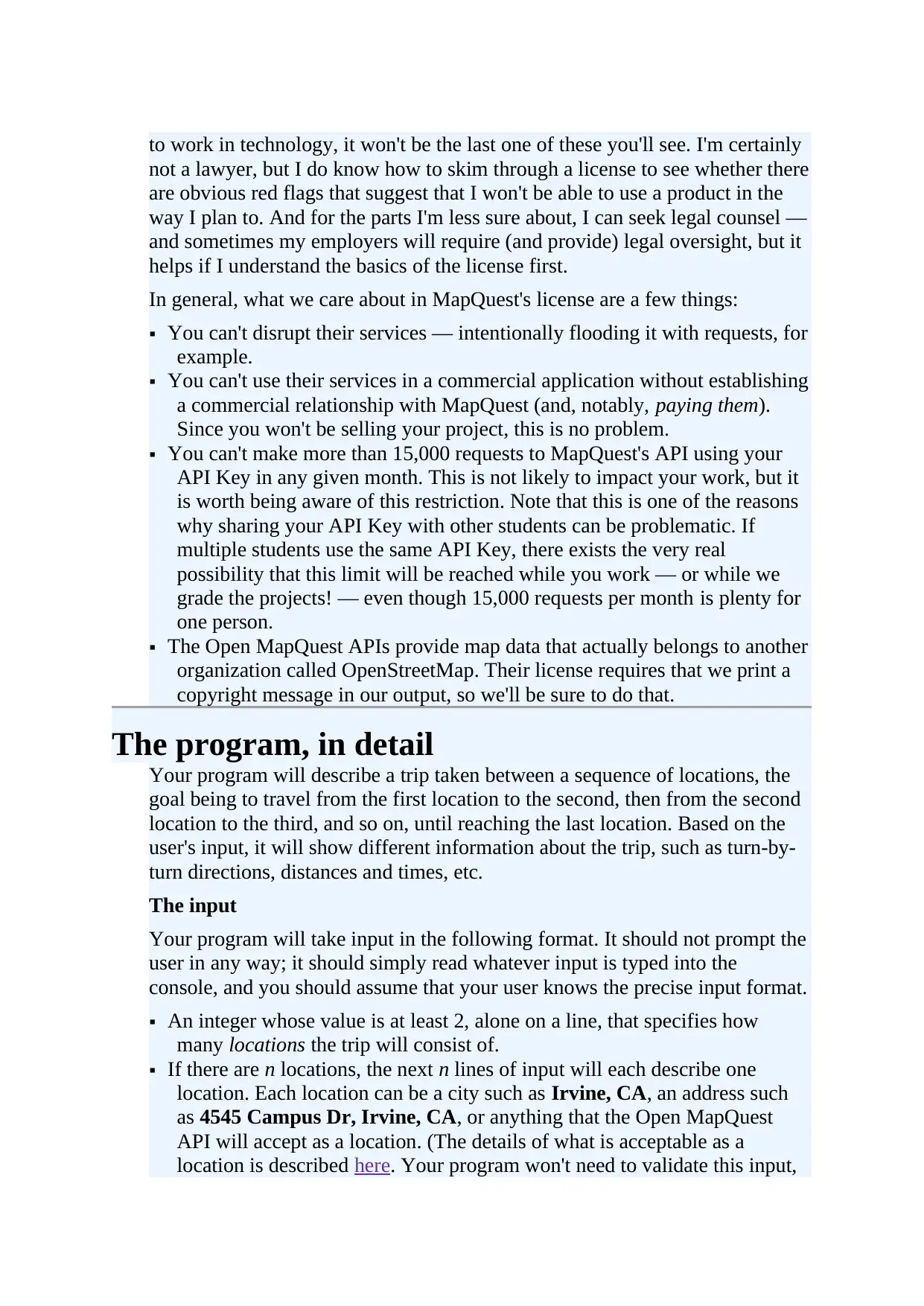
to work in technology, it won't be the last one of these you'll see. I'm certainly
not a lawyer, but I do know how to skim through a license to see whether there
are obvious red flags that suggest that I won't be able to use a product in the
way I plan to. And for the parts I'm less sure about, I can seek legal counsel —
and sometimes my employers will require (and provide) legal oversight, but it
helps if I understand the basics of the license first.
In general, what we care about in MapQuest's license are a few things:
You can't disrupt their services — intentionally flooding it with requests, for
example.
You can't use their services in a commercial application without establishing
a commercial relationship with MapQuest (and, notably, paying them).
Since you won't be selling your project, this is no problem.
You can't make more than 15,000 requests to MapQuest's API using your
API Key in any given month. This is not likely to impact your work, but it
is worth being aware of this restriction. Note that this is one of the reasons
why sharing your API Key with other students can be problematic. If
multiple students use the same API Key, there exists the very real
possibility that this limit will be reached while you work — or while we
grade the projects! — even though 15,000 requests per month is plenty for
one person.
The Open MapQuest APIs provide map data that actually belongs to another
organization called OpenStreetMap. Their license requires that we print a
copyright message in our output, so we'll be sure to do that.
The program, in detail
Your program will describe a trip taken between a sequence of locations, the
goal being to travel from the first location to the second, then from the second
location to the third, and so on, until reaching the last location. Based on the
user's input, it will show different information about the trip, such as turn-by-
turn directions, distances and times, etc.
The input
Your program will take input in the following format. It should not prompt the
user in any way; it should simply read whatever input is typed into the
console, and you should assume that your user knows the precise input format.
An integer whose value is at least 2, alone on a line, that specifies how
many locations the trip will consist of.
If there are n locations, the next n lines of input will each describe one
location. Each location can be a city such as Irvine, CA, an address such
as 4545 Campus Dr, Irvine, CA, or anything that the Open MapQuest
API will accept as a location. (The details of what is acceptable as a
location is described here. Your program won't need to validate this input,
not a lawyer, but I do know how to skim through a license to see whether there
are obvious red flags that suggest that I won't be able to use a product in the
way I plan to. And for the parts I'm less sure about, I can seek legal counsel —
and sometimes my employers will require (and provide) legal oversight, but it
helps if I understand the basics of the license first.
In general, what we care about in MapQuest's license are a few things:
You can't disrupt their services — intentionally flooding it with requests, for
example.
You can't use their services in a commercial application without establishing
a commercial relationship with MapQuest (and, notably, paying them).
Since you won't be selling your project, this is no problem.
You can't make more than 15,000 requests to MapQuest's API using your
API Key in any given month. This is not likely to impact your work, but it
is worth being aware of this restriction. Note that this is one of the reasons
why sharing your API Key with other students can be problematic. If
multiple students use the same API Key, there exists the very real
possibility that this limit will be reached while you work — or while we
grade the projects! — even though 15,000 requests per month is plenty for
one person.
The Open MapQuest APIs provide map data that actually belongs to another
organization called OpenStreetMap. Their license requires that we print a
copyright message in our output, so we'll be sure to do that.
The program, in detail
Your program will describe a trip taken between a sequence of locations, the
goal being to travel from the first location to the second, then from the second
location to the third, and so on, until reaching the last location. Based on the
user's input, it will show different information about the trip, such as turn-by-
turn directions, distances and times, etc.
The input
Your program will take input in the following format. It should not prompt the
user in any way; it should simply read whatever input is typed into the
console, and you should assume that your user knows the precise input format.
An integer whose value is at least 2, alone on a line, that specifies how
many locations the trip will consist of.
If there are n locations, the next n lines of input will each describe one
location. Each location can be a city such as Irvine, CA, an address such
as 4545 Campus Dr, Irvine, CA, or anything that the Open MapQuest
API will accept as a location. (The details of what is acceptable as a
location is described here. Your program won't need to validate this input,
Paraphrase This Document
Need a fresh take? Get an instant paraphrase of this document with our AI Paraphraser
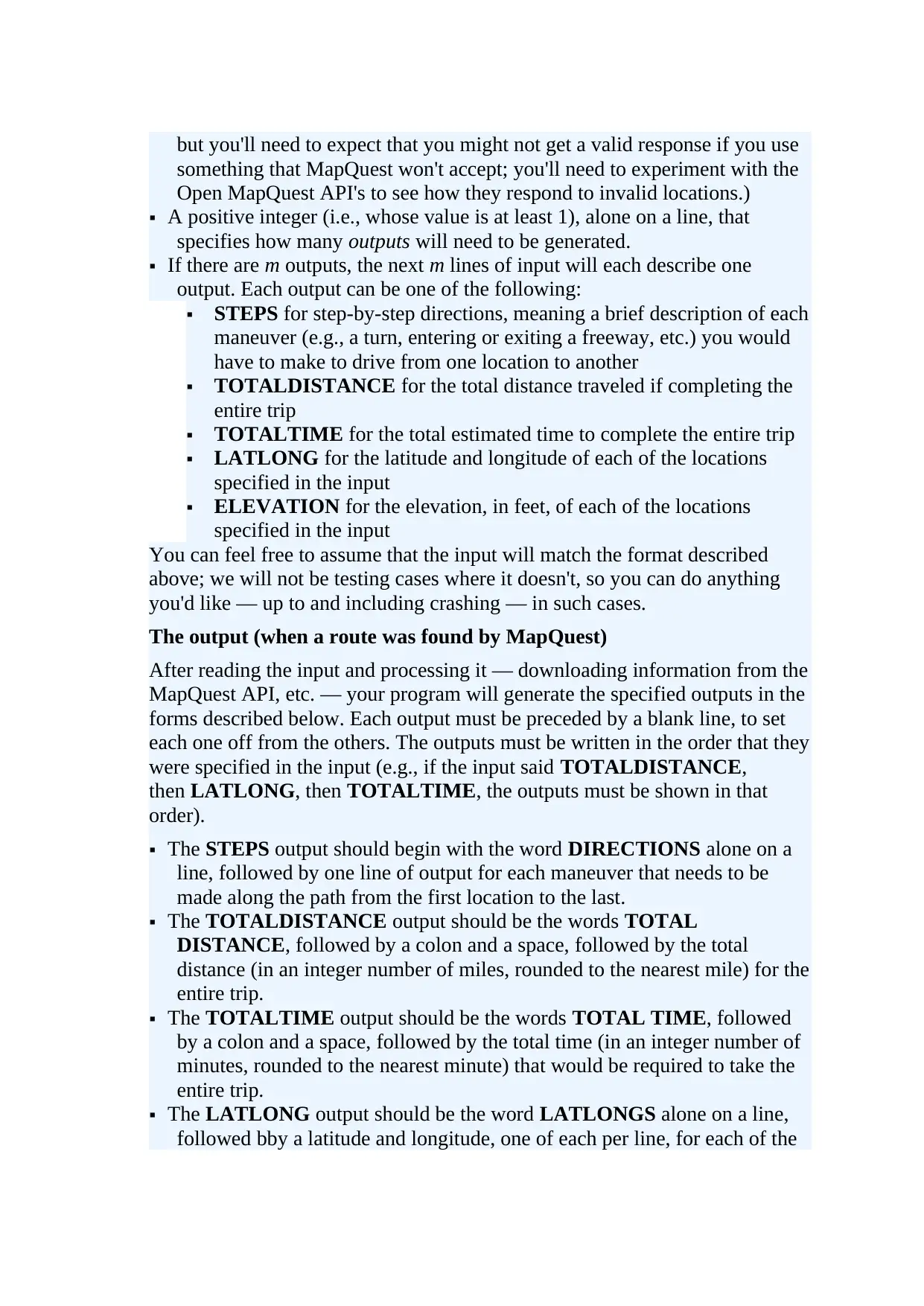
but you'll need to expect that you might not get a valid response if you use
something that MapQuest won't accept; you'll need to experiment with the
Open MapQuest API's to see how they respond to invalid locations.)
A positive integer (i.e., whose value is at least 1), alone on a line, that
specifies how many outputs will need to be generated.
If there are m outputs, the next m lines of input will each describe one
output. Each output can be one of the following:
STEPS for step-by-step directions, meaning a brief description of each
maneuver (e.g., a turn, entering or exiting a freeway, etc.) you would
have to make to drive from one location to another
TOTALDISTANCE for the total distance traveled if completing the
entire trip
TOTALTIME for the total estimated time to complete the entire trip
LATLONG for the latitude and longitude of each of the locations
specified in the input
ELEVATION for the elevation, in feet, of each of the locations
specified in the input
You can feel free to assume that the input will match the format described
above; we will not be testing cases where it doesn't, so you can do anything
you'd like — up to and including crashing — in such cases.
The output (when a route was found by MapQuest)
After reading the input and processing it — downloading information from the
MapQuest API, etc. — your program will generate the specified outputs in the
forms described below. Each output must be preceded by a blank line, to set
each one off from the others. The outputs must be written in the order that they
were specified in the input (e.g., if the input said TOTALDISTANCE,
then LATLONG, then TOTALTIME, the outputs must be shown in that
order).
The STEPS output should begin with the word DIRECTIONS alone on a
line, followed by one line of output for each maneuver that needs to be
made along the path from the first location to the last.
The TOTALDISTANCE output should be the words TOTAL
DISTANCE, followed by a colon and a space, followed by the total
distance (in an integer number of miles, rounded to the nearest mile) for the
entire trip.
The TOTALTIME output should be the words TOTAL TIME, followed
by a colon and a space, followed by the total time (in an integer number of
minutes, rounded to the nearest minute) that would be required to take the
entire trip.
The LATLONG output should be the word LATLONGS alone on a line,
followed bby a latitude and longitude, one of each per line, for each of the
something that MapQuest won't accept; you'll need to experiment with the
Open MapQuest API's to see how they respond to invalid locations.)
A positive integer (i.e., whose value is at least 1), alone on a line, that
specifies how many outputs will need to be generated.
If there are m outputs, the next m lines of input will each describe one
output. Each output can be one of the following:
STEPS for step-by-step directions, meaning a brief description of each
maneuver (e.g., a turn, entering or exiting a freeway, etc.) you would
have to make to drive from one location to another
TOTALDISTANCE for the total distance traveled if completing the
entire trip
TOTALTIME for the total estimated time to complete the entire trip
LATLONG for the latitude and longitude of each of the locations
specified in the input
ELEVATION for the elevation, in feet, of each of the locations
specified in the input
You can feel free to assume that the input will match the format described
above; we will not be testing cases where it doesn't, so you can do anything
you'd like — up to and including crashing — in such cases.
The output (when a route was found by MapQuest)
After reading the input and processing it — downloading information from the
MapQuest API, etc. — your program will generate the specified outputs in the
forms described below. Each output must be preceded by a blank line, to set
each one off from the others. The outputs must be written in the order that they
were specified in the input (e.g., if the input said TOTALDISTANCE,
then LATLONG, then TOTALTIME, the outputs must be shown in that
order).
The STEPS output should begin with the word DIRECTIONS alone on a
line, followed by one line of output for each maneuver that needs to be
made along the path from the first location to the last.
The TOTALDISTANCE output should be the words TOTAL
DISTANCE, followed by a colon and a space, followed by the total
distance (in an integer number of miles, rounded to the nearest mile) for the
entire trip.
The TOTALTIME output should be the words TOTAL TIME, followed
by a colon and a space, followed by the total time (in an integer number of
minutes, rounded to the nearest minute) that would be required to take the
entire trip.
The LATLONG output should be the word LATLONGS alone on a line,
followed bby a latitude and longitude, one of each per line, for each of the
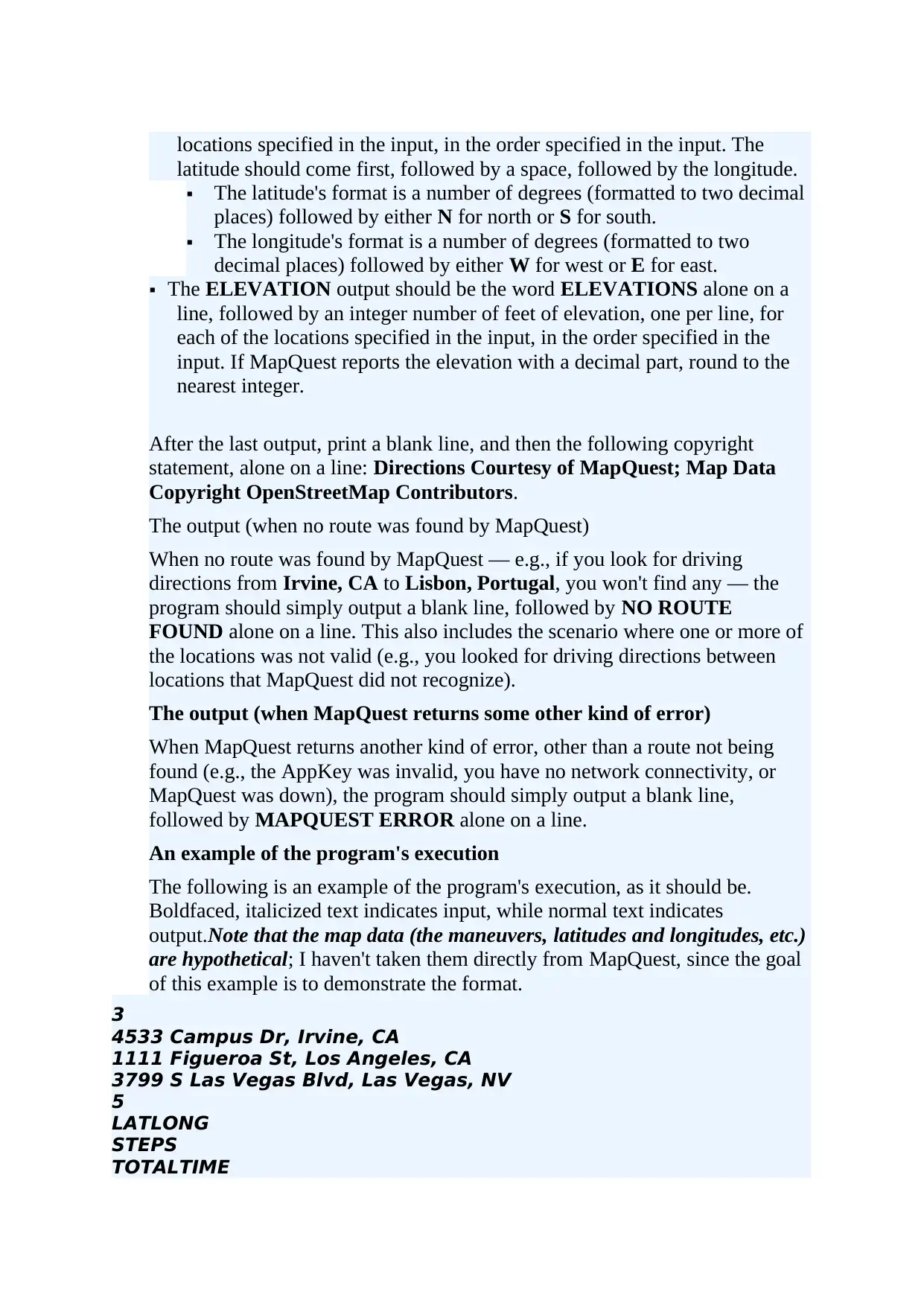
locations specified in the input, in the order specified in the input. The
latitude should come first, followed by a space, followed by the longitude.
The latitude's format is a number of degrees (formatted to two decimal
places) followed by either N for north or S for south.
The longitude's format is a number of degrees (formatted to two
decimal places) followed by either W for west or E for east.
The ELEVATION output should be the word ELEVATIONS alone on a
line, followed by an integer number of feet of elevation, one per line, for
each of the locations specified in the input, in the order specified in the
input. If MapQuest reports the elevation with a decimal part, round to the
nearest integer.
After the last output, print a blank line, and then the following copyright
statement, alone on a line: Directions Courtesy of MapQuest; Map Data
Copyright OpenStreetMap Contributors.
The output (when no route was found by MapQuest)
When no route was found by MapQuest — e.g., if you look for driving
directions from Irvine, CA to Lisbon, Portugal, you won't find any — the
program should simply output a blank line, followed by NO ROUTE
FOUND alone on a line. This also includes the scenario where one or more of
the locations was not valid (e.g., you looked for driving directions between
locations that MapQuest did not recognize).
The output (when MapQuest returns some other kind of error)
When MapQuest returns another kind of error, other than a route not being
found (e.g., the AppKey was invalid, you have no network connectivity, or
MapQuest was down), the program should simply output a blank line,
followed by MAPQUEST ERROR alone on a line.
An example of the program's execution
The following is an example of the program's execution, as it should be.
Boldfaced, italicized text indicates input, while normal text indicates
output.Note that the map data (the maneuvers, latitudes and longitudes, etc.)
are hypothetical; I haven't taken them directly from MapQuest, since the goal
of this example is to demonstrate the format.
3
4533 Campus Dr, Irvine, CA
1111 Figueroa St, Los Angeles, CA
3799 S Las Vegas Blvd, Las Vegas, NV
5
LATLONG
STEPS
TOTALTIME
latitude should come first, followed by a space, followed by the longitude.
The latitude's format is a number of degrees (formatted to two decimal
places) followed by either N for north or S for south.
The longitude's format is a number of degrees (formatted to two
decimal places) followed by either W for west or E for east.
The ELEVATION output should be the word ELEVATIONS alone on a
line, followed by an integer number of feet of elevation, one per line, for
each of the locations specified in the input, in the order specified in the
input. If MapQuest reports the elevation with a decimal part, round to the
nearest integer.
After the last output, print a blank line, and then the following copyright
statement, alone on a line: Directions Courtesy of MapQuest; Map Data
Copyright OpenStreetMap Contributors.
The output (when no route was found by MapQuest)
When no route was found by MapQuest — e.g., if you look for driving
directions from Irvine, CA to Lisbon, Portugal, you won't find any — the
program should simply output a blank line, followed by NO ROUTE
FOUND alone on a line. This also includes the scenario where one or more of
the locations was not valid (e.g., you looked for driving directions between
locations that MapQuest did not recognize).
The output (when MapQuest returns some other kind of error)
When MapQuest returns another kind of error, other than a route not being
found (e.g., the AppKey was invalid, you have no network connectivity, or
MapQuest was down), the program should simply output a blank line,
followed by MAPQUEST ERROR alone on a line.
An example of the program's execution
The following is an example of the program's execution, as it should be.
Boldfaced, italicized text indicates input, while normal text indicates
output.Note that the map data (the maneuvers, latitudes and longitudes, etc.)
are hypothetical; I haven't taken them directly from MapQuest, since the goal
of this example is to demonstrate the format.
3
4533 Campus Dr, Irvine, CA
1111 Figueroa St, Los Angeles, CA
3799 S Las Vegas Blvd, Las Vegas, NV
5
LATLONG
STEPS
TOTALTIME
⊘ This is a preview!⊘
Do you want full access?
Subscribe today to unlock all pages.
Trusted by 1+ million students worldwide
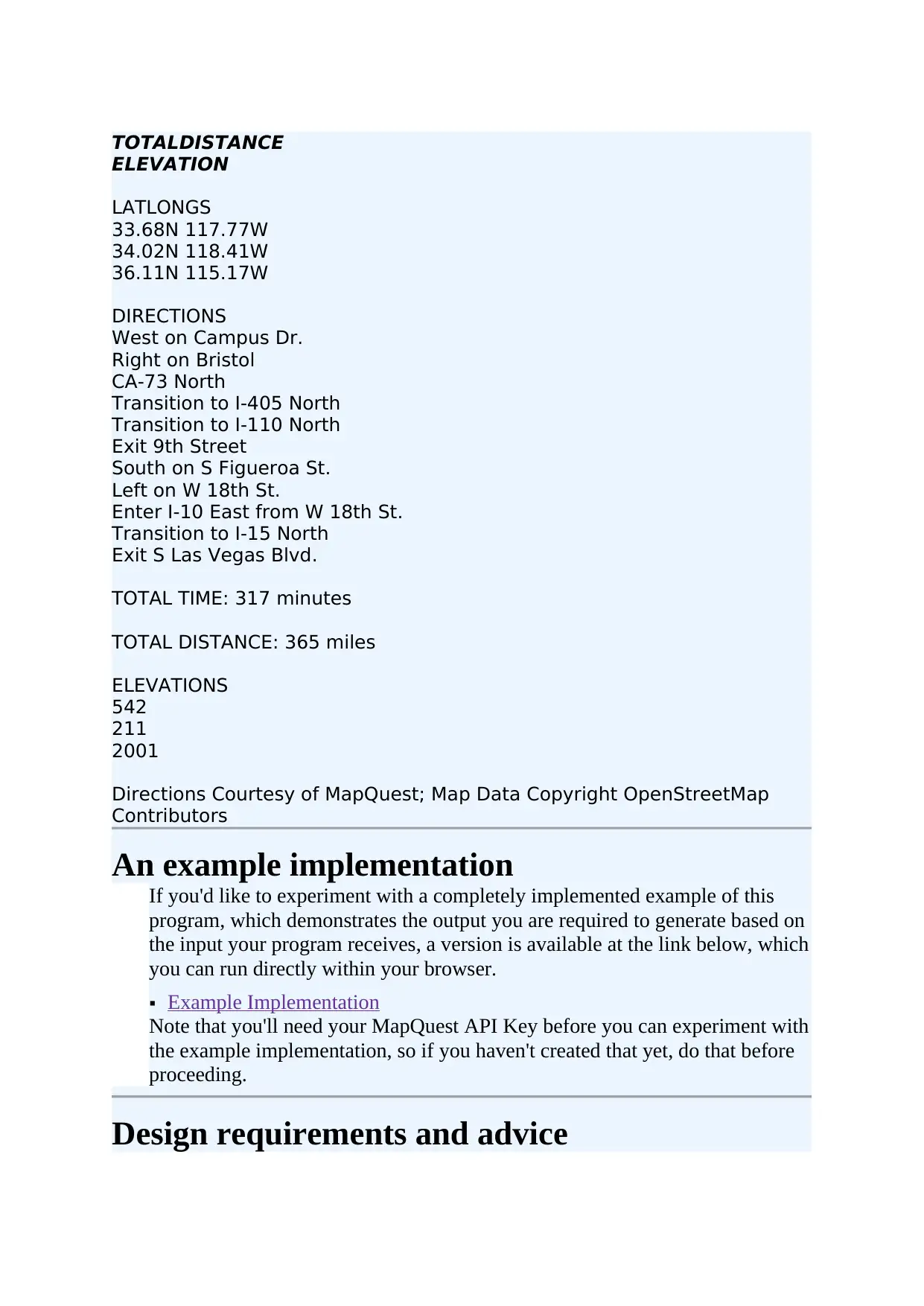
TOTALDISTANCE
ELEVATION
LATLONGS
33.68N 117.77W
34.02N 118.41W
36.11N 115.17W
DIRECTIONS
West on Campus Dr.
Right on Bristol
CA-73 North
Transition to I-405 North
Transition to I-110 North
Exit 9th Street
South on S Figueroa St.
Left on W 18th St.
Enter I-10 East from W 18th St.
Transition to I-15 North
Exit S Las Vegas Blvd.
TOTAL TIME: 317 minutes
TOTAL DISTANCE: 365 miles
ELEVATIONS
542
211
2001
Directions Courtesy of MapQuest; Map Data Copyright OpenStreetMap
Contributors
An example implementation
If you'd like to experiment with a completely implemented example of this
program, which demonstrates the output you are required to generate based on
the input your program receives, a version is available at the link below, which
you can run directly within your browser.
Example Implementation
Note that you'll need your MapQuest API Key before you can experiment with
the example implementation, so if you haven't created that yet, do that before
proceeding.
Design requirements and advice
ELEVATION
LATLONGS
33.68N 117.77W
34.02N 118.41W
36.11N 115.17W
DIRECTIONS
West on Campus Dr.
Right on Bristol
CA-73 North
Transition to I-405 North
Transition to I-110 North
Exit 9th Street
South on S Figueroa St.
Left on W 18th St.
Enter I-10 East from W 18th St.
Transition to I-15 North
Exit S Las Vegas Blvd.
TOTAL TIME: 317 minutes
TOTAL DISTANCE: 365 miles
ELEVATIONS
542
211
2001
Directions Courtesy of MapQuest; Map Data Copyright OpenStreetMap
Contributors
An example implementation
If you'd like to experiment with a completely implemented example of this
program, which demonstrates the output you are required to generate based on
the input your program receives, a version is available at the link below, which
you can run directly within your browser.
Example Implementation
Note that you'll need your MapQuest API Key before you can experiment with
the example implementation, so if you haven't created that yet, do that before
proceeding.
Design requirements and advice
Paraphrase This Document
Need a fresh take? Get an instant paraphrase of this document with our AI Paraphraser
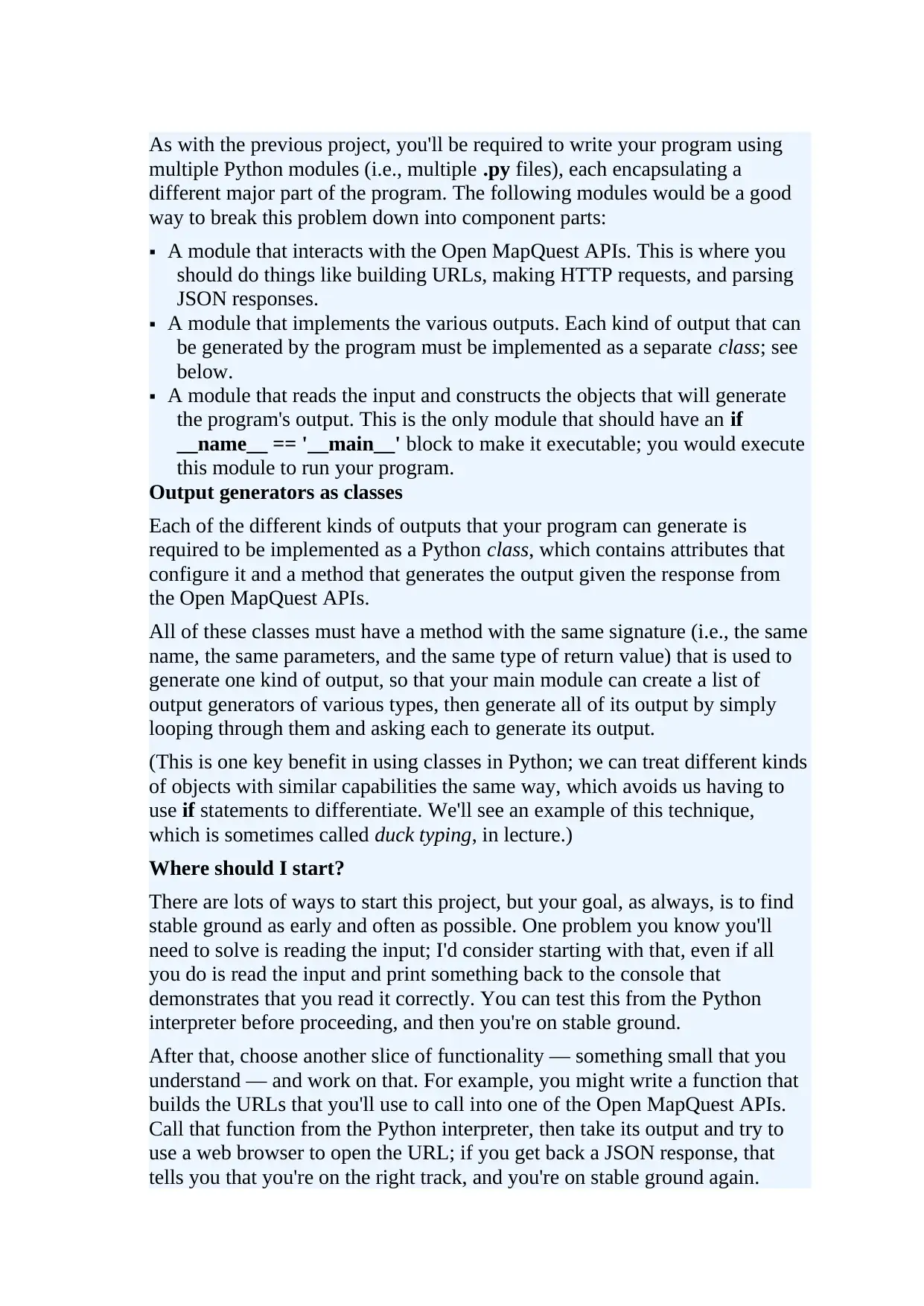
As with the previous project, you'll be required to write your program using
multiple Python modules (i.e., multiple .py files), each encapsulating a
different major part of the program. The following modules would be a good
way to break this problem down into component parts:
A module that interacts with the Open MapQuest APIs. This is where you
should do things like building URLs, making HTTP requests, and parsing
JSON responses.
A module that implements the various outputs. Each kind of output that can
be generated by the program must be implemented as a separate class; see
below.
A module that reads the input and constructs the objects that will generate
the program's output. This is the only module that should have an if
__name__ == '__main__' block to make it executable; you would execute
this module to run your program.
Output generators as classes
Each of the different kinds of outputs that your program can generate is
required to be implemented as a Python class, which contains attributes that
configure it and a method that generates the output given the response from
the Open MapQuest APIs.
All of these classes must have a method with the same signature (i.e., the same
name, the same parameters, and the same type of return value) that is used to
generate one kind of output, so that your main module can create a list of
output generators of various types, then generate all of its output by simply
looping through them and asking each to generate its output.
(This is one key benefit in using classes in Python; we can treat different kinds
of objects with similar capabilities the same way, which avoids us having to
use if statements to differentiate. We'll see an example of this technique,
which is sometimes called duck typing, in lecture.)
Where should I start?
There are lots of ways to start this project, but your goal, as always, is to find
stable ground as early and often as possible. One problem you know you'll
need to solve is reading the input; I'd consider starting with that, even if all
you do is read the input and print something back to the console that
demonstrates that you read it correctly. You can test this from the Python
interpreter before proceeding, and then you're on stable ground.
After that, choose another slice of functionality — something small that you
understand — and work on that. For example, you might write a function that
builds the URLs that you'll use to call into one of the Open MapQuest APIs.
Call that function from the Python interpreter, then take its output and try to
use a web browser to open the URL; if you get back a JSON response, that
tells you that you're on the right track, and you're on stable ground again.
multiple Python modules (i.e., multiple .py files), each encapsulating a
different major part of the program. The following modules would be a good
way to break this problem down into component parts:
A module that interacts with the Open MapQuest APIs. This is where you
should do things like building URLs, making HTTP requests, and parsing
JSON responses.
A module that implements the various outputs. Each kind of output that can
be generated by the program must be implemented as a separate class; see
below.
A module that reads the input and constructs the objects that will generate
the program's output. This is the only module that should have an if
__name__ == '__main__' block to make it executable; you would execute
this module to run your program.
Output generators as classes
Each of the different kinds of outputs that your program can generate is
required to be implemented as a Python class, which contains attributes that
configure it and a method that generates the output given the response from
the Open MapQuest APIs.
All of these classes must have a method with the same signature (i.e., the same
name, the same parameters, and the same type of return value) that is used to
generate one kind of output, so that your main module can create a list of
output generators of various types, then generate all of its output by simply
looping through them and asking each to generate its output.
(This is one key benefit in using classes in Python; we can treat different kinds
of objects with similar capabilities the same way, which avoids us having to
use if statements to differentiate. We'll see an example of this technique,
which is sometimes called duck typing, in lecture.)
Where should I start?
There are lots of ways to start this project, but your goal, as always, is to find
stable ground as early and often as possible. One problem you know you'll
need to solve is reading the input; I'd consider starting with that, even if all
you do is read the input and print something back to the console that
demonstrates that you read it correctly. You can test this from the Python
interpreter before proceeding, and then you're on stable ground.
After that, choose another slice of functionality — something small that you
understand — and work on that. For example, you might write a function that
builds the URLs that you'll use to call into one of the Open MapQuest APIs.
Call that function from the Python interpreter, then take its output and try to
use a web browser to open the URL; if you get back a JSON response, that
tells you that you're on the right track, and you're on stable ground again.
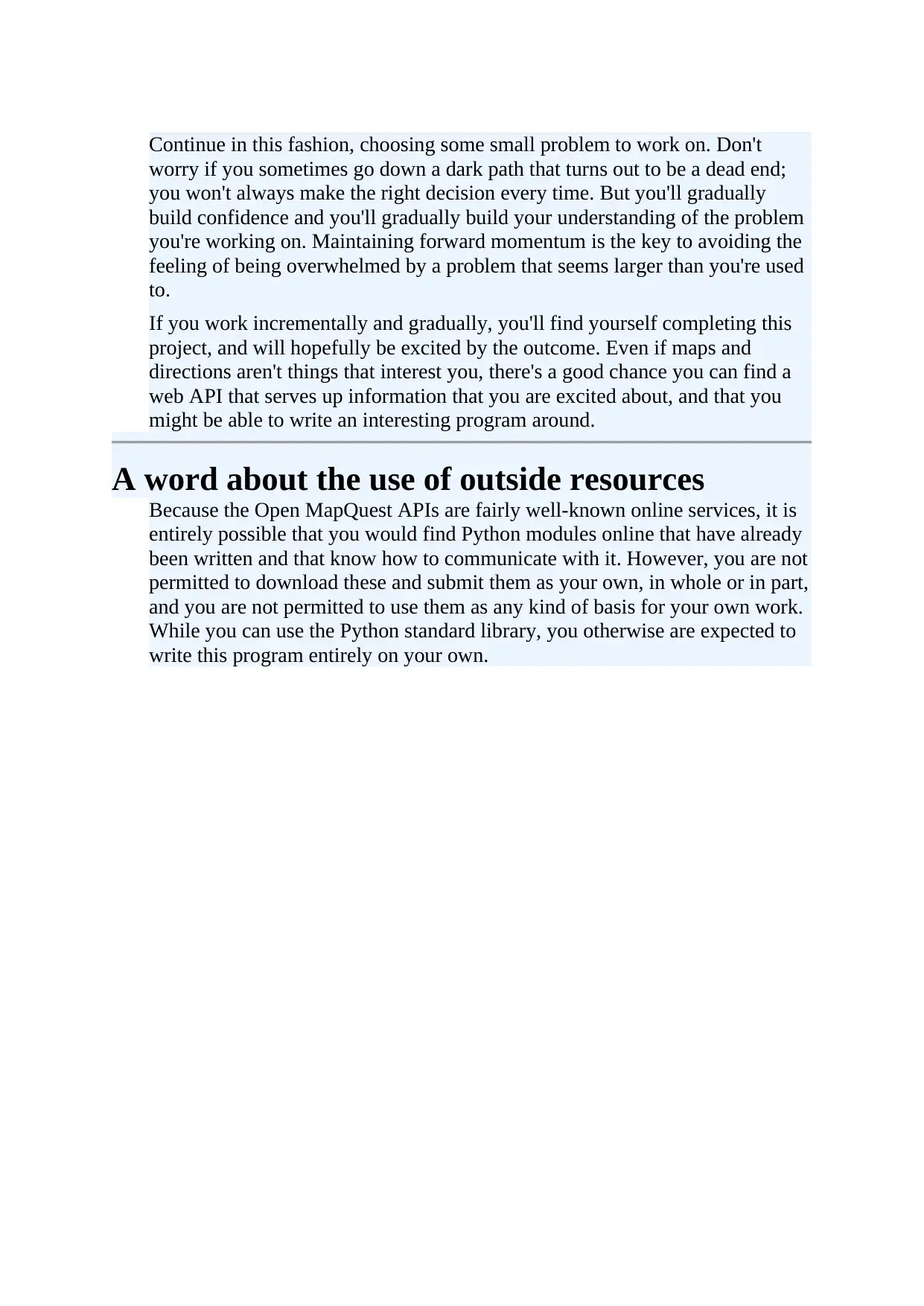
Continue in this fashion, choosing some small problem to work on. Don't
worry if you sometimes go down a dark path that turns out to be a dead end;
you won't always make the right decision every time. But you'll gradually
build confidence and you'll gradually build your understanding of the problem
you're working on. Maintaining forward momentum is the key to avoiding the
feeling of being overwhelmed by a problem that seems larger than you're used
to.
If you work incrementally and gradually, you'll find yourself completing this
project, and will hopefully be excited by the outcome. Even if maps and
directions aren't things that interest you, there's a good chance you can find a
web API that serves up information that you are excited about, and that you
might be able to write an interesting program around.
A word about the use of outside resources
Because the Open MapQuest APIs are fairly well-known online services, it is
entirely possible that you would find Python modules online that have already
been written and that know how to communicate with it. However, you are not
permitted to download these and submit them as your own, in whole or in part,
and you are not permitted to use them as any kind of basis for your own work.
While you can use the Python standard library, you otherwise are expected to
write this program entirely on your own.
worry if you sometimes go down a dark path that turns out to be a dead end;
you won't always make the right decision every time. But you'll gradually
build confidence and you'll gradually build your understanding of the problem
you're working on. Maintaining forward momentum is the key to avoiding the
feeling of being overwhelmed by a problem that seems larger than you're used
to.
If you work incrementally and gradually, you'll find yourself completing this
project, and will hopefully be excited by the outcome. Even if maps and
directions aren't things that interest you, there's a good chance you can find a
web API that serves up information that you are excited about, and that you
might be able to write an interesting program around.
A word about the use of outside resources
Because the Open MapQuest APIs are fairly well-known online services, it is
entirely possible that you would find Python modules online that have already
been written and that know how to communicate with it. However, you are not
permitted to download these and submit them as your own, in whole or in part,
and you are not permitted to use them as any kind of basis for your own work.
While you can use the Python standard library, you otherwise are expected to
write this program entirely on your own.
⊘ This is a preview!⊘
Do you want full access?
Subscribe today to unlock all pages.
Trusted by 1+ million students worldwide

1 out of 12


Your All-in-One AI-Powered Toolkit for Academic Success.
+13062052269
info@desklib.com
Available 24*7 on WhatsApp / Email
![[object Object]](/_next/static/media/star-bottom.7253800d.svg)
Unlock your academic potential
Copyright © 2020–2026 A2Z Services. All Rights Reserved. Developed and managed by ZUCOL.