User Interface Redesign and Usability Testing of a Fitness App
VerifiedAdded on 2023/06/13
|13
|2384
|69
Report
AI Summary
This report focuses on improving the user interface (UI) and user experience (UX) of a fitness application through usability testing and subsequent redesign. The initial assessment of the '7 Minute Workout' application revealed several usability issues. Testers encountered difficulties with tasks related to editing user data, accessing video tutorials, understanding tips, and navigating the app during workouts. The proposed solution includes embedding videos directly within the app, redesigning the weight and height input component for better user experience, and relocating the exercise timer settings for easier access during workouts. These changes aim to enhance user satisfaction, increase app downloads, and attract more advertisers. The report emphasizes the benefits of usability testing, such as increased revenue, reduced development costs, and improved user goal achievement, while also highlighting the negative consequences of neglecting usability issues, including customer loss and poor app ratings. The ultimate goal is to create a user-centered design that meets the needs of the target market and ensures the app's long-term success.
1
Running Head: User Interface Design
User Interface Design
Name
Course
Instructor
Date
Running Head: User Interface Design
User Interface Design
Name
Course
Instructor
Date

Paraphrase This Document
Need a fresh take? Get an instant paraphrase of this document with our AI Paraphraser
2
Running Head: User Interface Design
MONETIZATION
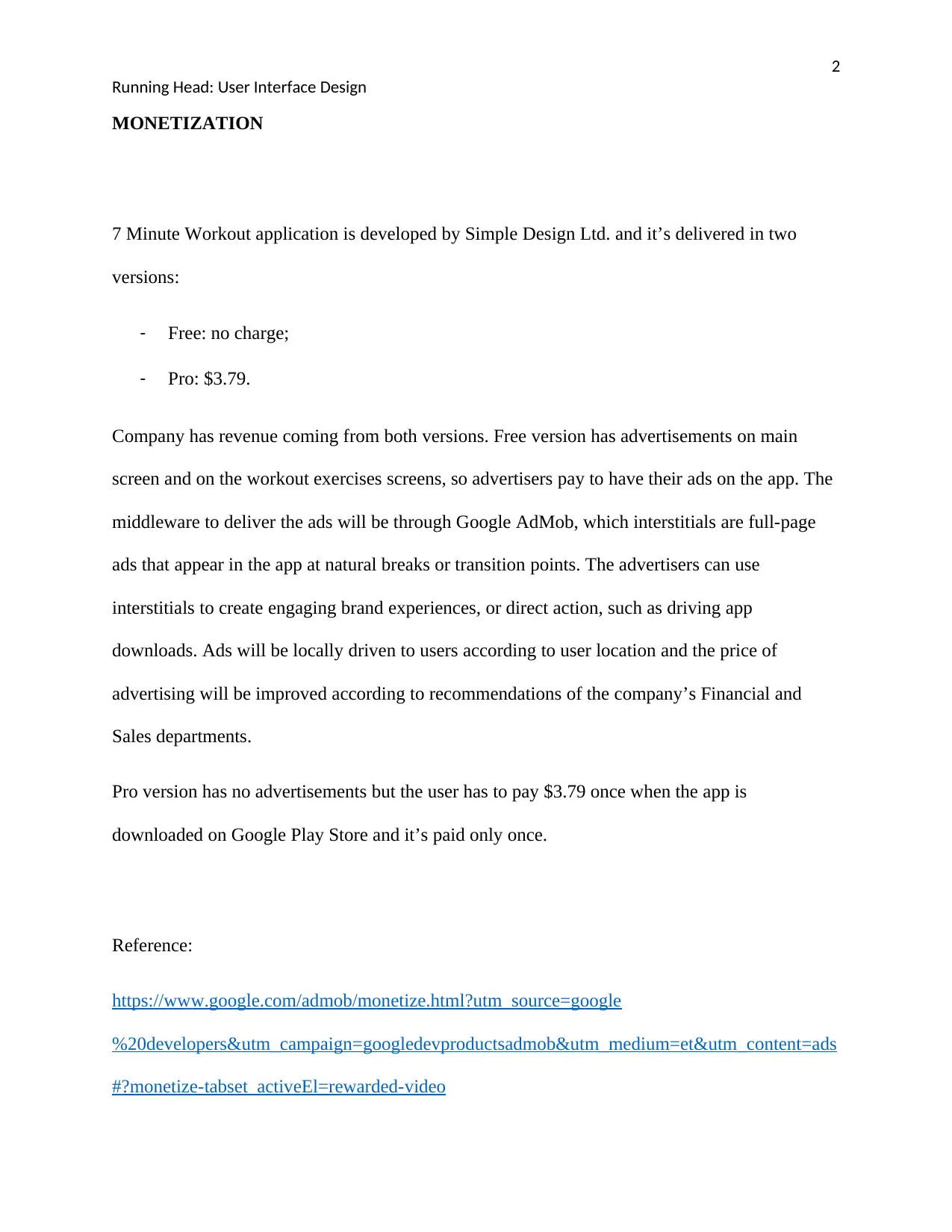
7 Minute Workout application is developed by Simple Design Ltd. and it’s delivered in two
versions:
- Free: no charge;
- Pro: $3.79.
Company has revenue coming from both versions. Free version has advertisements on main
screen and on the workout exercises screens, so advertisers pay to have their ads on the app. The
middleware to deliver the ads will be through Google AdMob, which interstitials are full-page
ads that appear in the app at natural breaks or transition points. The advertisers can use
interstitials to create engaging brand experiences, or direct action, such as driving app
downloads. Ads will be locally driven to users according to user location and the price of
advertising will be improved according to recommendations of the company’s Financial and
Sales departments.
Pro version has no advertisements but the user has to pay $3.79 once when the app is
downloaded on Google Play Store and it’s paid only once.
Reference:
https://www.google.com/admob/monetize.html?utm_source=google
%20developers&utm_campaign=googledevproductsadmob&utm_medium=et&utm_content=ads
#?monetize-tabset_activeEl=rewarded-video
Running Head: User Interface Design
MONETIZATION
7 Minute Workout application is developed by Simple Design Ltd. and it’s delivered in two
versions:
- Free: no charge;
- Pro: $3.79.
Company has revenue coming from both versions. Free version has advertisements on main
screen and on the workout exercises screens, so advertisers pay to have their ads on the app. The
middleware to deliver the ads will be through Google AdMob, which interstitials are full-page
ads that appear in the app at natural breaks or transition points. The advertisers can use
interstitials to create engaging brand experiences, or direct action, such as driving app
downloads. Ads will be locally driven to users according to user location and the price of
advertising will be improved according to recommendations of the company’s Financial and
Sales departments.
Pro version has no advertisements but the user has to pay $3.79 once when the app is
downloaded on Google Play Store and it’s paid only once.
Reference:
https://www.google.com/admob/monetize.html?utm_source=google
%20developers&utm_campaign=googledevproductsadmob&utm_medium=et&utm_content=ads
#?monetize-tabset_activeEl=rewarded-video
3
Running Head: User Interface Design
BUSINESS GOALS
The business goals for the company to be successful are reaching the highest number of
downloads by users (target: 3 million) making them satisfied about the application usability and
outcomes and increase the profitability by gathering more advertisers (target: 50) to announce in
the app (in-app ads) by the end of 2018.
TEST RESULTS
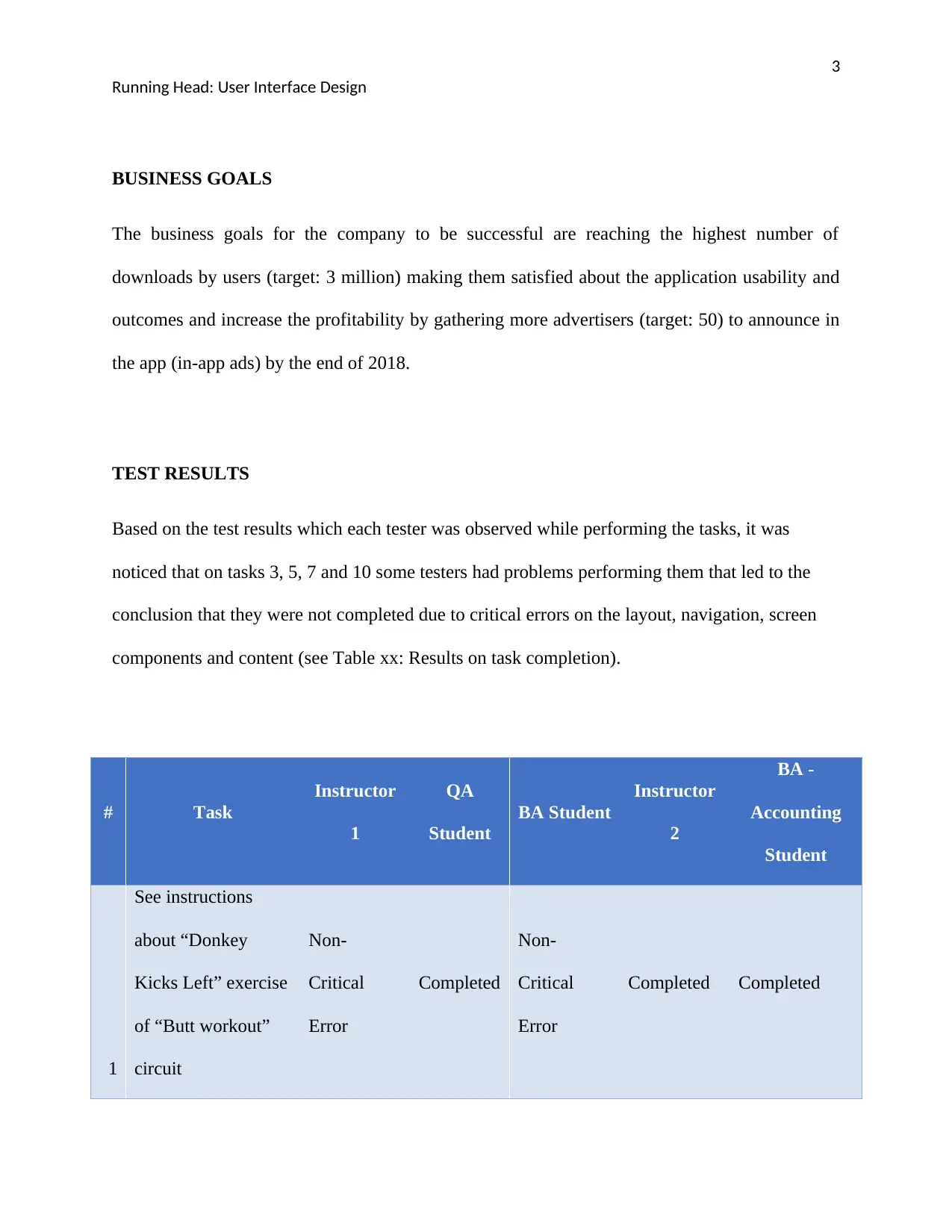
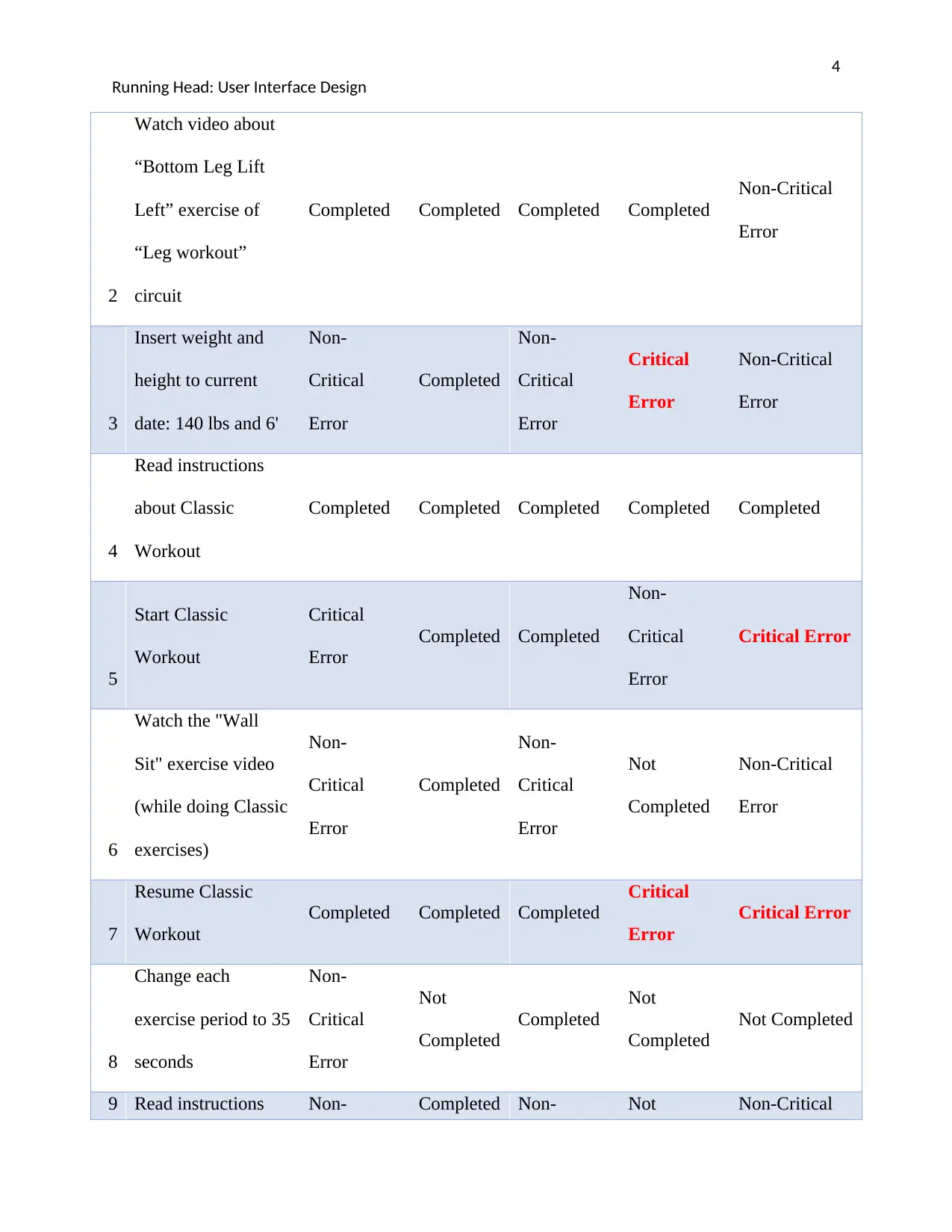
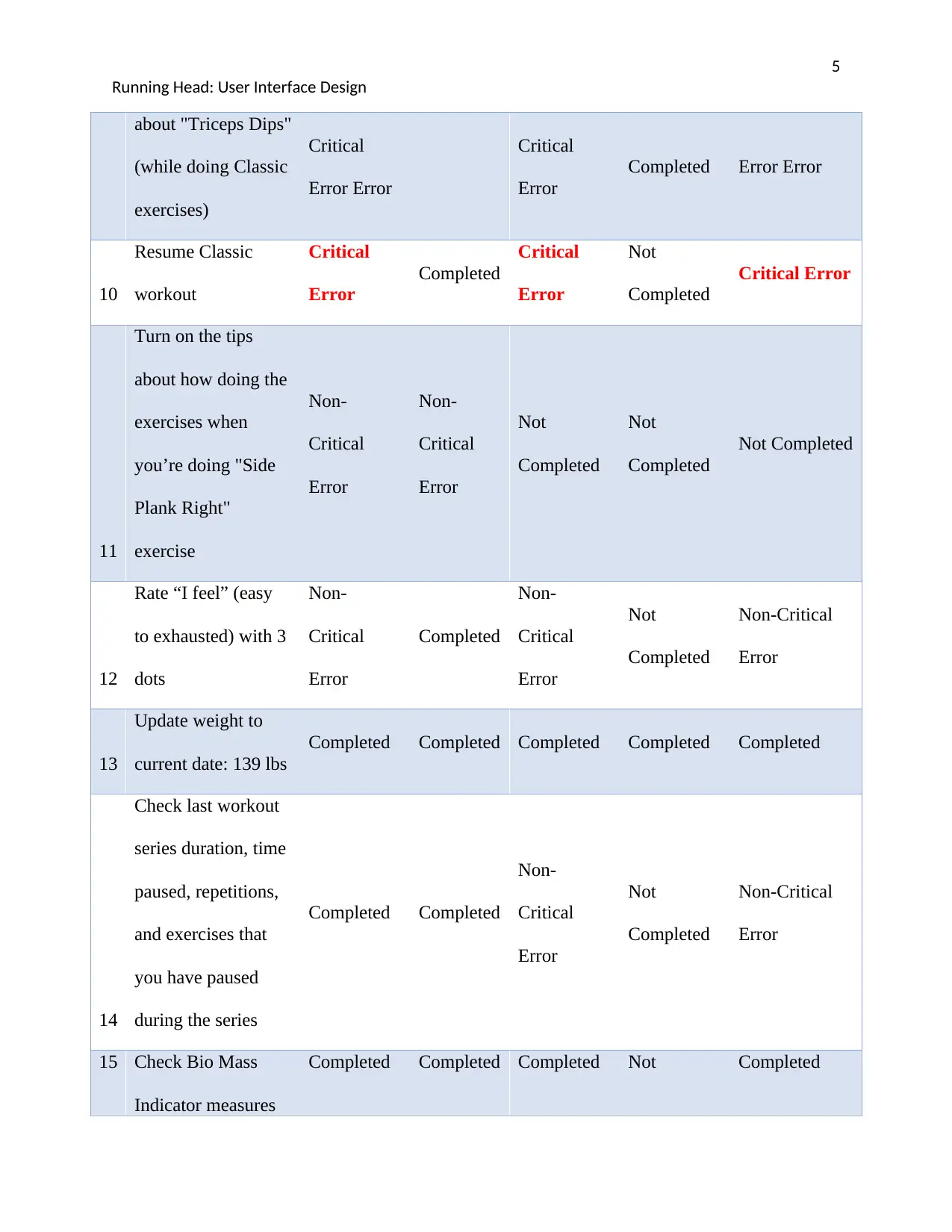
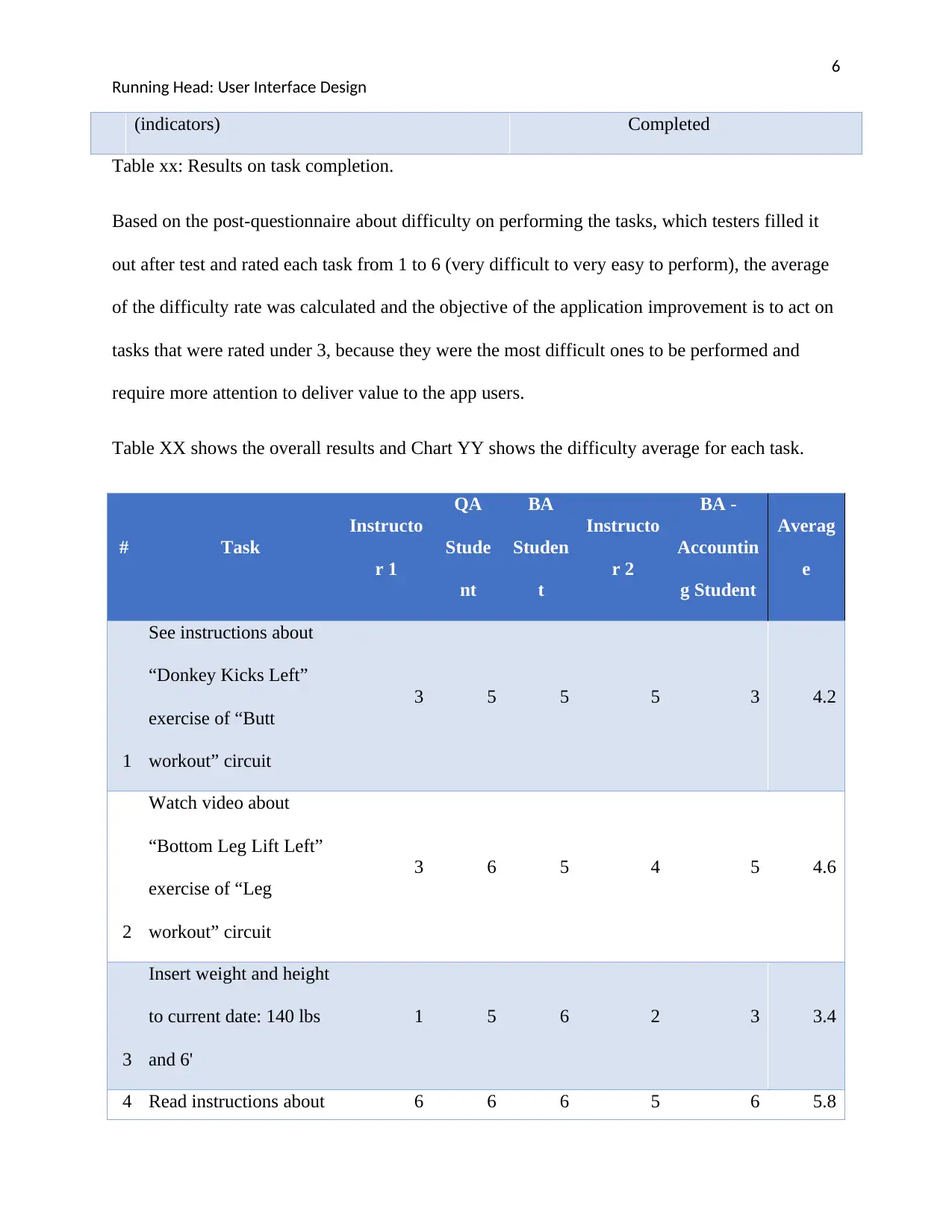
Based on the test results which each tester was observed while performing the tasks, it was
noticed that on tasks 3, 5, 7 and 10 some testers had problems performing them that led to the
conclusion that they were not completed due to critical errors on the layout, navigation, screen
components and content (see Table xx: Results on task completion).
# Task
Instructor
1
QA
Student
BA Student
Instructor
2
BA -
Accounting
Student
1
See instructions
about “Donkey
Kicks Left” exercise
of “Butt workout”
circuit
Non-
Critical
Error
Completed
Non-
Critical
Error
Completed Completed
Running Head: User Interface Design
BUSINESS GOALS
The business goals for the company to be successful are reaching the highest number of
downloads by users (target: 3 million) making them satisfied about the application usability and
outcomes and increase the profitability by gathering more advertisers (target: 50) to announce in
the app (in-app ads) by the end of 2018.
TEST RESULTS
Based on the test results which each tester was observed while performing the tasks, it was
noticed that on tasks 3, 5, 7 and 10 some testers had problems performing them that led to the
conclusion that they were not completed due to critical errors on the layout, navigation, screen
components and content (see Table xx: Results on task completion).
# Task
Instructor
1
QA
Student
BA Student
Instructor
2
BA -
Accounting
Student
1
See instructions
about “Donkey
Kicks Left” exercise
of “Butt workout”
circuit
Non-
Critical
Error
Completed
Non-
Critical
Error
Completed Completed
⊘ This is a preview!⊘
Do you want full access?
Subscribe today to unlock all pages.

Trusted by 1+ million students worldwide
4
Running Head: User Interface Design
2
Watch video about
“Bottom Leg Lift
Left” exercise of
“Leg workout”
circuit
Completed Completed Completed Completed
Non-Critical
Error
3
Insert weight and
height to current
date: 140 lbs and 6'
Non-
Critical
Error
Completed
Non-
Critical
Error
Critical
Error
Non-Critical
Error
4
Read instructions
about Classic
Workout
Completed Completed Completed Completed Completed
5
Start Classic
Workout
Critical
Error
Completed Completed
Non-
Critical
Error
Critical Error
6
Watch the "Wall
Sit" exercise video
(while doing Classic
exercises)
Non-
Critical
Error
Completed
Non-
Critical
Error
Not
Completed
Non-Critical
Error
7
Resume Classic
Workout
Completed Completed Completed
Critical
Error
Critical Error
8
Change each
exercise period to 35
seconds
Non-
Critical
Error
Not
Completed
Completed
Not
Completed
Not Completed
9 Read instructions Non- Completed Non- Not Non-Critical
Running Head: User Interface Design
2
Watch video about
“Bottom Leg Lift
Left” exercise of
“Leg workout”
circuit
Completed Completed Completed Completed
Non-Critical
Error
3
Insert weight and
height to current
date: 140 lbs and 6'
Non-
Critical
Error
Completed
Non-
Critical
Error
Critical
Error
Non-Critical
Error
4
Read instructions
about Classic
Workout
Completed Completed Completed Completed Completed
5
Start Classic
Workout
Critical
Error
Completed Completed
Non-
Critical
Error
Critical Error
6
Watch the "Wall
Sit" exercise video
(while doing Classic
exercises)
Non-
Critical
Error
Completed
Non-
Critical
Error
Not
Completed
Non-Critical
Error
7
Resume Classic
Workout
Completed Completed Completed
Critical
Error
Critical Error
8
Change each
exercise period to 35
seconds
Non-
Critical
Error
Not
Completed
Completed
Not
Completed
Not Completed
9 Read instructions Non- Completed Non- Not Non-Critical
Paraphrase This Document
Need a fresh take? Get an instant paraphrase of this document with our AI Paraphraser
5
Running Head: User Interface Design
about "Triceps Dips"
(while doing Classic
exercises)
Critical
Error Error
Critical
Error
Completed Error Error
10
Resume Classic
workout
Critical
Error
Completed
Critical
Error
Not
Completed
Critical Error
11
Turn on the tips
about how doing the
exercises when
you’re doing "Side
Plank Right"
exercise
Non-
Critical
Error
Non-
Critical
Error
Not
Completed
Not
Completed
Not Completed
12
Rate “I feel” (easy
to exhausted) with 3
dots
Non-
Critical
Error
Completed
Non-
Critical
Error
Not
Completed
Non-Critical
Error
13
Update weight to
current date: 139 lbs
Completed Completed Completed Completed Completed
14
Check last workout
series duration, time
paused, repetitions,
and exercises that
you have paused
during the series
Completed Completed
Non-
Critical
Error
Not
Completed
Non-Critical
Error
15 Check Bio Mass
Indicator measures
Completed Completed Completed Not Completed
Running Head: User Interface Design
about "Triceps Dips"
(while doing Classic
exercises)
Critical
Error Error
Critical
Error
Completed Error Error
10
Resume Classic
workout
Critical
Error
Completed
Critical
Error
Not
Completed
Critical Error
11
Turn on the tips
about how doing the
exercises when
you’re doing "Side
Plank Right"
exercise
Non-
Critical
Error
Non-
Critical
Error
Not
Completed
Not
Completed
Not Completed
12
Rate “I feel” (easy
to exhausted) with 3
dots
Non-
Critical
Error
Completed
Non-
Critical
Error
Not
Completed
Non-Critical
Error
13
Update weight to
current date: 139 lbs
Completed Completed Completed Completed Completed
14
Check last workout
series duration, time
paused, repetitions,
and exercises that
you have paused
during the series
Completed Completed
Non-
Critical
Error
Not
Completed
Non-Critical
Error
15 Check Bio Mass
Indicator measures
Completed Completed Completed Not Completed
6
Running Head: User Interface Design
(indicators) Completed
Table xx: Results on task completion.
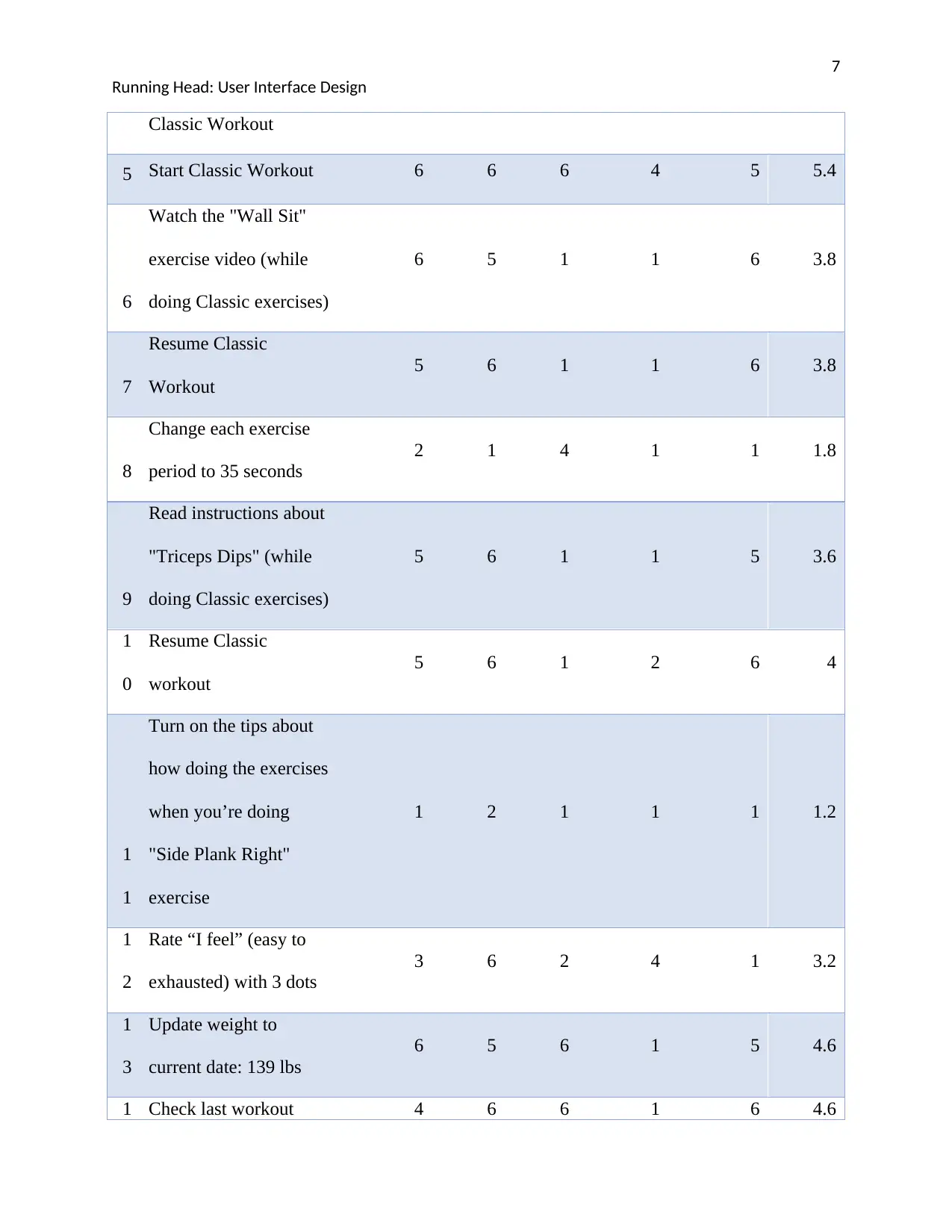
Based on the post-questionnaire about difficulty on performing the tasks, which testers filled it
out after test and rated each task from 1 to 6 (very difficult to very easy to perform), the average
of the difficulty rate was calculated and the objective of the application improvement is to act on
tasks that were rated under 3, because they were the most difficult ones to be performed and
require more attention to deliver value to the app users.
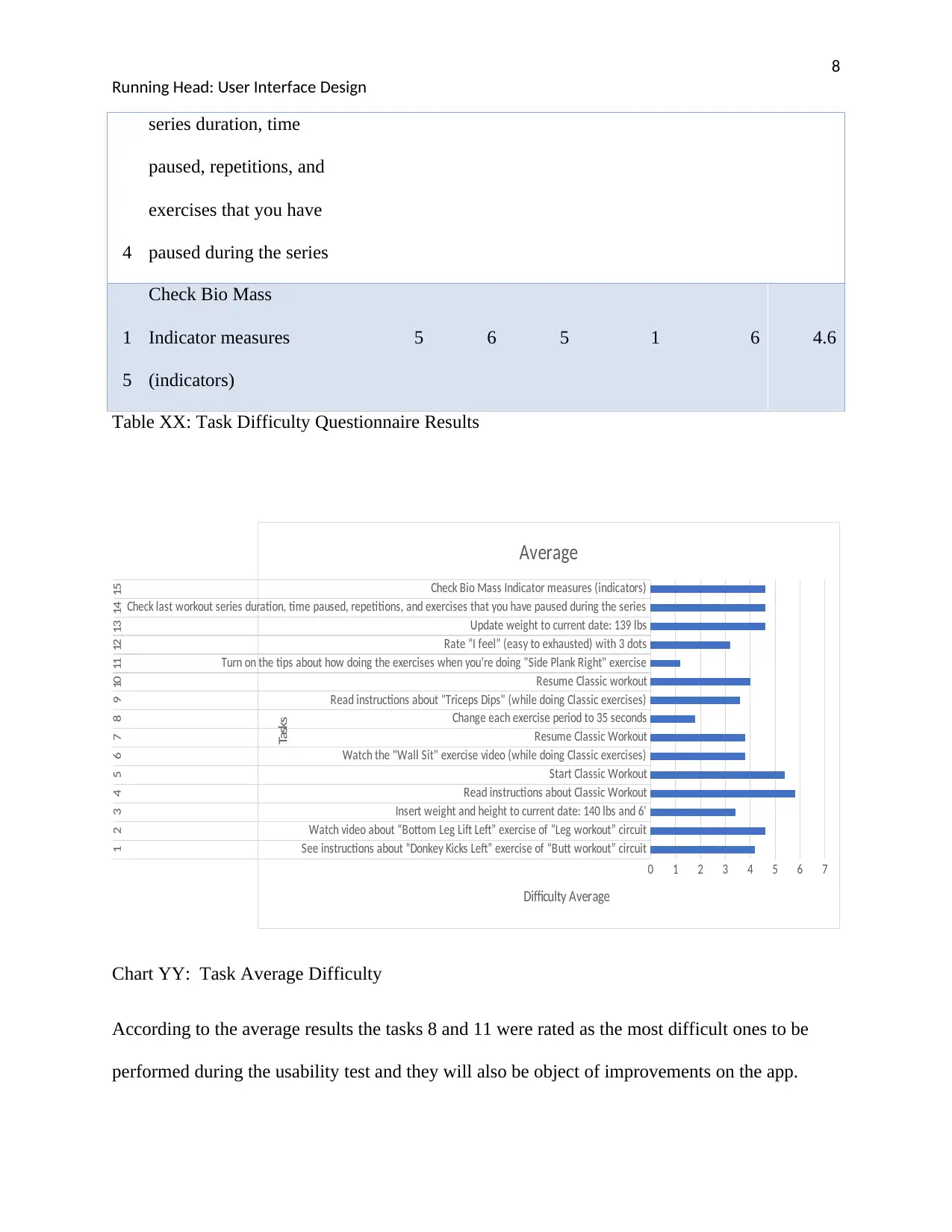
Table XX shows the overall results and Chart YY shows the difficulty average for each task.
# Task
Instructo
r 1
QA
Stude
nt
BA
Studen
t
Instructo
r 2
BA -
Accountin
g Student
Averag
e
1
See instructions about
“Donkey Kicks Left”
exercise of “Butt
workout” circuit
3 5 5 5 3 4.2
2
Watch video about
“Bottom Leg Lift Left”
exercise of “Leg
workout” circuit
3 6 5 4 5 4.6
3
Insert weight and height
to current date: 140 lbs
and 6'
1 5 6 2 3 3.4
4 Read instructions about 6 6 6 5 6 5.8
Running Head: User Interface Design
(indicators) Completed
Table xx: Results on task completion.
Based on the post-questionnaire about difficulty on performing the tasks, which testers filled it
out after test and rated each task from 1 to 6 (very difficult to very easy to perform), the average
of the difficulty rate was calculated and the objective of the application improvement is to act on
tasks that were rated under 3, because they were the most difficult ones to be performed and
require more attention to deliver value to the app users.
Table XX shows the overall results and Chart YY shows the difficulty average for each task.
# Task
Instructo
r 1
QA
Stude
nt
BA
Studen
t
Instructo
r 2
BA -
Accountin
g Student
Averag
e
1
See instructions about
“Donkey Kicks Left”
exercise of “Butt
workout” circuit
3 5 5 5 3 4.2
2
Watch video about
“Bottom Leg Lift Left”
exercise of “Leg
workout” circuit
3 6 5 4 5 4.6
3
Insert weight and height
to current date: 140 lbs
and 6'
1 5 6 2 3 3.4
4 Read instructions about 6 6 6 5 6 5.8
⊘ This is a preview!⊘
Do you want full access?
Subscribe today to unlock all pages.
Trusted by 1+ million students worldwide
7
Running Head: User Interface Design
Classic Workout
5 Start Classic Workout 6 6 6 4 5 5.4
6
Watch the "Wall Sit"
exercise video (while
doing Classic exercises)
6 5 1 1 6 3.8
7
Resume Classic
Workout
5 6 1 1 6 3.8
8
Change each exercise
period to 35 seconds
2 1 4 1 1 1.8
9
Read instructions about
"Triceps Dips" (while
doing Classic exercises)
5 6 1 1 5 3.6
1
0
Resume Classic
workout
5 6 1 2 6 4
1
1
Turn on the tips about
how doing the exercises
when you’re doing
"Side Plank Right"
exercise
1 2 1 1 1 1.2
1
2
Rate “I feel” (easy to
exhausted) with 3 dots
3 6 2 4 1 3.2
1
3
Update weight to
current date: 139 lbs
6 5 6 1 5 4.6
1 Check last workout 4 6 6 1 6 4.6
Running Head: User Interface Design
Classic Workout
5 Start Classic Workout 6 6 6 4 5 5.4
6
Watch the "Wall Sit"
exercise video (while
doing Classic exercises)
6 5 1 1 6 3.8
7
Resume Classic
Workout
5 6 1 1 6 3.8
8
Change each exercise
period to 35 seconds
2 1 4 1 1 1.8
9
Read instructions about
"Triceps Dips" (while
doing Classic exercises)
5 6 1 1 5 3.6
1
0
Resume Classic
workout
5 6 1 2 6 4
1
1
Turn on the tips about
how doing the exercises
when you’re doing
"Side Plank Right"
exercise
1 2 1 1 1 1.2
1
2
Rate “I feel” (easy to
exhausted) with 3 dots
3 6 2 4 1 3.2
1
3
Update weight to
current date: 139 lbs
6 5 6 1 5 4.6
1 Check last workout 4 6 6 1 6 4.6
Paraphrase This Document
Need a fresh take? Get an instant paraphrase of this document with our AI Paraphraser
8
Running Head: User Interface Design
4
series duration, time
paused, repetitions, and
exercises that you have
paused during the series
1
5
Check Bio Mass
Indicator measures
(indicators)
5 6 5 1 6 4.6
Table XX: Task Difficulty Questionnaire Results
See instructions about “Donkey Kicks Left” exercise of “Butt workout” circuit
Watch video about “Bottom Leg Lift Left” exercise of “Leg workout” circuit
Insert weight and height to current date: 140 lbs and 6'
Read instructions about Classic Workout
Start Classic Workout
Watch the "Wall Sit" exercise video (while doing Classic exercises)
Resume Classic Workout
Change each exercise period to 35 seconds
Read instructions about "Triceps Dips" (while doing Classic exercises)
Resume Classic workout
Turn on the tips about how doing the exercises when you’re doing "Side Plank Right" exercise
Rate “I feel” (easy to exhausted) with 3 dots
Update weight to current date: 139 lbs
Check last workout series duration, time paused, repetitions, and exercises that you have paused during the series
Check Bio Mass Indicator measures (indicators)
1 2 3 4 5 6 7 8 9 10 11 12 13 14 15
0 1 2 3 4 5 6 7
Average
Difficulty Average
Tasks
Chart YY: Task Average Difficulty
According to the average results the tasks 8 and 11 were rated as the most difficult ones to be
performed during the usability test and they will also be object of improvements on the app.
Running Head: User Interface Design
4
series duration, time
paused, repetitions, and
exercises that you have
paused during the series
1
5
Check Bio Mass
Indicator measures
(indicators)
5 6 5 1 6 4.6
Table XX: Task Difficulty Questionnaire Results
See instructions about “Donkey Kicks Left” exercise of “Butt workout” circuit
Watch video about “Bottom Leg Lift Left” exercise of “Leg workout” circuit
Insert weight and height to current date: 140 lbs and 6'
Read instructions about Classic Workout
Start Classic Workout
Watch the "Wall Sit" exercise video (while doing Classic exercises)
Resume Classic Workout
Change each exercise period to 35 seconds
Read instructions about "Triceps Dips" (while doing Classic exercises)
Resume Classic workout
Turn on the tips about how doing the exercises when you’re doing "Side Plank Right" exercise
Rate “I feel” (easy to exhausted) with 3 dots
Update weight to current date: 139 lbs
Check last workout series duration, time paused, repetitions, and exercises that you have paused during the series
Check Bio Mass Indicator measures (indicators)
1 2 3 4 5 6 7 8 9 10 11 12 13 14 15
0 1 2 3 4 5 6 7
Average
Difficulty Average
Tasks
Chart YY: Task Average Difficulty
According to the average results the tasks 8 and 11 were rated as the most difficult ones to be
performed during the usability test and they will also be object of improvements on the app.
9
Running Head: User Interface Design
A post test questionnaire also was applied to get information about “What are two things about
the design that testers didn't like?” and some of the relevant answers/opinions are stated below
concerning some features/non-functional requirements:
- “The videos not being in the app”
- “The way you edit the weight could be better”
- “I couldn't figure out how to scroll through exercises or do other options while doing
them”.
- “The collection/display of stats section seemed confusing.”
SUMMARY OF PROPOSED SOLUTION
The main goal of this project is to improve the application according to the observation during
the usability test, which the proposed solution is based on the test and questionnaire results
supported by the observation notes of the usability test team.
For the 1st iteration of development the following features will be considered for the design of the
wireframe and prototype to be improved:
1) Editing weight, height and DOB (date of birth) will be available in the same component
of the current state of the application “Weight +”, with label being changed to “Enter to
calculate BMI”
Running Head: User Interface Design
A post test questionnaire also was applied to get information about “What are two things about
the design that testers didn't like?” and some of the relevant answers/opinions are stated below
concerning some features/non-functional requirements:
- “The videos not being in the app”
- “The way you edit the weight could be better”
- “I couldn't figure out how to scroll through exercises or do other options while doing
them”.
- “The collection/display of stats section seemed confusing.”
SUMMARY OF PROPOSED SOLUTION
The main goal of this project is to improve the application according to the observation during
the usability test, which the proposed solution is based on the test and questionnaire results
supported by the observation notes of the usability test team.
For the 1st iteration of development the following features will be considered for the design of the
wireframe and prototype to be improved:
1) Editing weight, height and DOB (date of birth) will be available in the same component
of the current state of the application “Weight +”, with label being changed to “Enter to
calculate BMI”
⊘ This is a preview!⊘
Do you want full access?
Subscribe today to unlock all pages.
Trusted by 1+ million students worldwide
10
Running Head: User Interface Design
2) Videos are going to be hosted in the app, with new layout on the screen and not triggering
YouTube videos anymore, that used to make the application swap undesirable.
3) Turn on/off tips icon will be changed to another that it’s more intuitive to users while
working out.
4) Change exercises time period is currently available on Settings, and will still be, but
another component link will allow users to change it while working out.
Benefits Anticipated from Identified Drawbacks and Provided Solutions.
Firstly, usability testing has been proven to increase revenue. The developer can get first
hand information of what the user prefers in terms of design. Therefore, the developer can
redesign the interface to suite the user’s needs. This gives the company an advantage to retain
their customers and get recommendations through customer satisfaction. In the end, more the
customers, translates into more revenue for the company (Sharon, 2016).
Secondly, usability testing saves time and money. Knowing exactly what the customer
requires, will cut down the time and cost that could have been used through an iteration of
trial and error. The interface usability analysis gives the average optimal requirements of the
application look and feel from different users. Hence the application can be developed by
using guidelines directly from the user’s perspective (Jeffrey Rubin, Dana Chisnell, 20111).
Thirdly, usability testing helps customers achieve their goals in the easiest and fastest way.
All the user wants is to be able to navigate through the application with ease, understand it
and own it. In the case of an application that requires repetitive tasks, the user should be able
to complete the tasks efficiently using the fewest taps possible. Complex user interfaces tend
Running Head: User Interface Design
2) Videos are going to be hosted in the app, with new layout on the screen and not triggering
YouTube videos anymore, that used to make the application swap undesirable.
3) Turn on/off tips icon will be changed to another that it’s more intuitive to users while
working out.
4) Change exercises time period is currently available on Settings, and will still be, but
another component link will allow users to change it while working out.
Benefits Anticipated from Identified Drawbacks and Provided Solutions.
Firstly, usability testing has been proven to increase revenue. The developer can get first
hand information of what the user prefers in terms of design. Therefore, the developer can
redesign the interface to suite the user’s needs. This gives the company an advantage to retain
their customers and get recommendations through customer satisfaction. In the end, more the
customers, translates into more revenue for the company (Sharon, 2016).
Secondly, usability testing saves time and money. Knowing exactly what the customer
requires, will cut down the time and cost that could have been used through an iteration of
trial and error. The interface usability analysis gives the average optimal requirements of the
application look and feel from different users. Hence the application can be developed by
using guidelines directly from the user’s perspective (Jeffrey Rubin, Dana Chisnell, 20111).
Thirdly, usability testing helps customers achieve their goals in the easiest and fastest way.
All the user wants is to be able to navigate through the application with ease, understand it
and own it. In the case of an application that requires repetitive tasks, the user should be able
to complete the tasks efficiently using the fewest taps possible. Complex user interfaces tend
Paraphrase This Document
Need a fresh take? Get an instant paraphrase of this document with our AI Paraphraser
11
Running Head: User Interface Design
to discourage the user and hence without the customer satisfied, the company is at a loss
(Jeffrey Rubin, Dana Chisnell, 20111).
Lastly, usability testing helps build company reputation. An efficient user interface would
receive positive reviews from it’s customers and hence increase the application’s ratings that
would result to more downloads and more endorsements (Sharon, 2016).
Impact of not Providing Solutions to Interface Usability Problems
The biggest impact would be loss of customers to competitors. The competitors are just a
google click away. Fixing the interface usability issues will not only ensure retention of
customers but also addition of more new customers (Marcus, 2016).
Moreover, negative reviews lead to poor rating of the application. Before downloading an
application, many customers consider the rating of the application. A five-star rated
application is highly likely to get more downloads than a three-star rated application. Less
downloads will translate to less revenue.
Additionally, not providing solutions to the usability problems would beat the logic of
carrying out the usability test. The resources (time and money) consumed through this
process could have been set aside to improve other departments of the company, such as
marketing (Longoria, 2012).
In conclusion, the user interface tests ensure that before the first roll out, the application has
been tailored in the most effective way to meet the needs of the target market. Moreover,
usability testing allows the company to get the general view of the customers, to the idea
Running Head: User Interface Design
to discourage the user and hence without the customer satisfied, the company is at a loss
(Jeffrey Rubin, Dana Chisnell, 20111).
Lastly, usability testing helps build company reputation. An efficient user interface would
receive positive reviews from it’s customers and hence increase the application’s ratings that
would result to more downloads and more endorsements (Sharon, 2016).
Impact of not Providing Solutions to Interface Usability Problems
The biggest impact would be loss of customers to competitors. The competitors are just a
google click away. Fixing the interface usability issues will not only ensure retention of
customers but also addition of more new customers (Marcus, 2016).
Moreover, negative reviews lead to poor rating of the application. Before downloading an
application, many customers consider the rating of the application. A five-star rated
application is highly likely to get more downloads than a three-star rated application. Less
downloads will translate to less revenue.
Additionally, not providing solutions to the usability problems would beat the logic of
carrying out the usability test. The resources (time and money) consumed through this
process could have been set aside to improve other departments of the company, such as
marketing (Longoria, 2012).
In conclusion, the user interface tests ensure that before the first roll out, the application has
been tailored in the most effective way to meet the needs of the target market. Moreover,
usability testing allows the company to get the general view of the customers, to the idea

12
Running Head: User Interface Design
which has been made into an application. This helps to gauge the viability of the project in its
environment. Therefore, it is needless to say that, interface usability testing is one of the
critical processes of application development that should be handled with utmost priority.
References
Jeffrey Rubin, Dana Chisnell. (20111). Handbook of Usability Testing: How to Plan, Design, and Conduct
Effective Tests. New Jersey: John Wiley & Sons.
Longoria, R. (2012). Designing Software for the Mobile Context: A Practitioner’s Guide. Berlin: Springer
Science & Business Media.
Running Head: User Interface Design
which has been made into an application. This helps to gauge the viability of the project in its
environment. Therefore, it is needless to say that, interface usability testing is one of the
critical processes of application development that should be handled with utmost priority.
References
Jeffrey Rubin, Dana Chisnell. (20111). Handbook of Usability Testing: How to Plan, Design, and Conduct
Effective Tests. New Jersey: John Wiley & Sons.
Longoria, R. (2012). Designing Software for the Mobile Context: A Practitioner’s Guide. Berlin: Springer
Science & Business Media.
⊘ This is a preview!⊘
Do you want full access?
Subscribe today to unlock all pages.
Trusted by 1+ million students worldwide

1 out of 13


Your All-in-One AI-Powered Toolkit for Academic Success.
+13062052269
info@desklib.com
Available 24*7 on WhatsApp / Email
![[object Object]](/_next/static/media/star-bottom.7253800d.svg)
Unlock your academic potential
Copyright © 2020–2025 A2Z Services. All Rights Reserved. Developed and managed by ZUCOL.