Database Management System Report: UniPharma Database Design
VerifiedAdded on  2021/04/17
|9
|1406
|207
Report
AI Summary
This report details a database management system (DBMS) designed for UniPharma, a healthcare organization. The report begins with an overview of the relational schema and ER diagrams. It addresses design changes to accommodate different drug prices from different pharmacies, suggesting a bridge entity. A change management plan is outlined, focusing on the relationship between prescriptions and drugs. A comprehensive backup plan covers data, system applications, and legislative data, with full and incremental backup types. The report then delves into access privilege levels for different employee types, including managers, pharmacists, and receptionists. It discusses data consistency, addressing potential inconsistencies through data policies and consistency rules. Finally, the report presents lost data recovery techniques, including strategies for patient registration, prescription entry, and report entry, with RTO/RPO estimates and threat prevention strategies. The report concludes with a bibliography of relevant sources.
Running head: DATABASE MANAGEMENT SYSTEM
Database Management System
Name of the System
Name of the University
Database Management System
Name of the System
Name of the University
Paraphrase This Document
Need a fresh take? Get an instant paraphrase of this document with our AI Paraphraser

1DATABASE MANAGEMENT SYSTEM
Table of Contents
Task 1:.............................................................................................................................................2
1. Relational Schema:..................................................................................................................2
2. ER Diagram:............................................................................................................................3
3. Design Change:........................................................................................................................3
4. Change Management Plan:......................................................................................................4
5. Backup Plan:............................................................................................................................4
Task 2:.............................................................................................................................................5
1. Access Privilege Levels:..........................................................................................................5
2. Different Access Levels to the Employees:.............................................................................6
3. Data Consistency:....................................................................................................................6
4. Lost Data Recovery Technique:..............................................................................................7
Bibliography:.................................................................................................................................10
Table of Contents
Task 1:.............................................................................................................................................2
1. Relational Schema:..................................................................................................................2
2. ER Diagram:............................................................................................................................3
3. Design Change:........................................................................................................................3
4. Change Management Plan:......................................................................................................4
5. Backup Plan:............................................................................................................................4
Task 2:.............................................................................................................................................5
1. Access Privilege Levels:..........................................................................................................5
2. Different Access Levels to the Employees:.............................................................................6
3. Data Consistency:....................................................................................................................6
4. Lost Data Recovery Technique:..............................................................................................7
Bibliography:.................................................................................................................................10

2DATABASE MANAGEMENT SYSTEM
Task 1:
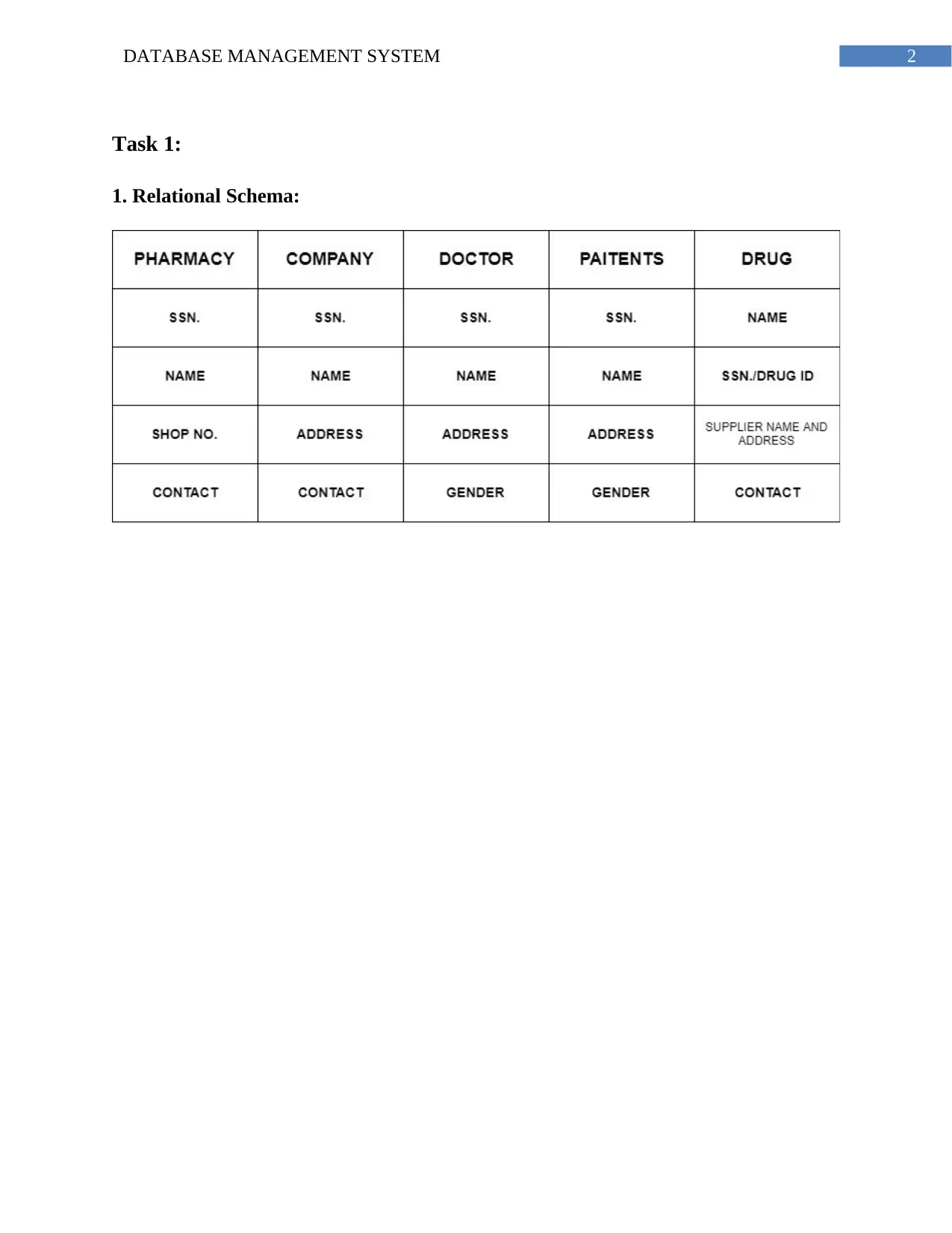
1. Relational Schema:
Task 1:
1. Relational Schema:
⊘ This is a preview!⊘
Do you want full access?
Subscribe today to unlock all pages.

Trusted by 1+ million students worldwide

3DATABASE MANAGEMENT SYSTEM
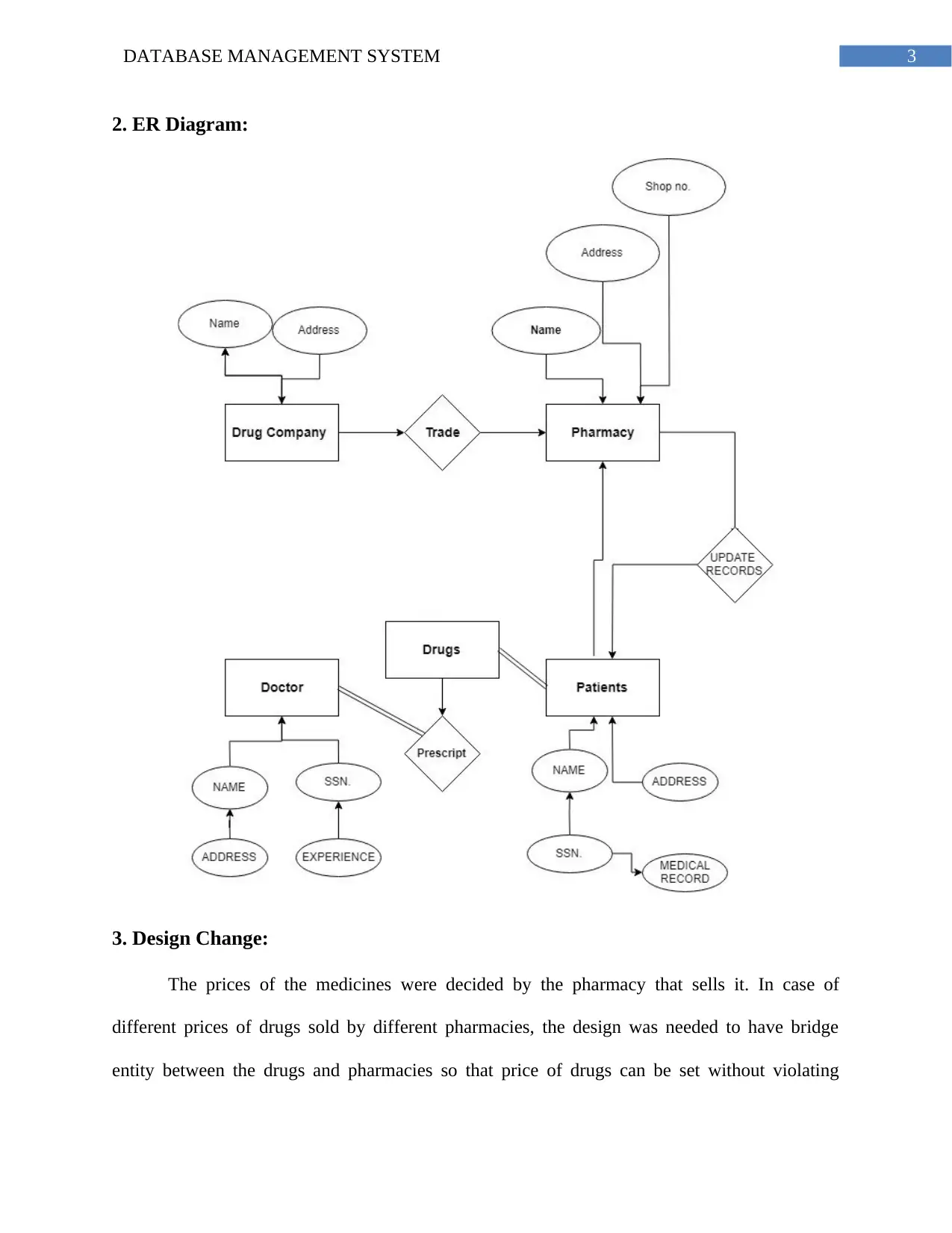
2. ER Diagram:
3. Design Change:
The prices of the medicines were decided by the pharmacy that sells it. In case of
different prices of drugs sold by different pharmacies, the design was needed to have bridge
entity between the drugs and pharmacies so that price of drugs can be set without violating
2. ER Diagram:
3. Design Change:
The prices of the medicines were decided by the pharmacy that sells it. In case of
different prices of drugs sold by different pharmacies, the design was needed to have bridge
entity between the drugs and pharmacies so that price of drugs can be set without violating
Paraphrase This Document
Need a fresh take? Get an instant paraphrase of this document with our AI Paraphraser

4DATABASE MANAGEMENT SYSTEM
anomalies. Now if all the pharmacies have to sell a medicine for a fixed price then price can be
directly added to the drugs entity. The database will be able to see the fixed prices of all the
drugs can just request the values of the price attribute in the drugs table.
4. Change Management Plan:
The change in design plan suggest that a bridge table has to be between the prescription
and drugs. This is because the drugs and prescription will have many to many relationship. The
relation between the patient and prescription will be one to many. This suggest that a patient may
get one or more than one prescription. The bridge table will divide the many to many relation
into two one to many relationships. The bridge table will have the attributes such as primary key
of drugs as foreign key and primary key of prescription as foreign key and an attribute that
indicates the quantity as well as the drug taking method with how many days the drug has to be
taken.
5. Backup Plan:
Data: All the data as well applications that are vital to the continued operation of the
UniPharma will be backed up. In addition to that the data that are related to legislative purpose
will be backed up. The system will back up those materials that are crucial for processing the
information such as programs, install files, control files and operating system software.
Types: There will be four types of backups. The first type is full backup which will be
run weekly. These types of the data backups will be stored for a long period of time. This ensures
that data recovery can be done minimum set of media utilized at that time. The incremental
backups are done regularly. The data protection is very high in this backup plan as the backup
time window is kept as low as possible.
anomalies. Now if all the pharmacies have to sell a medicine for a fixed price then price can be
directly added to the drugs entity. The database will be able to see the fixed prices of all the
drugs can just request the values of the price attribute in the drugs table.
4. Change Management Plan:
The change in design plan suggest that a bridge table has to be between the prescription
and drugs. This is because the drugs and prescription will have many to many relationship. The
relation between the patient and prescription will be one to many. This suggest that a patient may
get one or more than one prescription. The bridge table will divide the many to many relation
into two one to many relationships. The bridge table will have the attributes such as primary key
of drugs as foreign key and primary key of prescription as foreign key and an attribute that
indicates the quantity as well as the drug taking method with how many days the drug has to be
taken.
5. Backup Plan:
Data: All the data as well applications that are vital to the continued operation of the
UniPharma will be backed up. In addition to that the data that are related to legislative purpose
will be backed up. The system will back up those materials that are crucial for processing the
information such as programs, install files, control files and operating system software.
Types: There will be four types of backups. The first type is full backup which will be
run weekly. These types of the data backups will be stored for a long period of time. This ensures
that data recovery can be done minimum set of media utilized at that time. The incremental
backups are done regularly. The data protection is very high in this backup plan as the backup
time window is kept as low as possible.

5DATABASE MANAGEMENT SYSTEM
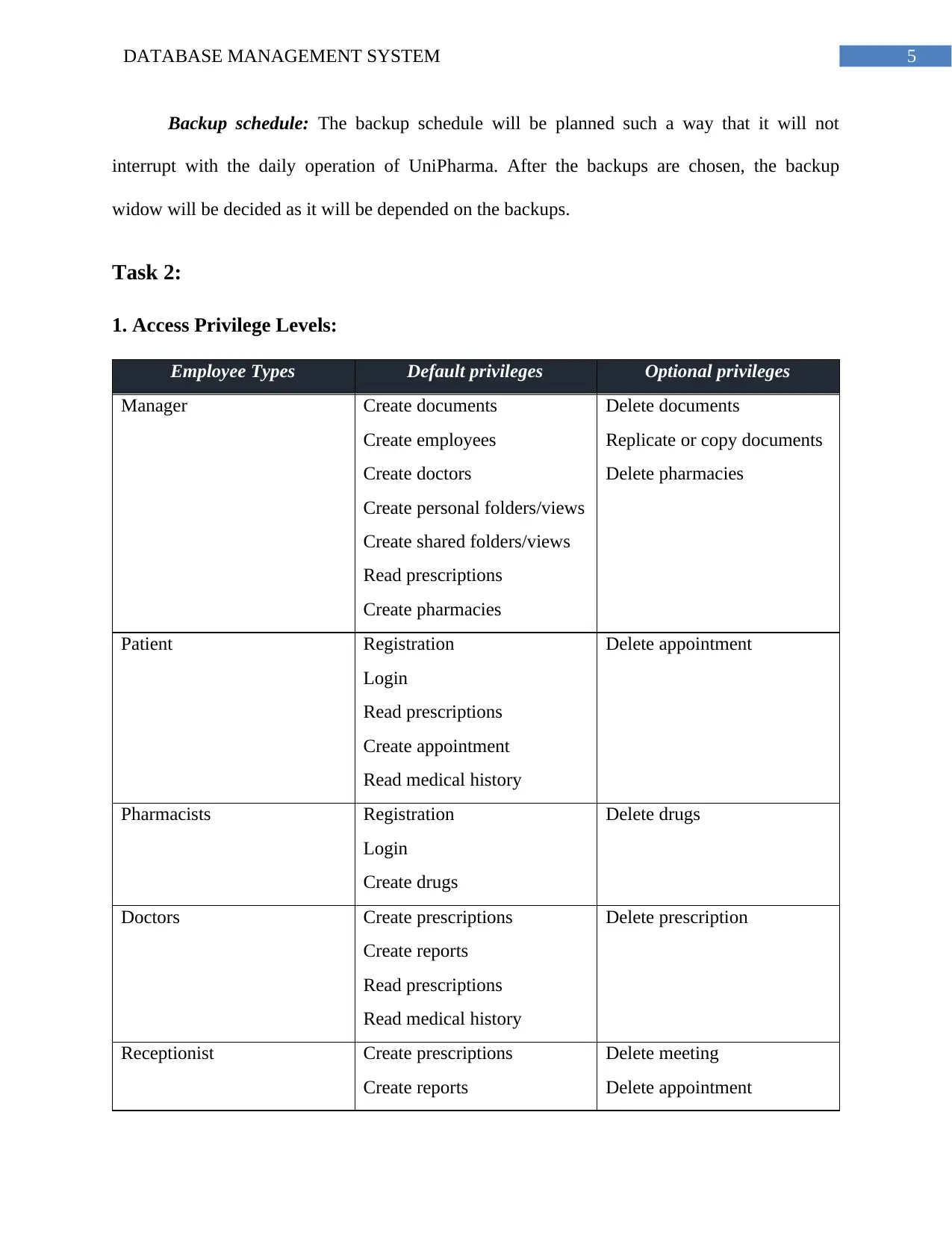
Backup schedule: The backup schedule will be planned such a way that it will not
interrupt with the daily operation of UniPharma. After the backups are chosen, the backup
widow will be decided as it will be depended on the backups.
Task 2:
1. Access Privilege Levels:
Employee Types Default privileges Optional privileges
Manager Create documents
Create employees
Create doctors
Create personal folders/views
Create shared folders/views
Read prescriptions
Create pharmacies
Delete documents
Replicate or copy documents
Delete pharmacies
Patient Registration
Login
Read prescriptions
Create appointment
Read medical history
Delete appointment
Pharmacists Registration
Login
Create drugs
Delete drugs
Doctors Create prescriptions
Create reports
Read prescriptions
Read medical history
Delete prescription
Receptionist Create prescriptions
Create reports
Delete meeting
Delete appointment
Backup schedule: The backup schedule will be planned such a way that it will not
interrupt with the daily operation of UniPharma. After the backups are chosen, the backup
widow will be decided as it will be depended on the backups.
Task 2:
1. Access Privilege Levels:
Employee Types Default privileges Optional privileges
Manager Create documents
Create employees
Create doctors
Create personal folders/views
Create shared folders/views
Read prescriptions
Create pharmacies
Delete documents
Replicate or copy documents
Delete pharmacies
Patient Registration
Login
Read prescriptions
Create appointment
Read medical history
Delete appointment
Pharmacists Registration
Login
Create drugs
Delete drugs
Doctors Create prescriptions
Create reports
Read prescriptions
Read medical history
Delete prescription
Receptionist Create prescriptions
Create reports
Delete meeting
Delete appointment
⊘ This is a preview!⊘
Do you want full access?
Subscribe today to unlock all pages.

Trusted by 1+ million students worldwide

6DATABASE MANAGEMENT SYSTEM
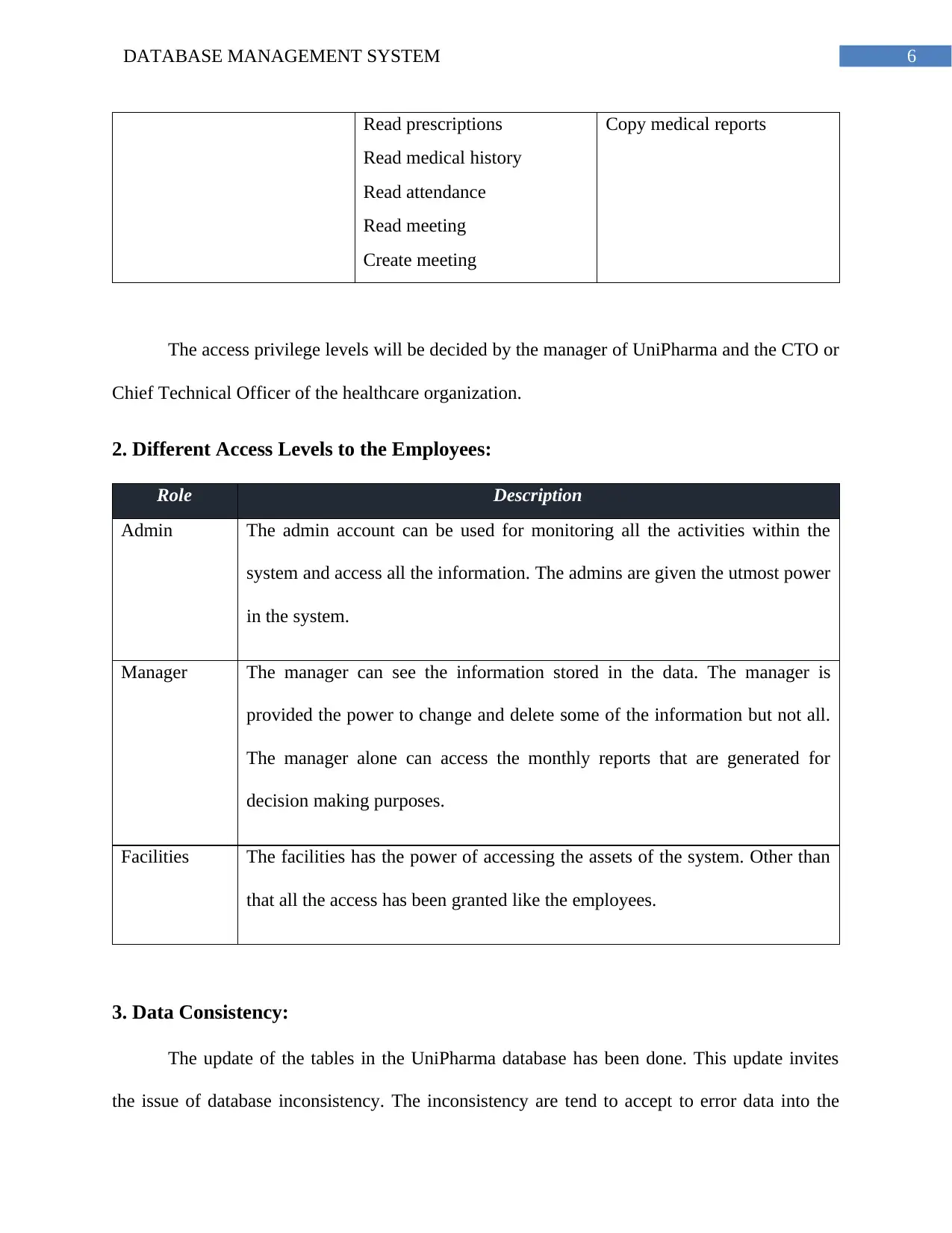
Read prescriptions
Read medical history
Read attendance
Read meeting
Create meeting
Copy medical reports
The access privilege levels will be decided by the manager of UniPharma and the CTO or
Chief Technical Officer of the healthcare organization.
2. Different Access Levels to the Employees:
Role Description
Admin The admin account can be used for monitoring all the activities within the
system and access all the information. The admins are given the utmost power
in the system.
Manager The manager can see the information stored in the data. The manager is
provided the power to change and delete some of the information but not all.
The manager alone can access the monthly reports that are generated for
decision making purposes.
Facilities The facilities has the power of accessing the assets of the system. Other than
that all the access has been granted like the employees.
3. Data Consistency:
The update of the tables in the UniPharma database has been done. This update invites
the issue of database inconsistency. The inconsistency are tend to accept to error data into the
Read prescriptions
Read medical history
Read attendance
Read meeting
Create meeting
Copy medical reports
The access privilege levels will be decided by the manager of UniPharma and the CTO or
Chief Technical Officer of the healthcare organization.
2. Different Access Levels to the Employees:
Role Description
Admin The admin account can be used for monitoring all the activities within the
system and access all the information. The admins are given the utmost power
in the system.
Manager The manager can see the information stored in the data. The manager is
provided the power to change and delete some of the information but not all.
The manager alone can access the monthly reports that are generated for
decision making purposes.
Facilities The facilities has the power of accessing the assets of the system. Other than
that all the access has been granted like the employees.
3. Data Consistency:
The update of the tables in the UniPharma database has been done. This update invites
the issue of database inconsistency. The inconsistency are tend to accept to error data into the
Paraphrase This Document
Need a fresh take? Get an instant paraphrase of this document with our AI Paraphraser

7DATABASE MANAGEMENT SYSTEM
system and inaccurate data stored in the database will result in error reports. The first thing that
is to be check as the DBA is the data policy of the system. The system must be able to accept
those data only that fulfill UniPharma goals and purposes. The consistency rules will be applied
to all the updated attributes. This rules will be implemented organization. This will allow the
system to accept only those data that are accurate and purposeful. Each of the data that will be
entered into the system will be checked and only accepted after the check is successful. Taken as
an example, the patient will try to register into the system and the system will not accept the
registration if a single input section is empty. The registration will be confirmed by clicking on
the link sent to patient email address.
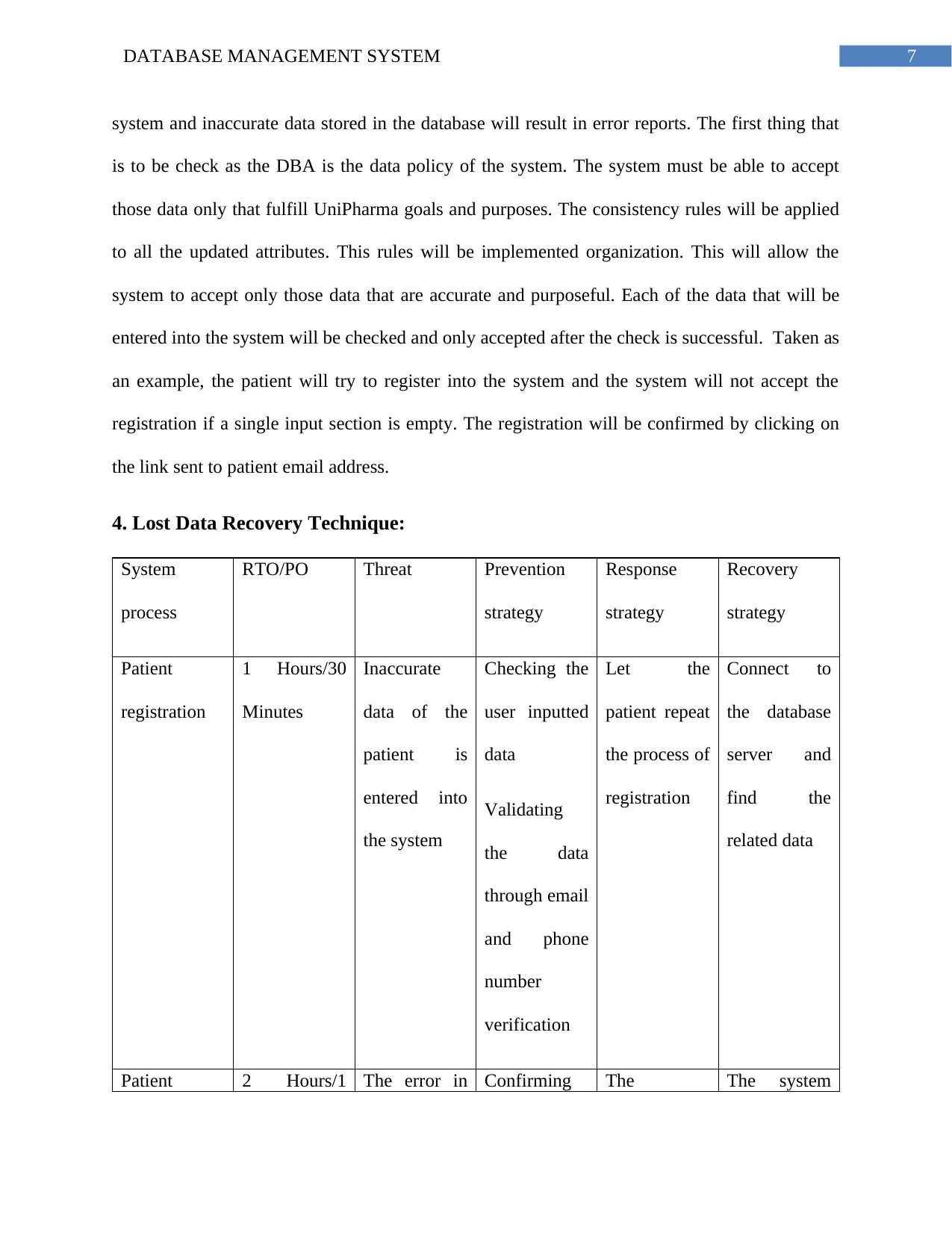
4. Lost Data Recovery Technique:
System
process
RTO/PO Threat Prevention
strategy
Response
strategy
Recovery
strategy
Patient
registration
1 Hours/30
Minutes
Inaccurate
data of the
patient is
entered into
the system
Checking the
user inputted
data
Validating
the data
through email
and phone
number
verification
Let the
patient repeat
the process of
registration
Connect to
the database
server and
find the
related data
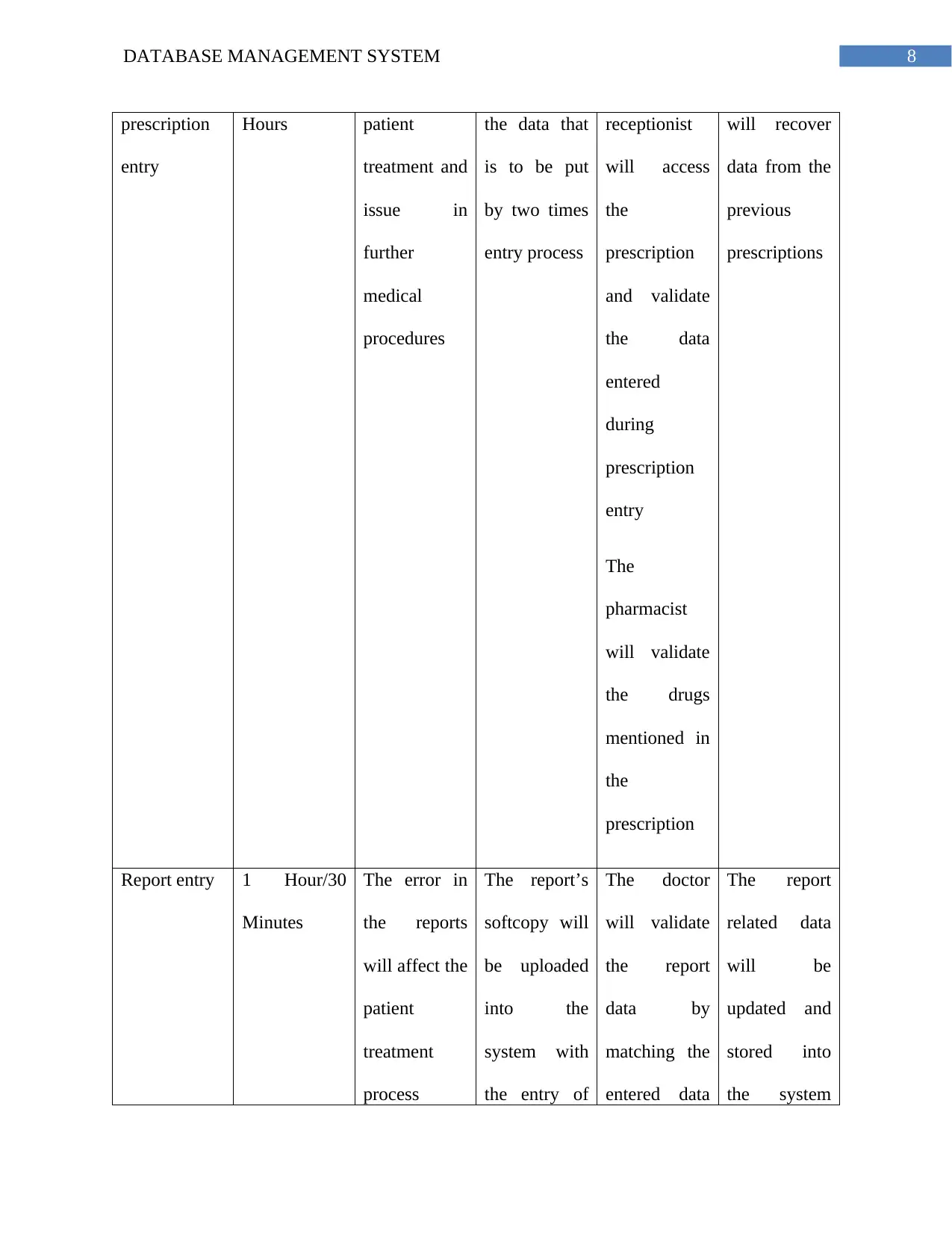
Patient 2 Hours/1 The error in Confirming The The system
system and inaccurate data stored in the database will result in error reports. The first thing that
is to be check as the DBA is the data policy of the system. The system must be able to accept
those data only that fulfill UniPharma goals and purposes. The consistency rules will be applied
to all the updated attributes. This rules will be implemented organization. This will allow the
system to accept only those data that are accurate and purposeful. Each of the data that will be
entered into the system will be checked and only accepted after the check is successful. Taken as
an example, the patient will try to register into the system and the system will not accept the
registration if a single input section is empty. The registration will be confirmed by clicking on
the link sent to patient email address.
4. Lost Data Recovery Technique:
System
process
RTO/PO Threat Prevention
strategy
Response
strategy
Recovery
strategy
Patient
registration
1 Hours/30
Minutes
Inaccurate
data of the
patient is
entered into
the system
Checking the
user inputted
data
Validating
the data
through email
and phone
number
verification
Let the
patient repeat
the process of
registration
Connect to
the database
server and
find the
related data
Patient 2 Hours/1 The error in Confirming The The system

8DATABASE MANAGEMENT SYSTEM
prescription
entry
Hours patient
treatment and
issue in
further
medical
procedures
the data that
is to be put
by two times
entry process
receptionist
will access
the
prescription
and validate
the data
entered
during
prescription
entry
The
pharmacist
will validate
the drugs
mentioned in
the
prescription
will recover
data from the
previous
prescriptions
Report entry 1 Hour/30
Minutes
The error in
the reports
will affect the
patient
treatment
process
The report’s
softcopy will
be uploaded
into the
system with
the entry of
The doctor
will validate
the report
data by
matching the
entered data
The report
related data
will be
updated and
stored into
the system
prescription
entry
Hours patient
treatment and
issue in
further
medical
procedures
the data that
is to be put
by two times
entry process
receptionist
will access
the
prescription
and validate
the data
entered
during
prescription
entry
The
pharmacist
will validate
the drugs
mentioned in
the
prescription
will recover
data from the
previous
prescriptions
Report entry 1 Hour/30
Minutes
The error in
the reports
will affect the
patient
treatment
process
The report’s
softcopy will
be uploaded
into the
system with
the entry of
The doctor
will validate
the report
data by
matching the
entered data
The report
related data
will be
updated and
stored into
the system
⊘ This is a preview!⊘
Do you want full access?
Subscribe today to unlock all pages.

Trusted by 1+ million students worldwide
1 out of 9
Related Documents
Your All-in-One AI-Powered Toolkit for Academic Success.
 +13062052269
info@desklib.com
Available 24*7 on WhatsApp / Email
Unlock your academic potential
Copyright © 2020–2026 A2Z Services. All Rights Reserved. Developed and managed by ZUCOL.