COM438: Designing Database Tables for Veterinary Practice in Wrexham
VerifiedAdded on 2023/01/11
|12
|1766
|24
Practical Assignment
AI Summary
This assignment focuses on designing a database for a veterinary practice in Wrexham, encompassing the creation of an Entity-Relationship (ER) diagram, development of a relational schema, and implementation of SQL queries. The solution begins with an introduction to databases and their importance in organizing information, particularly within a veterinary context. Task 1 involves finalizing an ER diagram to represent the data requirements, identifying entities like branches, employees, appointments, owners, diagnoses, and prescriptions, and defining their relationships and cardinalities. Task 2 centers on developing a relational schema, outlining tables with primary and foreign keys, and addressing normalization. Task 3 details the creation of tables, including employee, appointment, branch, pet owner, diagnosis, and prescription tables, along with their attributes and relationships. Finally, Task 4 demonstrates various SQL queries for selecting, updating, and deleting records from the database, covering aspects such as listing customer details, branch information, drug details, staff information, appointment details, and updating/deleting records. The assignment concludes with a summary of the database design process and references used.
Designing Database
Paraphrase This Document
Need a fresh take? Get an instant paraphrase of this document with our AI Paraphraser

Table of Contents
Introduction......................................................................................................................................2
Task 1...............................................................................................................................................2
Finalise ER diagram for data requirements by identification of all entities, relationships along
with cardinalities....................................................................................................................2
Task 2...............................................................................................................................................4
Develop relational schema that comprises of different keys along with other constraints....4
Task 3...............................................................................................................................................5
Creation of tables as well as relationship...............................................................................5
Task 4 – Query your Database.........................................................................................................7
A. Selection of records from table...................................................................................................7
1. List names as well as address of customers........................................................................7
2. List customers within branch and details of Pets...............................................................7
3 List details of drugs.............................................................................................................8
4. List of nurses and doctors within Veterinary Service........................................................8
5. List appointment details.....................................................................................................8
6. Count number of visit per each pet.....................................................................................8
7. List all available surgeons for particular time and date......................................................8
8. Produce list of treatment/diagnoses records.......................................................................8
9. List prescription details......................................................................................................8
B. Updating & Deleting Records.....................................................................................................9
1. Update stock of given drug.................................................................................................9
2. Update address details of customer....................................................................................9
3. Change appointment time...................................................................................................9
4. Delete or cancel appointment.............................................................................................9
5. Delete or remove customer from database.........................................................................9
Introduction......................................................................................................................................2
Task 1...............................................................................................................................................2
Finalise ER diagram for data requirements by identification of all entities, relationships along
with cardinalities....................................................................................................................2
Task 2...............................................................................................................................................4
Develop relational schema that comprises of different keys along with other constraints....4
Task 3...............................................................................................................................................5
Creation of tables as well as relationship...............................................................................5
Task 4 – Query your Database.........................................................................................................7
A. Selection of records from table...................................................................................................7
1. List names as well as address of customers........................................................................7
2. List customers within branch and details of Pets...............................................................7
3 List details of drugs.............................................................................................................8
4. List of nurses and doctors within Veterinary Service........................................................8
5. List appointment details.....................................................................................................8
6. Count number of visit per each pet.....................................................................................8
7. List all available surgeons for particular time and date......................................................8
8. Produce list of treatment/diagnoses records.......................................................................8
9. List prescription details......................................................................................................8
B. Updating & Deleting Records.....................................................................................................9
1. Update stock of given drug.................................................................................................9
2. Update address details of customer....................................................................................9
3. Change appointment time...................................................................................................9
4. Delete or cancel appointment.............................................................................................9
5. Delete or remove customer from database.........................................................................9

Conclusion.......................................................................................................................................9
References......................................................................................................................................10
⊘ This is a preview!⊘
Do you want full access?
Subscribe today to unlock all pages.

Trusted by 1+ million students worldwide

Introduction
Data structure which is liable for storing organised information is referred to as database.
This is an organised gathering of structured data or information which is responsible for storing
them electronically within computer system (Alaydrus and et. al, 2020). It is methodical
assortment of data. Structured Query language (SQL) refer to programming language that is
being utilised by relational database for query, manipulation as well as defining data for
providing access to data. This report is based on Veterinary practice which is present in
Wrexham and is looking forward to have computerised records. For doing so they need to
execute database for their four different branches. This report comprises of different aspects
related with entity relationship diagram, relational schema and certain queries will be illustrated.
Task 1
Finalise ER diagram for data requirements by identification of all entities, relationships along
with cardinalities.
The entity relationship diagram refers to kind of flowchart which illustrates ways in
which how entities like concepts, objects or entities relates with each other in a system. ERD
makes use of data modelling techniques that aids within defining business processes as well as
serve like a foundation for relational database (Arnbjerg-Nielsen, 2020). With respect to the case
scenario, there are four branches of Veterinary Services who deliver their functionalities. The
database comprises of details related with these branches, surgeons, nurses and many other
aspects. Basically, the ER diagram illustrates the way in which different aspects in an
organisation communicate with each other in terms of either direct or indirect relationship.
Data structure which is liable for storing organised information is referred to as database.
This is an organised gathering of structured data or information which is responsible for storing
them electronically within computer system (Alaydrus and et. al, 2020). It is methodical
assortment of data. Structured Query language (SQL) refer to programming language that is
being utilised by relational database for query, manipulation as well as defining data for
providing access to data. This report is based on Veterinary practice which is present in
Wrexham and is looking forward to have computerised records. For doing so they need to
execute database for their four different branches. This report comprises of different aspects
related with entity relationship diagram, relational schema and certain queries will be illustrated.
Task 1
Finalise ER diagram for data requirements by identification of all entities, relationships along
with cardinalities.
The entity relationship diagram refers to kind of flowchart which illustrates ways in
which how entities like concepts, objects or entities relates with each other in a system. ERD
makes use of data modelling techniques that aids within defining business processes as well as
serve like a foundation for relational database (Arnbjerg-Nielsen, 2020). With respect to the case
scenario, there are four branches of Veterinary Services who deliver their functionalities. The
database comprises of details related with these branches, surgeons, nurses and many other
aspects. Basically, the ER diagram illustrates the way in which different aspects in an
organisation communicate with each other in terms of either direct or indirect relationship.
Paraphrase This Document
Need a fresh take? Get an instant paraphrase of this document with our AI Paraphraser

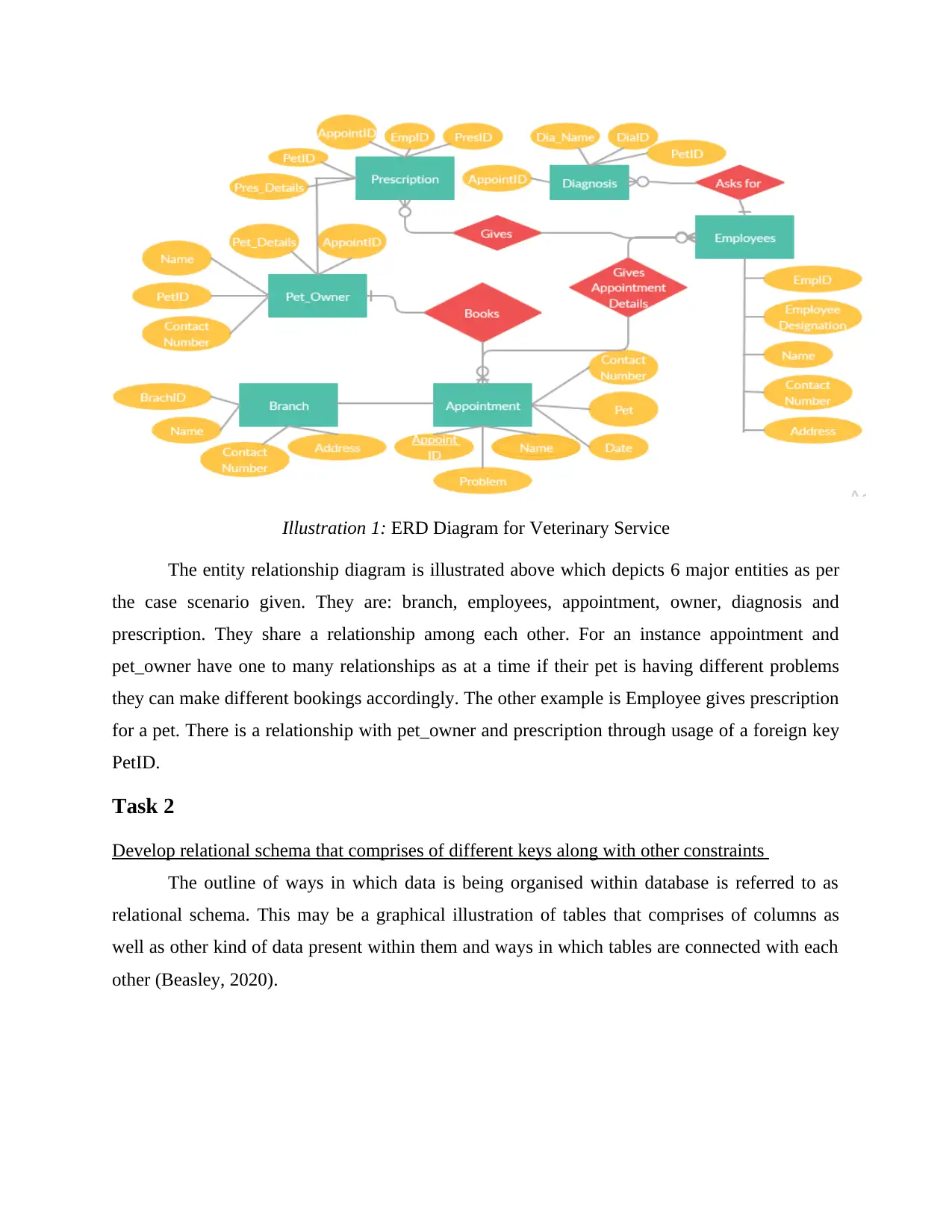
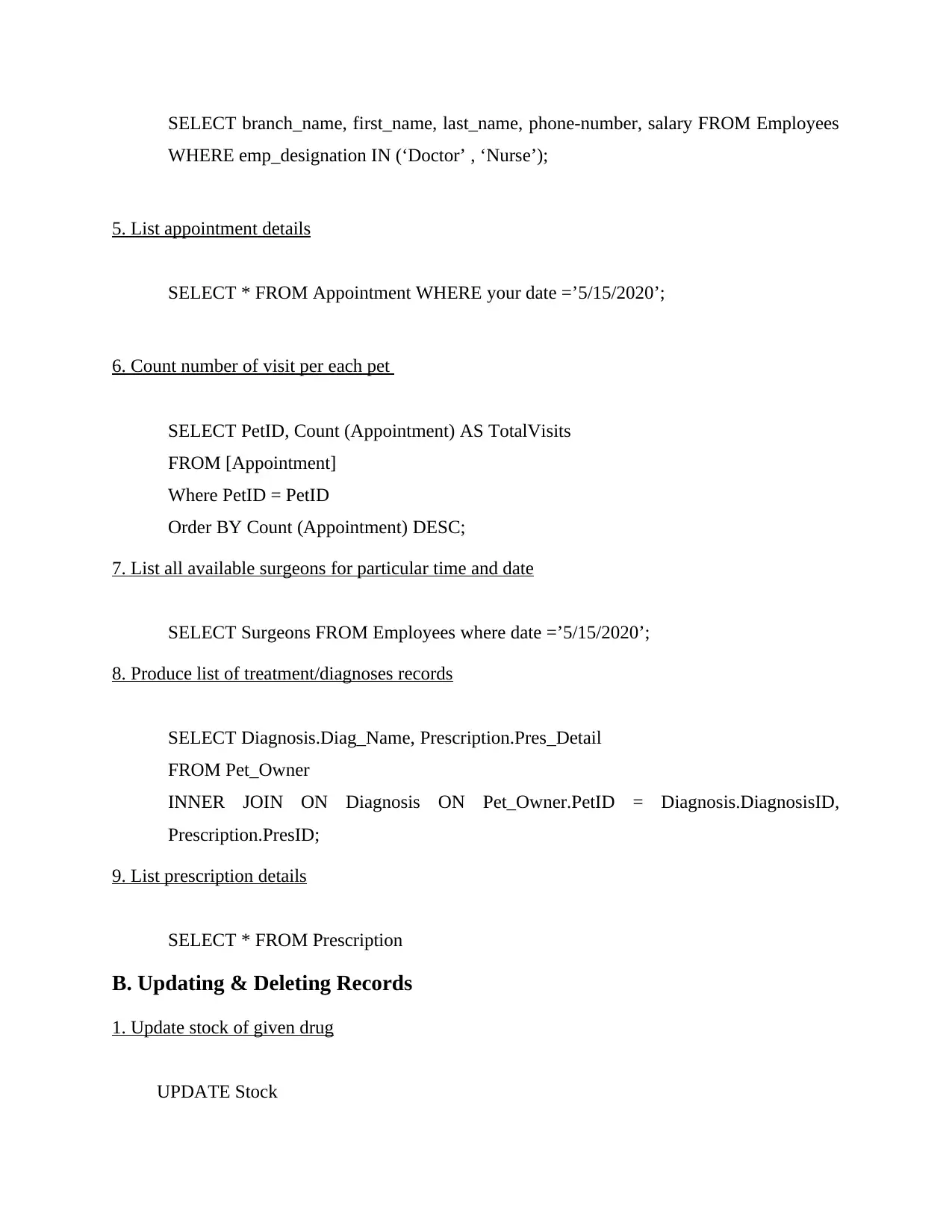
Illustration 1: ERD Diagram for Veterinary Service
The entity relationship diagram is illustrated above which depicts 6 major entities as per
the case scenario given. They are: branch, employees, appointment, owner, diagnosis and
prescription. They share a relationship among each other. For an instance appointment and
pet_owner have one to many relationships as at a time if their pet is having different problems
they can make different bookings accordingly. The other example is Employee gives prescription
for a pet. There is a relationship with pet_owner and prescription through usage of a foreign key
PetID.
Task 2
Develop relational schema that comprises of different keys along with other constraints
The outline of ways in which data is being organised within database is referred to as
relational schema. This may be a graphical illustration of tables that comprises of columns as
well as other kind of data present within them and ways in which tables are connected with each
other (Beasley, 2020).
The entity relationship diagram is illustrated above which depicts 6 major entities as per
the case scenario given. They are: branch, employees, appointment, owner, diagnosis and
prescription. They share a relationship among each other. For an instance appointment and
pet_owner have one to many relationships as at a time if their pet is having different problems
they can make different bookings accordingly. The other example is Employee gives prescription
for a pet. There is a relationship with pet_owner and prescription through usage of a foreign key
PetID.
Task 2
Develop relational schema that comprises of different keys along with other constraints
The outline of ways in which data is being organised within database is referred to as
relational schema. This may be a graphical illustration of tables that comprises of columns as
well as other kind of data present within them and ways in which tables are connected with each
other (Beasley, 2020).

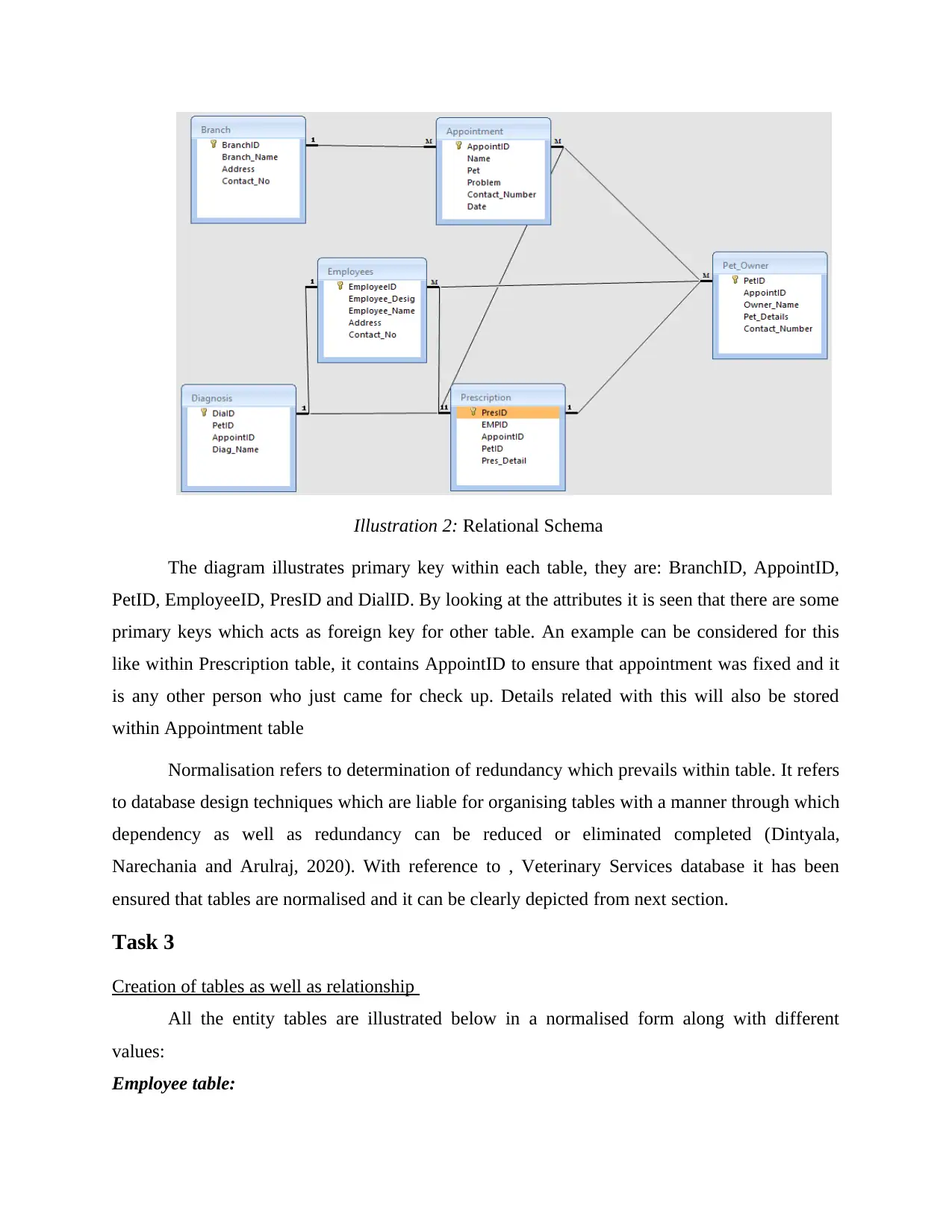
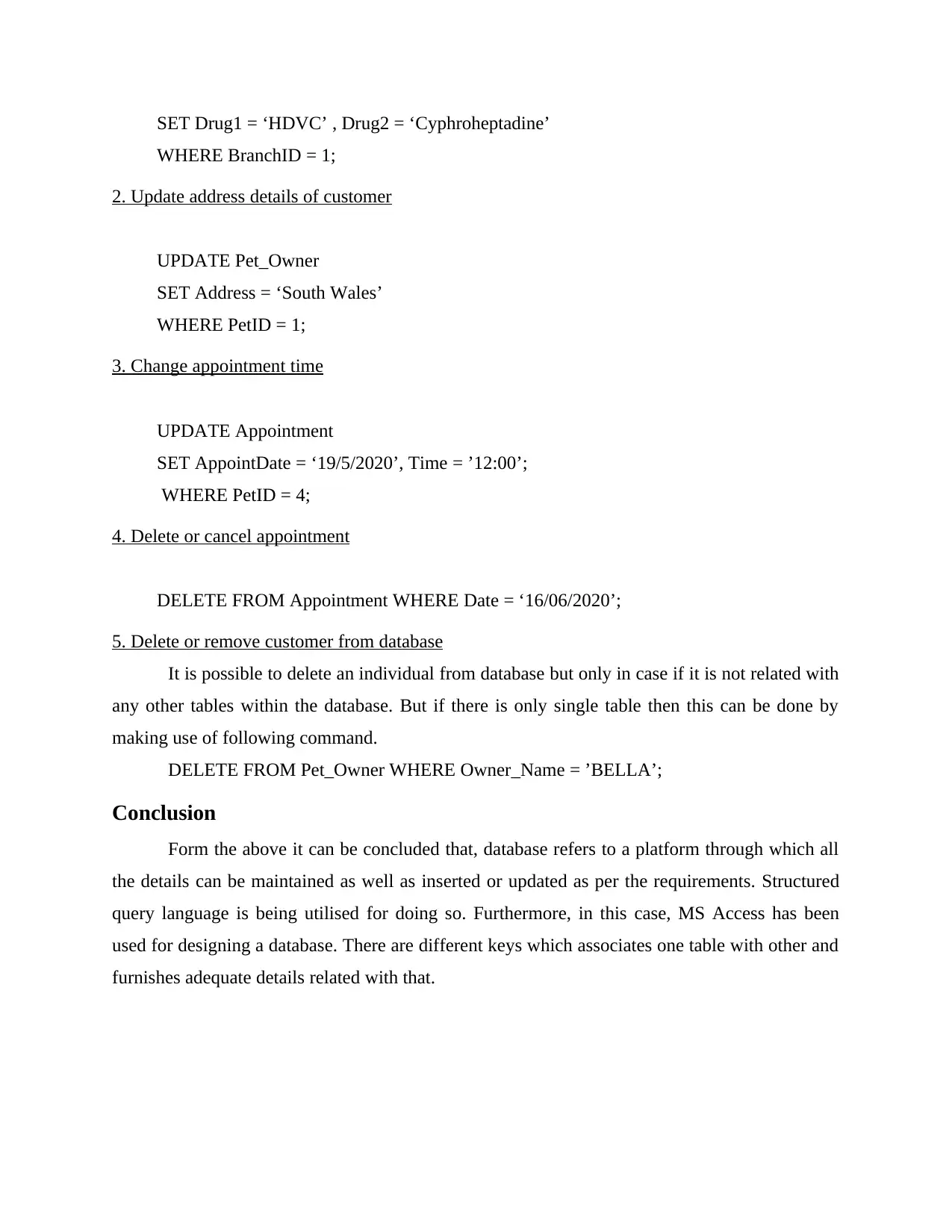
Illustration 2: Relational Schema
The diagram illustrates primary key within each table, they are: BranchID, AppointID,
PetID, EmployeeID, PresID and DialID. By looking at the attributes it is seen that there are some
primary keys which acts as foreign key for other table. An example can be considered for this
like within Prescription table, it contains AppointID to ensure that appointment was fixed and it
is any other person who just came for check up. Details related with this will also be stored
within Appointment table
Normalisation refers to determination of redundancy which prevails within table. It refers
to database design techniques which are liable for organising tables with a manner through which
dependency as well as redundancy can be reduced or eliminated completed (Dintyala,
Narechania and Arulraj, 2020). With reference to , Veterinary Services database it has been
ensured that tables are normalised and it can be clearly depicted from next section.
Task 3
Creation of tables as well as relationship
All the entity tables are illustrated below in a normalised form along with different
values:
Employee table:
The diagram illustrates primary key within each table, they are: BranchID, AppointID,
PetID, EmployeeID, PresID and DialID. By looking at the attributes it is seen that there are some
primary keys which acts as foreign key for other table. An example can be considered for this
like within Prescription table, it contains AppointID to ensure that appointment was fixed and it
is any other person who just came for check up. Details related with this will also be stored
within Appointment table
Normalisation refers to determination of redundancy which prevails within table. It refers
to database design techniques which are liable for organising tables with a manner through which
dependency as well as redundancy can be reduced or eliminated completed (Dintyala,
Narechania and Arulraj, 2020). With reference to , Veterinary Services database it has been
ensured that tables are normalised and it can be clearly depicted from next section.
Task 3
Creation of tables as well as relationship
All the entity tables are illustrated below in a normalised form along with different
values:
Employee table:
⊘ This is a preview!⊘
Do you want full access?
Subscribe today to unlock all pages.

Trusted by 1+ million students worldwide

Employees
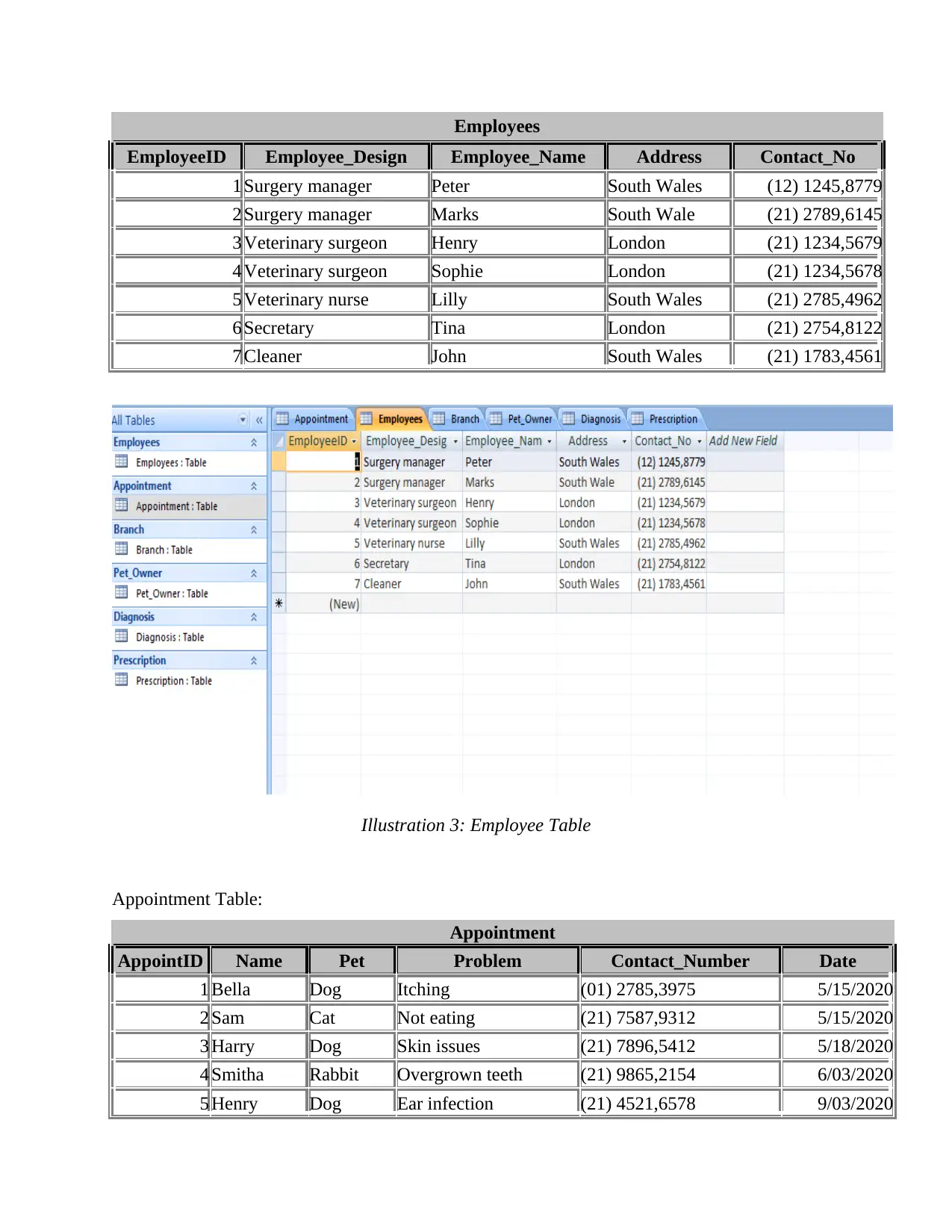
EmployeeID Employee_Design Employee_Name Address Contact_No
1 Surgery manager Peter South Wales (12) 1245,8779
2 Surgery manager Marks South Wale (21) 2789,6145
3 Veterinary surgeon Henry London (21) 1234,5679
4 Veterinary surgeon Sophie London (21) 1234,5678
5 Veterinary nurse Lilly South Wales (21) 2785,4962
6 Secretary Tina London (21) 2754,8122
7 Cleaner John South Wales (21) 1783,4561
Illustration 3: Employee Table
Appointment Table:
Appointment
AppointID Name Pet Problem Contact_Number Date
1 Bella Dog Itching (01) 2785,3975 5/15/2020
2 Sam Cat Not eating (21) 7587,9312 5/15/2020
3 Harry Dog Skin issues (21) 7896,5412 5/18/2020
4 Smitha Rabbit Overgrown teeth (21) 9865,2154 6/03/2020
5 Henry Dog Ear infection (21) 4521,6578 9/03/2020
EmployeeID Employee_Design Employee_Name Address Contact_No
1 Surgery manager Peter South Wales (12) 1245,8779
2 Surgery manager Marks South Wale (21) 2789,6145
3 Veterinary surgeon Henry London (21) 1234,5679
4 Veterinary surgeon Sophie London (21) 1234,5678
5 Veterinary nurse Lilly South Wales (21) 2785,4962
6 Secretary Tina London (21) 2754,8122
7 Cleaner John South Wales (21) 1783,4561
Illustration 3: Employee Table
Appointment Table:
Appointment
AppointID Name Pet Problem Contact_Number Date
1 Bella Dog Itching (01) 2785,3975 5/15/2020
2 Sam Cat Not eating (21) 7587,9312 5/15/2020
3 Harry Dog Skin issues (21) 7896,5412 5/18/2020
4 Smitha Rabbit Overgrown teeth (21) 9865,2154 6/03/2020
5 Henry Dog Ear infection (21) 4521,6578 9/03/2020
Paraphrase This Document
Need a fresh take? Get an instant paraphrase of this document with our AI Paraphraser

Branch Table:
Branch
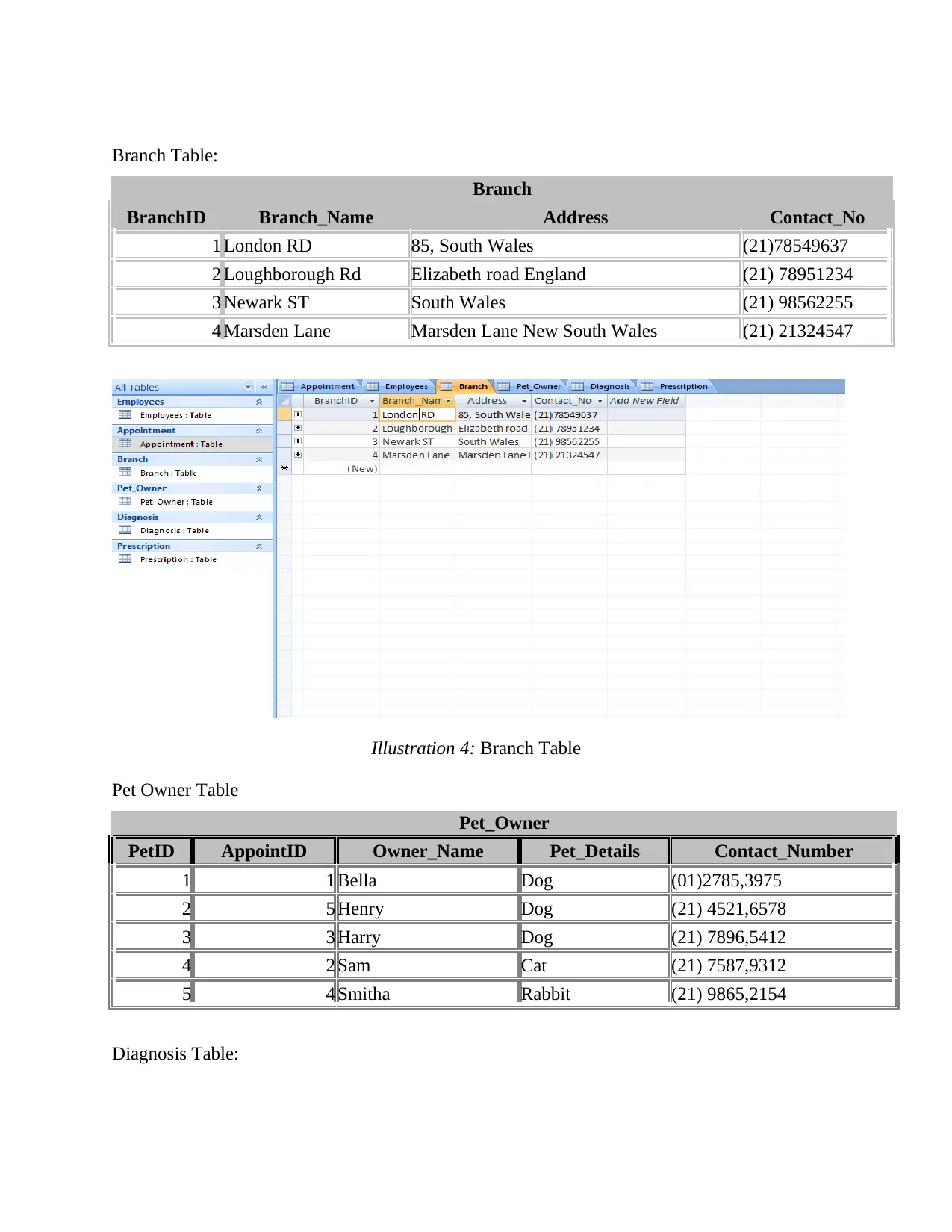
BranchID Branch_Name Address Contact_No
1 London RD 85, South Wales (21)78549637
2 Loughborough Rd Elizabeth road England (21) 78951234
3 Newark ST South Wales (21) 98562255
4 Marsden Lane Marsden Lane New South Wales (21) 21324547
Illustration 4: Branch Table
Pet Owner Table
Pet_Owner
PetID AppointID Owner_Name Pet_Details Contact_Number
1 1 Bella Dog (01)2785,3975
2 5 Henry Dog (21) 4521,6578
3 3 Harry Dog (21) 7896,5412
4 2 Sam Cat (21) 7587,9312
5 4 Smitha Rabbit (21) 9865,2154
Diagnosis Table:
Branch
BranchID Branch_Name Address Contact_No
1 London RD 85, South Wales (21)78549637
2 Loughborough Rd Elizabeth road England (21) 78951234
3 Newark ST South Wales (21) 98562255
4 Marsden Lane Marsden Lane New South Wales (21) 21324547
Illustration 4: Branch Table
Pet Owner Table
Pet_Owner
PetID AppointID Owner_Name Pet_Details Contact_Number
1 1 Bella Dog (01)2785,3975
2 5 Henry Dog (21) 4521,6578
3 3 Harry Dog (21) 7896,5412
4 2 Sam Cat (21) 7587,9312
5 4 Smitha Rabbit (21) 9865,2154
Diagnosis Table:

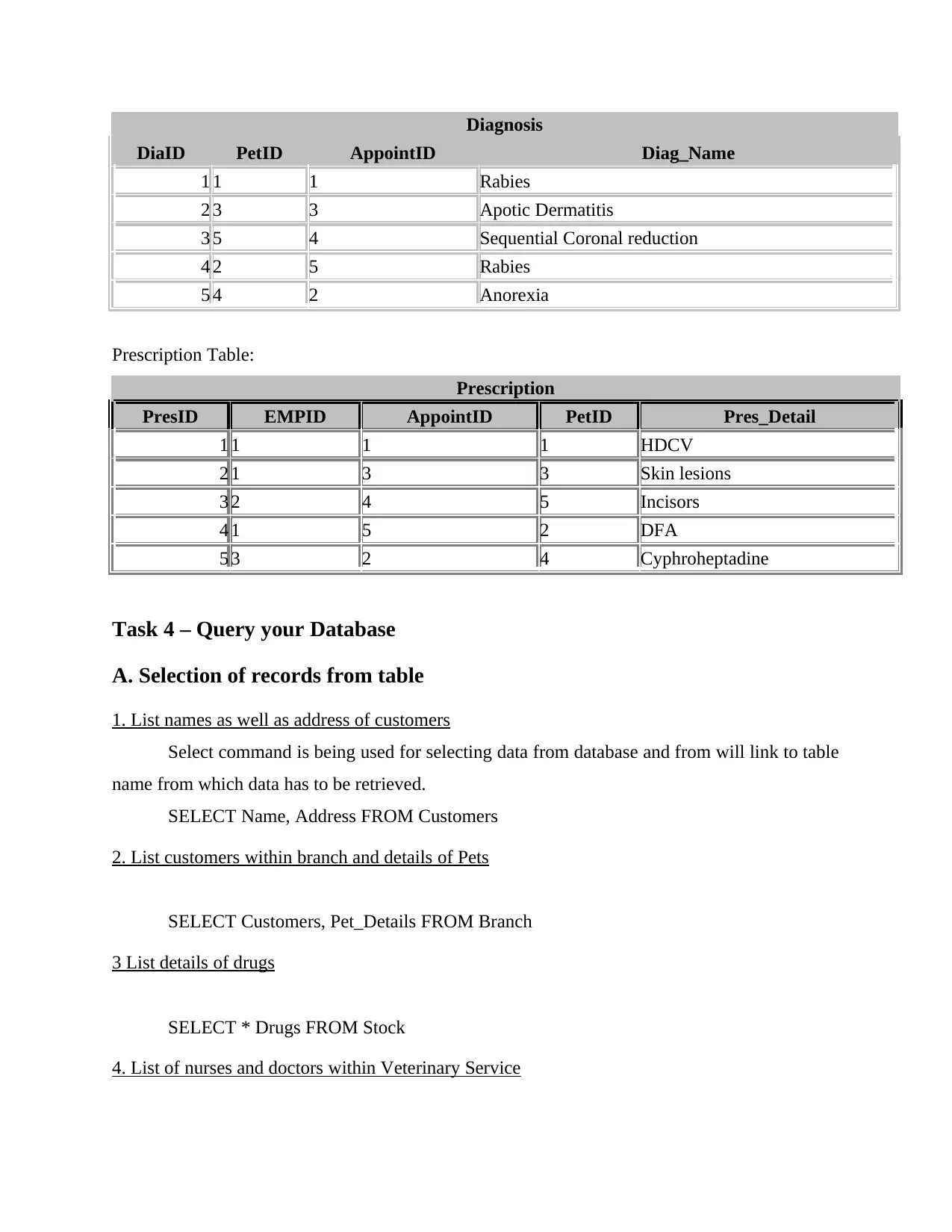
Diagnosis
DiaID PetID AppointID Diag_Name
1 1 1 Rabies
2 3 3 Apotic Dermatitis
3 5 4 Sequential Coronal reduction
4 2 5 Rabies
5 4 2 Anorexia
Prescription Table:
Prescription
PresID EMPID AppointID PetID Pres_Detail
1 1 1 1 HDCV
2 1 3 3 Skin lesions
3 2 4 5 Incisors
4 1 5 2 DFA
5 3 2 4 Cyphroheptadine
Task 4 – Query your Database
A. Selection of records from table
1. List names as well as address of customers
Select command is being used for selecting data from database and from will link to table
name from which data has to be retrieved.
SELECT Name, Address FROM Customers
2. List customers within branch and details of Pets
SELECT Customers, Pet_Details FROM Branch
3 List details of drugs
SELECT * Drugs FROM Stock
4. List of nurses and doctors within Veterinary Service
DiaID PetID AppointID Diag_Name
1 1 1 Rabies
2 3 3 Apotic Dermatitis
3 5 4 Sequential Coronal reduction
4 2 5 Rabies
5 4 2 Anorexia
Prescription Table:
Prescription
PresID EMPID AppointID PetID Pres_Detail
1 1 1 1 HDCV
2 1 3 3 Skin lesions
3 2 4 5 Incisors
4 1 5 2 DFA
5 3 2 4 Cyphroheptadine
Task 4 – Query your Database
A. Selection of records from table
1. List names as well as address of customers
Select command is being used for selecting data from database and from will link to table
name from which data has to be retrieved.
SELECT Name, Address FROM Customers
2. List customers within branch and details of Pets
SELECT Customers, Pet_Details FROM Branch
3 List details of drugs
SELECT * Drugs FROM Stock
4. List of nurses and doctors within Veterinary Service
⊘ This is a preview!⊘
Do you want full access?
Subscribe today to unlock all pages.

Trusted by 1+ million students worldwide

SELECT branch_name, first_name, last_name, phone-number, salary FROM Employees
WHERE emp_designation IN (‘Doctor’ , ‘Nurse’);
5. List appointment details
SELECT * FROM Appointment WHERE your date =’5/15/2020’;
6. Count number of visit per each pet
SELECT PetID, Count (Appointment) AS TotalVisits
FROM [Appointment]
Where PetID = PetID
Order BY Count (Appointment) DESC;
7. List all available surgeons for particular time and date
SELECT Surgeons FROM Employees where date =’5/15/2020’;
8. Produce list of treatment/diagnoses records
SELECT Diagnosis.Diag_Name, Prescription.Pres_Detail
FROM Pet_Owner
INNER JOIN ON Diagnosis ON Pet_Owner.PetID = Diagnosis.DiagnosisID,
Prescription.PresID;
9. List prescription details
SELECT * FROM Prescription
B. Updating & Deleting Records
1. Update stock of given drug
UPDATE Stock
WHERE emp_designation IN (‘Doctor’ , ‘Nurse’);
5. List appointment details
SELECT * FROM Appointment WHERE your date =’5/15/2020’;
6. Count number of visit per each pet
SELECT PetID, Count (Appointment) AS TotalVisits
FROM [Appointment]
Where PetID = PetID
Order BY Count (Appointment) DESC;
7. List all available surgeons for particular time and date
SELECT Surgeons FROM Employees where date =’5/15/2020’;
8. Produce list of treatment/diagnoses records
SELECT Diagnosis.Diag_Name, Prescription.Pres_Detail
FROM Pet_Owner
INNER JOIN ON Diagnosis ON Pet_Owner.PetID = Diagnosis.DiagnosisID,
Prescription.PresID;
9. List prescription details
SELECT * FROM Prescription
B. Updating & Deleting Records
1. Update stock of given drug
UPDATE Stock
Paraphrase This Document
Need a fresh take? Get an instant paraphrase of this document with our AI Paraphraser

SET Drug1 = ‘HDVC’ , Drug2 = ‘Cyphroheptadine’
WHERE BranchID = 1;
2. Update address details of customer
UPDATE Pet_Owner
SET Address = ‘South Wales’
WHERE PetID = 1;
3. Change appointment time
UPDATE Appointment
SET AppointDate = ‘19/5/2020’, Time = ’12:00’;
WHERE PetID = 4;
4. Delete or cancel appointment
DELETE FROM Appointment WHERE Date = ‘16/06/2020’;
5. Delete or remove customer from database
It is possible to delete an individual from database but only in case if it is not related with
any other tables within the database. But if there is only single table then this can be done by
making use of following command.
DELETE FROM Pet_Owner WHERE Owner_Name = ’BELLA’;
Conclusion
Form the above it can be concluded that, database refers to a platform through which all
the details can be maintained as well as inserted or updated as per the requirements. Structured
query language is being utilised for doing so. Furthermore, in this case, MS Access has been
used for designing a database. There are different keys which associates one table with other and
furnishes adequate details related with that.
WHERE BranchID = 1;
2. Update address details of customer
UPDATE Pet_Owner
SET Address = ‘South Wales’
WHERE PetID = 1;
3. Change appointment time
UPDATE Appointment
SET AppointDate = ‘19/5/2020’, Time = ’12:00’;
WHERE PetID = 4;
4. Delete or cancel appointment
DELETE FROM Appointment WHERE Date = ‘16/06/2020’;
5. Delete or remove customer from database
It is possible to delete an individual from database but only in case if it is not related with
any other tables within the database. But if there is only single table then this can be done by
making use of following command.
DELETE FROM Pet_Owner WHERE Owner_Name = ’BELLA’;
Conclusion
Form the above it can be concluded that, database refers to a platform through which all
the details can be maintained as well as inserted or updated as per the requirements. Structured
query language is being utilised for doing so. Furthermore, in this case, MS Access has been
used for designing a database. There are different keys which associates one table with other and
furnishes adequate details related with that.

References
Books & References
Alaydrus, M.F. and et. al, 2020. Designing Web-based Database Applications in CV
Bahagia. E&ES, 426(1), p.012172.
Arnbjerg-Nielsen, K., 2020. Panta Rhei-Non-stationarity in planning, designing, and operating
urban drainage systems.
Beasley, R.E., 2020. Database Design, SQL, and Data Binding. In Essential ASP. NET Web
Forms Development (pp. 359-394). Apress, Berkeley, CA.
Chiusano, M., 2020. IS 331-452: Database Design, Management and Applications.
Dintyala, V.S.P., Narechania, A. and Arulraj, J., 2020. SQLCheck: Automated Detection and
Diagnosis of SQL Anti-Patterns. arXiv preprint arXiv:2004.10232.
Books & References
Alaydrus, M.F. and et. al, 2020. Designing Web-based Database Applications in CV
Bahagia. E&ES, 426(1), p.012172.
Arnbjerg-Nielsen, K., 2020. Panta Rhei-Non-stationarity in planning, designing, and operating
urban drainage systems.
Beasley, R.E., 2020. Database Design, SQL, and Data Binding. In Essential ASP. NET Web
Forms Development (pp. 359-394). Apress, Berkeley, CA.
Chiusano, M., 2020. IS 331-452: Database Design, Management and Applications.
Dintyala, V.S.P., Narechania, A. and Arulraj, J., 2020. SQLCheck: Automated Detection and
Diagnosis of SQL Anti-Patterns. arXiv preprint arXiv:2004.10232.
⊘ This is a preview!⊘
Do you want full access?
Subscribe today to unlock all pages.

Trusted by 1+ million students worldwide
1 out of 12
Related Documents
Your All-in-One AI-Powered Toolkit for Academic Success.
+13062052269
info@desklib.com
Available 24*7 on WhatsApp / Email
Unlock your academic potential
Copyright © 2020–2026 A2Z Services. All Rights Reserved. Developed and managed by ZUCOL.