Virtualization Host Software Report: Platforms, Features, and Sectors
VerifiedAdded on 2020/04/15
|11
|1956
|176
Report
AI Summary
This report provides a detailed comparison of three virtualization host software platforms: Oracle VM, Solaris Container, and Virtual Box. The report begins by introducing each platform, detailing their features, benefits, and the industrial sectors where they are commonly used. Task 1 explores the functionalities of Oracle VM Manager, the resource control and separation boundaries of Solaris Container, and the capabilities of Virtual Box, including its support for multiple operating systems. The report then moves on to Task 2, which focuses on the Oracle Solaris 10 container, explaining its ability to isolate software applications and services. It also highlights the reasons for selecting this platform, the steps involved in its procurement, and a cost comparison between Solaris/SPARC and Linux/x86. The report concludes with recommendations for high-performance systems and references relevant literature. This report is contributed by a student and published on Desklib, a platform offering AI-based study tools, including past papers and solved assignments.
Running head: VIRTUALIZATION HOST SOFTWARE
VIRTUALIZATION HOST SOFTWARE
Name of the Student
Name of the University
Author Note
VIRTUALIZATION HOST SOFTWARE
Name of the Student
Name of the University
Author Note

Paraphrase This Document
Need a fresh take? Get an instant paraphrase of this document with our AI Paraphraser
2VIRTUALIZATION HOST SOFTWARE
Table of Contents
Task 1.........................................................................................................................................3
Platforms....................................................................................................................................3
Platform 1: Oracle VM...............................................................................................................3
Features..................................................................................................................................3
Benefits..................................................................................................................................3
Industrial sector......................................................................................................................3
Platform 2: Solaris container......................................................................................................3
Features..................................................................................................................................3
Benefits..................................................................................................................................4
Industrial sector......................................................................................................................4
Platform 3: Virtual Box..............................................................................................................4
Features..................................................................................................................................4
Benefits..................................................................................................................................4
Industrial sector......................................................................................................................4
Recommendation........................................................................................................................5
Task 2.........................................................................................................................................5
About the Platform.................................................................................................................5
Reason for selection of the platform......................................................................................5
Steps of Procurement.............................................................................................................5
Pricing....................................................................................................................................6
Table of Contents
Task 1.........................................................................................................................................3
Platforms....................................................................................................................................3
Platform 1: Oracle VM...............................................................................................................3
Features..................................................................................................................................3
Benefits..................................................................................................................................3
Industrial sector......................................................................................................................3
Platform 2: Solaris container......................................................................................................3
Features..................................................................................................................................3
Benefits..................................................................................................................................4
Industrial sector......................................................................................................................4
Platform 3: Virtual Box..............................................................................................................4
Features..................................................................................................................................4
Benefits..................................................................................................................................4
Industrial sector......................................................................................................................4
Recommendation........................................................................................................................5
Task 2.........................................................................................................................................5
About the Platform.................................................................................................................5
Reason for selection of the platform......................................................................................5
Steps of Procurement.............................................................................................................5
Pricing....................................................................................................................................6
3VIRTUALIZATION HOST SOFTWARE
References..................................................................................................................................7
References..................................................................................................................................7
⊘ This is a preview!⊘
Do you want full access?
Subscribe today to unlock all pages.

Trusted by 1+ million students worldwide
4VIRTUALIZATION HOST SOFTWARE
Task 1
Platforms
Platform 1: Oracle VM
The Oracle VM is a class server of virtualization, which is comprised of Oracle VM
Server for x86, Oracle VM Manager and Oracle VM Server for SPARC. Oracle engineered
the Oracle VM Server management and virtualization to address the basic need of the market
segment relating to the infrastructure of the public cloud within the sector of corporate data
centre, or at a site hosting (managed service of the cloud) as well as the cloud providers (van
Surksum 2017).
Features
The Oracle VM Manager provides the following advantages
Manages the oracle physical VM and can, for example, reboot or rediscover the hardware
which is physical.
Configures and creates server pools.
Manages and creates Oracle VM Server logical network for example NIC bonding of the
port and VLAN Network configuration (Pahlevan et al. 2016)
Benefits
Oracle VM benefit ranges from greater scalability than the concept of competitive
virtualization solution. Its basic architecture is highly scalable, supporting a maximum of 160
CPUs, which are physical, and memory of 4TB.
Task 1
Platforms
Platform 1: Oracle VM
The Oracle VM is a class server of virtualization, which is comprised of Oracle VM
Server for x86, Oracle VM Manager and Oracle VM Server for SPARC. Oracle engineered
the Oracle VM Server management and virtualization to address the basic need of the market
segment relating to the infrastructure of the public cloud within the sector of corporate data
centre, or at a site hosting (managed service of the cloud) as well as the cloud providers (van
Surksum 2017).
Features
The Oracle VM Manager provides the following advantages
Manages the oracle physical VM and can, for example, reboot or rediscover the hardware
which is physical.
Configures and creates server pools.
Manages and creates Oracle VM Server logical network for example NIC bonding of the
port and VLAN Network configuration (Pahlevan et al. 2016)
Benefits
Oracle VM benefit ranges from greater scalability than the concept of competitive
virtualization solution. Its basic architecture is highly scalable, supporting a maximum of 160
CPUs, which are physical, and memory of 4TB.
Paraphrase This Document
Need a fresh take? Get an instant paraphrase of this document with our AI Paraphraser
5VIRTUALIZATION HOST SOFTWARE
Industrial sector
The industrial sector where Oracle VM can be used can be any sector, which involves
the stocking concept of the goods. It can include retail sector is the industry area where the
Oracle VM (Zaheer and Arslan 2016)
Platform 2: Solaris container
Solaris Container is a basic implementation relating to the operating system for the
implementation of the virtualization technology for the SPARC and the x86. The software
was first released in the year 2005. The Solaris Container is a system of resources control and
the concept of the separation of the boundaries, which are provided by the zones. The zones
act as a virtual server, which is isolated within the single instance of the operating system. By
this means of consolidating the multiple services of the sets of the application into one system
by putting each of the containers which are isolated into a virtual server. The administrator of
the system can directly reduce the factor of the cost and provide the most of the protection of
the separate machine, which is single.
Features
The oracle Solaris container can be used to maintain one application per server
deployment model while simultaneously sharing the resources of the hardware. An integral
part of the oracle Solaris 10 operating system, oracle Solaris container isolate the software
application and the services by means of software defined boundaries and flexibility and
allow many environment execution which can be implemented within an instance of a single
oracle Solaris 10 operating system.
Industrial sector
The industrial sector where Oracle VM can be used can be any sector, which involves
the stocking concept of the goods. It can include retail sector is the industry area where the
Oracle VM (Zaheer and Arslan 2016)
Platform 2: Solaris container
Solaris Container is a basic implementation relating to the operating system for the
implementation of the virtualization technology for the SPARC and the x86. The software
was first released in the year 2005. The Solaris Container is a system of resources control and
the concept of the separation of the boundaries, which are provided by the zones. The zones
act as a virtual server, which is isolated within the single instance of the operating system. By
this means of consolidating the multiple services of the sets of the application into one system
by putting each of the containers which are isolated into a virtual server. The administrator of
the system can directly reduce the factor of the cost and provide the most of the protection of
the separate machine, which is single.
Features
The oracle Solaris container can be used to maintain one application per server
deployment model while simultaneously sharing the resources of the hardware. An integral
part of the oracle Solaris 10 operating system, oracle Solaris container isolate the software
application and the services by means of software defined boundaries and flexibility and
allow many environment execution which can be implemented within an instance of a single
oracle Solaris 10 operating system.
6VIRTUALIZATION HOST SOFTWARE
Benefits
The main benefit which can achieved from the concept is that it becomes very easy to
move the existing oracle Solaris 8 operating system application into a new , cost effective and
more powerful system which runs on the Oracle Solaris 10 operating system.
Industrial sector
The Oracle Solaris can be used in the sectors of non-global. This technology can be
easily be used to create a specific dedicated network.
Platform 3: Virtual Box
The virtual box is a very powerful x86 and AMD64 /Intel 64 product that can be used
in home use only. Presently the virtual box runs on the Linux, windows and Macintosh and
the Solaris host and support a large number of operating system who are guest. Virtual box is
developed actively with the frequent release and has been ever growing list of supported
operating system and features. Virtual box can be considered as a community afforded
backed by a company who is dedicated to the service: contribution is being encouraged by
everyone the oracle ensures the product meets the quality of professional level.
Features
Some of the features of the virtual box are as follows:
Automatic host boot and VM start.
Up to 36 network cards per Virtual machine.
Resource control of the bandwidth network.
VLAN tagging.
Improved window 8 guest support.
Virtual machine grouping (Balasubramanian et al. 2017).
Benefits
The main benefit which can achieved from the concept is that it becomes very easy to
move the existing oracle Solaris 8 operating system application into a new , cost effective and
more powerful system which runs on the Oracle Solaris 10 operating system.
Industrial sector
The Oracle Solaris can be used in the sectors of non-global. This technology can be
easily be used to create a specific dedicated network.
Platform 3: Virtual Box
The virtual box is a very powerful x86 and AMD64 /Intel 64 product that can be used
in home use only. Presently the virtual box runs on the Linux, windows and Macintosh and
the Solaris host and support a large number of operating system who are guest. Virtual box is
developed actively with the frequent release and has been ever growing list of supported
operating system and features. Virtual box can be considered as a community afforded
backed by a company who is dedicated to the service: contribution is being encouraged by
everyone the oracle ensures the product meets the quality of professional level.
Features
Some of the features of the virtual box are as follows:
Automatic host boot and VM start.
Up to 36 network cards per Virtual machine.
Resource control of the bandwidth network.
VLAN tagging.
Improved window 8 guest support.
Virtual machine grouping (Balasubramanian et al. 2017).
⊘ This is a preview!⊘
Do you want full access?
Subscribe today to unlock all pages.
Trusted by 1+ million students worldwide
7VIRTUALIZATION HOST SOFTWARE
Benefits
The main benefit, which is associated with the Virtual box, provides a virtualization
of the system. This mainly helps in incorporating more than one operating system at one
time. It is just as if the concept allows allocating certain amount of the CPU, RAM, Disk and
other peripherals into a manner of demand virtualized to an opearating system that can run
basically on top of another operating system. The user can install any operating system on top
of another and do experiment with it. Now depending upon the need the operating system can
be installed and experimented. The main advantage, which is associated with it, is that both
the operating system can run at the same time. On the other hand taking into account the
Linux system no separated partition is needed for the purpose of virtualization. This is done
without any dedicated new operating system. Each of the system run on its own environment.
The network and the system resources can be directly be allocated and controlled on a fine-
grained basis. This is helpful in simplifying the computing infrastructure and resource use
improvement.
Industrial sector
The virtual box is used in the animation industry with the implementation of the
Software as a service platform for the development of the application, which are related to the
animation.
Recommendation
Following are the recommendation for a high performance system
Locate separately the page file from other input output intensive application for example
operating system and frequently accessed data store
Benefits
The main benefit, which is associated with the Virtual box, provides a virtualization
of the system. This mainly helps in incorporating more than one operating system at one
time. It is just as if the concept allows allocating certain amount of the CPU, RAM, Disk and
other peripherals into a manner of demand virtualized to an opearating system that can run
basically on top of another operating system. The user can install any operating system on top
of another and do experiment with it. Now depending upon the need the operating system can
be installed and experimented. The main advantage, which is associated with it, is that both
the operating system can run at the same time. On the other hand taking into account the
Linux system no separated partition is needed for the purpose of virtualization. This is done
without any dedicated new operating system. Each of the system run on its own environment.
The network and the system resources can be directly be allocated and controlled on a fine-
grained basis. This is helpful in simplifying the computing infrastructure and resource use
improvement.
Industrial sector
The virtual box is used in the animation industry with the implementation of the
Software as a service platform for the development of the application, which are related to the
animation.
Recommendation
Following are the recommendation for a high performance system
Locate separately the page file from other input output intensive application for example
operating system and frequently accessed data store
Paraphrase This Document
Need a fresh take? Get an instant paraphrase of this document with our AI Paraphraser
8VIRTUALIZATION HOST SOFTWARE
Do not locate the page file on the fault tolerance drive, as this will typically slow down
the write access of the data. Either way if the disk fails then likely it would result in a
system crash.
Use of multiple physical disk or a disk array of paging should be incorporated (Sharan et
al. 2016).
Task 2
About the Platform
Taking into consideration the part of the Oracle Solaris 10 container isolates the
application of the software and services using the software defined boundaries and flexibility.
Oracle Solaris container represents a breakthrough virtualization approach and concept of
software partitioning. This majorly allow much private environment execution to be created
within a single instance of the Oracle Solaris. Each of the environment has its own separate
underlying hardware, own identity, so it works as if it is executing on its own system, secure
and simple. Due to the factor that oracle Solaris container are very much independent from
the underlying hardware, application services can be recreated on any other system as
needed.
Reason for selection of the platform
The oracle Solaris enables the user to more accurately recreate a physical system in
the world of the virtualization by means of allowing easy to configure CPU and memory
resource management together with a configuration of a specific network. This makes the
definition of the oracle Solaris very much simple. The concept takes advantage of other
technology, which are built into oracle Solaris to make the environment observable and
effective (Upreti 2016). The integration with Oracle Solaris ZFS for example enables the
multiple Solaris user to consume a minimum disk footpath by means of ZFS snapshots. The
Do not locate the page file on the fault tolerance drive, as this will typically slow down
the write access of the data. Either way if the disk fails then likely it would result in a
system crash.
Use of multiple physical disk or a disk array of paging should be incorporated (Sharan et
al. 2016).
Task 2
About the Platform
Taking into consideration the part of the Oracle Solaris 10 container isolates the
application of the software and services using the software defined boundaries and flexibility.
Oracle Solaris container represents a breakthrough virtualization approach and concept of
software partitioning. This majorly allow much private environment execution to be created
within a single instance of the Oracle Solaris. Each of the environment has its own separate
underlying hardware, own identity, so it works as if it is executing on its own system, secure
and simple. Due to the factor that oracle Solaris container are very much independent from
the underlying hardware, application services can be recreated on any other system as
needed.
Reason for selection of the platform
The oracle Solaris enables the user to more accurately recreate a physical system in
the world of the virtualization by means of allowing easy to configure CPU and memory
resource management together with a configuration of a specific network. This makes the
definition of the oracle Solaris very much simple. The concept takes advantage of other
technology, which are built into oracle Solaris to make the environment observable and
effective (Upreti 2016). The integration with Oracle Solaris ZFS for example enables the
multiple Solaris user to consume a minimum disk footpath by means of ZFS snapshots. The
9VIRTUALIZATION HOST SOFTWARE
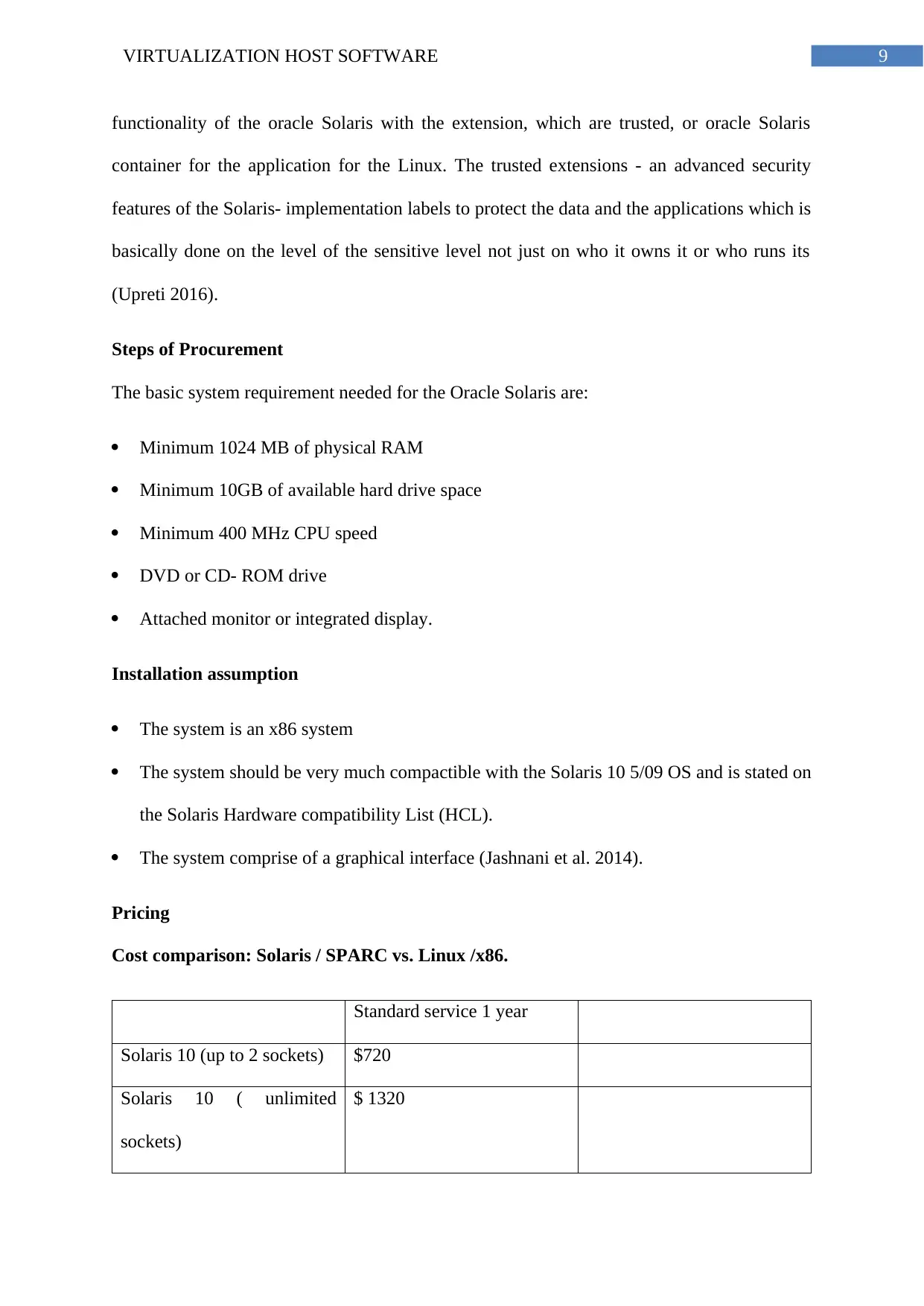
functionality of the oracle Solaris with the extension, which are trusted, or oracle Solaris
container for the application for the Linux. The trusted extensions - an advanced security
features of the Solaris- implementation labels to protect the data and the applications which is
basically done on the level of the sensitive level not just on who it owns it or who runs its
(Upreti 2016).
Steps of Procurement
The basic system requirement needed for the Oracle Solaris are:
Minimum 1024 MB of physical RAM
Minimum 10GB of available hard drive space
Minimum 400 MHz CPU speed
DVD or CD- ROM drive
Attached monitor or integrated display.
Installation assumption
The system is an x86 system
The system should be very much compactible with the Solaris 10 5/09 OS and is stated on
the Solaris Hardware compatibility List (HCL).
The system comprise of a graphical interface (Jashnani et al. 2014).
Pricing
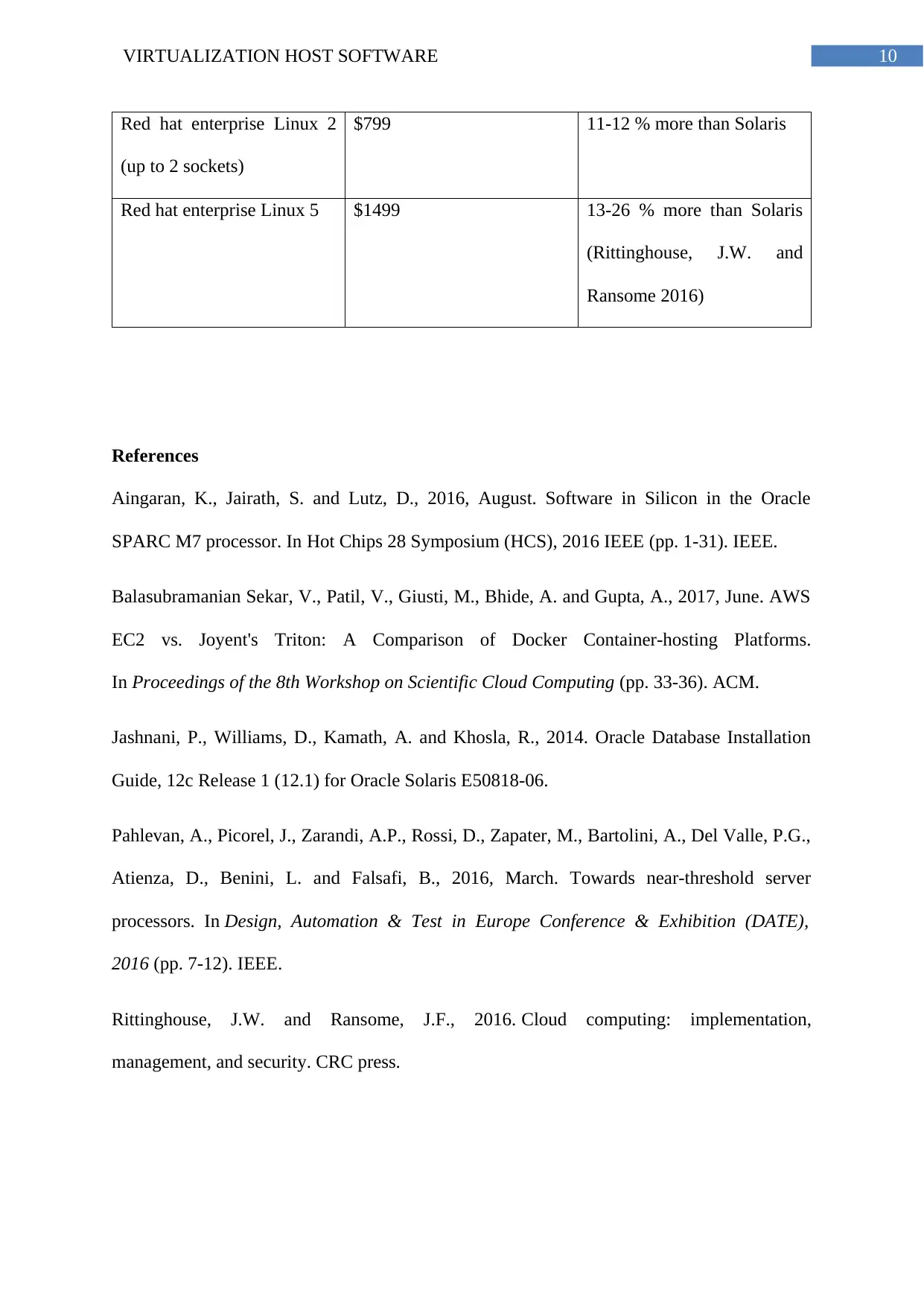
Cost comparison: Solaris / SPARC vs. Linux /x86.
Standard service 1 year
Solaris 10 (up to 2 sockets) $720
Solaris 10 ( unlimited
sockets)
$ 1320
functionality of the oracle Solaris with the extension, which are trusted, or oracle Solaris
container for the application for the Linux. The trusted extensions - an advanced security
features of the Solaris- implementation labels to protect the data and the applications which is
basically done on the level of the sensitive level not just on who it owns it or who runs its
(Upreti 2016).
Steps of Procurement
The basic system requirement needed for the Oracle Solaris are:
Minimum 1024 MB of physical RAM
Minimum 10GB of available hard drive space
Minimum 400 MHz CPU speed
DVD or CD- ROM drive
Attached monitor or integrated display.
Installation assumption
The system is an x86 system
The system should be very much compactible with the Solaris 10 5/09 OS and is stated on
the Solaris Hardware compatibility List (HCL).
The system comprise of a graphical interface (Jashnani et al. 2014).
Pricing
Cost comparison: Solaris / SPARC vs. Linux /x86.
Standard service 1 year
Solaris 10 (up to 2 sockets) $720
Solaris 10 ( unlimited
sockets)
$ 1320
⊘ This is a preview!⊘
Do you want full access?
Subscribe today to unlock all pages.
Trusted by 1+ million students worldwide
10VIRTUALIZATION HOST SOFTWARE
Red hat enterprise Linux 2
(up to 2 sockets)
$799 11-12 % more than Solaris
Red hat enterprise Linux 5 $1499 13-26 % more than Solaris
(Rittinghouse, J.W. and
Ransome 2016)
References
Aingaran, K., Jairath, S. and Lutz, D., 2016, August. Software in Silicon in the Oracle
SPARC M7 processor. In Hot Chips 28 Symposium (HCS), 2016 IEEE (pp. 1-31). IEEE.
Balasubramanian Sekar, V., Patil, V., Giusti, M., Bhide, A. and Gupta, A., 2017, June. AWS
EC2 vs. Joyent's Triton: A Comparison of Docker Container-hosting Platforms.
In Proceedings of the 8th Workshop on Scientific Cloud Computing (pp. 33-36). ACM.
Jashnani, P., Williams, D., Kamath, A. and Khosla, R., 2014. Oracle Database Installation
Guide, 12c Release 1 (12.1) for Oracle Solaris E50818-06.
Pahlevan, A., Picorel, J., Zarandi, A.P., Rossi, D., Zapater, M., Bartolini, A., Del Valle, P.G.,
Atienza, D., Benini, L. and Falsafi, B., 2016, March. Towards near-threshold server
processors. In Design, Automation & Test in Europe Conference & Exhibition (DATE),
2016 (pp. 7-12). IEEE.
Rittinghouse, J.W. and Ransome, J.F., 2016. Cloud computing: implementation,
management, and security. CRC press.
Red hat enterprise Linux 2
(up to 2 sockets)
$799 11-12 % more than Solaris
Red hat enterprise Linux 5 $1499 13-26 % more than Solaris
(Rittinghouse, J.W. and
Ransome 2016)
References
Aingaran, K., Jairath, S. and Lutz, D., 2016, August. Software in Silicon in the Oracle
SPARC M7 processor. In Hot Chips 28 Symposium (HCS), 2016 IEEE (pp. 1-31). IEEE.
Balasubramanian Sekar, V., Patil, V., Giusti, M., Bhide, A. and Gupta, A., 2017, June. AWS
EC2 vs. Joyent's Triton: A Comparison of Docker Container-hosting Platforms.
In Proceedings of the 8th Workshop on Scientific Cloud Computing (pp. 33-36). ACM.
Jashnani, P., Williams, D., Kamath, A. and Khosla, R., 2014. Oracle Database Installation
Guide, 12c Release 1 (12.1) for Oracle Solaris E50818-06.
Pahlevan, A., Picorel, J., Zarandi, A.P., Rossi, D., Zapater, M., Bartolini, A., Del Valle, P.G.,
Atienza, D., Benini, L. and Falsafi, B., 2016, March. Towards near-threshold server
processors. In Design, Automation & Test in Europe Conference & Exhibition (DATE),
2016 (pp. 7-12). IEEE.
Rittinghouse, J.W. and Ransome, J.F., 2016. Cloud computing: implementation,
management, and security. CRC press.
Paraphrase This Document
Need a fresh take? Get an instant paraphrase of this document with our AI Paraphraser
11VIRTUALIZATION HOST SOFTWARE
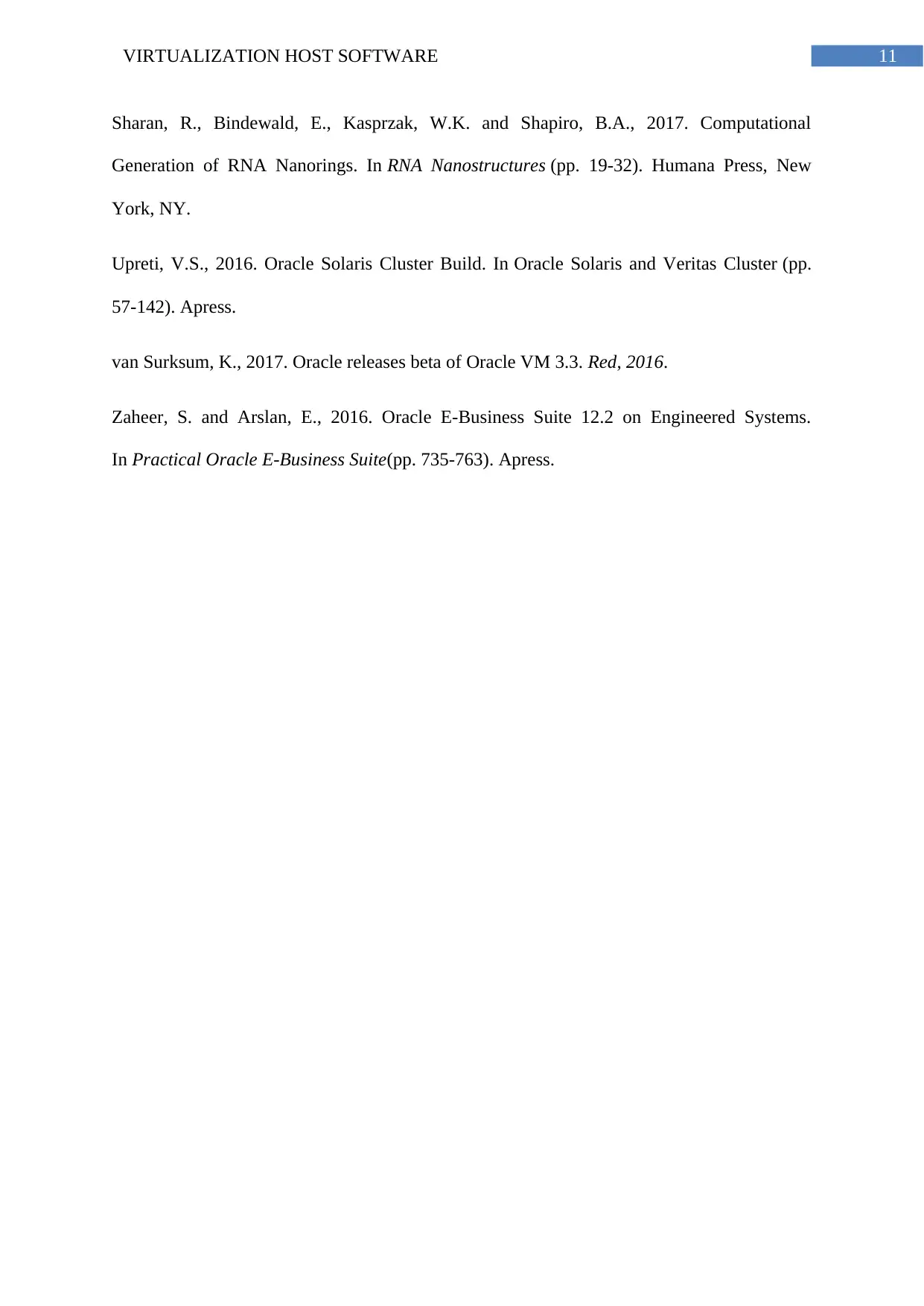
Sharan, R., Bindewald, E., Kasprzak, W.K. and Shapiro, B.A., 2017. Computational
Generation of RNA Nanorings. In RNA Nanostructures (pp. 19-32). Humana Press, New
York, NY.
Upreti, V.S., 2016. Oracle Solaris Cluster Build. In Oracle Solaris and Veritas Cluster (pp.
57-142). Apress.
van Surksum, K., 2017. Oracle releases beta of Oracle VM 3.3. Red, 2016.
Zaheer, S. and Arslan, E., 2016. Oracle E-Business Suite 12.2 on Engineered Systems.
In Practical Oracle E-Business Suite(pp. 735-763). Apress.
Sharan, R., Bindewald, E., Kasprzak, W.K. and Shapiro, B.A., 2017. Computational
Generation of RNA Nanorings. In RNA Nanostructures (pp. 19-32). Humana Press, New
York, NY.
Upreti, V.S., 2016. Oracle Solaris Cluster Build. In Oracle Solaris and Veritas Cluster (pp.
57-142). Apress.
van Surksum, K., 2017. Oracle releases beta of Oracle VM 3.3. Red, 2016.
Zaheer, S. and Arslan, E., 2016. Oracle E-Business Suite 12.2 on Engineered Systems.
In Practical Oracle E-Business Suite(pp. 735-763). Apress.

1 out of 11


Related Documents


Your All-in-One AI-Powered Toolkit for Academic Success.
+13062052269
info@desklib.com
Available 24*7 on WhatsApp / Email
![[object Object]](/_next/static/media/star-bottom.7253800d.svg)
Unlock your academic potential
Copyright © 2020–2026 A2Z Services. All Rights Reserved. Developed and managed by ZUCOL.