Comprehensive Evaluation of Web Application Testing Tools
VerifiedAdded on 2023/03/31
|60
|10977
|230
Report
AI Summary
This report provides a comprehensive evaluation of web application testing tools, focusing on their methodologies, implementation, and comparison. It begins with an introduction to testing concepts and web application specifics, highlighting the importance of web testing due to the increasing complexity and user load of web applications. Various testing tools, including Webload, TestIO, Acunetix, TestingWhiz, HPE Unified Functional Testing, Ranorex, Selenium, JMeter, TestComplete, Google Pagespeed Insight, GTmetrix, and Pingdom, are examined. The report uses archival research methodology to compare these tools based on factors like implementation, usage, technical support, and maintainability. Test scenarios and cross-browser comparisons are conducted to assess the tools' performance and effectiveness, with results discussed in detail. The conclusion recommends the best tool for web application testing based on the analysis.

EVALUATION OF WEB TESTING TOOL
(Student Name)
(University)
(Student Name)
(University)

Paraphrase This Document
Need a fresh take? Get an instant paraphrase of this document with our AI Paraphraser

Table of Contents
Table of figures................................................................................................................................4
List of tables....................................................................................................................................5
List of abbreviations........................................................................................................................6
Abstract............................................................................................................................................7
I. CHAPTER ONE.......................................................................................................................8
1.0 Overview of chapter one........................................................................................................8
1.1 Introduction............................................................................................................................8
1.1.1 Definition of Testing.......................................................................................................8
1.1.2 Division of testing.........................................................................................................12
1.1.3 White Box testing and black box type of testing...........................................................13
1.1.3 Web application testing.................................................................................................14
1.1.3 Benefits of web application testing...............................................................................17
1.1.4 Problem statement.........................................................................................................18
1.1.5 Objective of this research paper....................................................................................18
1.1.6 Research question..........................................................................................................19
1.1.7 Principles of web application testing.............................................................................19
1.1.8 Research gap..................................................................................................................19
II CHAPTER TWO.......................................................................................................................21
2.0 Overview of chapter two......................................................................................................21
Table of figures................................................................................................................................4
List of tables....................................................................................................................................5
List of abbreviations........................................................................................................................6
Abstract............................................................................................................................................7
I. CHAPTER ONE.......................................................................................................................8
1.0 Overview of chapter one........................................................................................................8
1.1 Introduction............................................................................................................................8
1.1.1 Definition of Testing.......................................................................................................8
1.1.2 Division of testing.........................................................................................................12
1.1.3 White Box testing and black box type of testing...........................................................13
1.1.3 Web application testing.................................................................................................14
1.1.3 Benefits of web application testing...............................................................................17
1.1.4 Problem statement.........................................................................................................18
1.1.5 Objective of this research paper....................................................................................18
1.1.6 Research question..........................................................................................................19
1.1.7 Principles of web application testing.............................................................................19
1.1.8 Research gap..................................................................................................................19
II CHAPTER TWO.......................................................................................................................21
2.0 Overview of chapter two......................................................................................................21

2.1 Materials and methods.........................................................................................................22
2.1.1 Related works................................................................................................................22
2.1.1 Software testing tools....................................................................................................22
2.1.1.1 Webload......................................................................................................................23
2.1.1.2 TestIO tool..................................................................................................................24
2.1.1.3 Acunetix web application testing tool........................................................................25
2.1.1.4 TestingWhiz web application testing tool..................................................................26
2.1.1.5 HPE unified web application functional testing tool..................................................27
2.1.1.6 Ranorex......................................................................................................................28
2.1.1.7 Selenium.....................................................................................................................28
2.1.1.8 JMeter.........................................................................................................................29
2.1.1.9 TestComplete Web application tool...........................................................................29
2.1.1.10 Google Pagespeed Insight Web application tool......................................................30
2.1.1.11 GTmetrix Web application tool................................................................................31
2.1.1.12 Pingdom Web application tool.................................................................................31
2.2 Traditional web application methodologies.........................................................................32
CHAPTER THREE.......................................................................................................................34
III. Methodology............................................................................................................................34
3.1 Automated Software Testing tools.......................................................................................34
3.2 Archival research methodology...........................................................................................34
2.1.1 Related works................................................................................................................22
2.1.1 Software testing tools....................................................................................................22
2.1.1.1 Webload......................................................................................................................23
2.1.1.2 TestIO tool..................................................................................................................24
2.1.1.3 Acunetix web application testing tool........................................................................25
2.1.1.4 TestingWhiz web application testing tool..................................................................26
2.1.1.5 HPE unified web application functional testing tool..................................................27
2.1.1.6 Ranorex......................................................................................................................28
2.1.1.7 Selenium.....................................................................................................................28
2.1.1.8 JMeter.........................................................................................................................29
2.1.1.9 TestComplete Web application tool...........................................................................29
2.1.1.10 Google Pagespeed Insight Web application tool......................................................30
2.1.1.11 GTmetrix Web application tool................................................................................31
2.1.1.12 Pingdom Web application tool.................................................................................31
2.2 Traditional web application methodologies.........................................................................32
CHAPTER THREE.......................................................................................................................34
III. Methodology............................................................................................................................34
3.1 Automated Software Testing tools.......................................................................................34
3.2 Archival research methodology...........................................................................................34
⊘ This is a preview!⊘
Do you want full access?
Subscribe today to unlock all pages.

Trusted by 1+ million students worldwide
3.2.1 Why use archival data...................................................................................................34
3.3 overview of comparison from archival research methodology [24]....................................36
1V CHAPTER FOUR....................................................................................................................38
4.0 Test..........................................................................................................................................38
4.1 Test scenario............................................................................................................................38
4.3 Cross browser comparison.......................................................................................................39
V CHAPTER FIVE.......................................................................................................................43
5.0 Results......................................................................................................................................43
5.1 Discussion................................................................................................................................50
6.0 Conclusion and recommendation............................................................................................51
References......................................................................................................................................53
3.3 overview of comparison from archival research methodology [24]....................................36
1V CHAPTER FOUR....................................................................................................................38
4.0 Test..........................................................................................................................................38
4.1 Test scenario............................................................................................................................38
4.3 Cross browser comparison.......................................................................................................39
V CHAPTER FIVE.......................................................................................................................43
5.0 Results......................................................................................................................................43
5.1 Discussion................................................................................................................................50
6.0 Conclusion and recommendation............................................................................................51
References......................................................................................................................................53
Paraphrase This Document
Need a fresh take? Get an instant paraphrase of this document with our AI Paraphraser

Table of figures
Figure 1: Illustration of testing......................................................................................................10
Figure 2: Methods of testing..........................................................................................................12
Figure 3: Usability testing of a web application............................................................................16
Figure 4:WebLoad tool..................................................................................................................26
Figure 5: TestingWhiz tool............................................................................................................29
Figure 6: Ranorex tool...................................................................................................................31
Figure 7: Google Pagespeed Insight..............................................................................................34
Figure 8: PingDom tool.................................................................................................................36
Figure 9: A graph showing the average mean time for one, fifty, and one hundred users............50
Figure 10: Number of tools vs the type of testing.........................................................................53
Figure 11: Number of open source tools vs. the licensed tool.......................................................53
Figure 1: Illustration of testing......................................................................................................10
Figure 2: Methods of testing..........................................................................................................12
Figure 3: Usability testing of a web application............................................................................16
Figure 4:WebLoad tool..................................................................................................................26
Figure 5: TestingWhiz tool............................................................................................................29
Figure 6: Ranorex tool...................................................................................................................31
Figure 7: Google Pagespeed Insight..............................................................................................34
Figure 8: PingDom tool.................................................................................................................36
Figure 9: A graph showing the average mean time for one, fifty, and one hundred users............50
Figure 10: Number of tools vs the type of testing.........................................................................53
Figure 11: Number of open source tools vs. the licensed tool.......................................................53

List of tables
Table 1: Other web application testing challenges........................................................................17
Table 2: A summary of a comparison of the four best web-application.......................................45
Table 3: Technical Support services..............................................................................................45
Table 4: Selenium comparison with other tools............................................................................46
Table 5: Comparison of the various types of web application tools..............................................47
Table 6: Web application testing activities....................................................................................49
Table 7: Results for performance testing for selenium..................................................................50
Table 8: A Comparison of the various web application testing tools............................................53
Table 1: Other web application testing challenges........................................................................17
Table 2: A summary of a comparison of the four best web-application.......................................45
Table 3: Technical Support services..............................................................................................45
Table 4: Selenium comparison with other tools............................................................................46
Table 5: Comparison of the various types of web application tools..............................................47
Table 6: Web application testing activities....................................................................................49
Table 7: Results for performance testing for selenium..................................................................50
Table 8: A Comparison of the various web application testing tools............................................53
⊘ This is a preview!⊘
Do you want full access?
Subscribe today to unlock all pages.
Trusted by 1+ million students worldwide

List of abbreviations
SSL-Secure Socket Layer
QA-Quality Assurance
IDE-Integrated Development Environment
XML- Extensible Mark-up Langauge
AJAX- Asynchronous JavaScript and XML
GB- GigaByte
AMD- Advanced Micro Devices
GUI- Graphical User Interface
HTML-Hypertext Mark-up Language
ROI-Return on Investment
SAP- System Applications and Products
JDBC: Java Database Connectivity
SMTP: Simple Mail Transfer Protocol
MAC- Media Access Control
RAM- Random Access Memory
IPv6: Internet Protocol Version six
SSL-Secure Socket Layer
QA-Quality Assurance
IDE-Integrated Development Environment
XML- Extensible Mark-up Langauge
AJAX- Asynchronous JavaScript and XML
GB- GigaByte
AMD- Advanced Micro Devices
GUI- Graphical User Interface
HTML-Hypertext Mark-up Language
ROI-Return on Investment
SAP- System Applications and Products
JDBC: Java Database Connectivity
SMTP: Simple Mail Transfer Protocol
MAC- Media Access Control
RAM- Random Access Memory
IPv6: Internet Protocol Version six
Paraphrase This Document
Need a fresh take? Get an instant paraphrase of this document with our AI Paraphraser

Abstract
Testing software and application after development is an important part of software
development. Web applications continue to grow and their requirements on their performance
also continue to grow as they are exposed to a higher load of users and an increased web
technology. This makes the subject web testing important and of great interest to the web
application designers. Also due to the fact that web application development is costly and time-
consuming, testing is the only way which can lead to cheaper maintenance and development.
There are various tools which have been developed in response to web testing. An example is the
Microsoft Product Application Center Test. Specifically, this tool is used to simulate multiple
users by generating requests. The tests are then automated where the results are then presented in
charts. This paper discusses web application subject in detail with a more focus to web
application tools
This research paper explores the current trends in web application. The paper is divided into
five chapters where the first chapter introduces web application. The second chapter has outlined
the various web application tools and selected the best web application testing tools and
compared them according to various factors. Based on the analysis, the paper has settled on the
best web application tool.
Therefore this research paper seeks to describe and explore the current trends in web
application testing. This is achieved at first exploring the various web application tools and then
selecting the best-automated web application testing tools and comparing them, according to
implementation, their usage, the provided technical support and maintainability. The work goal
is to propose the best tool which can be used at the testing phase of a web application.
Testing software and application after development is an important part of software
development. Web applications continue to grow and their requirements on their performance
also continue to grow as they are exposed to a higher load of users and an increased web
technology. This makes the subject web testing important and of great interest to the web
application designers. Also due to the fact that web application development is costly and time-
consuming, testing is the only way which can lead to cheaper maintenance and development.
There are various tools which have been developed in response to web testing. An example is the
Microsoft Product Application Center Test. Specifically, this tool is used to simulate multiple
users by generating requests. The tests are then automated where the results are then presented in
charts. This paper discusses web application subject in detail with a more focus to web
application tools
This research paper explores the current trends in web application. The paper is divided into
five chapters where the first chapter introduces web application. The second chapter has outlined
the various web application tools and selected the best web application testing tools and
compared them according to various factors. Based on the analysis, the paper has settled on the
best web application tool.
Therefore this research paper seeks to describe and explore the current trends in web
application testing. This is achieved at first exploring the various web application tools and then
selecting the best-automated web application testing tools and comparing them, according to
implementation, their usage, the provided technical support and maintainability. The work goal
is to propose the best tool which can be used at the testing phase of a web application.

I. CHAPTER ONE
1.0 Overview of chapter one
This chapter defines what is testing and a broad definition of web application testing. The
chapter has also stated the objectives of this thesis paper and the research question. In addition,
the chapter has stated the reasons as to why web application testing is important.
1.1 Introduction
Anything needs to be tested before it is used. Testing is everywhere, whether it is
hardware or software everything needs to be tested before it is taken into use. English testing
means everything which can be tried out. In computer science, testing is an act of searching
faults in software. This is done by system analyst by executing parts of the software; it is the act
of testing with some predefined data. The main motivation is to prove that the program or the
software is working as required and producing the correct results. A simple testing definition is
as shown by the diagram below. Here data is given as input which is then executed with inputted
data. Testing is usually corrected done if the results are correct and when the inner state has been
changed to another state [1].
1.1.1 Definition of Testing
Web testing is a name given to software testing which focusses on web applications. It is
the process of checking whether a web application has bugs before the web code is moved into a
production environment or for any potential bugs. It is a web testing where web security is
checked, the ability of the site to handle traffic, and the regular users of the site.
1.0 Overview of chapter one
This chapter defines what is testing and a broad definition of web application testing. The
chapter has also stated the objectives of this thesis paper and the research question. In addition,
the chapter has stated the reasons as to why web application testing is important.
1.1 Introduction
Anything needs to be tested before it is used. Testing is everywhere, whether it is
hardware or software everything needs to be tested before it is taken into use. English testing
means everything which can be tried out. In computer science, testing is an act of searching
faults in software. This is done by system analyst by executing parts of the software; it is the act
of testing with some predefined data. The main motivation is to prove that the program or the
software is working as required and producing the correct results. A simple testing definition is
as shown by the diagram below. Here data is given as input which is then executed with inputted
data. Testing is usually corrected done if the results are correct and when the inner state has been
changed to another state [1].
1.1.1 Definition of Testing
Web testing is a name given to software testing which focusses on web applications. It is
the process of checking whether a web application has bugs before the web code is moved into a
production environment or for any potential bugs. It is a web testing where web security is
checked, the ability of the site to handle traffic, and the regular users of the site.
⊘ This is a preview!⊘
Do you want full access?
Subscribe today to unlock all pages.
Trusted by 1+ million students worldwide

Figure 1: Illustration of testing
Paraphrase This Document
Need a fresh take? Get an instant paraphrase of this document with our AI Paraphraser

In software and applications, good testing usually includes test planning, creation of test
environments, viewing the results, and test cases. These four phases usually take half of the
resources reserved for application testing. When testing a new program such as a web
application, it starts from the beginning. The planning phase usually specifies how testing is to
be done. Testing results in mistake, bug, and language error. Error is defined as a deviation from
specifications; the application is doing something that it is not supposed to do. Also, errors can
result in a program or an application working very slowly; usually the user has trouble using it.
Jukka defines error as a human function that causes application defects. A fault is the reason for
the failure of an application [2]
There are usually four levels of testing during software or application development. This
is as shown by figure 2 below
environments, viewing the results, and test cases. These four phases usually take half of the
resources reserved for application testing. When testing a new program such as a web
application, it starts from the beginning. The planning phase usually specifies how testing is to
be done. Testing results in mistake, bug, and language error. Error is defined as a deviation from
specifications; the application is doing something that it is not supposed to do. Also, errors can
result in a program or an application working very slowly; usually the user has trouble using it.
Jukka defines error as a human function that causes application defects. A fault is the reason for
the failure of an application [2]
There are usually four levels of testing during software or application development. This
is as shown by figure 2 below
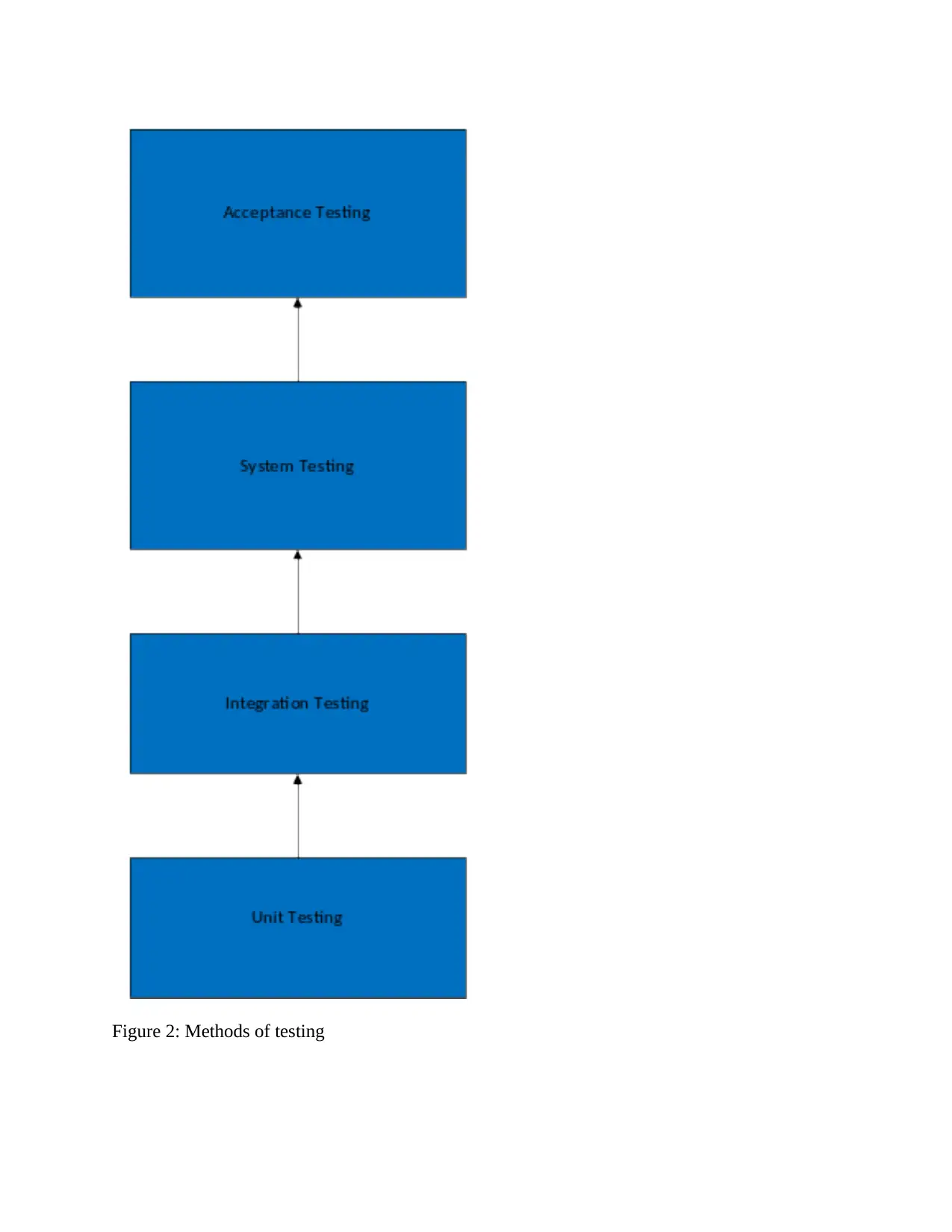
Figure 2: Methods of testing
⊘ This is a preview!⊘
Do you want full access?
Subscribe today to unlock all pages.
Trusted by 1+ million students worldwide

1 out of 60


Related Documents


Your All-in-One AI-Powered Toolkit for Academic Success.
+13062052269
info@desklib.com
Available 24*7 on WhatsApp / Email
![[object Object]](/_next/static/media/star-bottom.7253800d.svg)
Unlock your academic potential
Copyright © 2020–2026 A2Z Services. All Rights Reserved. Developed and managed by ZUCOL.