Redesigning the User Interface of a Healthcare Website
VerifiedAdded on 2019/09/23
|13
|3968
|445
Project
AI Summary
This project focuses on redesigning the user interface (UI) of the 'Live Support' chat feature on the http://www.rxfastfind.com/ healthcare website. The assignment begins with an introduction that identifies usability issues in the existing UI, such as a non-user-friendly interface for typing, posting information, and visualizing the chat. The project then details the work re-engineering process, outlining a use case scenario for user interactions, including steps for opening the webpage, filling in details, and initiating a chat session. The conceptual design phase defines the concrete use case 'Make chatting with representative' and lists the task objects involved, along with their attributes and actions. A detailed content diagram illustrates the components of the system under the essential use case. The core of the project involves developing low and high-fidelity prototypes to improve the user experience. The low-fidelity prototype provides a basic, user-friendly interface, while the high-fidelity design incorporates active components for improved usability. The redesigned interface addresses previous issues by providing a clear distinction between user interaction and information visualization. The justification for the redesigned interface emphasizes the simplicity and improved usability of the new design, highlighting the benefits of the new chat window design.
1. Introduction
User interacts with the system like a website homepage or other internal pages through the user
interface which are designed and developed with web pages of website. The webpage of website
http://www.rxfastfind.com/ ‘Live Support’ chat has not so user friendly user interface that user
can perform the chatting with the medical care representatives The problem of visualization,
typing and posting the asked and required information such as name, email address, order ID,
Initial Question etc are not so user friendly. The frames and sections are provided very well and
user friendly but no color of the typing interface for messaging during the chatting period with
healthcare executive the user was observed with the problematic situation. This problem also
requires time by the users to perform the relative tasks associated with the webpage
functionalities.
Therefore, it is considered that to make this webpage of http://www.rxfastfind.com/ user friendly
by making the re-design by inclusion of some existing components and addition of additional
components (Live Support. (2017). http://www.rxfastfind.com/.). The user interface the
mentioned webpage should be so user friendly that provide easier interface to make chat with the
healthcare executive. So, re-design of user interface of the mentioned webpage such as ‘Live
Support’ must be taken to make user friendly.
2. Work-Reengineering
The use case scenario for the given system with given user interface of the webpage ‘Live
Supportt’ of the http://www.rxfastfind.com/ website should be clear and contrast in context of
the interactions of the users from both sides such as patient and healthcare executive. The use
case scenario is presented as follows (Live Support. (2017). http://www.rxfastfind.com/.).
The user group from John Sabastein side open the homepage of
http://www.rxfastfind.com/ in web browser by typing the domain name of website of this
medical informatics side.
After loading the homepage in the browser window the user group select the ‘Live
Support’ menu item by clicking this link.
When the ‘Live Support’ is clicked by user, the webpage associated with this link is
opened. The browser window containing the webpage components and user interface is
presented in figure 1.
User interacts with the system like a website homepage or other internal pages through the user
interface which are designed and developed with web pages of website. The webpage of website
http://www.rxfastfind.com/ ‘Live Support’ chat has not so user friendly user interface that user
can perform the chatting with the medical care representatives The problem of visualization,
typing and posting the asked and required information such as name, email address, order ID,
Initial Question etc are not so user friendly. The frames and sections are provided very well and
user friendly but no color of the typing interface for messaging during the chatting period with
healthcare executive the user was observed with the problematic situation. This problem also
requires time by the users to perform the relative tasks associated with the webpage
functionalities.
Therefore, it is considered that to make this webpage of http://www.rxfastfind.com/ user friendly
by making the re-design by inclusion of some existing components and addition of additional
components (Live Support. (2017). http://www.rxfastfind.com/.). The user interface the
mentioned webpage should be so user friendly that provide easier interface to make chat with the
healthcare executive. So, re-design of user interface of the mentioned webpage such as ‘Live
Support’ must be taken to make user friendly.
2. Work-Reengineering
The use case scenario for the given system with given user interface of the webpage ‘Live
Supportt’ of the http://www.rxfastfind.com/ website should be clear and contrast in context of
the interactions of the users from both sides such as patient and healthcare executive. The use
case scenario is presented as follows (Live Support. (2017). http://www.rxfastfind.com/.).
The user group from John Sabastein side open the homepage of
http://www.rxfastfind.com/ in web browser by typing the domain name of website of this
medical informatics side.
After loading the homepage in the browser window the user group select the ‘Live
Support’ menu item by clicking this link.
When the ‘Live Support’ is clicked by user, the webpage associated with this link is
opened. The browser window containing the webpage components and user interface is
presented in figure 1.

Paraphrase This Document
Need a fresh take? Get an instant paraphrase of this document with our AI Paraphraser
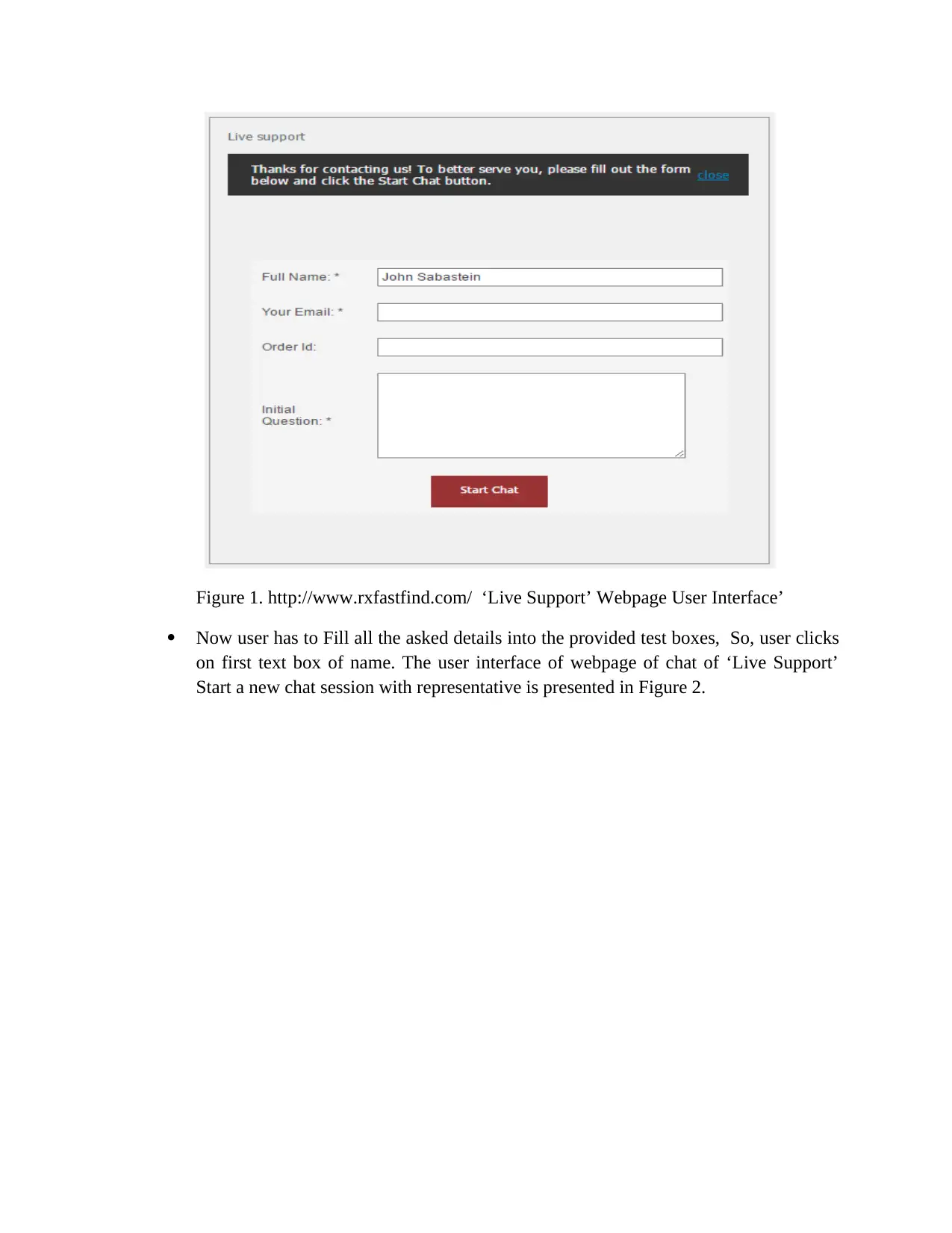
Figure 1. http://www.rxfastfind.com/ ‘Live Support’ Webpage User Interface’
Now user has to Fill all the asked details into the provided test boxes, So, user clicks
on first text box of name. The user interface of webpage of chat of ‘Live Support’
Start a new chat session with representative is presented in Figure 2.
Now user has to Fill all the asked details into the provided test boxes, So, user clicks
on first text box of name. The user interface of webpage of chat of ‘Live Support’
Start a new chat session with representative is presented in Figure 2.
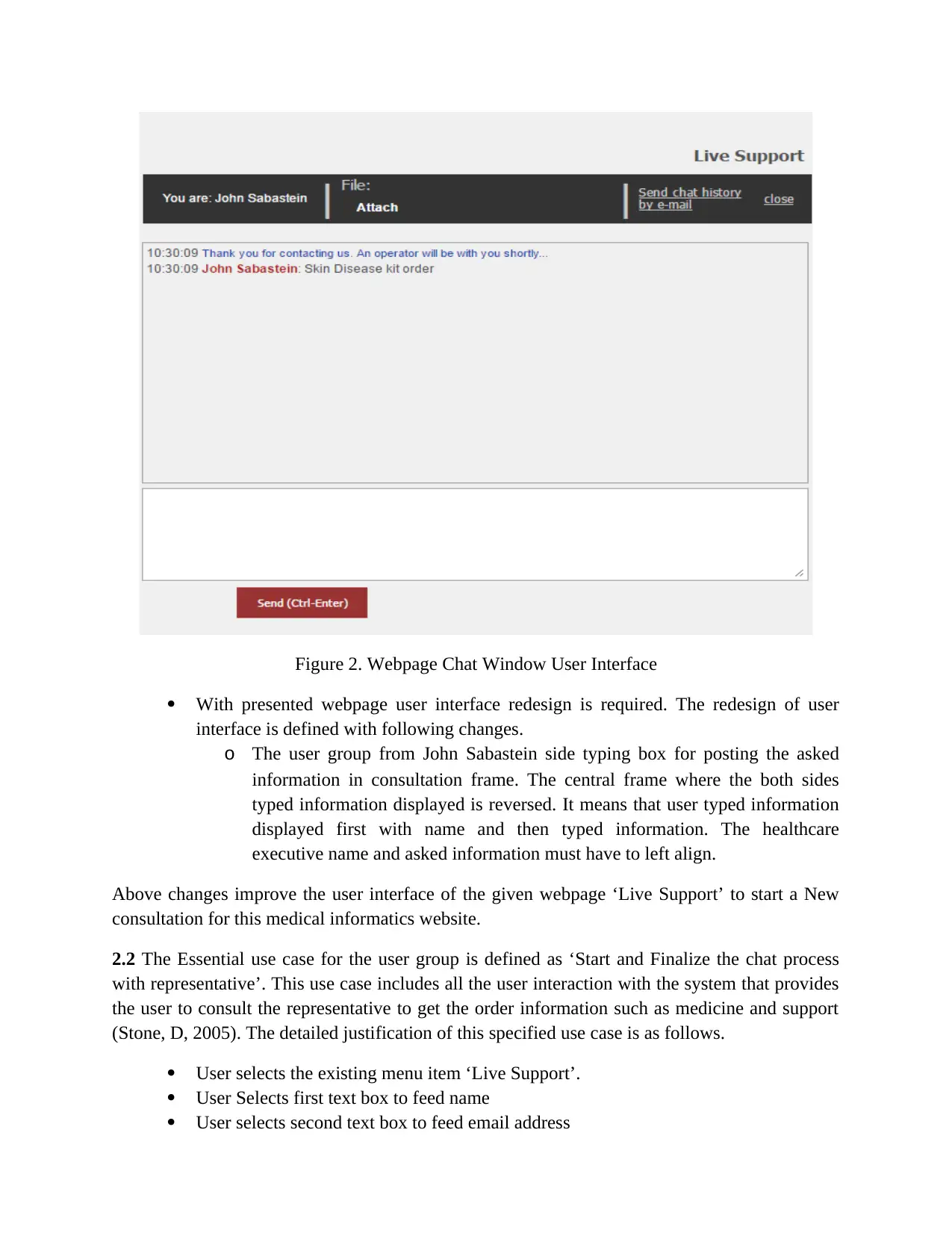
Figure 2. Webpage Chat Window User Interface
With presented webpage user interface redesign is required. The redesign of user
interface is defined with following changes.
o The user group from John Sabastein side typing box for posting the asked
information in consultation frame. The central frame where the both sides
typed information displayed is reversed. It means that user typed information
displayed first with name and then typed information. The healthcare
executive name and asked information must have to left align.
Above changes improve the user interface of the given webpage ‘Live Support’ to start a New
consultation for this medical informatics website.
2.2 The Essential use case for the user group is defined as ‘Start and Finalize the chat process
with representative’. This use case includes all the user interaction with the system that provides
the user to consult the representative to get the order information such as medicine and support
(Stone, D, 2005). The detailed justification of this specified use case is as follows.
User selects the existing menu item ‘Live Support’.
User Selects first text box to feed name
User selects second text box to feed email address
With presented webpage user interface redesign is required. The redesign of user
interface is defined with following changes.
o The user group from John Sabastein side typing box for posting the asked
information in consultation frame. The central frame where the both sides
typed information displayed is reversed. It means that user typed information
displayed first with name and then typed information. The healthcare
executive name and asked information must have to left align.
Above changes improve the user interface of the given webpage ‘Live Support’ to start a New
consultation for this medical informatics website.
2.2 The Essential use case for the user group is defined as ‘Start and Finalize the chat process
with representative’. This use case includes all the user interaction with the system that provides
the user to consult the representative to get the order information such as medicine and support
(Stone, D, 2005). The detailed justification of this specified use case is as follows.
User selects the existing menu item ‘Live Support’.
User Selects first text box to feed name
User selects second text box to feed email address
⊘ This is a preview!⊘
Do you want full access?
Subscribe today to unlock all pages.

Trusted by 1+ million students worldwide
User selects third text box to feed order ID
User select last text box to feed information related with product and medicine
ordered
User type box and post button is already displayed in consultation frame pan and user
types the name and click on start chat
User types the need question
Representative replies and window shows the answers
Representative directs the user to login interface
If user has login information then user has to login by userID and password
User logins and a new window with specialist will be opened for consulting with
online doctor.
The all conversation between user and healthcare executive or specialist are displayed in same
frame pan of the window. The user name and information and the representative answers are
displayed left aligned with same frame pan of window at top position in a order one after another
(Stone, D, 2005).
This use case all the tasks are layered one after another and assigned after finish of top layered to
just below till end of the chat with the representative of http://www.rxfastfind.com/.
3. Conceptual Design
3.1 The concrete use case corresponding to the essential use case is “Make chatting with
representative”. This concrete use case provides the interactions of the user group with the
system of “Live Support” of http://www.rxfastfind.com/ with the specialist to get finalized
opinion about the ordered products by the users.
The task objects of this defined concrete use case “Make chatting with Representative” are
defined by following points.
User has to open the website http://www.rxfastfind.com/
User has to find out the “Live Support” and then click on the link of “Live Support”.
User has to wait till the “Live Support” linked page opened and another window.
User has to fill name.
User has to fill email address
User has to fill order ID
User has to fill the product information at last.
When new window opened with as chat window , user has to click on the link of send
the typed information.
After clicking on send button chat session page the typed information of user
displayed at the top of the window with user name.
Similarly, user can chat with typing and posting the information to the system and
representative replies all the questions asked by the users simultaneously.
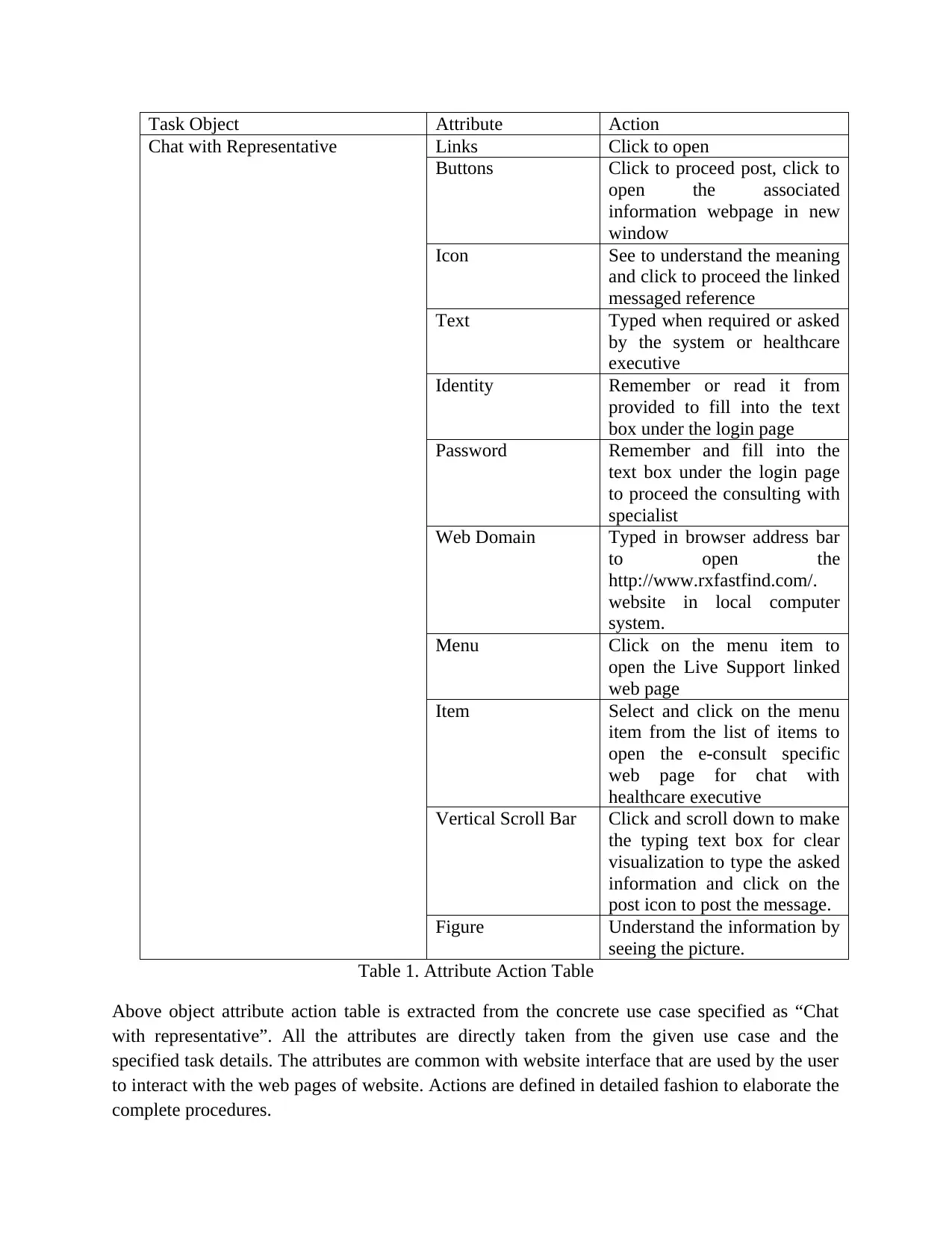
3.2 Object, attribute action table for the primary task objects from concrete use case is defined
with the following table 1.
User select last text box to feed information related with product and medicine
ordered
User type box and post button is already displayed in consultation frame pan and user
types the name and click on start chat
User types the need question
Representative replies and window shows the answers
Representative directs the user to login interface
If user has login information then user has to login by userID and password
User logins and a new window with specialist will be opened for consulting with
online doctor.
The all conversation between user and healthcare executive or specialist are displayed in same
frame pan of the window. The user name and information and the representative answers are
displayed left aligned with same frame pan of window at top position in a order one after another
(Stone, D, 2005).
This use case all the tasks are layered one after another and assigned after finish of top layered to
just below till end of the chat with the representative of http://www.rxfastfind.com/.
3. Conceptual Design
3.1 The concrete use case corresponding to the essential use case is “Make chatting with
representative”. This concrete use case provides the interactions of the user group with the
system of “Live Support” of http://www.rxfastfind.com/ with the specialist to get finalized
opinion about the ordered products by the users.
The task objects of this defined concrete use case “Make chatting with Representative” are
defined by following points.
User has to open the website http://www.rxfastfind.com/
User has to find out the “Live Support” and then click on the link of “Live Support”.
User has to wait till the “Live Support” linked page opened and another window.
User has to fill name.
User has to fill email address
User has to fill order ID
User has to fill the product information at last.
When new window opened with as chat window , user has to click on the link of send
the typed information.
After clicking on send button chat session page the typed information of user
displayed at the top of the window with user name.
Similarly, user can chat with typing and posting the information to the system and
representative replies all the questions asked by the users simultaneously.
3.2 Object, attribute action table for the primary task objects from concrete use case is defined
with the following table 1.
Paraphrase This Document
Need a fresh take? Get an instant paraphrase of this document with our AI Paraphraser
Task Object Attribute Action
Chat with Representative Links Click to open
Buttons Click to proceed post, click to
open the associated
information webpage in new
window
Icon See to understand the meaning
and click to proceed the linked
messaged reference
Text Typed when required or asked
by the system or healthcare
executive
Identity Remember or read it from
provided to fill into the text
box under the login page
Password Remember and fill into the
text box under the login page
to proceed the consulting with
specialist
Web Domain Typed in browser address bar
to open the
http://www.rxfastfind.com/.
website in local computer
system.
Menu Click on the menu item to
open the Live Support linked
web page
Item Select and click on the menu
item from the list of items to
open the e-consult specific
web page for chat with
healthcare executive
Vertical Scroll Bar Click and scroll down to make
the typing text box for clear
visualization to type the asked
information and click on the
post icon to post the message.
Figure Understand the information by
seeing the picture.
Table 1. Attribute Action Table
Above object attribute action table is extracted from the concrete use case specified as “Chat
with representative”. All the attributes are directly taken from the given use case and the
specified task details. The attributes are common with website interface that are used by the user
to interact with the web pages of website. Actions are defined in detailed fashion to elaborate the
complete procedures.
Chat with Representative Links Click to open
Buttons Click to proceed post, click to
open the associated
information webpage in new
window
Icon See to understand the meaning
and click to proceed the linked
messaged reference
Text Typed when required or asked
by the system or healthcare
executive
Identity Remember or read it from
provided to fill into the text
box under the login page
Password Remember and fill into the
text box under the login page
to proceed the consulting with
specialist
Web Domain Typed in browser address bar
to open the
http://www.rxfastfind.com/.
website in local computer
system.
Menu Click on the menu item to
open the Live Support linked
web page
Item Select and click on the menu
item from the list of items to
open the e-consult specific
web page for chat with
healthcare executive
Vertical Scroll Bar Click and scroll down to make
the typing text box for clear
visualization to type the asked
information and click on the
post icon to post the message.
Figure Understand the information by
seeing the picture.
Table 1. Attribute Action Table
Above object attribute action table is extracted from the concrete use case specified as “Chat
with representative”. All the attributes are directly taken from the given use case and the
specified task details. The attributes are common with website interface that are used by the user
to interact with the web pages of website. Actions are defined in detailed fashion to elaborate the
complete procedures.
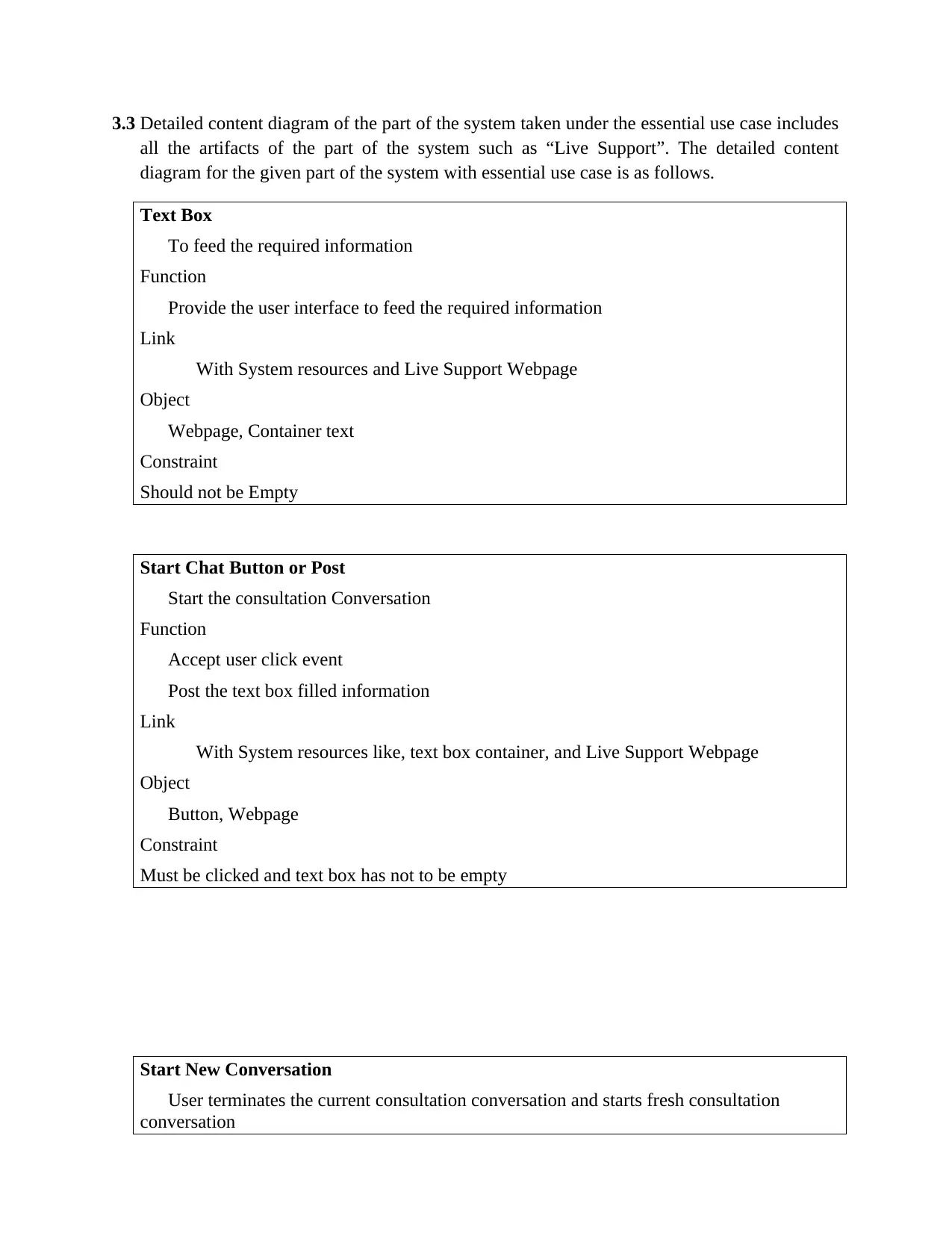
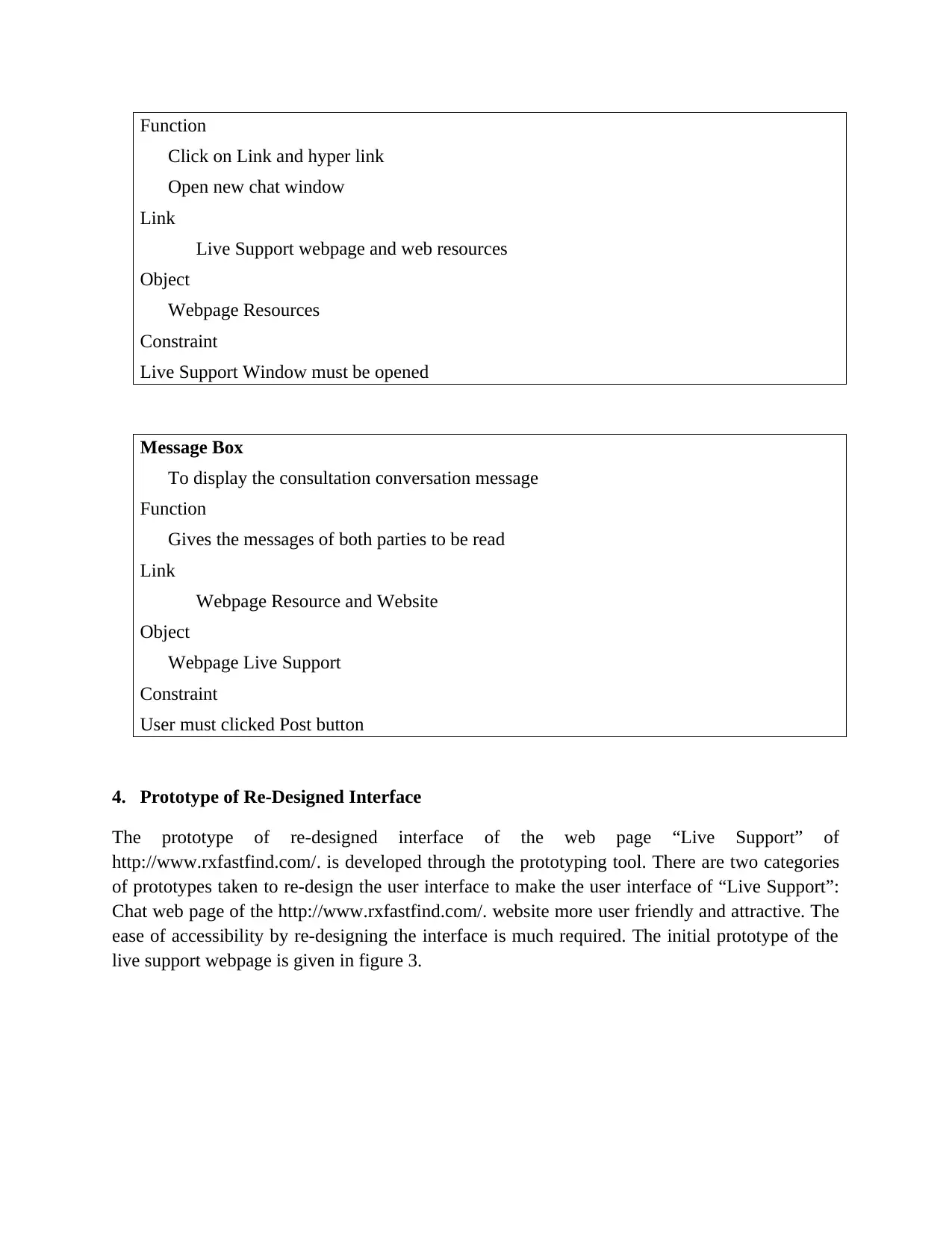
3.3 Detailed content diagram of the part of the system taken under the essential use case includes
all the artifacts of the part of the system such as “Live Support”. The detailed content
diagram for the given part of the system with essential use case is as follows.
Text Box
To feed the required information
Function
Provide the user interface to feed the required information
Link
With System resources and Live Support Webpage
Object
Webpage, Container text
Constraint
Should not be Empty
Start Chat Button or Post
Start the consultation Conversation
Function
Accept user click event
Post the text box filled information
Link
With System resources like, text box container, and Live Support Webpage
Object
Button, Webpage
Constraint
Must be clicked and text box has not to be empty
Start New Conversation
User terminates the current consultation conversation and starts fresh consultation
conversation
all the artifacts of the part of the system such as “Live Support”. The detailed content
diagram for the given part of the system with essential use case is as follows.
Text Box
To feed the required information
Function
Provide the user interface to feed the required information
Link
With System resources and Live Support Webpage
Object
Webpage, Container text
Constraint
Should not be Empty
Start Chat Button or Post
Start the consultation Conversation
Function
Accept user click event
Post the text box filled information
Link
With System resources like, text box container, and Live Support Webpage
Object
Button, Webpage
Constraint
Must be clicked and text box has not to be empty
Start New Conversation
User terminates the current consultation conversation and starts fresh consultation
conversation
⊘ This is a preview!⊘
Do you want full access?
Subscribe today to unlock all pages.
Trusted by 1+ million students worldwide
Function
Click on Link and hyper link
Open new chat window
Link
Live Support webpage and web resources
Object
Webpage Resources
Constraint
Live Support Window must be opened
Message Box
To display the consultation conversation message
Function
Gives the messages of both parties to be read
Link
Webpage Resource and Website
Object
Webpage Live Support
Constraint
User must clicked Post button
4. Prototype of Re-Designed Interface
The prototype of re-designed interface of the web page “Live Support” of
http://www.rxfastfind.com/. is developed through the prototyping tool. There are two categories
of prototypes taken to re-design the user interface to make the user interface of “Live Support”:
Chat web page of the http://www.rxfastfind.com/. website more user friendly and attractive. The
ease of accessibility by re-designing the interface is much required. The initial prototype of the
live support webpage is given in figure 3.
Click on Link and hyper link
Open new chat window
Link
Live Support webpage and web resources
Object
Webpage Resources
Constraint
Live Support Window must be opened
Message Box
To display the consultation conversation message
Function
Gives the messages of both parties to be read
Link
Webpage Resource and Website
Object
Webpage Live Support
Constraint
User must clicked Post button
4. Prototype of Re-Designed Interface
The prototype of re-designed interface of the web page “Live Support” of
http://www.rxfastfind.com/. is developed through the prototyping tool. There are two categories
of prototypes taken to re-design the user interface to make the user interface of “Live Support”:
Chat web page of the http://www.rxfastfind.com/. website more user friendly and attractive. The
ease of accessibility by re-designing the interface is much required. The initial prototype of the
live support webpage is given in figure 3.
Paraphrase This Document
Need a fresh take? Get an instant paraphrase of this document with our AI Paraphraser
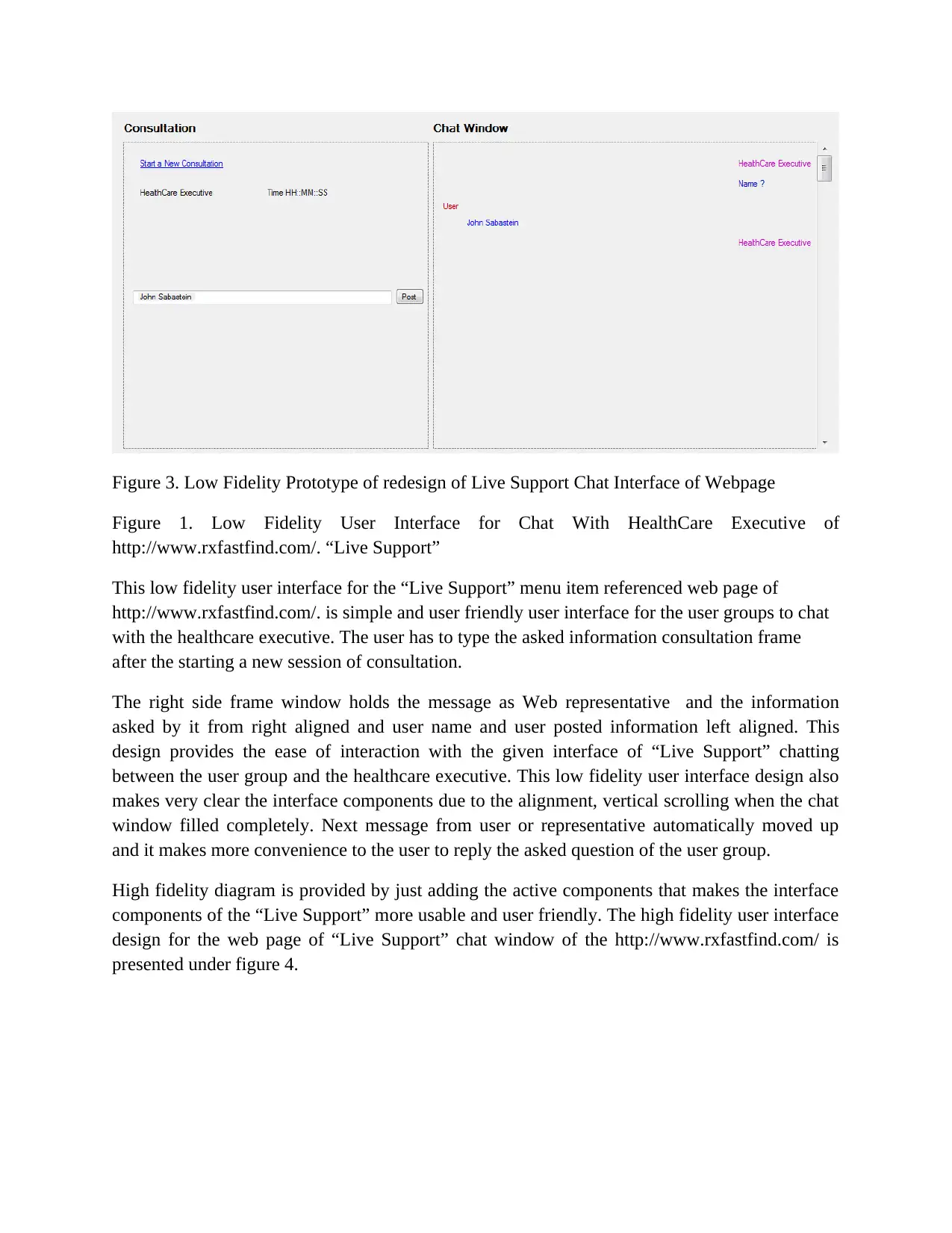
Figure 3. Low Fidelity Prototype of redesign of Live Support Chat Interface of Webpage
Figure 1. Low Fidelity User Interface for Chat With HealthCare Executive of
http://www.rxfastfind.com/. “Live Support”
This low fidelity user interface for the “Live Support” menu item referenced web page of
http://www.rxfastfind.com/. is simple and user friendly user interface for the user groups to chat
with the healthcare executive. The user has to type the asked information consultation frame
after the starting a new session of consultation.
The right side frame window holds the message as Web representative and the information
asked by it from right aligned and user name and user posted information left aligned. This
design provides the ease of interaction with the given interface of “Live Support” chatting
between the user group and the healthcare executive. This low fidelity user interface design also
makes very clear the interface components due to the alignment, vertical scrolling when the chat
window filled completely. Next message from user or representative automatically moved up
and it makes more convenience to the user to reply the asked question of the user group.
High fidelity diagram is provided by just adding the active components that makes the interface
components of the “Live Support” more usable and user friendly. The high fidelity user interface
design for the web page of “Live Support” chat window of the http://www.rxfastfind.com/ is
presented under figure 4.
Figure 1. Low Fidelity User Interface for Chat With HealthCare Executive of
http://www.rxfastfind.com/. “Live Support”
This low fidelity user interface for the “Live Support” menu item referenced web page of
http://www.rxfastfind.com/. is simple and user friendly user interface for the user groups to chat
with the healthcare executive. The user has to type the asked information consultation frame
after the starting a new session of consultation.
The right side frame window holds the message as Web representative and the information
asked by it from right aligned and user name and user posted information left aligned. This
design provides the ease of interaction with the given interface of “Live Support” chatting
between the user group and the healthcare executive. This low fidelity user interface design also
makes very clear the interface components due to the alignment, vertical scrolling when the chat
window filled completely. Next message from user or representative automatically moved up
and it makes more convenience to the user to reply the asked question of the user group.
High fidelity diagram is provided by just adding the active components that makes the interface
components of the “Live Support” more usable and user friendly. The high fidelity user interface
design for the web page of “Live Support” chat window of the http://www.rxfastfind.com/ is
presented under figure 4.
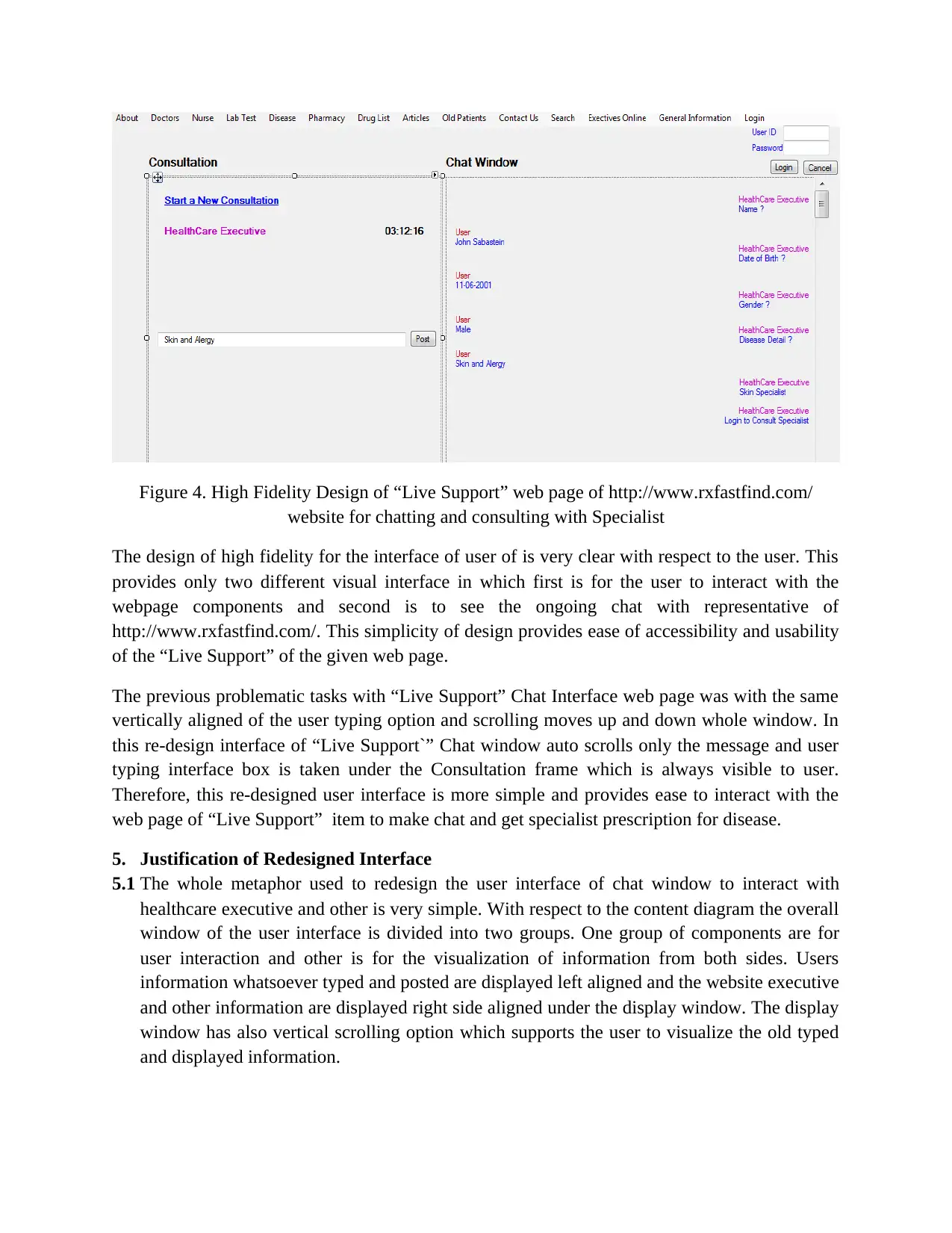
Figure 4. High Fidelity Design of “Live Support” web page of http://www.rxfastfind.com/
website for chatting and consulting with Specialist
The design of high fidelity for the interface of user of is very clear with respect to the user. This
provides only two different visual interface in which first is for the user to interact with the
webpage components and second is to see the ongoing chat with representative of
http://www.rxfastfind.com/. This simplicity of design provides ease of accessibility and usability
of the “Live Support” of the given web page.
The previous problematic tasks with “Live Support” Chat Interface web page was with the same
vertically aligned of the user typing option and scrolling moves up and down whole window. In
this re-design interface of “Live Support`” Chat window auto scrolls only the message and user
typing interface box is taken under the Consultation frame which is always visible to user.
Therefore, this re-designed user interface is more simple and provides ease to interact with the
web page of “Live Support” item to make chat and get specialist prescription for disease.
5. Justification of Redesigned Interface
5.1 The whole metaphor used to redesign the user interface of chat window to interact with
healthcare executive and other is very simple. With respect to the content diagram the overall
window of the user interface is divided into two groups. One group of components are for
user interaction and other is for the visualization of information from both sides. Users
information whatsoever typed and posted are displayed left aligned and the website executive
and other information are displayed right side aligned under the display window. The display
window has also vertical scrolling option which supports the user to visualize the old typed
and displayed information.
website for chatting and consulting with Specialist
The design of high fidelity for the interface of user of is very clear with respect to the user. This
provides only two different visual interface in which first is for the user to interact with the
webpage components and second is to see the ongoing chat with representative of
http://www.rxfastfind.com/. This simplicity of design provides ease of accessibility and usability
of the “Live Support” of the given web page.
The previous problematic tasks with “Live Support” Chat Interface web page was with the same
vertically aligned of the user typing option and scrolling moves up and down whole window. In
this re-design interface of “Live Support`” Chat window auto scrolls only the message and user
typing interface box is taken under the Consultation frame which is always visible to user.
Therefore, this re-designed user interface is more simple and provides ease to interact with the
web page of “Live Support” item to make chat and get specialist prescription for disease.
5. Justification of Redesigned Interface
5.1 The whole metaphor used to redesign the user interface of chat window to interact with
healthcare executive and other is very simple. With respect to the content diagram the overall
window of the user interface is divided into two groups. One group of components are for
user interaction and other is for the visualization of information from both sides. Users
information whatsoever typed and posted are displayed left aligned and the website executive
and other information are displayed right side aligned under the display window. The display
window has also vertical scrolling option which supports the user to visualize the old typed
and displayed information.
⊘ This is a preview!⊘
Do you want full access?
Subscribe today to unlock all pages.
Trusted by 1+ million students worldwide
5.2 The user always find the typing interface and posting interface at same place as the
consultation frame under the window of chat of “Live Support” does not move up or down.
This provides the convenience to the user group to not search the typing interface and move
up and down the vertical scroll bars which exist with the real website “Live Support” menu
line web page reference for chatting with web executive and others.
5.3 The justification of the design of the user interface with respect to the main design principle
of the user interface are presented as follows
Simplicity : The redesigned user interface is more simple than that of the real user interface
of the http://www.rxfastfind.com/ “Live Support” like web page for chatting with web
executive and others in specified area (Su & Tang, 2013).
The presented redesigned user interface does not hide the information to the users so that
user has the simple interface to interact with the web page related with the chat to web
executives and others. Further, it is also much specific design where the user typing interface
is always situated at fixed place so that user can type and post the asked information from
healthcare executives and specialist. The defined alignment of the conversation information
separately simplify the identification of information by the user and this makes the interface
simple to the user groups.
Structure: The structure of the redesigned user interface of the web page of “Live Support”
of the http://www.rxfastfind.com/ is directly associated with the windows components. The
messages are well structured as per the required facts and the typing interface where the user
group types the asked information very easily through the clicking the mouse button in the
text box. Two separate window frame is specified where left side frame of window for the
consultation and right side frame is for chat information visualization. The top of the window
of “Live Support” web page has a menu bar containing various menu items for the user
interaction for different information with the website http://www.rxfastfind.com/. Therefore,
it is concluded that structurally the redesign of the website is suitable for the chatting with
web executive and others,
Consistency : The redesigned user interface of the web page of “Live Support” of
http://www.rxfastfind.com/ is very consistent with the other web pages of this website (Su &
Tang, 2013). All the defined and used components are windows standard components and the
interface for visualization and interaction by the users are straight forward. This nature of
redesigned interface makes the user interface very consistent with respect to the existing
system. The login interface when the web executive diverts the user group to make
consultation with others is direct visible from startup of the webpage of “Live Support”.
Hence it is concluded that the user interface is much consistent in designed and presentation
of the windows components for the interaction to the users.
Tolerance: The redesigned user interface has no question of the user tolerance as the design
patterns are very much straight forward and every artifacts of the design elements are
consultation frame under the window of chat of “Live Support” does not move up or down.
This provides the convenience to the user group to not search the typing interface and move
up and down the vertical scroll bars which exist with the real website “Live Support” menu
line web page reference for chatting with web executive and others.
5.3 The justification of the design of the user interface with respect to the main design principle
of the user interface are presented as follows
Simplicity : The redesigned user interface is more simple than that of the real user interface
of the http://www.rxfastfind.com/ “Live Support” like web page for chatting with web
executive and others in specified area (Su & Tang, 2013).
The presented redesigned user interface does not hide the information to the users so that
user has the simple interface to interact with the web page related with the chat to web
executives and others. Further, it is also much specific design where the user typing interface
is always situated at fixed place so that user can type and post the asked information from
healthcare executives and specialist. The defined alignment of the conversation information
separately simplify the identification of information by the user and this makes the interface
simple to the user groups.
Structure: The structure of the redesigned user interface of the web page of “Live Support”
of the http://www.rxfastfind.com/ is directly associated with the windows components. The
messages are well structured as per the required facts and the typing interface where the user
group types the asked information very easily through the clicking the mouse button in the
text box. Two separate window frame is specified where left side frame of window for the
consultation and right side frame is for chat information visualization. The top of the window
of “Live Support” web page has a menu bar containing various menu items for the user
interaction for different information with the website http://www.rxfastfind.com/. Therefore,
it is concluded that structurally the redesign of the website is suitable for the chatting with
web executive and others,
Consistency : The redesigned user interface of the web page of “Live Support” of
http://www.rxfastfind.com/ is very consistent with the other web pages of this website (Su &
Tang, 2013). All the defined and used components are windows standard components and the
interface for visualization and interaction by the users are straight forward. This nature of
redesigned interface makes the user interface very consistent with respect to the existing
system. The login interface when the web executive diverts the user group to make
consultation with others is direct visible from startup of the webpage of “Live Support”.
Hence it is concluded that the user interface is much consistent in designed and presentation
of the windows components for the interaction to the users.
Tolerance: The redesigned user interface has no question of the user tolerance as the design
patterns are very much straight forward and every artifacts of the design elements are
Paraphrase This Document
Need a fresh take? Get an instant paraphrase of this document with our AI Paraphraser
arranged to make the user interface much user friendly. The ease of typing, posting the typed
information and the understanding the domain of the information exchange from the web
executive and others are clearly visible to the users. Users have not to search any information
by scrolling down and up to the message window and typing interface. Therefore, user does
not lose its tolerance during the interaction with web executive and other entities.
5,4 There are three basic interaction devices are used in redesign where the user can interact
with the system. These interaction devices are mouse, keyboard and visual display unit.
Mouse and keyboard are taken as the input devices and visual display unit such as monitor is
used for the visual interface.
a) Users are selected from the defined user group such as John Sabastein user group. Tasks
are detailed for the making interactive session for chat with web executive and other, the
environment is web based. In web based environment the Internet and web browsers are
used to access the webpage of website and interact. The website is taken as
http://www.rxfastfind.com/ and “Live Support” Web page referenced to make chat with
the web executive and other entities are taken to evaluate and redesign the user interface.
b) The technical characteristics of device are elaborated separately with each taken device as
follows.
Keyboard : it is standard input device user for the entering the alphabets, numeric digits
and special symbols. Basically a keyboard has 101 keys containing all alphabets, numeric
digits and special characters. Keyboard is attached with the central main board of the
personal computer to communicate the typed information to the computer memory and
processing elements.
Mouse: Mouse is pointing device. It is optical in nature where the light rays detects the
position of pointer of mouse on the visual display unit. Mouse has two buttons, one is
right button for right click and another is left button for left click.
Visual Display Unit: A television type display unit can be a CRT based tube display
system or LED or LCD based display system. The visual Display unit isa output device.
The display screen displays the information ether typed or coming from Internet.
c) There are many organizational and financial constraints. The organizational constraints
are those constraint like.
Without motive the access of http://www.rxfastfind.com/ chat is only for test and
evaluation.
The modification and implementation of redesigned user interface of specified
web page of http://www.rxfastfind.com/ requires an agreement between
http://www.rxfastfind.com/ and team of design and development.
Design of the user interface requires investment to hire the professional to
redesign the interface and implement
information and the understanding the domain of the information exchange from the web
executive and others are clearly visible to the users. Users have not to search any information
by scrolling down and up to the message window and typing interface. Therefore, user does
not lose its tolerance during the interaction with web executive and other entities.
5,4 There are three basic interaction devices are used in redesign where the user can interact
with the system. These interaction devices are mouse, keyboard and visual display unit.
Mouse and keyboard are taken as the input devices and visual display unit such as monitor is
used for the visual interface.
a) Users are selected from the defined user group such as John Sabastein user group. Tasks
are detailed for the making interactive session for chat with web executive and other, the
environment is web based. In web based environment the Internet and web browsers are
used to access the webpage of website and interact. The website is taken as
http://www.rxfastfind.com/ and “Live Support” Web page referenced to make chat with
the web executive and other entities are taken to evaluate and redesign the user interface.
b) The technical characteristics of device are elaborated separately with each taken device as
follows.
Keyboard : it is standard input device user for the entering the alphabets, numeric digits
and special symbols. Basically a keyboard has 101 keys containing all alphabets, numeric
digits and special characters. Keyboard is attached with the central main board of the
personal computer to communicate the typed information to the computer memory and
processing elements.
Mouse: Mouse is pointing device. It is optical in nature where the light rays detects the
position of pointer of mouse on the visual display unit. Mouse has two buttons, one is
right button for right click and another is left button for left click.
Visual Display Unit: A television type display unit can be a CRT based tube display
system or LED or LCD based display system. The visual Display unit isa output device.
The display screen displays the information ether typed or coming from Internet.
c) There are many organizational and financial constraints. The organizational constraints
are those constraint like.
Without motive the access of http://www.rxfastfind.com/ chat is only for test and
evaluation.
The modification and implementation of redesigned user interface of specified
web page of http://www.rxfastfind.com/ requires an agreement between
http://www.rxfastfind.com/ and team of design and development.
Design of the user interface requires investment to hire the professional to
redesign the interface and implement
5.5 Three components are text, color and layout selected for detailed explanation of the user
perspective. The details with respect to user perspective are as follows.
Text : The texts which are taken with user interface are very clear and simple to
understand. User expects to see the different font of text to understand the theme and
information depth. The text clears the user to understand and does more than one activity
at a time. The organization of informational texts in chat message box left and right for
users and healthcare executive makes more good layout of arrangement of text. It is very
easy to recognize and recall the information because scrolling is automatic and user
based.
Color : The colors of various components such as text, text box, information label, menu
and links are different. User easily differentiate the meaning according to different colors
of texts and other items. The color scheme employed with respect to user ease to proceed
by grasping the information with more depth. With color schemes of text, background
and foreground user easily identifies the actions to do.
Layout: the layout components such as frame, menu, labeling and links, text box and
message bars are placed with layered style. This provides the user convenience to
understand the proceeding factors. The proposed layout always gives the single activity
to be followed by user and user does this. The layout is easily perceived by user due to
unity of activity.
5.6 The design area is selected as user centered design to redesign the webpage user interface of
“Live Support”. User centered design always inherits the properties for making design of user
interface with user aspects and usability ease of the user interface of a website web page. This
user centered design always focuses on the user usability and understanding factors so, this
design area is selected to redesign the web page.
6. Conclusion
The redesign of the user interface of “Live Support” linked web page of the
http://www.rxfastfind.com/ is done due to problem of single vertical aligned interface of some of
the user interface item such as typing interface for user. Further the problem of searching by
scrolling vertically up and down to navigate the typing and posting the information by users. The
user centered design methodology is used to redesign the user interface to make the user
interface more user friendly and ease to use and understand the interface components and
perform activities without help and support. The layout, text and colors are taken with respect to
the user convenience that enhance the scope of the use acidities to be performed easily. The
design patterns first redesign the low fidelity prototype of the user interface for whole web page
of the “Live Support” for a chatting session between the user group and web executive and
others and then high fidelity prototype. This high fidelity prototype includes all the artifacts that
enhances the user ease with the given user interface of the webpage “Live Support” of
http://www.rxfastfind.com/. Ergonomically the redesign user interface can also be enhanced with
perspective. The details with respect to user perspective are as follows.
Text : The texts which are taken with user interface are very clear and simple to
understand. User expects to see the different font of text to understand the theme and
information depth. The text clears the user to understand and does more than one activity
at a time. The organization of informational texts in chat message box left and right for
users and healthcare executive makes more good layout of arrangement of text. It is very
easy to recognize and recall the information because scrolling is automatic and user
based.
Color : The colors of various components such as text, text box, information label, menu
and links are different. User easily differentiate the meaning according to different colors
of texts and other items. The color scheme employed with respect to user ease to proceed
by grasping the information with more depth. With color schemes of text, background
and foreground user easily identifies the actions to do.
Layout: the layout components such as frame, menu, labeling and links, text box and
message bars are placed with layered style. This provides the user convenience to
understand the proceeding factors. The proposed layout always gives the single activity
to be followed by user and user does this. The layout is easily perceived by user due to
unity of activity.
5.6 The design area is selected as user centered design to redesign the webpage user interface of
“Live Support”. User centered design always inherits the properties for making design of user
interface with user aspects and usability ease of the user interface of a website web page. This
user centered design always focuses on the user usability and understanding factors so, this
design area is selected to redesign the web page.
6. Conclusion
The redesign of the user interface of “Live Support” linked web page of the
http://www.rxfastfind.com/ is done due to problem of single vertical aligned interface of some of
the user interface item such as typing interface for user. Further the problem of searching by
scrolling vertically up and down to navigate the typing and posting the information by users. The
user centered design methodology is used to redesign the user interface to make the user
interface more user friendly and ease to use and understand the interface components and
perform activities without help and support. The layout, text and colors are taken with respect to
the user convenience that enhance the scope of the use acidities to be performed easily. The
design patterns first redesign the low fidelity prototype of the user interface for whole web page
of the “Live Support” for a chatting session between the user group and web executive and
others and then high fidelity prototype. This high fidelity prototype includes all the artifacts that
enhances the user ease with the given user interface of the webpage “Live Support” of
http://www.rxfastfind.com/. Ergonomically the redesign user interface can also be enhanced with
⊘ This is a preview!⊘
Do you want full access?
Subscribe today to unlock all pages.
Trusted by 1+ million students worldwide

1 out of 13


Your All-in-One AI-Powered Toolkit for Academic Success.
+13062052269
info@desklib.com
Available 24*7 on WhatsApp / Email
![[object Object]](/_next/static/media/star-bottom.7253800d.svg)
Unlock your academic potential
Copyright © 2020–2026 A2Z Services. All Rights Reserved. Developed and managed by ZUCOL.