Student Database Analysis: ER Diagram, SQL Queries, and Forms Creation
VerifiedAdded on 2020/02/24
|11
|1016
|204
Practical Assignment
AI Summary
This assignment focuses on the design and implementation of a student database system. It begins with an overview of the database structure, including four tables: Student, Enrolment, Teacher, and Units, along with their respective fields and relationships. An Entity-Relationship (ER) diagram visually represents the database structure and the connections between the tables. The core of the assignment involves constructing and executing various SQL queries to retrieve specific data from the database. These queries include postcode lookups, suburb searches, telephone number filtering, grade-based selections (D or HD), semester-based unit selections (Spring 2010), unit selections by subject (COMP and ISYS), and teacher-based selections (Dr. Smith). Finally, the assignment includes the creation of a form for adding new entries to the database, specifically for adding new units with details like unit code, name, credit points, fee, and teacher ID. The assignment demonstrates practical database design, query construction, and form creation skills.

ACCOUNTING AND INFORMATION SYSTEMS
Paraphrase This Document
Need a fresh take? Get an instant paraphrase of this document with our AI Paraphraser

Table of Contents
1. Tables............................................................................................................................................2
2. ER Diagram.................................................................................................................................3
3. Queries..........................................................................................................................................4
3.1 Query – Postcode Lookup...................................................................................................4
3.2 Query – SuburbB.................................................................................................................4
3.3 Query – Telephone lookup..................................................................................................5
3.4 Query – D or HD..................................................................................................................6
3.5 Query – Spring.....................................................................................................................6
3.6 Query - Tech classes............................................................................................................7
3.7 Query - Smith.......................................................................................................................8
4. Form.............................................................................................................................................9
References..........................................................................................................................................10
1
1. Tables............................................................................................................................................2
2. ER Diagram.................................................................................................................................3
3. Queries..........................................................................................................................................4
3.1 Query – Postcode Lookup...................................................................................................4
3.2 Query – SuburbB.................................................................................................................4
3.3 Query – Telephone lookup..................................................................................................5
3.4 Query – D or HD..................................................................................................................6
3.5 Query – Spring.....................................................................................................................6
3.6 Query - Tech classes............................................................................................................7
3.7 Query - Smith.......................................................................................................................8
4. Form.............................................................................................................................................9
References..........................................................................................................................................10
1

1. Tables
Student Database contains the four table such as student, enrolment, teacher and units
table (Bhatia and Bansal, 2015).
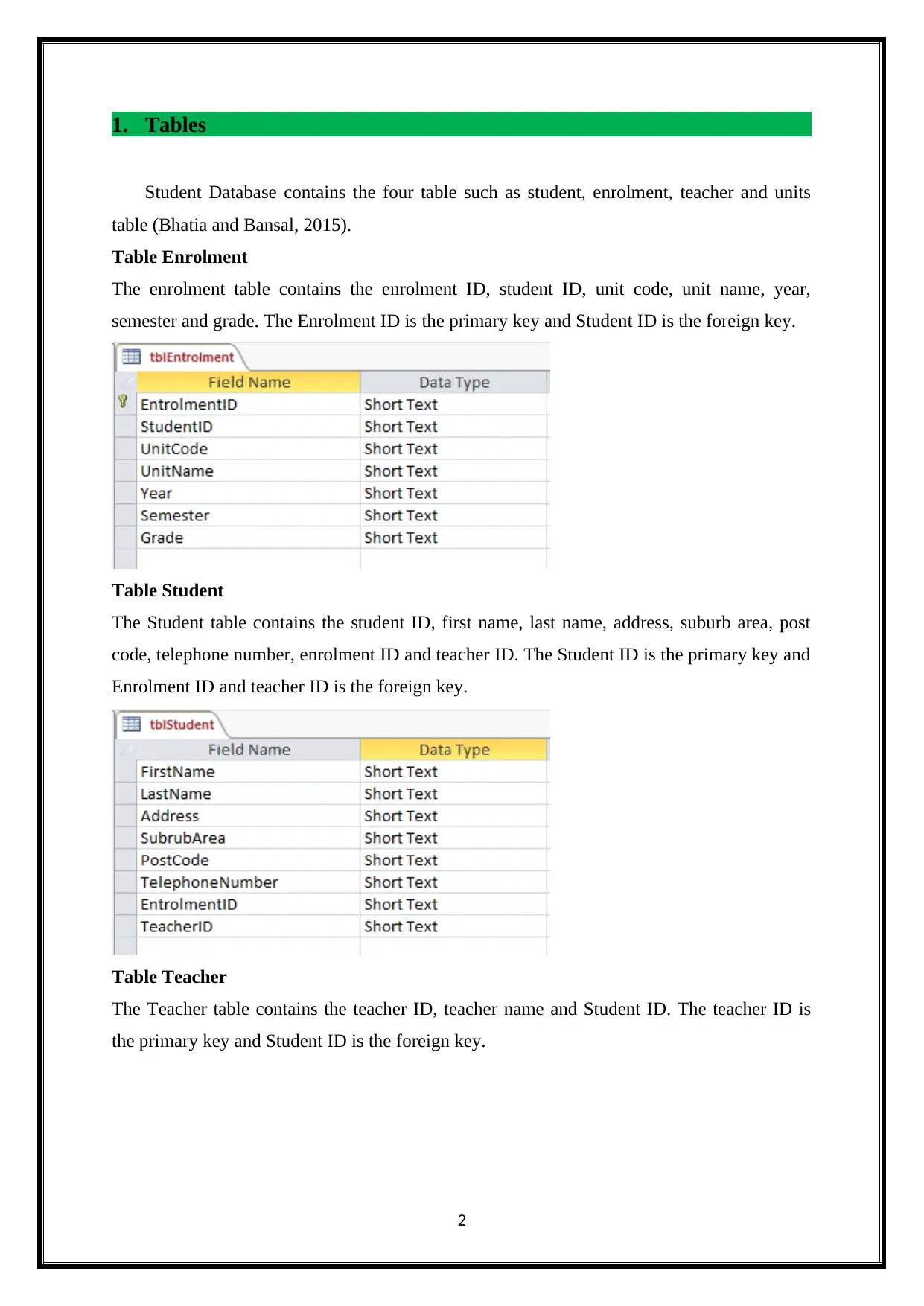
Table Enrolment
The enrolment table contains the enrolment ID, student ID, unit code, unit name, year,
semester and grade. The Enrolment ID is the primary key and Student ID is the foreign key.
Table Student
The Student table contains the student ID, first name, last name, address, suburb area, post
code, telephone number, enrolment ID and teacher ID. The Student ID is the primary key and
Enrolment ID and teacher ID is the foreign key.
Table Teacher
The Teacher table contains the teacher ID, teacher name and Student ID. The teacher ID is
the primary key and Student ID is the foreign key.
2
Student Database contains the four table such as student, enrolment, teacher and units
table (Bhatia and Bansal, 2015).
Table Enrolment
The enrolment table contains the enrolment ID, student ID, unit code, unit name, year,
semester and grade. The Enrolment ID is the primary key and Student ID is the foreign key.
Table Student
The Student table contains the student ID, first name, last name, address, suburb area, post
code, telephone number, enrolment ID and teacher ID. The Student ID is the primary key and
Enrolment ID and teacher ID is the foreign key.
Table Teacher
The Teacher table contains the teacher ID, teacher name and Student ID. The teacher ID is
the primary key and Student ID is the foreign key.
2
⊘ This is a preview!⊘
Do you want full access?
Subscribe today to unlock all pages.

Trusted by 1+ million students worldwide

Table Units
The unit table contains the unit code, unit name and Student ID. The Unit code is the primary
key and student ID is the foreign key.
2. ER Diagram
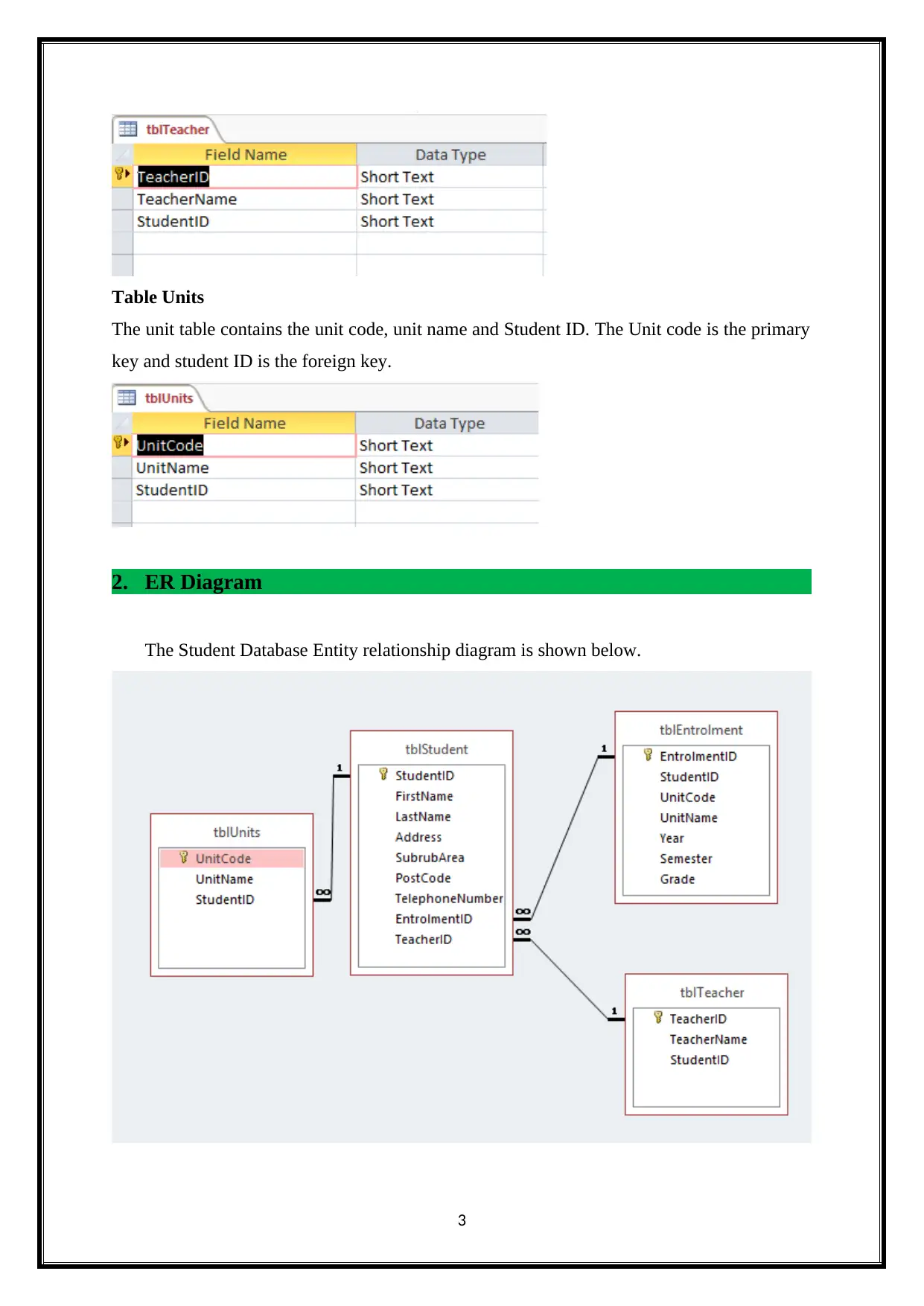
The Student Database Entity relationship diagram is shown below.
3
The unit table contains the unit code, unit name and Student ID. The Unit code is the primary
key and student ID is the foreign key.
2. ER Diagram
The Student Database Entity relationship diagram is shown below.
3
Paraphrase This Document
Need a fresh take? Get an instant paraphrase of this document with our AI Paraphraser

The above entity relationship diagram display the Student database relationship. The ER
diagram connecting the four table like Student, units, teacher and enrolment table. The
Student table is base table for the student database. The student table connecting the other
table. The Student table contains the student ID, first name, last name, address, suburb area,
post code, telephone number, enrolment ID and teacher ID. The Student ID is the primary
key and Enrolment ID and teacher ID is the foreign key. The student table connected to
Teacher table, enrolment table and unit tables.
3. Queries
3.1 Query – Postcode Lookup
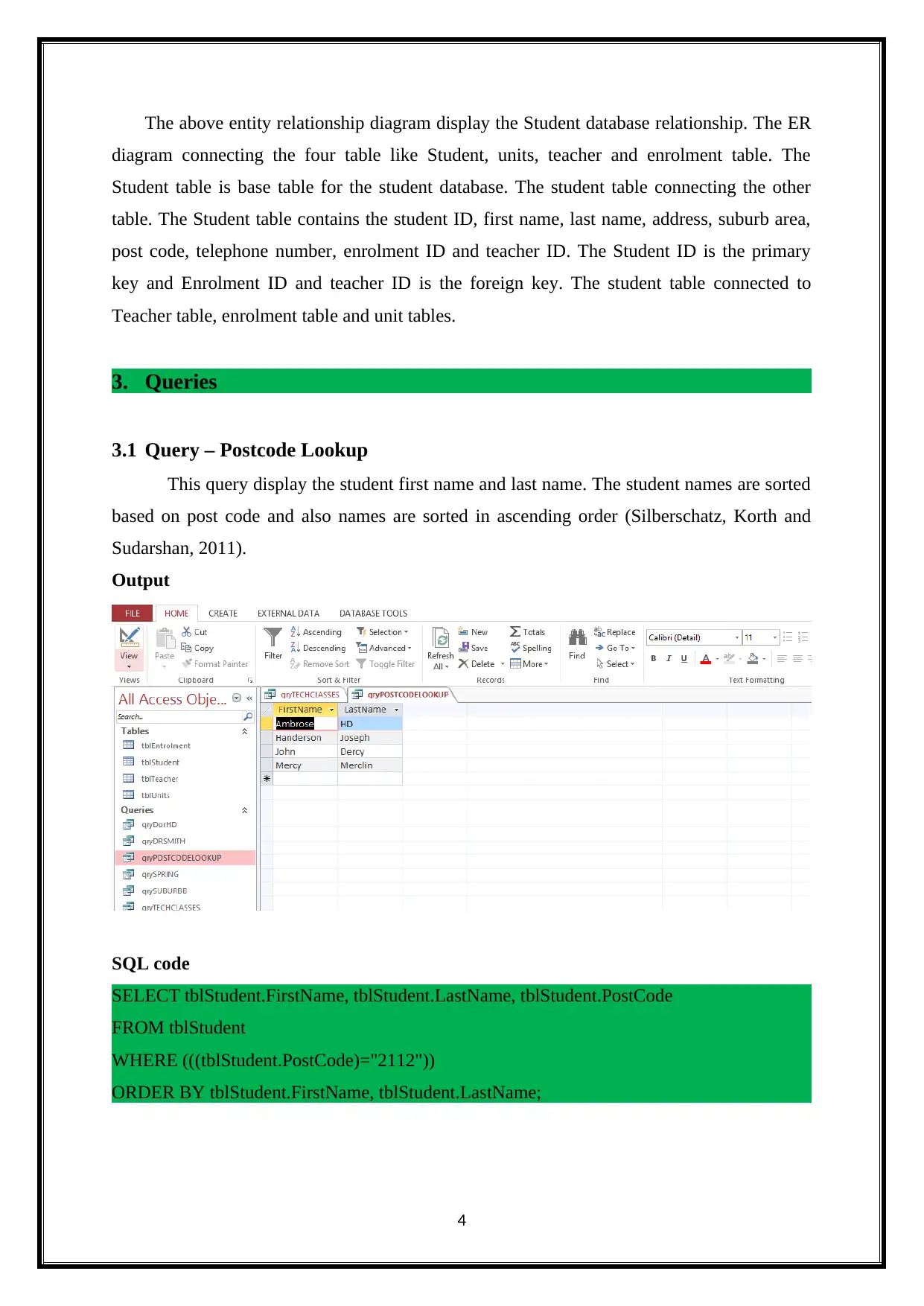
This query display the student first name and last name. The student names are sorted
based on post code and also names are sorted in ascending order (Silberschatz, Korth and
Sudarshan, 2011).
Output
SQL code
SELECT tblStudent.FirstName, tblStudent.LastName, tblStudent.PostCode
FROM tblStudent
WHERE (((tblStudent.PostCode)="2112"))
ORDER BY tblStudent.FirstName, tblStudent.LastName;
4
diagram connecting the four table like Student, units, teacher and enrolment table. The
Student table is base table for the student database. The student table connecting the other
table. The Student table contains the student ID, first name, last name, address, suburb area,
post code, telephone number, enrolment ID and teacher ID. The Student ID is the primary
key and Enrolment ID and teacher ID is the foreign key. The student table connected to
Teacher table, enrolment table and unit tables.
3. Queries
3.1 Query – Postcode Lookup
This query display the student first name and last name. The student names are sorted
based on post code and also names are sorted in ascending order (Silberschatz, Korth and
Sudarshan, 2011).
Output
SQL code
SELECT tblStudent.FirstName, tblStudent.LastName, tblStudent.PostCode
FROM tblStudent
WHERE (((tblStudent.PostCode)="2112"))
ORDER BY tblStudent.FirstName, tblStudent.LastName;
4

3.2 Query – SuburbB
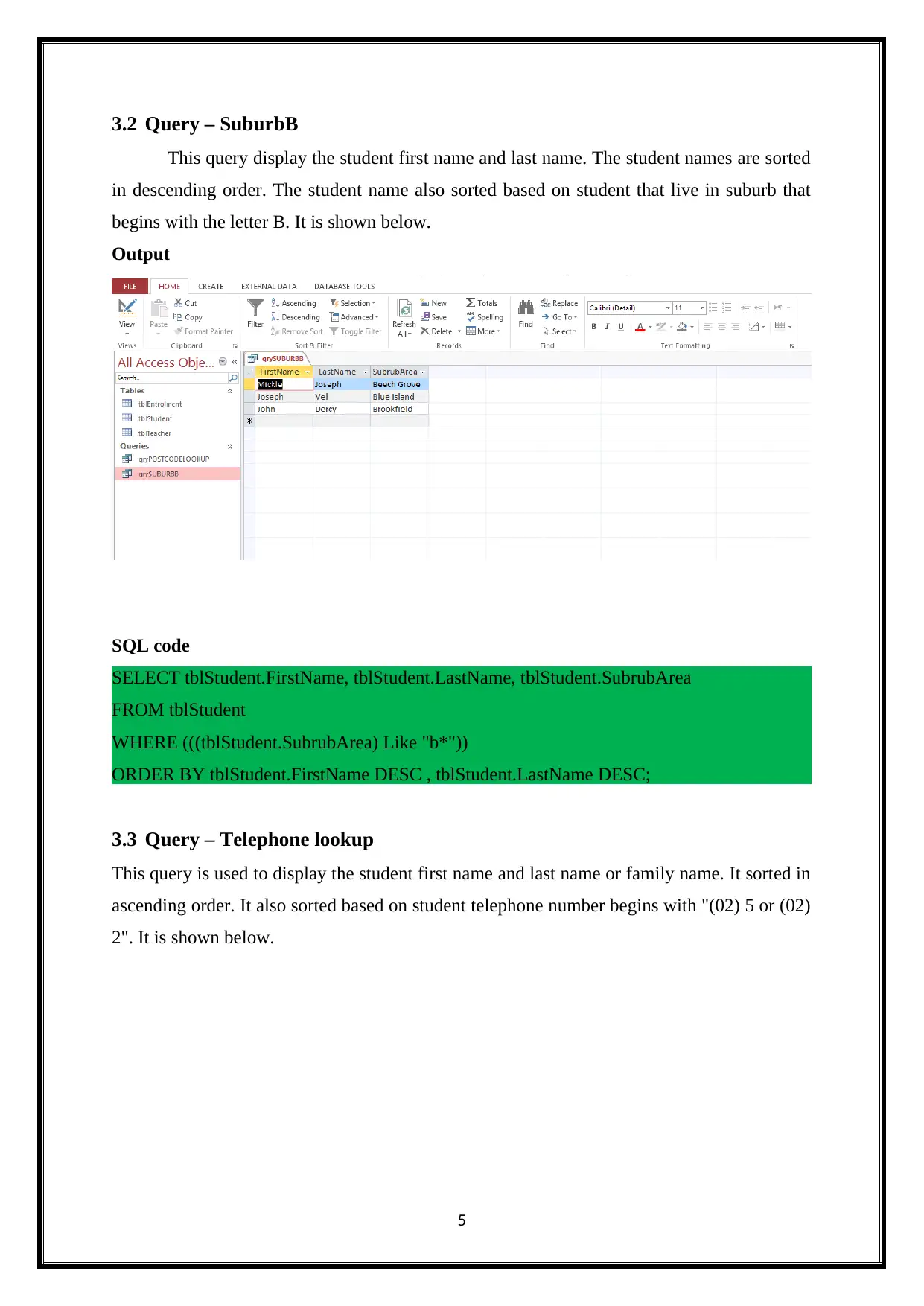
This query display the student first name and last name. The student names are sorted
in descending order. The student name also sorted based on student that live in suburb that
begins with the letter B. It is shown below.
Output
SQL code
SELECT tblStudent.FirstName, tblStudent.LastName, tblStudent.SubrubArea
FROM tblStudent
WHERE (((tblStudent.SubrubArea) Like "b*"))
ORDER BY tblStudent.FirstName DESC , tblStudent.LastName DESC;
3.3 Query – Telephone lookup
This query is used to display the student first name and last name or family name. It sorted in
ascending order. It also sorted based on student telephone number begins with "(02) 5 or (02)
2". It is shown below.
5
This query display the student first name and last name. The student names are sorted
in descending order. The student name also sorted based on student that live in suburb that
begins with the letter B. It is shown below.
Output
SQL code
SELECT tblStudent.FirstName, tblStudent.LastName, tblStudent.SubrubArea
FROM tblStudent
WHERE (((tblStudent.SubrubArea) Like "b*"))
ORDER BY tblStudent.FirstName DESC , tblStudent.LastName DESC;
3.3 Query – Telephone lookup
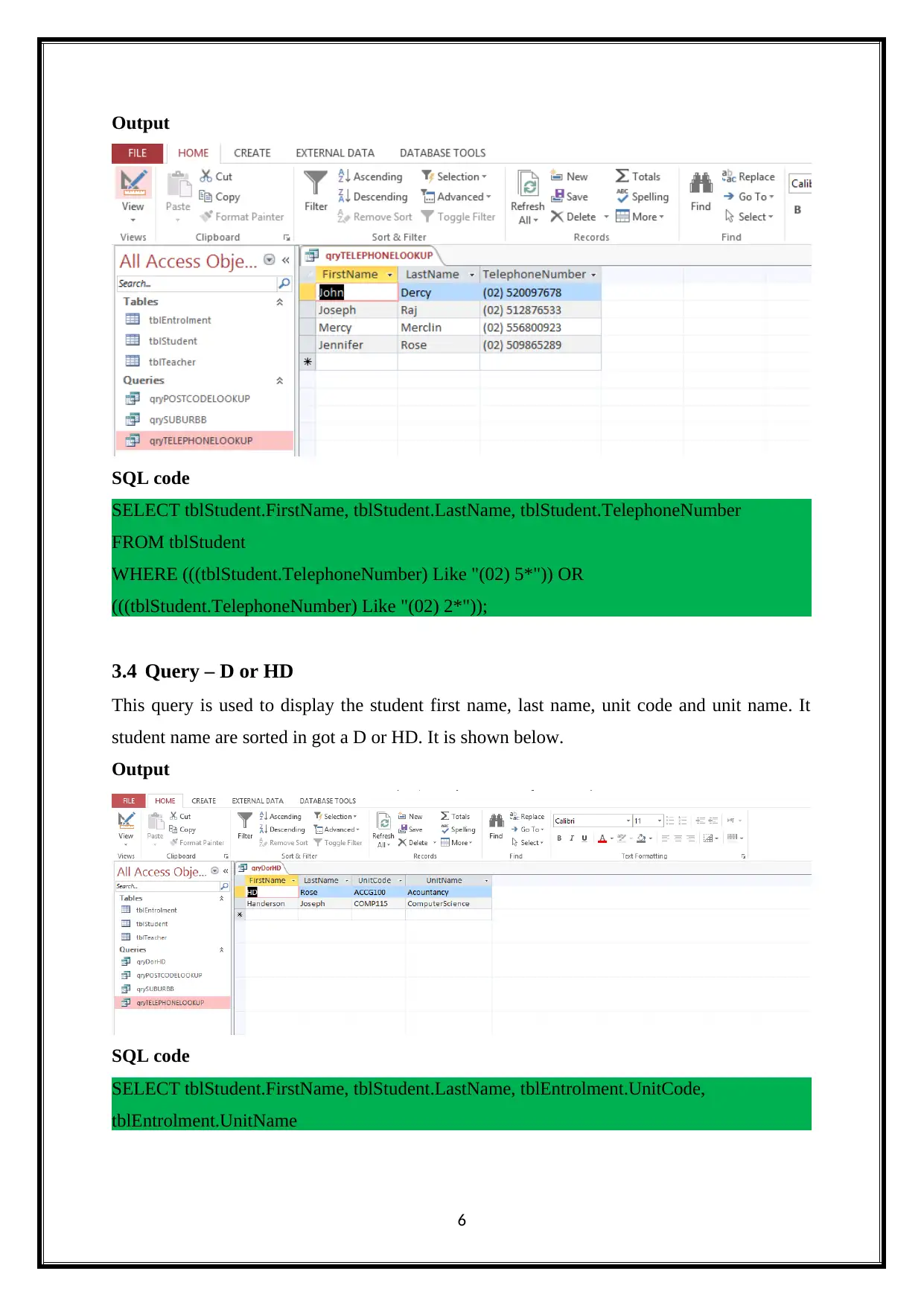
This query is used to display the student first name and last name or family name. It sorted in
ascending order. It also sorted based on student telephone number begins with "(02) 5 or (02)
2". It is shown below.
5
⊘ This is a preview!⊘
Do you want full access?
Subscribe today to unlock all pages.

Trusted by 1+ million students worldwide

Output
SQL code
SELECT tblStudent.FirstName, tblStudent.LastName, tblStudent.TelephoneNumber
FROM tblStudent
WHERE (((tblStudent.TelephoneNumber) Like "(02) 5*")) OR
(((tblStudent.TelephoneNumber) Like "(02) 2*"));
3.4 Query – D or HD
This query is used to display the student first name, last name, unit code and unit name. It
student name are sorted in got a D or HD. It is shown below.
Output
SQL code
SELECT tblStudent.FirstName, tblStudent.LastName, tblEntrolment.UnitCode,
tblEntrolment.UnitName
6
SQL code
SELECT tblStudent.FirstName, tblStudent.LastName, tblStudent.TelephoneNumber
FROM tblStudent
WHERE (((tblStudent.TelephoneNumber) Like "(02) 5*")) OR
(((tblStudent.TelephoneNumber) Like "(02) 2*"));
3.4 Query – D or HD
This query is used to display the student first name, last name, unit code and unit name. It
student name are sorted in got a D or HD. It is shown below.
Output
SQL code
SELECT tblStudent.FirstName, tblStudent.LastName, tblEntrolment.UnitCode,
tblEntrolment.UnitName
6
Paraphrase This Document
Need a fresh take? Get an instant paraphrase of this document with our AI Paraphraser

FROM tblEntrolment INNER JOIN tblStudent ON tblEntrolment.EntrolmentID =
tblStudent.EntrolmentID
WHERE (((tblStudent.FirstName) Like "H*")) OR (((tblStudent.FirstName) Like "D*"));
3.5 Query – Spring
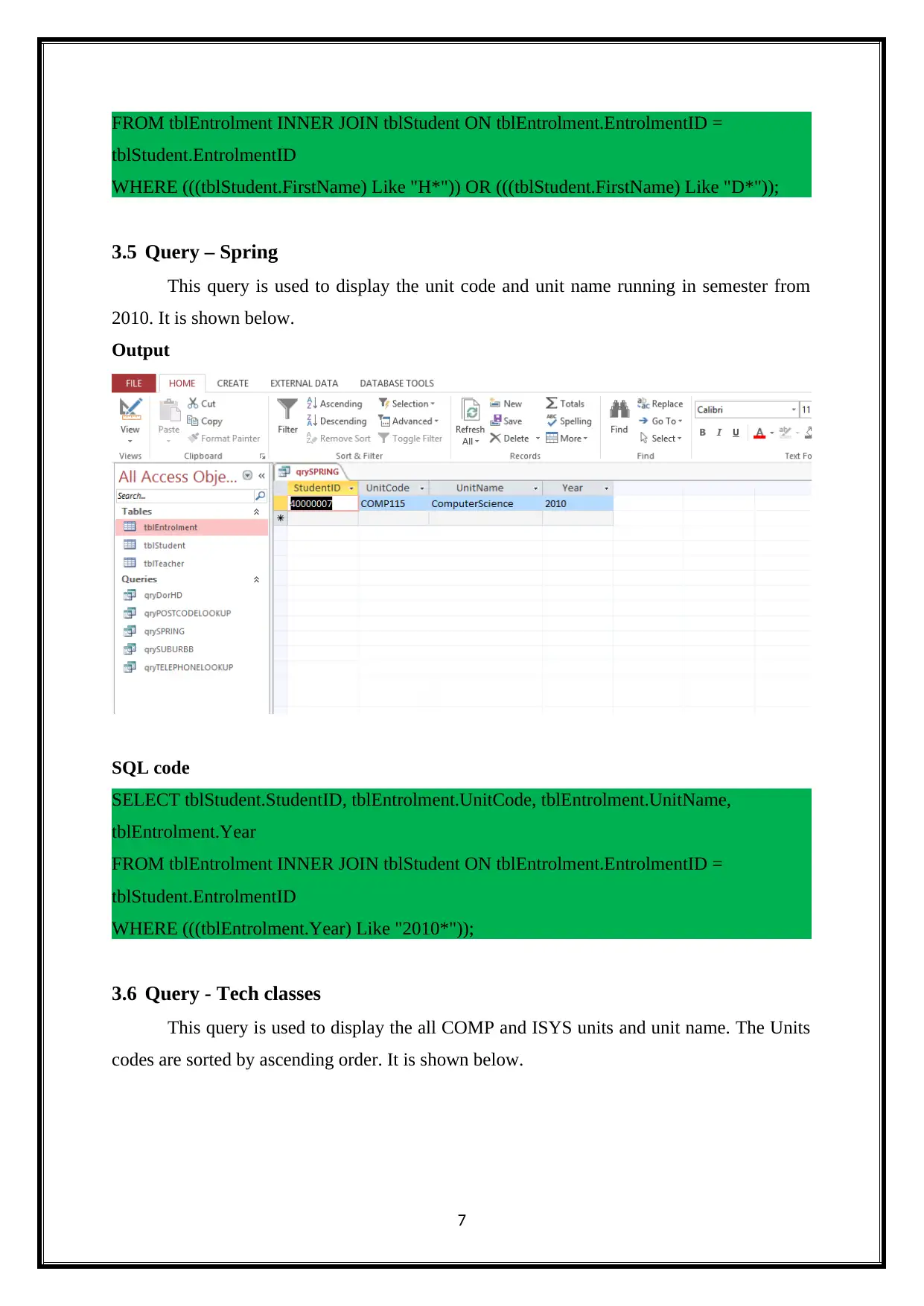
This query is used to display the unit code and unit name running in semester from
2010. It is shown below.
Output
SQL code
SELECT tblStudent.StudentID, tblEntrolment.UnitCode, tblEntrolment.UnitName,
tblEntrolment.Year
FROM tblEntrolment INNER JOIN tblStudent ON tblEntrolment.EntrolmentID =
tblStudent.EntrolmentID
WHERE (((tblEntrolment.Year) Like "2010*"));
3.6 Query - Tech classes
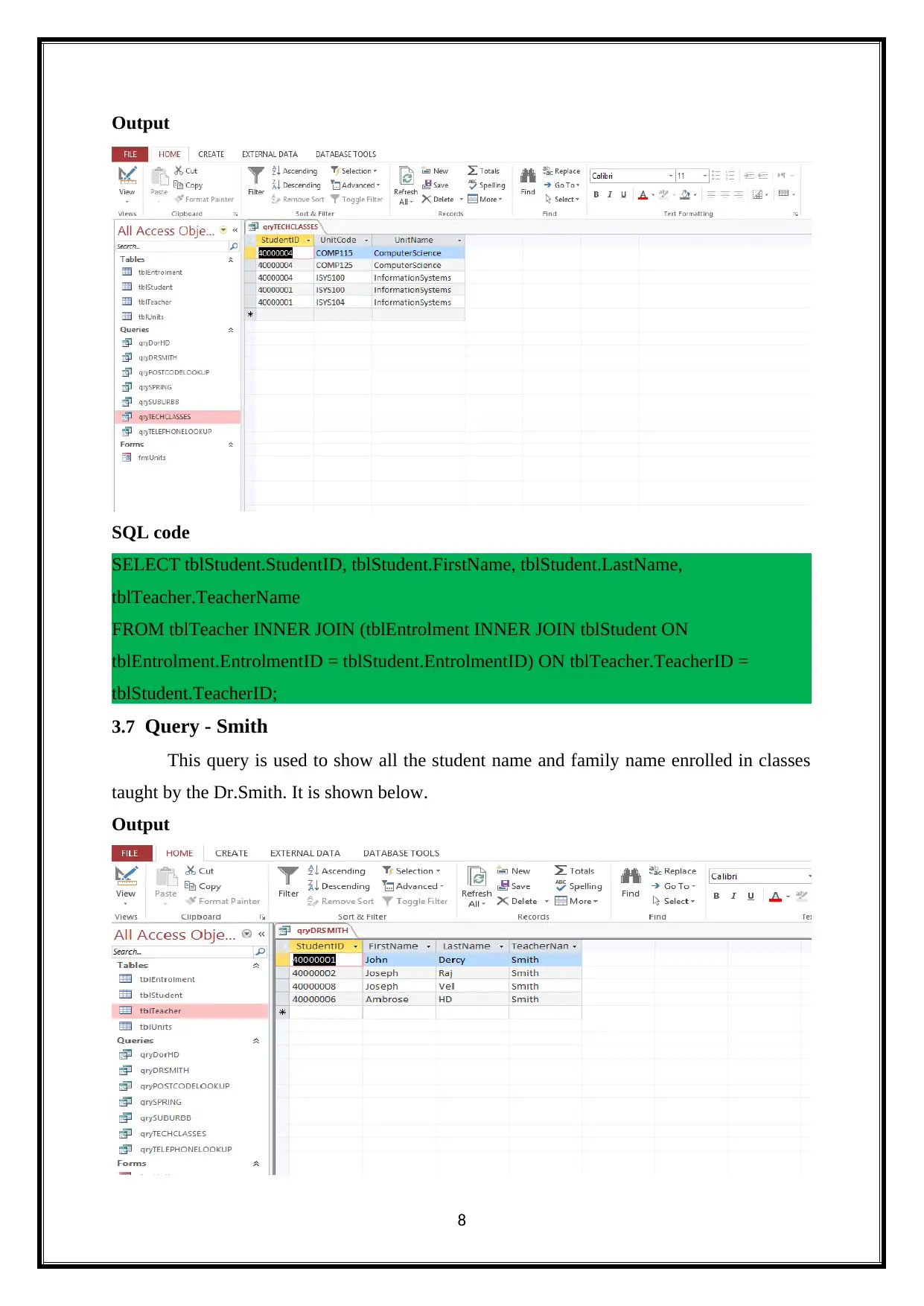
This query is used to display the all COMP and ISYS units and unit name. The Units
codes are sorted by ascending order. It is shown below.
7
tblStudent.EntrolmentID
WHERE (((tblStudent.FirstName) Like "H*")) OR (((tblStudent.FirstName) Like "D*"));
3.5 Query – Spring
This query is used to display the unit code and unit name running in semester from
2010. It is shown below.
Output
SQL code
SELECT tblStudent.StudentID, tblEntrolment.UnitCode, tblEntrolment.UnitName,
tblEntrolment.Year
FROM tblEntrolment INNER JOIN tblStudent ON tblEntrolment.EntrolmentID =
tblStudent.EntrolmentID
WHERE (((tblEntrolment.Year) Like "2010*"));
3.6 Query - Tech classes
This query is used to display the all COMP and ISYS units and unit name. The Units
codes are sorted by ascending order. It is shown below.
7

Output
SQL code
SELECT tblStudent.StudentID, tblStudent.FirstName, tblStudent.LastName,
tblTeacher.TeacherName
FROM tblTeacher INNER JOIN (tblEntrolment INNER JOIN tblStudent ON
tblEntrolment.EntrolmentID = tblStudent.EntrolmentID) ON tblTeacher.TeacherID =
tblStudent.TeacherID;
3.7 Query - Smith
This query is used to show all the student name and family name enrolled in classes
taught by the Dr.Smith. It is shown below.
Output
8
SQL code
SELECT tblStudent.StudentID, tblStudent.FirstName, tblStudent.LastName,
tblTeacher.TeacherName
FROM tblTeacher INNER JOIN (tblEntrolment INNER JOIN tblStudent ON
tblEntrolment.EntrolmentID = tblStudent.EntrolmentID) ON tblTeacher.TeacherID =
tblStudent.TeacherID;
3.7 Query - Smith
This query is used to show all the student name and family name enrolled in classes
taught by the Dr.Smith. It is shown below.
Output
8
⊘ This is a preview!⊘
Do you want full access?
Subscribe today to unlock all pages.

Trusted by 1+ million students worldwide

SQL Code
SELECT tblStudent.StudentID, tblStudent.FirstName, tblStudent.LastName,
tblTeacher.TeacherName
FROM tblTeacher INNER JOIN (tblEntrolment INNER JOIN tblStudent ON
tblEntrolment.EntrolmentID = tblStudent.EntrolmentID) ON tblTeacher.TeacherID =
tblStudent.TeacherID
WHERE (((tblTeacher.TeacherName)="Smith"));
4. Form
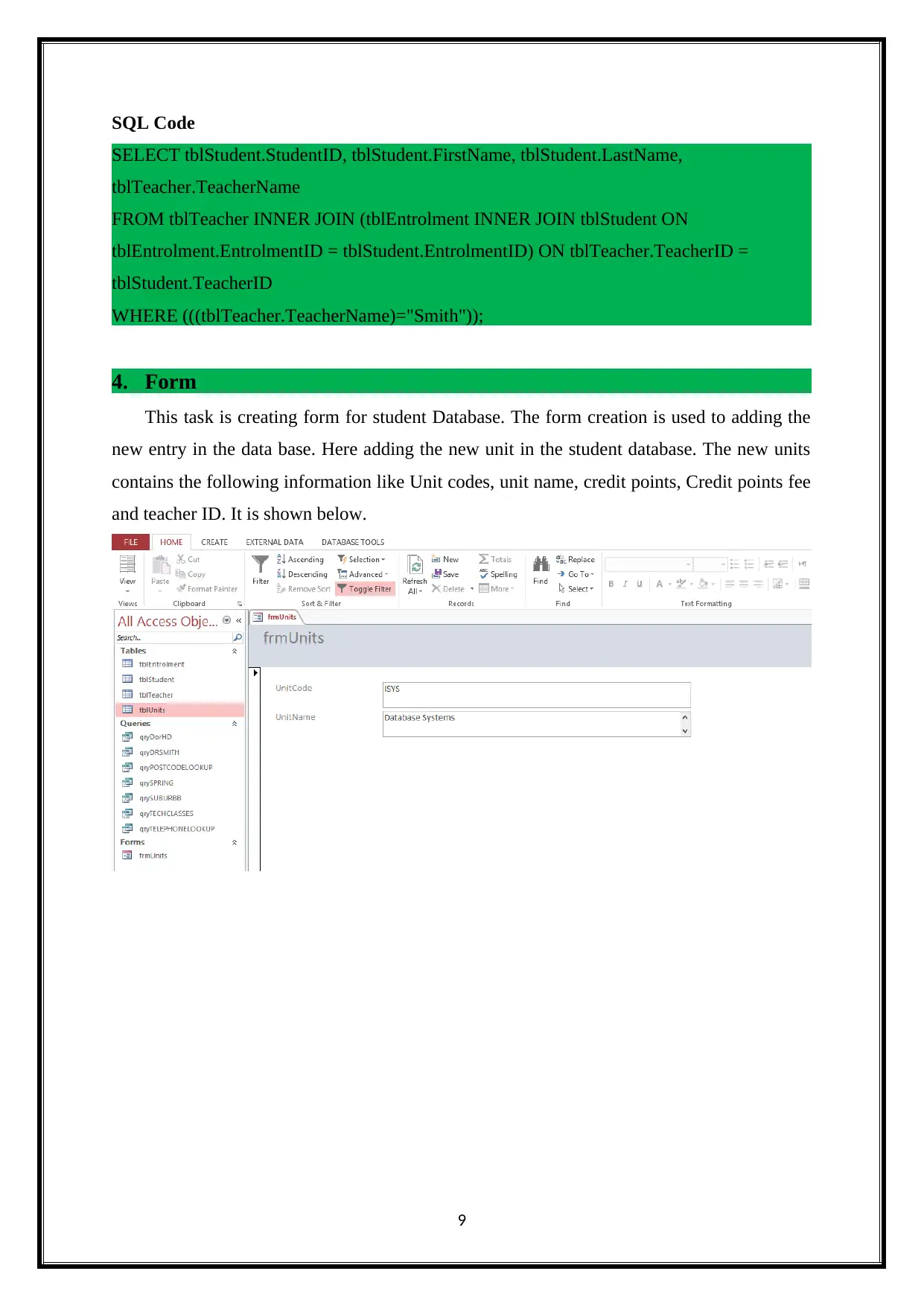
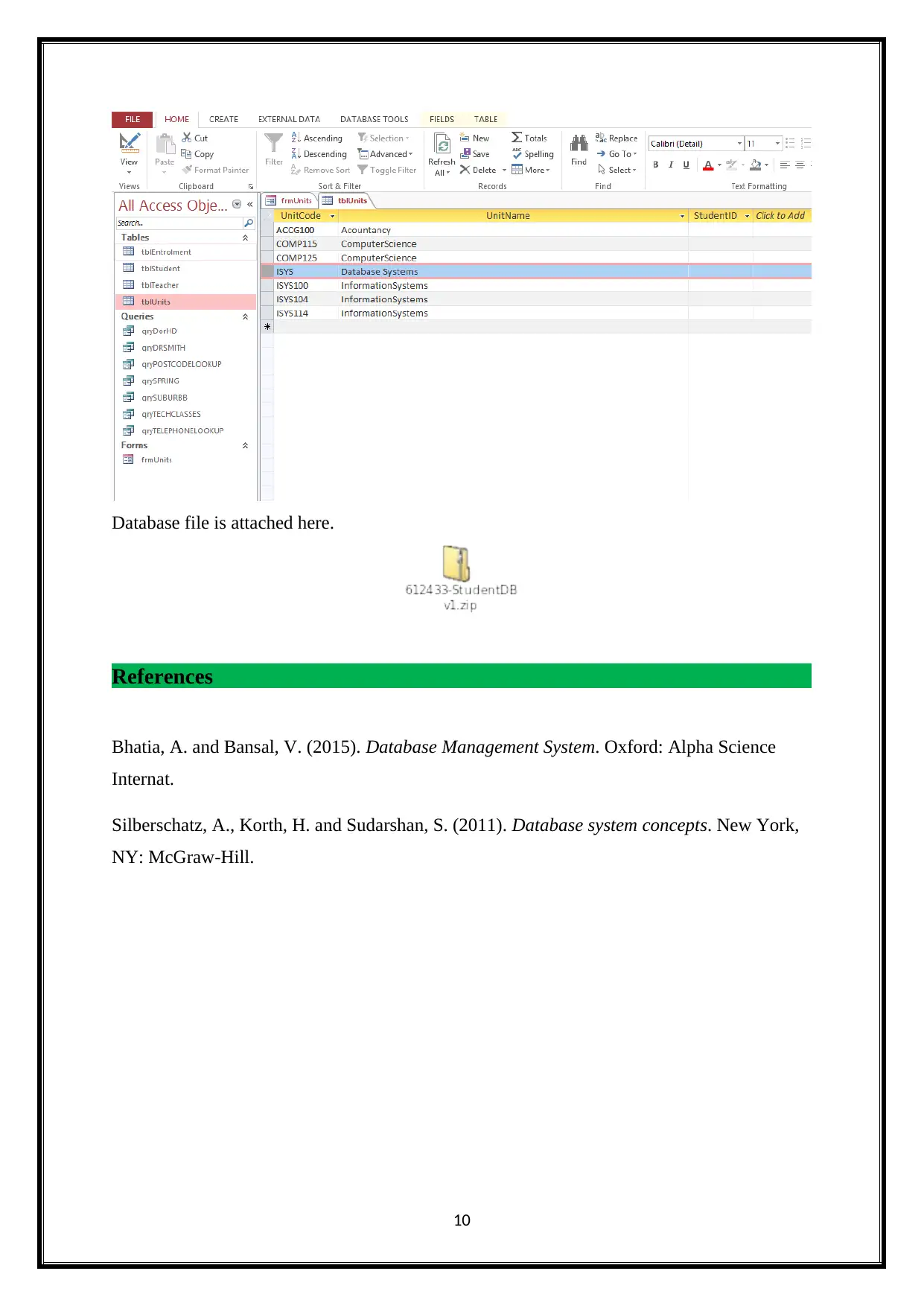
This task is creating form for student Database. The form creation is used to adding the
new entry in the data base. Here adding the new unit in the student database. The new units
contains the following information like Unit codes, unit name, credit points, Credit points fee
and teacher ID. It is shown below.
9
SELECT tblStudent.StudentID, tblStudent.FirstName, tblStudent.LastName,
tblTeacher.TeacherName
FROM tblTeacher INNER JOIN (tblEntrolment INNER JOIN tblStudent ON
tblEntrolment.EntrolmentID = tblStudent.EntrolmentID) ON tblTeacher.TeacherID =
tblStudent.TeacherID
WHERE (((tblTeacher.TeacherName)="Smith"));
4. Form
This task is creating form for student Database. The form creation is used to adding the
new entry in the data base. Here adding the new unit in the student database. The new units
contains the following information like Unit codes, unit name, credit points, Credit points fee
and teacher ID. It is shown below.
9
Paraphrase This Document
Need a fresh take? Get an instant paraphrase of this document with our AI Paraphraser

Database file is attached here.
References
Bhatia, A. and Bansal, V. (2015). Database Management System. Oxford: Alpha Science
Internat.
Silberschatz, A., Korth, H. and Sudarshan, S. (2011). Database system concepts. New York,
NY: McGraw-Hill.
10
References
Bhatia, A. and Bansal, V. (2015). Database Management System. Oxford: Alpha Science
Internat.
Silberschatz, A., Korth, H. and Sudarshan, S. (2011). Database system concepts. New York,
NY: McGraw-Hill.
10
1 out of 11
Related Documents
Your All-in-One AI-Powered Toolkit for Academic Success.
+13062052269
info@desklib.com
Available 24*7 on WhatsApp / Email
Unlock your academic potential
Copyright © 2020–2026 A2Z Services. All Rights Reserved. Developed and managed by ZUCOL.