Linux System Administration: Core Concepts and Practical Guide
VerifiedAdded on 2023/04/22
|22
|4728
|393
Homework Assignment
AI Summary
This assignment provides a detailed overview of Linux system administration, covering essential topics such as redirection, file viewing commands (head, tail, less, cat), bash scripting, inittab file configuration, default user accounts, installation sources, package dependencies and conflicts (RPM vs. Debian), modifying user accounts (useradd vs. adduser), disk partitioning, file system mounting, different disk types, Linux security with a focus on the shadow file, process management using the ps command, run level services, syslogd, local security best practices, SSH, hostname resolution, DNS, Linux-based systems, lsof, day light saving time configuration, and the vi editor. It explains how to manage input and output, view file contents, manage user accounts, understand package management, ensure system security, and configure network settings, offering a foundational understanding for Linux system administrators.
1
Linux System Administration
Linux System Administration

Paraphrase This Document
Need a fresh take? Get an instant paraphrase of this document with our AI Paraphraser
Table of Contents
1. Redirection..........................................................................................................................2
2. File Viewing Commands....................................................................................................3
3. Bash....................................................................................................................................4
4. Inittab File...........................................................................................................................4
5. Default User Accounts........................................................................................................5
6. Installation Sources.............................................................................................................6
7. Package Dependencies and Conflicts.................................................................................6
8. RPM vs. Debian..................................................................................................................7
9. Modifying User Accounts...................................................................................................7
10. useradd vs. adduser.........................................................................................................8
11. Partitioning a Disk...........................................................................................................8
12. Mounting a File System..................................................................................................9
13. Different Disk Types.......................................................................................................9
14. Linux Security - The shadow file....................................................................................9
15. ps Command..................................................................................................................10
16. Run level Services.........................................................................................................11
17. Syslogd..........................................................................................................................11
18. Local Security Good Practices......................................................................................12
19. Ssh.................................................................................................................................12
20. Resolving Hostnames....................................................................................................12
21. DNS...............................................................................................................................13
22. Linux-based Systems....................................................................................................13
23. Lsof...............................................................................................................................13
24. Day Light Saving Time.................................................................................................14
25. vi....................................................................................................................................14
References................................................................................................................................14
1. Redirection..........................................................................................................................2
2. File Viewing Commands....................................................................................................3
3. Bash....................................................................................................................................4
4. Inittab File...........................................................................................................................4
5. Default User Accounts........................................................................................................5
6. Installation Sources.............................................................................................................6
7. Package Dependencies and Conflicts.................................................................................6
8. RPM vs. Debian..................................................................................................................7
9. Modifying User Accounts...................................................................................................7
10. useradd vs. adduser.........................................................................................................8
11. Partitioning a Disk...........................................................................................................8
12. Mounting a File System..................................................................................................9
13. Different Disk Types.......................................................................................................9
14. Linux Security - The shadow file....................................................................................9
15. ps Command..................................................................................................................10
16. Run level Services.........................................................................................................11
17. Syslogd..........................................................................................................................11
18. Local Security Good Practices......................................................................................12
19. Ssh.................................................................................................................................12
20. Resolving Hostnames....................................................................................................12
21. DNS...............................................................................................................................13
22. Linux-based Systems....................................................................................................13
23. Lsof...............................................................................................................................13
24. Day Light Saving Time.................................................................................................14
25. vi....................................................................................................................................14
References................................................................................................................................14
1. Redirection
Redirection is an element in Linux with the end goal that when executing a command,
you can change the standard Input and Outputs. The essential work process of any Linux
command is that it takes an Input and gives an Output ("Linux I/O Redirection - javatpoint",
2019).
Output Redirection
The Output from a command typically expected for standard Output can be
effortlessly redirected to a file. This ability is known as Output redirection. The Output of
that command will be composed to file rather than your terminal.
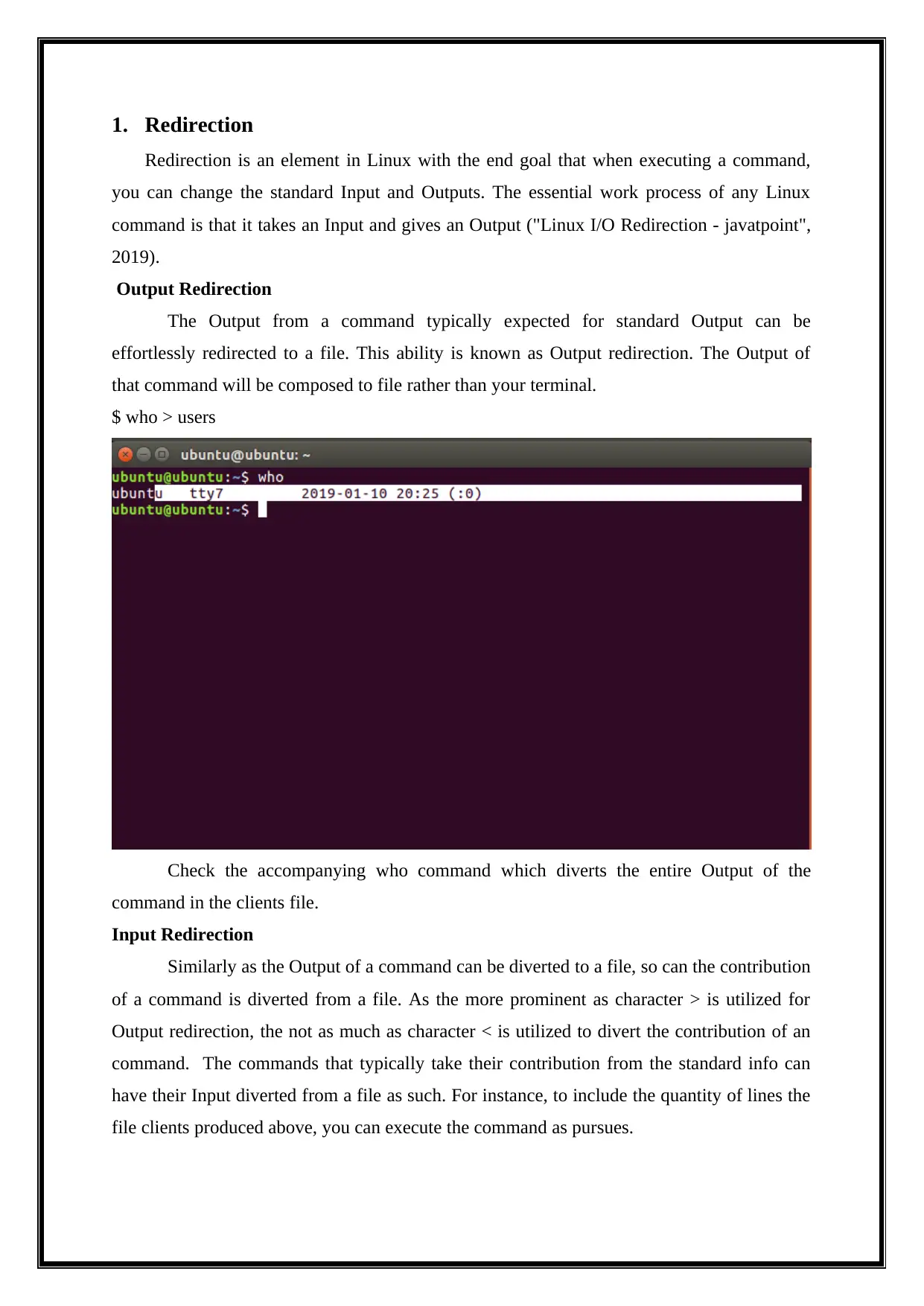
$ who > users
Check the accompanying who command which diverts the entire Output of the
command in the clients file.
Input Redirection
Similarly as the Output of a command can be diverted to a file, so can the contribution
of a command is diverted from a file. As the more prominent as character > is utilized for
Output redirection, the not as much as character < is utilized to divert the contribution of an
command. The commands that typically take their contribution from the standard info can
have their Input diverted from a file as such. For instance, to include the quantity of lines the
file clients produced above, you can execute the command as pursues.
Redirection is an element in Linux with the end goal that when executing a command,
you can change the standard Input and Outputs. The essential work process of any Linux
command is that it takes an Input and gives an Output ("Linux I/O Redirection - javatpoint",
2019).
Output Redirection
The Output from a command typically expected for standard Output can be
effortlessly redirected to a file. This ability is known as Output redirection. The Output of
that command will be composed to file rather than your terminal.
$ who > users
Check the accompanying who command which diverts the entire Output of the
command in the clients file.
Input Redirection
Similarly as the Output of a command can be diverted to a file, so can the contribution
of a command is diverted from a file. As the more prominent as character > is utilized for
Output redirection, the not as much as character < is utilized to divert the contribution of an
command. The commands that typically take their contribution from the standard info can
have their Input diverted from a file as such. For instance, to include the quantity of lines the
file clients produced above, you can execute the command as pursues.
⊘ This is a preview!⊘
Do you want full access?
Subscribe today to unlock all pages.

Trusted by 1+ million students worldwide
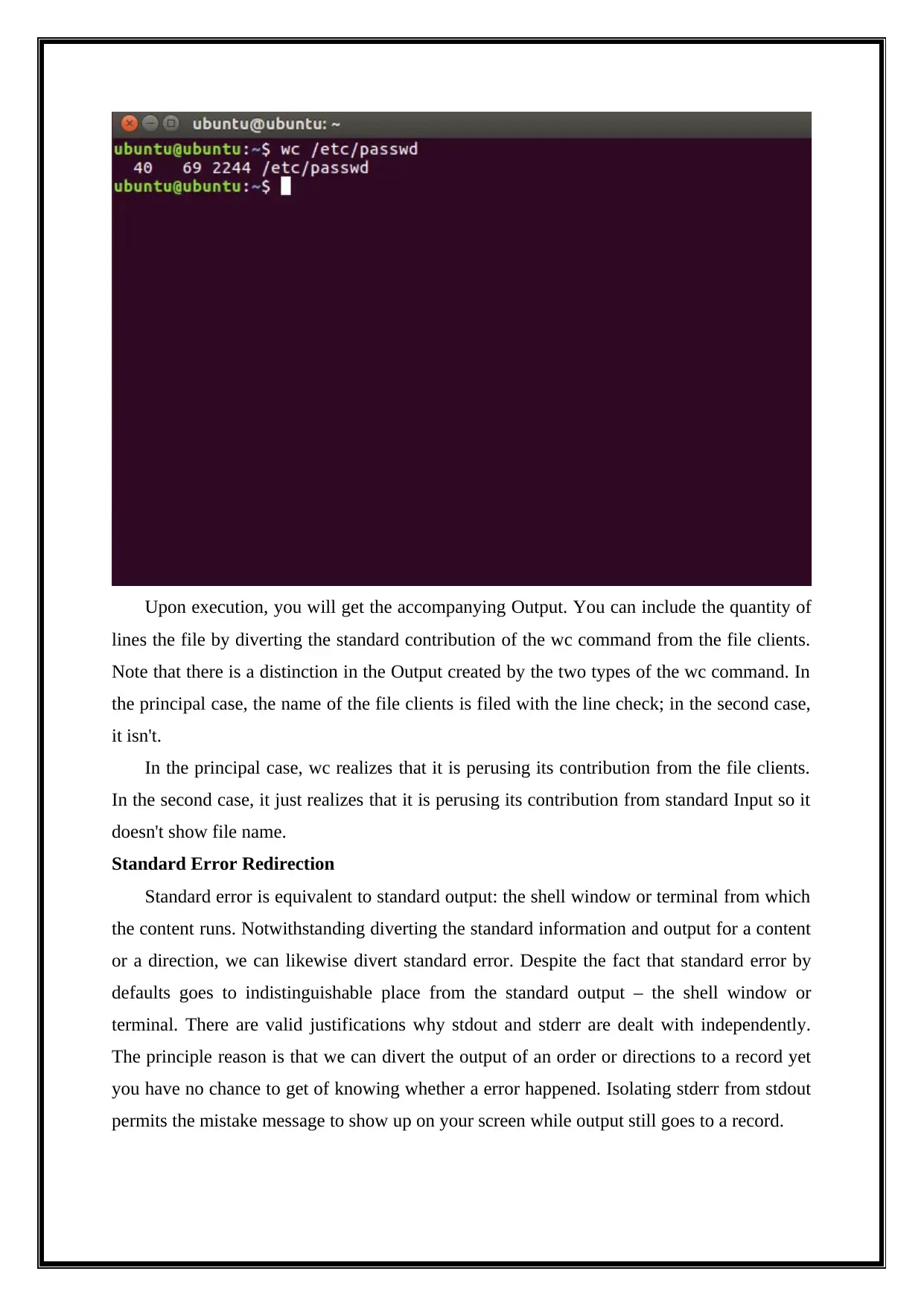
Upon execution, you will get the accompanying Output. You can include the quantity of
lines the file by diverting the standard contribution of the wc command from the file clients.
Note that there is a distinction in the Output created by the two types of the wc command. In
the principal case, the name of the file clients is filed with the line check; in the second case,
it isn't.
In the principal case, wc realizes that it is perusing its contribution from the file clients.
In the second case, it just realizes that it is perusing its contribution from standard Input so it
doesn't show file name.
Standard Error Redirection
Standard error is equivalent to standard output: the shell window or terminal from which
the content runs. Notwithstanding diverting the standard information and output for a content
or a direction, we can likewise divert standard error. Despite the fact that standard error by
defaults goes to indistinguishable place from the standard output – the shell window or
terminal. There are valid justifications why stdout and stderr are dealt with independently.
The principle reason is that we can divert the output of an order or directions to a record yet
you have no chance to get of knowing whether a error happened. Isolating stderr from stdout
permits the mistake message to show up on your screen while output still goes to a record.
lines the file by diverting the standard contribution of the wc command from the file clients.
Note that there is a distinction in the Output created by the two types of the wc command. In
the principal case, the name of the file clients is filed with the line check; in the second case,
it isn't.
In the principal case, wc realizes that it is perusing its contribution from the file clients.
In the second case, it just realizes that it is perusing its contribution from standard Input so it
doesn't show file name.
Standard Error Redirection
Standard error is equivalent to standard output: the shell window or terminal from which
the content runs. Notwithstanding diverting the standard information and output for a content
or a direction, we can likewise divert standard error. Despite the fact that standard error by
defaults goes to indistinguishable place from the standard output – the shell window or
terminal. There are valid justifications why stdout and stderr are dealt with independently.
The principle reason is that we can divert the output of an order or directions to a record yet
you have no chance to get of knowing whether a error happened. Isolating stderr from stdout
permits the mistake message to show up on your screen while output still goes to a record.
Paraphrase This Document
Need a fresh take? Get an instant paraphrase of this document with our AI Paraphraser
2. File Viewing Commands
Three file seeing commands (head, tail, and less) are utilized to show a part of a file.
These are particularly helpful when you have a substantial content file you need to view and
you need to limit its showcase.
Head Command
The head command peruses the initial ten lines of any given file name ("Manage Files
Effectively using head, tail and cat Commands in Linux", 2019). The essential sentence
structure of head command is:
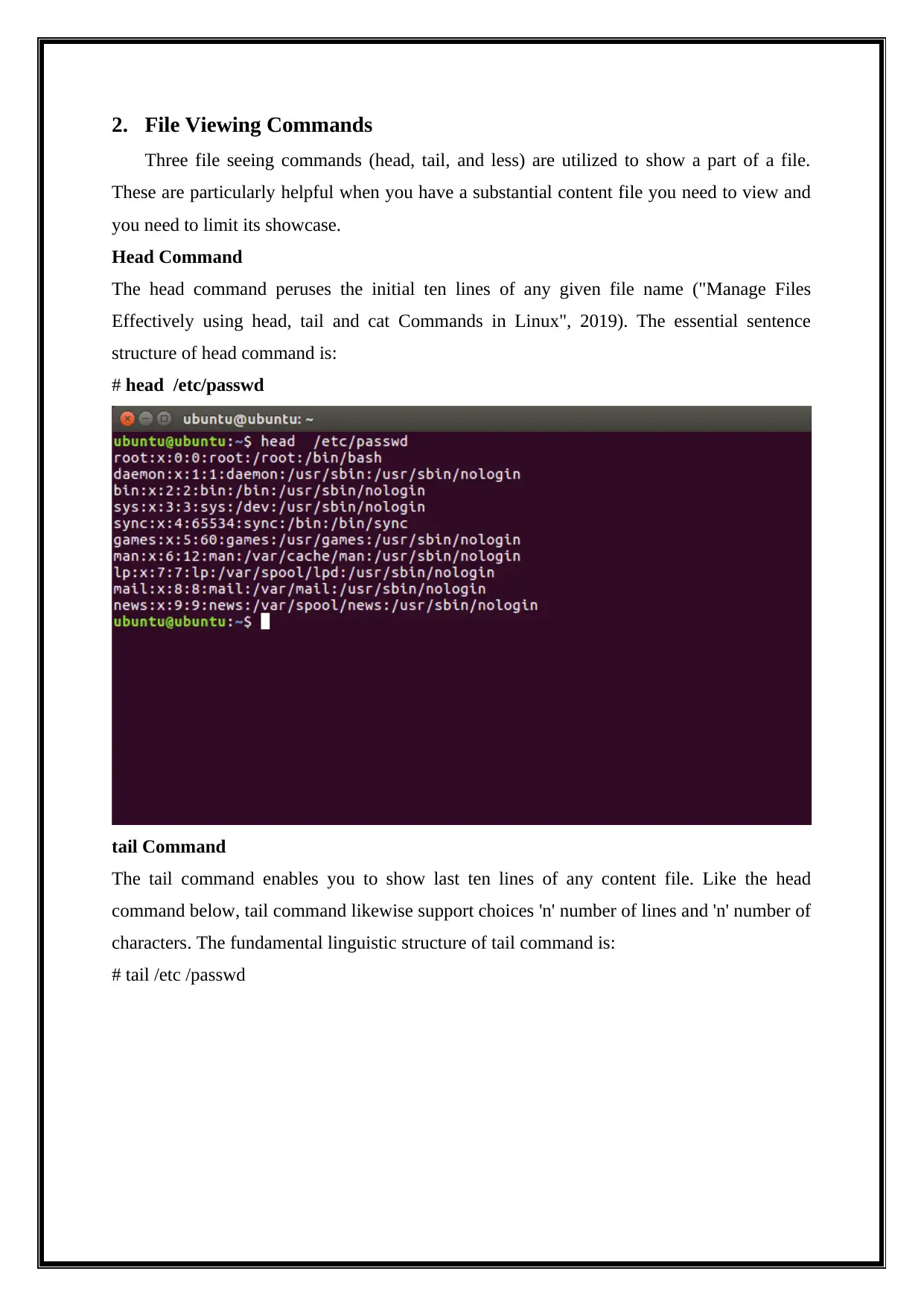
# head /etc/passwd
tail Command
The tail command enables you to show last ten lines of any content file. Like the head
command below, tail command likewise support choices 'n' number of lines and 'n' number of
characters. The fundamental linguistic structure of tail command is:
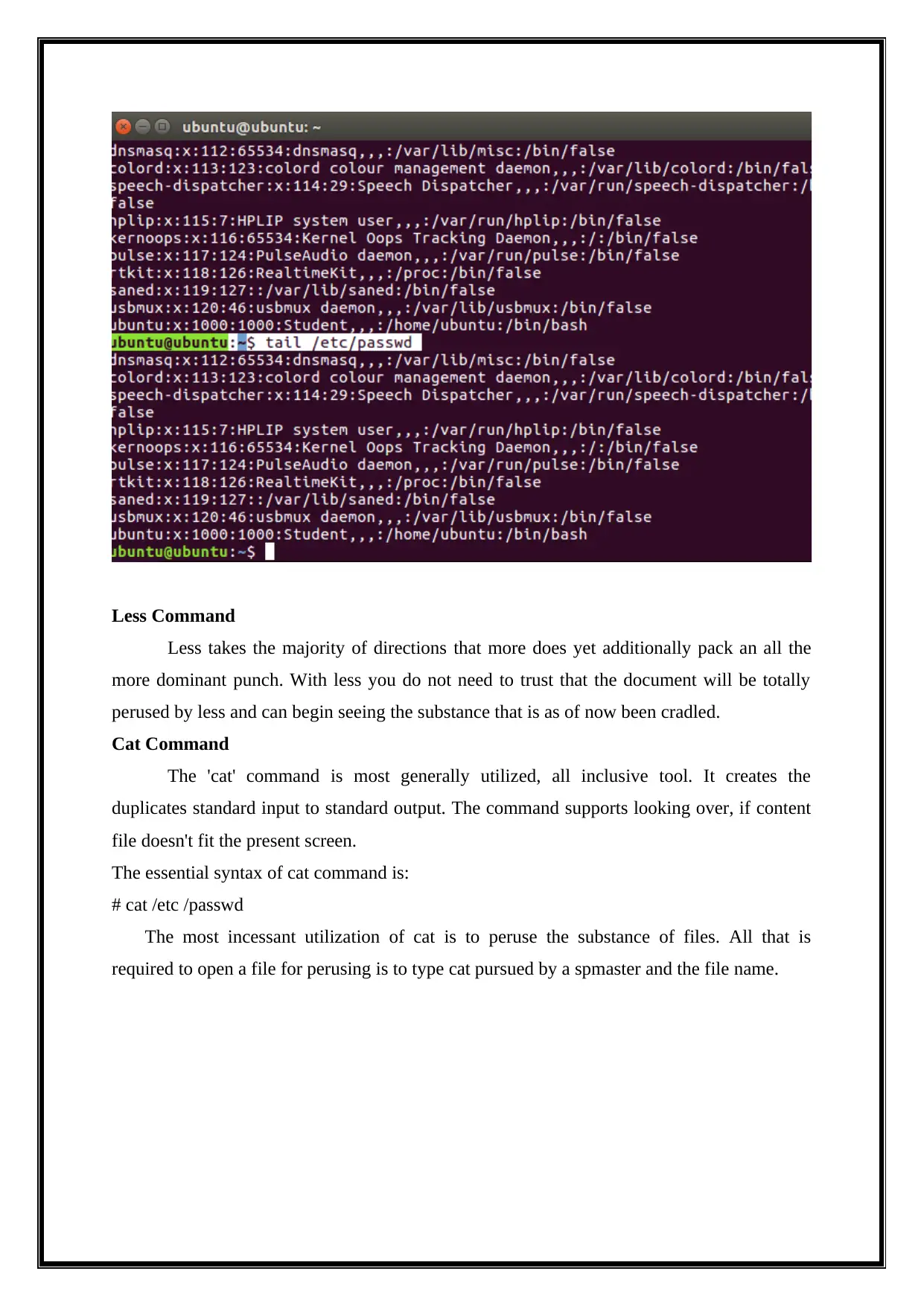
# tail /etc /passwd
Three file seeing commands (head, tail, and less) are utilized to show a part of a file.
These are particularly helpful when you have a substantial content file you need to view and
you need to limit its showcase.
Head Command
The head command peruses the initial ten lines of any given file name ("Manage Files
Effectively using head, tail and cat Commands in Linux", 2019). The essential sentence
structure of head command is:
# head /etc/passwd
tail Command
The tail command enables you to show last ten lines of any content file. Like the head
command below, tail command likewise support choices 'n' number of lines and 'n' number of
characters. The fundamental linguistic structure of tail command is:
# tail /etc /passwd
Less Command
Less takes the majority of directions that more does yet additionally pack an all the
more dominant punch. With less you do not need to trust that the document will be totally
perused by less and can begin seeing the substance that is as of now been cradled.
Cat Command
The 'cat' command is most generally utilized, all inclusive tool. It creates the
duplicates standard input to standard output. The command supports looking over, if content
file doesn't fit the present screen.
The essential syntax of cat command is:
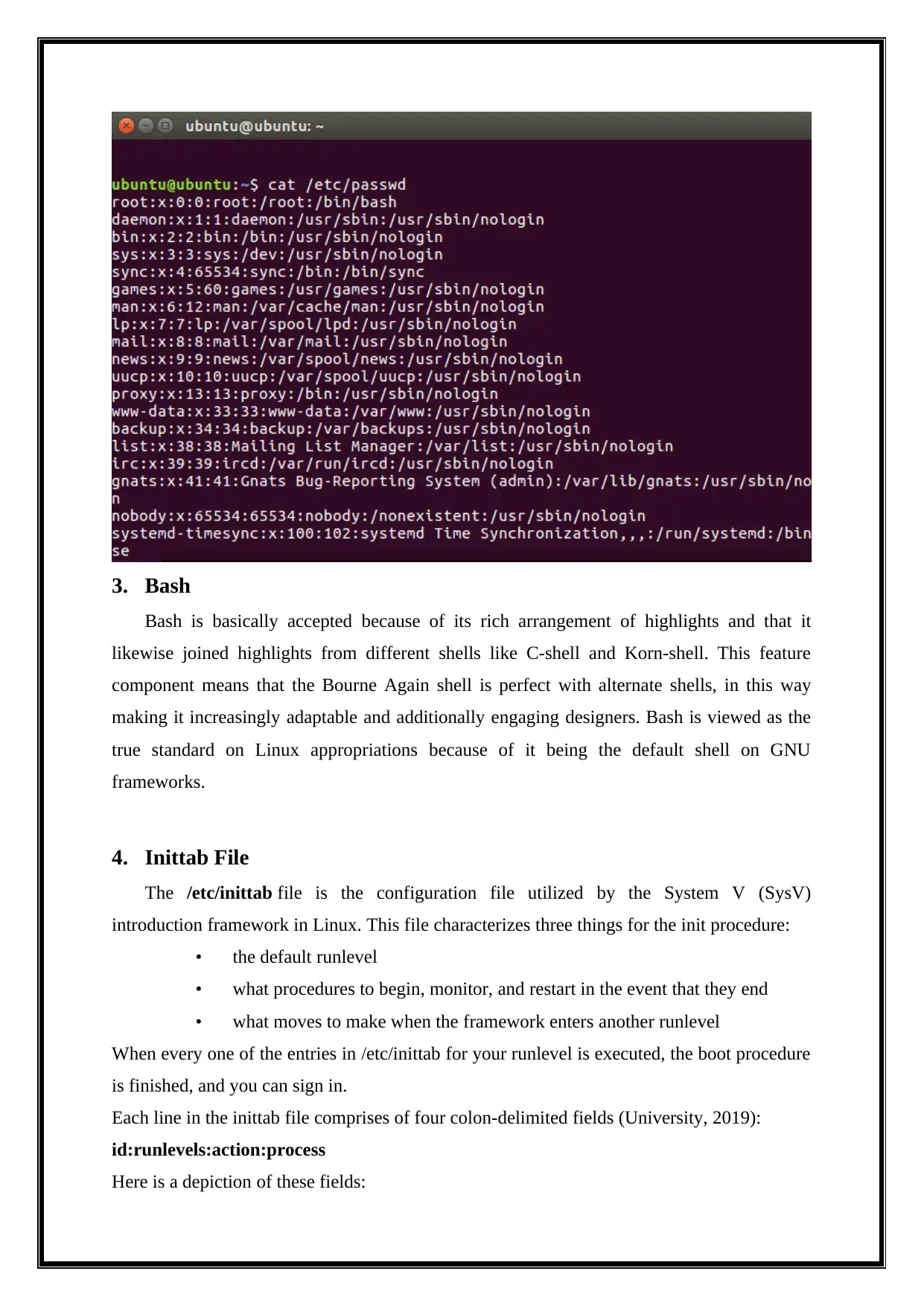
# cat /etc /passwd
The most incessant utilization of cat is to peruse the substance of files. All that is
required to open a file for perusing is to type cat pursued by a spmaster and the file name.
Less takes the majority of directions that more does yet additionally pack an all the
more dominant punch. With less you do not need to trust that the document will be totally
perused by less and can begin seeing the substance that is as of now been cradled.
Cat Command
The 'cat' command is most generally utilized, all inclusive tool. It creates the
duplicates standard input to standard output. The command supports looking over, if content
file doesn't fit the present screen.
The essential syntax of cat command is:
# cat /etc /passwd
The most incessant utilization of cat is to peruse the substance of files. All that is
required to open a file for perusing is to type cat pursued by a spmaster and the file name.
⊘ This is a preview!⊘
Do you want full access?
Subscribe today to unlock all pages.
Trusted by 1+ million students worldwide
3. Bash
Bash is basically accepted because of its rich arrangement of highlights and that it
likewise joined highlights from different shells like C-shell and Korn-shell. This feature
component means that the Bourne Again shell is perfect with alternate shells, in this way
making it increasingly adaptable and additionally engaging designers. Bash is viewed as the
true standard on Linux appropriations because of it being the default shell on GNU
frameworks.
4. Inittab File
The /etc/inittab file is the configuration file utilized by the System V (SysV)
introduction framework in Linux. This file characterizes three things for the init procedure:
• the default runlevel
• what procedures to begin, monitor, and restart in the event that they end
• what moves to make when the framework enters another runlevel
When every one of the entries in /etc/inittab for your runlevel is executed, the boot procedure
is finished, and you can sign in.
Each line in the inittab file comprises of four colon-delimited fields (University, 2019):
id:runlevels:action:process
Here is a depiction of these fields:
Bash is basically accepted because of its rich arrangement of highlights and that it
likewise joined highlights from different shells like C-shell and Korn-shell. This feature
component means that the Bourne Again shell is perfect with alternate shells, in this way
making it increasingly adaptable and additionally engaging designers. Bash is viewed as the
true standard on Linux appropriations because of it being the default shell on GNU
frameworks.
4. Inittab File
The /etc/inittab file is the configuration file utilized by the System V (SysV)
introduction framework in Linux. This file characterizes three things for the init procedure:
• the default runlevel
• what procedures to begin, monitor, and restart in the event that they end
• what moves to make when the framework enters another runlevel
When every one of the entries in /etc/inittab for your runlevel is executed, the boot procedure
is finished, and you can sign in.
Each line in the inittab file comprises of four colon-delimited fields (University, 2019):
id:runlevels:action:process
Here is a depiction of these fields:
Paraphrase This Document
Need a fresh take? Get an instant paraphrase of this document with our AI Paraphraser
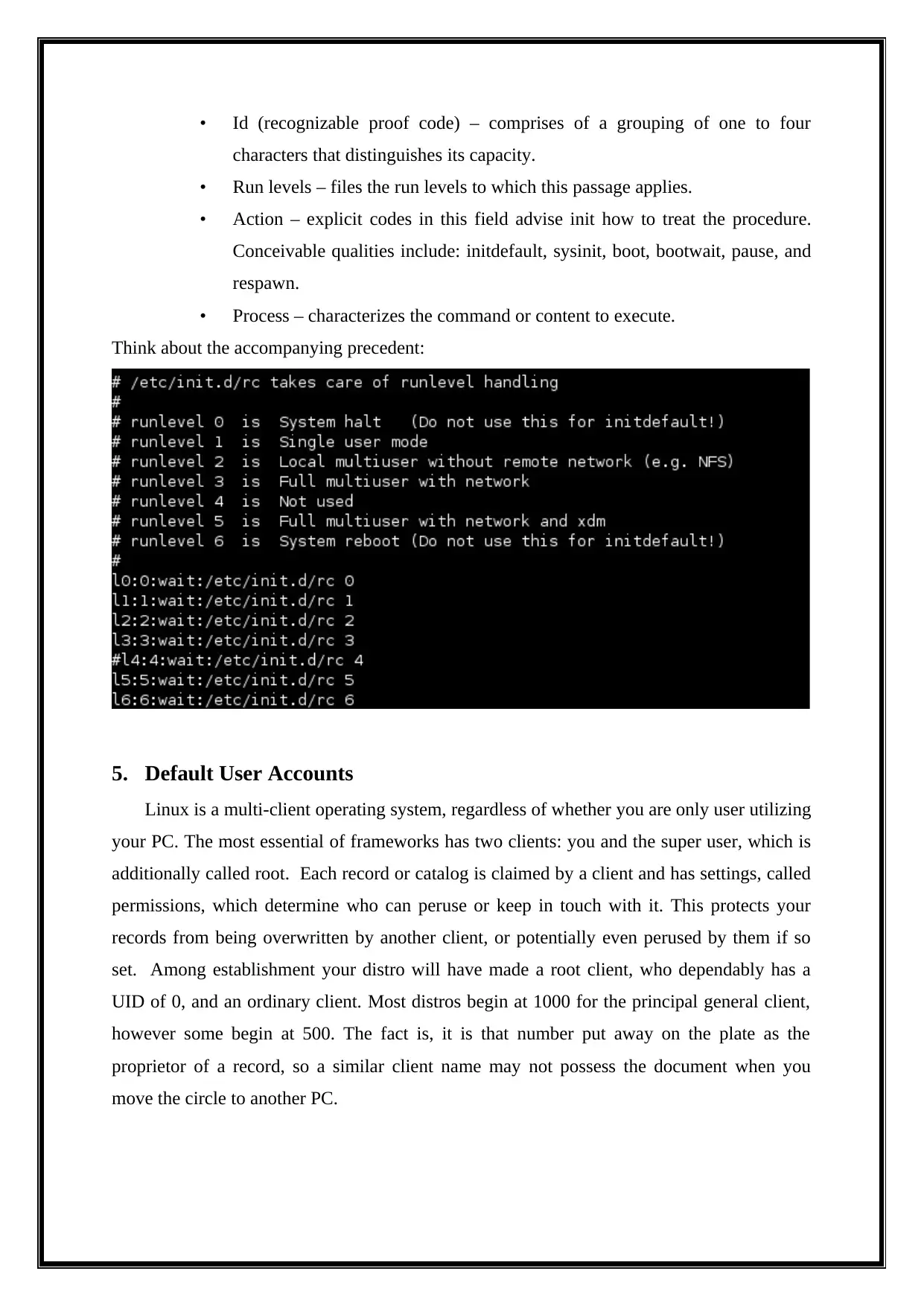
• Id (recognizable proof code) – comprises of a grouping of one to four
characters that distinguishes its capacity.
• Run levels – files the run levels to which this passage applies.
• Action – explicit codes in this field advise init how to treat the procedure.
Conceivable qualities include: initdefault, sysinit, boot, bootwait, pause, and
respawn.
• Process – characterizes the command or content to execute.
Think about the accompanying precedent:
5. Default User Accounts
Linux is a multi-client operating system, regardless of whether you are only user utilizing
your PC. The most essential of frameworks has two clients: you and the super user, which is
additionally called root. Each record or catalog is claimed by a client and has settings, called
permissions, which determine who can peruse or keep in touch with it. This protects your
records from being overwritten by another client, or potentially even perused by them if so
set. Among establishment your distro will have made a root client, who dependably has a
UID of 0, and an ordinary client. Most distros begin at 1000 for the principal general client,
however some begin at 500. The fact is, it is that number put away on the plate as the
proprietor of a record, so a similar client name may not possess the document when you
move the circle to another PC.
characters that distinguishes its capacity.
• Run levels – files the run levels to which this passage applies.
• Action – explicit codes in this field advise init how to treat the procedure.
Conceivable qualities include: initdefault, sysinit, boot, bootwait, pause, and
respawn.
• Process – characterizes the command or content to execute.
Think about the accompanying precedent:
5. Default User Accounts
Linux is a multi-client operating system, regardless of whether you are only user utilizing
your PC. The most essential of frameworks has two clients: you and the super user, which is
additionally called root. Each record or catalog is claimed by a client and has settings, called
permissions, which determine who can peruse or keep in touch with it. This protects your
records from being overwritten by another client, or potentially even perused by them if so
set. Among establishment your distro will have made a root client, who dependably has a
UID of 0, and an ordinary client. Most distros begin at 1000 for the principal general client,
however some begin at 500. The fact is, it is that number put away on the plate as the
proprietor of a record, so a similar client name may not possess the document when you
move the circle to another PC.
6. Installation Sources
There are a few establishment courses of Linux environment, for example, CD/DVD
media, removable hard drive/USB stick, and establishment through system. Disc/DVD is the
most widely recognized establishment technique. Although, Purchase or request CD or DVD
of a Linux distribution, one can definitely download an ISO file of a distribution and copy it
into CD or DVD relying upon the size. Today, certainly, one would require a DVD because
of expanding size of programming. You just need to expend a bit of your web data transfer
capacity to download the ISO file and a burn to copy into an available DVD. Be that as it
may, when you copy it, it remains there except if it is a rewriteable DVD yet a Linux
appropriation is being refreshed each year if few out of every odd a half year. It implies that
your DVD would wind up old in a brief span. Obviously you can most likely do the updates,
even the extensive ones, through web however it would dependably be a great idea to have an
up and coming Linux image on DVD. Another choice is to introduce the Linux dispersion
through system. This strategy is the most complex one and the most difficult.
7. Package Dependencies and Conflicts
A dependency happens when one package relies upon another. You may figure it would
make for a less demanding to-oversee framework if no package relied upon any others,
however you did confront a couple of issues, not the slightest of which would be significantly
expanded disk usage ("Cap. 5. Package Dependencies", 2019). Packages on your Linux
framework rely upon different packages. Pretty much every package with an application, for
instance, relies upon the framework C libraries, since these libraries give normal offices that
pretty much every program employments. System applications regularly rely upon low-level
systems administration libraries. These conditions truly work to support you, since a security
bug fix in the system libraries can refresh all applications that make utilization of the
refreshed libraries. Moreover, sharing programming implies that each package has less code
to keep up and therefore enhanced quality. A few packages may furnish abilities that meddle
with those in different packages. This is known as a conflict. Introducing clashing packages is
a error. For instance, the httpd package (the Apache Web server) strife with the thttpd
package. The two packages need to give the essential Web server to a framework. The RPM
framework will keep you from introducing packages that conflict with different packages.
There are a few establishment courses of Linux environment, for example, CD/DVD
media, removable hard drive/USB stick, and establishment through system. Disc/DVD is the
most widely recognized establishment technique. Although, Purchase or request CD or DVD
of a Linux distribution, one can definitely download an ISO file of a distribution and copy it
into CD or DVD relying upon the size. Today, certainly, one would require a DVD because
of expanding size of programming. You just need to expend a bit of your web data transfer
capacity to download the ISO file and a burn to copy into an available DVD. Be that as it
may, when you copy it, it remains there except if it is a rewriteable DVD yet a Linux
appropriation is being refreshed each year if few out of every odd a half year. It implies that
your DVD would wind up old in a brief span. Obviously you can most likely do the updates,
even the extensive ones, through web however it would dependably be a great idea to have an
up and coming Linux image on DVD. Another choice is to introduce the Linux dispersion
through system. This strategy is the most complex one and the most difficult.
7. Package Dependencies and Conflicts
A dependency happens when one package relies upon another. You may figure it would
make for a less demanding to-oversee framework if no package relied upon any others,
however you did confront a couple of issues, not the slightest of which would be significantly
expanded disk usage ("Cap. 5. Package Dependencies", 2019). Packages on your Linux
framework rely upon different packages. Pretty much every package with an application, for
instance, relies upon the framework C libraries, since these libraries give normal offices that
pretty much every program employments. System applications regularly rely upon low-level
systems administration libraries. These conditions truly work to support you, since a security
bug fix in the system libraries can refresh all applications that make utilization of the
refreshed libraries. Moreover, sharing programming implies that each package has less code
to keep up and therefore enhanced quality. A few packages may furnish abilities that meddle
with those in different packages. This is known as a conflict. Introducing clashing packages is
a error. For instance, the httpd package (the Apache Web server) strife with the thttpd
package. The two packages need to give the essential Web server to a framework. The RPM
framework will keep you from introducing packages that conflict with different packages.
⊘ This is a preview!⊘
Do you want full access?
Subscribe today to unlock all pages.
Trusted by 1+ million students worldwide
8. RPM vs. Debian
Package the executive’s frameworks offer numerous advantages. As a client, you may
discover you need to inquiry the package database to discover what packages are introduced
on the framework and their variants. As a framework head, you require tool to introduce and
deal with the packages on your framework. Furthermore, on the off chance that you are
likewise an engineer, you have to realize how to fabricate a package for conveyance.
In addition to other things, package supervisors ("Red Hat and Debian Package Managers
(Linux in a Nutshell, 3rd Edition)", 2019):
Give tool to introducing, refreshing, expelling, and dealing with the product on your
framework.
Give you a chance to put in new or redesigned programming specifically over a
system.
Disclose to you what programming package a specific document has a plmaster with
or what files a package contains.
Keep up a database of packages on the framework and their state, so you can discover
what packages or forms are introduced on your framework.
Give dependency checking, so you do not destroy your framework with inconsistent
programming.
Give PGP, MD5, or other mark confirmation tool.
Give tools to building packages.
The Red Hat Package Manager (RPM) is an openly accessible bundling framework for
programming circulation and establishment. Notwithstanding Red Hat and Red Hat-based
environments, both SuSE and fedora are among the Linux environment that utilization RPM.
Utilizing RPM is clear. A solitary command, rpm, has choices to play out all the package
capacities. Debian package chief keeps running on appropriations that don't utilize RPMs, for
example, Ubuntu, Knoppix, and Linspire.
9. Modifying User Accounts
In Unix/Linux environment, the command 'usermod' is utilized to alter or change any
character of an as of now made client account by means of command line. The command
'usermod' is like that 'useradd' or 'adduser' however the login conceded to a current client. The
command 'useradd'or 'adduser' is utilized for making client accounts in Linux frameworks.
Package the executive’s frameworks offer numerous advantages. As a client, you may
discover you need to inquiry the package database to discover what packages are introduced
on the framework and their variants. As a framework head, you require tool to introduce and
deal with the packages on your framework. Furthermore, on the off chance that you are
likewise an engineer, you have to realize how to fabricate a package for conveyance.
In addition to other things, package supervisors ("Red Hat and Debian Package Managers
(Linux in a Nutshell, 3rd Edition)", 2019):
Give tool to introducing, refreshing, expelling, and dealing with the product on your
framework.
Give you a chance to put in new or redesigned programming specifically over a
system.
Disclose to you what programming package a specific document has a plmaster with
or what files a package contains.
Keep up a database of packages on the framework and their state, so you can discover
what packages or forms are introduced on your framework.
Give dependency checking, so you do not destroy your framework with inconsistent
programming.
Give PGP, MD5, or other mark confirmation tool.
Give tools to building packages.
The Red Hat Package Manager (RPM) is an openly accessible bundling framework for
programming circulation and establishment. Notwithstanding Red Hat and Red Hat-based
environments, both SuSE and fedora are among the Linux environment that utilization RPM.
Utilizing RPM is clear. A solitary command, rpm, has choices to play out all the package
capacities. Debian package chief keeps running on appropriations that don't utilize RPMs, for
example, Ubuntu, Knoppix, and Linspire.
9. Modifying User Accounts
In Unix/Linux environment, the command 'usermod' is utilized to alter or change any
character of an as of now made client account by means of command line. The command
'usermod' is like that 'useradd' or 'adduser' however the login conceded to a current client. The
command 'useradd'or 'adduser' is utilized for making client accounts in Linux frameworks.
Paraphrase This Document
Need a fresh take? Get an instant paraphrase of this document with our AI Paraphraser
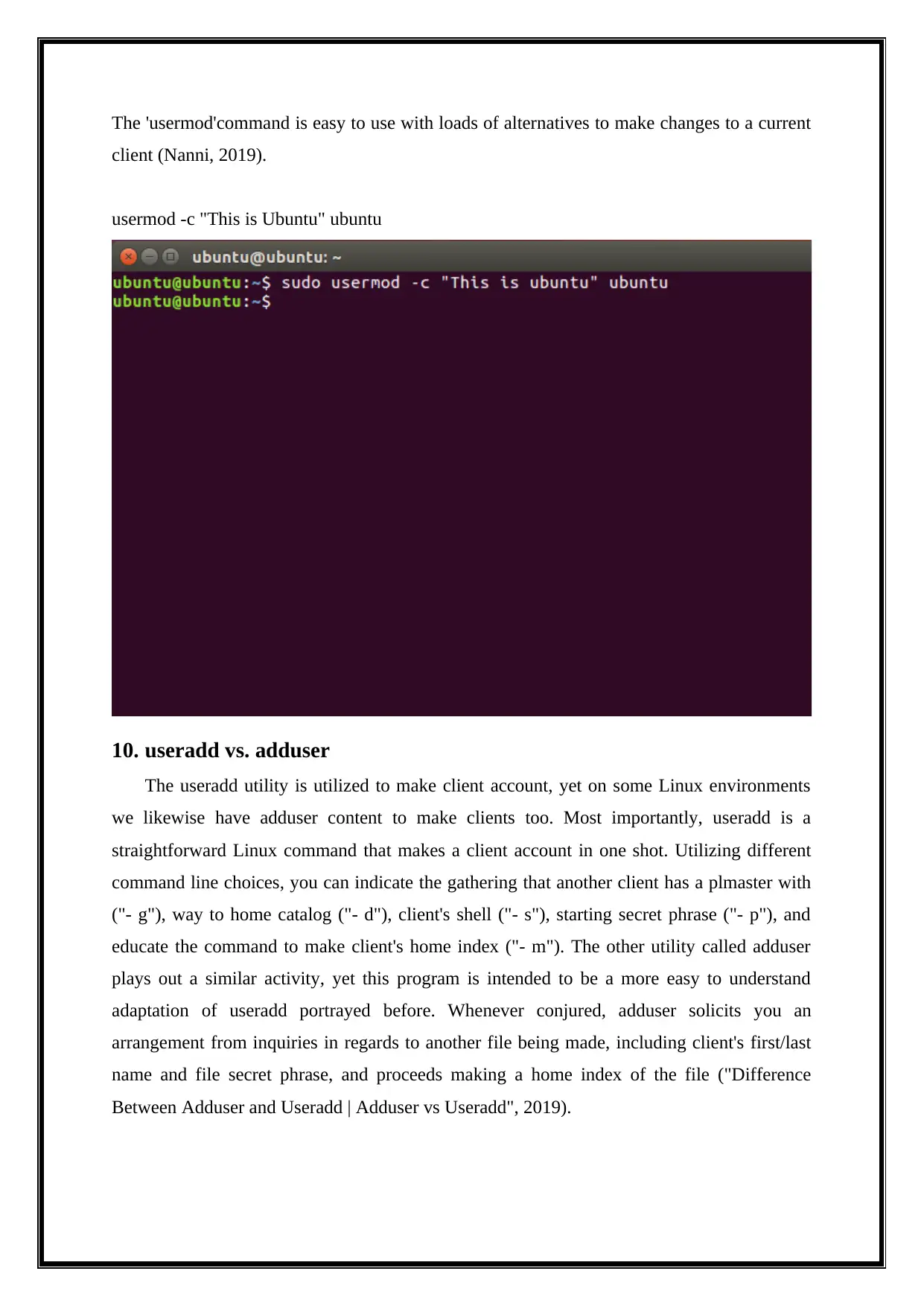
The 'usermod'command is easy to use with loads of alternatives to make changes to a current
client (Nanni, 2019).
usermod -c "This is Ubuntu" ubuntu
10. useradd vs. adduser
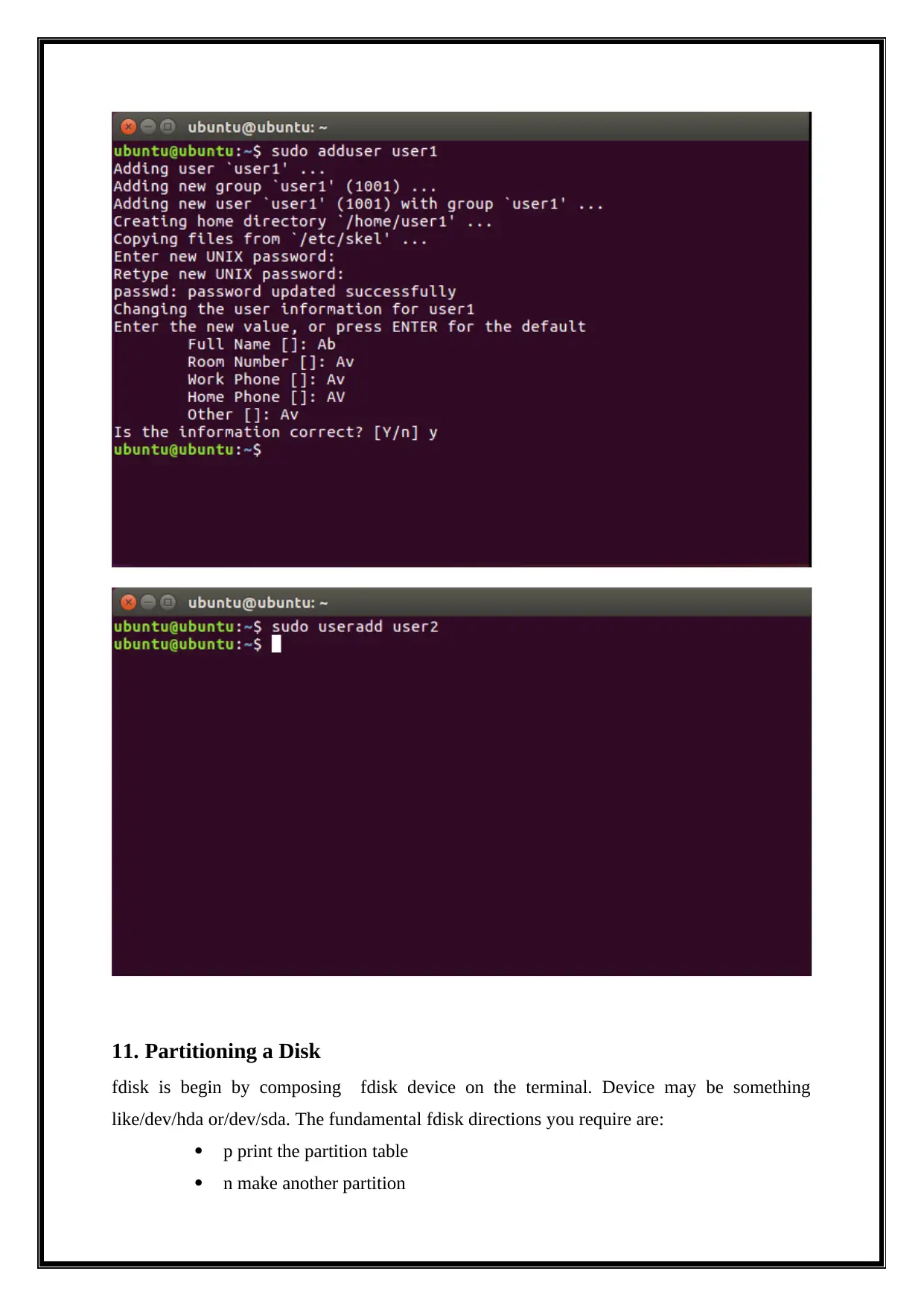
The useradd utility is utilized to make client account, yet on some Linux environments
we likewise have adduser content to make clients too. Most importantly, useradd is a
straightforward Linux command that makes a client account in one shot. Utilizing different
command line choices, you can indicate the gathering that another client has a plmaster with
("- g"), way to home catalog ("- d"), client's shell ("- s"), starting secret phrase ("- p"), and
educate the command to make client's home index ("- m"). The other utility called adduser
plays out a similar activity, yet this program is intended to be a more easy to understand
adaptation of useradd portrayed before. Whenever conjured, adduser solicits you an
arrangement from inquiries in regards to another file being made, including client's first/last
name and file secret phrase, and proceeds making a home index of the file ("Difference
Between Adduser and Useradd | Adduser vs Useradd", 2019).
client (Nanni, 2019).
usermod -c "This is Ubuntu" ubuntu
10. useradd vs. adduser
The useradd utility is utilized to make client account, yet on some Linux environments
we likewise have adduser content to make clients too. Most importantly, useradd is a
straightforward Linux command that makes a client account in one shot. Utilizing different
command line choices, you can indicate the gathering that another client has a plmaster with
("- g"), way to home catalog ("- d"), client's shell ("- s"), starting secret phrase ("- p"), and
educate the command to make client's home index ("- m"). The other utility called adduser
plays out a similar activity, yet this program is intended to be a more easy to understand
adaptation of useradd portrayed before. Whenever conjured, adduser solicits you an
arrangement from inquiries in regards to another file being made, including client's first/last
name and file secret phrase, and proceeds making a home index of the file ("Difference
Between Adduser and Useradd | Adduser vs Useradd", 2019).
11. Partitioning a Disk
fdisk is begin by composing fdisk device on the terminal. Device may be something
like/dev/hda or/dev/sda. The fundamental fdisk directions you require are:
p print the partition table
n make another partition
fdisk is begin by composing fdisk device on the terminal. Device may be something
like/dev/hda or/dev/sda. The fundamental fdisk directions you require are:
p print the partition table
n make another partition
⊘ This is a preview!⊘
Do you want full access?
Subscribe today to unlock all pages.
Trusted by 1+ million students worldwide

1 out of 22


Your All-in-One AI-Powered Toolkit for Academic Success.
+13062052269
info@desklib.com
Available 24*7 on WhatsApp / Email
![[object Object]](/_next/static/media/star-bottom.7253800d.svg)
Unlock your academic potential
Copyright © 2020–2026 A2Z Services. All Rights Reserved. Developed and managed by ZUCOL.