Interactive Systems Design and Evaluation: Tablet Usability Report
VerifiedAdded on 2020/02/18
|10
|2472
|140
Report
AI Summary
This report details a usability evaluation of the Toshiba Excite Write tablet, focusing on its application for workplace tasks by adults with Down syndrome. The evaluation employed a usability inquiry method using a structured questionnaire distributed via email. The study aimed to assess subjective satisfaction, intuitive design, efficiency, ease of learning, error frequency, and memorability across various tasks including email, price comparison, calendar usage, note-taking, and social networking. Ten participants with Down syndrome, each with prior computer experience, were involved in the study. The questionnaire included questions about overall reactions, ease of use, satisfaction, organization, and the usefulness of help messages. The findings of this evaluation, although not explicitly stated in this provided text, would offer insights into the tablet's usability for this specific user group, highlighting strengths, weaknesses, and areas for improvement in the design of the interactive system. The report provides a comprehensive overview of the methodology, user demographics, and task goals of the evaluation.
Interactive Systems Design and Evaluation 1
Interactive Systems Design and Evaluation
Student’s Name:
Course:
Instructor’s Name:
Institution:
Date:
Interactive Systems Design and Evaluation
Student’s Name:
Course:
Instructor’s Name:
Institution:
Date:
Paraphrase This Document
Need a fresh take? Get an instant paraphrase of this document with our AI Paraphraser

Interactive Systems Design and Evaluation 2
Interactive Systems Design and Evaluation
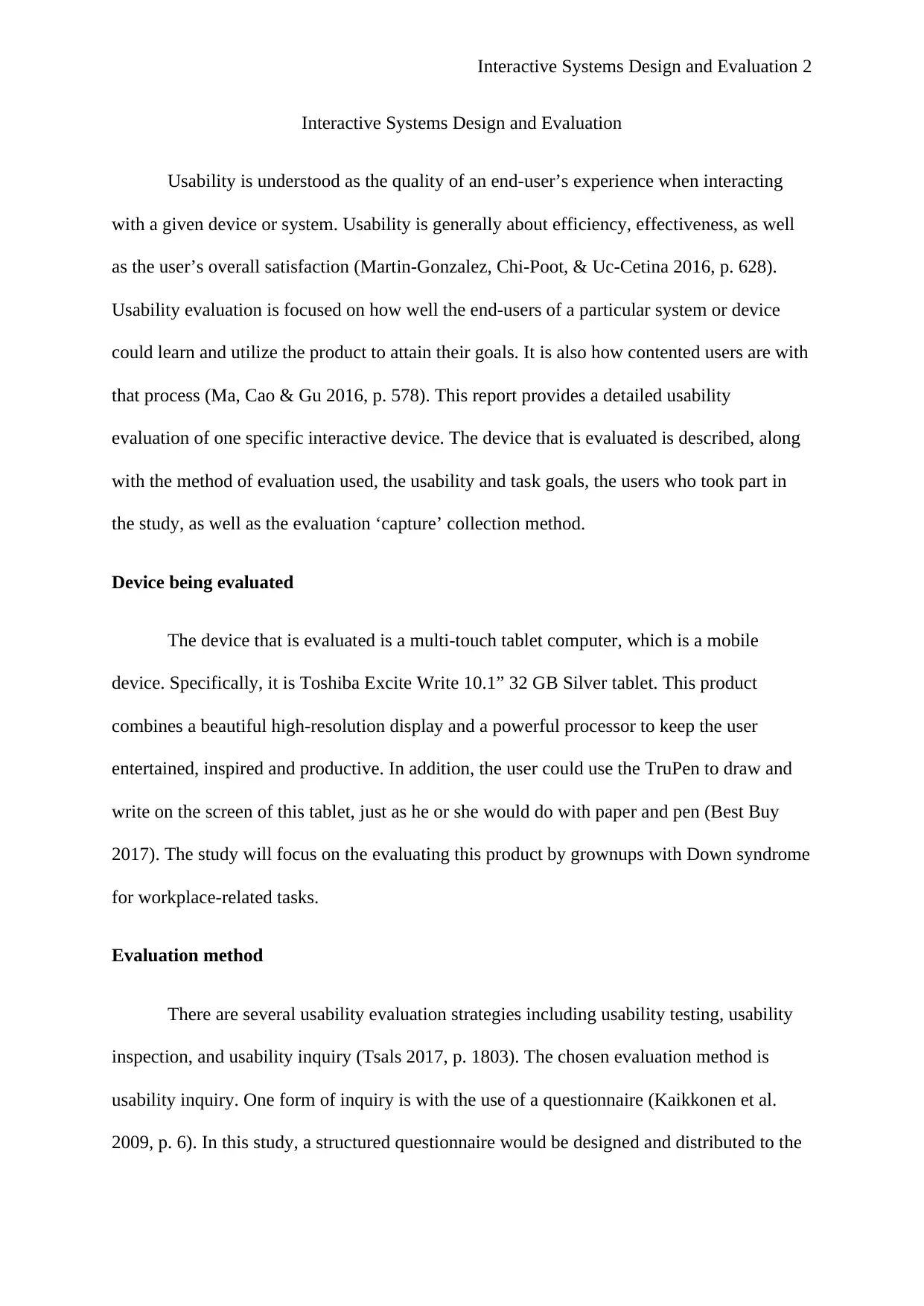
Usability is understood as the quality of an end-user’s experience when interacting
with a given device or system. Usability is generally about efficiency, effectiveness, as well
as the user’s overall satisfaction (Martin-Gonzalez, Chi-Poot, & Uc-Cetina 2016, p. 628).
Usability evaluation is focused on how well the end-users of a particular system or device
could learn and utilize the product to attain their goals. It is also how contented users are with
that process (Ma, Cao & Gu 2016, p. 578). This report provides a detailed usability
evaluation of one specific interactive device. The device that is evaluated is described, along
with the method of evaluation used, the usability and task goals, the users who took part in
the study, as well as the evaluation ‘capture’ collection method.
Device being evaluated
The device that is evaluated is a multi-touch tablet computer, which is a mobile
device. Specifically, it is Toshiba Excite Write 10.1” 32 GB Silver tablet. This product
combines a beautiful high-resolution display and a powerful processor to keep the user
entertained, inspired and productive. In addition, the user could use the TruPen to draw and
write on the screen of this tablet, just as he or she would do with paper and pen (Best Buy
2017). The study will focus on the evaluating this product by grownups with Down syndrome
for workplace-related tasks.
Evaluation method
There are several usability evaluation strategies including usability testing, usability
inspection, and usability inquiry (Tsals 2017, p. 1803). The chosen evaluation method is
usability inquiry. One form of inquiry is with the use of a questionnaire (Kaikkonen et al.
2009, p. 6). In this study, a structured questionnaire would be designed and distributed to the
Interactive Systems Design and Evaluation
Usability is understood as the quality of an end-user’s experience when interacting
with a given device or system. Usability is generally about efficiency, effectiveness, as well
as the user’s overall satisfaction (Martin-Gonzalez, Chi-Poot, & Uc-Cetina 2016, p. 628).
Usability evaluation is focused on how well the end-users of a particular system or device
could learn and utilize the product to attain their goals. It is also how contented users are with
that process (Ma, Cao & Gu 2016, p. 578). This report provides a detailed usability
evaluation of one specific interactive device. The device that is evaluated is described, along
with the method of evaluation used, the usability and task goals, the users who took part in
the study, as well as the evaluation ‘capture’ collection method.
Device being evaluated
The device that is evaluated is a multi-touch tablet computer, which is a mobile
device. Specifically, it is Toshiba Excite Write 10.1” 32 GB Silver tablet. This product
combines a beautiful high-resolution display and a powerful processor to keep the user
entertained, inspired and productive. In addition, the user could use the TruPen to draw and
write on the screen of this tablet, just as he or she would do with paper and pen (Best Buy
2017). The study will focus on the evaluating this product by grownups with Down syndrome
for workplace-related tasks.
Evaluation method
There are several usability evaluation strategies including usability testing, usability
inspection, and usability inquiry (Tsals 2017, p. 1803). The chosen evaluation method is
usability inquiry. One form of inquiry is with the use of a questionnaire (Kaikkonen et al.
2009, p. 6). In this study, a structured questionnaire would be designed and distributed to the

Interactive Systems Design and Evaluation 3
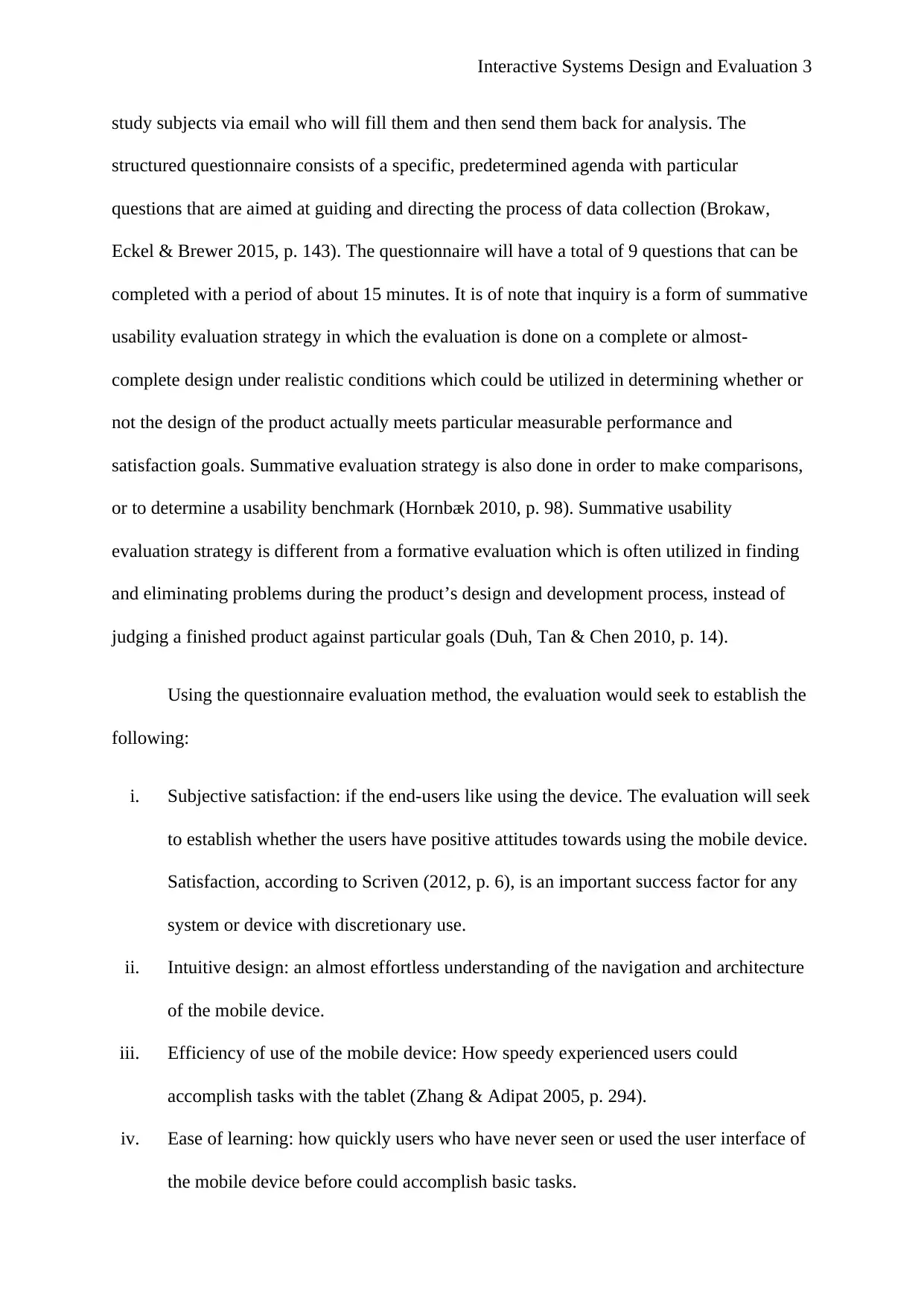
study subjects via email who will fill them and then send them back for analysis. The
structured questionnaire consists of a specific, predetermined agenda with particular
questions that are aimed at guiding and directing the process of data collection (Brokaw,
Eckel & Brewer 2015, p. 143). The questionnaire will have a total of 9 questions that can be
completed with a period of about 15 minutes. It is of note that inquiry is a form of summative
usability evaluation strategy in which the evaluation is done on a complete or almost-
complete design under realistic conditions which could be utilized in determining whether or
not the design of the product actually meets particular measurable performance and
satisfaction goals. Summative evaluation strategy is also done in order to make comparisons,
or to determine a usability benchmark (Hornbæk 2010, p. 98). Summative usability
evaluation strategy is different from a formative evaluation which is often utilized in finding
and eliminating problems during the product’s design and development process, instead of
judging a finished product against particular goals (Duh, Tan & Chen 2010, p. 14).
Using the questionnaire evaluation method, the evaluation would seek to establish the
following:
i. Subjective satisfaction: if the end-users like using the device. The evaluation will seek
to establish whether the users have positive attitudes towards using the mobile device.
Satisfaction, according to Scriven (2012, p. 6), is an important success factor for any
system or device with discretionary use.
ii. Intuitive design: an almost effortless understanding of the navigation and architecture
of the mobile device.
iii. Efficiency of use of the mobile device: How speedy experienced users could
accomplish tasks with the tablet (Zhang & Adipat 2005, p. 294).
iv. Ease of learning: how quickly users who have never seen or used the user interface of
the mobile device before could accomplish basic tasks.
study subjects via email who will fill them and then send them back for analysis. The
structured questionnaire consists of a specific, predetermined agenda with particular
questions that are aimed at guiding and directing the process of data collection (Brokaw,
Eckel & Brewer 2015, p. 143). The questionnaire will have a total of 9 questions that can be
completed with a period of about 15 minutes. It is of note that inquiry is a form of summative
usability evaluation strategy in which the evaluation is done on a complete or almost-
complete design under realistic conditions which could be utilized in determining whether or
not the design of the product actually meets particular measurable performance and
satisfaction goals. Summative evaluation strategy is also done in order to make comparisons,
or to determine a usability benchmark (Hornbæk 2010, p. 98). Summative usability
evaluation strategy is different from a formative evaluation which is often utilized in finding
and eliminating problems during the product’s design and development process, instead of
judging a finished product against particular goals (Duh, Tan & Chen 2010, p. 14).
Using the questionnaire evaluation method, the evaluation would seek to establish the
following:
i. Subjective satisfaction: if the end-users like using the device. The evaluation will seek
to establish whether the users have positive attitudes towards using the mobile device.
Satisfaction, according to Scriven (2012, p. 6), is an important success factor for any
system or device with discretionary use.
ii. Intuitive design: an almost effortless understanding of the navigation and architecture
of the mobile device.
iii. Efficiency of use of the mobile device: How speedy experienced users could
accomplish tasks with the tablet (Zhang & Adipat 2005, p. 294).
iv. Ease of learning: how quickly users who have never seen or used the user interface of
the mobile device before could accomplish basic tasks.
⊘ This is a preview!⊘
Do you want full access?
Subscribe today to unlock all pages.

Trusted by 1+ million students worldwide

Interactive Systems Design and Evaluation 4
v. Error frequency and severity: how often does a user make errors whilst using the
mobile device, how serious those errors are, and how the user recovers from them
(Hartson, Andre & Williges 2013, p. 146).
vi. Memorability: after using the mobile for the first time, if the user could remember
enough to use the product in an effective way next time (Alshehri & Freeman 2012, p.
6).
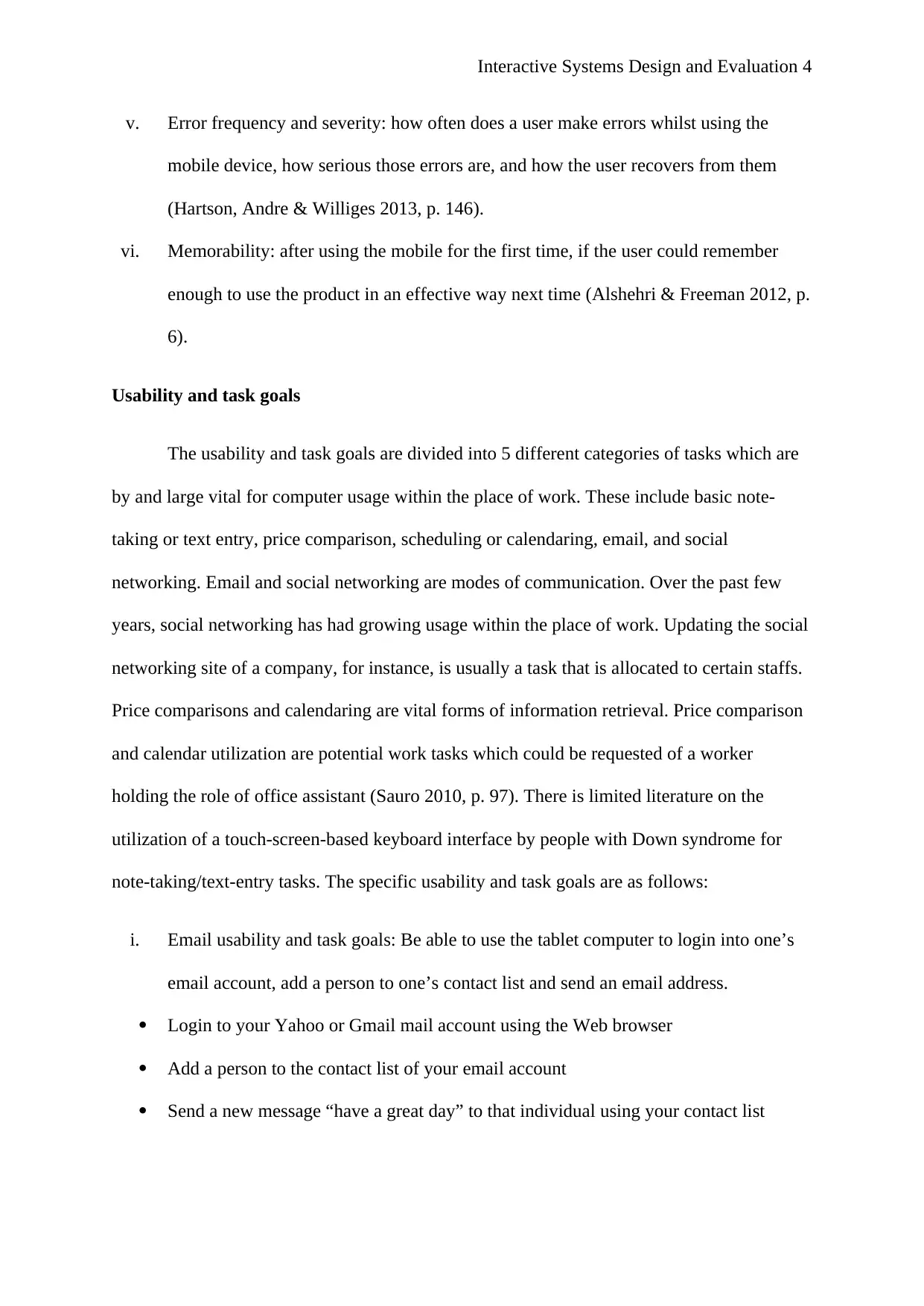
Usability and task goals
The usability and task goals are divided into 5 different categories of tasks which are
by and large vital for computer usage within the place of work. These include basic note-
taking or text entry, price comparison, scheduling or calendaring, email, and social
networking. Email and social networking are modes of communication. Over the past few
years, social networking has had growing usage within the place of work. Updating the social
networking site of a company, for instance, is usually a task that is allocated to certain staffs.
Price comparisons and calendaring are vital forms of information retrieval. Price comparison
and calendar utilization are potential work tasks which could be requested of a worker
holding the role of office assistant (Sauro 2010, p. 97). There is limited literature on the
utilization of a touch-screen-based keyboard interface by people with Down syndrome for
note-taking/text-entry tasks. The specific usability and task goals are as follows:
i. Email usability and task goals: Be able to use the tablet computer to login into one’s
email account, add a person to one’s contact list and send an email address.
Login to your Yahoo or Gmail mail account using the Web browser
Add a person to the contact list of your email account
Send a new message “have a great day” to that individual using your contact list
v. Error frequency and severity: how often does a user make errors whilst using the
mobile device, how serious those errors are, and how the user recovers from them
(Hartson, Andre & Williges 2013, p. 146).
vi. Memorability: after using the mobile for the first time, if the user could remember
enough to use the product in an effective way next time (Alshehri & Freeman 2012, p.
6).
Usability and task goals
The usability and task goals are divided into 5 different categories of tasks which are
by and large vital for computer usage within the place of work. These include basic note-
taking or text entry, price comparison, scheduling or calendaring, email, and social
networking. Email and social networking are modes of communication. Over the past few
years, social networking has had growing usage within the place of work. Updating the social
networking site of a company, for instance, is usually a task that is allocated to certain staffs.
Price comparisons and calendaring are vital forms of information retrieval. Price comparison
and calendar utilization are potential work tasks which could be requested of a worker
holding the role of office assistant (Sauro 2010, p. 97). There is limited literature on the
utilization of a touch-screen-based keyboard interface by people with Down syndrome for
note-taking/text-entry tasks. The specific usability and task goals are as follows:
i. Email usability and task goals: Be able to use the tablet computer to login into one’s
email account, add a person to one’s contact list and send an email address.
Login to your Yahoo or Gmail mail account using the Web browser
Add a person to the contact list of your email account
Send a new message “have a great day” to that individual using your contact list
Paraphrase This Document
Need a fresh take? Get an instant paraphrase of this document with our AI Paraphraser

Interactive Systems Design and Evaluation 5
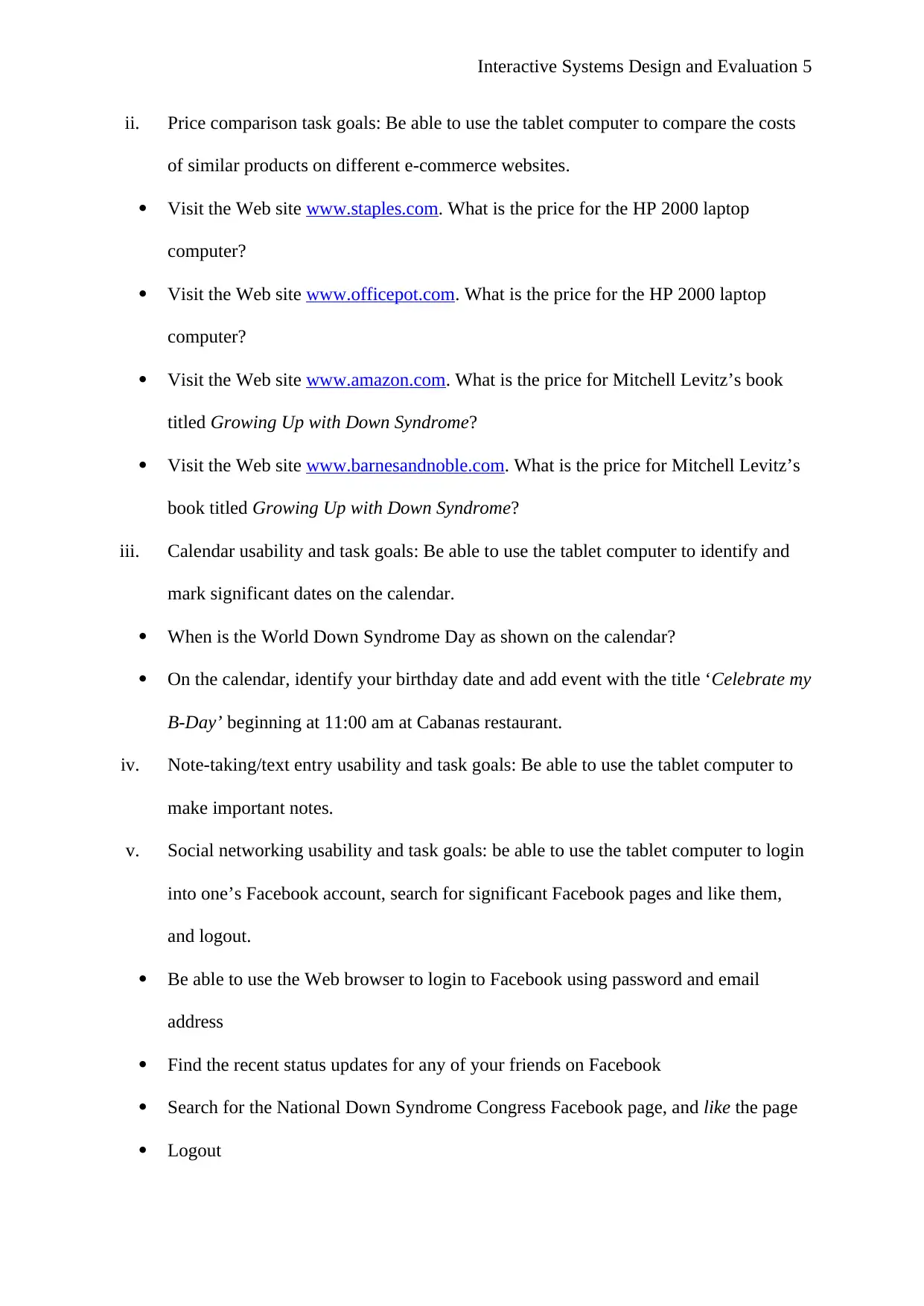
ii. Price comparison task goals: Be able to use the tablet computer to compare the costs
of similar products on different e-commerce websites.
Visit the Web site www.staples.com. What is the price for the HP 2000 laptop
computer?
Visit the Web site www.officepot.com. What is the price for the HP 2000 laptop
computer?
Visit the Web site www.amazon.com. What is the price for Mitchell Levitz’s book
titled Growing Up with Down Syndrome?
Visit the Web site www.barnesandnoble.com. What is the price for Mitchell Levitz’s
book titled Growing Up with Down Syndrome?
iii. Calendar usability and task goals: Be able to use the tablet computer to identify and
mark significant dates on the calendar.
When is the World Down Syndrome Day as shown on the calendar?
On the calendar, identify your birthday date and add event with the title ‘Celebrate my
B-Day’ beginning at 11:00 am at Cabanas restaurant.
iv. Note-taking/text entry usability and task goals: Be able to use the tablet computer to
make important notes.
v. Social networking usability and task goals: be able to use the tablet computer to login
into one’s Facebook account, search for significant Facebook pages and like them,
and logout.
Be able to use the Web browser to login to Facebook using password and email
address
Find the recent status updates for any of your friends on Facebook
Search for the National Down Syndrome Congress Facebook page, and like the page
Logout
ii. Price comparison task goals: Be able to use the tablet computer to compare the costs
of similar products on different e-commerce websites.
Visit the Web site www.staples.com. What is the price for the HP 2000 laptop
computer?
Visit the Web site www.officepot.com. What is the price for the HP 2000 laptop
computer?
Visit the Web site www.amazon.com. What is the price for Mitchell Levitz’s book
titled Growing Up with Down Syndrome?
Visit the Web site www.barnesandnoble.com. What is the price for Mitchell Levitz’s
book titled Growing Up with Down Syndrome?
iii. Calendar usability and task goals: Be able to use the tablet computer to identify and
mark significant dates on the calendar.
When is the World Down Syndrome Day as shown on the calendar?
On the calendar, identify your birthday date and add event with the title ‘Celebrate my
B-Day’ beginning at 11:00 am at Cabanas restaurant.
iv. Note-taking/text entry usability and task goals: Be able to use the tablet computer to
make important notes.
v. Social networking usability and task goals: be able to use the tablet computer to login
into one’s Facebook account, search for significant Facebook pages and like them,
and logout.
Be able to use the Web browser to login to Facebook using password and email
address
Find the recent status updates for any of your friends on Facebook
Search for the National Down Syndrome Congress Facebook page, and like the page
Logout

Interactive Systems Design and Evaluation 6
Users involved in the study
The users that were involved in the study included adults suffering from Down
syndrome condition. They were 10 in total: 6 men and 4 women. Each participant in the
research had to satisfy the following criteria: have prior experience with the Internet and
computers; be aged no less than eighteen years; have an existing Web-based email account
and a Facebook account which they may utilize for the study; have the Trisomy twenty-one
form of Down syndrome, which is recognized as the most common form of Down syndrome
affecting an estimated 95% of people with Down syndrome; and have a basic experience with
touch-screen computers. The demographic information of the users who took part in the study
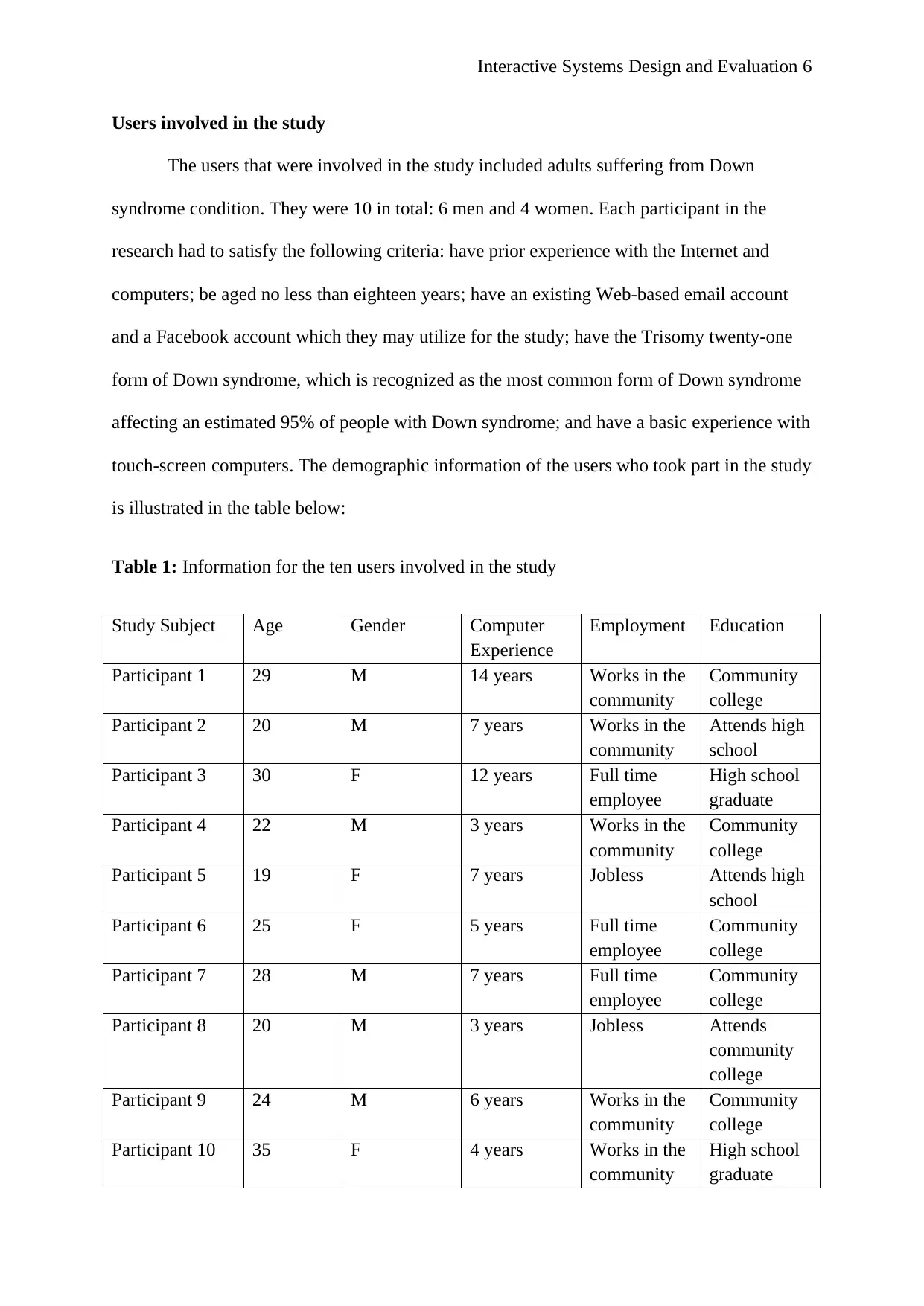
is illustrated in the table below:
Table 1: Information for the ten users involved in the study
Study Subject Age Gender Computer
Experience
Employment Education
Participant 1 29 M 14 years Works in the
community
Community
college
Participant 2 20 M 7 years Works in the
community
Attends high
school
Participant 3 30 F 12 years Full time
employee
High school
graduate
Participant 4 22 M 3 years Works in the
community
Community
college
Participant 5 19 F 7 years Jobless Attends high
school
Participant 6 25 F 5 years Full time
employee
Community
college
Participant 7 28 M 7 years Full time
employee
Community
college
Participant 8 20 M 3 years Jobless Attends
community
college
Participant 9 24 M 6 years Works in the
community
Community
college
Participant 10 35 F 4 years Works in the
community
High school
graduate
Users involved in the study
The users that were involved in the study included adults suffering from Down
syndrome condition. They were 10 in total: 6 men and 4 women. Each participant in the
research had to satisfy the following criteria: have prior experience with the Internet and
computers; be aged no less than eighteen years; have an existing Web-based email account
and a Facebook account which they may utilize for the study; have the Trisomy twenty-one
form of Down syndrome, which is recognized as the most common form of Down syndrome
affecting an estimated 95% of people with Down syndrome; and have a basic experience with
touch-screen computers. The demographic information of the users who took part in the study
is illustrated in the table below:
Table 1: Information for the ten users involved in the study
Study Subject Age Gender Computer
Experience
Employment Education
Participant 1 29 M 14 years Works in the
community
Community
college
Participant 2 20 M 7 years Works in the
community
Attends high
school
Participant 3 30 F 12 years Full time
employee
High school
graduate
Participant 4 22 M 3 years Works in the
community
Community
college
Participant 5 19 F 7 years Jobless Attends high
school
Participant 6 25 F 5 years Full time
employee
Community
college
Participant 7 28 M 7 years Full time
employee
Community
college
Participant 8 20 M 3 years Jobless Attends
community
college
Participant 9 24 M 6 years Works in the
community
Community
college
Participant 10 35 F 4 years Works in the
community
High school
graduate
⊘ This is a preview!⊘
Do you want full access?
Subscribe today to unlock all pages.

Trusted by 1+ million students worldwide

Interactive Systems Design and Evaluation 7
It is of note that the 10 study subjects have some experience with the use of computers and
some of them actually own a multi-touch device, though each of them has previously used a
multi-touch device such as computer tablet or iPad.
Evaluation ‘capture’ collection method
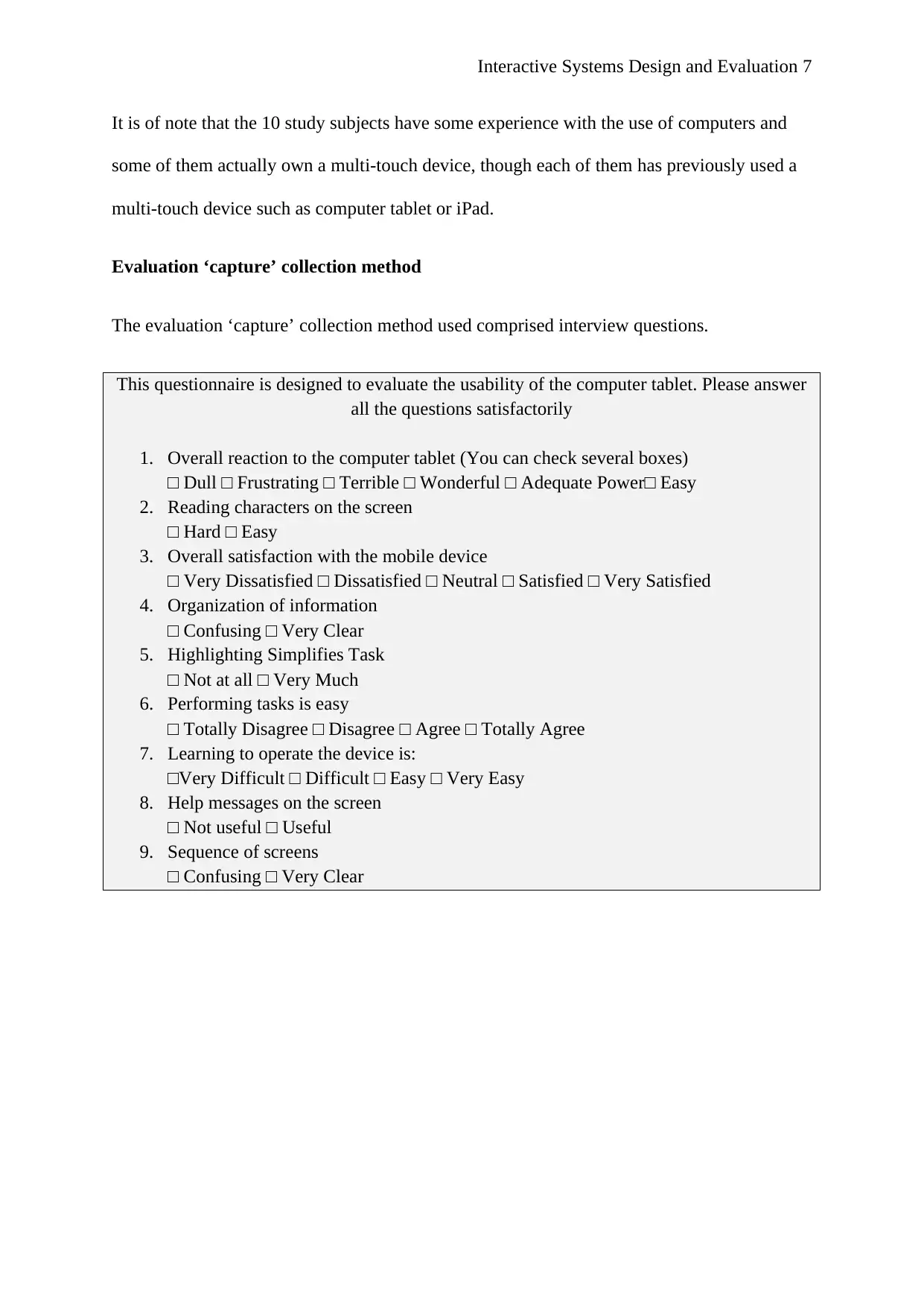
The evaluation ‘capture’ collection method used comprised interview questions.
This questionnaire is designed to evaluate the usability of the computer tablet. Please answer
all the questions satisfactorily
1. Overall reaction to the computer tablet (You can check several boxes)
□ Dull □ Frustrating □ Terrible □ Wonderful □ Adequate Power□ Easy
2. Reading characters on the screen
□ Hard □ Easy
3. Overall satisfaction with the mobile device
□ Very Dissatisfied □ Dissatisfied □ Neutral □ Satisfied □ Very Satisfied
4. Organization of information
□ Confusing □ Very Clear
5. Highlighting Simplifies Task
□ Not at all □ Very Much
6. Performing tasks is easy
□ Totally Disagree □ Disagree □ Agree □ Totally Agree
7. Learning to operate the device is:
□Very Difficult □ Difficult □ Easy □ Very Easy
8. Help messages on the screen
□ Not useful □ Useful
9. Sequence of screens
□ Confusing □ Very Clear
It is of note that the 10 study subjects have some experience with the use of computers and
some of them actually own a multi-touch device, though each of them has previously used a
multi-touch device such as computer tablet or iPad.
Evaluation ‘capture’ collection method
The evaluation ‘capture’ collection method used comprised interview questions.
This questionnaire is designed to evaluate the usability of the computer tablet. Please answer
all the questions satisfactorily
1. Overall reaction to the computer tablet (You can check several boxes)
□ Dull □ Frustrating □ Terrible □ Wonderful □ Adequate Power□ Easy
2. Reading characters on the screen
□ Hard □ Easy
3. Overall satisfaction with the mobile device
□ Very Dissatisfied □ Dissatisfied □ Neutral □ Satisfied □ Very Satisfied
4. Organization of information
□ Confusing □ Very Clear
5. Highlighting Simplifies Task
□ Not at all □ Very Much
6. Performing tasks is easy
□ Totally Disagree □ Disagree □ Agree □ Totally Agree
7. Learning to operate the device is:
□Very Difficult □ Difficult □ Easy □ Very Easy
8. Help messages on the screen
□ Not useful □ Useful
9. Sequence of screens
□ Confusing □ Very Clear
Paraphrase This Document
Need a fresh take? Get an instant paraphrase of this document with our AI Paraphraser

Interactive Systems Design and Evaluation 8
References
Alshehri, F., & Freeman, M 2012, Methods of usability evaluations of mobile devices.
Interacting with Computers 22, 5, pp. 4-14
Best Buy 2017, Toshiba – Excite Write – 10.1”. Retrieved from
https://www.bestbuy.com/site/toshiba-excite-write-10-1-32gb-silver/1293261.p?
skuId=1293261
Brokaw, E, Eckel, E, & Brewer, B 2015, 'Usability evaluation of a kinematics focused Kinect
therapy program for individuals with stroke', Technology & Health Care, 23, 2, pp.
143-151, Academic Search Premier, EBSCOhost, viewed 3 September 2017.
Duh, HB., Tan, GCB., & Chen, VH 2010. Usability evaluation for mobile devices: A
comparison of laboratory and field tests. Helsinki, Finland: ACM Publishers.
Hartson, HR., Andre, TS & Williges, RC 2013, Criteria For Evaluating Usability Evaluation
Methods. International Journal of HCI, 5,1, pp. 145-181.
Hornbæk, K 2010, 'Dogmas in the assessment of usability evaluation methods', Behaviour &
Information Technology, 29, 1, pp. 97-111, Business Source Complete, EBSCOhost,
viewed 3 September 2017.
Kaikkonen, A., Kekalainen, A., Cankar, M., Kallio, T., & Kankainen, A 2009, Usability
testing of mobile applications: A comparison between laboratory and field testing.
Journal of Usability Studies, 1,1, pp. 4-16.
References
Alshehri, F., & Freeman, M 2012, Methods of usability evaluations of mobile devices.
Interacting with Computers 22, 5, pp. 4-14
Best Buy 2017, Toshiba – Excite Write – 10.1”. Retrieved from
https://www.bestbuy.com/site/toshiba-excite-write-10-1-32gb-silver/1293261.p?
skuId=1293261
Brokaw, E, Eckel, E, & Brewer, B 2015, 'Usability evaluation of a kinematics focused Kinect
therapy program for individuals with stroke', Technology & Health Care, 23, 2, pp.
143-151, Academic Search Premier, EBSCOhost, viewed 3 September 2017.
Duh, HB., Tan, GCB., & Chen, VH 2010. Usability evaluation for mobile devices: A
comparison of laboratory and field tests. Helsinki, Finland: ACM Publishers.
Hartson, HR., Andre, TS & Williges, RC 2013, Criteria For Evaluating Usability Evaluation
Methods. International Journal of HCI, 5,1, pp. 145-181.
Hornbæk, K 2010, 'Dogmas in the assessment of usability evaluation methods', Behaviour &
Information Technology, 29, 1, pp. 97-111, Business Source Complete, EBSCOhost,
viewed 3 September 2017.
Kaikkonen, A., Kekalainen, A., Cankar, M., Kallio, T., & Kankainen, A 2009, Usability
testing of mobile applications: A comparison between laboratory and field testing.
Journal of Usability Studies, 1,1, pp. 4-16.

Interactive Systems Design and Evaluation 9
Lewis, JR 2001, 'Current Issues in Usability Evaluation', International Journal Of Human-
Computer Interaction, 13, 4, pp. 343-349, Business Source Complete, EBSCOhost,
viewed 3 September 2017.
Ma, C, Cao, S, & Gu, T 2016, 'Usability evaluation with tasks characterized by the
information search process', Electronic Library, 34, 4, pp. 572-587, Library,
Information Science & Technology Abstracts, EBSCOhost, viewed 3 September
2017.
Martin-Gonzalez, A, Chi-Poot, A, & Uc-Cetina, V 2016, 'Usability evaluation of an
augmented reality system for teaching Euclidean vectors', Innovations In Education
& Teaching International, 53, 6, pp. 627-636, Professional Development Collection,
EBSCOhost, viewed 3 September 2017.
Pant, A 2015, 'Usability evaluation of an academic library website', Electronic Library, 33, 5,
pp. 896-915, Library, Information Science & Technology Abstracts, EBSCOhost,
viewed 3 September 2017.
Sauro, J 2010, Are the Terms Formative and Summative Helpful or Harmful? Behaviour &
Information Technology, 29,1, pp. 97-111
Scriven, M 2012, The methodology of evaluation. Perspectives of curriculum evaluation.
Chicago, IL: Rand McNally Publishers.
Tsals, I 2017, 'Usability evaluation of intradermal adapters (IDA)', Vaccine, 35, 14, pp. 1797-
1801, Academic Search Premier, EBSCOhost, viewed 3 September 2017.
Lewis, JR 2001, 'Current Issues in Usability Evaluation', International Journal Of Human-
Computer Interaction, 13, 4, pp. 343-349, Business Source Complete, EBSCOhost,
viewed 3 September 2017.
Ma, C, Cao, S, & Gu, T 2016, 'Usability evaluation with tasks characterized by the
information search process', Electronic Library, 34, 4, pp. 572-587, Library,
Information Science & Technology Abstracts, EBSCOhost, viewed 3 September
2017.
Martin-Gonzalez, A, Chi-Poot, A, & Uc-Cetina, V 2016, 'Usability evaluation of an
augmented reality system for teaching Euclidean vectors', Innovations In Education
& Teaching International, 53, 6, pp. 627-636, Professional Development Collection,
EBSCOhost, viewed 3 September 2017.
Pant, A 2015, 'Usability evaluation of an academic library website', Electronic Library, 33, 5,
pp. 896-915, Library, Information Science & Technology Abstracts, EBSCOhost,
viewed 3 September 2017.
Sauro, J 2010, Are the Terms Formative and Summative Helpful or Harmful? Behaviour &
Information Technology, 29,1, pp. 97-111
Scriven, M 2012, The methodology of evaluation. Perspectives of curriculum evaluation.
Chicago, IL: Rand McNally Publishers.
Tsals, I 2017, 'Usability evaluation of intradermal adapters (IDA)', Vaccine, 35, 14, pp. 1797-
1801, Academic Search Premier, EBSCOhost, viewed 3 September 2017.
⊘ This is a preview!⊘
Do you want full access?
Subscribe today to unlock all pages.

Trusted by 1+ million students worldwide

Interactive Systems Design and Evaluation 10
Zhang, D., & Adipat, B 2005, Challenges, methodologies and issues in the usability testing of
mobile applications. International Journal of Human-Computer Interaction, 18,3,
pp. 293-308
Zhang, D., & Adipat, B 2005, Challenges, methodologies and issues in the usability testing of
mobile applications. International Journal of Human-Computer Interaction, 18,3,
pp. 293-308
1 out of 10
Related Documents
Your All-in-One AI-Powered Toolkit for Academic Success.
+13062052269
info@desklib.com
Available 24*7 on WhatsApp / Email
Unlock your academic potential
Copyright © 2020–2026 A2Z Services. All Rights Reserved. Developed and managed by ZUCOL.